

Power Your Software Testing with AI Agents and Cloud
The Native AI-Agentic Cloud Platform to Supercharge Quality Engineering. Test Intelligently and Ship Faster.


- TestMu AI (Formerly LambdaTest)
- /
- Learning Hub
- /
- How to Use Cypress Skill With Claude Code [2026]
How to Use Cypress Skill With Claude Code [2026]
Learn what a Cypress skill is, how to install the Cypress Skill in Claude Code, and run cloud-based Cypress tests on TestMu AI step by step.
Last Updated on:
A Cypress Skill is a SKILL.md file that loads Cypress-specific conventions into Claude Code. It defines selector strategy, custom command patterns, API intercept rules, and cloud grid configuration.
Without one, Claude Code writes tests with cy.get('.btn-submit') selectors tied to CSS classes, skips cy.intercept() entirely, and chains assertions that race against network responses.
Overview
To run stable end-to-end tests, clone the Cypress Skill into your project's .claude/skills/ directory, set your TestMu AI credentials, and prompt Claude Code. Claude Code generates optimized test suites using Cypress-specific conventions, while TestMu AI executes them in parallel across configured cloud browsers.
What Is a Cypress Agent Skill
- Cypress Agent Skill: The SKILL.md file provides Claude Code with Cypress-specific conventions for selector strategies, custom commands, and API stubbing to generate stable end-to-end tests.
How to Run Tests Using Cypress Skill in Claude Code
- Cloning the skill: Developers must clone the TestMu AI agent-skills repository into the project's .claude/skills/ directory so Claude Code can automatically detect the Cypress conventions on session start.
- Claude Code prompting: Users prompt the agent with a test target, prompting Claude Code to read the Cypress Skill and generate spec files, custom commands, and configuration files.
- TestMu AI credentials: Developers must export their TestMu AI username and access key as environment variables to authenticate cloud execution on the TestMu AI platform.
- Cloud execution: The Cypress Skill defaults to executing tests on the TestMu AI cloud grid, running them in parallel across configured browsers and uploading results to the automation dashboard.
What Is a Cypress Skill
A Cypress Skill tells AI coding agents how to write Cypress tests correctly: which selectors to use, how to handle network calls, and how to structure custom commands.
The skill follows the open Agent Skills Standard. One SKILL.md file works across Claude Code, Cursor AI, GitHub Copilot, Gemini CLI, and 16+ other tools as of 2026.
It is task-scoped, not general-purpose. Claude Code loads it only when you ask it to write or fix a Cypress test.
Cypress Skill Repository
The cypress-skill is one of 46 skills in the TestMu AI agent-skills repository alongside Playwright, Selenium, Appium, and WebdriverIO.
The repository ships a compact SKILL.md entry point and a reference folder with implementation guides for selectors, custom commands, fixtures, and cloud execution. Here is the folder layout:
cypress-skill/
├── SKILL.md                    # Entry point: selector rules, intercept patterns, command conventions
└── reference/
    ├── playbook.md             # Full setup guide, custom commands, fixture patterns, CI configs
    ├── advanced-patterns.md    # Shadow DOM, iframes, multi-tab flows, retry strategies
    └── cloud-integration.md    # TestMu AI Cypress CLI setup, capabilities, tunnel config
Claude Code reads SKILL.md first. It stays compact so it does not bloat the context window. When the agent needs deeper guidance on Cypress intercepts or cloud configuration, it pulls from the reference files on demand.

Note: Run your Cypress tests effortlessly using Agent Skills. Try TestMu AI Today
How to Run Tests Using Cypress Skill in Claude Code
Clone the TestMu AI agent-skills repository into your project's .claude/skills/ directory. Claude Code detects the skill automatically on the next session start with no extra configuration.
LambdaTest Now Called TestMu AI — the same trusted platform with a new name and powerful AI capabilities.
git clone https://github.com/LambdaTest/agent-skills.git .claude/skills/agent-skills
Next, set your TestMu AI credentials. Find them at the bottom of the TestMu AI dashboard under Credentials.
# macOS/Linux
export LT_USERNAME="YOUR_TESTMUAI_USERNAME"
export LT_ACCESS_KEY="YOUR_TESTMUAI_ACCESS_KEY"

# Windows (PowerShell)
$env:LT_USERNAME="YOUR_TESTMUAI_USERNAME"
$env:LT_ACCESS_KEY="YOUR_TESTMUAI_ACCESS_KEY"

# Windows (Command Prompt)
set LT_USERNAME="YOUR_TESTMUAI_USERNAME"
set LT_ACCESS_KEY="YOUR_TESTMUAI_ACCESS_KEY"
Open Claude Code inside your project directory and enter a prompt with the test target:
Create a Cypress test that navigates to the TestMu AI Selenium Playground [https://www.testmuai.com/selenium-playground/], clicks on the “Simple Form Demo” option, and runs the test on TestMu AI.
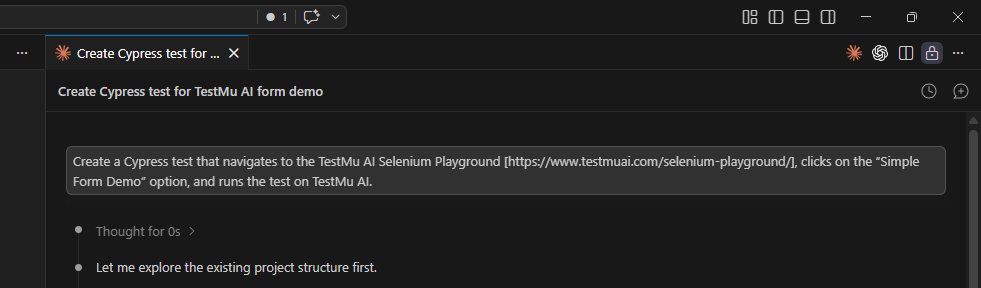
Claude Code reads the Cypress Skill and generates the full suite: a spec file, custom commands extracted into commands.js, and cypress.config.js.
The skill instructs the agent to put reusable actions into Cypress custom commands rather than duplicating them across specs.
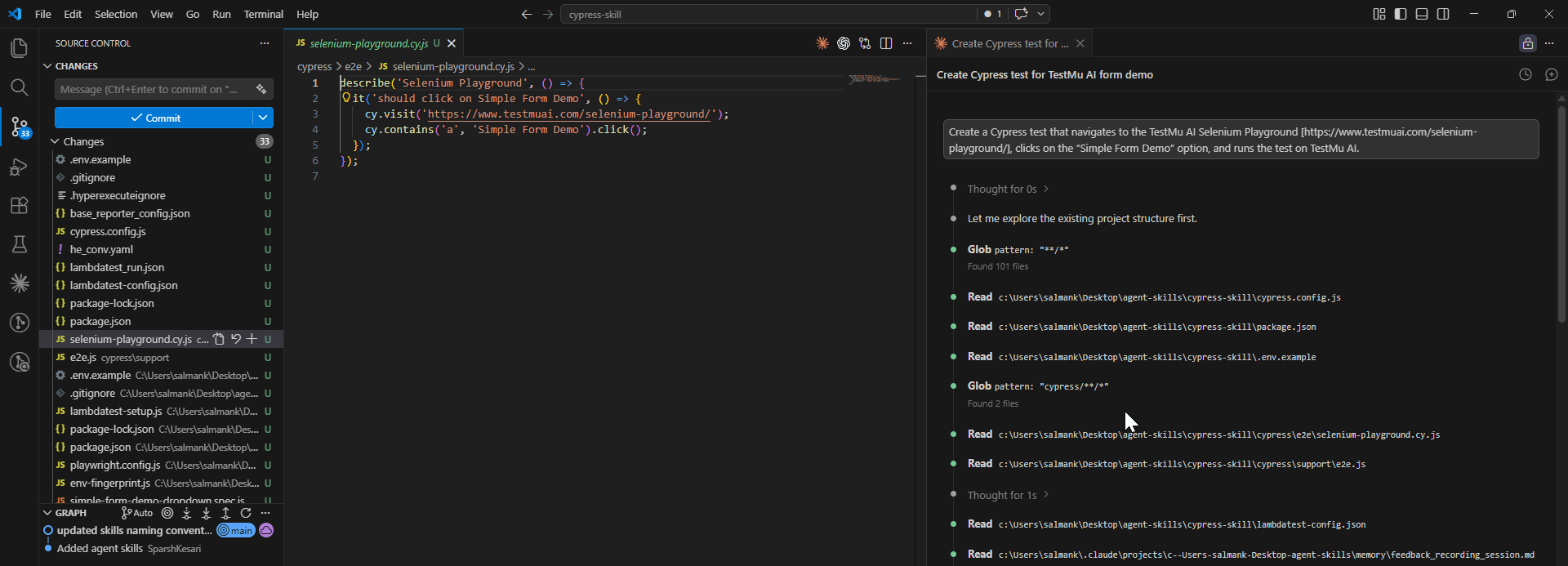
Claude Code reads reference/cloud-integration.md from the skill and updates the project. It generates lambdatest-config.json with browser capabilities and parallel settings, updates cypress.config.js with the TestMu AI base URL, and adds the lambdatest-cypress-cli package to package.json.

The CLI uploads your suite and triggers parallel execution across all configured browsers. Open the TestMu AI Automation Dashboard to see pass/fail status per browser, execution time, video recordings, and command logs for each session.

For the full setup reference, see the guide on running Cypress tests using Agent Skills.

Conclusion
The Cypress Skill gives Claude Code the conventions it needs to write tests that hold up.
Stable data-cy selectors, cy.intercept() for network control, cy.session() for auth reuse, and custom commands for shared logic, all enforced automatically on every test it generates.
Clone the skill into .claude/skills/, set your TestMu AI credentials, and prompt Claude Code with a test target. The output runs directly on the TestMu AI cloud grid across every browser you configure.
For AI-assisted test generation directly inside the Cypress runner, see the guide on Cypress AI.
The TestMu AI agent-skills repository ships the Cypress Skill alongside 45 others covering Playwright, Selenium, Appium, and more.
Install the skill for your framework. Claude Code responds like a senior QA engineer who already knows your codebase.
Author

Salman Khan
Blogs: 147


Salman is a Test Automation Evangelist and Community Contributor at TestMu AI, with over 6 years of hands-on experience in software testing and automation. He has completed his Master of Technology in Computer Science and Engineering, demonstrating strong technical expertise in software development, testing, AI agents and LLMs. He is certified in KaneAI, Automation Testing, Selenium, Cypress, Playwright, and Appium, with deep experience in CI/CD pipelines, cross-browser testing, AI in testing, and mobile automation. Salman works closely with engineering teams to convert complex testing concepts into actionable, developer-first content. Salman has authored 120+ technical tutorials, guides, and documentation on test automation, web development, and related domains, making him a strong voice in the QA and testing community.


Frequently asked questions
Did you find this page helpful?
More Related Blogs
TestMu AI forEnterprise
Get access to solutions built on Enterprise
grade security, privacy, & compliance
- Advanced access controls
- Advanced data retention rules
- Advanced Local Testing
- Premium Support options
- Early access to beta features
- Private Slack Channel
- Unlimited Manual Accessibility DevTools Tests