

Power Your Software Testing with AI Agents and Cloud
The Native AI-Agentic Cloud Platform to Supercharge Quality Engineering. Test Intelligently and Ship Faster.


- TestMu AI (Formerly LambdaTest)
- /
- Blog
- /
- How to Run JUnit and TestNG Selenium Tests Together
How to Run JUnit and TestNG Selenium Tests Together
TestNG removed JUnit support in 7.10.0. Learn how to run JUnit and TestNG Selenium tests together on the JUnit Platform, with working Java examples.
Last Updated on:
Both JUnit and TestNG are popular unit testing frameworks that have been widely accepted by Java developers. JUnit was introduced as an open-source unit testing framework for Java way back in 1997. In fact, JUnit is one of the widely used test automation frameworks for test automation. TestNG is another Java-based test automation framework that is not only open-source but also offers awesome features that are best suited for large-scale web automation testing. TestNG was created for a range of testing categories, including (but not limited to) unit testing, functional testing, end-to-end testing, and integration testing.
If you work with both frameworks, you will sooner or later have a repository that contains JUnit tests and TestNG tests at the same time, and you will want one command that runs all of them. For years the usual answer was to let TestNG run the JUnit tests. That is no longer possible: TestNG removed JUnit execution support in version 7.10.0. The modern answer is the JUnit Platform, which runs both through separate engines and lets you keep every test exactly as it is written.
In this blog, we look at how you can run JUnit and TestNG test cases in Selenium together, without rewriting any of the tests.
Overview
TestNG used to run your JUnit tests for you. It does not anymore - TestNG deprecated its JUnit mode in 7.7.0 and removed it in 7.10.0 (April 2024). A testng.xml carrying junit="true" still validates, but TestNG now prints a warning to stderr pointing you at the replacement instead of running your JUnit tests.
The replacement inverts the relationship. Instead of running JUnit under TestNG, you run both under the JUnit Platform, which has become the single runner for the Java testing ecosystem.
What Is TestNG Framework?
TestNG is a Java-based testing framework that supports annotations, grouping, sequencing, and parallel execution, simplifying test configuration, execution, and reporting across projects.
What Is JUnit Framework?
JUnit is a widely used open-source testing framework for Java applications, supporting annotations, assertions, and test suites to enable systematic unit testing and automation.
How to Run JUnit and TestNG Tests Together?
Here are the steps to run both frameworks from a single test run on current versions.
- Add the JUnit Platform - Put junit-jupiter-engine on the test classpath for JUnit 5 and 6 tests, or junit-vintage-engine if you still have JUnit 4 classes.
- Add the TestNG engine - Add org.junit.support:testng-engine, maintained by the JUnit team, which lets the JUnit Platform discover and run TestNG tests.
- Point your build at the platform - Use useJUnitPlatform() in Gradle, or Maven Surefire 3.x, which selects the JUnit Platform provider automatically.
- Run once - A single mvn test or gradle test now discovers and executes both your JUnit and your TestNG tests, in one report.
Introduction to JUnit
Java came up with its open-source unit testing framework called JUnit, following the practice of extreme programming. Though JUnit is primarily used for unit testing, automated testing with JUnit and Selenium can be extensively used for cross browser testing (or browser compatibility testing).
On the other hand, the TestNG (Test Next Generation) framework has advanced features that let you perform various categories of tests (i.e., unit testing, integration testing, functional testing, etc.).
Installing JUnit, writing a first test class, and running it are covered step by step in the JUnit Tutorial, starting with getting started with JUnit. The rest of this chapter assumes a working JUnit project.
Introduction to TestNG
TestNG is also a very prevalent Java testing framework that is widely used by the developer and tester community. The framework is extensively used for test creation with an immense focus on features such as grouping, dependency, prioritization, annotations, and more. As of September 2026, the latest released version of TestNG is 7.12.0.

Austin Siewert
Co-Founder, Steadfast Systems
Discovered @TestMu AI yesterday. Best browser testing tool I've found for my use case. Great pricing model for the limited testing I do 👏
2M+ Devs and QAs rely on TestMu AI
Deliver immersive digital experiences with Next-Generation Mobile Apps and Cross Browser Testing Cloud

With TestNG certification, you can challenge your skills in performing automated testing with TestNG and take your career to the next level.
Here's a short glimpse of the TestNG certification from TestMu AI:

The same ground for TestNG is covered by the install TestNG in Eclipse and TestNG Example chapters. From here on, the chapter assumes both frameworks are on the classpath.
How To Run JUnit and TestNG Tests Together in Selenium
Before the 'how,' it is worth being clear about the 'why.' Teams usually end up with both frameworks in one repository for historical reasons: an older JUnit suite that still works, plus newer TestNG tests written for its grouping and suite-level configuration. Rather than rewrite either one, you want a single command that runs both.
Here is a brief rundown of the TestNG vs JUnit comparison:
- Annotations - TestNG offers more annotations to make automation test case management more flexible when compared to JUnit. JUnit 5 and 6 have since closed much of that gap with @Nested, @ParameterizedTest, @RepeatedTest, @TestFactory, and @DisplayName.
- Grouping of test cases - TestNG supports the grouping of test cases if you wish to run only a set of test cases. This can be achieved with the help of groups parameters in @Test annotation. The same tag is specified in testng.xml with the name of the groups you wish to run.
- Parallel test case execution - TestNG supports parallel execution of test cases using multiple threads and classes using the "parallel" keyword in testng.xml
- Test case dependency - The dependsOnMethods parameter in @Test annotation is used to define the dependent method (or a group of methods). This is mostly used where one test method depends on the output of another test method(s). However, dependent tests is not a good practice when it comes to Selenium automation testing. Hence, it is recommended to follow Selenium best practices to make the most out of the test automation framework.
JUnit parallel execution has been stable since JUnit 5.10 - the @Execution annotation is marked @API(status = STABLE). Only the worker_thread_pool executor-service option remains experimental in current releases.
junit.jupiter.execution.parallel.enabled = true
junit.jupiter.execution.parallel.mode.default = concurrent
Here concurrent mode specifies parallel threads to be run for each test method. Set it to 'same_thread' instead if you want sequential execution - 'concurrent' and 'same_thread' are the only two valid values. Test methods in such test classes are only executed concurrently if the @Execution(CONCURRENT) annotation is present on the test class or method. Parallel test execution in TestNG is preferred since it helps you achieve test results at a much faster pace.
You can achieve dependency injection in JUnit 5, where the test methods are permitted to have parameters.
Here is a brief video to help you with Parallel Testing in TestNG.

Both frameworks are actively maintained, and the gap between them is much narrower than it was when this comparison was first written. The practical question is no longer which one to migrate to, but how to run the tests you already have side by side.
You might have any number of unit tests written in JUnit and wired into your CI/CD pipeline. The framework, the pipeline, and the reporting are all in place and running well before each release. Rewriting those tests to satisfy a runner would be a large and unnecessary cost. So what is the ideal way to get JUnit, TestNG, and your existing CI/CD tooling working from one test run?
Historically, TestNG solved this by recognizing JUnit test classes through the junit attribute in testng.xml. That support was removed in TestNG 7.10.0.
On any current release you use the JUnit Platform instead. The JUnit team maintains org.junit.support:testng-engine, which lets the JUnit Platform discover and run TestNG tests alongside your JUnit ones.
We will discuss this in detail with the same example with the help of TestMu AI's cloud Selenium Grid.
This JUnit Tutorial for beginners and professionals will help you learn how to use JUnit framework with Selenium and Java for performing Selenium automation testing.

Parallel Test Execution of JUnit Tests on a Remote Selenium Grid
Parallel testing in Selenium helps you achieve better test coverage at an expedited pace. JUnit supports parallel execution natively, and the JUnit 4 suite below achieves it with a custom runner, which we discuss in this section.
To make the execution of JUnit test cases more efficient, we can run them against a cloud-based remote Selenium Grid. The test class itself does not change, whichever engine runs it. A cloud grid removes the work of maintaining your own nodes and gives you the browser and OS combinations you need on demand.
To demonstrate running JUnit tests in parallel on a cloud Selenium Grid, we consider the following test scenario:
Test Scenario
- Navigate to https://todomvc.com/examples/react/dist/.
- Enter the text "JUnit Parallel Test sample" in the textbox.
- Validate that the exact text appears in the list below the textbox.
For demonstrating the potential of parallel testing with JUnit and TestNG using Selenium cloud grid, we run the same test on multiple browser and platform combinations:
Browser | Version | Platform |
|---|---|---|
Chrome | latest | Windows 11 |
Safari | latest | macOS Sequoia |
Firefox | latest | Windows 11 |
Let us first write the JUnit code to support the parallel execution of threads for each of the browser-platform combinations. To run a JUnit test on different browsers simultaneously, you will need to create a helper class that extends parameterized class (org.junit.runners.Parameterized) and implements RunnerScheduler class.
To demonstrate this, we are using TestMu AI cloud-based Selenium Grid that offers Selenium Automation Testing With JUnit across 3000+ browsers and operating systems.
package Test;
import java.util.concurrent.ExecutorService;
import java.util.concurrent.Executors;
import java.util.concurrent.TimeUnit;
import org.junit.runners.Parameterized;
import org.junit.runners.model.RunnerScheduler;
public class Parallelized extends Parameterized {
   private static class ThreadPoolScheduler implements RunnerScheduler {
       private ExecutorService executor;
       public ThreadPoolScheduler() {
           String threads = System.getProperty("junit.parallel.threads", "15");
           int numThreads = Integer.parseInt(threads);
           executor = Executors.newFixedThreadPool(numThreads);
       }

       public void finished() {
           executor.shutdown();
           try {
               executor.awaitTermination(10, TimeUnit.MINUTES);
           } catch (InterruptedException exc) {
               throw new RuntimeException(exc);
           }
       }

       public void schedule(Runnable childStatement) {
           executor.submit(childStatement);
       }
   }
   public Parallelized(Class<?> klass) throws Throwable {
       super(klass);
       setScheduler(new ThreadPoolScheduler());
   }
}
Now we will write the script to implement the above-mentioned test scenario. The Parallelized class will be passed as a parameter in @RunWith annotation. To execute the test case on TestMu AI, you have to provide your username and access key, which is available in the TestMu AI profile section.
package Test;
import org.openqa.selenium.By;
import org.openqa.selenium.chrome.ChromeOptions;
import org.openqa.selenium.remote.RemoteWebDriver;
import org.junit.After;
import org.junit.Assert;
import org.junit.Before;
import org.junit.Test;
import org.junit.runner.RunWith;
import org.junit.runners.Parameterized;
import java.net.MalformedURLException;
import java.net.URL;
import java.util.HashMap;
import java.util.LinkedList;
import java.util.Map;

@RunWith(Parallelized.class)
public class JunitParallelExecutionDemo {
   public static String username = "YOUR_USER_NAME";
   public static String accessKey = "YOUR_ACCESS_KEY";
   public String gridURL = "@hub.lambdatest.com/wd/hub";
   public String platform;
   public String browserName;
   public String browserVersion;
   public RemoteWebDriver driver = null;
   boolean status = false;

   @Parameterized.Parameters
   public static LinkedList<String[]> getEnvironments() throws Exception {
       LinkedList<String[]> env = new LinkedList<String[]>();
       env.add(new String[] { "Windows 11", "chrome", "latest" });
       env.add(new String[] { "macOS Sequoia", "safari", "latest" });
       env.add(new String[] { "Windows 11", "firefox", "latest" });
       return env;
   }

   public JunitParallelExecutionDemo(String platform, String browserName, String browserVersion) {
       this.platform = platform;
       this.browserName = browserName;
       this.browserVersion = browserVersion;
   }

   @Before
   public void setUp() throws Exception {
       ChromeOptions browserOptions = new ChromeOptions();
       browserOptions.setCapability("browserName", browserName);
       browserOptions.setBrowserVersion(browserVersion);
       browserOptions.setPlatformName(platform);

       // vendor-specific capabilities must be namespaced under LT:Options in W3C
       Map<String, Object> ltOptions = new HashMap<String, Object>();
       ltOptions.put("build", "JUnitParallelSample");
       ltOptions.put("name", "JUnitParallelSample");
       ltOptions.put("network", true);  // To enable network logs
       ltOptions.put("visual", true);   // To enable step by step screenshot
       ltOptions.put("video", true);    // To enable video recording
       ltOptions.put("console", true);  // To capture console logs
       browserOptions.setCapability("LT:Options", ltOptions);

       try {
           driver = new RemoteWebDriver(new URL("https://" + username + ":" + accessKey + gridURL), browserOptions);
       } catch (MalformedURLException e) {
           System.out.println("Invalid grid URL");
       } catch (Exception e) {
           System.out.println(e.getMessage());
       }
   }
   @Test
   public void testParallel() throws Exception {
       try { // Change it to production page
           int total_elements=0;
           driver.get("https://todomvc.com/examples/react/dist/");
           driver.findElement(By.className("new-todo")).sendKeys("JUnit Parallel Test sample");
           total_elements = driver.findElements(By.cssSelector("ul.todo-list li")).size();
           Assert.assertEquals(1, total_elements);

       } catch (Exception e) {
           System.out.println(e.getMessage());
       }
   }

   @After
   public void tearDown() throws Exception {
           driver.quit();
       }

}
On TestNG 7.9.x and earlier this was where you added junit="true" to the suite tag. On current TestNG that attribute no longer runs JUnit tests - TestNG reads it and prints a deprecation warning to stderr pointing at the JUnit team's testng-engine. The modern equivalent is to let the JUnit Platform run both engines, as shown below.
For reference, this is the legacy configuration, which works only on TestNG 7.9.x and earlier:
<?xml version="1.0" encoding="UTF-8"?>
<!DOCTYPE suite SYSTEM "https://testng.org/testng-1.0.dtd" >
<suite name = "Parallel Tests" junit="true">
 <test name="JunitParallelExecutionDemo">
   <classes>
      <class name="Test.JunitParallelExecutionDemo"/>
   </classes>
</test>
</suite>
On current versions you configure the JUnit Platform instead. The test class above is a JUnit 4 class, so it runs on the Vintage engine, while the TestNG engine picks up any TestNG classes in the same run. Note that testng-engine does not support custom suites declared in a testng.xml, so the parallel settings move into JUnit Platform configuration parameters:
<dependencies>
  <!-- runs your legacy JUnit 4 classes, such as JunitParallelExecutionDemo -->
  <dependency>
    <groupId>org.junit.vintage</groupId>
    <artifactId>junit-vintage-engine</artifactId>
    <version>6.1.3</version>
    <scope>test</scope>
  </dependency>
  <!-- maintained by the JUnit team; runs TestNG tests on the JUnit Platform -->
  <dependency>
    <groupId>org.junit.support</groupId>
    <artifactId>testng-engine</artifactId>
    <version>1.1.0</version>
    <scope>test</scope>
  </dependency>
</dependencies>

<build>
  <plugins>
    <plugin>
      <groupId>org.apache.maven.plugins</groupId>
      <artifactId>maven-surefire-plugin</artifactId>
      <version>3.5.2</version>
      <configuration>
        <configurationParameters>
          testng.parallel = methods
          testng.threadCount = 3
          junit.jupiter.execution.parallel.enabled = true
        </configurationParameters>
      </configuration>
    </plugin>
  </plugins>
</build>
A single mvn test now runs both sets of tests. Keep the engine and TestNG versions in step - older testng-engine releases fail against newer TestNG with a NoSuchMethodError.
As we can see from the below execution log for the above test case ran on three different browsers-platforms combination-
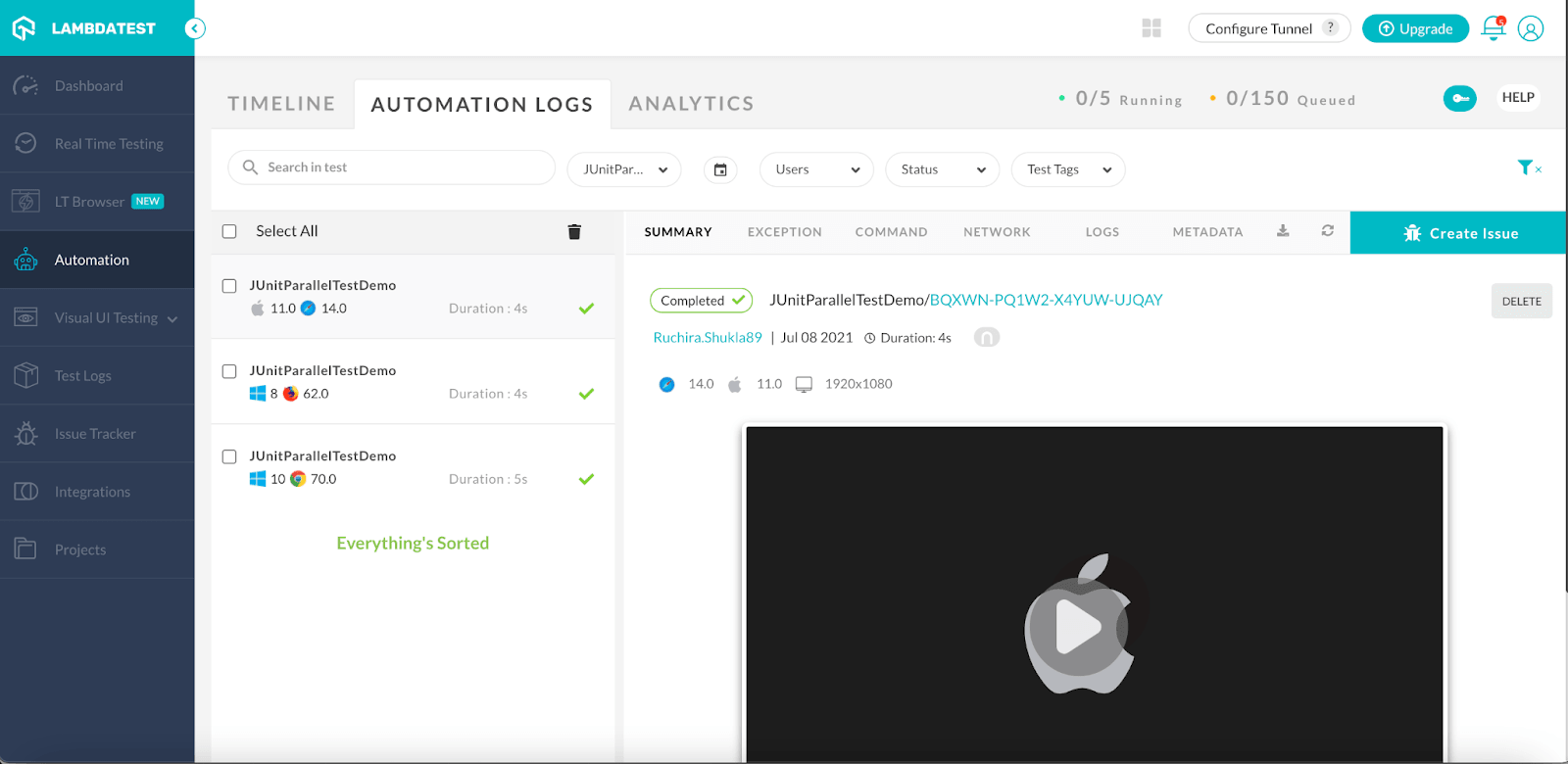
As we can see in the screenshot, the test has run on the given browsers in parallel. We can also see the execution video by selecting the particular execution and click on the video on the right side. This would help to find the issue in case there is any failure.
Now if your test fail you can learn how to capture screenshot of failed tests easily through this video.
Conclusion
To summarize, we have looked at JUnit and TestNG, how they differ, and why a project often ends up running both. The key change since this article was first published is that TestNG no longer runs JUnit tests itself - that support was removed in TestNG 7.10.0. The JUnit Platform is now the common runner, with junit-jupiter-engine, junit-vintage-engine, and testng-engine sitting beneath it, so a single build command covers every test you have.
I hope this blog helps you run your JUnit and TestNG tests from one place and scale that suite across browsers without rewriting what already works.
If you are preparing for an interview you can learn more through TestNG interview questions.
Happy Testing!
Austin Siewert
Co-Founder, Steadfast Systems
Discovered @TestMu AI yesterday. Best browser testing tool I've found for my use case. Great pricing model for the limited testing I do 👏
2M+ Devs and QAs rely on TestMu AI
Deliver immersive digital experiences with Next-Generation Mobile Apps and Cross Browser Testing Cloud
Running JUnit Selenium Tests using TestNG
Combining JUnit with TestNG in Selenium automation uses TestNG's advanced features for better test management. TestNG offers more annotations, test grouping, and reliable parallel execution compared to JUnit.
Key advantages of TestNG over JUnit:
- Annotations: TestNG provides extensive annotations for flexible test configuration.
- Grouping: Group tests using the 'groups' parameter for selective execution.
- Parallel Execution: Native support for running tests in parallel across threads and classes.
TestNG is preferred for parallel testing in Selenium. Use a cloud-based Selenium Grid like TestMu AI for secure, fast execution.
Test Scenario: Navigate to TodoMVC, enter text, and validate it appears in the list.
| Browser | Version | Platform |
| Chrome | 121.0 | Windows 10 |
| Safari | 17.0 | macOS Big Sur |
| Firefox | 122.0 | Windows 8 |
Sample code:
@Test
public void testParallel() {
    driver.get("https://todomvc.com/examples/react/#/");
    driver.findElement(By.className("new-todo")).sendKeys("TestMu AI Cross Browser Testing");
    int totalElements = driver.findElements(By.xpath("//ul[contains(@class,'todo-list')]/li")).size();
    Assert.assertEquals(1, totalElements);
}
The same pattern applies when a suite mixes JUnit and TestNG runners in one Selenium project.
Author

Ruchira Shukla
Blogs: 5

Ruchira Shukla is a Lead SDET with 13+ years of experience in software testing, QA automation, and delivery leadership across fintech and enterprise projects. She specializes in automation using Selenium, Appium, REST Assured, Cucumber, and TestNG, with strong expertise in Java-based testing frameworks. Ruchira is ISTQB Certified, has led global QA teams, and has authored articles on modern Selenium practices.
Reviewer

Shahzeb Hoda
Reviewer
Shahzeb Hoda is the Associate Director of Marketing and a Community Contributor at TestMu AI, leading strategic initiatives in developer marketing, content, and community growth. With 10+ years of experience in quality engineering, software testing, automation testing, and e-learning, he has authored and reviewed 70+ technical articles on software testing and automation. Shahzeb holds an M.Tech in Computer Science from BIT, Mesra, and is certified in Selenium, Cypress, Playwright, Appium, and KaneAI. He brings deep expertise in CI/CD pipeline automation, cross-browser testing, AI-driven testing practices, and framework documentation. On LinkedIn, he is followed by 3,700+ engineers, developers, DevOps professionals, tech leaders, and enthusiasts.
JUnit and TestNG FAQs
Did you find this page helpful?
More Related Blogs
TestMu AI forEnterprise
Get access to solutions built on Enterprise
grade security, privacy, & compliance
- Advanced access controls
- Advanced data retention rules
- Advanced Local Testing
- Premium Support options
- Early access to beta features
- Private Slack Channel
- Unlimited Manual Accessibility DevTools Tests