

Power Your Software Testing with AI Agents and Cloud
The Native AI-Agentic Cloud Platform to Supercharge Quality Engineering. Test Intelligently and Ship Faster.


- TestMu AI (Formerly LambdaTest)
- /
- Blog
- /
- TestNG Listeners In Selenium WebDriver With Examples
TestNG Listeners In Selenium WebDriver With Examples
Here, we will look at all of the TestNG listeners in Selenium WebDriver with examples, so you could use them proficiently according to your project requirements.
Last Updated on:
There are different interfaces provided by Java that allow you to modify TestNG behavior. These interfaces are known as TestNG Listeners in Selenium WebDriver. They enable you to customize test logs or reports based on your project requirements.
This chapter is part of the TestNG tutorial, which covers setup, annotations, testng.xml, data-driven tests, and parallel execution.
Overview
TestNG Listeners are Java interfaces that monitor and customize test execution events in Selenium WebDriver. For most automation projects, use ITestListener to track test lifecycle events like failures and capture screenshots, and IReporter to generate customized, detailed execution reports after the test suite runs.
Commonly Used TestNG Listeners
- Best for tracking test lifecycle events: ITestListener - This listener monitors events like test start, success, failure, and skip, allowing you to log custom messages or capture screenshots when a test fails.
- Best for custom test reporting: IReporter - This listener generates detailed, customized execution reports summarizing suite results, failed tests, and execution statistics after all test suites have finished running.
- Best for actions around method execution: IInvokedMethodListener - This listener executes custom actions before and after every configuration and test method invocation, making it ideal for detailed logging or capturing screenshots.
- Best for dynamic test execution control: IHookable - This listener allows you to override test method execution dynamically, which is useful for wrapping test method calls with custom logic like JAAS authentication.
Other TestNG Listeners
- Best for modifying annotations at runtime: IAnnotationTransformer - This listener dynamically modifies TestNG annotations at runtime, allowing you to programmatically customize test execution, priorities, or data-driven parameters.
- Best for suite-level setup and teardown: ISuiteListener - This listener tracks the start and finish events of a test suite, enabling custom setup, teardown, or reporting operations at the suite level.
- Best for fine-grained configuration control: IConfigurable - This listener allows configuration methods to access and modify test method details, providing precise control during the execution of configuration methods.
- Best for global setup and teardown: IExecutionListener - This listener monitors the start and finish of the entire test run, enabling global setup, teardown, or framework-level logging.
- Best for sorting and filtering test methods: IMethodInterceptor - This listener intercepts test methods before execution to sort, filter, or modify the execution order based on runtime conditions or data.
- Best for monitoring configuration events: IConfigurationListener - This listener monitors configuration method events such as before or after suites, classes, and methods to enhance logging and debugging capabilities.
What are TestNG Listeners?
TestNG listeners serve as vital components in the TestNG framework, offering a powerful mechanism to monitor and influence the progress of test executions. These listeners are specialized classes that facilitate enhanced control over test scenarios, enabling developers and testers to capture and respond to various events during test runs. With TestNG listeners, you can amplify test automation capabilities by customizing behavior, generating comprehensive reports, and implementing dynamic test management.
There are numerous TestNG listeners in Selenium WebDriver, some of them are used very frequently by the testing community & some are almost forgotten. In this TestNG tutorial, I will demonstrate the most popular TestNG listeners with examples but before that, let me enlist the various TestNG listeners in Selenium WebDriver.
- ITestListener
- IAnnotationTransformer
- IInvokedMethodListener
- ISuiteListener
- IReporter
- IConfigurable
- IExecutionListener
- IHookable
- IMethodInterceptor
- IConfigurationListener

Austin Siewert
Co-Founder, Steadfast Systems
Discovered @TestMu AI yesterday. Best browser testing tool I've found for my use case. Great pricing model for the limited testing I do 👏
2M+ Devs and QAs rely on TestMu AI
Deliver immersive digital experiences with Next-Generation Mobile Apps and Cross Browser Testing Cloud

With TestNG certification, you can challenge your skills in performing automated testing with TestNG and take your career to the next level.
Here’s a short glimpse of the TestNG certification from TestMu AI:

Frequently Used TestNG Listeners With Examples
Now, in this TestNG tutorial, let’s us first look into the most popular & widely used TestNG listeners with examples.
1. ITestListener
ITestListener is the most adopted TestNG listener in Selenium WebDriver. Providing you with an easy to implement interface through a normal Java class, where the class overrides every method declared inside the ITestListener. By using this TestNG listener in Selenium WebDriver, you can change the default behaviour of your test by adding different events to the methods. It also defines a new way of logging or reporting.
Following are some methods provided by this interface:
onStart: This method is invoked before any test method gets executed. This can be used to get the directory from where the tests are running.
onFinish: This method is invoked after all tests methods gets executed. This can be used to store information of all the tests that were run.
onTestStart: This method is invoked before any tests method is invoked. This can be used to indicate that the particular test method has been started.
onTestSkipped: This method is invoked when each test method is skipped. This can be used to indicate that the particular test method has been skipped.
onTestSuccess: This method is invoked when any test method gets succeeded. This can be used to indicate that the particular test method has successfully finished its execution.
onTestFailure: This method is invoked when any test method gets failed. This can be used to indicate that the particular test method has been failed. You can create an event of taking a screenshot which would show where the test has been failed.
onTestFailedButWithinSuccessPercentage: This method is invoked each time the test method fails but is within the success percentage mentioned. To implement this method, we use two attributes as a parameter of TestNG annotations i.e. successPercentage and invocationCount. The success percentage takes the value of success percentage and invocation count denotes the number of times that a particular test method would execute.
For example: @Test(successPercentage=60, invocationCount=5), in this annotation success percentage is 60% and invocation count is 5, that means out of 5 times if at least 3 times ((⅗)*100= 60) the test method gets passed, it would be considered as passed.
If you are not aware of TestNG and Selenium, we recommend you check our TestNG tutorial to run your first automation script.
For every ITestListener method we usually pass the following arguments:
- “ITestResult” interface along with its instance “result” which describes the result of a test.
- “ITestContext” interface along with its instance “context” which describes the test context containing all the information of the given test run.
Note: If you want to trace your exception through ITestResult then you need to avoid try/catch handling.
Now, in this TestNG tutorial for listeners, we will take a basic example code for running the test at the class level. Logs would get generated at a console and it would help you understanding which tests passed, failed and skipped.
The first class(ListentersBlog.java) would contain all the methods implemented by ITestListener interface:
package TestNgListeners;

import org.testng.ITestContext;
import org.testng.ITestListener;
import org.testng.ITestResult;

public class ListenersBlog implements ITestListener {


	public void onTestStart(ITestResult result) {

		System.out.println("New Test Started" +result.getName());

	}

	public void onTestSuccess(ITestResult result) {

		System.out.println("Test Successfully Finished" +result.getName());

	}

	public void onTestFailure(ITestResult result) {

		System.out.println("Test Failed" +result.getName());

	}

	public void onTestSkipped(ITestResult result) {

		System.out.println("Test Skipped" +result.getName());

	}

	public void onTestFailedButWithinSuccessPercentage(ITestResult result) {

		System.out.println("Test Failed but within success percentage" +result.getName());

	}

	public void onStart(ITestContext context) {


		System.out.println("This is onStart method" +context.getOutputDirectory());

	}

	public void onFinish(ITestContext context) {

		System.out.println("This is onFinish method" +context.getPassedTests());
		System.out.println("This is onFinish method" +context.getFailedTests());
	}
}
package TestNgListeners;

import org.testng.ITestContext;
import org.testng.ITestListener;
import org.testng.ITestResult;

public class ListenersBlog implements ITestListener {


	public void onTestStart(ITestResult result) {

		System.out.println("New Test Started" +result.getName());

	}

	public void onTestSuccess(ITestResult result) {

		System.out.println("Test Successfully Finished" +result.getName());

	}

	public void onTestFailure(ITestResult result) {

		System.out.println("Test Failed" +result.getName());

	}

	public void onTestSkipped(ITestResult result) {

		System.out.println("Test Skipped" +result.getName());

	}

	public void onTestFailedButWithinSuccessPercentage(ITestResult result) {

		System.out.println("Test Failed but within success percentage" +result.getName());

	}

	public void onStart(ITestContext context) {


		System.out.println("This is onStart method" +context.getOutputDirectory());

	}

	public void onFinish(ITestContext context) {

		System.out.println("This is onFinish method" +context.getPassedTests());
		System.out.println("This is onFinish method" +context.getFailedTests());
	}
}
Below is the code that includes the tests methods(TestNGListenersTest.java). Make sure you add a Listeners annotation just above your class name to implement the above added methods. Syntax: @Listeners(PackageName.ClassName.class)
package TestNgListeners;

import org.openqa.selenium.By;
import org.openqa.selenium.WebDriver;
import org.openqa.selenium.chrome.ChromeDriver;
import org.testng.SkipException;
import org.testng.annotations.Listeners;
import org.testng.annotations.Test;

import junit.framework.Assert;

@Listeners(TestNgListeners.ListenersBlog.class)
public class TestNGListenersTest {


	@Test  //Passing Test
	public void sampleTest1() throws InterruptedException
	{
		System.setProperty("webdriver.chrome.driver", "C:\Users\Lenovo-I7\Desktop\Selenium\chromedriver.exe");

		WebDriver driver = new ChromeDriver();

		driver.get("https://www.apple.com/");
        driver.manage().window().maximize();

        driver.findElement(By.xpath("//*[@id='ac-globalnav']/div/ul[2]/li[3]")).click();
        Thread.sleep(2000);

        driver.findElement(By.cssSelector("#chapternav > div > ul > li.chapternav-item.chapternav-item-ipad-air > a")).click();
   	    Thread.sleep(2000);

   	    driver.findElement(By.linkText("Why iPad")).click();
   	    Thread.sleep(2000);

   	    driver.quit();

	}

	@Test  //Failing Test
	public void sampleTest2() throws InterruptedException
	{
		System.out.println("Forcely Failed Test Method");
		Assert.assertTrue(false);
	}

	private int i = 0;

	@Test(successPercentage = 60, invocationCount = 5)  //Test Failing But Within Success Percentage
	public void sampleTest3() {
		i++;
		System.out.println("Test Failed But Within Success Percentage Test Method, invocation count: " + i);
		if (i == 1 || i == 2) {
			System.out.println("sampleTest3 Failed");
			Assert.assertEquals(i, 6);
		}
	}

	@Test  //Skipping Test
	public void sampleTest4()
	{
		 throw new SkipException("Forcely skipping the sampleTest4");
	}

}
Console Output Screen:
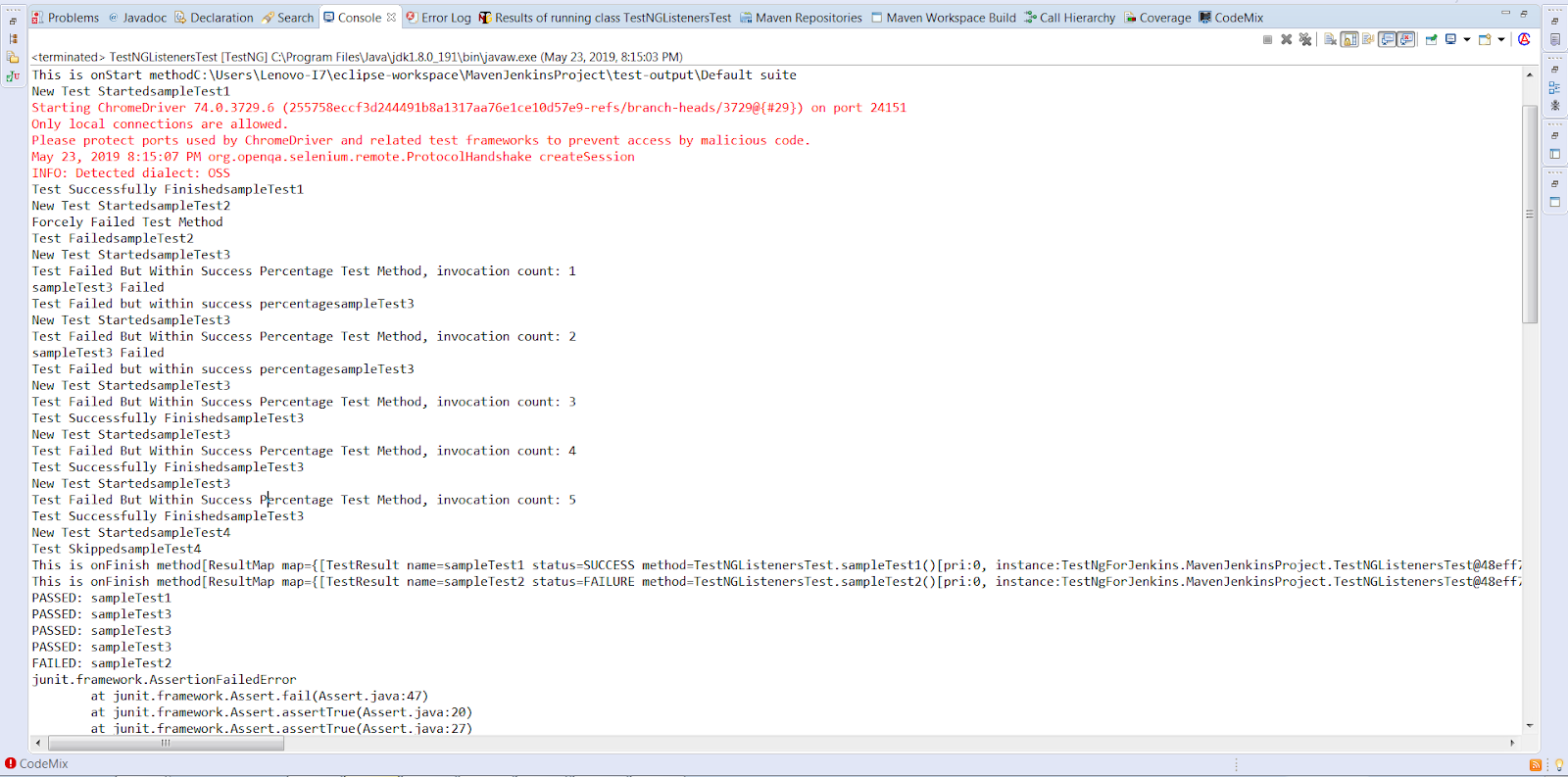
Now, suppose you have multiple classes in your project, then adding TestNG Listeners in Selenium WebDriver to each class might be a pain. In such cases, you can create a test suite and add Listeners tag to your suite(xml file) instead of adding Listeners to each class.
Here is the example code(testng.xml) for running the test at the suite level :
<?xml version="1.0" encoding="UTF-8"?>
<!DOCTYPE suite SYSTEM "http://testng.org/testng-1.0.dtd">

<suite name="TestNG Listeners Suite" parallel="false">

   <listeners>
       <listener class-name="TestNgListeners.ListenersBlog" />
   </listeners>

   <test name="Test">
       <classes>
           <class name="TestNgListeners.TestNGListenersTest" />
       </classes>
   </test>

</suite>
Watch this video to learn how TestNG has become one of the most robust test automation frameworks and all you need to know to get started with TestNG in Selenium.

2. IAnnotationTransformer
IAnnotationTransformer is an interface that provides a method “transform” which would get invoked by TestNG to modify the behaviour of Test annotation method in our test class. The transform method provides various parameters:
- annotation: The annotation that would get read from the test class.
- testClass: If the annotation found on a class, this parameter would represent that same class.
- testConstructor: If the annotation found on a constructor, this parameter would represent that same constructor.
- testMethod: If the annotation found on a method, this parameter would represent that same method.
Note: At least one of the parameters will be non-null.
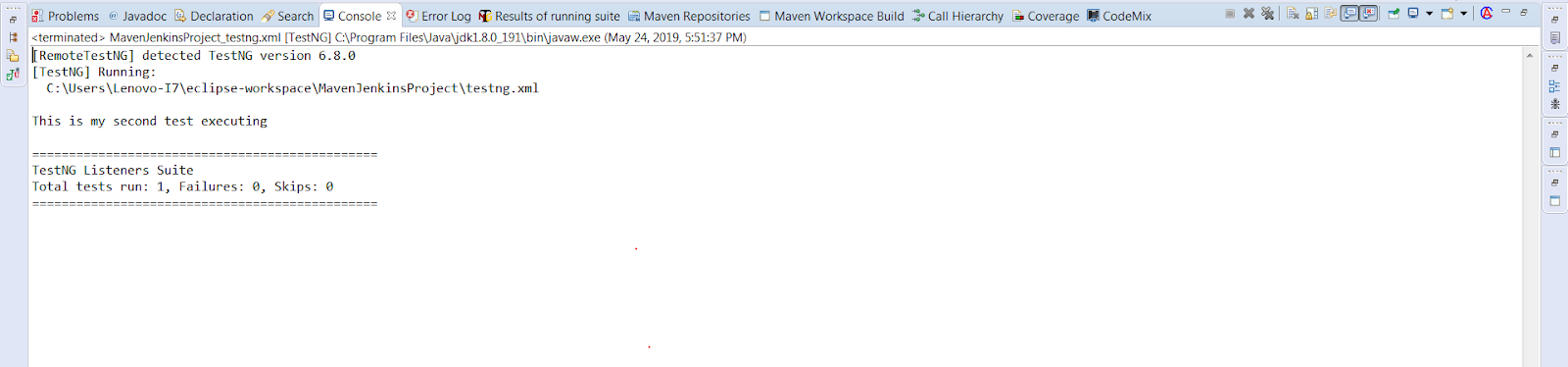
Below is the sample code that would be executed at the suite level. In this code, we have used a parameter “alwaysRun = true” in our Test annotation that indicates that the test method would always run even if the parameters on which the method depends fails. However, we would transform this behaviour of our test method through IAnnotationTransformer Listener which won’t allow the particular test method to get executed.
Listeners Class File:
package TestNgListeners;

import java.lang.reflect.Constructor;
import java.lang.reflect.Method;

import org.testng.IAnnotationTransformer;
import org.testng.annotations.ITestAnnotation;

public class AnnotationTransformers implements IAnnotationTransformer {

	public boolean isTestRunning(ITestAnnotation ins)
	{
		if(ins.getAlwaysRun())
		{
			return true;
		}
		return false;
	}


		public void transform(ITestAnnotation annotation, Class testClass, Constructor testConstructor, Method testMethod) {

		if(isTestRunning(annotation))
		{
			annotation.setEnabled(false);

		}

	}

}
Test Class File:
package TestNgListeners;

import org.testng.annotations.Listeners;
import org.testng.annotations.Test;


public class AnnotationTransformerTests {

	@Test(alwaysRun=true)
	public void test1()
	{
	   System.out.println("This is my first test whose behaviour would get changed while executing");
	}

	@Test
	public void test2()
	{
	   System.out.println("This is my second test executing");
	}

}
Console Output Screen:

3. IInvokedMethodListener
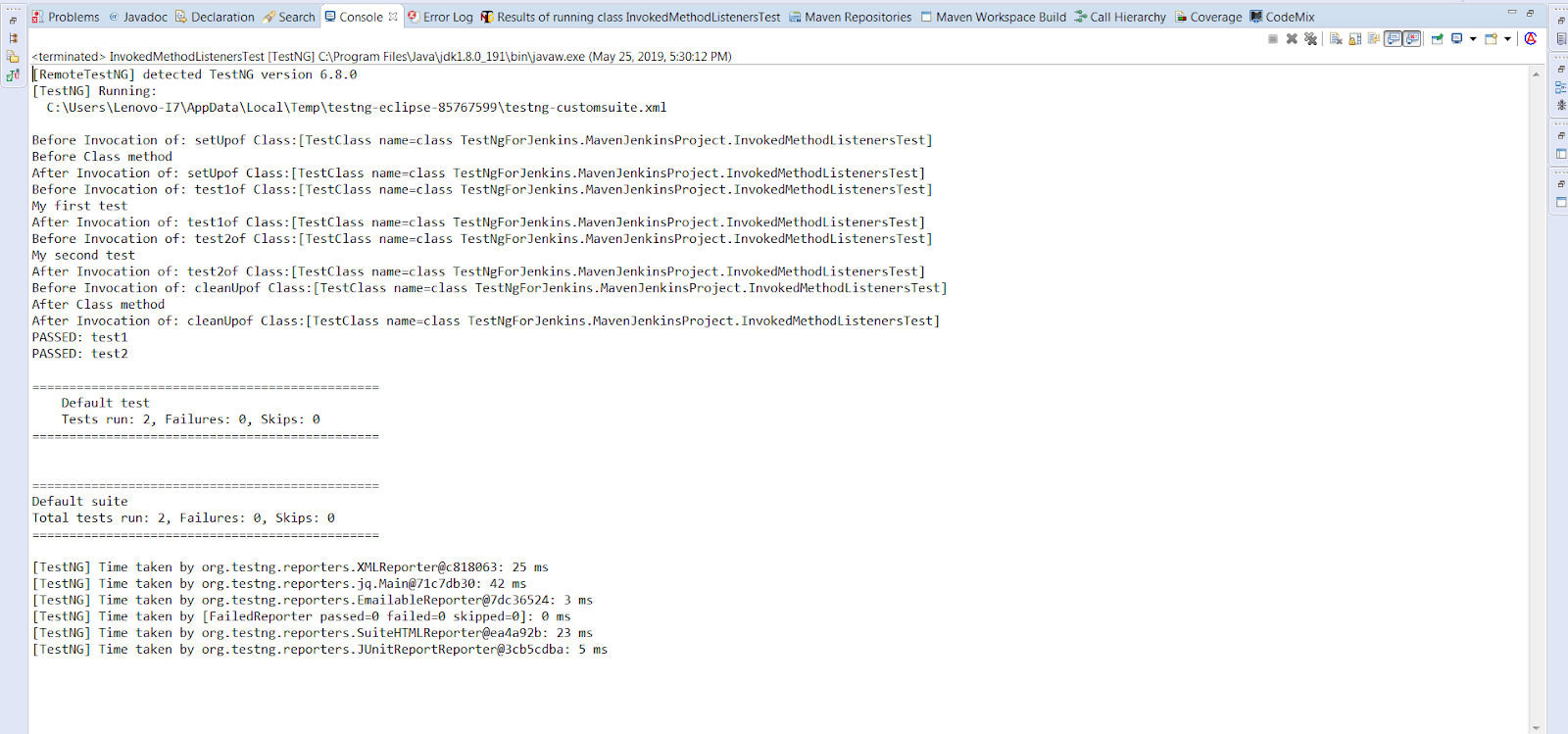
This interface allows you to perform some action before and after a method has been executed. This listener gets invoked for configuration and test methods. This TestNG listener in Selenium WebDriver works same as the ITestListerner and the ISuiteListerner. However, there is a difference that you should make a note of & that is, in IInvokedMethodListener, it makes the call before and after every method.
There are two methods to be implemented:
beforeInvocation(): This method is invoked prior every method.
afterInvocation(): This method is invoked post every method.
Here is sample code for this listener, implemented at class level.
InvokedMethodListeners.java(includes listeners implemented methods)

package TestNgListeners;

import org.testng.IInvokedMethod;
import org.testng.IInvokedMethodListener;
import org.testng.ITestResult;

public class InvokedMethodListeners implements IInvokedMethodListener {

	public void beforeInvocation(IInvokedMethod method, ITestResult testResult) {

		 System.out.println("Before Invocation of: " + method.getTestMethod().getMethodName() + "of Class:" + testResult.getTestClass());
	}

	public void afterInvocation(IInvokedMethod method, ITestResult testResult) {

		 System.out.println("After Invocation of: " + method.getTestMethod().getMethodName() + "of Class:" + testResult.getTestClass());

	}
}
File Name: InvokedMethodListenersTest.java (includes configuration and test methods)
package TestNgListeners;

import org.testng.annotations.AfterClass;
import org.testng.annotations.BeforeClass;
import org.testng.annotations.Listeners;
import org.testng.annotations.Test;

@Listeners(value=InvokedMethodListeners.class)
public class InvokedMethodListenersTest {
	@Test
	public void test1()
	{
		System.out.println("My first test");
	}

	@Test
	public void test2()
	{
		System.out.println("My second test");
	}

	 @BeforeClass
	    public void setUp() {
	        System.out.println("Before Class method");
	    }
	    @AfterClass
	    public void cleanUp() {
	        System.out.println("After Class method");
	    }
}
Console Output Screen:

4. ISuiteListener
This TestNG listener in Selenium WebDriver is implemented at a suite level called ISuiteListener. It has 2 methods:
onStart: This method is invoked prior the test suite execution.
onFinish: This method is invoked post the test suite execution.
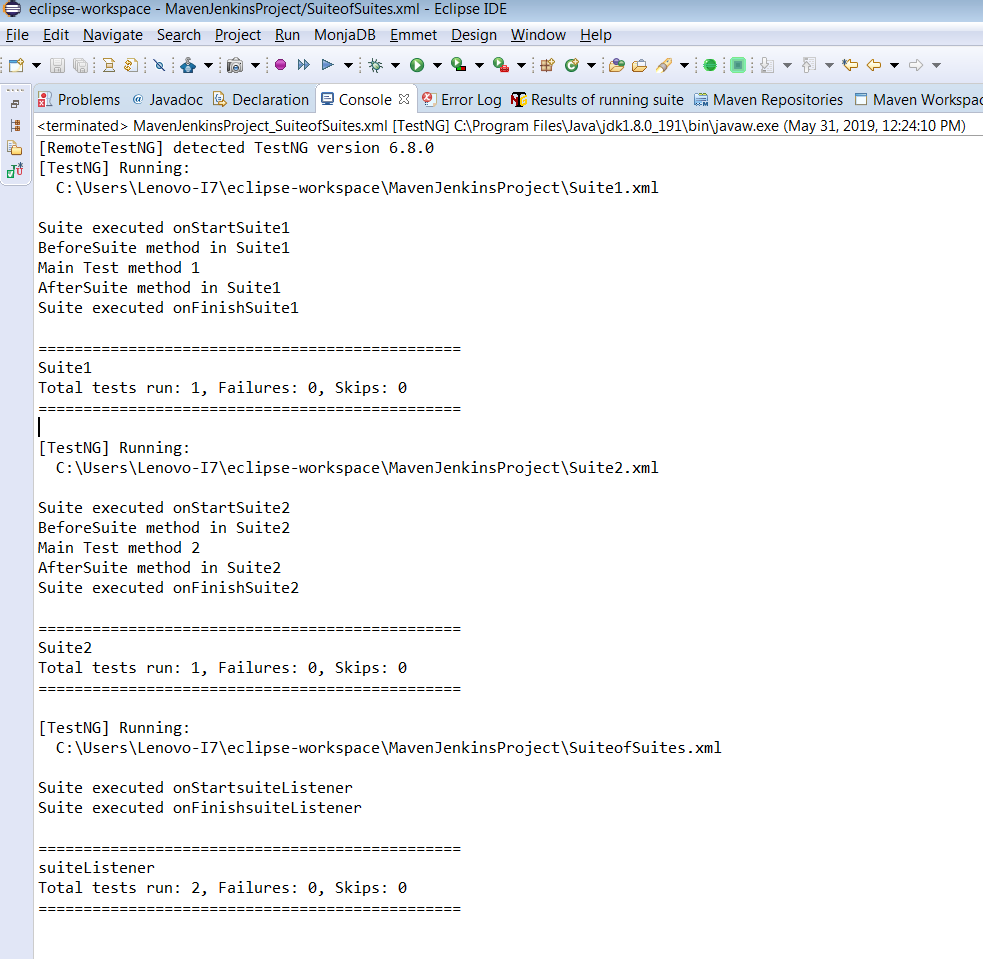
This listener basically listen to the events to have occurred before and after the execution of the suite.If the parent suite further contains child suites then child suites are executed before running the parent suite.
Step 1: Implementing ISuiteListener with normal java class and adding the unimplemented methods.
Class: SuiteListeners
package TestNgListeners;

import org.testng.ISuite;
import org.testng.ISuiteListener;

public class SuiteListeners implements ISuiteListener {
	public void onStart(ISuite suite) {
		System.out.println("Suite executed onStart"  + suite.getName());
	}
	public void onFinish(ISuite suite) {
		System.out.println("Suite executed onFinish"  + suite.getName());
	}
}
Step 2: Creating two test classes to be added in two different child suites.
Class 1: SuiteListenersTests1
package TestNgListeners;

import org.testng.annotations.AfterSuite;
import org.testng.annotations.BeforeSuite;
import org.testng.annotations.Test;

public class SuiteListenersTests1 {

	@BeforeSuite
	public void test1()
	{
	   System.out.println("BeforeSuite method in Suite1");
	}


	@Test
	public void test2()
	{
		System.out.println("Main Test method 1");
	}

	@AfterSuite
	public void test3()
	{
	   System.out.println("AfterSuite method in Suite1");
	}

}
Class 2: SuiteListenersTests2
package TestNgListeners;

import org.testng.annotations.AfterSuite;
import org.testng.annotations.BeforeSuite;
import org.testng.annotations.Test;

public class SuiteListenersTests2 {

	@BeforeSuite
	public void test1()
	{
	   System.out.println("BeforeSuite method in Suite2");
	}


	@Test
	public void test2()
	{
		System.out.println("Main Test method 2");
	}

	@AfterSuite
	public void test3()
	{
	   System.out.println("AfterSuite method in Suite2");
	}

}
Step 3: Adding the test classes to the child suites.
Suite 1: Test Suite One.xml
<?xml version="1.0" encoding="UTF-8"?>
<!DOCTYPE suite SYSTEM "http://testng.org/testng-1.0.dtd">
<suite name="Test Suite One">

 <test name="Test Method1">
   <classes>
     <class name="TestNgListeners.SuiteListenersTests1"/>
   </classes>
 </test>

</suite>
Suite 2: Test Suite Two.xml
<?xml version="1.0" encoding="UTF-8"?>
<!DOCTYPE suite SYSTEM "http://testng.org/testng-1.0.dtd">
<suite name="Test Suite Two">

 <test name="Test Method2">
   <classes>
     <class name="TestNgListeners.SuiteListenersTests2"/>
   </classes>
 </test>
</suite>
Step 4: Creating a parent suite xml file that would combine other 2 defined suites along with the listeners class.
<?xml version="1.0" encoding="UTF-8"?>
<!DOCTYPE suite SYSTEM "http://testng.org/testng-1.0.dtd">

<suite name="suiteListener">

    <listeners>
        <listener class-name="TestNgListeners.SuiteListeners"></listener>
    </listeners>

    <suite-files>
        <suite-file path="./Suite1.xml"> </suite-file>
        <suite-file path="./Suite2.xml"> </suite-file>
    </suite-files>
</suite>
Console Output Screen:

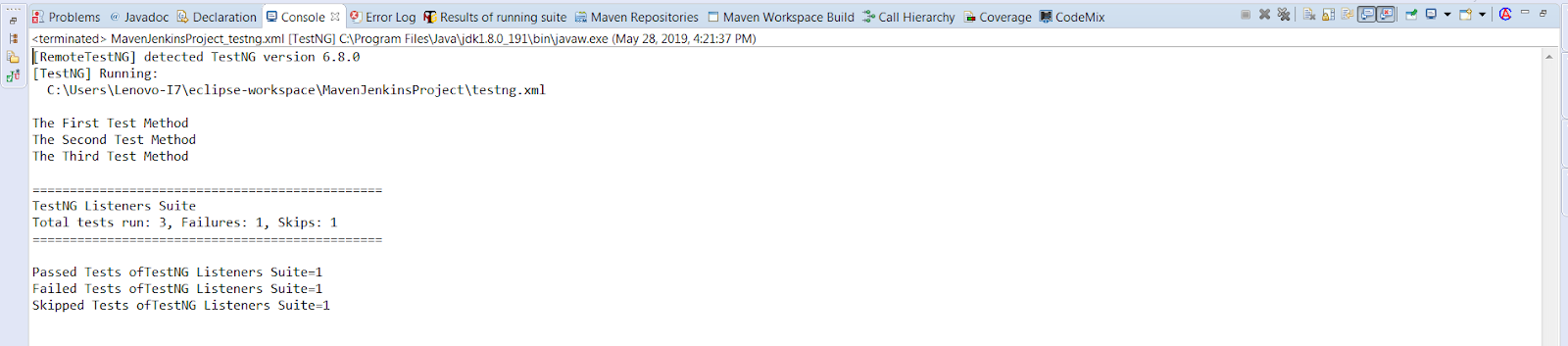
5. IReporter
This TestNG listener in Selenium WebDriver provides an interface which helps you to customize the test report generated by TestNG. It provides generateReport method which would get invoked after execution of all the suites. The method further contains three parameters:
- xmlSuite: it provides you with a list of multiple suites presented in the testng xml file that goes under execution.
- suites: This object represents a great deal of information about the classes, packages, test execution result, along with all the test methods. Basically, it represents detailed information around the suite after the final execution.
- outputDirectory: contains the output folder path where the report gets generated.
Below is the example of IReporterer listener at suite level.
File Name :ReporterListener.java
package TestNgListener;

import java.util.List;
import java.util.Map;

import org.testng.IReporter;
import org.testng.ISuite;
import org.testng.ISuiteResult;
import org.testng.ITestContext;
import org.testng.xml.XmlSuite;

public class ReporterListener implements IReporter {

	public void generateReport(List xmlSuites, List suites, String outputDirectory) {

		for(ISuite isuite : suites)
		{
			Map<string, isuiteresult=""> suiteResults = isuite.getResults();
			String sn = isuite.getName();

			for(ISuiteResult obj : suiteResults.values())
			{
				ITestContext tc = obj.getTestContext();

				System.out.println("Passed Tests of"  + sn + "=" +  tc.getPassedTests().getAllResults().size());

				System.out.println("Failed Tests of"  + sn + "=" +  tc.getFailedTests().getAllResults().size());

				System.out.println("Skipped Tests of"  + sn + "=" +  tc.getSkippedTests().getAllResults().size());
			}

		}


	}

}
</string,>
File Name: ReporterTest.java
package TestNgListener;

import org.testng.SkipException;
import org.testng.annotations.Listeners;
import org.testng.annotations.Test;

import junit.framework.Assert;


public class ReporterTest {

	@Test
	public void FirstTest()
	{
		System.out.println("The First Test Method");
		Assert.assertTrue(true);
	}

	@Test
	public void SecondTest()
	{
		System.out.println("The Second Test Method");
		Assert.fail("Failing this test case");
	}

	@Test
	public void ThirdTest()
	{
		System.out.println("The Third Test Method");
		throw new SkipException("Test Skipped");
	}

}
Console Output Screen:
Not So Frequently Used TestNG Listeners In Selenium WebDriver
In this section, I will be highlighting those TestNG listeners which are not so renowned as the ones discussed in the previous section. I have avoided the practical demonstration of these TestNG listeners with their examples as they are rarely used. I will, however, help you understand their purpose.
6. IConfigurationListener
This TestNG listener in Selenium WebDriver is used to create an event only when the configuration method is passed, failed or skipped. Below are the unimplemented methods provided by this listener:
- onConfigurationSuccess: It gets invoked when the configuration method gets succeeded.
- onConfigurationFailure: It gets invoked when the configuration method gets failed.
- onConfigurationSkip: As the name suggests, when your configuration method is skipped, it calls for onConfigurationSkip method.
7. IExecutionListener
This listener is used to keep track when the test or suite run start and finish. It provides two methods:
onExecutionStart: It is invoked before the suite or test starts running.
onExecutionFinish: It is invoked after the suite or test gets executed.
Note: It is not possible for this listener to prevent the execution but only to create events in some way. Also, you can provide more than one “IExecution” listener as you configure TestNG.
8. IHookable
This interface skips the invocation of test methods and provides a run method which gets invoked instead of each @Test method found. The test method is then invoked once the callBack() method of the IHookCallBack parameter is called.
IHookable listener is utilized when you wish to perform testing on classes which require JAAS authentication. This can be used to set permissions i.e. for whom the test method should run and when the test method should get skipped.
9. IMethodInterceptor
→To return the list of IMethodInstance, post-execution of TestNG.
→ To sort the list of test methods.
TestNG would execute the tests methods in the same order defined in the returned value. IMethodInterceptor interface includes only one method to implement “intercept” which returns the modified list of test methods.
Example: One of the test methods SampleTestOne is to test the logs, so we grouped it in “LogCheck”.
Now, suppose we only want to run the LogCheck grouped tests and not the other tests, so, we have to provide an IMethodInterceptor listener that can eliminate the other tests and return only LogCheck grouped tests.
10. IConfigurable
The ICongurable listener is somewhat similar to IHookable listener. This interface skips the invocation of test methods and provides a run method which gets invoked instead of each configuration method found. The configuration method is then invoked once the callBack() method of the IConfigureCallBack parameter is called.

Which TestNG Listener to Use
The interfaces above overlap, and most suites need only two or three of them. This table maps the common jobs to the listener that fires at the right moment.
| Listener | Fires | Use it for |
|---|---|---|
| ITestListener | On test start, success, failure, and skip | Screenshots on failure, per-test logging, marking results in a dashboard |
| ISuiteListener | On suite start and finish | Starting and stopping shared resources, one summary message per run |
| IInvokedMethodListener | Before and after every method, including configuration methods | Timing every method, injecting data before @BeforeMethod runs |
| IRetryAnalyzer | When a test fails | Re-running flaky tests a fixed number of times |
| IAnnotationTransformer | Before the suite starts, once per annotation | Attaching a retry analyzer or changing enabled without editing every test |
| IReporter | After the whole suite, with all results | Custom HTML or JSON reports |
| IExecutionListener | Before the first suite and after the last | Global setup that must run once per JVM |
Register the listener once in testng.xml under <listeners> rather than with @Listeners on every class, so the suite file stays the single place that decides what observes the run.
How Do AI Agents Use TestNG Listeners to Triage Test Failures?
AI triage agents hook into ITestListener's onTestFailure and IReporter's generateReport to read failure data, but a synchronous LLM call inside the hook adds latency to every failing test.
- onTestFailure hook: ITestListener's onTestFailure fires synchronously when a test fails, so a triage agent reading the ITestResult stack trace there can classify the failure before a human opens the report.
- IReporter for pattern data: generateReport in IReporter collects results across the whole suite, giving an agent enough history to flag a test as flaky rather than broken instead of judging a single run.
- MCP-based CI hooks: A Model Context Protocol server can expose the TestNG XML and HTML report as a tool call, letting a chat-based agent pull suite results into a triage conversation without parsing the report by hand.
- Latency inside the JVM: A listener method runs in the same thread as the test suite, so a synchronous call to an LLM inside onTestFailure or onExecutionFinish blocks the next test and can add minutes to a large suite unless it runs asynchronously.
Which TestNG Listeners In Selenium WebDriver Do You Use The Most?
I hope this TestNG tutorial, helped you to realize which TestNG listeners are most suitable for your project requirements. Regarding the rarely used TestNG listeners, if there are any specific TestNG listener in Selenium that you find highly useful then feel free to share them in the comment section below. For an all in one session on performing a complete TestNG tutorial with Selenium you can checkout this video.

Author

Ramit Dhamija
Blogs: 10


Ramit Dhamija is a DevOps Engineer with 6+ years of experience in software testing, Java-based test automation, and cloud infrastructure. At TestMu AI, he contributed to automation frameworks that enhanced cross-browser testing reliability. Skilled in Java, Selenium, Kubernetes, and AWS, he also holds certifications including CKA and ISTQB. Ramit earned his MCA in Computer Science from Birla Institute of Technology, Mesra, and specializes in bridging QA practices with modern DevOps pipelines.
Frequently asked questions
Did you find this page helpful?
More Related Blogs
TestMu AI forEnterprise
Get access to solutions built on Enterprise
grade security, privacy, & compliance
- Advanced access controls
- Advanced data retention rules
- Advanced Local Testing
- Premium Support options
- Early access to beta features
- Private Slack Channel
- Unlimited Manual Accessibility DevTools Tests