

Power Your Software Testing with AI Agents and Cloud
The Native AI-Agentic Cloud Platform to Supercharge Quality Engineering. Test Intelligently and Ship Faster.


- TestMu AI (Formerly LambdaTest)
- /
- Blog
- /
- How To Use DataProviders In TestNG [With Examples]
How To Use DataProviders In TestNG [With Examples]
DataProvider in TestNG is used to inject multiple values into the same test case, this guide explains how to use them in your Selenium test automation scripts.
Last Updated on:
DataProvider in TestNG is a @DataProvider-annotated method returning Object[][], so TestNG runs the linked @Test once per row. Per testng.org/parameters.html, @DataProvider also accepts Iterator<Object[]>, custom types like MyCustomData[][], a java.lang.reflect.Method first parameter, and parallel = true with a default 10-thread pool.
This chapter is part of the TestNG tutorial, which covers setup, annotations, testng.xml, data-driven tests, and parallel execution.
This article covers @DataProvider syntax, dataProviderClass inheritance, multi-value rows, Apache POI 5.x Excel rows, method-aware rows, parallel execution, four TestNG error strings, and a Selenium RemoteWebDriver cloud-grid snippet.
Overview
To perform data-driven testing in TestNG, use the @DataProvider annotation to pass multiple input datasets to a single test method. For local execution, define a method returning a 2D object array, and scale cross-browser execution by running these datasets in parallel on the TestMu AI Selenium Grid.
Why Do DataProviders Matter in TestNG?
- @DataProvider annotation: This TestNG annotation runs a single test method multiple times with different input rows, reducing code duplication and scaling test coverage.
- @Parameters annotation: This TestNG annotation passes specific values to a test suite once per execution, making it ideal for suite-level configurations rather than multi-row datasets.
- Apache POI: This Java library integrates with TestNG DataProviders to read external test data from Excel spreadsheets, allowing non-developers to update test rows without changing code.
- TestMu AI Selenium Grid: This cloud platform runs TestNG DataProvider rows concurrently across 10,000+ real browsers and devices when combined with parallel execution settings.
What Are the Core Pillars of TestNG DataProviders?
- Data source definition: TestNG defines a named data source by marking a method with the @DataProvider annotation to return a 2D array or an Iterator of objects.
- dataProviderClass attribute: This TestNG attribute references a static DataProvider method in an external class, separating test logic from test data for cleaner code organization.
- java.lang.reflect.Method parameter: This Java parameter allows a single TestNG DataProvider to dynamically return different datasets based on the name of the calling test method.
- parallel = true setting: This TestNG parameter runs DataProvider rows concurrently across a default pool of 10 threads, significantly reducing overall test execution time.
What is a DataProvider in TestNG?
A DataProvider in TestNG is a method annotated with @DataProvider that returns a 2D array of objects. Each row is one test invocation. When a @Test method declares the matching DataProvider by name, TestNG calls the test once per row and passes the row values as arguments. According to the official TestNG documentation, DataProviders can also return Iterator<Object[]> for lazy evaluation when the dataset is large.
The base syntax is:
@DataProvider(name = "data-provider-name")
public Object[][] dataProviderFunc() {
  return new Object[][] {
    {"row-1-value-1", "row-1-value-2"},
    {"row-2-value-1", "row-2-value-2"}
  };
}- The name attribute is the string the @Test annotation uses to find this DataProvider. If omitted, the method name is the default DataProvider name.
- The DataProvider is a separate method from the test, unlike @Parameters which annotates the test itself.
- Return type is Object[][] or Iterator<Object[]>. TestNG 7.x also accepts custom types like MyCustomData[][].
- The width of each inner array must equal the parameter count of the linked @Test method.
For a refresher on how TestNG wires this together, see our TestNG annotations tutorial.

Note: Want to validate the same DataProvider rows across 10,000+ real browsers and devices? Spin up a free TestMu AI cloud Selenium Grid in minutes. Start free.
The video below walks through the TestMu AI TestNG certification, which covers DataProvider and other TestNG annotations end to end:
LambdaTest Now Called TestMu AI — the same trusted platform with a new name and powerful AI capabilities.
Using DataProvider in TestNG
The minimal pattern: declare the DataProvider, link it from a @Test method with the same name. The example below runs the same TestMu Selenium Playground form twice, once per input row, using WebDriverManager so the test is not tied to a local chromedriver path.
package dataProviders;

import io.github.bonigarcia.wdm.WebDriverManager;
import org.openqa.selenium.By;
import org.openqa.selenium.WebDriver;
import org.openqa.selenium.WebElement;
import org.openqa.selenium.chrome.ChromeDriver;
import org.testng.Reporter;
import org.testng.annotations.AfterMethod;
import org.testng.annotations.BeforeMethod;
import org.testng.annotations.DataProvider;
import org.testng.annotations.Test;

public class SimpleDataProviderTest {

  WebDriver driver;

  @DataProvider(name = "form-messages")
  public Object[][] dataProvFunc() {
    return new Object[][] {
      {"TestMu AI cloud run"},
      {"DataProvider iteration"}
    };
  }

  @BeforeMethod
  public void setUp() {
    WebDriverManager.chromedriver().setup();
    driver = new ChromeDriver();
    driver.manage().window().maximize();
    driver.get("https://www.testmuai.com/selenium-playground/simple-form-demo/");
  }

  @Test(dataProvider = "form-messages")
  public void enterMessage(String message) {
    WebElement input = driver.findElement(By.id("user-message"));
    input.clear();
    input.sendKeys(message);
    Reporter.log("Submitted: " + message);
  }

  @AfterMethod
  public void tearDown() {
    if (driver != null) driver.quit();
  }
}
TestNG runs enterMessage twice because the DataProvider returns two rows. The Reporter log captures each submitted value in the TestNG HTML report.
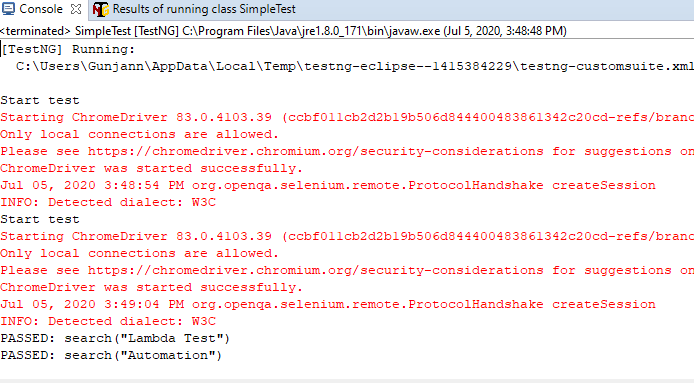
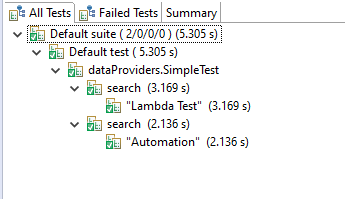
Two rows in, two test executions out, all from one method. The next section pulls the DataProvider into a dedicated class so test logic and test data stay separate.
If you also need event hooks around these runs, see TestNG Listeners in Selenium WebDriver.
Inheriting DataProvider in TestNG
Real test suites quickly outgrow one-file classes. Keep the DataProvider in its own class so several test classes can share the same dataset. Two changes are needed: mark the DataProvider method static, and reference its class from @Test via dataProviderClass.
DataProvider class:
package dataProviders;

import org.testng.annotations.DataProvider;

public class DPClass {

  @DataProvider(name = "form-messages")
  public static Object[][] dataProvFunc() {
    return new Object[][] {
      {"TestMu AI cloud run"},
      {"DataProvider iteration"}
    };
  }
}
Test class:
package dataProviders;

import io.github.bonigarcia.wdm.WebDriverManager;
import org.openqa.selenium.By;
import org.openqa.selenium.WebDriver;
import org.openqa.selenium.WebElement;
import org.openqa.selenium.chrome.ChromeDriver;
import org.testng.Reporter;
import org.testng.annotations.AfterMethod;
import org.testng.annotations.BeforeMethod;
import org.testng.annotations.Test;

public class TestClass {

  WebDriver driver;

  @BeforeMethod
  public void setUp() {
    WebDriverManager.chromedriver().setup();
    driver = new ChromeDriver();
    driver.manage().window().maximize();
    driver.get("https://www.testmuai.com/selenium-playground/simple-form-demo/");
  }

  @Test(dataProvider = "form-messages", dataProviderClass = DPClass.class)
  public void enterMessage(String message) {
    WebElement input = driver.findElement(By.id("user-message"));
    input.clear();
    input.sendKeys(message);
    Reporter.log("Submitted: " + message);
  }

  @AfterMethod
  public void tearDown() {
    if (driver != null) driver.quit();
  }
}
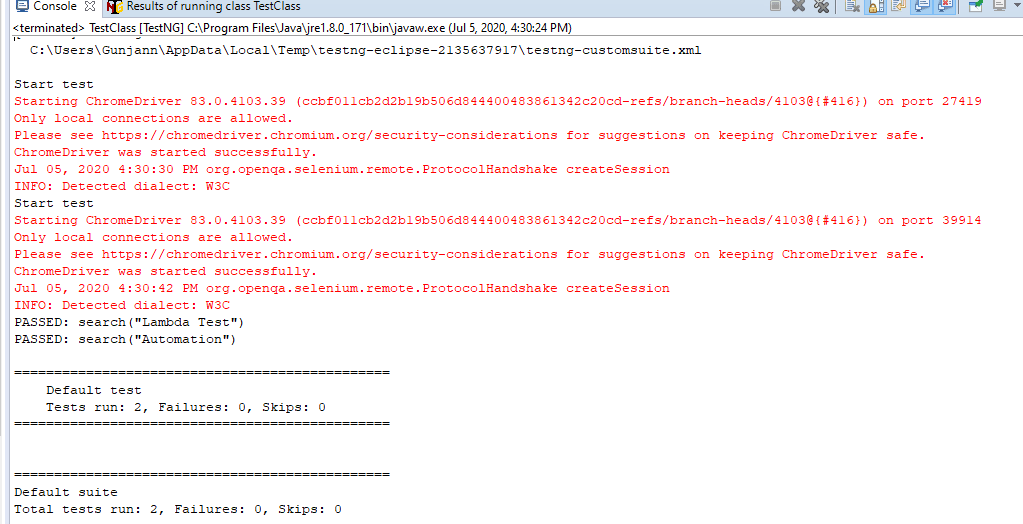
The single new attribute, dataProviderClass = DPClass.class, lets any test class anywhere in the project reuse the same data rows. Output mirrors the previous run: one row per test invocation.

Passing Multiple Parameter Values
Each row in Object[][] can carry as many values as needed. Widen the inner array, then add matching parameters to the @Test method signature in the same order.
package dataProviders;

import io.github.bonigarcia.wdm.WebDriverManager;
import org.openqa.selenium.By;
import org.openqa.selenium.WebDriver;
import org.openqa.selenium.WebElement;
import org.openqa.selenium.chrome.ChromeDriver;
import org.testng.Reporter;
import org.testng.annotations.AfterMethod;
import org.testng.annotations.BeforeMethod;
import org.testng.annotations.DataProvider;
import org.testng.annotations.Test;

public class MultiValueDataProviderTest {

  WebDriver driver;

  @DataProvider(name = "tool-and-language")
  public Object[][] dataProvFunc() {
    return new Object[][] {
      {"Selenium", "Java"},
      {"Playwright", "TypeScript"},
      {"Appium", "Mobile"}
    };
  }

  @BeforeMethod
  public void setUp() {
    WebDriverManager.chromedriver().setup();
    driver = new ChromeDriver();
    driver.manage().window().maximize();
    driver.get("https://www.testmuai.com/selenium-playground/simple-form-demo/");
  }

  @Test(dataProvider = "tool-and-language")
  public void enterCombined(String tool, String language) {
    WebElement input = driver.findElement(By.id("user-message"));
    input.clear();
    input.sendKeys(tool + " " + language);
    Reporter.log("Submitted: " + tool + " " + language);
  }

  @AfterMethod
  public void tearDown() {
    if (driver != null) driver.quit();
  }
}
Three rows, three executions, two arguments per call. The output shows all three combined strings submitted to the playground form.
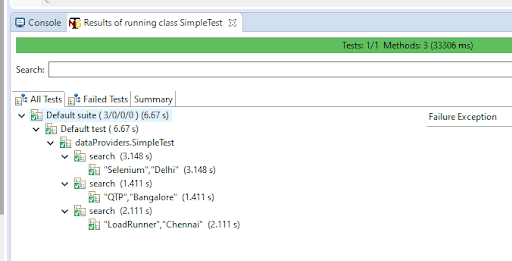
Hardcoded rows work for a handful of values. For real datasets, point the DataProvider at an external file. The next section uses Excel.
DataProvider in TestNG using Excel
Reading test data from Excel keeps test rows under version-control-friendly files and lets non-developers update the dataset. The Apache POI library handles .xlsx parsing; the current stable line is Apache POI 5.x, which targets Java 8+.
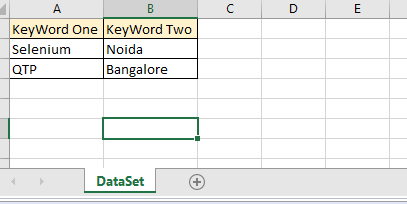
Create a Test Data Sheet
Create a package such as testData under the project root and drop the spreadsheet (TestData.xlsx) inside it. Row 0 is the header, rows 1+ are test data:
Wire Apache POI into the DataProvider: a helper reads the sheet into a 2D String array, and the DataProvider returns it.
@DataProvider(name = "excel-data")
public Object[][] excelDP() throws IOException {
  // Reads rows from a local xlsx file and returns them as a 2D array for TestNG.
  return getExcelData(
    "src/test/resources/testData/TestData.xlsx",
    "Sheet1"
  );
}

public String[][] getExcelData(String fileName, String sheetName) {
  String[][] data = null;
  try (FileInputStream fis = new FileInputStream(fileName);
       XSSFWorkbook wb = new XSSFWorkbook(fis)) {
    XSSFSheet sh = wb.getSheet(sheetName);
    int noOfRows = sh.getPhysicalNumberOfRows();
    int noOfCols = sh.getRow(0).getLastCellNum();
    data = new String[noOfRows - 1][noOfCols];
    for (int i = 1; i < noOfRows; i++) {
      XSSFRow row = sh.getRow(i);
      for (int j = 0; j < noOfCols; j++) {
        Cell cell = row.getCell(j);
        data[i - 1][j] = cell.getStringCellValue();
      }
    }
  } catch (Exception e) {
    System.out.println("Excel read failed: " + e.getMessage());
  }
  return data;
}
Wire the DataProvider into a test class and the rest is identical to the multi-value pattern from the previous section.
package testNG;

import java.io.FileInputStream;
import java.io.IOException;
import org.apache.poi.ss.usermodel.Cell;
import org.apache.poi.xssf.usermodel.XSSFRow;
import org.apache.poi.xssf.usermodel.XSSFSheet;
import org.apache.poi.xssf.usermodel.XSSFWorkbook;
import io.github.bonigarcia.wdm.WebDriverManager;
import org.openqa.selenium.By;
import org.openqa.selenium.WebDriver;
import org.openqa.selenium.WebElement;
import org.openqa.selenium.chrome.ChromeDriver;
import org.testng.Reporter;
import org.testng.annotations.AfterMethod;
import org.testng.annotations.BeforeMethod;
import org.testng.annotations.DataProvider;
import org.testng.annotations.Test;

public class ExcelDataProvider {

  WebDriver driver;

  @BeforeMethod
  public void setUp() {
    WebDriverManager.chromedriver().setup();
    driver = new ChromeDriver();
    driver.manage().window().maximize();
    driver.get("https://www.testmuai.com/selenium-playground/simple-form-demo/");
  }

  @DataProvider(name = "excel-data")
  public Object[][] excelDP() throws IOException {
    return getExcelData(
      "src/test/resources/testData/TestData.xlsx",
      "Sheet1"
    );
  }

  public String[][] getExcelData(String fileName, String sheetName) {
    String[][] data = null;
    try (FileInputStream fis = new FileInputStream(fileName);
         XSSFWorkbook wb = new XSSFWorkbook(fis)) {
      XSSFSheet sh = wb.getSheet(sheetName);
      int noOfRows = sh.getPhysicalNumberOfRows();
      int noOfCols = sh.getRow(0).getLastCellNum();
      data = new String[noOfRows - 1][noOfCols];
      for (int i = 1; i < noOfRows; i++) {
        XSSFRow row = sh.getRow(i);
        for (int j = 0; j < noOfCols; j++) {
          Cell cell = row.getCell(j);
          data[i - 1][j] = cell.getStringCellValue();
        }
      }
    } catch (Exception e) {
      System.out.println("Excel read failed: " + e.getMessage());
    }
    return data;
  }

  @Test(dataProvider = "excel-data")
  public void enterCombined(String keyWord1, String keyWord2) {
    WebElement input = driver.findElement(By.id("user-message"));
    input.clear();
    input.sendKeys(keyWord1 + " " + keyWord2);
    Reporter.log("Submitted: " + keyWord1 + " " + keyWord2);
  }

  @AfterMethod
  public void tearDown() {
    if (driver != null) driver.quit();
  }
}
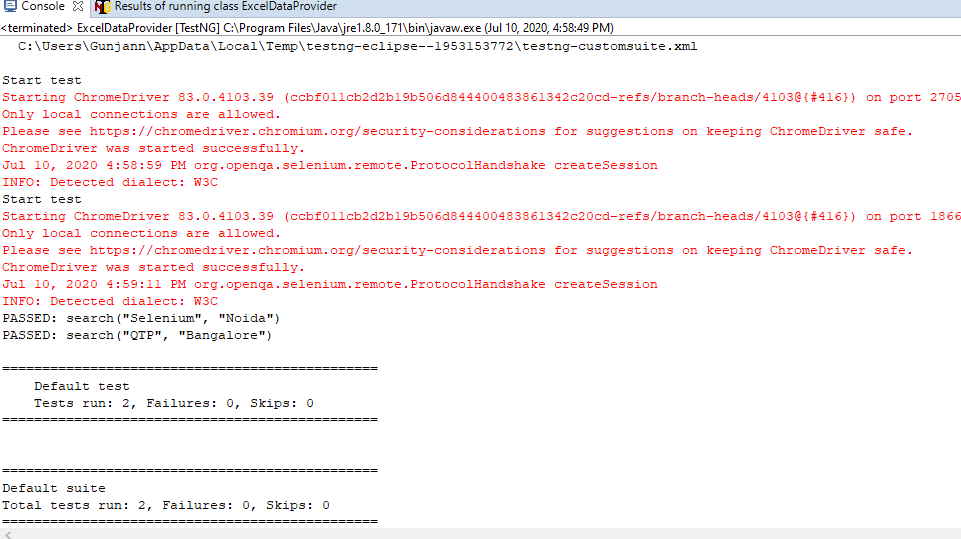
Running this prints one Reporter line per row in TestData.xlsx, the same way a hardcoded DataProvider would.
Method-Aware DataProviders
A single DataProvider can return different rows depending on which test method is calling it. Per the TestNG documentation: "If you declare your @DataProvider as taking a java.lang.reflect.Method as first parameter, TestNG will pass the current test method for this first parameter." Branch on method.getName() and one DataProvider feeds many tests.
import java.lang.reflect.Method;
import org.testng.annotations.DataProvider;
import org.testng.annotations.Test;

public class MethodAwareDataProvider {

  @DataProvider(name = "by-method")
  public Object[][] dpForMethod(Method method) {
    if (method.getName().equals("loginTest")) {
      return new Object[][] {
        {"user-1" + "@testmuai.com", "Pass#1"},
        {"user-2" + "@testmuai.com", "Pass#2"}
      };
    }
    if (method.getName().equals("searchTest")) {
      return new Object[][] {
        {"TestMu AI", "Selenium"},
        {"DataProvider", "TestNG"}
      };
    }
    return new Object[][] {{"default-1", "default-2"}};
  }

  @Test(dataProvider = "by-method")
  public void loginTest(String username, String password) {
    // login flow uses login-specific rows
  }

  @Test(dataProvider = "by-method")
  public void searchTest(String term1, String term2) {
    // search flow uses different rows from the same DataProvider
  }
}
One DataProvider, two callers, two datasets. This avoids one DataProvider per test method when only the rows differ.
Parallel DataProviders in TestNG
When the test row is I/O-bound (browser, network), DataProvider rows are easy to fan out across threads. Per the TestNG documentation, setting parallel = true on @DataProvider runs each row on its own thread, with a default pool of 10 threads. Override the pool size via data-provider-thread-count in the suite XML.
@DataProvider(name = "browser-matrix", parallel = true)
public Object[][] browserMatrix() {
  return new Object[][] {
    {"Chrome",  "latest", "Windows 11"},
    {"Firefox", "latest", "Windows 11"},
    {"Edge",    "latest", "macOS 14"},
    {"Safari",  "17",     "macOS 14"}
  };
}

@Test(dataProvider = "browser-matrix")
public void runOnBrowser(String browser, String version, String platform) {
  // each row runs on its own thread
}
And the matching suite XML if a larger pool is needed:
<!DOCTYPE suite SYSTEM "https://testng.org/testng-1.0.dtd">
<suite name="DataProviderSuite" data-provider-thread-count="8">
  <test name="ParallelMatrix">
    <classes>
      <class name="com.testmu.tests.ParallelDataProviderTest" />
    </classes>
  </test>
</suite>
Parallel DataProviders are most effective when each row drives a separate browser session. For full parallel suite control beyond a single DataProvider, see our guide on how to create a TestNG XML file and execute parallel testing.

Common DataProvider Errors and How to Fix Them
Four errors account for almost every broken DataProvider in TestNG. The verbatim strings below come from TestNG's Parameters class on GitHub; once you can map a stack trace to one of them, each is mechanical to fix.
- Method foo requires a @DataProvider named : the-name: The string in @Test(dataProvider = "...") does not match any @DataProvider in scope. Verify the strings match exactly (case-sensitive) and that the DataProvider method is reachable, either in the same class or via dataProviderClass.
- Method foo requires N parameters but M were supplied in the @Test annotation: The width of the inner array does not equal the @Test method's parameter count. Add or remove values per row, or change the test method signature so the counts line up.
- Dynamic data provider class X not found: dataProviderClass references a class that is not on the test classpath. Confirm the class is compiled and that the fully qualified class name (or import) is correct.
- DataProvider in another class cannot be invoked: When @Test uses dataProviderClass, TestNG must be able to call the method without your help. Mark the DataProvider method static, or give the class a public no-argument constructor so TestNG can instantiate it.
Running TestNG DataProviders on TestMu AI Cloud
Local DataProvider runs are fine for tens of rows. Real cross-browser matrices need a cloud Selenium Grid. Swap the local ChromeDriver for a RemoteWebDriver pointing at the TestMu AI hub, and the same DataProvider rows execute across 10,000+ real browsers and devices. For full setup, see the TestMu AI Selenium automation getting-started docs.
import java.net.URL;
import java.util.HashMap;
import org.openqa.selenium.remote.DesiredCapabilities;
import org.openqa.selenium.remote.RemoteWebDriver;

@BeforeMethod
public void setUp() throws Exception {
  DesiredCapabilities caps = new DesiredCapabilities();
  caps.setCapability("browserName", "Chrome");
  caps.setCapability("browserVersion", "latest");

  HashMap<String, Object> ltOptions = new HashMap<>();
  ltOptions.put("platform", "Windows 11");
  ltOptions.put("build", "TestNG DataProvider Demo");
  ltOptions.put("name", "DataProvider Cloud Run");
  ltOptions.put("username", System.getenv("LT_USERNAME"));
  ltOptions.put("accessKey", System.getenv("LT_ACCESS_KEY"));
  caps.setCapability("LT:Options", ltOptions);

  driver = new RemoteWebDriver(
    new URL("https://hub.lambdatest.com/wd/hub"),
    caps
  );
  driver.get("https://www.testmuai.com/selenium-playground/simple-form-demo/");
}
Combine this with parallel = true on the DataProvider and an 8-thread suite to run the full browser matrix concurrently against TestMu AI online Selenium Grid. For mobile coverage, the same pattern works against the TestMu AI real device cloud.
Conclusion
Start by replacing your most-duplicated TestNG @Test methods with one method plus a @DataProvider, then move the rows into Excel as the dataset grows. Add parallel = true and a RemoteWebDriver pointing at the TestMu AI hub once you need cross-browser coverage at speed. For deeper TestNG plumbing, the Selenium automation testing with TestNG guide and the TestMu AI Selenium automation docs are the next two reads.
Author

Kritika Murari
Blogs: 31


Kritika Murari is a Community Contributor with experience in creating technical content around software testing, automation, and emerging technologies. A former Content Manager at TestMu AI, she has authored blogs, guides, and resources that simplify complex testing concepts for developers and QA professionals. Kritika actively contributes to the testing community through insightful content and knowledge-sharing.
Frequently asked questions
Did you find this page helpful?
More Related Blogs
TestMu AI forEnterprise
Get access to solutions built on Enterprise
grade security, privacy, & compliance
- Advanced access controls
- Advanced data retention rules
- Advanced Local Testing
- Premium Support options
- Early access to beta features
- Private Slack Channel
- Unlimited Manual Accessibility DevTools Tests