

Power Your Software Testing with AI Agents and Cloud
The Native AI-Agentic Cloud Platform to Supercharge Quality Engineering. Test Intelligently and Ship Faster.


- TestMu AI (Formerly LambdaTest)
- /
- Learning Hub
- /
- Software Bugs: Types, Life Cycle, Examples & How to Fix Them
Software Bugs: Types, Life Cycle, Examples & How to Fix Them
What are software bugs? Learn the common causes of software bugs and how to fix them, plus the 13 types, the bug life cycle, and real-world examples.
Last Updated on:
On This Page
- What Is a Software Bug?
- Why Are Bugs Called "Bugs"?
- Why Do Software Bugs Arise?
- What Are the Types of Software Bugs?
- What Is the Difference Between Bugs and Defects?
- Is a Software Bug a Virus?
- What Is the Impact of Software Bugs?
- How Do You Identify Software Bugs?
- Where Do Software Bugs Appear in the Software Development Life Cycle?
- What Is the Software Bug Life Cycle?
- What Are Real-Life Examples of Software Bugs?
- How Do You Fix Software Bugs?
- What Should a Software Bug Report Include?
- Which Bug Tracking Tools Do Teams Use?
- Which Debugging Tools Help Fix Software Bugs?
- How Can You Prevent Software Bugs?
- What Are the Best Practices for Finding and Fixing Bugs?
- How Is AI Changing How Teams Find and Fix Software Bugs?
- Where Should You Start With Reducing Software Bugs?
The Consortium for IT Software Quality (CISQ) estimated the cost of poor software quality in the US at $2.41 trillion in 2022, with ~$1.52 trillion attributed to accumulated technical debt. Software bugs, the errors in code that cause unexpected behavior, crashes, or security vulnerabilities, are the root cause of most of these costs.
This guide covers the 13 types of software bugs, why they arise, the bug life cycle from discovery to resolution, real-world examples of bugs that caused millions in damages, and practical techniques for finding and fixing them throughout the software development life cycle.
Overview
To resolve software bugs, developers must catch errors early using static analysis and code reviews, then run automated regression testing. Teams can use cloud-based test automation platforms to execute automated tests across thousands of real browsers, devices, and operating systems to identify compatibility issues before release.
What Are the Main Types of Software Bugs?
- Functional and logical bugs: Functional and logical bugs disrupt the intended workflow or cause features to behave incorrectly, such as a save button failing to store user data.
- Syntax and unit-level bugs: Syntax and unit-level bugs are code-level mistakes, like missing brackets or misspelled labels, that developers catch early during the unit testing phase.
- Performance, compatibility, and security bugs: Performance, compatibility, and security bugs surface under heavy load, cause inconsistent behavior across different operating systems, or expose exploitable vulnerabilities to malicious attackers.
- Concurrency and arithmetic bugs: Concurrency and arithmetic bugs include race conditions, deadlocks, integer overflows, and division-by-zero calculations that can freeze or crash the application.
What Causes Software Bugs?
- Human error: Human error is the primary cause of software bugs, often stemming from miscommunication during requirement gathering, unrealistic development deadlines, and poor coding practices.
- Insufficient test coverage: Insufficient test coverage, excessive reliance on automation without human intuition, and failing to test under real user conditions lead to undetected defects.
- Third-party tool defects: Third-party tool defects in external integrations, such as faulty compilers, debuggers, HTML editors, or shared DLLs, can directly introduce errors into your software.
How Do You Find and Fix Software Bugs?
- CI/CD pipelines: CI/CD pipelines allow teams to integrate static analysis, code reviews, and automated regression testing to catch and resolve code defects early in development.
- TestMu AI: TestMu AI provides a test automation cloud that lets teams run automated tests across thousands of real browsers, devices, and operating systems to catch bugs before release.
What Is a Software Bug?
A software bug is any flaw in code that causes the application to behave differently from its specification. This could be a button that doesn't save data, a calculation that returns the wrong result, a page that crashes under load, or a security vulnerability that exposes user data. Bugs range from cosmetic issues (misaligned text) to critical failures (data loss, system crashes).
Bugs are inevitable in the Software Development Life Cycle (SDLC). Industry data from high-quality enterprise systems shows defect densities of 1-3 defects per thousand lines of code (KLOC), while typical business applications can have up to 10 defects per KLOC. The key is not to eliminate all bugs (impossible) but to detect and fix them before they reach production, where repair costs escalate significantly.
Why Are Bugs Called "Bugs"?
The term predates computers. Engineers used "bug" for mechanical and electrical faults in the 1800s, and Thomas Edison described such faults as "bugs" in an 1878 letter, calling them "little faults and difficulties" that show up during development.
The story most people know comes from 1947, when operators of the Harvard Mark II traced a malfunction to a moth trapped in a relay. They taped the moth into the logbook with the note "First actual case of bug being found." Grace Hopper, who worked on the Mark II program, popularized the anecdote, cementing "bug" and "debugging" in software vocabulary. The moth did not coin the term; it made an existing one famous.
Why Do Software Bugs Arise?
Human errors are the primary cause of nearly all software bugs, and eliminating them is almost impossible; understanding the factors contributing to human errors can help mitigate them. Here are the common reasons why software bugs arise.
- Communication issues: Bugs may go unnoticed or unreported in the software development process due to miscommunication or a lack of communication at various stages, from requirement gathering to interpretation/documentation or translation.
- Insufficient code coverage: Some software bugs may arise from poor code coverage, resulting from inadequate code base maintenance to support scalability or the oversight of dead, unused codes due to poor code writing.
- Unrealistic development timeframe: Developers often need more resources, unrealistic release schedules, and tight project deadlines. These constraints may lead to compromises, such as insufficient time for design and inadequate testing, which can increase the likelihood of bugs or errors.
- Incorrect testing framework selection: A testing framework is crucial for effective automation testing, providing an execution environment for automated test scripts. However, selecting an inappropriate automation testing framework can result in defects, as differences in test data between frameworks may lead to undetected issues.
- Poor coding practices: Bad coding practices, including unhandled errors, missing exceptions, faulty input validations, and flawed tools (such as faulty compilers, debuggers, and validators), can introduce errors that are challenging to debug.
- Bugs in third-party tools: While third-party tools like debuggers, HTML editors, shared DLLs, and add-ons/plug-ins are often necessary in software development, they may contain bugs that can affect your software.
- Excessive reliance on automation testing: Depending too much on automation testing, which lacks human intuition and experience, may result in manual testers overlooking bugs or defects. Successful automation testing requires a balance between experienced testers and effective management.
- Neglecting real user conditions in testing: Inadequate real-user stimulation during testing can lead to unexpected errors, especially when applications are tested on emulators and simulators that cannot replicate native environment conditions.

Note: Catch software bugs earlier with TestMu AI's test analytics and root cause analysis. Try TestMu AI free!
Various Parameters of a Software Bug
Software bugs have many parameters or characteristics used to document, track, and manage bugs during SDLC. Here are the standard parameters that better describe software bugs.
- ID: This is a unique identifier given to a bug, helping developers track them and provide references.
- Title/Summary: This briefly describes the bugs and gives a quick overview.
- Severity: This defines bug severity and impact on the software application. Its severity can be deduced by different levels, such as critical, major, minor, or cosmetic.
- Priority: This indicates the urgency of fixing the bug. Critical bugs require early fixation compared to low-priority bugs.
- Reproducibility: This shows how easily the bugs can be reproduced. This parameter helps developers because easily reproducible bugs are often easier to identify and fix.
- Attachments: This includes any additional files, logs, screenshots, or other materials to help understand and fix the bug.
- Date Reported: This is the date the bug was initially discovered and reported. This information helps track the timeline of bug identification and fixation.
- Version: This is the software version in which the bug was found. It is essential for version control and determining whether the bug is specific to certain releases.
Follow this guide on bug severity and priority to get detailed insights, learn more about setting the bug priority based on the bug's severity, and speed up your bug-fixing process.
What Are the Types of Software Bugs?
The main types of software bugs are functional, logical, syntax, performance, security, compatibility, usability, and integration bugs, each breaking a different part of the software.
Software bugs are of different types and are generally encountered in software testing. Knowing about them will allow developers and testers to handle or manage them.
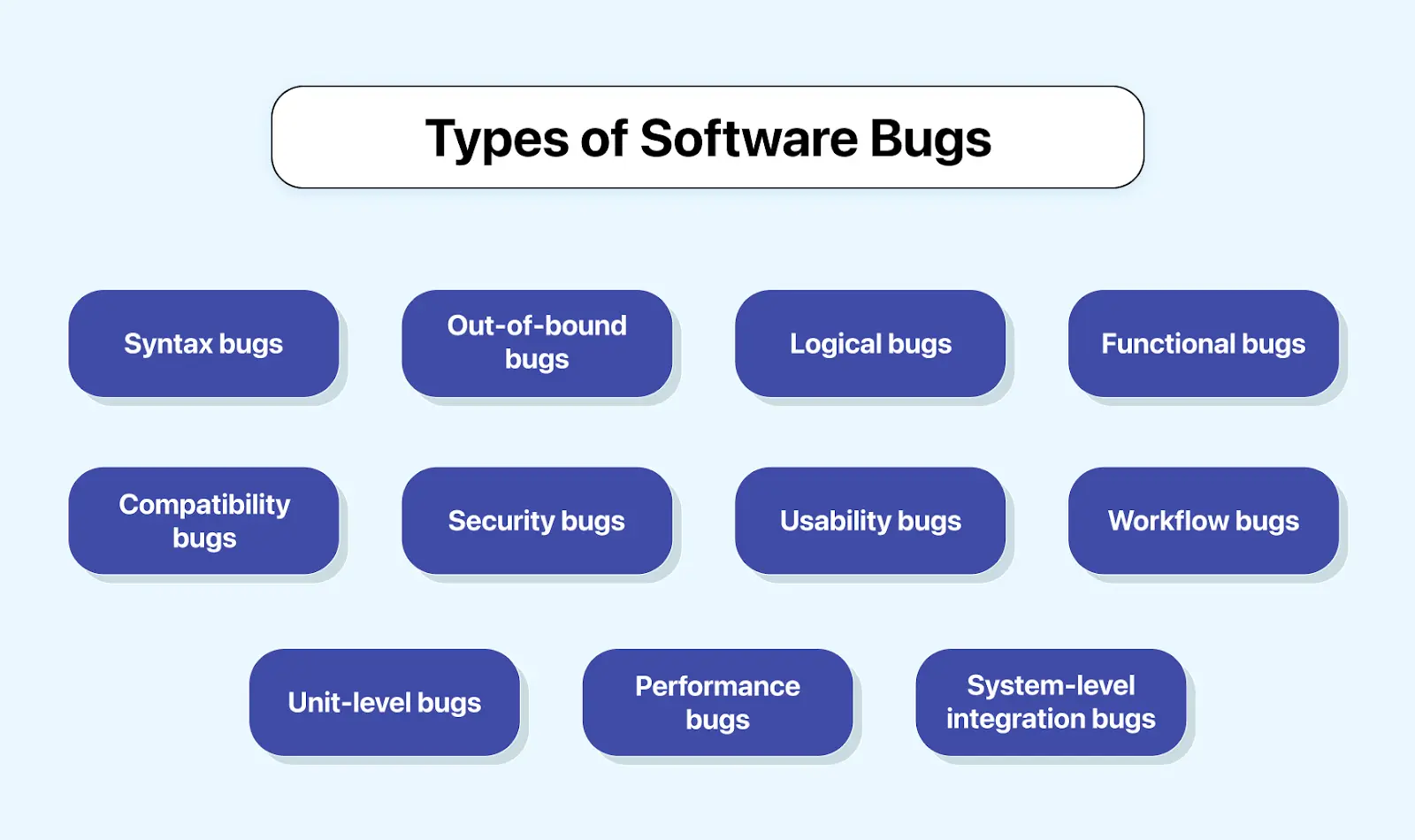
- Syntax bugs: Occur when there is a mistake in the source code. They commonly happen when the developer has yet to declare or misspell a label in the code or when a close bracket for a method or a class is missing. For example, a single missing bracket for a class or a technique can lead to a syntax error.
- Logical bugs: Occur when the software's intended workflow is disrupted, causing incorrect behavior and potential crashes. These bugs often result from poorly written code or a misinterpretation of business logic.
- Functional bugs: Occur when software deviates from its intended behavior. For instance, if a user clicks the Save button and the data entered in the form isn't saved, it qualifies as a functional error. Essentially, any component in an app or website that does not perform as intended is a functional bug.
- Unit-level bugs: Occur during software applications' development and testing phases. They are identified during coding when logic mistakes are made, or requirements within a specific code unit are incorrectly implemented. These errors are identified and fixed during unit testing.
- System-level integration bugs: Occur when code units from different developers fail to interact appropriately. They result from inconsistencies or incompatibility between components, making them challenging to track and fix.
- Usability bugs: Occur when an application's usability issues make it difficult for users to use it effectively. These issues can manifest as unclear interface designs, non-intuitive workflows, or challenging features.
- Workflow bugs: These bugs are associated with the user journey in a software application and impact navigation. For instance, in a data entry form, users might encounter issues with options like Save, Save and Exit, and Previous Page.
- Compatibility bugs: Occur when software behaves differently on various devices or operating systems, causing incompatibility.
- Performance bugs: Occur when any issues affect a software application's performance. These errors are associated with the application's speed, stability, response time, and reactivity. Performance testing helps identify these bugs.
- Security bugs: Occur when there is a flaw or vulnerability in software, hardware, or a system that attackers can exploit to compromise system security or gain unauthorized access to sensitive information. These bugs can range from coding errors to design flaws and may emerge at any stage of the development process.
- Out-of-bound bugs: Occur when users interact with the UI unintendedly, such as entering values outside the intended limits or using undefined data types.
- Concurrency bugs: Occur when multiple threads or processes access shared resources in the wrong order. Race conditions produce different results depending on timing, while deadlocks freeze the program when two threads each wait for a resource the other holds. They are hard to reproduce because they depend on precise execution timing.
- Arithmetic bugs: Occur when a calculation produces an invalid or unexpected result, such as an integer overflow (a value exceeding its maximum storage size and wrapping around) or a division-by-zero error that crashes the program.
What Is the Difference Between Bugs and Defects?
The terms bug and defect are often used interchangeably and with good reason. Both refer to a coding error that adversely affects its functionality during development. The key distinction lies in the following.
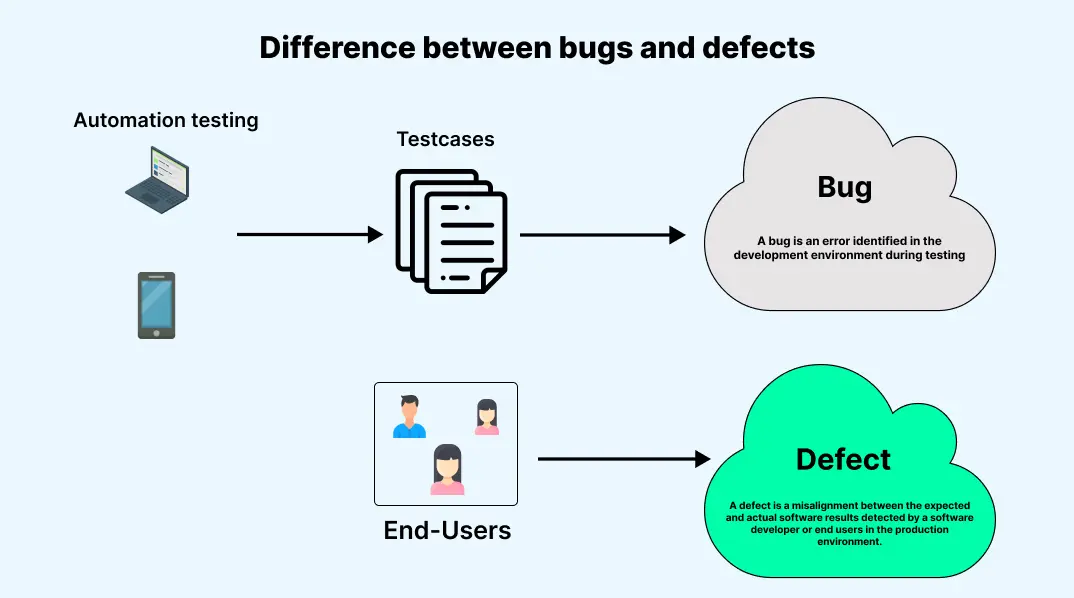
- A bug is an error identified in the development environment during testing.
- A defect is a misalignment between the expected and actual software results detected by a software developer or end users in the production environment.
| Bugs | Defects |
|---|---|
| Code error or incorrect implementation of requirements leads to unexpected behavior. | Incorrect implementation of requirements resulting in a deviation from user specifications. |
| Causes malfunction in the software applications | Reduces the usability of the software applications. |
| Detected during unit testing by the developer or system testing by the tester | Identified by users once the software application is available to them. |
| Observed in a test environment or dev environment makes tracking and fixing easy. | Identified in the production environment by the user, making tracking and fixing challenging. |
| Changes and corrections can be less time-consuming and cost-effective. | Changes and corrections are time-consuming and costly. |
Follow this defect management guide to learn more about defects and how to manage them. It will provide a brief overview of handling defects before they reach the users and help you build quality software with minimal defects.
Is a Software Bug a Virus?
No. A software bug and a virus are fundamentally different. A bug is an unintentional mistake introduced by developers, an accidental flaw in otherwise well-meaning code. A virus, a type of malware, is code written deliberately to cause harm, spread, or exploit a system. A bug can create a vulnerability that malware later exploits, but the bug itself is a mistake, not an attack.
| Aspect | Software Bug | Virus / Malware |
|---|---|---|
| Intent | Unintentional mistake. | Deliberately malicious. |
| Origin | Introduced accidentally by developers. | Written by attackers to cause harm. |
| Purpose | None; it is an error. | Damage, data theft, or unauthorized access. |
| Resolution | Fixed with a code change or patch. | Removed with security tools and patched exploits. |
What Is the Impact of Software Bugs?
Software bugs cause crashes, data loss, security breaches, lost revenue, and damaged trust, and the cost of fixing them grows the later they are found.
The impact of software bugs can be severe if left undetected or unfixed. Learn about the effect from the below section:
- Impact on users: When software bugs affect end users, it can lead to signs like slow performance and unreliable user experiences. It causes user dissatisfaction, leading to decreased user trust and adoption. In severe cases, bugs may threaten user security and privacy.
- Impact on organization: When software bugs affect organizations, productivity loss is a significant concern, as bugs contribute to worker downtime, disruptions, and delays. Financial losses result not only from the direct costs but also from a damaged reputation. It gives users an indication that the organization may not deliver high-quality software applications. Additionally, bugs introduce security risks, potentially leading to substantial financial consequences such as cyberattacks, data breaches, and financial theft.
- Impact on software development: When software bugs affect the development phase, they cause unexpected delays in the release. It is mainly because the bugs need additional resources for fixation, and detecting the main source error takes time. However, the software bug also impacts the overall quality and reliability of the application.
In addition, software bugs in software applications require more ongoing maintenance. As a result, software developers are diverted from developing new features or improvements. Severe bugs can force developers to prioritize bug fixing rather than implementing any new feature.
How Do You Identify Software Bugs?
You identify software bugs by observing and reproducing them, studying the user interface, setting clear quality goals, and using automation tools to catch regressions.
Identifying software bugs causes significant challenges for software developers. To identify and address software bugs, the following steps are recommended:
- Sighting: The sighting is the initial event that signals the existence of a bug. It could be a test failure, a user-reported problem, a crash, or a system hang. However, the information obtained at this stage is usually insufficient to understand the defect's root cause or behavior.
- Study the user interface: You can explore every menu, button, and page, looking for inconsistencies and unexpected features. For example, when testing a registration page, analyze the user interface to ensure the correct validation of all input fields.
- Set goals for software quality: Define standards to which the software should adhere. Knowing these standards helps testers identify the specific bugs to look for. When you think about how to find bugs on websites, start by understanding the expected user experience. Check for a goals document or research statements from the organization or senior personnel regarding their priorities.
- Utilize automation tools: Leverage tools to execute test scripts and verify if the outputs align with expectations, which can help you uncover unknown software bugs. Choose the right automation testing tools compatible with your application for optimal results. Additionally, consider using AI-native test analytics tools to get better insights into bugs, understand what caused the application or test to fail, and identify which bug caused it.
Tools like TestMu AI provide native test analytics, allowing you to access essential information about your tests, including inconsistencies, the number of tests, and categorization based on status and environments. Its AI-infused Test Intelligence helps identify issues through root cause analysis for efficient problem-solving and quick resolutions.
Where Do Software Bugs Appear in the Software Development Life Cycle?
SDLC follows a series of steps to develop quality software, including planning, analysis, designs, implementation, deployment, and maintenance. Software bugs can occur in any of these different phases of SDLC. Identifying the software bug at an early stage of SDLC is highly significant so that it can be fixed promptly and the involved cost can be reduced. However, if a bug emerges early in the SDLC and is not quickly addressed, its costs can escalate as it progresses through the cycle.
QAs should perform various software tests to address the impacts of software bugs in SDLC. Here are some of those tests.
- Unit testing: It is vital to perform unit testing, an essential type of test, to uncover software errors. It is particularly relevant for legacy code, which may need more rigorous tests. Unit testing helps mitigate risks and proves beneficial when refactoring old code for improved readability or performance.
- Integrating testing: It is crucial to integrate automated tests into software development to avoid creating deployment backlogs. Developers may need to wait for test results before proceeding with their work.
- Manual testing: It is necessary to perform manual testing in addition to automated testing. It helps identify logic errors that automated testing might overlook. It is precious before automated tests are developed for the software being created.
- Automated regression testing: It ensures that changes do not disrupt existing functionality, while smoke tests confirm critical functionality is operating as intended.

Austin Siewert
Co-Founder, Steadfast Systems
Discovered @TestMu AI yesterday. Best browser testing tool I've found for my use case. Great pricing model for the limited testing I do 👏
2M+ Devs and QAs rely on TestMu AI
Deliver immersive digital experiences with Next-Generation Mobile Apps and Cross Browser Testing Cloud

What Is the Software Bug Life Cycle?
The bug life cycle, also known as the defect life cycle, is a sequential process that outlines the various stages a defect undergoes throughout its existence in testing. It commences when a tester identifies a new defect during the application testing phase and concludes when the tester resolves the defect, marking it closed to prevent recurrence. Each stage signifies a specific state in the life of the defect. Let's delve into the details of each stage.
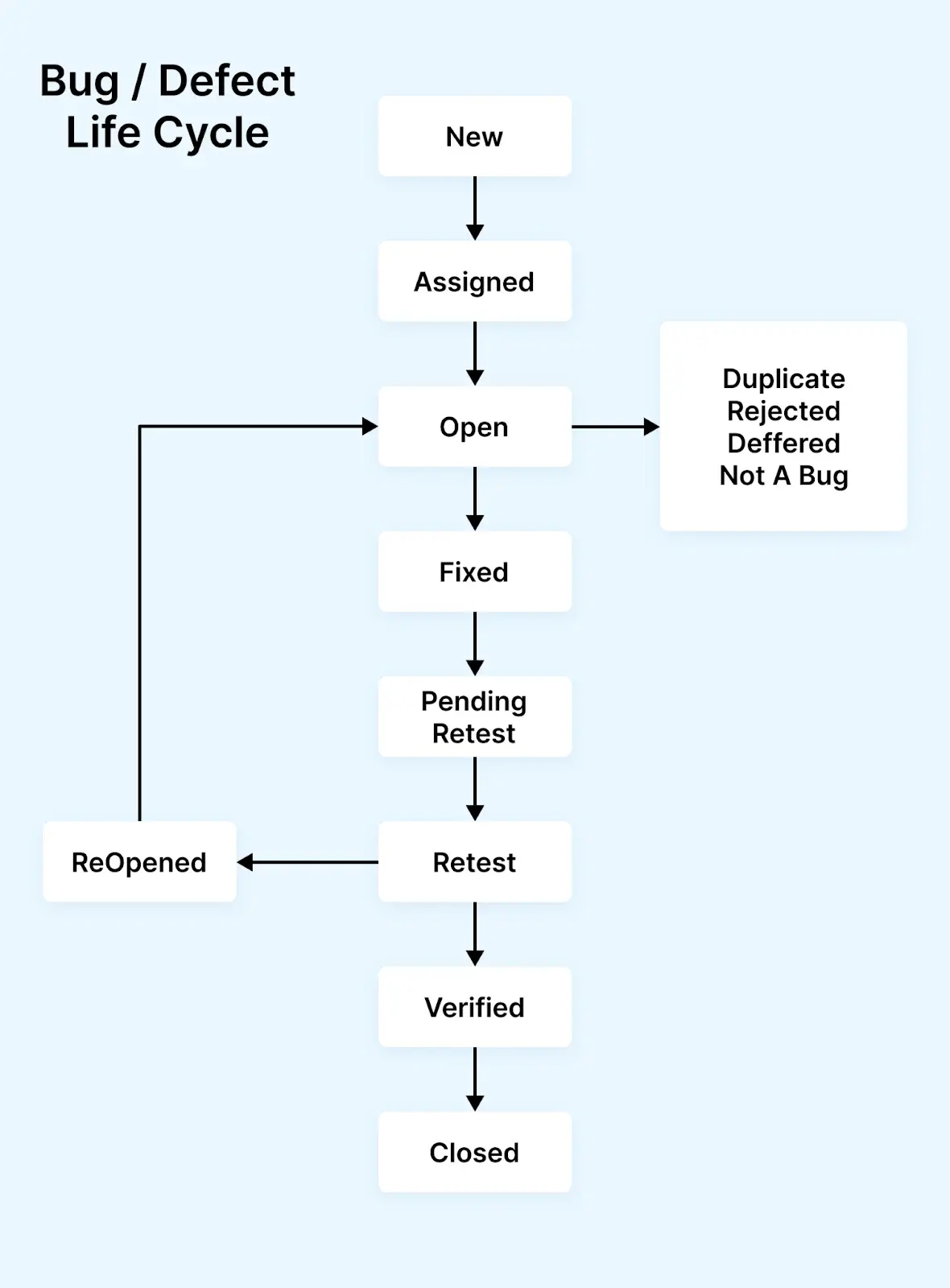
- New: The first stage in the bug life cycle is when a new defect is identified during testing. Confirmation and testing are carried out on these bugs in later stages when a new feature is discovered.
- Assigned: Bugs in the New status are approved, and the newly identified defect is assigned to the development team for resolution. Once assigned, the bug's status changes to Assigned.
- Open: This is the initial stage where the developer starts analyzing and possibly fixing the bugs. If the developer deems the issue insufficient or, for some reason, the bug might be moved to the following stages, reject or not, indicating a repetition.
- Duplicate: If the developer identifies a defect similar to another or if the defect coincides with another, the status is changed to Duplicate.
- Fixed: Once the developer completes the debugging task with the necessary changes, the defect status is labeled Fixed.
- Pending Retest: After fixing a defect, the developer provides the tester with a defect check, and the status remains pending until the tester verifies the fix.
- Retest: The tester then reviews the defect to ensure the developer has corrected it.
- Reopened: If there is still an issue, the developer must recheck and reopen the defect status.
- Verified: If the tester encounters no issues with the defect after the developer provides it for testing and believes it's appropriately addressed, the status becomes Verified or Confirmed.
- Closed: If no issue persists, the tester changes the defect status to Closed.
What Are Real-Life Examples of Software Bugs?
Real-life software bug examples include IT failures at Heathrow Airport, flight crashes linked to software glitches, healthcare risks, airline disruptions, and an Amazon pricing glitch.
In the below section, we will discuss some real-life examples of software bugs for better clarity:
- The IT failure at London’s Heathrow Airport: A systems failure at an airline supplier caused flights at London’s Heathrow Airport to be cancelled and delayed, and even forced the air traffic control tower to close. Incidents like this show how a single software or systems failure can ripple across scheduling, check-in, and departure information, underscoring the importance of thorough testing and resilient, well-maintained systems.
- Flight crash due to software glitch: In October 2022, the F-35A Lightning II fighter at Hill Air Force Base, Utah, crashed due to a software glitch that occurred when turbulent air confused the aircraft's aviation, making it uncontrollable. The pilot safely ejected, but the aircraft was destroyed, resulting in a loss of over $166 million. Proper testing, identification, and fixing of software bugs are essential to ensure the safety and reliability of complex systems like fighter jets.
- Healthcare Risks: Software bugs can have profound real-life consequences, particularly in the healthcare sector. In 2018, the UK's National Health Service (NHS) faced critical bugs in its SystmOne platform used by over 2,600 GP practices, where cancelled prescriptions were not properly synchronized across systems, putting patients at risk of receiving incorrect medications. The clinical impact was assessed as "major," underscoring the direct impact of software quality on patient safety.
- Airlines Facing Disruptions: Software bugs can cause ripple effects beyond immediate users. In November 2017, American Airlines experienced a bug in its pilot scheduling software, granting leave to all pilots who requested time off over Christmas. Roughly 15,000 flights were left without assigned pilots. It led to the airline rescheduling thousands of flights, customer dissatisfaction, and substantial financial losses.
- Amazon Pricing Glitch: In December 2014, just ten days before Christmas, some products’ prices on the Amazon site dropped to a mere one penny due to a software glitch. However, Amazon's automatic delivery and warehousing services had already shipped many products before sellers could cancel purchases. This bug resulted in significant losses, around £100,000, for several small businesses, pushing them to bankruptcy.
- Flight crashes with tragic consequences: Software bugs have tragically contributed to several flight crashes in recent decades. The 1994 Chinook helicopter crash in Scotland, initially attributed to pilot error, raised significant concerns about unverified FADEC engine control software that the MoD itself deemed "unsuitable for its purpose." Similarly, a 1993 Swedish Gripen fighter jet crash was traced to a flight control software bug. More recently, the March 2019 Boeing 737 Max crash was associated with software design flaws, highlighting the life-and-death consequences of software bugs in aviation.
How Do You Fix Software Bugs?
Early detection and resolution are essential to preventing software bugs from causing issues in your software application. It requires fixation of bugs, which involves making code changes to address identified bugs. Bug fixes may not always imply a complete solution; they could serve as temporary workarounds until a more permanent resolution can be implemented. To perform bug fixation, different techniques are used, which include the following:
Software Testing
Before taking any other action, ensuring your software application functions correctly by testing it in a controlled environment is crucial. Implementing rigorous testing methodologies, such as unit, integration, and system testing, helps identify and resolve bugs early in the software development life cycle.
You should understand that software testing is an ongoing process even after software release, as updates may be required. Continuous testing is necessary to ensure compatibility with changes in browsers, devices, and other components that may impact software functionality. You can perform software applications by two different methods:
- On-premise testing
- Cloud testing
On-premise testing
On-premise testing involves evaluating software applications on local machines, systems, or devices within an office. This approach requires significant responsibility for maintenance, monitoring, and upgrading machines and software. It is an expensive and time-consuming testing method.
Cloud testing
Cloud testing evaluates the scalability, performance, security, and reliability of web applications or websites. This testing is executed within a cloud computing environment.
Many cloud-based platforms will allow you to perform testing over the cloud without worrying about maintaining infrastructure and data breaches in terms of managing security.
One such cloud-based platform is TestMu AI. TestMu AI is a cloud-native test orchestration and execution platform that lets you run manual and automated tests at scale across 10,000+ real devices and 3,000+ browser and OS combinations.
Why consider TestMu AI for cloud testing?
- It offers cross-browser testing that allows testers to perform testing of applications across a wide range of browsers and browser versions to help identify bugs specific to certain browsers, ensuring a consistent user experience.
- It offers real-time testing, allowing testers to interact with the website in real time on various devices and browsers. It helps quickly identify and fix bugs as they occur.
- It offers visual testing and allows testers to compare screenshots of your website or web application across different browsers and view any visual differences. It helps to identify the layout issues and other visual bugs that may affect the user experience.
- It offers integrations with popular bug-tracking tools such as Jira, Bugsnag, Bugzilla, Shortcut, and more. These tools allow you to easily track and manage bugs identified during testing, helping ensure that bugs are addressed promptly and efficiently.
Rapid Prototyping
When tackling a bug, creating quick prototypes of alternative solutions can help find the optimal resolution quickly and minimize the impact on users. This approach is advantageous when faced with multiple potential solutions, and only some are guaranteed to be effective.
Code Reviews
Methodical evaluations of code aim to uncover bugs, enhance code quality, and assist developers in comprehending the source code. Establishing a robust code review process forms the basis for continuous improvement, preventing the shipment of unstable code to users.
Pair Programming
It is a code review approach involving two developers in real-time collaboration. Here, one writes code (the driver), and the other reviews code (the navigator). Development teams favor pair programming sessions. This collaborative approach allows team members to identify the most effective solutions to challenges, share knowledge, and easily overcome difficulties by leveraging their combined expertise. Fresh perspectives from fellow developers can detect hidden software bugs and enhance code quality.
Bug Tracking
Bug tracking is a systematic process for identifying, documenting, and resolving software issues or bugs. It involves recording reported bugs and assigning them to the relevant team members based on their expertise. These bugs are monitored until resolution. An effective bug-tracking process offers visibility into issue statuses, promotes collaboration among team members, and ensures the systematic resolution of bugs, addressing them promptly.
Debugging
Debugging involves identifying and rectifying software source code errors or bugs. When software deviates from its expected behavior, programmers check the code to understand the reasons for the error. During this process, coders inspect the error by documenting all changes in program state and data values. The bug fix is prioritized based on its impact on software functionality. Developers address the bug and perform tests to verify that the software functions as intended. They may create new tests to check for the bug's recurrence in future scenarios.
What Should a Software Bug Report Include?
A software bug report should include a clear title, steps to reproduce, expected and actual results, environment details, severity, priority, and screenshots or logs.
While fixing software bugs, the tester must communicate the identified bug to the development team. This communication requires comprehensive bug documentation, including information like the bugs' occurrence count and expected results. It helps developers accurately determine the cause of software applications' failures.
A software bug report should include the following information that proves beneficial for the developer:
- Defect/Bug ID: A unique identification number assigned to the defect.
- Defect/Bug Name: A concise headline specifically describing the defect.
- Defect Description: A comprehensive description of the bug, including details about the module in which it was detected. It provides a detailed summary covering severity, priority, expected results vs. actual output, etc.
- Severity: Describes the impact of the defect on the application under test.
- Priority: Indicates the urgency of fixing the defect, categorized as High, Medium, or Low based on the urgency of the fix.
- Reported By: Name/ID of the tester who reported the bug.
- Reported On: The date when the defect was raised.
- Steps: Detailed steps and screenshots enable the developer to reproduce the defect.
- Status: New/Open/Active.
- Fixed By: Name/ID of the developer who resolved the defect.
- Date Closed: The date when the defect was officially closed.
To complement the comprehensive bug reporting process, TestMu AI provides detailed test reports indicating the status of your test cases, whether they passed or failed. You can debug failed test cases to identify issues using different test logs.
You can leverage test analytics to gain deeper insights into your passed/failed test suites, including test summary, browser categorization, test trends, test status ratio, and more.
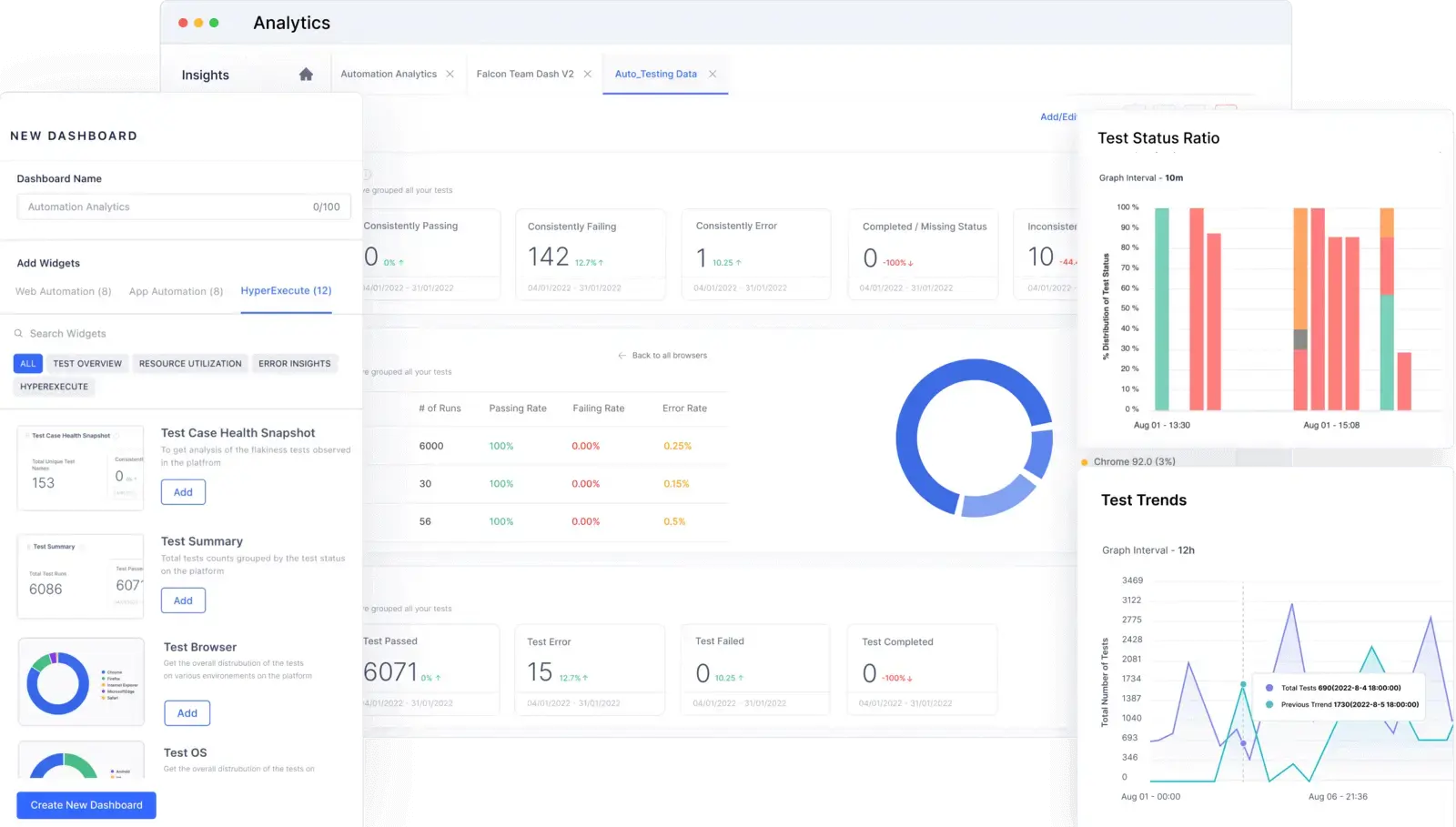
TestMu AI's test observability platform accesses vital information on tests, including test inconsistencies, the number of tests, and tests categorized by their status and environments.
Additionally, TestMu AI offers AI-infused Test Intelligence to help identify issues using root cause analysis for quick resolution and efficient problem-solving.
Note: Run automated tests across 10,000+ real devices and 3,000+ browser and OS combinations to catch software bugs before your users do. Try TestMu AI free!
Which Bug Tracking Tools Do Teams Use?
Bug tracking tools centralize bug reporting, assignment, and resolution across teams. Key capabilities to evaluate: Jira integration (bidirectional sync), CI/CD pipeline triggers, custom workflows for severity-based routing, and real-time dashboards showing open vs. resolved defects by sprint.
TestMu AI's test management platform lets you log bugs with one click during test execution, auto-attaching screenshots, environment details, and test steps. For a comprehensive comparison of options, see our bug tracking tools guide.
Which Debugging Tools Help Fix Software Bugs?
Common debugging tools include TestMu AI's LT Debug for web debugging and Chrome DevTools for inspecting, profiling, and stepping through front-end code.
Below are some of the commonly used debugging tools used to detect and fix software bugs:
LT Debug
LT Debug by TestMu AI is a simple and free developer tool that adds a layer to your debugging needs. Installing LT Debug is easy; you navigate to the LT Debug Chrome Extension page and add the necessary Chrome extension, making you ready to use the required features without encountering significant complexities.
Key features of LT Debug
- It allows you to modify, add, or remove headers as request or response headers, allowing you to test header details quickly.
- It can block HTTP requests based on specific URL filter conditions.
- It enables you to perform network throttling to manage network speed for each request effectively.
- It lets you add or remove query parameters.
- It provides a redirect request tool to configure a URL for redirection to a preferred web URL.
- It allows you to switch between different user-agent strings quickly.
Chrome DevTools
Google Chrome, a prevalent web browser, extends its capabilities beyond browsing with robust web authoring and debugging features. These features enable users to perform tasks such as testing mobile viewport displays and evaluating the performance of entire websites or specific components.
Key features of Chrome DevTools
- It quickly inspects and manipulates HTML and CSS in real-time, helping in debugging and design adjustments.
- It views JavaScript logs, errors, and warnings, which help debug JavaScript code.
- It gains detailed insights into network requests, headers, and timing, which is crucial for optimizing web performance.
- It provides a robust JavaScript code editor with debugging capabilities, including breakpoints and variable inspection.
How Can You Prevent Software Bugs?
Fixing bugs is expensive. Preventing them is cheaper. These strategies catch bugs before they reach production:
- Static code analysis in the IDE: Tools like SonarLint, ESLint, and Pylint flag syntax errors, null pointer risks, and security vulnerabilities while the developer is writing code. This catches bugs at the lowest possible cost, before the code is even committed.
- Mandatory code reviews before merge: A second pair of eyes catches logical bugs that linters miss. Enforce pull request reviews with at least one approval required. Focus reviewers on edge cases, error handling, and boundary conditions rather than style.
- Automated regression testing in CI/CD: Run your full test suite on every commit via CI/CD pipelines. If a code change breaks existing functionality, the pipeline fails before the code reaches the main branch. This prevents reintroduction of fixed bugs.
- Shift-left testing: Involve QA from the requirements phase, not after development. Write test cases alongside user stories so developers know what will be tested before they write code. This catches requirements bugs, which are the most expensive category to fix later.
- Test across real browsers and devices: Compatibility bugs are invisible in a developer's local environment. Cloud testing platforms like TestMu AI let you run tests across thousands of real browser/OS/device combinations to catch rendering, layout, and interaction bugs that only appear on specific configurations.
- Root cause analysis on every production bug: When a bug escapes to production, ask: why did our tests miss it? Was there no test case? Was the test case weak? Was the environment different? Document the root cause and add a regression test to prevent recurrence. Over time, this closes the gaps in your test coverage.
What Are the Best Practices for Finding and Fixing Bugs?
When a bug is found, the speed and quality of the fix depends on how well the bug is documented, triaged, and verified. Follow this workflow:
- Reproduce first, then fix: Never start fixing a bug you cannot reproduce. Write exact steps to reproduce, including browser, OS, test data, and user state. If the bug is intermittent, run it 10 times and note the failure rate. Unreproducible bugs waste developer time and often get closed as "cannot reproduce" only to reappear in production.
- Triage by severity and impact, not by who reported it: Use a severity matrix: Critical (data loss, crash, security) gets fixed in the current sprint. Major (feature broken, workaround exists) goes into the next sprint. Minor (cosmetic, typo) goes into the backlog. This prevents the loudest stakeholder from dictating the fix order.
- Fix the root cause, not the symptom: If a null pointer exception crashes the app, don't just add a null check. Ask why the value was null. Was the API contract violated? Is the database returning unexpected data? Fixing symptoms creates a pattern of recurring bugs in the same module.
- Write a regression test before closing: Every bug fix should include a test that would have caught the bug. Add it to your automated test suite. This ensures the bug never comes back and gradually improves your test coverage.
- Track defect density per module: Measure bugs per KLOC (thousand lines of code) by module. Modules with consistently high defect density need architectural review or refactoring, not just more bug fixes. This shifts effort from reactive fixing to proactive quality improvement.
- Use AI-powered root cause analysis: TestMu AI's Test Intelligence automatically clusters similar failures, identifies flaky tests, and surfaces probable root causes from test logs. This cuts triage time from hours to minutes for large test suites.

How Is AI Changing How Teams Find and Fix Software Bugs?
AI is changing bug work at both ends: coding assistants catch some bugs as code is written, and AI testing tools cluster failures, suggest root causes, and draft bug reports.
AI also creates bugs. Generated code can look correct while missing edge cases, handling errors poorly, or calling APIs that do not exist, so teams that adopt assistants need more tests, not fewer.
Use AI to speed up triage and reproduction, but keep a person confirming the root cause before a fix ships. Our guide to ai debugging covers the tools and workflow.
Where Should You Start With Reducing Software Bugs?
Start with one change: set up automated regression tests for your most critical user flows. When those tests run after every commit via your CI/CD pipeline, you catch bugs before they reach production, where the CISQ estimates they cost orders of magnitude more to fix.
TestMu AI's Test Intelligence automatically identifies flaky tests, performs AI-driven root cause analysis on failures, and surfaces the bugs that matter most. Pair it with Test Analytics for real-time dashboards tracking defect trends across builds. Explore the documentation to get started.
Author

Nazneen Ahmad
Blogs: 39


Nazneen Ahmad is a freelance Technical Content SEO Writer with over 6 years of experience in crafting high ranking content on software testing, web development, and medical case studies. She has written 60+ technical blogs, including 50+ top-ranking articles focused on software testing and web development. Certified in Automation Basic and Advanced Training - XO 10, she blends subject knowledge with SEO strategies to create user focused, authoritative content. Over time, she has shifted from quick, keyword-heavy drafts to producing content that prioritizes user intent, readability, and topical authority to deliver lasting value.
Reviewer

Abhishek Mishra
Reviewer
Abhishek Mishra is a Technical Product Manager at TestMu AI, where he owns Test Manager, the test management product. He has over 8 years of experience in product management and market analysis. His expertise spans across AI-native software testing, product strategy, and analytics. Previously, Abhishek served as the Product Lead at IndiaClan and co-founded Gartley618 Technologies, where he led innovative projects in quantitative trading and blockchain. He holds a B.Tech degree.


Software Bugs FAQs
Did you find this page helpful?
More Related Learning Hubs
TestMu AI forEnterprise
Get access to solutions built on Enterprise
grade security, privacy, & compliance
- Advanced access controls
- Advanced data retention rules
- Advanced Local Testing
- Premium Support options
- Early access to beta features
- Private Slack Channel
- Unlimited Manual Accessibility DevTools Tests