

Power Your Software Testing with AI Agents and Cloud
The Native AI-Agentic Cloud Platform to Supercharge Quality Engineering. Test Intelligently and Ship Faster.


- TestMu AI (Formerly LambdaTest)
- /
- Blog
- /
- Mobile App Testing with Emulators and Simulators: Getting Started
Mobile App Testing with Emulators and Simulators: Getting Started
In this blog, we will see how to get started with mobile application testing using emulators and simulators.
Last Updated on:
Emulators and simulators solve a real scale problem: no mobile app testing team can buy every mobile device in active use worldwide. Debugging is faster on a simulator, but it cannot replicate hardware behavior like battery drain or GPS accuracy the way a physical device can.
With the mobile industry growing rapidly, any app needs to be compatible across the different versions of iOS and Android devices.
Mobile app testing involves attestation for functionalities, performance, usability, and consistency by running them on virtual mobile app testing platforms. Mobile app testing is performed on three parameters: functionality, real environment, and non-functional aspects.
Functionality testing covers business flow, UI testing, cross-platform coverage, while real environment testing aims for background testing, interruptions, gestures, and testing under different network conditions.
In this article on mobile app testing, we will see how to get started with mobile app testing using Android emulator online and iOS simulators.
So, let’s get started!
Need for a virtual mobile app testing platform
QA teams need to perform mobile app testing multiple times before releasing them to production. Procuring a real device to test the features all the time is a costly affair, given the fragmentation of devices and operating systems.
When you release a mobile application, it needs to be compatible with different devices and different versions. The number of mobile devices in active use worldwide keeps rising every year. Performing mobile app testing on every real device is almost impossible. The real mobile app testing challenge is keeping pace with that device fragmentation.
The magnitude of this problem increases if you want to test your application or website on a mobile browser. Test your mobile websites and smartphone apps on a mobile emulator online.
Most of the browsers update their versions every 15-20 days. So when it comes to mobile app testing, you need to test your web app on different browsers that you want to support and the different browser versions.
Given all these hassles, mobile application testing using emulators and simulators makes testing a breeze for QA teams. App emulators let you execute a program on a device without actually installing it. Simulators, on the other hand, work with native applications. Therefore, knowing the emulator vs simulator difference is important before performing mobile application testing using emulators and simulators. Now test Android apps with real android devices on the cloud.
Also Read – Difference Between Web vs Hybrid vs Native Apps
Looking to perform Android and iOS app testing on Real Device Cloud, check out our video below –
What is an Emulator in mobile app testing?
A mobile app emulator is a virtual platform that simulates the Android device on your computer, making it seamless to perform mobile application testing using emulators. As a result, you can test Android apk files using an online APK Emulator without the need for a physical device.
Watch this video to learn what is an Android emulator online, its benefits, and how to set it up.

What is a Simulator in mobile app testing?
A simulator is a virtual platform that imitates the iOS operating system and runs the application on the selected apple device (eg. iPhone app emulator) by taking charge of the computer’s operating system without needing a physical device. Using a simulator allows you to perform iOS app testing or mobile app testing using simulators easily.
The first question that would come to your mind is, “Should I choose an emulator or simulator to test my application?”
The answer is to plan your mobile app testing strategy to push yourself to reach your objectives. Both being the virtual platforms have their merits and demerits.
Some developers advise going for the cocktail of tests spread across simulators, emulators, and sometimes for more precise results, a real device too. When it comes to emulator-based testing, developers look at it as a litmus test for the functionalities and features taking shape at the time of development. Test apps on iOS simulators!!!
Also Read – Mobile Application Testing Strategy To Save Your Time


Advantages and Disadvantages of Emulator and Simulator
Emulator and simulator – based mobile app testing is successful and considered one of the smooth methods to evaluate the performance of the mobile apps. However, like every technology, mobile application testing using emulators and simulators have their crests and troughs.
| Issues | Advantages | Disadvantages |
|---|---|---|
Mimics real devices | Simulators/Emulators work as real devices giving the real environment to perform Android app testing and iOS app testing. | May hamper the tester’s confidence on the arrival of the new version of OS. |
Easy to Fetch | Simulators/Emulators are usually available for use without any underlying constraints. | Availability of Beta version may remain unavailable for the testing leading to certain restrictions on testing. |
Capturing Results | Working on a simulator/emulator works well if a user can take a screenshot of the bug observed while building the app. | The screenshot of the bug observed while building the app may appear differently if the new version of the OS is released. |
Internal Storage | Internal Storage and related issues may not appear while working on simulations and emulations. | The internal storage and related issues can easily hamper the mobile app performance as real devices may have certain limitations. |
Not the Last Resort | Considering the profuse changes in the device environment, developers tend to resolve most functionality issues. | Mobile application testing using emulators and simulators does not always bring outstanding platters as performance validations may vary with enhancements in the OS. |
Apart from the mentioned contrast, certain challenges may exceed the allocated team size and the corresponding budget. Moreover, even if we can work on it, a new challenge may appear where an emulator/simulator may not support the required mobile applications. In such a scenario, we have to pay and play the software patches, which may prove costly to the organization. Listed below are the differences between testing using a real device and testing using an emulator and simulator. Test your mobile websites and smartphone apps on mobile emulators online.
| Criteria | Real Device | Emulator/Simulator |
|---|---|---|
Reliability | Real devices allow you to test features such as the battery, GPS, etc | Virtual testing cannot replicate hardware configurations |
Debugging | Debugging using a real device is time-consuming | You can easily debug and track your issues |
Cross-Platform Testing | You cannot perform cross-platform testing | It is extremely easy to perform cross-platform testing. |
Cost | Costly as you have to buy a lot of devices to test your application | Cheaper as you can test your app or website on all devices using a testing platform like TestMu AI. Check out the TestMu AI pricing page for more details. |
Also Read – Mobile Application Manual Testing Strategy
When Should You Use an Emulator, a Simulator, or a Real Device?
Match the device type to the test phase: simulators for early UI checks, emulators for system-level testing, and real devices for the final validation pass.
- Early UI and unit testing: Use a simulator for fast, low-cost checks of layout and basic user flows before the backend logic is stable.
- System-level and integration testing: Use an emulator once you need to check platform-specific behavior, permissions, or API calls, since it recreates real OS and hardware conditions.
- CI pipelines: Run emulators and simulators in CI to catch regressions on every commit without waiting for physical hardware to free up.
- Pre-release validation: Move to a real device for the final pass, since only physical hardware shows true battery drain, GPS accuracy, and carrier network behavior.
What to look for in a mobile app testing tool?
A mobile app testing tool is supposed to make mobile app development easier. But how do you choose the right mobile app testing tool for your team?
The question of what kind of tools to use is difficult enough, but it’s complicated by the fact that the market is fragmented. There are many mobile app testing tools on the market, and each has its own features, target audience, pricing model, and approach. And this is because many different types of teams could benefit from tools that allow mobile application testing using emulators and simulators.
Here are some important aspects/features that should be considered when choosing a toolset for mobile app testing.
- Easy upload
- Availability of different devices for Android app testing
- Availability of devices for iOS app testing.
- Real-time debugging options
- Native experience
- Geolocation testing
- Test any environment
- Test logs
- Issue tracker
- Integrations
Also Read – The Ultimate Mobile App Testing Checklist

Choosing the right mobile app testing tool
Mobile app testing is an important part of the overall mobile application development life cycle. Therefore, it is beneficial to choose the right tool for the job.
Tools that allow mobile app testing using simulators and emulators are available in two categories: cloud-based and on-premise. While mobile device cloud testing solutions are gaining popularity for their ease of use and scalability, many organizations still prefer on-premise tools. When it comes to cloud-based mobile app testing solutions, there are many tools to choose from.
TestMu AI is a popular cloud-based cross browser testing tool that offers both real device testing as well as virtual platform testing using emulators and simulators. Apart from the seamless capability to perform mobile application testing using emulators and simulators, there are several reasons why the TestMu AI is among the most recommended mobile app testing tools:
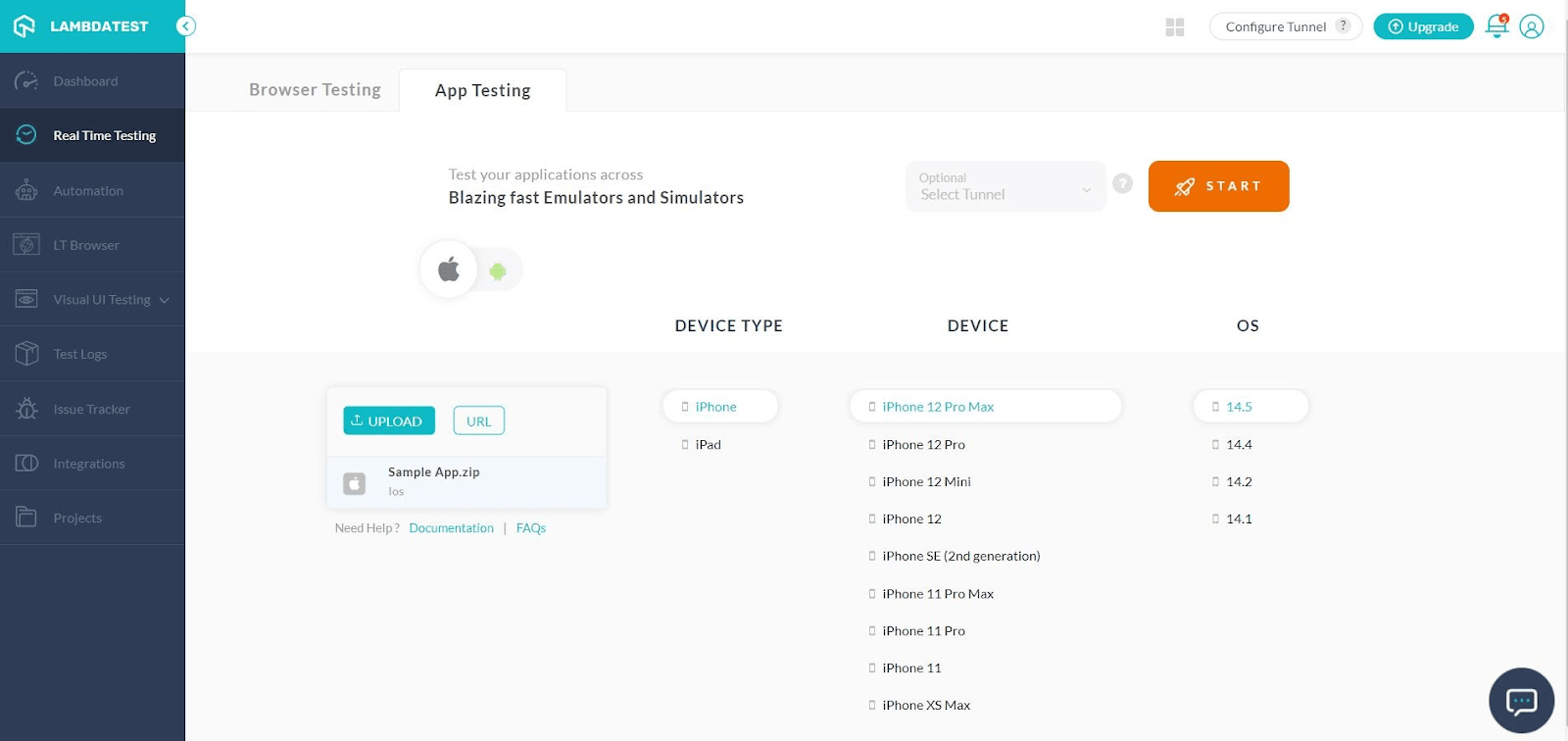
- TestMu AI caters to a single click approach for the files (.apk, app.zip). This means you have to upload the mobile app file and follow simple steps to procure your objective.
- Making a wide range of emulators and simulators available minimizes the chance of getting off-field and thereby increases the probability of a successful run on real devices.
- TestMu AI can test from 170+ countries. A user just has to simulate the GPS location or IP geolocation while testing the mobile application, and the device will behave accordingly.
- TestMu AI brings you irresistible test execution velocity, productivity, and bug logs on your dashboard with just a click away. The detailed report of bug logs and insights are quite useful in crafting a perfect app.
Here’s a short glimpse of cloud-based mobile app testing offered by TestMu AI:

Also Read: Mobile App Testing is Now LIVE On TestMu AI!
However, you can follow the TestMu AI YouTube channel and stay updated with the latest videos and tutorials around mobile app testing, test automation, and more.
Also Read: An Ultimate Mobile Experience Drives 73% Of E-Commerce Sales
Summary
Mobile application testing using emulators and simulators has made the tedious process of testing the mobile app easier. It just requires your clarity over device brand, device type, and OS as these virtual platforms exactly mimic the chosen device giving precise output whenever run on the real devices.
Digital honchos working on developing mobile app testing platforms have delicately woven emulators and simulators to their platforms with more derived utilities, making platforms more interactive and productive than ever before. The organizations with such platforms are consistently working to disrupt the stabilized segment of mobile app testing.
Author

Shwetha Ashokumar
Blogs: 3


Shwetha Ashokumar is a community contributor with 9+ years of experience in technical content and documentation for SaaS products. She has worked as a Technical Content Writer at Zoho and Chargebee, creating product and API documentation, implementation guides, e-books, and explainer content for analytics, billing, and CRM platforms. Shwetha currently leads content initiatives at BrowserStack and holds a B.Tech in Information Technology.
Reviewer

Shivam Singh
Reviewer
Shivam Singh is a Lead Member of Technical Staff at TestMu AI (formerly LambdaTest), architecting the Real Device Cloud that runs automated app and web tests on real Android and iOS devices. He designed the architecture for real-device app and web automation and wrote the microservices from scratch in Golang, including the XCUITest and Espresso execution layers for iOS and Android. His platform reached peak parallel concurrency of 150+ for app automation while handling roughly 500,000 tests a month, and he leads the team that keeps the automation grid running. He brings over eight years of engineering experience and holds a B.Tech in Computer Science.


Emulator & Simulator Testing FAQs
Did you find this page helpful?
More Related Blogs
TestMu AI forEnterprise
Get access to solutions built on Enterprise
grade security, privacy, & compliance
- Advanced access controls
- Advanced data retention rules
- Advanced Local Testing
- Premium Support options
- Early access to beta features
- Private Slack Channel
- Unlimited Manual Accessibility DevTools Tests