
Run Tests Up to 70% Faster than Traditional Test Grids
HyperExecute Is an AI-Native Test Orchestration Platform to Run Your Automation Test Suites with Blazing Fast Speed.

Allure Report: Set Up, Generate and Keep History in CI
Set up an Allure report for pytest or Playwright, keep history and trends in CI, and merge results from parallel jobs into one report. Commands included.
Published on:
Allure Report is an open-source tool that takes your test results and turns them into an interactive HTML report. You've got an Allure adapter in your framework (e.g., allure-pytest), you write your raw results to an allure-results folder, and then you run allure generate to produce the report. In CI, you'll want to keep the history file between runs and merge the results from your parallel jobs before you generate.
Allure Report is the reporting layer that you end up with when your suite has grown beyond the bounds of console output. It's a multi-framework solution (works with JS, Python, Java, C#, PHP and Ruby as per the Allure Report docs). This guide covers the bits that most tutorials just don't touch on: Allure 3 vs Allure 2, keeping the trends alive in CI and aggregating the results from multiple parallel machines into a single report.
Reporting is just one part of the wider automation testing workflow. If you haven't got your tests running in CI yet, then that's where you need to start, then come back and add Allure.
TL;DR
An Allure report is built in two stages: an adapter such as allure-pytest or allure-playwright writes one result file per test into allure-results, and allure generate turns that folder into a static HTML report. In CI, carry history.jsonl between runs for trends and copy every parallel job's results into one folder before generating.
How to Set Up Allure Report for pytest and Playwright
- allure-pytest: Install it with pip install allure-pytest, run python -m pytest --alluredir allure-results, then run allure generate allure-results. Node.js required for the Allure 3 CLI: Yes. The allure serve command builds the same report and opens it in a browser for a quick local check.
- allure-playwright: Add allure-playwright with resultsDir set to allure-results to the reporter list in playwright.config.ts, run npx playwright test, then run allure generate allure-results. The allure-js-commons runtime API adds epic, feature and story labels inside a test.
How to Keep Allure Report History and Merge Parallel CI Jobs
- historyPath: In Allure 3, historyPath in the config file points to history.jsonl, and each allure generate adds one line for the launch. History kept on a clean CI machine by default: No, so restore the file before generating and save it after. Allure 2 copies allure-report/history into allure-results/history instead.
- merge-multiple: On GitHub Actions, upload each shard's allure-results as an artifact, then download them all with actions/download-artifact and merge-multiple set to true. Special merge command needed: No. Every result file lands in one folder before generating the final Allure HTML report.
- HyperExecute: TestMu AI's HyperExecute splits a pytest suite across parallel machines with autosplit and builds one consolidated Allure report per job from the parent results folder set under partialReports in hyperexecute.yaml.
How Does Allure Report Work?
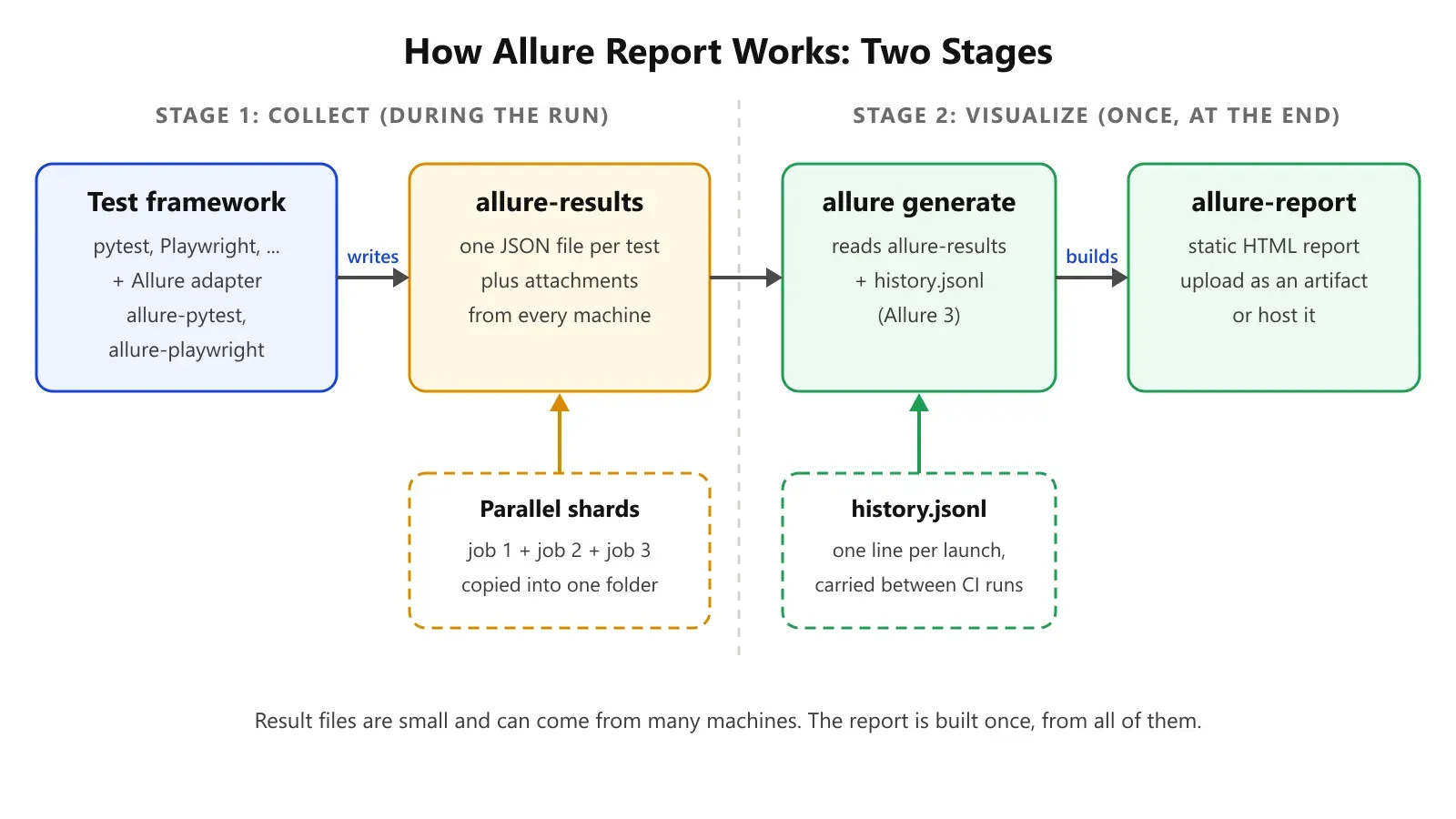
Allure Report operates in two stages. Firstly, an adapter within your test framework writes one result file per test into a results directory (usually called allure-results). Secondly, the Allure command-line tool reads that directory and generates a static HTML report (by default in allure-report).
That split is important in the CI environment. The results files are tiny and can come from a multitude of machines. The report is then built once at the end from all of them.
| Folder or file | Created by | Contains | In CI |
|---|---|---|---|
| allure-results | Framework adapter (allure-pytest, allure-playwright) | Raw JSON results, attachments | Per run; merge across shards |
| allure-report | allure generate | Static HTML report | Publish or archive |
| history.jsonl (Allure 3) | allure generate with historyPath set | One line per launch | Yes, carry between runs |
How Do You Install Allure Report?
Allure 3 is installed from npm and needs Node.js. The Allure 3 install guide gives two options:
# Global install
npm install -g allure
allure --version

# Or per project
npm install allure
npx allure --version
Then add the adapter for your framework.
pytest:
pip install allure-pytestPlaywright Test (TypeScript):
npm install --save-dev @playwright/test allure-playwrightHow Do You Generate an Allure Report With pytest?
To generate an Allure report with pytest, run your tests with the --alluredir flag, then build the report from that folder. The allure-pytest guide uses this flow:
python -m pytest --alluredir allure-results
allure generate allure-results   # writes HTML to allure-report
allure open                      # opens the generated report
allure serve allure-results builds the same report and opens it in one step, which is handy on a laptop. In CI, use allure generate so the HTML is saved as an artifact.
Annotations turn a flat list of test names into a proper report. The example shown groups a discount test by epic, feature and story and records each step. Test data comes in as parameters so the same test can cover a number of cases:
# tests/test_discounts.py
import allure
import pytest
from shop.cart import apply_discount  # your code under test


@allure.epic("Checkout")
@allure.feature("Discounts")
class TestDiscounts:
    @allure.story("Percentage codes")
    @allure.title("Percentage discount is applied to the cart total")
    @pytest.mark.parametrize(
        "total, code, expected",
        [(100.0, "SAVE10", 90.0), (59.99, "SAVE10", 53.99)],
    )
    def test_percentage_discount(self, total, code, expected):
        with allure.step(f"Apply {code} to a cart of {total}"):
            result = apply_discount(total, code)
        with allure.step("Check the new total"):
            assert result == pytest.approx(expected, abs=0.01)
Grouping tests in a class is optional in pytest, though it does keep the file compatible with the HyperExecute discovery command we'll be using later in this guide.
For your UI tests, attach the evidence at the point of failure. With Playwright for Python, page.screenshot() returns PNG bytes, which you can just pass straight to Allure:
allure.attach(
    page.screenshot(),
    name="checkout-page",
    attachment_type=allure.attachment_type.PNG,
)
How Do You Add Failure Categories and Run Details?
In Allure 3, both live in the config file. Custom categories go in the categories field (an object with a rules array, as per the Allure categories guide).
Each rule requires a name and matchers; id is used to keep the category stable across runs. Key value run details go in variables (as per the Allure 3 config reference, these are displayed at the top of the report):
// allurerc.mjs (works with a global install: export the object directly)
export default {
  name: "Checkout regression",
  output: "./allure-report",
  historyPath: "./history.jsonl",
  categories: {
    rules: [
      {
        name: "Timeouts",
        id: "timeouts",
        matchers: {
          statuses: ["failed", "broken"],
          message: /timed out|timeout/, // accepts regular expressions
        },
      },
    ],
  },
  variables: {
    "Environment": "Staging",
    "Build Number": "#1234",
  },
};
Allure 2 note: the same concepts apply using a categories.json file and an environment.properties file placed in the allure-results directory prior to generating.
One caveat: the results build up in the allure-results, so a later report will contain the results of all the earlier runs. You should start each fresh CI run from an empty folder unless you specifically want the retries to show (more on that below).

Running pytest suites at scale?
Note: HyperExecute from TestMu AI will run your existing pytest suite across parallel machines and produce one consolidated Allure report per job. You can start free, keep your allure-results folder in a parent folder, and just point HyperExecute at that parent folder.
How Do You Add Allure Report to Playwright?
Add allure-playwright as a reporter in playwright.config.ts. The Allure Playwright guide shows this setup, which will have the line reporter for the terminal:
// playwright.config.ts
import { defineConfig } from "@playwright/test";

export default defineConfig({
  reporter: [
    ["line"],
    ["allure-playwright", { resultsDir: "allure-results" }],
  ],
});
Run npx playwright test, then allure generate allure-results. Within a test, the runtime API from allure-js-commons will add the same Epic, Feature and Story labels as in pytest:
import { test } from "@playwright/test";
import * as allure from "allure-js-commons";

test("Guest can reach checkout", async ({ page }) => {
  await allure.epic("Checkout");
  await allure.feature("Guest flow");
  await allure.story("Reach payment step");
  // ...test steps
});
If you just need Playwright's built-in HTML reporter, then the Playwright reporting guide is all you need. Allure comes into its own when you want a single report format across multiple frameworks, or history across runs.
What Was Different in Allure 3 as Opposed to Allure 2?
Allure 3 is a TypeScript rewrite with a single config file, an inbuilt allure run wrapper, and history stored in a single JSONL file. The Allure 3 migration guide states that framework integrations will produce the same result files as Allure 2, so you can switch to the report tool without any change to your tests.
| Area | Allure 2 | Allure 3 |
|---|---|---|
| Configuration | Several settings sources | One file (allurerc.mjs, .js, .ts, .json, .yaml and others) |
| History | history folder copied into results before each report | historyPath points to one history.jsonl file |
| History depth | Up to 20 latest reports | Appends one line per launch |
| Reruns | Shown as retries when result files remain | allure run --rerun 3 -- <test command> |
| Results format | allure-results JSON | Same files, same adapters |
A minimal Allure 3 config using keys from the Allure 3 config reference. With a global install (as in the CI workflow below), just export the object. Only wrap it in defineConfig imported from "allure" if Allure is installed locally in the project:
// allurerc.mjs
export default {
  name: "Checkout regression",
  output: "./allure-report",
  historyPath: "./history.jsonl",
};
How Do You Keep Allure History and Trends in CI?
To maintain Allure history in CI, we need to persist the history between runs. Each CI job runs on a clean machine, so the trend charts are very often just a single point.
- Allure 3: set
historyPathand carryhistory.jsonlfrom one run to the next. Each Allure generate reads the file and appends the current launch in accordance with the history and retries guide. SethistoryBaseUrlif you want the History tab entries to link to older published reports. - Allure 2: copy
allure-report/historyintoallure-results/historyprior to generation. Allure 2 retains up to 20 reports of history in this fashion.
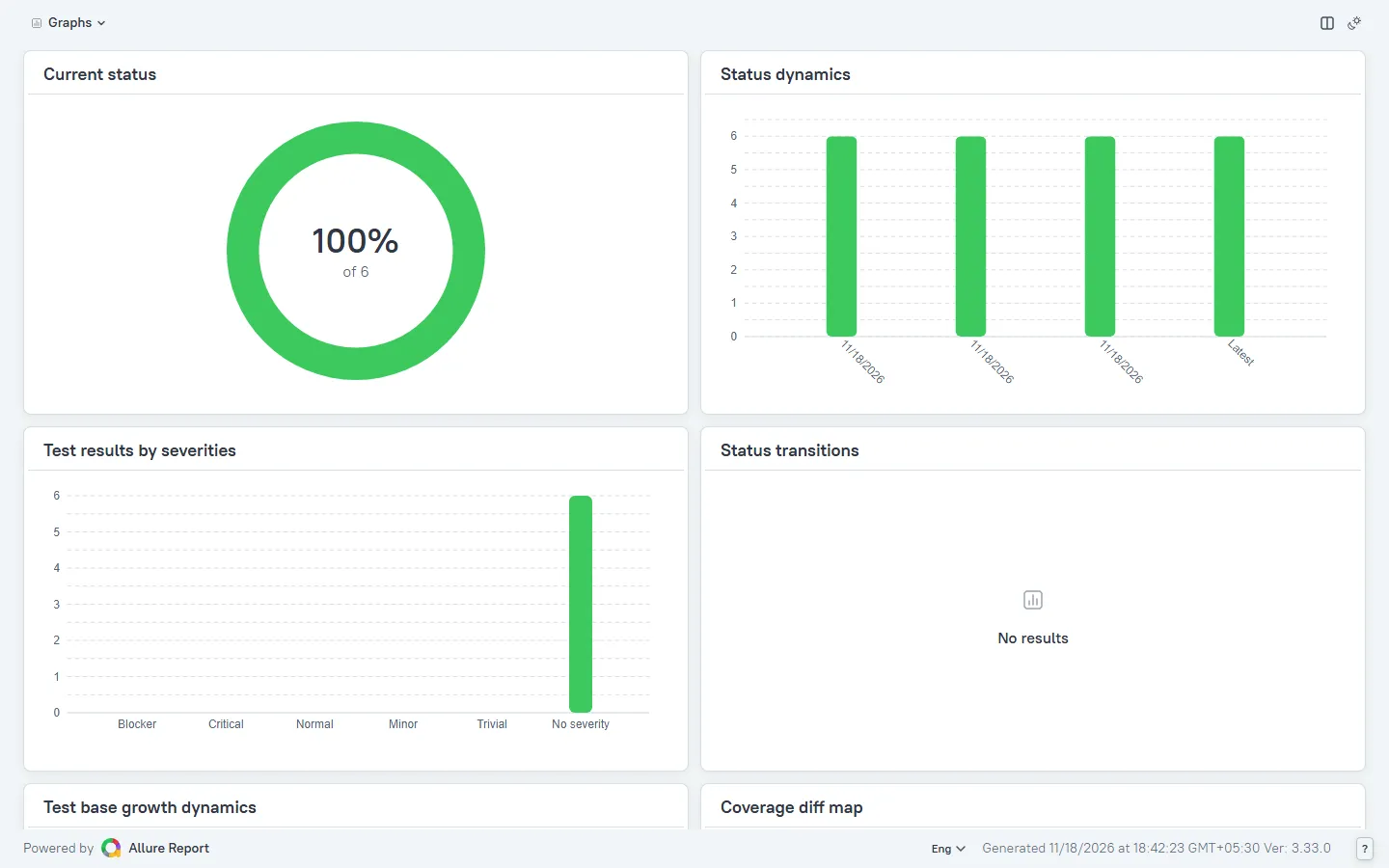
With historyPath set, each launch of the pytest example adds a bar to the Status dynamics chart in the report's Graphs view, even when every launch starts from an empty allure-results folder.
Retries are the other half. If a test runs more than once, then each run will write its own result file.
The report will show the latest status and list the previous runs as retries. Allure 3 will mark a test as having 'Changed on retry' if its status has flipped.
How Do You Merge the Allure Results From the Parallel CI Jobs?
To merge the Allure results from the parallel jobs, you simply upload each job's allure-results as an artifact, download them all into one folder, and subsequently generate a single report from that folder. Allure will read every result file it finds, so the merge is just a copy exercise rather than a special command.
If you've already split your specs across the CI machines, then this is the step that reassembles the reports. Here's a GitHub Actions workflow for a pytest suite split by folder. Secrets are kept out of the file, and the suite names are matrix parameters:
# .github/workflows/tests.yml
name: tests
on: [push]

jobs:
  test:
    runs-on: ubuntu-latest
    strategy:
      fail-fast: false
      matrix:
        suite: [checkout, search, account]
    steps:
      - uses: actions/checkout@v7
      - uses: actions/setup-python@v7
        with:
          python-version: "3.12"
      - run: pip install -r requirements.txt
      - run: python -m pytest tests/${{ matrix.suite }} --alluredir allure-results
      - uses: actions/upload-artifact@v7
        if: always()
        with:
          name: allure-results-${{ matrix.suite }}
          path: allure-results/

  report:
    needs: test
    if: always()
    runs-on: ubuntu-latest
    steps:
      - uses: actions/checkout@v7          # brings allurerc.mjs
      - uses: actions/download-artifact@v8
        with:
          path: allure-results
          pattern: allure-results-*
          merge-multiple: true
      - uses: actions/cache/restore@v6
        with:
          path: history.jsonl
          key: allure-history-${{ github.run_id }}
          restore-keys: |
            allure-history-
      - uses: actions/setup-node@v7
        with:
          node-version: 24
      - run: npm install -g allure
      - run: allure generate allure-results
      - uses: actions/cache/save@v6
        if: always()
        with:
          path: history.jsonl
          key: allure-history-${{ github.run_id }}
      - uses: actions/upload-artifact@v7
        with:
          name: allure-report
          path: allure-report/
The merge-multiple: true input of actions/download-artifact is what causes all the shards' files to end up in one allure-results folder.
How Do You Get One Allure Report out of a HyperExecute Job?
HyperExecute builds one consolidated Allure report per job and displays that in the Report section of the HyperExecute dashboard (as per the Allure Reports on HyperExecute doc). You continue to use your existing framework Allure adapter. HyperExecute deals with the split across machines and the merge.
Your requirements.txt must contain allure-pytest. Two of the rules from the doc are to save the allure-results in a parent directory and to pass that parent directory as the location.
This YAML runs a pytest suite with auto-split. The keys adhere to the pytest section of the HyperExecute doc:
# hyperexecute.yaml
version: 0.1
runson: linux
autosplit: true
concurrency: 4
retryOnFailure: true
maxRetries: 1

runtime:
  language: python
  version: "3"

pre:
  - pip install -r requirements.txt

testDiscovery:
  type: raw
  mode: remote
  command: grep -nri 'class' tests -ir --include=\*.py | sed 's/:.*//'

testRunnerCommand: pytest -s --verbose $test --alluredir reports/allure-results

report: true
partialReports:
  location: reports
  type: html
  frameworkName: allure

jobLabel: ['checkout', 'allure', 'autosplit']
The testDiscovery command is taken directly from the pytest docs - it discovers every .py file under tests that contains the word 'class' and each of those files becomes a unit that HyperExecute can send off to a different machine. That's why the pytest example in the previous section groups its tests into a TestDiscounts class. The testRunnerCommand takes the pytest call from the docs and just replaces the HTML report flag with --alluredir so the results end up in the reports parent folder.
Set the LT_USERNAME and LT_ACCESS_KEY as environment variables. Download the HyperExecute CLI as per the pytest docs and then run it from the project root.
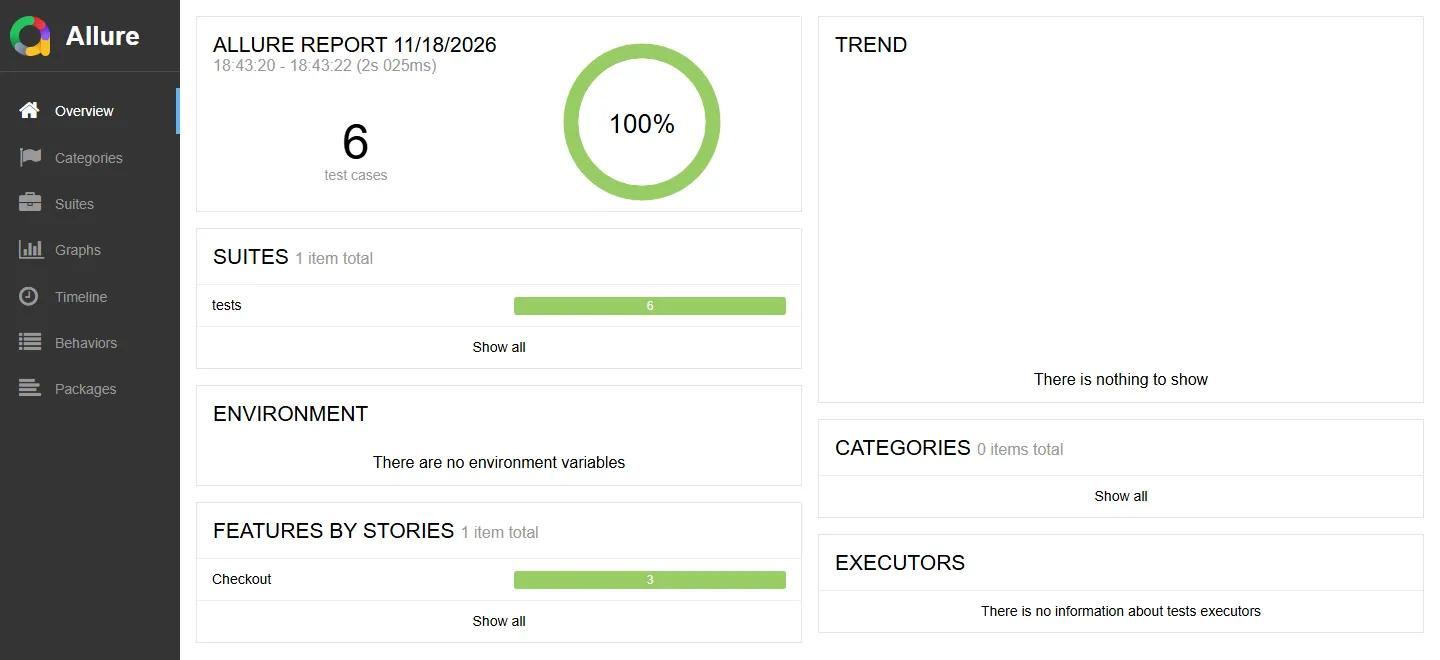
./hyperexecute --config hyperexecute.yamlAdd --download-report to that command and the CLI also saves the job's consolidated Allure report locally. On a suite with three test files, autosplit gave each file its own machine, and the report's Timeline lists all three hosts.
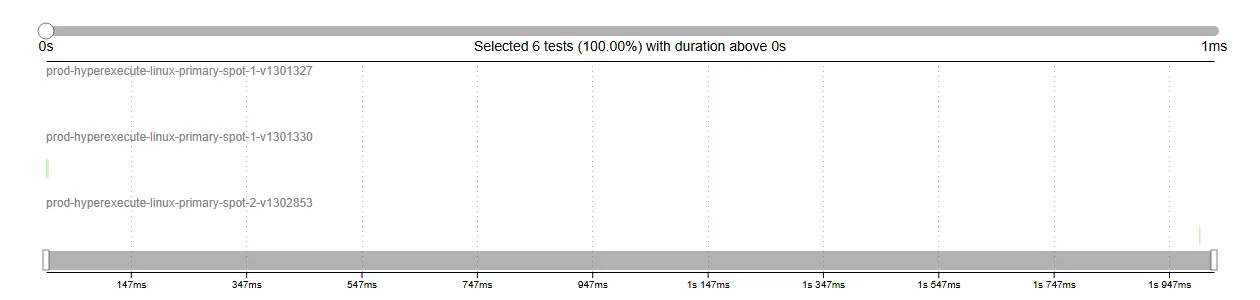
To add your own Allure plugins, set configPath under partialReports (HyperExecute will pass that on to Allure as --config). For the various trends across jobs, you can use the Allure Test Insights widgets, which add Allure Test Trends, Allure Suite Health, Allure Test Status Ratio and duration views to an Insights dashboard. These require an Allure report in YAML and a job label on the tests.
Splitting the suite in this way is where the time savings come in (TestMu AI's HyperExecute page shows Transavia at 70% faster test execution).
| Where it runs | Who splits the suite | How results merge | History across runs |
|---|---|---|---|
| Laptop | Nobody | Not needed | Usually none |
| GitHub Actions matrix | You (matrix per folder or shard) | download-artifact with merge-multiple | You persist history.jsonl |
| HyperExecute | autosplit + concurrency | HyperExecute, one report per job | Allure Test Insights widgets across jobs |

How Do You Go About Publishing an Allure Report?
Publish the generated allure-report folder as a static site so anyone can open it from a link.
- GitHub Pages: upload the report as the final step of the report job and then deploy it from a separate job which needs it. In the repository's Pages settings, set the source to "GitHub Actions" and set
historyBaseUrlto the Pages URL so that the History entries link to the older reports.# last step of the report job - uses: actions/upload-pages-artifact@v3 with: path: allure-report/ deploy: needs: report runs-on: ubuntu-latest permissions: pages: write id-token: write environment: name: github-pages steps: - uses: actions/deploy-pages@v4 - Jenkins: the Allure Jenkins plugin will generate and publish Allure reports from your Jenkins builds, so you just point it at
allure-resultsrather than running the CLI yourself. - HyperExecute: the consolidated report is already in the job's report section, so there's nothing to host.
The 5-R Allure CI Checklist
Run through these five steps before you call the reporting done:
- Results directory: every job writes to the same relative path (allure-results or reports/allure-results on HyperExecute).
- Reporter: the adapter is in, and the new tests have the appropriate labels on (epic, feature, story).
- Retain history: either the historyPath (Allure 3) or the history copy (Allure 2) will survive between runs.
- Reunite shards: all parallel results land in one folder before allure generate.
- Review and publish: the HTML report is uploaded as an artifact or hosted, and the link is then posted in the place where the team triages the failures.
Why Is My Allure Report Coming Back as Empty or With No Trends?
The vast majority of Allure problems stem from the paths and clean machines.
- Empty report: allure generate was pointed at the wrong folder. Check the folder your adapter wrote to (
--alluredirorresultsDir). - Old tests still showing: allure-results wasn't cleared between runs, so the previous result files were included.
- Trend chart has one point: history wasn't carried over. Persist history.jsonl or the Allure 2 history folder.
- Only one shard in the report: the artifacts were downloaded into separate subfolders. Set
merge-multiple: true. - No Allure tab on HyperExecute: the results weren't in the folder that was set as the location under
partialReports.
Allure Reports on HyperExecute
For a quick visual walkthrough of this concept, watch the videos below from TestMu AI.

New to pytest reporting? This earlier tutorial walks through pytest-html and Allure reports side by side:
Subscribe to the TestMu AI YouTube channel for more tutorials on testing and automation.
When Is Allure the Right Report?
Pick the report by what the team needs to see, not by habit:
| What the team needs | Report to use |
|---|---|
| One Playwright suite, failures with traces, no history | Playwright's built-in HTML reporter |
| Several frameworks in one report format | Allure Report |
| Trends, retries and flaky-status history across CI runs | Allure Report with historyPath |
| One report from a suite split across many machines | Allure on HyperExecute, or a merge job in CI |
If none of the last three rows apply, then the framework's own reporter is the simpler option.
Conclusion
Start with the 5-R checklist on your current pipeline. Point allure generate at the folder your adapter writes to, restore history.jsonl before it and save the file after it, and download every shard into one allure-results folder.
Once the trend chart shows more than one launch, post the report link where the team triages failures. If the suite already runs across several machines, compare the matrix workflow with a HyperExecute job, which builds the consolidated report for you.
One report per run (not one per machine). Run your suite on HyperExecute via TestMu AI, keep your Allure adapter, and you'll end up with one consolidated report per job.
Author

Japneet Singh Chawla
Blogs: 4

Japneet Singh Chawla is an Engineering Manager at TestMu AI, where he leads a team driving HyperExecute, the AI-native Test Orchestration Cloud Platform, and integrations with Cypress, Provar, Tosca, and Selenium, improving test execution efficiency and driving adoption across 500+ enterprise clients. He also spearheaded zero-downtime deployments that cut release-related downtime by 90%, and mentors new engineers into productive contributors. He brings 9+ years of experience building and scaling distributed systems, SaaS platforms, and developer tools, with deep hands-on backend engineering across Golang, Python, Node.js, Kafka, and Redis. Earlier at Sumo Logic he built award-winning developer tools, including a VS Code Parser Linter, and at Indus Valley Partners he was a founding member of the Sentiment Analyzer team, building ML-powered solutions for financial clients. Japneet holds an MCA in Computer Science from GGSIPU.
Reviewer

Mayank Bhola
Reviewer
Mayank Bhola is Co-Founder and Head of Products at TestMu AI, where he leads the entire product portfolio across KaneAI, Kane CLI, HyperExecute, SmartUI, the Real Device Cloud, Accessibility, and other software testing product lines. As an early Lead Architect he designed and built the company's flagship Tunnel technology from scratch, created the React-based automation platform, and architected the data-intensive pipelines and FAAS services that scale it. He brings more than 10 years of experience in software development and product engineering, with earlier roles as Head of Technology at Juggernaut Books and Senior Software Engineer at PressPlay TV and Zomato. Mayank holds a B.Tech in Computer Engineering from JIIT Noida.


Allure Report FAQs
Did you find this page helpful?
More Related Blogs


TestMu AI forEnterprise
Get access to solutions built on Enterprise
grade security, privacy, & compliance
- Advanced access controls
- Advanced data retention rules
- Advanced Local Testing
- Premium Support options
- Early access to beta features
- Private Slack Channel
- Unlimited Manual Accessibility DevTools Tests