

Power Your Software Testing with AI Agents and Cloud
The Native AI-Agentic Cloud Platform to Supercharge Quality Engineering. Test Intelligently and Ship Faster.


- TestMu AI (Formerly LambdaTest)
- /
- Learning Hub
- /
- What Is Distributed Testing? Architecture and Strategies
What Is Distributed Testing? Architecture and Strategies
Distributed testing runs tests across many machines to cut run time and mirror real load. Learn its architecture, sharding, tools, and best practices.
Last Updated on:
On This Page
- What Is Distributed Testing?
- Why Does Distributed Testing Matter?
- When to Use Distributed Testing?
- What Is the Architecture of Distributed Testing?
- How Do Tests Get Split Across Machines?
- How Do You Set Up a Distributed Test Environment?
- How Are Tests Executed in a Distributed Environment?
- How Do You Monitor and Report on Distributed Testing?
- Which Tools Are Used for Distributed Testing?
- How to Perform Distributed Testing?
- How Do You Run Cloud-Native Distributed Stress Tests With AWS, k6, and Artillery?
- How Does Distributed Testing Work in Gradle and Maven Build Pipelines?
- How Do You Test Distributed Systems With Chaos Engineering, Jepsen, and Deterministic Simulation?
- What Are the Security Challenges in Distributed Testing?
- What Are the Best Practices for Distributed Testing?
- How Is AI Changing Distributed Testing?
- When Should You Move to Distributed Testing?
Distributed testing runs one test suite across multiple machines at the same time so the suite finishes in a fraction of the wall-clock time it would take on a single host. The suite is split into parts, each part is assigned to a node, and the results are collected back into one report.
The term carries two meanings, and mixing them up causes most of the confusion around it. Distributed test execution splits a suite across machines to save time, which is the main subject of this guide. Testing distributed systems validates software that is itself spread across nodes, such as microservices and replicated databases, under network partitions and node failures. Both are covered here, in separate sections.
Key Takeaways
- Two different meanings: Distributed test execution splits one suite across machines for speed. Testing distributed systems checks whether a multi-node application stays correct when the network fails. The tooling for each has almost nothing in common.
- Distributed is not parallel: Parallel describes tests running at the same time, distributed describes them running on different machines. Multi-threading on one host is parallel but not distributed.
- Three splitting strategies: Shard by file is simple but uneven, shard by timing balances on recorded durations, and shard by history reorders on past pass and fail data. The strategy you pick decides how much of the theoretical speedup you actually get.
- The longest test is your floor: No node count finishes a suite faster than its slowest single test, so parallelism stops paying once shards reach that length.
- Architecture drives overhead: Hub-and-node and master-slave models both pay a network round trip per command, which co-located execution avoids by keeping the test and the browser on the same machine.
- Shared state is the usual failure: Tests that assume execution order, a shared fixture, or a mutable static will pass on one machine and fail the moment the suite is split.
- Pick the layer first: Load tools such as JMeter and k6 distribute virtual users, build tools such as Gradle distribute test classes, and grids distribute browser sessions. Matching the tool to the layer matters more than the tool brand.
What Is Distributed Testing?
Distributed testing involves breaking a test into multiple segments, each executed on a separate machine. This configuration is necessary because a distributed test case comprises various components that interact with one another, with each component being processed on a distinct system. What distinguishes distributed testing is precisely this interplay between different test case elements.
Typically, the focus lies on testing the interaction between different computer systems, such as evaluating a client-server application or the configuration of a file system. All the test cases for distributed testing processed across various processors collectively contribute to a unified result.
This differs from simultaneous testing, as even though simultaneous testing involves the execution of different test case components on separate processors, they do not interact with one another or with the processors. As mentioned earlier, this interaction factor sets distributed testing apart.
Why Does Distributed Testing Matter?
Distributed testing is an important part of software testing for modern software application development. Here are some of the reasons why it matters.
- It allows the execution of test cases across multiple systems. It becomes easy to manage the workload and ensure that complex software applications are end-to-end tested at a given time.
- It allows for parallel testing where multiple test cases are executed simultaneously by simulating the real-world scenario. In this, the multiple test cases interact with each other simultaneously, thus lowering the overall testing time.
- Distributed testing overcame the challenge of traditional testing methodologies, where testers usually relied on a single machine.
- Testers perform distributed testing in diverse environments that mimic the diversity of the user devices and configuration. With this, they can easily detect issues that can only be detected in specific setups.
- With distributed tests, testers can consistently verify that software updates do not introduce new defects or bugs. Hence, it allows consistent and repeatable testing, which is essential for regression testing.
- Specific to complex applications, distributed testing is needed to manage the complex test scenario as different test components are delegated to respective machines.

When to Use Distributed Testing?
Knowing when to employ distributed testing is crucial to harness its benefits effectively. Consider the following scenarios when distributed testing is particularly valuable:
- When you test any complex applications with extensive functionality, diverse user environments, etc., distributed testing is performed to ensure comprehensive test coverage across multiple systems.
- When the testing time is limited, and you are supposed to run several test cases altogether, it is beneficial to execute distributed tests. It will help in lowering the testing duration.
- In the development of software applications, updates are made to the code for adding or removing any feature required to perform regression testing. This test has to be conducted repeatedly to verify that any new introduction of change has not affected other functionality of the software application. In such cases, distributed tests can be executed to ensure consistent, repeatable testing across different configurations.
- If a software application targets a broad user base with varying devices, operating systems, and network conditions, distributed tests allow you to simulate these real-world scenarios accurately.
- In situations when the test process in any software application requires comprehensive computational resources like performance testing, there is a need for more resources. In this case, distributed tests are needed to allow proper resource utilization by distributing the workload across multiple machines.
- Distributed testing is highly preferred for testing a software application's robustness under high load or stress conditions. This is because it allows you to simulate heavy user traffic and identify performance-related issues effectively.
What Is the Architecture of Distributed Testing?
The architecture of distributed testing generally involves different components and communication flow in a distributed test environment. To know these in-depth, it is important that you know exactly how it works.
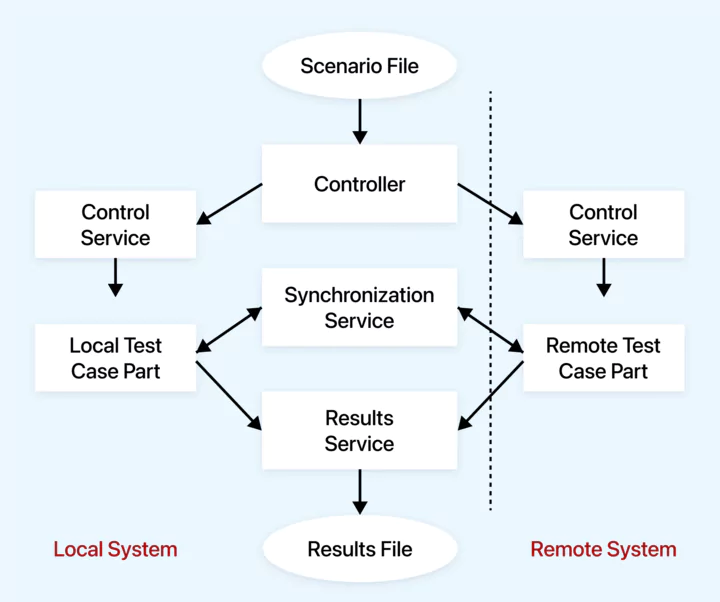
Components Involved:
- Distributed directive: It is the configuration or information present in the test scenario file. This information basically defines that tests should be distributed or divided into different parts that run on diverse systems or machines.
- Controller: It is another important component of distributed testing. It works to manage the distributed test process and read the test scenario file having a distributed directive.
- Control service: They are the components that function to efficiently control and coordinate the execution of test components on different systems. It is basically divided into two main types:
- Local system control service: For the test components executed in the local system that has a running controller, this control service handles them. It also manages the tasks for the local testing environment.
- Remote system control services: These services oversee the execution of test components on their respective remote systems.
Architecture Flow:
- In the first phase, the test scenario file, which has distributed directives, is created. This file highlights and gives information on how the execution of the test is divided and performed across different systems.
- Next comes the role of controllers. This reads the scenario file, and based on this, the allocation of different parts of the test is done to control services to the remote and local systems.
- Note that these logical systems (the remote and the local systems) may coexist on the same physical device. In other words, multiple testing environments can run on a single physical machine.
- The test suite may have up to 999 remote systems. Each of the remote systems works to interact and contribute to the single test result. In addition, each remote system has its respective remote system control service that performs its management.
- The end phase of the distributed tests is having a result file. This file has the outcome of all the distributed test components executed on the local or remote systems. It gives detailed information on the test result, which helps in easy analysis.
How Do You Set Up a Distributed Test Environment?
It is important to set up a distributed test environment. It involves an extensive process, including configuring software and hardware components to execute the test.
Here, we will discuss the crucial aspects of setting up such an environment that supports efficient testing.
Hardware Requirement
To start with the setting up of the test environment, the first step involves careful evaluation of the hardware requirement, addressing the need for testing projects like the scale of the test, the complexity of the application, etc. The tester shouldn't skip it because the evaluation will guide them in selecting servers, workstations, storage devices, etc.
In addition, hardware configuration also includes an approach where testers allocate the resources effectively. This involves the distribution of CPU, memory, and network bandwidth to ensure the accurate function of the system. This approach aligns with the expected workload. It indicates that the distribution of resources can be done based on the workload.
Software Requirement
In setting up a test environment, fulfilling software requirements is equally important. In this phase, testers ensure that all the machines or systems used for distributed test environments have compatible operating systems. It is important that both master and slave nodes have compatible OS so that there is no incompatibility issue during the test process.
Further, on the software side, testers install and configure the selected automated tool or framework to synchronize in terms of versions. This is required to ensure they are suitable for distributed testing and compatible with your chosen software stack. To maintain communication between the distributed test environment, network infrastructure analysis is done for factors like latency, security, and bandwidth.
Configuration of Test Environment
When testers have met the software and hardware requirements to perform testing, the next step is configuring the test environment. Typically, it involves replicating production settings, mirroring server configurations, database schemas, and network parameters. This involves some of the key steps, which are as follows:
- Firstly, testers configure each test client (computer or device that is set up and configured to run software tests) by confirming that all the software components are installed and connected to the network. With this step, it becomes possible to establish communication with the test orchestrator and central test database required for the test cases.
- Secondly, it is crucial to configure the test orchestrator to identify and handle all the communicated and connected test clients, determine the flow of test execution, and set up error-handling mechanisms.
- Lastly, set up the test database with the appropriate schema to store test data and results.
In the configuration of test environments, major challenges can be encountered, like resource conflict, data contamination, and network interference. To avoid such, the use of virtualization or containerization technologies is recommended for environment isolation. Testers also do network segmentation that ensures that test environments remain distinct and insulated from each other.
Scalability Considerations
Lastly, scalability considerations are essential, especially in the dynamic testing landscape. This involves assessing potential workloads, devising a scaling strategy to accommodate changing demands, and planning resource scaling by adding or reducing hardware or virtual nodes as required.
Test Planning
With all software and hardware requirements in place for distributed tests, this also involves robust test planning. This planning is comprehensive preparation and strategic decision-making to ensure that all the testing efforts are required to meet your software development project and give accurate test results. Here is the way for testing planning for distributed tests.
Test Strategy and Objectives
The testing of software applications must have a clear objective and test strategy so that the QA analysts and developers in a team can keep tracking the progress. You must highlight the underlying goal of the test, like validation of specific functionality, ensuring compatibility for browsers, devices, and OS, or verifying the performance of the software application under load and stress. The goal can vary, and based on this, the test strategy is prepared by considering factors like the criticality of diverse test scenarios. This creates a roadmap for the team to follow.
For example, if your objective is to test a web application's scalability, you might prioritize load testing over other types of testing. Conversely, if the primary goal is to find critical functional defects, functional testing might take precedence.
Test Data Management
In this phase, data distribution is important for distributing the test data across different nodes in the established test environment. No matter if your test node is a remote machine or virtual system, the testers performing distributed tests should have a consistent data source for the test scenario. You can use synthetic or production data to create controlled testing environments and realistic scenarios. This helps replicate real-world conditions and ensure consistent test results.
Test data management also ensures data privacy and security issues, mainly when testers work with confidential data in distributed testing. Here, data masking or anonymization techniques are used to protect the sensitive data and its integrity for testing purposes.
Test Case Selection and Prioritization
Selecting and prioritizing test cases in a distributed test environment is a strategic process that optimizes resource utilization and test coverage. First, you have to prepare the test cases based on finding which test scenario is critical and appropriate for your software development goal. However, several test cases must be executed; you have to prioritize those based on criticality, allowing for early detection of critical issues.
Several factors influence test case selection and prioritization, including:
- High-impact scenarios should be tested more rigorously.
- Consider components of the application that are prone to defects.
- Consider the most common user scenarios and ensure they are thoroughly tested.
The central part of distributed testing is to execute the different test cases parallelly. For instance, if you have a suite of test cases for various functionalities of a web application, you can identify subsets of test cases that can run independently without dependencies on one another. By running these subsets concurrently on different test nodes, you can significantly reduce testing time and expedite the feedback loop in your development process.

How Are Tests Executed in a Distributed Environment?
In the distribution testing process, the execution of tests in the distribution environment is essential because this involves running multiple test cases in various test nodes. Here is how this process works:
To perform distributed testing effectively, we must ensure the following three prerequisites:
- Shared resource integrity: The first condition necessitates all shared resources function seamlessly throughout the testing procedure. Among the most common shared resources in test automation, the file system stands out. This becomes particularly critical when files are uploaded or downloaded as part of the testing process.
- Isolated data usage: The second condition enables separate data utilization during parallel testing on a single test environment. It is imperative that each test accesses its unique set of data to prevent any potential interference with other concurrently executing tests.
- Exclusivity of environment-altering tests: Finally, tests involving modifications to the testing environment cannot be executed concurrently with other tests. These tests should be isolated to prevent conflicts with parallel test runs.
Parallel Test Execution
To perform distributed testing, different selected test cases are executed on multiple machines to lower the testing time and effort. For example, if you have a suite of 100 test cases, you can divide them into smaller groups and execute each group on separate test nodes. This way, instead of running one test case at a time, you can execute 10 test cases concurrently on 10 different nodes.
In this process, the major challenge involves conflict with resources. To avoid this, concurrency control is recommended to manage the test execution parallelly. For example, if two test cases require access to the same database, concurrency control mechanisms ensure that they don't interfere with each other, potentially leading to inaccurate results.
Load Distribution Strategies
Load distribution is a key strategy for distributing user loads evenly across different nodes in a distributed test environment. In the test process, it is important to maintain the stability of work and function of other machines or nodes and ensure that no single node creates any issue or blocks the complete process. To ensure this, different strategies are used:
- Round robin: Test cases are distributed to each available test node in a circular order.
- Dynamic load balancing: Load balancers monitor the performance of each test node and distribute test cases based on their current workload.
- Weighted distribution: Test cases are assigned weights based on their complexity or importance.
Handling Synchronization
The most significant obstacle in distributed testing is ensuring that all tests are executed on all systems in the correct sequence. To address this challenge, synchronization methods for the test cases are used. Techniques like mutexes, semaphores, or explicit synchronization commands control the flow of test execution.
Synchronization can happen automatically, initiated by predefined system checkpoints (such as the start and end of each test case), or manually at intervals specified by the user.
Distributed testing poses a dual challenge: synchronization and managing the testing process itself. This encompasses activities like configuring remote systems, generating scenario files, and processing the results to produce meaningful reports. Equally important is the ability to consistently replicate tests and choose which tests to repeat based on their outcomes, especially for regression testing. This repetition must occur consistently across various platforms, including UNIX, Windows, and Linux.
How Do You Monitor and Report on Distributed Testing?
Monitoring and reporting in distributed tests is one of the most critical steps. It is conducted to ensure that the test process is monitored for real-time detection of issues and to have a report on the test result. Let us now understand the process in detail.
Real-time Monitoring of Distributed Test
Real-time oversight of distributed test processes involves ongoing tracking of the progression and performance of test execution across multiple test nodes. This continuous monitoring is crucial for quickly identifying and addressing issues as they arise.
Integral aspects of real-time oversight include:
- Tracking test progress: Monitoring tools furnish visibility into the current status of individual test cases, whether they are actively running, have been completed, or have encountered errors. This assists testers and test managers in measuring the overall testing progress. Some of the well-known monitoring tools include Datadog, Dynatrace, etc.
- Performance metrics observation: Real-time monitoring includes tracking performance metrics like response times, error rates, and throughput. This capability enables the timely identification of performance-related issues or anomalies.
- Alters and notification: In real-time monitoring of distributed tests, encountering any error or system failure, give the team a real-time alert and notification. This aspect allows the team to fix the issue as soon as possible so that it does not cause any large issues in the test process at a later stage of the development of software applications.
Real-time monitoring allows testing teams to respond to issues promptly, re-run failed tests, and make informed decisions to ensure the accuracy and reliability of test results.
Logging and Handling Errors
Encountering errors in distributed testing is a common phenomenon. However, logging and managing errors is the needed activity that allows the team to capture and handle them related to test execution. This is how it can be done:
- Logging: The concept of the logging mechanism involves recording the information on the execution of the test cases. This involves data on the test environment, steps taken during the test, input parameters, and outcomes. The team has log files that contain information on identified bugs, debugging test cases, and records of test execution. This becomes a crucial resource in debugging. For example, when any test case fails, the log file has critical data and information like error messages, stack traces, and values of variables at diverse points in code.
- Error handling: In the execution of distributed testing, the rise of unexpected issues requires effective error handling. Such issues could be software bugs, system errors, etc. It is well known that when any error is encountered, it requires capturing all crucial information related to it.
The team has the important role of handling those issues in a way that does not impact the overall testing process. Thus, the error is handled in a controlled manner where other tests continue to run. For this, the team thoroughly documents the failure by recording all relevant information and context.
This documentation can include the steps leading up to the failure, the expected outcome, and the observed behavior. Thus, logging and error handling help troubleshoot the issue and ensure the development of thorough test reports.
Generating Comprehensive Test Reports
The final step involves the generation of test reports based on the collected information from logging, error handling, etc. The test report has detailed information and views on the testing efforts, test outcomes, and any issues. Here are the key components of the test reports:
- Status of test cases: Test reports have the status of test case execution, which shows the number of passed test cases, failed test cases, and the test cases that were skipped.
- Detailed findings: Comprehensive information regarding the failure is included, encompassing error messages, stack traces, and relevant screenshots to help in debugging and resolution.
- Performance metrics: The information on performance metrics is included in the test reports that help the team evaluate the system's performance. Some of the performance metrics include response time, error rate, etc.
Test reports may provide insights into trends and analysis, including identifying defect trends, regression testing results, and comparisons with previous testing cycles.
Which Tools Are Used for Distributed Testing?
Distributed testing can be leveraged using software testing tools that simplify the test process across multiple machines and different test environments. The tools also help in the effective management and execution of the test cases in parallel, which in turn also ensures test coverage and gives accurate test outcomes. Here are some of the popular testing tools that can be used to perform distributed testing:
- Apache JMeter: It is one of the most widely used tools for executing load and performance testing. This tool is known to support distributed testing as this allows the tester to run the test plan across different servers and systems simultaneously. It is based on master-slave architecture, where a master node controls and coordinates the test execution while multiple slave nodes perform the actual testing. In addition to this, you can effortlessly add or eliminate the slave machine in case you want to scale your testing infrastructure.
- Selenium grid: Selenium grid plays a pivotal role in automated testing, enabling the execution of test cases across various browsers, operating systems, and machine combinations. Furthermore, it empowers you to execute tests in parallel, significantly speeding up the testing process. Selenium grid serves as a major component within the Selenium framework.
- Gatling: This tool is designed to perform distributed testing for the web application and execute performance testing by generating high loads on the web servers. It allows for the distribution of load testing of the software application across multiple systems.
- JUnit: It is one of the most used testing frameworks specifically for web applications. However, it should be noted that it is not mainly designed to execute distributed testing; instead, it can be integrated with different tools like Selenium grid, Maven, and Gradle. It helps to run tests in parallel across different systems.
- TestNG: This testing framework is also for web-based applications. The most amazing feature of TestNG is that it has built-in support for parallel test execution. This feature is leveraged by the testers for defining test suites and parallel execution configurations. TestNG allows testers to group test methods based on criteria such as functionality, priority, or categories. Thus, it is suitable for both local and distributed test scenarios.
Explore this comprehensive guide to understand what is Selenium and its functionalities.
Also, if you want to run distributed tests using the Selenium grid, we recommend you to check our tutorial - Selenium Grid 4 Tutorial For Distributed Testing.
Furthermore, you can use Selenium 4 to perform Selenium automation on cloud-based testing platforms like TestMu AI, which offers a scalable online Selenium Grid. It is an AI-native test orchestration and execution platform that provides automation testing across 3,000+ browser and OS combinations. With TestMu AI, you can speed up your release cycles by running tests in parallel across a cloud grid instead of maintaining your own nodes.

Subscribe to our TestMu AI YouTube Channel for the latest updates on tutorials around Selenium, Cypress testing, and more.

Note: Run Selenium tests with TestNG across 3,000+ browser and OS combinations. Try TestMu AI Now!
The tools above cover different layers of distribution. Instead of generic descriptions, the table below maps the modern options to how each one distributes work and where it fits best, so you can match a tool to the layer you are testing. For teams that want a managed cloud grid to run distributed suites in parallel, the HyperExecute pricing plan lays out the tiers for scaling execution without maintaining your own nodes.
| Tool | Distribution model | Best for |
|---|---|---|
| Selenium Grid | Hub-and-node, routing tests to registered browser nodes | Cross-browser and cross-OS UI test parallelization |
| Apache JMeter | Master-slave over Java RMI | Protocol-level load and performance testing |
| Gradle Develocity | Test Distribution to remote agents plus a remote build cache | Splitting unit and integration tests inside a build |
| k6 and Artillery | Scriptable workers scaled across nodes or serverless functions | Developer-owned, code-first load testing |
| AWS Distributed Load Testing | Containers orchestrated on AWS Fargate | Massive-scale load with no standing infrastructure |
Choosing the Right Tool
In the above section, we have seen many different testing tools that can be leveraged to perform distributed testing. However, the primary challenge testers encounter is choosing the right tool for the software projects. Here are some key considerations to be addressed while selecting the right tool to run distributed tests:
- First, you should consider the characteristics of the software project, like its scope, objective, and complexity. Based on this information, you can review the features and ability of the testing tools in terms of their integration with the existing toolchain. Also, check whether tools have reporting and analysis capabilities and ensure they align with your project's available resources.
- It is important to evaluate the scalability requirement of the testing efforts. Check if a selected tool can manage the expected workload and scale based on increased complexity or changes in the software applications.
- Check the integration capabilities of the tools. It is better that tools best integrate with other testing tools and build automation frameworks.
- Prioritize testing efficiency and effectiveness. The selected tools should enhance the efficiency of your testing processes while delivering accurate and meaningful results.
Now, let us learn how to execute distributed tests.
How to Perform Distributed Testing?
JMeter is a widely used open-source tool designed for load and performance testing. It is particularly popular for distributed test scenarios because of its scalability and flexibility. Here, we will use JMeter as an example to demonstrate how to run distributed tests. Examining the process of distributed load testing using JMeter, a well-known open-source load testing tool, involves three primary components: the master, the slaves, and the target system.
- Master: The master serves as the test controller and is where you initiate tests from the JMeter GUI.
- Slaves: Slaves act upon commands from the master to generate requests directed at the target server.
- Target system: The target denotes the system under evaluation.
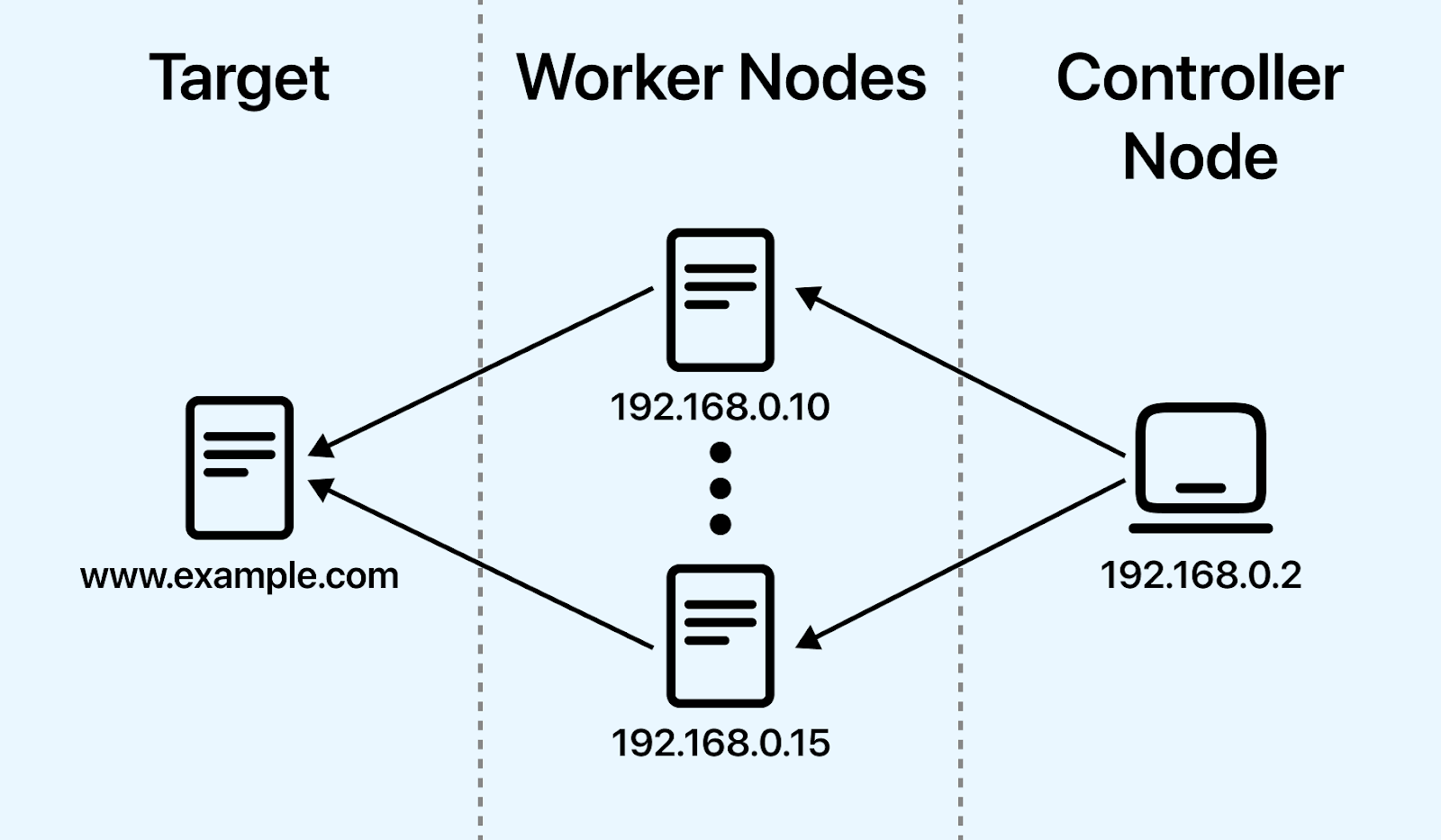
To distribute the load effectively, multiple slaves can be employed, all following commands issued by the master. The JMeter GUI runs exclusively on the master machine, overseeing test monitoring and report generation. The master doesn't generate the load itself but rather orchestrates the slave machines to do so. A noteworthy challenge arises with JMeter since the master and all slaves must be on the same network subnet.
Additionally, due to JMeter's limitations of handling only around 500 simultaneous requests, scenarios necessitating load testing for hundreds of thousands of users demand multiple machines equipped with JMeter servers. Given that such an approach isn't always practical, extensive load testing for large user volumes requires utilizing cloud-based load testing tools.
Here is the step-by-step process to run distributed tests using JMeter.
Prerequisites:
- Ensure that all system firewalls are deactivated. Disabling Windows or Linux firewalls is recommended, as they may still obstruct traffic.
- All participating machines must reside on the same network subnet. Machines outside the same subnet may not recognize each other within the network.
- Employ identical JMeter versions across all machines to prevent unexpected errors or complications.
- System configuration: Configure the slave systems by navigating to the jmeter/bin directory and executing the jmeter-server.bat file.
- Master configuration: Within the /bin directory on the master system, modify the jmeter.properties file as instructed, incorporating the IP address of the slave machine.
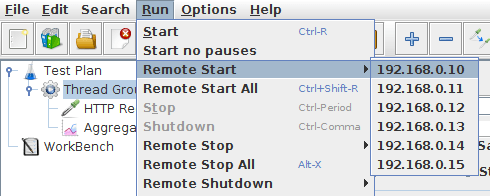
- Test execution: With the necessary configurations in place, commence load testing. Launch the JMeter GUI on the master machine, open your test plan, and select Run from the menu bar. Opt for Remote Start and specify the IP address of the slave machine.
- Troubleshooting: If issues arise while initiating the test from the master machine, and you encounter the provided error, simply request the owner of the slave machine to execute the jmeter-server.bat file. To resolve this issue, disable the firewall on both the master and slave machines.
How Do You Run Cloud-Native Distributed Stress Tests With AWS, k6, and Artillery?
The JMeter master-slave setup works, but it forces you to provision and babysit physical or long-lived machines, and a single JMeter instance struggles past roughly 500 concurrent requests. Cloud-native distributed stress testing removes that ceiling by running load from ephemeral serverless workers that spin up for the run and disappear afterward, so you never hand-configure a fixed master and a standing fleet of slaves.
Instead of wiring up nodes yourself, you let the platform launch workers on demand. AWS Distributed Load Testing, for example, orchestrates containers on AWS Fargate so hundreds of workers generate traffic in parallel with no standing infrastructure to maintain. AWS Lambda suits shorter, spiky bursts, where each invocation acts as a lightweight, short-lived load generator.
k6 and Artillery for Scriptable Load
k6 is a developer-focused load testing tool that scripts scenarios in JavaScript and scales out across multiple worker nodes or a managed cloud, which makes it a common replacement for hand-managed JMeter clusters. Artillery takes a similar approach with YAML-defined scenarios and can fan tests out across AWS Lambda and Fargate, so a laptop can trigger a load test that actually runs at cloud scale.
The shared idea across k6, Artillery, and AWS Distributed Load Testing is that the orchestration, meaning provisioning workers, distributing virtual users, and collecting metrics, is automated for you. You describe the load profile, and the tool decides how many workers to run and where to place them.
If you would rather not stitch this orchestration together yourself, HyperExecute provisions and tears down just-in-time virtual machines per job, applying the matrix and auto-split strategies described earlier to your existing suite. That gives you cloud-scale distribution without maintaining a master, a fleet of workers, or your own Selenium Grid.
How Does Distributed Testing Work in Gradle and Maven Build Pipelines?
Distribution does not only happen at the load-testing layer. Modern build tools distribute test execution at the build level, splitting a project's unit and integration tests across many machines during a single build so a large suite finishes in a fraction of the wall-clock time.
Gradle Develocity and Remote Build Caching
Gradle Develocity (formerly Gradle Enterprise) adds Test Distribution and remote build caching to Gradle and Maven builds. Test Distribution sends test classes to a pool of remote agents so they execute in parallel, while the remote build cache lets one machine reuse compiled outputs and test results another machine already produced, so unchanged work is never repeated. The combination shrinks both compilation and test time across a team and its continuous integration servers.
Troubleshooting Common Distributed Build Failures
Spreading tests across agents surfaces problems that never appear on a single machine. Two of them show up often.
- Tests that share static state can fail unpredictably. A static field mutated by one test may leak into another when the two land on different agents in an order you did not expect, producing failures that never reproduce locally. Keep tests independent and avoid shared mutable statics so any agent can safely run any test.
- WebSocket connection failures interrupt the build. Develocity agents talk to the build over WebSocket connections, so a proxy, firewall, or idle timeout that drops those connections shows up as agents disconnecting mid-build. Allow the Develocity ports and keep the connections alive to resolve it.
How Do You Test Distributed Systems With Chaos Engineering, Jepsen, and Deterministic Simulation?
Distributed systems are tested with chaos engineering to inject failures, Jepsen to check consistency under network partitions, and deterministic simulation to replay rare bugs.
So far this guide has treated distribution as a way to run tests faster. There is a second, very different meaning, which is testing systems that are themselves distributed. Microservices, replicated databases, and message queues have to stay correct when the network splits, a node dies, or messages arrive out of order. Verifying that behavior is its own discipline, and the techniques below are built for it.
Chaos Engineering
Chaos engineering tests resilience by deliberately injecting failures, such as killing instances, adding latency, or dropping packets, and then observing whether the system degrades gracefully. Netflix's Chaos Monkey popularized the practice by randomly terminating production instances, which forces teams to build services that tolerate the sudden loss of a node.
Jepsen and Consistency Testing
Jepsen is a framework for testing the consistency and correctness of distributed databases and coordination services. It runs real operations against a cluster while injecting network partitions, then checks the recorded history against a consistency model to catch data loss and anomalies that only appear under failure. Jepsen analyses have exposed serious consistency bugs in databases that were widely believed to be safe, which is why it became a standard reference for distributed data stores.
Deterministic Simulation and Fault Injection
Concurrency bugs in distributed systems are notoriously hard to reproduce. Deterministic simulation runs the whole system on a single simulated scheduler so every source of nondeterminism, including timing, message order, and thread interleaving, is controlled, which means any failing run can be replayed exactly until it is fixed. Lineage-driven fault injection takes a complementary route: it reasons backward from a successful outcome to work out which combinations of faults could have prevented it, then injects only those faults, testing failure handling far more efficiently than random fault injection.
What Are the Security Challenges in Distributed Testing?
In distributed testing, the security of the data, system, test environment, access control, etc., has a significant role. The reason is an expansion of test activity across multiple nodes, environments, systems, etc. We know that in distributed testing, different data are shared between the nodes and the system.
Such data may be sensitive or proprietary data related to software applications being tested. Thus, it is important to ensure the security and privacy of the data during the execution of distributed tests.
Some of the key security challenges that occur while running distributed tests include the following:
- Network security: Communication between distributed nodes transpires over networks, rendering them susceptible to security threats. Safeguarding data during transit and fortifying defenses against network-based attacks assumes critical importance.
- Resource segregation: Implementing effective resource segregation mechanisms is imperative to avert interference between tests. Ensuring that the execution of one test does not jeopardize the security or performance of others is essential.
- Access control: Managing access to distributed resources is complex. It involves overseeing who can interact with specific test nodes and enforcing rigorous authentication and authorization protocols to prevent unauthorized access.
What Are the Best Practices for Distributed Testing?
Generic security advice applies here as it does anywhere. The practices below are the ones that change specifically because execution is spread across machines.
- Make every test independent of execution order and of data another test created. This is the single highest-value practice, because shard boundaries break those assumptions and produce failures that never reproduce locally.
- Refresh timing data on a schedule. A timing-based split decays as tests are added, so shards drift back out of balance until the recorded durations are regenerated.
- Scope credentials to the node rather than the fleet. Each worker needs only the access its own shard requires, which limits the blast radius if one node is compromised.
- Give each node its own test data namespace. Two nodes writing to the same row is the most common source of distributed-only failures, and schema-per-node or record-per-test removes it entirely.
- Keep tool versions identical across every machine. Version drift between a coordinator and its workers produces errors that look like network faults and waste hours of debugging.
- Retain per-node artifacts. Video, console output, and network logs tied to a specific node are what make a one-node failure diagnosable without re-running the whole suite.
How Is AI Changing Distributed Testing?
AI is changing distributed testing by splitting suites across nodes from past run times, predicting which tests a change affects, and grouping node-specific failures.
Smarter sharding matters because a distributed run is only as fast as its slowest node. Models that learn each test's duration and flakiness can balance shards better than static splits by file or count, and can retry or quarantine unstable tests automatically.
Keep the decisions visible: log why each test ran where it did, so a skipped or moved test does not hide a regression. Our guide to test orchestration explains how scheduling and retries fit together.
When Should You Move to Distributed Testing?
Start by timing your suite and finding the single longest test, because that number is the floor no amount of parallelism gets under. Then check whether your current split is by file, and if the shards finish at noticeably different times, move to a timing-based split before you add a single machine.
Expect the first distributed run to surface failures the single-machine run never showed. Almost all of them trace back to shared state, so budget time to make tests independent of execution order and of data another test created. That work is what makes the distribution hold up, and it does not go away by adding nodes.
When maintaining the machines becomes the bottleneck rather than the tests, move the execution to managed infrastructure. HyperExecute provisions just-in-time virtual machines per job across 60+ regions and applies the matrix and auto-split strategies described earlier, and the HyperExecute YAML parameters documentation covers the configuration keys for concurrency, test discovery, and retries.
Author

Srinivasan Sekar
Blogs: 18


Srinivasan Sekar is Director of Engineering at TestMu AI (formerly LambdaTest), where he leads engineering and open-source initiatives behind the Selenium and Appium automation grid and owns TestMu AI's MCP Server. A committer to Appium and a contributor to Selenium, WebdriverIO, Taiko, and AppiumTestDistribution, he brings over 15 years of experience in quality engineering and open-source technologies. He is the author of the Apress book 'The MCP Standard: A Developer's Guide to Building Universal AI Tools with the Model Context Protocol,' a Certified Kubernetes and Cloud Native Associate, and an international conference speaker. Before TestMu AI he spent over eight years at Thoughtworks as a Principal Consultant and Quality Architect. Srinivasan holds a B.Tech in Information Technology from Anna University.
Reviewer

Anmol Gupta
Reviewer
Anmol Gupta is Vice President of Product Management at TestMu AI (formerly LambdaTest), driving HyperExecute, the test orchestration cloud that runs and accelerates automated test execution. He led the development of the Unified Test Execution Cloud Platform and now leads a 30-member cross-functional product organization across product lines contributing $7M+ in revenue. He brings over nine years of experience and previously co-founded the SaaS company Timble as CTO, where he grew the team from 5 to 40 and launched an AI KYC platform that processed 600K+ applications in five months while cutting verification time from 12 minutes to under 30 seconds. Anmol holds an MTech and BTech from IIT Delhi.


Distributed Testing FAQs
Did you find this page helpful?
More Related Learning Hubs
TestMu AI forEnterprise
Get access to solutions built on Enterprise
grade security, privacy, & compliance
- Advanced access controls
- Advanced data retention rules
- Advanced Local Testing
- Premium Support options
- Early access to beta features
- Private Slack Channel
- Unlimited Manual Accessibility DevTools Tests