
Price Your Suite on TestMu AI Before You Renew
Run your existing Selenium, Playwright or Cypress tests in parallel across 3,000+ browser and OS combinations. The free plan includes 100 lifetime minutes on 2 parallel tests.

BrowserStack Pricing in 2026: What Each Plan Costs and What It Meters
BrowserStack pricing as of Nov 2026: what Live, Automate, App Automate and Percy cost, what each plan meters, the free tiers, and how TestMu AI compares.
Published on:
BrowserStack pricing is product-based, and each product meters something different. As of 15th November 2026, Live Desktop is $29/month per user, Automate is $99 (priced by parallel tests), and App Automate and Percy are both $199 (annual billing). The free trial includes 60 Automate minutes, and Test Management and Low Code Automation both have free plans.
TL;DR
BrowserStack pricing is set per product, and each product bills on its own meter: users for manual testing, parallel tests for automation and screenshots for visual testing. As of November 15, 2026, annual list prices start at $29 a month per user for Live Desktop and $99 for Automate Desktop, with enterprise plans quoted on request.
BrowserStack Pricing Plans by Meter
- BrowserStack Live (per user): Live bills each tester as a seat, and so does App Live. Live Desktop is $29 a month per user billed annually, and the five-user Live Team tier is $150, so five testers cost about the same on either route.
- BrowserStack Automate (per parallel test): Automate bills by how many tests run at once, with unlimited users and testing minutes, and App Automate works the same way. Automate Desktop is listed from $99 a month, and the price rises with every parallel test you add.
- BrowserStack Percy (per screenshot): Percy bills a monthly screenshot allowance. Percy Desktop is $199 a month for 10,000 screenshots, and each extra screenshot costs $0.036, so wide browser and width coverage uses the allowance faster than the page count suggests.
- BrowserStack enterprise pricing: Published price: No. Every BrowserStack enterprise tier is quote-only ("Inquire for pricing"), and add-ons such as SSO and IP whitelisting are priced in the sales conversation, so ask for each one as its own line item.
BrowserStack Subscription Billing and Free Trial
- BrowserStack subscription billing: Monthly billing: Yes. A BrowserStack subscription shows annual prices by default, and the billing toggle says annual billing saves up to 25%. The Live Freelancer plan, for example, is $12.50 a month billed annually or $19 month-to-month.
- BrowserStack free trial: The BrowserStack free trial includes 60 minutes of Automate and 100 minutes of App Automate, and you can invite any number of users. BrowserStack's trial FAQ does not give a calendar length for the trial.
BrowserStack Cost Compared With TestMu AI
TestMu AI prices most plans per parallel test, manual testing included: Virtual Live is $15 a month and Web Automation on Desktop is $79, both billed annually. Its free plan includes 100 lifetime minutes of web and mobile automation on 2 parallel tests, enough to price the same suite before a renewal.
How Does BrowserStack Pricing Work?
BrowserStack doesn't sell one platform license. They sell a range of separate products, and each of those products is on a different unit. The unit is far more important than the headline price because the unit is what determines how your bill will grow as your team or test suite grows.
- Manual testing (Live, App Live) is priced on a per-user basis. The Live "Single User Plan" is for one user.
- Automation (Automate, App Automate) is priced on the basis of parallel tests. BrowserStack's pricing page makes this very clear: "Parallel tests indicate the number of automated tests that can be run simultaneously." Both users and testing minutes are unlimited on these plans.
- Visual testing (Percy, App Percy) is priced on a per-screenshot-per-month basis, with a per-screenshot charge above the included amount.
- Test Management has a free plan, then paid plans which are priced according to the number of users (5, 10, 25 or more than 25).
- Enterprise plans are quote-only ("Inquire for pricing"), whereas the paid Accessibility plans show "Reveal Pricing" rather than a price.
BrowserStack shows the annual prices by default. The billing toggle switches between annual and monthly, and it says that annual billing saves up to 25%, so the month-to-month prices are higher and are what you see when you switch the toggle. The Live Freelancer plan shows both: $12.50/month billed annually or $19/month month-to-month.
If you're pricing a switch rather than a renewal, our BrowserStack alternative comparison puts each BrowserStack product alongside its TestMu AI equivalent product by product.
How Much Does BrowserStack Cost per Product?
The table below is BrowserStack's published pricing from their pricing page as of 15th November 2026. All prices are USD per month, annual billing unless otherwise stated.
| Product | Plan | Price per month | What it includes |
|---|---|---|---|
| Live (manual web) | Freelancer | $12.50 ($19 month-to-month) | 1 user, 100 minutes of Live |
| Live | Desktop | $29 | 1 user, desktop browsers, unlimited minutes |
| Live | Desktop & Mobile | $39 | 1 user, adds 35,000+ real devices |
| Live | Team / Team Pro | $150 / $249 | User tiers of 5, 10 or more than 10 |
| Live | Volume | Inquire | Per-user discounts as team size grows |
| Testing Toolkit Pack | Team Ultimate | $375 | User tiers of 3, 5 or more than 5; bundles Live Team Pro with other manual tools |
| Automate (web automation) | Desktop | from $99 | Parallel tests; 3,500+ desktop browser combinations |
| Automate | Desktop & Mobile | from $175 | Parallel tests; adds 35,000+ real devices |
| Automate | Desktop & Mobile Pro | from $225 | Adds AI features, advanced reporting, SIM/OTP testing |
| App Live (manual app) | Individual | $39 | 1 user, 30,000+ real devices |
| App Live | Team / Team Pro | $150 / $249 | User tiers of 5, 10 or more than 10 |
| App Automate (app automation) | Device Cloud / Device Cloud Pro | from $199 / $249 | Parallel tests; 30,000+ real devices |
| Percy (web visual) | Desktop | $199 | 10,000 screenshots a month; extra at $0.036 each |
| Percy | Desktop & Mobile | $599 | 25,000 screenshots a month; extra at $0.048 each |
| App Percy | Essentials | $199 | 10,000 screenshots a month |
| App Percy | Device Cloud | from $399 | Adds 30,000+ real devices |
| Test Management | Free / Team / Team Pro | $0 / $99 / $199 | Free: unlimited test cases and manual runs; paid plans by user tier |
| Test Management | Team Ultimate / Enterprise | Inquire | User tiers |
| Low Code Automation | Free / paid tiers | $0 / Inquire | Free tier lets you create as many tests as you need |
| Accessibility | Free / Essentials and above | $0 / "Reveal Pricing" | Free tier covers up to 5 unique pages |
Two things are easily missed. Firstly, Automate and App Automate both have a parallel test selector (1, 2, 5 or more than 5) next to each price, so you need to confirm which parallel count your quote is based on. Secondly, a number of lines show no price at all, including the paid Low Code Automation tiers, reporting for external tests and Custom Device Lab.

Anyone budgeting for a renewal?
Note: Price the same suite on TestMu AI before you commit. The free plan gives you 100 lifetime minutes of web and mobile automation on 2 parallel tests, which is more than enough to run a small slice of your real suite. Check out the TestMu AI plans.
Are BrowserStack Plans Billed per User or per Parallel Test?
BrowserStack charges for manual products on a per-user basis and for automation products on a per-parallel-test basis. That split is what determines the total.
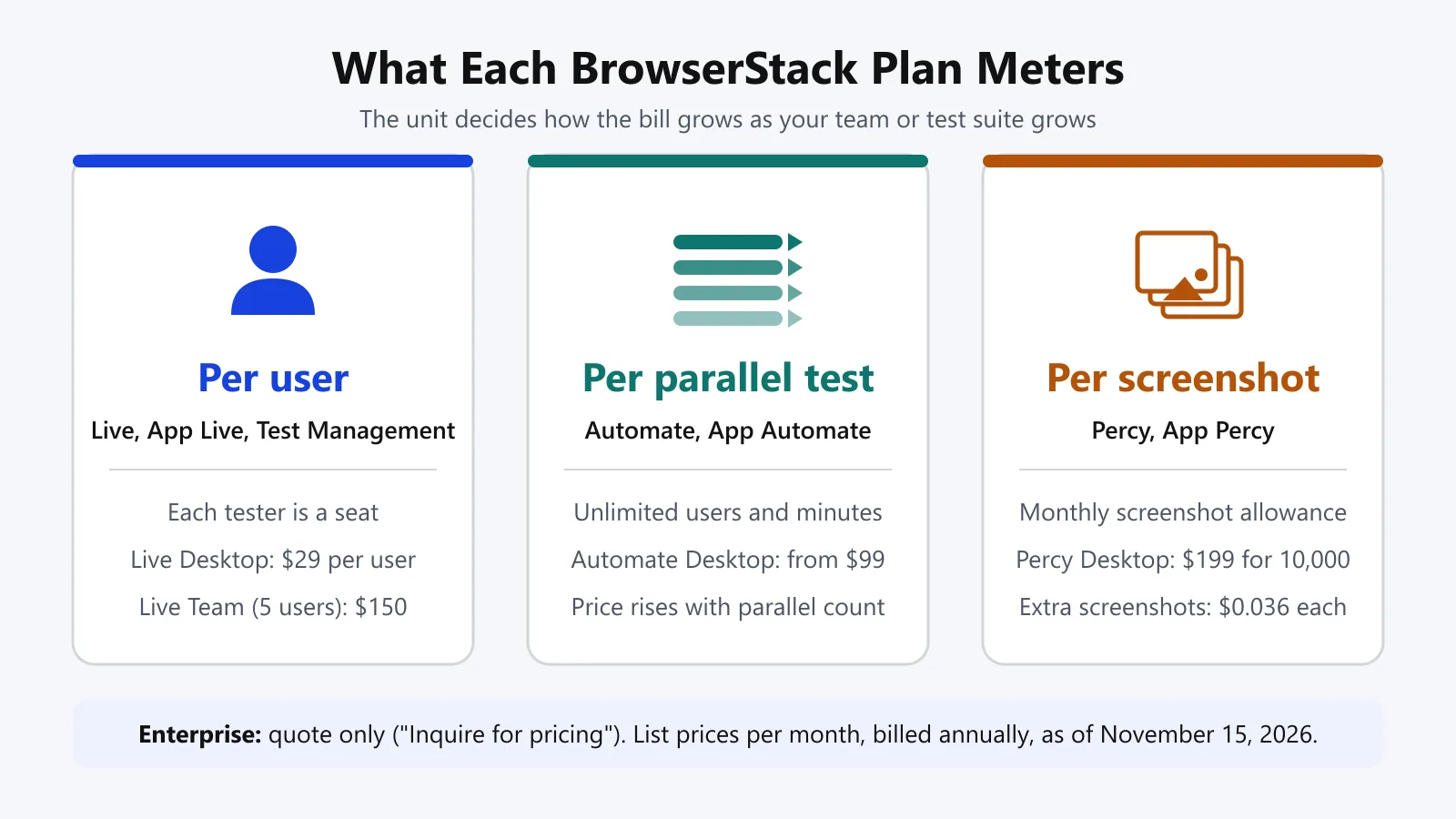
On Live, a tester adds a seat. A worked example using only published annual prices: 3 manual testers on Live Desktop would be 3 x $29 = $87 per month (billed annually). 5 testers on Live Desktop would be 5 x $29 = $145.
The Live Team plan five-user tier is $150 (only $5 more than the $145 figure above) and includes real device access. Do the arithmetic for your own headcount before deciding whether you want to go down the single-user route or opt for a Team tier.
On Automate and App Automate, every engineer on the team can trigger runs (unlimited users). The constraint is how many tests you can run at the same time.
The larger your suite is or the tighter your CI time budget, the more parallel tests you'll be pushed towards and the more expensive it gets at every step. The static content on the page doesn't show the price at 2 or 5 parallels, so you have to read that off the configurator.
On Percy, the meter is screenshots. The suite that captures many pages across many browsers and widths will consume the 10k screenshot Desktop allowance much more quickly than the number of pages would indicate, and every extra screenshot is charged.
What Do You Get on the BrowserStack Free Trial and Free Tiers?
BrowserStack's free trial FAQ lists what the trial includes, as of November 15, 2026:
| Product | Free trial includes |
|---|---|
| Live | 30 minutes, one minute per available device, plus 100 screenshots (responsive screenshots count toward the total) |
| App Live | 30 minutes, one minute per available device |
| Automate | 60 minutes of automated cross-browser testing |
| App Automate | 100 minutes of automated app testing |
| Percy | 5,000 screenshots a month |
You can invite as many users as you like into your BrowserStack team during the trial. The FAQ doesn't state the length of the trial on a calendar.
Beyond the trial, the pricing page lists these permanent free plans and offers:
- Percy Free: $0, unlimited users, 5,000 screenshots per month, one month of build history.
- App Percy Free: $0, 1,000 screenshots/month and 100 minutes of infrastructure.
- Test Management Free: $0, unlimited test cases and manual test runs.
- Low Code Automation Free: $0, you can create as many tests as you want.
- Accessibility Free: $0, up to 5 unique pages and 60 days of data retention.
- Automate new-customer offer: three months free of Live Team for 5 users (new customers only).
- Open source program: BrowserStack's open source page provides Live, Automate and Percy to approved projects (access to 5 users and 5 parallels). You apply with the details of your project.
The Freelancer plans for Live and App Live are low-cost paid plans ($12.50 a month, billed annually), not free plans.
What's Included in BrowserStack Enterprise Pricing?
BrowserStack enterprise pricing is not published. Every enterprise tier on the pricing page is "Inquire for pricing".
The page does, however, list out what the enterprise add-ons cover: advanced access control, SSO, IP whitelisting, advanced local testing, usage analytics, priority support and an optional Custom Device Lab. Percy Enterprise adds a 99% uptime SLA and 2X parallel allocation.
As these are priced in the conversation rather than on the page, they're where two quotes for the 'same' plan can diverge. Ask for each add-on as a separate line item.
How Does BrowserStack's Pricing Compare With TestMu AI?
TestMu AI prices the majority of plans via parallel testing (including manual Live testing), whereas BrowserStack prices manual testing via user. Four published list prices from both pricing pages (checked 15th November 2026), on a monthly basis billed annually:
| What you need | BrowserStack | TestMu AI |
|---|---|---|
| Manual testing on desktop browsers | Live Desktop, $29 per user | Virtual Live, $15 per parallel test |
| Web automation on desktop browsers | Automate Desktop, from $99 | Web Automation on Desktop, $79 (Linux-only tier $29) |
| App automation on real devices | App Automate Device Cloud, from $199 | Real Device Plus Automation Cloud, $199 (web and app) |
| Free visual testing tier | Percy Free, 5,000 screenshots a month | SmartUI Free, 2,000 screenshots (lifetime) |
BrowserStack's free Percy tier is the more generous of the two, and at the real device automation level both are listed at $199. For every other product pair and the case for the switch, see the product-by-product comparison linked earlier. For one pair in depth, see BrowserStack Automate vs HyperExecute.
For proof beyond the list prices, TestMu AI's comparison page points to Boomi at 78% faster test execution following the move to TestMu AI. It is also positioned as a Leader in the 2026 Gartner® Magic Quadrant™.
The BrowserStack Quote Checklist: 7 Questions to Ask Before You Sign
The published price is just a starting point. Use this checklist on any BrowserStack quote (whether new or renewal), as each line covers something that the pricing page itself will not tell you.
- Unit: is it priced on a per-user, per-parallel test, or per-screenshot basis?
- Parallel count: how many parallel tests does each Automate or App Automate line contain? The selector is adjacent to the headline price.
- Billing basis: annual or monthly? The toggle indicates that annual billing saves you up to 25%, so get both figures.
- "Inquire" lines: what are the costs of the Enterprise tiers, paid Low Code Automation, Custom Device Lab, and reporting for external tests?
- Add-ons: do SSO, IP whitelisting, advanced local testing and priority support come as standard, or are they extra?
- Overages and bundles: what happens above the screenshot allowance (Percy bills $0.036 or $0.048 per extra screenshot), and does the quote bundle Live, Automate and App Automate or bill them separately?
- Side-by-side run: have you run the same suite on a second vendor's free plan to compare speed and pass rates?
How Do You Price the Same Suite on TestMu AI Prior to Renewal?
Run a slice of your existing suite on TestMu AI, and you turn a list price comparison into a measured one. For Selenium suites, you just swap the hub URL and the capability block and keep the tests.
- Create a free TestMu AI account and then copy your username and access key from Account Settings.
- Store the credentials in environment variables (
LT_USERNAME,LT_ACCESS_KEY), not in the code or in URLs. - Replace
bstack:optionswithLT:Optionsand point the driver at the TestMu AI hub. - Run the same tests at the same parallel count as you currently pay for, then compare the run time, pass rate and the plan price.
// selenium-webdriver 4 (Node.js) - credentials are taken from the environment variables.
const { Builder } = require('selenium-webdriver');

async function runOnTestMu({ browserName, browserVersion, platformName, build }) {
  const capabilities = {
    browserName,
    browserVersion,
    platformName,
    'LT:Options': {
      username: process.env.LT_USERNAME,
      accessKey: process.env.LT_ACCESS_KEY,
      build,
      w3c: true,
    },
  };

  return new Builder()
    .usingServer('https://hub.lambdatest.com/wd/hub')
    .withCapabilities(capabilities)
    .build();
}

module.exports = { runOnTestMu };

// Usage: always quit the driver so the session is released.
// const driver = await runOnTestMu(matrixEntry); // one entry from your browser matrix
// try { await driver.get(startUrl); /* your test steps */ } finally { await driver.quit(); }
To check the setup before a full run, save the module as runOnTestMu.js and call it with one matrix entry against TestMu AI's Selenium Playground:
const { runOnTestMu } = require('./runOnTestMu');

(async () => {
  const driver = await runOnTestMu({
    browserName: 'Chrome',
    browserVersion: 'latest',
    platformName: 'Windows 11',
    build: 'browserstack-pricing-comparison',
  });
  try {
    const session = await driver.getSession();
    const caps = session.getCapabilities();
    await driver.get('https://www.testmuai.com/selenium-playground/simple-form-demo/');
    console.log('session', session.getId());
    console.log('browser', caps.get('browserName'), caps.get('browserVersion'), caps.get('platformName'));
    console.log('title', await driver.getTitle());
    await driver.executeScript('lambda-status=passed');
  } finally {
    await driver.quit();
  }
})();
With LT_USERNAME and LT_ACCESS_KEY set, it prints the session ID, the browser the grid assigned and the page title:
session 512e9aec73965922077dcce261fa75bf
browser chrome 157.0.8103.79 windows
title Selenium Grid Online | Run Selenium Test On Cloud
The session then shows as passed under the build name browserstack-pricing-comparison on the TestMu AI Automation dashboard, with its video and screenshots. Keep that build name for every comparison run, so run time and pass rate for the whole slice sit in one place.
Pass the browser, version, platform, and build name as parameters so that the same test file will run across your matrix. The full range of capabilities for Selenium 3 and 4 is detailed in the BrowserStack to TestMu AI migration guide.
If your App Automate spend is the larger line, then the step-by-step guide to migrating Appium tests from BrowserStack App Automate covers app upload, capabilities and side-by-side runs. TestMu AI's Real Device Cloud has 50,000+ real iOS and Android devices.
This TestMu AI walkthrough shows app automation running on real devices, the workload behind most App Automate bills:
Subscribe to the TestMu AI YouTube channel for more tutorials on testing and automation.
Conclusion
BrowserStack's pricing is actually quite easy to parse once you know the unit of measure (users for manual testing, parallel tests for automation, screenshots for visual testing, and a quote for anything enterprise). Just write down the unit, the parallel count, the basis of billing, and all the add-ons in the quote, and you can compare it to any other vendor on a line-by-line basis.
Compare it yourself on your suite. Run your Selenium, Playwright or Appium tests on TestMu AI's free plan at the parallel count you're paying for today and put the numbers alongside your BrowserStack quote.
Running Selenium, Playwright or Cypress suites? TestMu AI's Automation Cloud runs your existing scripts in parallel across 3,000+ browser and OS combinations, with no grid to maintain.
Author

Srinivasan Sekar
Blogs: 21


Srinivasan Sekar is Director of Engineering at TestMu AI, where he leads engineering and open-source initiatives behind the Selenium and Appium automation grid and owns TestMu AI's MCP Server. A committer to Appium and a contributor to Selenium, WebdriverIO, Taiko, and AppiumTestDistribution, he brings over 15 years of experience in quality engineering and open-source technologies. He is the author of the Apress book 'The MCP Standard: A Developer's Guide to Building Universal AI Tools with the Model Context Protocol,' a Certified Kubernetes and Cloud Native Associate, and an international conference speaker. Before TestMu AI he spent over eight years at Thoughtworks as a Principal Consultant and Quality Architect. Srinivasan holds a B.Tech in Information Technology from Anna University.
Reviewer

Mayank Bhola
Reviewer
Mayank Bhola is Co-Founder and Head of Products at TestMu AI, where he leads the entire product portfolio across KaneAI, Kane CLI, HyperExecute, SmartUI, the Real Device Cloud, Accessibility, and other software testing product lines. As an early Lead Architect he designed and built the company's flagship Tunnel technology from scratch, created the React-based automation platform, and architected the data-intensive pipelines and FAAS services that scale it. He brings more than 10 years of experience in software development and product engineering, with earlier roles as Head of Technology at Juggernaut Books and Senior Software Engineer at PressPlay TV and Zomato. Mayank holds a B.Tech in Computer Engineering from JIIT Noida.


BrowserStack Pricing FAQs
Did you find this page helpful?
More Related Blogs


TestMu AI forEnterprise
Get access to solutions built on Enterprise
grade security, privacy, & compliance
- Advanced access controls
- Advanced data retention rules
- Advanced Local Testing
- Premium Support options
- Early access to beta features
- Private Slack Channel
- Unlimited Manual Accessibility DevTools Tests