

Power Your Software Testing with AI Agents and Cloud
The Native AI-Agentic Cloud Platform to Supercharge Quality Engineering. Test Intelligently and Ship Faster.


- TestMu AI (Formerly LambdaTest)
- /
- Learning Hub
- /
- Regression Testing: Types, Techniques & Examples (2026)
Regression Testing: Types, Techniques & Examples (2026)
Regression testing re-runs passed tests after code changes to catch broken features. Learn the types, techniques, real examples, and how to automate it.
Last Updated on:
On This Page
- What is Regression Testing
- Why is it Important
- When is it Performed
- Regression Testing Examples
- How to Do It, Step by Step
- How to Automate It
- Tools and Frameworks
- Testing Techniques
- Regression vs Retesting
- Defining a Test Case
- Types of Regression Testing
- How AI is Changing It
- Regression Testing in CI/CD
- Challenges
- Best Practices
- Conclusion
Regression testing is the practice of re-running test cases that already passed, after a code change, to confirm the change did not break existing functionality.
It applies to bug fixes, new features, configuration updates, and environment migrations, and it runs either manually or automated.
The distinction that matters: regression testing does not check whether the new code works. It checks whether everything that already worked still works.
Overview
How Often Should You Run Regression Tests
Run a prioritized subset on every pull request, the full suite after each merge, and the complete browser matrix nightly.
Who Is Responsible for Regression Testing
Ownership is split across four roles, each covering a different layer of the suite.
- Developers - write and maintain unit-level regression tests for the modules they change.
- QA engineers - own the functional suite, triage failures, and decide what each release retests.
- SDETs - build the automation framework and keep selection and parallel execution working.
- Release managers - set the quality gate each pipeline stage must clear before shipping.
Regression testing ensures software stability after modifications. Its primary goal is to catch regressions, where updates inadvertently reintroduce or create new bugs.
This guide covers what regression testing is, when to run it, and a worked example built from real test cases.
You will also get the techniques and types, how AI is changing test selection, and the practices that keep a suite maintainable.
What is Regression Testing
Regression testing re-runs test cases that already passed, after a code change, to verify that recent code modifications have not broken any of an application's existing functionality.
Regression testing is the process of re-evaluating a software application after changes have been made to ensure that existing functionalities remain intact, and it is called Regression Testing.
In the software development lifecycle, regression testing verifies that recent code modifications have not negatively impacted an application's current functions.
Confirming that no new flaws appeared requires methodically rerunning previously executed test cases against the updated codebase.
When a new build is validated, testers run functional testing to verify modifications in existing and newly added functionality.
Regression testing follows. It determines whether those improvements caused a defect in behaviour that was satisfactory before the latest alterations.
One of the most important aspects of quality assurance is establishing strong regression test procedures, which guarantee that software is developed with the utmost reliability and integrity throughout the whole development process.
Why is Regression Testing Important
Regression testing matters because dependencies between code segments mean one change can break an unrelated feature, and shipping that breakage costs far more than catching it before release.
Regression testing matters whenever new code is added or defects are corrected, because new and old functionality have to coexist.
Dependencies between code segments are what make the check crucial, which is why teams scope the retest with impact analysis in testing first.
Last-minute system changes raise the stakes further, since no time remains to discover that the original code broke.
Continuous enhancements or alterations in the product can potentially disrupt previously tested code, leading to unforeseen bugs. Failing to test such code changes may result in critical issues in the live environment, causing inconvenience for the customer.
Let us consider an online website. You report an issue that the cost of a product for sale is not getting displayed correctly, that is, a lesser price is replacing the actual cost of a product. You conclude that this issue must be fixed as soon as possible.
Now a developer fixes the issue. The price on the reported page changes, but the summary page may still carry the wrong cost.
Worse, the email sent to the client can repeat the same error. After the fix, the reported page and every related page must be checked.
That is precisely why regression tests exist.
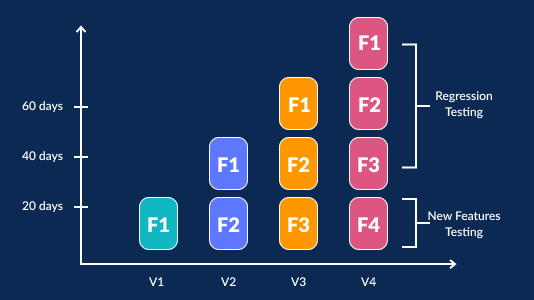
The below graph shows the importance of running a regression test.
When is Regression Testing Performed
Regression testing runs whenever production code changes: after new features, bug fixes, performance work, configuration updates, environment migrations, and before every release candidate ships. It also runs on changes you do not author: SaaS suites such as Oracle EPM patch on a fixed monthly schedule, so the regression pack follows the vendor's calendar.
Every scenario that involves alterations in the production code necessitates regression tests. All the following scenarios have the requirement for this testing.
- Addition of new functionality to the application - A website having login functionality. Users can use this functionality only with email. A new feature is to perform login using Facebook credentials.
- Requirement for change - An example is removing the Remember Password functionality, which was previously applicable.
- Fixing a defect - A Login page on which the Login button is not functioning correctly. A tester provides a report that there is a bug, which is that the Login button is broken. Once developers fix this bug, a QA engineer performs a test, ensuring that the Login button is working as expected. At the same time, the tester tests other functionality that is pertinent to the Login button.
- Performance issue fix - An example is that the home page needs five seconds to load. Now, this duration is decreased to two seconds.
- Modification in the environment - An example is when the database is changed from MySQL to Oracle.
- Long Development Cycles - Some software products require several months for completion. So for these products, regression tests are recommended daily. Some releases are done every week. In the case of such products, regression tests begin after the functional testing is over.
Regression Testing Examples: Four Worked Scenarios
Four regression testing examples follow: a shared pricing helper, an authentication refactor, a checkout pricing change, and a dependency upgrade with no application code change at all.
Each one shows the same move. Start from what changed, list the features that consumed it, and turn that list into regression test cases.
Take an order management product. One function triggers dispatch, acceptance, and confirmation emails when a user clicks the Dispatch, Accept, and Confirm buttons.
During development, the confirmation email starts failing. It sends, but the order total inside it is wrong.
A developer traces the bug to the order-total helper and patches it. Retesting the confirmation email confirms the fix. That is where most teams stop, and that is where the regression escapes.
The same order-total helper is called by the dispatch email, the acceptance email, the order summary page, and the invoice PDF.
A change to it can break any of them. Regression scope is not the confirmation email; it is every consumer of the code that changed.
That is the question impact analysis answers before a single test runs.
Regression Test Case Example
Here is what the resulting regression test cases look like for that one-line fix. Note that only the first row is retesting; everything below it is regression testing.
| ID | Module | Test steps | Expected result | Priority |
|---|---|---|---|---|
| RT-01 | Confirmation email | Place an order for 3 items with a coupon, click Confirm, open the email | Email total matches the cart total, including discount | P1 (retest) |
| RT-02 | Dispatch email | Mark the same order as dispatched, open the dispatch email | Total is unchanged from the confirmed order | P1 |
| RT-03 | Acceptance email | Accept the order, open the acceptance email | Total renders and matches the order record | P1 |
| RT-04 | Order summary page | Open the order in the account area | Subtotal, tax, and grand total match the confirmation email | P1 |
| RT-05 | Invoice PDF | Download the invoice for the order | Grand total matches the order summary page | P2 |
| RT-06 | Zero-total edge case | Place a fully discounted order, confirm it | Total shows 0.00, not a blank or negative value | P2 |
RT-06 is the case teams most often miss. A rounding or currency fix frequently breaks boundary values rather than the common path.
A regression suite covering only happy paths will pass while the defect ships.
Automating the Regression Test Cases
Once the cases are stable, tag them so the suite can be selected rather than run whole. In TestNG, groups do this cleanly:
public class OrderTotalRegressionTest extends BaseTest {

    @Test(groups = {"regression", "p1"})
    public void confirmationEmailTotalMatchesCart() {
        Order order = orders.placeOrder(3, "SAVE10");
        Email email = mailbox.waitFor(order.id(), EmailType.CONFIRMATION);
        Assert.assertEquals(email.total(), order.cartTotal());
    }

    @Test(groups = {"regression", "p1"})
    public void dispatchEmailTotalIsUnchanged() {
        Order order = orders.placeOrder(3, "SAVE10");
        orders.dispatch(order);
        Email email = mailbox.waitFor(order.id(), EmailType.DISPATCH);
        Assert.assertEquals(email.total(), order.cartTotal());
    }

    @Test(groups = {"regression", "p2"})
    public void fullyDiscountedOrderShowsZeroTotal() {
        Order order = orders.placeOrder(1, "FREE100");
        Email email = mailbox.waitFor(order.id(), EmailType.CONFIRMATION);
        Assert.assertEquals(email.total(), Money.of("0.00"));
    }
}
The suite file then decides what a given pipeline stage runs. A pull request build can run only p1, while the nightly build runs the full regression group:
<suite name="PR-Regression" parallel="methods" thread-count="10">
  <test name="critical-path">
    <groups>
      <run><include name="p1"/></run>
    </groups>
    <packages>
      <package name="com.shop.tests.regression"/>
    </packages>
  </test>
</suite>
This is the smallest useful version of regression test selection. The group tag is the selection signal, and Cypress parallel testing shows how parallel runs keep runtime flat as the suite grows.

Note: Only RT-01 in that table is retesting. Every row below it exists because the changed helper is shared, which is exactly what impact analysis is meant to surface.
Example 2: Login Flow After an Auth Refactor
A team replaces server-side sessions with tokens issued by an identity provider. The login screen is untouched, so the diff looks small.
The blast radius is not. Password reset, session expiry, role checks, and deep links all read the credential that just changed shape.
| ID | Module | Test steps | Expected result | Priority |
|---|---|---|---|---|
| AUTH-01 | Standard sign-in | Sign in with valid credentials, then refresh the page | User lands on the dashboard and stays signed in after the refresh | P1 |
| AUTH-02 | Invalid credentials | Sign in with a valid email and a wrong password | Same generic error text as before the refactor, with no hint about which field was wrong | P1 |
| AUTH-03 | Session expiry | Sign in, wait past the token lifetime, then open a protected page | Redirect to the login page, not a blank screen or a server error | P1 |
| AUTH-04 | Password reset | Request a reset link, set a new password, sign in twice | The new password works and the old one is rejected | P1 |
| AUTH-05 | Role-based access | Sign in as a viewer and open an admin-only URL directly | Access is denied and no admin data is returned in the response body | P1 |
| AUTH-06 | Deep link after sign-in | Open a protected URL while signed out, then sign in | User arrives at the originally requested URL, not the default dashboard | P2 |
| AUTH-07 | Sign out everywhere | Sign in on two browsers, then sign out of one | The second session is rejected on its next request | P2 |
AUTH-05 is the row worth arguing about. Authorization usually reads the same credential the login flow issues, so changing how a user proves identity quietly changes how the app decides what they may see.
None of these cases test the new auth code. They test the features that consumed the old one.
Example 3: Checkout After a Pricing Change
The pricing service moves from a flat tax rate to region-based tax. Product pages and the cart page both render correctly in the first manual check, so the change looks contained.
The regression cases below target the systems that recompute the same number somewhere else in the flow.
- Cart totals - add three items across different tax categories, then confirm subtotal, tax, and grand total agree with what the pricing service returned.
- Coupon stacking - apply a percentage coupon and a fixed-amount coupon together, and confirm the order they are applied in has not changed.
- Free-shipping threshold - order one cent below and one cent above the threshold, because a tax change moves the value the threshold is compared against.
- Currency rounding - place an order in a currency with no minor units, such as JPY, and confirm no decimal places appear anywhere in the flow.
- Payment capture - confirm the amount authorized at the gateway matches the amount shown at checkout rather than the pre-tax total.
- Refunds - refund a discounted order and confirm the refunded amount matches what was charged, since refund logic usually recomputes instead of replaying.
- Receipts and reports - confirm the confirmation email, the invoice PDF, and the revenue export all show the same grand total for that order.
Pricing changes rarely break the checkout page itself. They break refunds, accounting exports, and reports, which is where a bad total costs money quietly for a month.
Example 4: A Dependency Upgrade With No Code Change
A bot raises a pull request bumping the date-handling library one minor version. No application file changes, so impact analysis has nothing to read.
That is exactly why this example belongs in a regression suite discussion. The regression scope here is behavioural, not textual.
- Stored dates - open a record created before the upgrade and confirm the displayed timestamp is byte-for-byte what it was.
- Timezone boundaries - check a record created at 23:30 in a UTC+13 zone, where a parsing change shifts the calendar day.
- Daylight saving - run a recurring job across a DST transition and confirm it fires once, rather than twice or not at all.
- Relative filters - run a report for the last 30 days and compare the row count against the pre-upgrade baseline.
- Serialization - confirm dates in API responses keep the same format, since the clients parsing them are outside your deploy.
Dependency and configuration updates are the case where selection has no signal to work from. A full pass on a schedule is what covers them.
How Do You Do Regression Testing, Step by Step
To do regression testing, identify what changed, run impact analysis to find every module that consumes it, select and prioritize the already passing cases covering those modules, split them across manual and automated runs, execute in priority order, then triage failures and fold new cases back into the suite.
The eight steps below are the sequence, and the sections after the list expand the ones teams get wrong most often. If you are still deciding whether your team needs a suite at all, start with what regression testing is and how to do it.
- Identify what changed - pull the diff for the release, then add configuration edits and dependency bumps, which break behaviour without appearing in application code.
- Run impact analysis - map every module, service, job, and report that consumes the changed code. That map is the outer boundary of your scope.
- Select the cases - take the already passing cases covering the impacted modules, add the failed case that triggered the fix, and drop cases for features that no longer exist.
- Prioritize them - rank by revenue impact, usage volume, and defect history, so a run that gets cut short still covers what matters.
- Split manual from automated - automate the stable and repeatable cases, and keep human effort for the areas that just changed and the exploratory checks around them.
- Set the time budget - decide how long the pass may take at each pipeline stage before you schedule it, not after it overruns.
- Execute in priority order - run the high-priority group first so blocking failures surface in the first few minutes instead of the last.
- Triage and feed back - fix or quarantine every failure, and add a regression case for each defect that reached production.
Every organization uses a different strategy or Regression Test Suite. Nonetheless, the majority adhere to a few basic steps, which are as follows:
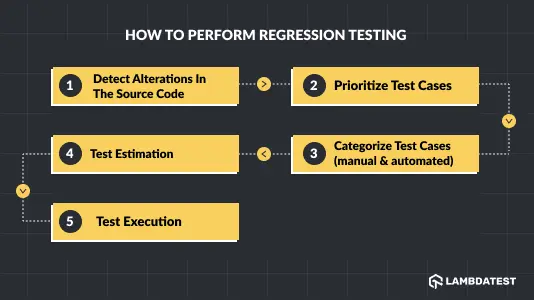
Detect alterations in the source code
Carefully find and examine source code optimizations and alterations in this step. Subsequently, a comprehensive evaluation of the impacted components and their influence on the key elements of the product are conducted.
Prioritize Test Cases
Choose specific test cases that cover the critical functionalities of the application. These test cases should represent typical user actions and how they interact with the software. Prioritize the most important test cases based on their impact on the system.
Test Estimation
Test estimation in regression testing involves determining how long it will take to execute the entire suite of test cases. This helps in planning resources and schedules effectively for a comprehensive regression testing process.
Categorize test cases (manual & automated)
Testers should select between manual and automated testing based on the number of test cases once they are done with time estimation.
Test Execution
Finally, all test cases are executed in the order of priority to find defects and ensure that the application is working correctly. Test execution is the phase where pre-defined test cases are run against the updated codebase to ensure that new changes haven't introduced any regression issues.
How Do You Automate Regression Testing
Automate regression testing by promoting only stable, deterministic cases into a tagged suite, wiring a trigger to each pipeline stage so the right subset runs, executing it in parallel across the browsers you support, and funding the maintenance that keeps locators and test data current.
Automation is not a switch you throw across the whole suite. Three decisions carry most of the outcome: what goes in, when it runs, and who keeps it alive.
Which Regression Tests Should You Automate
A case earns automation when it will be run many times and its result can be asserted without a judgement call.
- Cases that run on every build - the same steps repeated each release are where the payoff compounds.
- Cases with an assertable outcome - a value you can compare, not an appearance somebody has to eyeball.
- Revenue and access paths - sign-in, checkout, search, and billing, where a regression is a real incident.
- Cases that must repeat across browsers and devices - the multiplication is what makes manual coverage impossible.
- Data-driven cases - one script driven by many input rows is where a framework starts paying for itself.
Leave three groups manual for now: interfaces still being redesigned, one-off migration checks, and anything whose expected result is still under discussion. Automating an unsettled requirement means writing the test twice.
When Should the Automated Suite Run
The trigger is where selection is enforced. Group tags like the ones in the TestNG example above are what let a pull request build and a nightly build run the same suite differently.
- On every pull request - the priority one group only, scoped by impact analysis, under a hard time budget.
- On merge to the main branch - the full suite in parallel, gating the release candidate.
- On a nightly schedule - the full suite plus the cross-browser and cross-device matrix, off the critical path.
- On dependency update pull requests - a bot-raised upgrade deserves the same gate as a human-authored change.
- Before a release - the full pass plus manual exploratory testing around whatever changed.
Target runtimes for each of those gates are in the CI/CD section further down. Treating regression as a standing gate rather than a release-week event is the substance of continuous testing.
How Do You Keep an Automated Suite Maintainable
Most automation projects fail here rather than at the framework choice. A suite is code, and it rots at the same rate as the application it tests.
- Fund maintenance as standing work - budget it per sprint the way you budget the features that keep breaking the tests.
- Prefer stable locators - dedicated test attributes survive a redesign, while CSS paths break when somebody moves a container.
- Isolate test data - a case that depends on a record another case created will fail the moment you run in parallel.
- Quarantine flaky cases the day you spot them - keep them running in a separate group, and never leave them inside a merge gate.
- Delete tests for deleted features - retiring dead cases is the only maintenance step that makes a suite faster.
- Add a case per escaped defect - every bug that reached production should leave a regression test behind it.
Regression Testing Tools and Frameworks
No single tool covers a regression suite end to end. You pick a driver for the application type, then an execution layer that runs the suite fast enough to gate a release.
The options below are the ones most regression suites are actually built on.
Selenium: a leading tool for cross-platform regression testing, specializing in web application automation. It supports data-driven testing and suits large teams with experienced testers.
Playwright: Playwright testing is a flexible tool that works with several browsers and is useful for regression testing web applications.
Puppeteer: Similar to Playwright, Puppeteer testing is proficient at doing regression testing on web applications in a variety of browsers.
Appium: Appium mobile testing plays a key role in regression testing iOS and Android apps to guarantee maximum functionality.
TestMu AI: a cloud test execution platform built around the constraint that defines regression testing at scale, which is suite runtime.
It runs your existing Selenium, Cypress, and Playwright suites across 10,000+ browser and OS combinations in parallel.
The point is that adding regression cases stops adding wall-clock time. Suite growth becomes a cost decision rather than a release-blocking one.
- Automation Cloud - runs regression suites in parallel across 10,000+ environments, so runtime stays flat as cases grow.
- HyperExecute - orchestrates and distributes test execution, cutting the full-suite pass that gates a release candidate.
- SmartUI - catches visual regressions by diffing screenshots against a baseline, covering what assertions miss.
- KaneAI - authors and updates regression cases from natural language, lowering the maintenance cost of a growing suite.
- Test Intelligence - flags flaky tests and predicts likely failures, so red builds get triaged instead of re-run.
Setup and framework-specific configuration are covered in the getting started with TestMu automation documentation.
Katalon: If your user community for test automation is large, this is the preferred choice among the tools. It is an all-in-one platform. You need not have a complicated setup for this tool. It is a readymade framework that renders codeless and free solutions.
Watir: The complete name is web application testing in Ruby. The Ruby programming code is used to create this open-source library. Using this, you can write tests that can be easily read and maintained on a flexible, lightweight UI. Watir endorses disparate user interaction abilities for website testing, such as validating texts, entering data in forms, and clicking links.
Apache JMeter: This is open-source software for test automation. It can measure test performance and load functional test behaviors. It can render an entire Regression test suite for end users. It supports performance and load testing on disparate servers, applications, and protocols.
Ranorex Studio: This has an inbuilt Selenium WebDriver. It can be used for automated regression testing of mobile, web, and desktop apps. The studio is inclusive of complete IDE plus tools to perform codeless automation.

What Are the Regression Testing Techniques
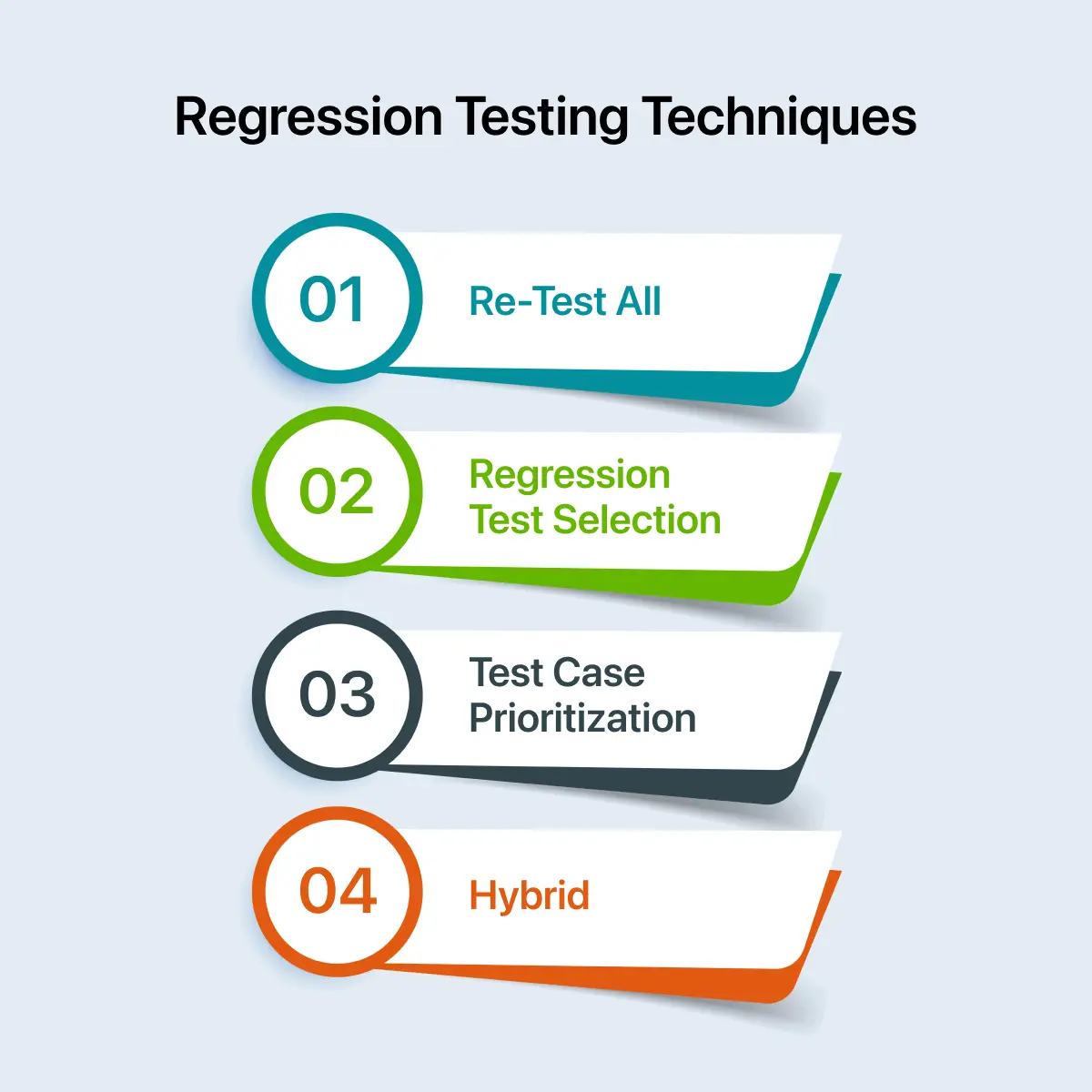
The regression testing techniques are re-test all, regression test selection, and test case prioritization, plus a hybrid combining selection with prioritization to balance coverage against runtime.
The following are techniques used in regression tests: Test case prioritization, Regression test selection, Re-test all, and Hybrid.
Re-Test All
You have to re-execute all the test cases in the suite, ensuring the code alteration has not introduced any bugs.
Re-test all needs more time and resources than the other techniques, which makes it the most expensive.
However, it is the most secure method because it ensures that all the bugs have been identified and fixed. This method is generally applicable when there is a major update in the operating system, or the application is modified for a new language or platform. ERP upgrades are a common example, where the difference between ERP configuration and customization decides whether a vendor update needs a targeted pass or this full re-test cycle.
Regression Test Selection
Based on the code modification in the module, you can choose some test cases from the test suite. Then, you re-execute these selected test cases. The entire test suite need not be re-executed. The test cases are categorized into two types: obsolete test cases and reusable test cases.
In upcoming regression cycles, skip the obsolete test cases and execute the reusable ones.
You are implementing only the relevant cases, which are limited in number. That decreases the time and effort the regression pass costs.
Test Case Prioritization
Every test case is assigned a priority based on its criticality, its impact on the product, and how frequently the functionality is used.
Cases covering newly added functionality and customer-facing areas fall into the high-priority category.
High-priority cases execute first, medium-priority follow, and low-priority run last.
Prioritization pays off most when the suite is longer than the CI window.
Ordering by risk means the failures that would block a release surface in the first few minutes, not at the end of a two-hour run.
Hybrid
This technique is a blend of test case prioritization and regression test selection. The complete test suite is not re-executed. Based on priority, you have to select test cases for re-execution.
Regression Testing vs Retesting: What's the Difference
Retesting re-runs test cases that failed, confirming a specific bug is fixed, while regression testing re-runs cases that already passed, confirming the fix did not break anything else.
The short answer: retesting re-runs test cases that failed, confirming a specific bug is fixed.
Regression testing re-runs cases that passed, confirming the fix broke nothing else. Retesting is scoped to the defect; regression testing covers everything the changed code touches.
Here's a detailed comparison between retesting and regression testing:
| Retesting | Regression Testing |
|---|---|
| Ensures bug-free and flawless execution of test cases after fixing bugs. | Ensures code functionality remains unaffected after adjusting or modifying the application. |
| Performed for failed test cases. | Performed for passed test cases. |
| Fixes the original bug in the build. | Tests for unintended changes or outcomes in the code. |
| Automated retesting is not possible. | automated regression testing is possible. |
| Also known as planned testing. | Also known as generic testing. |
| Usually cannot be performed in parallel with regression testing due to high priority. | It can be performed in parallel with retesting in some cases, based on lower priority and resource availability. |
| Doesn't include bug verification as a part of testing. | Includes bug verification as a part of testing |
| Performed across all software releases. | Performed across a few latest versions of the software. |
| Less time-consuming. | More time-consuming as it involves a detailed analysis of previous software versions' issues. |
How Do You Define a Regression Test Case
Define a regression test case by covering frequently failing defects, recently fixed areas, priority one and two paths, core features, integration points, and every module the code change touched.
Ensuring the smooth release of software involves selecting the correct test cases while performing regression testing. New bugs can even arise after making changes or fixing the code. Hence, performing regression testing with the correct test cases is crucial before launching the product.
Given below are some types of test cases that you should include in your regression test suite:
- Frequently failing defects - cases covering issues that recurred in the past. Those areas are where bugs resurface.
- Recent testing defects - cases addressing issues found in the most recent test phases, confirming the fixes held and caused nothing new.
- Priority 1 and Priority 2 test cases - With this test case, developers can prioritize the important test cases that check critical parts or features of the product. These areas need thorough testing to maintain the product's quality.
- Core features or functionalities - This category includes test cases focusing on the core features or functionalities of the product. These factors play a vital role for the product to work properly.
- Integration test cases - The integration test cases choose test cases covering how different parts of the product work together. This ensures that everything fits together nicely.
- Complex test cases - Include test cases that test out tricky situations, special cases, or challenging inputs. These help find any potential issues in the more complicated parts of the software.
- Test cases for modified modules - Pick test cases that specifically target the parts of the product that have been recently changed. This makes sure that the changes didn't introduce any new problems.
- Frequently used functionalities - Consider test cases that cover the things that users do most often with the product. These are the areas where any issues can have a big impact on the user experience.
By including the above-suggested test cases, developers can improve their chances of finding bugs early on and ensure a smooth release of their product.
What Are the Types of Regression Testing
The types of regression testing are complete, partial, unit, corrective, selective, and re-test regression, each scoped to how widely a given code change reaches across the application's modules.
You can implement various regression tests depending on the feature or update you aim to deploy. However, it is crucial to understand the several regression test types to choose the right one.
Regression testing is of the following types.
- Complete or Full Regression
- Partial Regression
- Unit Regression
- Corrective Regression
- Selective Regression
- Re-test Regression
Complete or Full Regression
Opt for this type when code changes across many modules and the impact on other modules is unknown.
The decision then is to check the entire product, detecting any further modifications originating from the changed code.
For a second product release, a client may request four or five new features plus fixes for defects from the first release.
The testing team runs impact analysis and concludes the entire product needs testing. In short, this type means testing all altered and old features.
Let us consider a Java application with Java Virtual Machine (JVM) as the root file. The Java application must be tested if a change is essential for the JVM file.
Partial Regression
After developers make some code changes, the unit of this changed code is integrated with the existing (that is, unchanged) code. You have to verify whether the changed code works as per expectations.
Unit Regression
You have to do this while the unit testing phase is in progress, with the code of a unit tested in isolation.
The goal is testing the unit at an individual level, so all dependencies on the unit under test are blocked.
Corrective Regression
Corrective regression is one of the simpler tests and requires less effort.
It involves zero changes to the existing codebase while new functionality is added. You test existing functionality with its current cases rather than developing new ones.
Selective Regression
Selective Regression test determines the impact of the existing codebase and both new and existing code. Common elements like variables and functions are implemented into the application to identify results without affecting the entire process.
Re-test Regression
Re-test regression involves re-executing all the test cases to ensure no defects due to code alterations in the software. This type of testing needs more manual effort from the QA side.
Note: Types and techniques are different axes. A type describes how much of the product you retest; a technique describes how you choose which cases actually run.
How Is AI Changing Regression Testing
AI changes regression testing through predictive test selection, self-healing locators, flaky-test detection, and natural-language authoring, all aimed at cutting suite runtime and maintenance cost.
Worth separating two things that share the phrase AI regression testing. One is using models to run your existing suite better, which is what this section covers first.
The other is regression testing a product feature that is itself model-backed, where the output is not deterministic. That problem is different enough to get its own subsection below.
The oldest problem in regression testing is that the suite only ever grows. Every release adds cases, and every case runs on every build afterwards.
Beyond a certain size, running everything stops being affordable, and selecting correctly becomes the whole game.
Machine learning is now used to make that selection.
Rather than mapping code to tests by hand, a model trains on historical build data to predict which tests are likely to fail for a change.
The published results are strong. In Predictive Test Selection, Machalica et al. report that a machine-learned model cut total testing infrastructure cost by half.
It still reported over 95% of individual test failures and over 99.9% of faulty changes back to developers.
Google reached a similar conclusion from the opposite direction.
Their analysis in Taming Google-Scale Continuous Testing found that very few tests ever fail, and that code recently modified by more than three developers breaks more often.
That second finding is the practical one. Ownership churn is a usable risk signal, and you do not need a trained model to act on it.
Prioritizing tests that cover files with many recent contributors is something a team can do this sprint.
Where AI Helps in a Regression Suite
- Predictive test selection - scoring which tests a change is likely to break, so pull requests run a subset.
- Self-healing locators - when a UI change breaks a selector, the runner falls back to secondary attributes. This attacks maintenance cost.
- Flaky test detection - clustering failures across runs to separate genuine regressions from non-deterministic noise, so teams stop ignoring red builds.
- Natural-language authoring - generating and updating regression cases from plain-English intent, which lowers the cost of keeping the suite current.
- Visual comparison - diffing screenshots to catch layout regressions assertions never see. See visual regression testing for baselines and thresholds.
One caution worth stating plainly: predictive selection trades completeness for speed. A model that skips 60% of your suite will eventually skip the test that mattered.
Most teams run selection on pull requests and a full pass nightly, so the safety net still exists.
Our guide to AI in regression testing covers how these pieces fit together in a working pipeline.
How Do You Do Regression Testing for LLM Features
LLM regression testing compares a candidate build against a frozen evaluation set and scores it on properties rather than exact strings, because the same prompt can return different wording on two consecutive calls.
Every technique above assumes a case either passes or fails on the same input. A model-backed feature breaks that assumption, so string equality assertions go red for reasons that have nothing to do with a regression.
Two things have to be redefined: what counts as a change, and what counts as a pass.
Start with the change. These are the inputs that can regress an LLM feature, and none of them necessarily show up in a code diff.
- The prompt template - a wording edit is a behaviour change with no compiler to catch it.
- The model version - a provider updating the model behind an endpoint changes your outputs with no deploy on your side.
- Decoding parameters - temperature, top-p, and maximum tokens move the output distribution.
- Retrieval context - re-indexing or re-chunking a knowledge base changes what the model is handed to work with.
- Tool and function definitions - renaming an argument changes which calls the model chooses to make.
- Guardrails and filters - a stricter safety filter turns previously valid answers into refusals.
Now the pass criterion. The working pattern is a versioned evaluation set that lives alongside the prompt and acts as the regression suite.
- Freeze the inputs - a fixed set of cases, versioned with the prompt, so two runs are comparable at all.
- Assert on properties - valid JSON against a schema, required entities present, forbidden claims absent, the right tool called with the right arguments, output inside a length bound.
- Compare to a baseline - record the pass rate of the last known-good release and treat a drop against it as the regression signal, rather than judging a run in isolation.
- Pin what the provider lets you pin - the model version, temperature at zero where the task allows it, and a seed if one is exposed.
- Repeat each case - run it several times and compare distributions, since pinning parameters narrows variance without removing it.
- Keep the ordinary tests ordinary - auth, rate limits, caching, streaming, and error handling around the model are conventional software and belong in the conventional suite.
Drift is the part teams underestimate. Real user inputs move over time, so an evaluation set frozen a year ago stops representing production even when the pass rate looks healthy.
Refresh it on a schedule and keep the retired cases, so historical comparisons stay meaningful.
One caution on reading the numbers: a two-case swing on a 50-case evaluation set is noise, not a regression. Set the margin from your sample size before you gate a release on it. Deeper coverage of harnesses and metrics is in LLM testing, and multi-step tool-calling systems are covered in AI agent testing.
How Does Regression Testing Fit Into CI/CD
In CI/CD, regression testing runs as staged gates: unit tests pre-commit, a prioritized subset on pull requests, the full suite post-merge, and the browser matrix nightly, each with its own budget.
In a CI/CD pipeline, regression testing is not one event. It is a set of gates, each with a different budget and a different tolerance for missing something.
| Stage | What runs | Target runtime | On failure |
|---|---|---|---|
| Pre-commit | Unit tests for the changed module | Under 2 minutes | Blocks the commit |
| Pull request | P1 regression group, selected by impact analysis | Under 10 minutes | Blocks the merge |
| Post-merge | Full regression suite, run in parallel | Under 30 minutes | Blocks the release candidate |
| Nightly | Full suite plus cross-browser and cross-device matrix | Hours, off the critical path | Raises a triage ticket |
| Pre-release | Full suite plus manual exploratory around changed areas | Scheduled | Blocks the release |
The runtimes matter more than the stage names. Once a pull request gate exceeds roughly ten minutes, developers start context-switching away, and the feedback loop that justified the suite stops working.
Two levers keep those numbers in range. Selection reduces how many tests run, and parallel execution reduces how long a given set takes.
Selection alone eventually hits its accuracy limit, so most teams need both.
What Are the Challenges in Regression Testing
The main regression testing challenges are suite cost and runtime, rising case complexity, ongoing maintenance, flaky tests destroying trust in results, and knowing which tests a change requires.
Regression tests help unearth bugs while introducing new features or in an existing codebase and mitigate app failures and performance bottlenecks.
However, while running a regression test, the following are a few challenges testers face.
Test suite cost and time: A regression test suite needs continuous improvement when deploying new features. The number of test cases keeps growing, and new tests must run alongside older ones on every build.
Incorporating parallel testing is the usual fix, running test cases concurrently across multiple browsers and OS combinations so that suite growth costs money rather than wall-clock time.
Complex test cases: As the software project becomes more intricate, the number of test cases and their complexity also rise, consuming a lot of time and resources.
Maintenance: As the application size grows, the complexity of test cases in regression test suites increases. Therefore, proper maintenance is crucial to tackling the complexity and test execution time.
Flaky tests: a test that passes and fails on the same code destroys the signal the suite exists to provide.
Once a team learns to re-run red builds instead of investigating them, genuine regressions start slipping through.
Quarantine flaky cases into a separate group rather than deleting them, then fix them on a schedule. A regression suite that developers do not trust is worse than a smaller one they do.
Knowing what to run: Without impact analysis, the only safe choice is to run everything, which is exactly the option teams cannot afford. Weak dependency mapping is what forces the brute-force approach.
Best Practices for Regression Testing
Most regression suites do not fail because the tests were written badly. They fail because nobody decided what the suite was allowed to cost. These practices are ordered by how much they change that.
- Tag every case with a priority when you write it. Retrofitting priorities across a 2,000-case suite is a project nobody funds.
- Set a time budget per pipeline stage. Give the pull request gate ten minutes, then treat exceeding it as a defect.
- Run impact analysis first. Knowing which modules consume the changed code turns selection from guesswork into a decision.
- Quarantine flaky tests. Move unstable cases to a separate group, keep them running, and fix them on a schedule.
- Delete obsolete cases deliberately. Removing tests for features that no longer exist is the only maintenance step that makes a suite faster.
- Keep a full pass somewhere. If pull requests run a subset, the nightly build must run everything. Selection needs a safety net.
- Cover the browser and device matrix. A regression that only appears in Safari passes every assertion you run elsewhere.
- Scale execution horizontally before trimming coverage. Cutting tests to save time is a coverage decision disguised as a performance one.
The number of test cases will grow as your application becomes more complex, so the infrastructure needs to scale with the suite rather than cap it. Reviewing common testing patterns helps here, since that guide walks through 11 design patterns with code examples and shows how to fix the ice cream cone anti-pattern that fast-growing regression suites slide into.
Subscribe to our TestMu AI YouTube Channel to get the latest updates on tutorials around Selenium automation, Cypress testing, and more.
Conclusion
For features with a model in the path, the objectives and error budgets around them are covered in AI reliability engineering. Regression testing is the check that keeps working software working. Everything else in this guide, the types, the techniques, the tooling, exists to answer one question: after this change, what else might have broken?
The teams that do it well are not the ones with the largest suites.
They are the ones who decided what the suite costs, tagged cases so selection is possible, quarantined flaky tests, and kept a full pass off the critical path.
Start smaller than feels safe.
A prioritized set covering the paths that generate revenue, running on every pull request in under ten minutes, catches more real regressions than a suite everybody skips.
From there, grow coverage and add environments. Selection keeps the run list short, and parallel execution keeps the clock flat, which is what lets the suite expand without the pipeline slowing down.
Testμ 2026 had a session on exactly this, AI-Powered Impact-Based Testing for Faster Safer Releases.
Author

Irshad Ahamed
Blogs: 11


Irshad Ahamed is a Technical Writer and Information Architect with over 4 years of experience working across notable companies like Amazon, IBM, and Symantec. He specializes in crafting high-quality documentation, technical writing, and content strategies for software development, APIs, and process documentation. Irshad’s expertise spans across product documentation, creating instructional content, and collaborating with cross-functional teams to ensure clear, concise, and easily understandable outputs. His certifications include PMI-ACP and Camtasia 2019 Essentials.
Reviewer

Himanshu Sheth
Reviewer
Himanshu Sheth is the Director of Marketing (Technical Content) at TestMu AI, with over 8 years of hands-on experience in Selenium, Cypress, and other test automation frameworks. He has authored more than 130 technical blogs for TestMu AI, covering software testing, automation strategy, and CI/CD. At TestMu AI, he leads the technical content efforts across blogs, YouTube, and social media, while closely collaborating with contributors to enhance content quality and product feedback loops. He has done his graduation with a B.E. in Computer Engineering from Mumbai University. Before TestMu AI, Himanshu led engineering teams in embedded software domains at companies like Samsung Research, Motorola, and NXP Semiconductors. He is a core member of DZone and has been a speaker at several unconferences focused on technical writing and software quality.


Regression Testing FAQs
Did you find this page helpful?
More Related Blogs
TestMu AI forEnterprise
Get access to solutions built on Enterprise
grade security, privacy, & compliance
- Advanced access controls
- Advanced data retention rules
- Advanced Local Testing
- Premium Support options
- Early access to beta features
- Private Slack Channel
- Unlimited Manual Accessibility DevTools Tests