

Power Your Software Testing with AI Agents and Cloud
The Native AI-Agentic Cloud Platform to Supercharge Quality Engineering. Test Intelligently and Ship Faster.


- TestMu AI (Formerly LambdaTest)
- /
- Blog
- /
- Verification vs Validation: Know The Differences in Testing
Verification vs Validation: Know The Differences
Explore the crucial roles of verification & validation in software quality, their key differences, and best practices to boost reliability.
Last Updated on:
On This Page
- Verification vs Validation: Key Differences
- What is Verification?
- Advantages of Verification
- When to use Verification
- Phases of Verification
- Methodologies of Verification
- Best Practices of Verification
- What is Validation?
- Advantages of Validation
- When to use Validation?
- Testing Involved in the Validation Process
- Phases of Validation
- Methodologies of Validation
- Best Practices of Validation
Verification asks whether you are building the product right. Validation asks whether you are building the right product. Both words get used interchangeably in standups, and the confusion costs teams real money when a technically flawless build turns out to solve the wrong problem.
The distinction matters most at the boundary. A build can pass every unit test, every type check, and every code review, and still fail the person it was written for, because all of those checks confirm the code matches the spec rather than confirming the spec was right. Both processes sit inside the Software Development Life Cycle.
TL;DR
Verification checks a product against its specification without running it, using reviews, walkthroughs, and inspections. Validation checks the running product against what the user actually needs, using executed tests. Verification asks "are we building it right"; validation asks "are we building the right thing".
How Do Verification and Validation Differ?
- Verification: A static process. Requirements documents, design specs, and code are reviewed and inspected against the spec, without executing the software. It answers whether the artifact matches what was agreed.
- Validation: A dynamic process. The built software is executed against real scenarios to confirm it meets user needs. It answers whether the working product actually solves the problem it was commissioned for.
- Cost of skipping verification: Defects survive into code, where they are more expensive to remove than they would have been in a design review.
- Cost of skipping validation: The team ships a product that passes every internal check and still fails its users, because nobody tested the assumption behind the requirement.
Which One Do You Need?
Both, at different points. Verification runs continuously during development through reviews and static analysis. Validation runs once something executable exists, which is where automated end-to-end testing across real browsers and devices does the work.
Verification vs Validation: Key Differences
Verification confirms the software was built to its specification. Validation confirms the specification was right in the first place. Verification is static and reads artifacts without running them; validation is dynamic and always executes the product. In every phase of the lifecycle, verification comes first.
| Aspect | Verification | Validation |
|---|---|---|
| Definition | Evaluating the work products of a development phase against the requirements agreed for that phase. | Evaluating the finished product against the business and user needs it was commissioned to meet. |
| Core question | Are we building the product right? | Are we building the right product? |
| Nature | Static. Artifacts are read and inspected. | Dynamic. The product is executed. |
| Code execution | Not required. | Always required. |
| Techniques | Reviews, walkthroughs, inspections, desk-checking, and static analysis. | Unit, integration, system, regression, cross browser, and acceptance testing. |
| Performed by | Developers, reviewers, and QA, working on documents and source code. | QA and end users, working on the running application. |
| Timing in the SDLC | Throughout development, at the close of each phase. | Once an executable build exists, and again before release. |
| Target artifact | Requirement specs, design documents, architecture, source code, and test cases. | The built application a customer will actually use. |
| Defects it finds | Specification and design defects, caught in the phase that introduced them. | Behavioral defects that only surface when the product runs. |
| Cost of a caught defect | Lowest. The defect never reaches code. | Higher. The defect is already implemented and has to be reworked. |
| Environment needed | No specific device, browser, or operating system. | Real browsers, devices, and operating systems that match production. |
| Output | Reviewed and signed-off artifacts. | A tested build carrying a pass or fail verdict and its evidence. |
| Worked example | Reviewing the login design document and finding the spec never defines what happens after repeated failed attempts. | Running the built login form and finding the fifth failed attempt does not lock the account. |
The last row is the clearest argument for running both. The review catches a requirement nobody wrote down. The executed test catches a requirement that was written down and then implemented incorrectly. Neither check finds the other one's defect, which is why treating them as interchangeable leaves a gap in the middle.
The sections below break each process down on its own terms: what it covers, when to run it, the methods involved, and the practices that keep it useful.
What is Verification?
Verification is the process in software testing where you check that the software application is developed in the right way and shows correct functionality without any bugs.
In simple terms, verification ensures that developed software applications fulfill the Software Requirement Specification (SRS). Here, the SRS functions as the input for the software development process. Verification ensures that the code logic of the software application is in line with the specification.
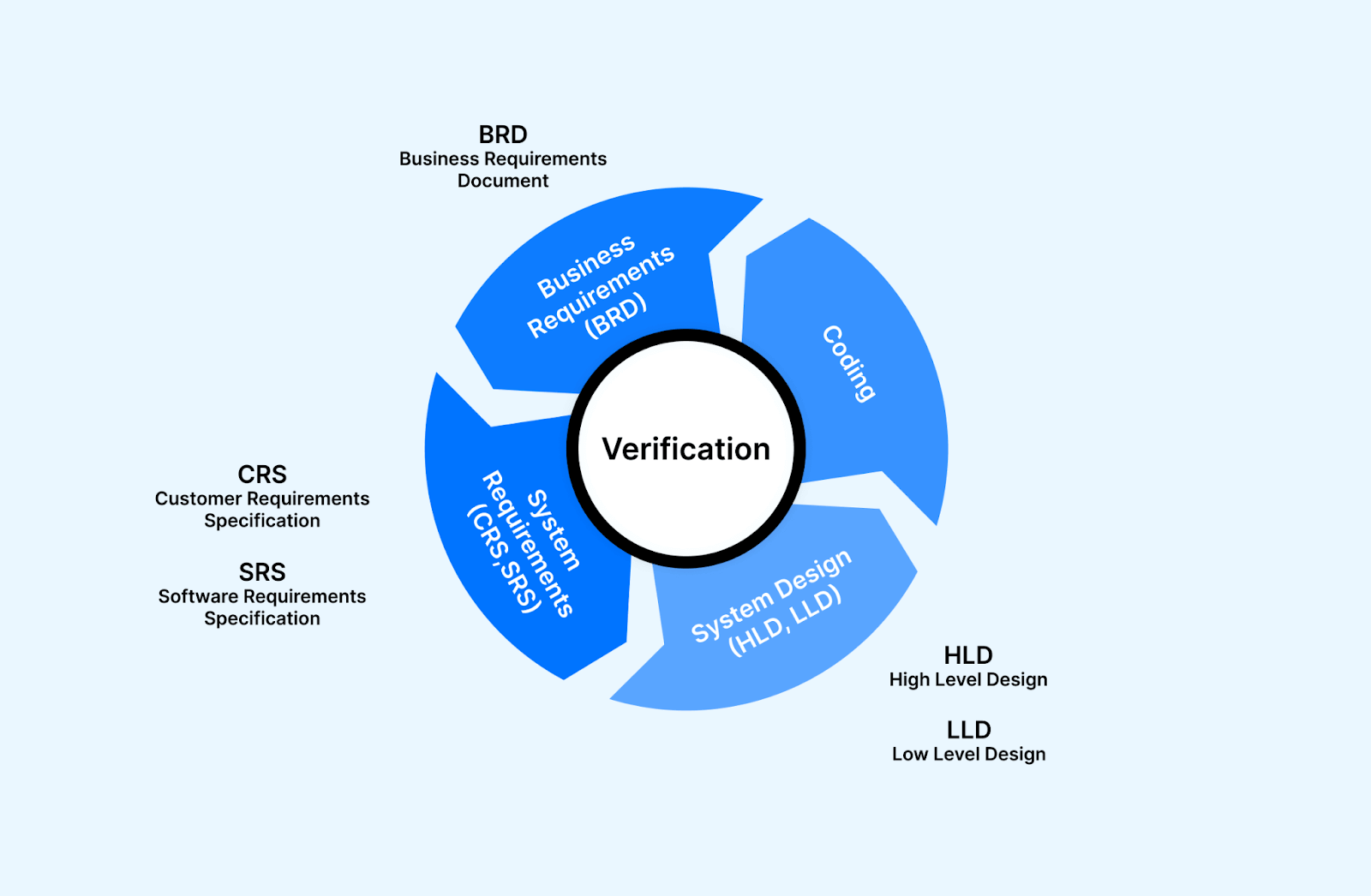
Verification is static testing, which means that the process is focused on verifying the software artifact without running the code or the software application. It is mainly executed by checking documents, designs, and other artifacts. The activities involved here include technical review, code review walk-through, and inspection.
Some of the crucial features of the verification method involve the following:
- The key components of verification include code review, walkthrough, inspection, specification analysis, and design.
- The documents reviewed in the verification method include requirement specifications, database table designs, test cases, test scenarios, traceability matrix, ER diagrams, design blueprints, database table design, etc.
- Verification helps ensure development elements, including software, hardware, documentation, and human resources, align with team-specific standards and protocols.
- It ensures that system design and architecture are correctly architectured and bug-free.

Note: Run your automated tests across 3,000+ browser and OS combinations. Try TestMu AI Today!
Advantages of Verification
The verification process in software testing involves several advantages that highlight its significance in Software Development Life Cycle. It is important for you to know about it so that the quality of the software application is maintained. Here are some advantages of the verification process:
- Verification ensures that software applications are developed correctly and in line with specified requirements.
- It helps validate the design and implementation, adhere to the functionality, and meet the desired quality standards.
- This process checks each component and module of the software applications and ensures that software applications work as intended.
- Verification activities are performed early in the software development process; potential bugs are identified and fixed quickly.
- If you perform verification activities at each stage of the development process, you can get timely feedback and insight on the software’s progress and areas that require improvement.
- Verification actions, including testing and analysis, allow you to identify bugs immediately, which gives the team the option to plan for their resolution.
- It helps keep the software application aligned with customer and business requirements at every stage of software development.
- Verification involves assessing software artifacts, such as requirements, designs, and specifications, to ensure they align with the intended objectives and functionality.
When to use Verification
It’s important to run verification tests at each stage before implementing any new feature in the development process.
Let’s take an example of a button called “Proceed to Pay.” Before creating this button, verification tests would examine all the requirements established during the initial idea generation and brainstorming phases.
For instance, the documentation specifies that the button should be yellow with red lettering, no larger than 9mm X 9mm, and always visible in the top right corner of every product page on the website. Additionally, another button with the same text, color, and dimensions should be placed below each product on the page.
Before developing the button, you must review the design and requirements documents and ensure all the specifications are listed. This step is necessary to avoid overlooking guidelines or missing important details.
By performing these verification tests before working on every feature or element on the page, you can ensure that they meet the SRS and follow the agreed-upon design. This helps maintain consistency, adhere to guidelines, and prevent potential issues from arising during development.
In the next section of this blog on verification vs validation, let us understand the phases involved in verification activities.
Phases of Verification
When verifying a software application during its development, there are three main phases of verification testing to go through:
- Requirements Verification: This phase involves confirming that the requirements for the software application are complete, clear, and accurate. Before moving into the design phase, you must very carefully verify the business or end-user requirements to ensure they are correct and detailed.
- Design Verification: In this phase, you have to check whether the design of the software applications aligns with the design specifications provided. They assess various aspects such as layouts, prototypes, navigational charts, architectural designs, and logical database models. The goal is to verify that the design meets both the functional and non-functional requirements specified for the application.
- Code Verification: During code verification, you have to check the code of the software application for completeness, correctness, and consistency. You must review the development artifacts, including the source code, user interfaces, and physical database model, to ensure they align with the design specifications. This phase focuses on validating that the code implementation accurately reflects the intended design.
By going through these three verification phases, you can ensure that the software application meets the specified requirements, adheres to the design specifications, and has complete, correct, and consistent code.
This comprehensive verification process helps identify any potential issues or deviations early on, leading to a higher-quality software application.
The next section of this blog on verification vs validation discusses methodologies of the verification process.
Methodologies of Verification
Verification methodologies include formal reviews, walkthroughs, and inspections of software artifacts. As part of it, code reviews and documentation walkthroughs are performed, allowing for complete verification and identification of errors and inconsistencies. The following are some of the different methodologies used in the verification process, which help ensure the quality of software applications:
- Reviews: The review method may be formal or informal, which mainly depends on the complexity of the software application being reviewed. Here, you must evaluate the software artifacts like source code, requirements, and test cases to give feedback and identify potential issues.
- Walkthrough: In the walkthrough method, you focus on understanding the content, identifying errors, gathering feedback, and gaining insights. In other words, the developers of the software applications guide stakeholders through software code and different artifacts.
- Inspection: It is a formal method of verification that includes a different team of reviewers, mainly experienced testers, SMEs, and others, to verify the software documents and code. This is done to detect defects, design flaws, coding errors, and others.
- Model Checking: It uses formal methods to verify software models against formal specifications, ensuring consistency, correctness, and adherence to desired properties.
Static testing methods like walkthroughs, inspections, model checking, and reviews are essential for verifying software quality. They help identify defects, improve the software design and code, and ensure that the final software applications meet the required standards and expectations. These methods promote collaboration, enhance communication among team members, and contribute to building software that holds up under change.
In the next section of this blog on verification vs validation, we will see the best practices of the verification process.
Best Practices of Verification
If you want to verify software artifacts and improve software quality and reliability effectively, you need to follow some best practices. Here are some of those.
- Establishing clear and concise standards, guidelines, and coding practices helps maintain consistency and facilitates effective verification.
- Encouraging collaboration and communication among team members fosters a culture of peer review, where multiple individuals critically assess software artifacts.
- Leveraging automation tools and frameworks for code analysis, test execution, and verification tasks improves the efficiency, accuracy, and repeatability of the verification process.
- Establishing traceability between software artifacts, such as requirements, designs, and test cases, helps ensure that each element is verified and validated against its corresponding requirement.
- Regularly evaluating and enhancing the verification process based on lessons learned, feedback, and industry advancements contributes to continuous improvement and better software quality.
What is Validation?
Validation is the process of checking the developed software application to ensure that it meets the exact needs of the end users. It is usually performed after the completion of the software development process and takes place after the verification process is done.
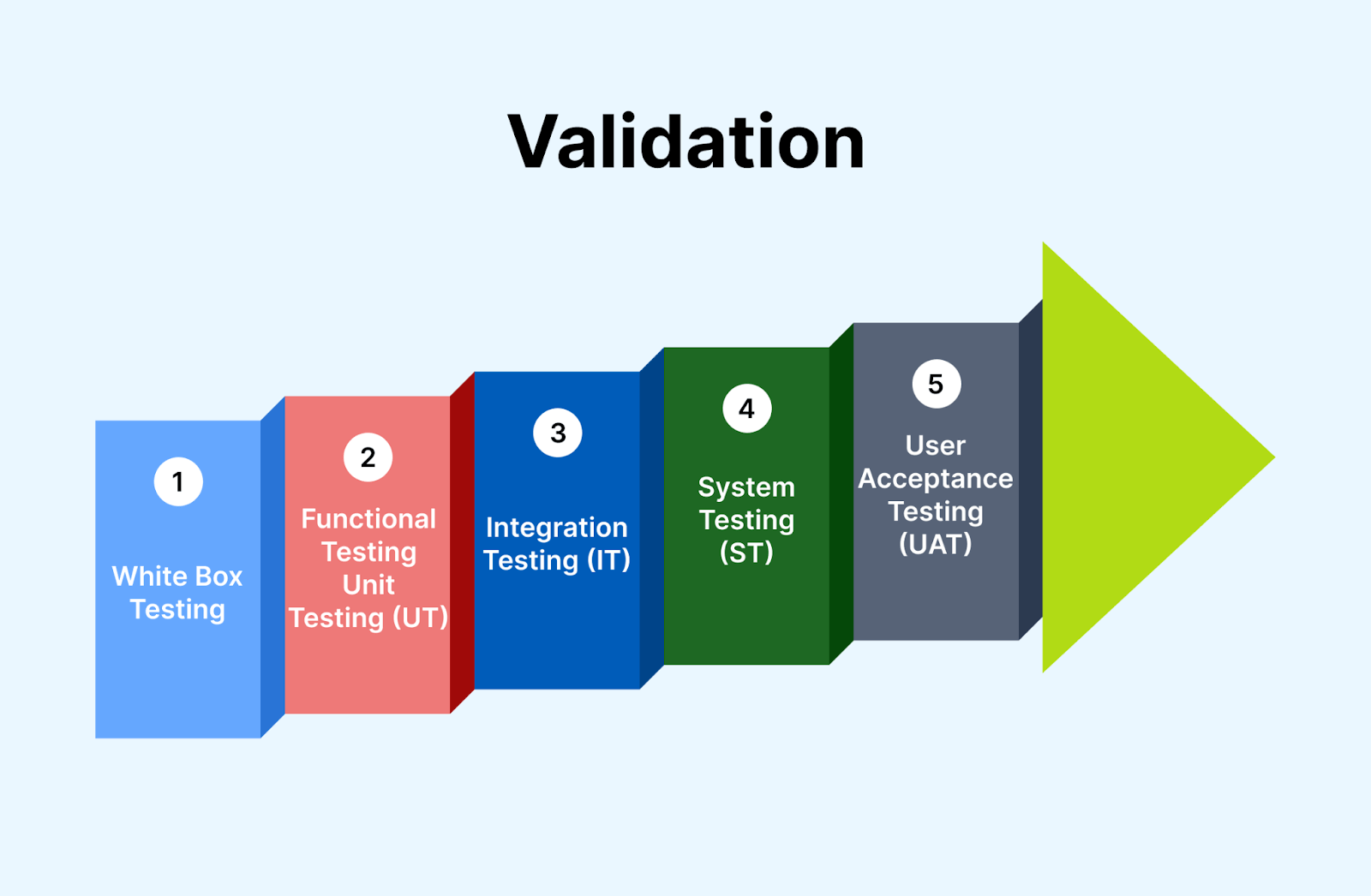
Here, you only focus on the output and do not consider the internal process and technical complexities involved in the development process. Through the validation process, the team gains valuable insights regarding the development of the software application and ensures its intended functionality within a suitable environment.
It is basically dynamic testing. This indicates that the validation process involves running the software application and monitoring its behavior and functionality in real-time. It mainly addresses the dynamic aspects of the software application, like performance, functionality, and user interaction. Unlike the verification method, it does not validate the static components of the software application, like code or design.
Some of the crucial features of the validation method involve the following:
- The validation verifies that the software application aligns with the intended functionality and purpose.
- It works to ensure that a software application fulfills the end user’s needs and gives the desired outcome.
- It considers the output of the software application to check for its correctness and accuracy.
- It checks for the factors like ease of use, usability, and user interface design of the software application.
- The validation process includes different test methods, such as manual testing, automated testing, user acceptance testing (UAT), and regression testing.
- In the Agile development approach, validation involves repetitive cycles that allow continuous feedback, refinements, and revalidation to check its alignment with requirements.
- Validation involves reporting the validation process, test cases, test results, and any identified issues.
Advantages of Validation
There are several advantages of the validation process in software testing. Some of those include enhanced bug detection, identification of specification inadequacies, alignment with customer demands, and verification of cross browser compatibility.
You can improve the final software application’s quality, reliability, and user satisfaction by incorporating validation into the software development process. Let us learn more about this:
- If you perform a verification process and any bug or error is missed from detection, validation helps uncover those.
- In the software development process, if the specification defined is incorrect or insufficient, validation helps reveal that inefficacy. This enables you to address the shortcoming and avoid potential issues.
- By performing the validation process, you can check whether the development of the software application adheres to the end-user demands, expectations, and preferences in different scenarios like slow connectivity, low battery, and so on.
- Validation is crucial to ensure that the software application functions flawlessly across different combinations of browsers, devices, and operating systems.
- You can identify and fix the defects and bugs in the last phase of the software development process, leading to a reduction of cost and efforts in fixing them after their release in the market.
- It helps ensure that software applications function correctly in real-time conditions, thus lowering the risk of failure.
- It easily identifies any usability issues like confusing workflow and user interface issues.
In the next section of this blog on verification vs validation, we will explore when to use the validation process.
When to use Validation?
The validation process should be executed after the development of each feature of the software application or step of the software development process. It will help you understand the correct functioning of the software application. Let us look at some examples to have clear concepts on this:
One form of the validation process is unit testing, which is performed after creating a unit of code and helps verify that each is functioning as intended before proceeding to the next step. Another form of the validation process is integration testing. It is performed to check how multiple modules or components work together.
A crucial aspect of validation testing is cross browser testing. Quality assurance professionals must check how the software applications render and function on different combinations of browsers, devices, and operating systems.
For instance, they would test if a specific feature, like a “Proceed to Payment” button, works perfectly on different browsers like Google Chrome on a Samsung Galaxy A23 device and Safari on an iPhone 13. By running these tests, the team can identify any issues or discrepancies in the software’s performance across various browser-device-OS combinations.
In the next section of this blog on verification vs validation, we will cover different testing types involved in the validation process.

Testing Involved in the Validation Process
Most of the QA forms fall under the category of the validation process. The test from unit testing to user acceptance tests is included as a validation test. Some of the tests involved in the validation of software applications include the following:
Functional Testing
Functional testing verifies that the software application functions correctly according to the specified requirements. Testers execute different scenarios and compare the actual outcomes with the expected results. Here are the different types of functionality tests involved in the validation process.
- Unit testing: It is executed by the developers who are mainly involved in writing test scripts that validate the individual components and units of the software application. It is done to check whether the software application matches the requirements.
- Cross browser testing: This type of test involves validating the behavior and functionality of the software application across different web browsers like Google Chrome, Mozilla Firefox, and others. It is mainly performed to check for compatibility issues due to variations in browser behavior, HTML interpretation, and CSS rendering.
- Smoke testing: It is typically performed after the release of each build to ensure that software stability is intact and does not encounter any error or bug.
- Sanity testing: It is performed after a smoke test and validates that every major function of the software application is working correctly. It aims to quickly assess whether the specific modifications or fixes have not introduced new issues or affected existing functionalities of the software application.
- Regression testing: This type of test is performed to check or validate the change done to the software application’s codebase; like bug fixes, the addition of new code does not lead to cause any issue or error in the existing working of the software application.
- Integration testing: Integration testing occurs when a software system consists of multiple functional modules that must work together effectively. Integration testing aims to validate that these individual modules interact and function as expected when integrated.
- Beta testing: Beta testing involves releasing the software to a limited group of actual customers or end users in a real or simulated production environment. Beta testing aims to gather feedback and evaluate how comfortable the customers are with the software’s interface, features, and overall usability.
- User acceptance testing: It is performed to define whether a software application meets the requirements and expectations of end users or stakeholders. UAT aims to gain confidence in the software’s readiness for production use by verifying its functionality, ease of use, and alignment with user expectations.
If you want to leverage cross browser testing, you can execute the test in a cloud-based digital experience testing platform like TestMu AI. TestMu AI offers efficient cross browser testing for web and mobile apps to ensure they behave identically across browsers, versions, and operating systems.
With real time and automation testing, TestMu AI simplifies the process, saving time and effort. You can deliver a flawless user experience, improve customer satisfaction, and expand your software application’s reach with TestMu AI.

Subscribe to our TestMu AI YouTube Channel to get the latest updates on tutorials around Selenium testing, Cypress testing, and more.
Non-Functional Testing
Non-functional testing focuses on assessing the attributes of a software system that are not directly related to its specific functionality.
Unlike functional testing, which verifies if the software meets the functional requirements, non-functional testing evaluates aspects such as performance, reliability, usability, security, and compatibility. Here are the different types of non-functionality tests involved in the validation process.
- Performance testing: It validates the performance of the software application under other workload conditions. For example, it measures response time, resource utilization, and throughput.
- Security Testing: In this testing, QA engineers validate the ability of the software application to protect or safeguard against security vulnerability, data breach, and unauthorized access. It includes identifying any potential risk, assessing encryption, and addressing compliance with security standards.
In the next section of this blog on verification vs validation, let us understand the phases involved in validation activities.
Phases of Validation
In software testing, the validation process typically consists of several phases to ensure that the software meets the intended requirements and functions correctly. Here are the common phases of validation:
- Requirement analysis: In this phase, you have to analyze and evaluate the requirements of software applications carefully. This can be done by reviewing the functional and non-functional requirements to get an idea of how it performs.
- Test planning: Here, you make a test strategy and test plan where you identify the key objective, scope, and validation approach. This involves identifying the software testing tools, test cases, and others.
- Test design: Next step is to create detailed test cases based on the identified requirements. Along with this, you also prepare the test data and the required test environment setup.
- Test execution: During this phase, the test cases are executed as per the defined test plan. You can record and report any defects or bugs from the expected behavior, ensuring that all issues are captured and documented for further analysis.
- Defect management: This phase involves managing and tracking the reported defects. In the defect management process, defects are logged, prioritized, and assigned for resolution. Following this, a validation process is closed by analyzing the test result and preparation of the test summary report.
The next section of this blog on verification vs validation discusses methodologies of the validation process.
Methodologies of Validation
When it comes to validating software applications, two methodologies, namely white box testing and black box testing, play a vital role.
- White box testing in the validation process: In validation, white box testing focuses on examining the internal structure and logic of the software application to ensure that all components work together as intended. Testers can design test cases that thoroughly examine different paths and conditions within the code by having access to the source code. This method helps identify potential errors, flaws, or inconsistencies within the software’s internal workings.
- Black box testing in the validation process: On the other hand, black box testing evaluates the software application’s functionality from an end-user perspective. Testers cannot access the internal code or structure but instead evaluate inputs and outputs to ensure that it meets specified requirements and performs as expected.
This method uncovers any deviations from desired behavior, functional issues, or usability problems that users may encounter.
By incorporating white box and black box testing methodologies into the validation process, software developers and testers can cover various aspects of the software application’s quality. This comprehensive approach helps you to identify and address potential issues, resulting in a validated software application that meets the intended requirements and user expectations.

In the next section of this blog on verification vs validation, we will see the best practices to follow when using the validation process.
Best Practices of Validation Activities
To improve or optimize the validation process in software testing, you need to follow some of its best practices, which are explained below.
- Setting well-defined acceptance criteria helps in setting clear expectations and benchmarks for validation.
- Active involvement of end-users throughout the validation process ensures their needs and expectations are accurately addressed.
- Proper management of test data, including realistic and representative data sets, enhances the accuracy and reliability of the validation process.
- Conducting regression tests after making changes to the software or system helps ensure that existing functionality remains intact.
- Maintaining comprehensive documentation of the validation process, including test plans, test cases, and results, facilitates traceability and future reference.
The next section of this blog on verification vs validation discusses key differences in the verification vs validation process.
Conclusion
Audit your current pipeline against the split before your next sprint. List every quality gate you run, then mark each one verification or validation. Most teams find the verification column full and the validation column thin, because static checks are easy to automate and executing the real product is not.
That imbalance has become sharper as AI coding agents took over more of the writing. An agent's own quality gates, unit tests, type checkers, and linters, all read source code, so they are verification instruments by definition. An agent can report a passing build for a button wired to the wrong endpoint, because nothing in its loop renders the page.
Closing that gap means executing the product the way a user would. Kane CLI is built for exactly that boundary: it drives real Chrome from a natural-language objective and is restricted to actions a real user could perform, so it will not inject JavaScript to force a pass that no user could reach. That restriction is what keeps it a validation instrument rather than another check on the code surface.
Note: A validation instrument has to execute the product the way a user would, which is why Kane CLI is restricted to actions a real user could perform. Read the Kane CLI docs
Author

Nazneen Ahmad
Blogs: 39


Nazneen Ahmad is a freelance Technical Content SEO Writer with over 6 years of experience in crafting high ranking content on software testing, web development, and medical case studies. She has written 60+ technical blogs, including 50+ top-ranking articles focused on software testing and web development. Certified in Automation Basic and Advanced Training - XO 10, she blends subject knowledge with SEO strategies to create user focused, authoritative content. Over time, she has shifted from quick, keyword-heavy drafts to producing content that prioritizes user intent, readability, and topical authority to deliver lasting value.
Reviewer

Harish Rajora
Reviewer
Harish Rajora is a software developer at TestMu AI with over 6 years of hands-on experience in Python and cross-platform application development across Windows, macOS, and Linux. He has authored 800+ technical articles and worked on large-scale projects, including GenAI applications and core engineering features used by millions. Harish has led DevOps initiatives building CI/CD pipelines with Jenkins, AWS, GitLab, and GitHub, and holds an M.Tech in Software Engineering from IIIT Allahabad.


Verification vs Validation FAQs
Did you find this page helpful?
More Related Blogs
TestMu AI forEnterprise
Get access to solutions built on Enterprise
grade security, privacy, & compliance
- Advanced access controls
- Advanced data retention rules
- Advanced Local Testing
- Premium Support options
- Early access to beta features
- Private Slack Channel
- Unlimited Manual Accessibility DevTools Tests