

Power Your Software Testing with AI Agents and Cloud
The Native AI-Agentic Cloud Platform to Supercharge Quality Engineering. Test Intelligently and Ship Faster.


- TestMu AI (Formerly LambdaTest)
- /
- Learning Hub
- /
- What Is Negative Testing? Types, Examples, and Test Cases
What Is Negative Testing? Types, Examples, and Test Cases
Negative testing checks how software handles invalid and unexpected input. Learn its types, techniques, scenarios, and how to write negative test cases.
Last Updated on:
On This Page
- What Is Negative Testing?
- How Does Happy Path Testing Differ From Negative Testing?
- Why Is Negative Testing Important in the SDLC?
- What Are the Benefits of Negative Testing?
- What Are the Disadvantages of Negative Testing?
- What Is an Example of Negative Testing?
- What Are the Types of Negative Testing?
- How Do You Set Up a Test Environment for Negative Testing?
- What Are Common Negative Testing Scenarios?
- How Do Frontend and Backend Negative Test Scenarios Differ?
- How Do You Design Negative Test Cases?
- How Do You Manage Defects Found in Negative Testing?
- Which Techniques Are Used for Negative Testing?
- How Do You Perform Negative Testing?
- What Is the Difference Between Positive and Negative Testing?
- How Is Validation Testing Different From Verification?
- What Are the Challenges in Negative Testing?
- What Are the Best Practices for Negative Testing?
- How Is AI Changing Negative Testing?
- Where Should You Start With Negative Testing?
OVERVIEW
Nеgativе tеsting is a softwarе tеsting tеchniquе that aims to idеntify how a systеm bеhavеs whеn subjеctеd to invalid or unеxpеctеd inputs. It involvеs dеlibеratеly providing incorrеct or abnormal data to thе softwarе application to assеss its ability to handlе such scеnarios and to idеntify any vulnеrabilitiеs.
To develop a high-quality software application, the QA analyst focuses on different aspects, like its functionality and working. This requires the implementation of effective testing techniques. One of those techniques includes negative testing. It plays a crucial role in the testing process that helps the QA analyst to identify and fix defects in the software application.
Software testers and developers need to identify an effective test automation strategy during the Software Development Life Cycle (SDLC). This strategy simplifies the testing process and helps them find and fix defects. When you implement negative testing in this strategy, you test the software application with invalid inputs to find errors and bugs which may otherwise lead to a costly issue.
Considering the cost of bugs, System Science Institute at IBM reported that it is six times more expensive to fix a bug discovered during the implementation phase than to fix a bug identified during the design phase. While most organizations focus on positive testing methods to fix the bugs, which includes unit, integration, system, acceptance, regression, smoke, or sanity testing, they often overlook negative testing.
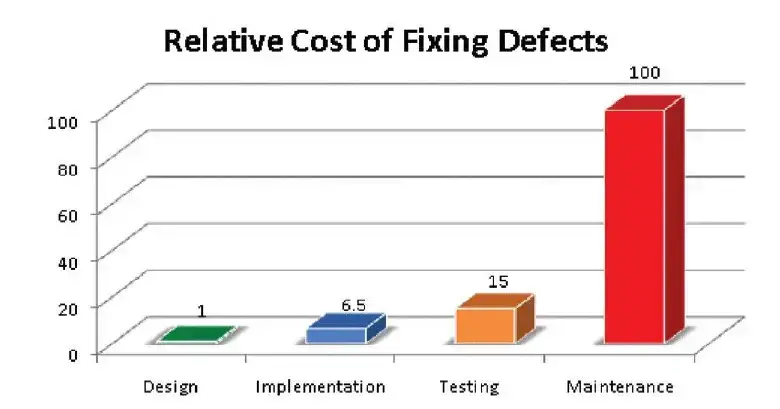
Negative testing involves uncovering any potential bugs, errors, or security vulnerabilities that might exist. This lowers the cost of bugs and helps develop software applications within the budget. It plays a significant role in modern software development. By deliberately testing for unexpected scenarios, it helps ensure that the software is robust and reliable.
What Is Negative Testing?
Negative testing, a vital form of software testing, examines how an application handles unexpected input data and test scenarios. Testers intentionally use random, incorrect, and even strong hacking attacks to assess the application's resilience against potential bugs and errors. By subjecting the software to unexpected conditions, negative testing ensures that it adheres to requirements and functions reliably in real-world scenarios.
The main purpose of negative testing is to analyze the behavior of the software application by exposing it to invalid inputs. This is done to prevent the software application from crashing due to negative inputs and improvise its quality and stability. However, by performing positive testing, testers can only ensure that the application works adequately in normal scenarios. It is equally important to ensure that the software application handles unexpected conditions to ensure that it is completely bug and error-free.
Negative testing serves several important objectives for software developers and testers. Here are some of those as follows:
- It functions as a crucial part of the software quality assurance that helps testers to verify and validate the performance of the software application as expected and aligns with the customer's requirement.
- It checks the functionality of the software application when faced with invalid inputs. It intends to provide a better user experience by minimizing the chances of user frustration or system failure.
- Identifies and addresses stability issues that may remain unnoticed during positive testing.

Note: Run your negative tests across 3,000+ browser and OS combinations and 10,000+ real devices on TestMu AI. Try TestMu AI Today
How Does Happy Path Testing Differ From Negative Testing?
Happy path testing checks the expected, error-free flow with valid inputs, while negative testing feeds invalid or unexpected inputs to confirm the app fails safely.
Happy path testing executes the default, error-free flow that a user is expected to follow, for example logging in with valid credentials and completing a purchase with a valid card. It confirms that the software works when everything goes right. Negative testing does the opposite. It intentionally tries to break the system with invalid inputs, malformed data, and unexpected actions to confirm that the software fails safely instead of crashing or exposing data.
Both are required for complete test coverage. Happy path testing proves the feature is usable, and negative testing proves it is resilient. A checkout flow that works with a valid card but corrupts an order when the card is expired has passed the happy path and failed real-world use. People often group happy path testing with positive testing, so the table below sets all three side by side.
| Aspect | Happy Path Testing | Positive Testing | Negative Testing |
|---|---|---|---|
| Goal | Confirm the primary, expected user journey completes end to end. | Confirm the system accepts every valid input, not just the main journey. | Confirm the system rejects invalid input and fails safely. |
| Input used | The single default, valid flow. | A range of valid inputs and valid alternate paths. | Invalid, out-of-range, malformed, or malicious inputs. |
| Expected result | Feature works with no errors. | Feature works for all acceptable inputs. | Clear error handling, with no crash and no data corruption. |
| Typical example | Log in with a correct email and password. | Log in with valid credentials in different valid formats. | Log in with a blank password or a SQL injection string. |
Why Is Negative Testing Important in the SDLC?
Negative testing is important in the SDLC because it catches defects early, confirms invalid inputs are handled as the requirements specify, and reduces risks like data loss or corruption.
Negative testing holds significant value within the Software Development Life Cycle (SDLC) as it plays a pivotal role in ensuring the software's excellence and security for its intended purpose. Below, you'll find simplified explanations highlighting the importance of negative testing in the SDLC:
- When running negative tests, detection of any bug or error in the software application during the early stage of SDLC can be done. It helps improve the software application's quality and functionality by lowering the risk of defects and errors.
- In SDLC, analysis of the Software Requirement Specification is very crucial. Here, negative tests validate this and ensure that software applications perform as per specification, and that invalid inputs are handled correctly.
- By testing how the software product performs under adverse conditions, we can demonstrate its ability to function correctly even when things go wrong. This builds trust in the software's reliability and boosts the user's confidence.
- The common risk associated with software applications, like the risk of loss or corruption of data, can be eliminated. This, in turn, ensures that the developed software application meets the requirement of the end users.
What Are the Benefits of Negative Testing?
Negative testing improves app quality, validates failure handling, prevents post-release failures, exposes security flaws, and gives customers more resilient software at lower cost.
Negative testing, also known as "fault injection" or "error path testing," holds profound importance in software development. It encompasses the detailed test of a software application's behavior when subjected to unforeseen circumstances.
While positive testing ensures the software application's proper functioning under normal conditions, negative testing exposes vulnerabilities, weaknesses, and potential points of failure. Let's understand the benefits of negative testing from the organization and customer perspectives.
Perspective from Organizations:
- Delivering a top-notch application: Organizations are responsible for providing dependable and resilient software applications to their customers. Negative testing plays a key role in identifying potential failures and weaknesses, enabling organizations to enhance the overall quality of their software applications.
- Validation against failures: It validates the software application's capacity to handle failures, errors, or exceptions gracefully. By intentionally injecting issues, organizations can evaluate the system's resilience and ensure it responds appropriately in such scenarios.
- Failure prevention: It is very challenging to develop 100% error- and bug-free software applications. However, ensuring the software application does not fail after being released in the market is equally important. For this, negative testing is needed to mitigate the risk and identify any points of failure.
- Security consideration: Negative testing is required to uncover any security vulnerabilities in the software application. Its execution is needed as it mimics the attacks to detect security-related issues like SQL injection to protect sensitive data.
Perspective from Customers:
- Expectation of resilience: The common expectation that every end-user has for the software application is its high quality and stability. With negative testing, it is easy to ensure that any vulnerabilities and bugs can be identified and fixed, giving robust software products to end users.
- Cost considerations: While negative testing involves additional time, effort, and resources, its benefits outweigh the costs of developing software applications. It considers mitigating any potential software application failure and thus lowers future costs.
What Are the Disadvantages of Negative Testing?
Negative testing can be time-consuming, hard to automate, and resource-intensive, and it is sometimes unnecessary when the scenarios it covers are very unlikely.
Like other software testing types, negative testing is no exception and has some disadvantages. Some of those explained:
- In software engineering, it can be unnecessary in certain cases, such as when unlikely scenarios or conditions are considered. Evaluating the relevance of negative tests is crucial to optimize testing efforts efficiently.
- It is time-consuming and needs extensive testing of edge cases and invalid inputs.
- The major challenge encountered in negative tests is automating the process. It is due to creating test cases that correctly represent invalid inputs and the ability to interpret the result.
- The management of invalid inputs may require additional hardware and software. Hence, we can say that negative tests can be a resource-intensive process.
What Is an Example of Negative Testing?
A common negative testing example is a login form that requires an 8 to 16 character password, tested with 7-character and 17-character passwords to confirm both are rejected.
Consider the scenario of testing the login functionality of a website. To exemplify negative testing, let's focus on boundary value testing. Suppose the system stipulates that passwords must consist of a minimum of 8 characters and a maximum of 16 characters.
In this case, you would test the software application by entering passwords that precisely adhere to the 8-character limit, passwords that exceed the 16-character limit, and even passwords that contain the minimum or maximum allowable characters minus one. It's like entering a password with one less character than required or allowed.
Doing this lets you check how the software application handles these extreme cases. For example, does it allow too short or too long passwords? Does it display the appropriate error message? Negative testing helps you identify flaws in the software application's password validation mechanism and ensures that it behaves correctly when faced with invalid input.
This type of testing serves the crucial purpose of preventing users from breaching the software application's security measures by entering passwords that fail to meet the specified requirements. The significance lies in its ability to fortify the software application, enabling it to navigate diverse scenarios and effectively preempt any potential security vulnerabilities.
Thus, negative testing, in this particular instance, plays a pivotal role in validating the functionality of the login system, even in the face of invalid inputs, such as passwords that fall outside the acceptable length range.
What Are the Types of Negative Testing?
Common types of negative testing include boundary value testing, input validation testing, exception testing, load testing, and compatibility testing.
Different types of negative testing are implemented by software developers and testers to assess the performance of the software application in different scenarios. Some of those are as follows:
Boundary Value Testing
One effective approach to testing software applications involves subjecting them to inputs located at the extreme limits of the input values. By evaluating these exceptional values, potential underlying issues within the application can be easily uncovered, particularly at the boundaries of acceptable inputs.
Input Validation Testing
Another form of negative testing entails examining the software application's capacity to handle invalid inputs, encompassing invalid data types, out-of-range values, and even the presence of invalid characters. Consequently, this form of testing enables a comprehensive assessment of the application's ability to reject and identify the inputs.
Exception Testing
While assessing software applications, exception testing is crucial. This type of negative testing focuses on examining the application's capability to effectively handle extraordinary conditions, including scenarios such as missing data, unexpected shutdowns, and other exceptional events.
Load Testing
To ensure seamless functionality, software applications are subjected to load testing. Such tests are designed to gauge the application's performance under heavy usage and stressful conditions, such as high traffic volumes, extensive data processing, and other resource-intensive scenarios. Conducting load testing can quickly identify and address potential system failures or performance issues.
Compatibility Testing
When performing comprehensive testing, compatibility testing takes center stage. This particular form of negative testing meticulously examines the software application's compatibility with diverse hardware, network configurations, and software setups. Through this examination, developers can ensure that the application seamlessly operates across various environments, safeguarding against potential compatibility issues.
Now that you have become familiar with the different types of negative testing, let's look at how to set up testing environments to run negative tests.
How Do You Set Up a Test Environment for Negative Testing?
Set up a negative testing environment by matching the required hardware and software, preparing invalid and unexpected test data, and choosing test management, automation, and mocking tools.
Getting started with negative testing requires some preparation to ensure a hassle-free test execution. One of the most important aspects of initiating the negative test is setting up a test environment. It is defined as configuring the required infrastructure, tools, and resources to have a controlled environment for testing the software applications. Here, the following components are involved in the test environment setup for a negative test:
Test Environment Requirement
When you perform a negative test, certain requirements must be aligned with the test process.
When running the negative test, you need to have the necessary hardware components and software configurations which support the software applications to be tested. This will also help to mimic real-world conditions and negative test scenarios.
For example, if you perform a negative web application test, the test environment involves having a database, operating system, browsers, and a particular version of web servers. You may also need network configurations like firewalls, proxies, and load balancers. Hence, the test environment should be similar to the production environment for accurate testing.
Test Data Preparation
It is one of the crucial aspects of a negative test that includes identifying and creating test data with invalid and unexpected input values. Its main objective is to verify and check the functioning of the software application and how it handles such inputs. For example, it verifies how it responds to the inputs by returning error messages and appropriately handling the exceptional test scenario.
Test Tools and Frameworks
In negative testing, automation testing frameworks or tools play a crucial role as it automates the complete test process. When using the manual approach for negative testing, executing the negative test cases is challenging due to the involvement of a huge amount of time and test efforts.
Further, it is also prone to error which might not represent the performance of software applications in unexpected test scenarios. Hence, using automation tools and frameworks is preferred for the execution of negative test cases, capturing test results, and facilitating test management.
Some tools used and frameworks for negative testing include the following:
- Test management tools: These types of tools are used by developers and testers for organizing and managing test cases, test execution cycles, and test data. You can track defects and report issues while performing testing. Some of the test management tools include TestRail and qTest.
- Test automation tools: These tools are used for automating the test cases, which helps in the seamless execution of negative tests and enables repeated testing. They are also helpful in simulating negative scenarios and generating test data. Some commonly used test automation tools are as follows:
- TestMu AI: It is a cloud-based digital experience testing platform that gives access to 3000+ browser and OS combinations. It offers various testing capabilities like parallel testing, real-time testing, and real device cloud testing. It integrates with various automation tools like Selenium, Cypress, Playwright, which allow the testing of software applications across different environments.

Subscribe to the TestMu AI YouTube Channel and stay updated with the latest tutorials around Selenium testing, Cypress testing, and more.
You can simultaneously execute negative tests on different browsers, operating systems, and devices. This feature ensures broad test coverage and reliable test execution. It offers visual regression testing capabilities, using which you can capture screenshots and compare the expected and actual outputs and outcomes. Hence, you can easily identify visual defects arising from negative scenarios.
- Selenium: It is one of the most used open-source automation testing frameworks for web applications. Selenium supports multiple programming languages like Java, JavaScript, Python, and others. With Selenium, you can execute tests across multiple web browsers.
It provides various methods and commands for interacting with web elements. This allows you to simulate different negative inputs and helps in reliable interaction with the elements.
- Cypress: It is a JavaScript-based end-to-end testing framework, particularly for web applications. It offers a live reloading feature to see the changes to the test scripts and code in the test runner in real time.
Cypress helps you to pause and debug test execution at any time during the process of a negative test. This feature helps identify errors and evaluate software applications' function during negative test scenarios.
- Mocking and Stubbing tools: These tools help mimic specific behaviors of dependent software applications or their components that are unavailable or difficult to replicate in the test environment. Some of the mocking and stubbing tools include Mockito and WireMock.

What Are Common Negative Testing Scenarios?
Common negative testing scenarios include blank required fields, wrong data types, out-of-bounds values, too many characters, opening pages without logging in, and nonsensical data.
While running the negative test, having a test scenario is essential to pinpoint possible failure of the software application in different situations. Here are some potential scenarios where software applications can unexpectedly encounter errors and crashes.
- Populating required fields
Many software applications and web pages have fields the user must fill out. In this scenario, a negative test would involve leaving the required fields blank to evaluate how the software application responds to this situation. The expectation is that the application should provide appropriate error messages or prevent submission until all required fields are filled.
- Correspondence between data and field types
Digital forms and dialog boxes typically expect specific data types, such as text, numbers, dates, or times. A negative test in this scenario would involve entering data of the wrong type into a field to observe how the application reacts. The application should ideally detect and handle incompatible data types gracefully, such as displaying an error message or rejecting the input.
- Allowed data bounds and limits
Some applications have input fields with specific ranges or limits for data entry, whether numbers or text. Negative tests here involve inputting values that exceed or fall outside the specified boundaries of a field. The application should appropriately handle such inputs, such as rejecting out-of-range values or displaying warnings.
- Allowed number of characters
Certain software applications restrict the number of characters that can be entered in a field. Negative testing would involve entering more characters than the field allows and testing whether the application enforces the character limit correctly by truncating or rejecting the extra input.
- Web session testing
Some web browsers require users to log in before accessing certain web pages. Negative testing in this scenario would involve attempting to open web pages within the application without logging in first. The expectation is that the application should recognize the absence of a valid session and prompt the user to log in before granting access.
- Reasonable data
Some software applications have fields that expect input within a reasonable range or format. Negative tests involve inputting invalid or nonsensical data into these fields to see how the application handles it. The application should ideally detect and reject invalid data, providing appropriate error messages or preventing further processing.
When performing negative testing, it is essential to design well-crafted test cases that align with the specific type of testing being conducted. These test cases should be carefully created to simulate real-world scenarios and assess the application behavior, robustness, and compliance with software requirements specifications.
How Do Frontend and Backend Negative Test Scenarios Differ?
Frontend negative tests check that the UI blocks bad input such as script tags and oversized files, while backend tests send malformed payloads and invalid tokens straight to the API.
Negative test scenarios land in two layers. Frontend scenarios attack the user interface and client-side validation, while backend scenarios attack the API, business logic, and data layer. Splitting your negative test cases this way keeps coverage organized and makes sure a broken UI check does not hide a broken server-side check. Techniques like Boundary Value Analysis and Equivalence Partitioning help you pick the specific invalid inputs for each layer.
Frontend Negative Test Scenarios
Frontend negative tests confirm the interface stops bad input before it ever reaches the server.
- Entering invalid characters such as emojis, control characters, or script tags into text fields to check input sanitization and Cross-Site Scripting (XSS) protection.
- Bypassing UI limits by pasting more text than a maxlength field allows or forcing a disabled button to active through the browser console.
- Rapid double-clicking a submit button to trigger duplicate requests, race conditions, or double charges.
- Uploading a file of the wrong type or size, or an empty file, to confirm client-side validation rejects it with a clear message.
- Submitting a form with the browser back button or a stale session to confirm the UI handles an expired state.
Backend Negative Test Scenarios
Backend negative tests bypass the interface and hit the API directly, where the most damaging failures hide.
- Sending malformed JSON payloads, missing required fields, or wrong data types to confirm the API returns a controlled validation error instead of a stack trace.
- Attempting SQL injection strings in query parameters and request bodies to confirm inputs are parameterized and the database is protected.
- Verifying correct API response codes, so a missing resource returns a 404 error and an unhandled fault returns a 500 Internal Server Error rather than leaking internal details.
- Sending requests without a valid token or with an expired one to confirm authentication and authorization return 401 or 403 as expected.
- Flooding an endpoint with oversized payloads or rapid repeated calls to confirm rate limiting and graceful degradation.
Writing this many invalid-input cases by hand is slow, which is why teams pair negative testing with AI authoring. With KaneAI, you describe the invalid inputs and edge cases in plain English, and the agent generates the executable negative test cases, proposes smart assertions for the expected error handling, and runs them across the TestMu AI grid of 3,000+ browser and OS combinations and 10,000+ real devices. Generated tests export to Selenium, Playwright, Cypress, or Appium, so your team keeps its existing framework.
How Do You Design Negative Test Cases?
Design negative test cases in five steps: identify potential negative scenarios, determine the expected outcome, choose the input, write the test cases, and execute them.
In performing negative tests, designing test cases is a crucial step. This involves identifying test scenarios where the software application should work or function as expected. It tests the software application with incorrect inputs to accurately verify how it handles those scenarios.
Here are the key steps to designing negative test cases:
- Identify potential negative scenarios
It is the first step in designing test cases, which involves reviewing the Software Requirements Specification (SRS), use cases, and functionalities to identify potential negative scenarios. These steps led to finding the scenario where the software application may fail or give unexpected results. That scenario might include error conditions, boundary cases, and situations.
- Determine the expected outcome
For each negative scenario, determine what the expected outcome should be. This involves understanding how the system should handle invalid inputs or unexpected conditions. The expected outcome could be an error message, system crash, efficient recovery, or predefined behavior.
- Choose the input
When an expected outcome is determined, choose the inputs that cause the software applications' negative behavior. This input may not typically be encountered during normal usage.
- Design the test cases
Based on the collected information, create test cases by detailing the steps to be executed during the negative test. Here, the negative test cases include specific inputs, the underlying activities to be performed, and the expected outcome. While creating test cases, always document the valid conditions of test cases and exhibition of the behavior of software applications.
- Execute test cases
When the test case is designed, now its execution can be done on the software application under the test. Here, a comparison of the actual and expected outcomes is required to determine whether the software application functions correctly in negative scenarios.
Have you thought about the defects that we get while running negative tests? These defects must be effectively managed and fixed for the success of the software applications. Let us understand this in detail.
How Do You Manage Defects Found in Negative Testing?
Manage negative testing defects by logging, triaging, assigning, resolving, verifying, and closing them, classifying each by severity, and running root cause analysis on the failures.
The defect management identified in negative tests involves different steps and procedures that effectively handle defects identified during the test process. It covers an entire defect life cycle, from discovery to resolution and closure.
Defect Management Process
This process entails various essential activities, which are as follows:
- Defect logging: The defects identified are logged in the centralized system for effective tracking and management. Here, the system captures correct information like details of defects and their severity and priority.
- Defect triage: The identified logged defects are then reviewed by the team and prioritized based on their impact, urgency, and severity. In this process, the allocation of resources is done, and the testers evaluate each defect to find a way of addressing those.
- Defect assignment: After reviewing the defect logged, it is assigned to the development team for its early fixes.
- Defect resolution: In this process, the development team evaluates the defects and identifies their root causes. Later, they implement code fixes and changes to fix the defects.
- Defect verification: When the defects are fixed, retesting is performed by the QA engineers to verify the functionality of the software application.
- Defect closure: Once the verified fixes are deemed satisfactory, the defects are marked as closed in the defect tracking system. This closure signifies that the reported issues have been adequately addressed and resolved.
Classification and Prioritization of Defects
Effectively classifying and prioritizing defects are crucial for efficient management. Defects are typically classified based on their severity and impact on the application under test, enabling a prioritization strategy that ensures immediate attention is given to critical issues.
- Critical defects: These defects cause the system to crash, fail, or corrupt data. They demand immediate attention and are typically assigned the highest priority.
- Cosmetic defects: They are aesthetic or cosmetic, such as UI alignment issues or typos. While they do not affect functionality, addressing these defects is important for a seamless user experience.
- Minor defects: These types of defects have a lower effect on the software application's functionality and performance. Even though they are not very critical, but need to be addressed to ensure the quality of the software application.
- Major defects: These types of defects have a larger impact on the software application's functionality and performance. Thus, these defects have to be addressed without any delay.
By effectively classifying and prioritizing defects, development and testing teams can focus their efforts on resolving the most critical issues promptly, ensuring that the defects with the highest impact are addressed first.
Root Cause Analysis
It is a systematic identification and analysis of the cause of defects identified during the negative testing of software applications. In other words, the tester executes root cause analysis to find the reason behind the defects for the implemented invalid inputs and negative test cases. There are different approaches used for the execution of root cause analysis. Some of those are the 5 Whys and Pareto analysis.
- 5 Whys - repeatedly asking "why" until the root cause of a defect surfaces. It suits issues that do not need advanced statistical analysis.
- Pareto analysis - a bar and line chart that ranks defects by frequency or cost, so teams fix the small number of causes behind most failures first.
Together, the defect management process, classification and prioritization, and root cause analysis keep defects from negative tests tracked and resolved. Next, let us look at the techniques used to perform negative testing.
Which Techniques Are Used for Negative Testing?
Common negative testing techniques include boundary value analysis, equivalence partitioning, error guessing, state transition testing, fuzz testing, penetration testing, and error injection.
Negative testing plays a key role in software testing, validating the system's behavior when encountering unexpected or invalid inputs. This form of testing is essential in identifying potential vulnerabilities, weaknesses, and defects within the software application. Diverse techniques are employed to execute effective negative testing, including:
- Boundary value analysis: This technique involves testing input parameter boundaries or extreme values. Its objective is to ascertain whether the system behaves correctly at the lower and upper limits while verifying the handling of values just within and outside those limits.
- Equivalence partitioning: It subdivides the input sections into distinct equivalence classes or groups expected to exhibit similar behavior. Its purpose is to ensure that test cases are chosen from each partition to validate the system's response for each class.
- Error guessing: This technique is informal and relies on the tester's experience and intuition to identify potential error-prone areas in the software product. Test cases are devised based on well-informed speculations about areas where defects are likely to arise.
- Checklists: Checklists provide a structured approach to negative tests by outlining potential error scenarios, test conditions, and test cases. They remind testers to cover various aspects and help ensure comprehensive testing.
- Anti-patterns: Anti-patterns are simple designs that seem appropriate; however, they lead to cause execution practices that carry software defects. These patterns need to be recognized and tested to make your system defect free. Removal of anti-patterns will also make your system robust.
- Exploratory testing: Exploratory testing can be performed by designing and executing the test cases simultaneously. In this technique, the testers interact with the software applications by providing various inputs and test cases to find defects. Exploratory testing is used when there is a chance of defects being unfounded by executing the pre-designed test cases.
- Small-scale test automation: Small-scale test automation allows testers to test, test cases that are repetitive or involve complex combinations of input using the automation testing tool. This helps by saving time and effort. Further, the saved time can be used for performing ad hoc or exploratory testing.
- State transition testing: The technique of state transition testing can detect any type of defect in the software application. The principle involved in this testing process is that the software application changes its state with every change in input. This means that state transition testing detects the behavior of the software application with the change in inputs.
- Cause-effect graphing: Cause-effect graphing is a technique that generates a graphical representation of inputs and their corresponding outputs or effects. It assists in identifying test cases that cover all possible combinations of inputs, thus ensuring comprehensive testing.
- Risk-based testing: Risk-based testing prioritizes test efforts based on the impact and likelihood of potential defects. It focuses on high-risk areas, such as critical functionality or complex modules, to ensure effective testing.
- Negative test case documentation: Negative test case documentation involves creating a repository of test cases specifically designed to assess the system's behavior under negative scenarios. These test cases document the expected outcomes and aid in tracking testing progress.
- Fuzz testing: In this technique, the software application is provided with the input of random data, leading to unexpected failure and issues. In such a situation, unlike other negative test cases, there is no preset expected outcome. Testers execute fuzz testing to observe potential occurrences due to arbitrary inputs.
- Penetration testing: This technique is based on ensuring the security of the software application. It mimics real-world attacks and security vulnerabilities to detect any security loophole in the system and analyze its ability to overcome or withstand those.
- Static code analysis: This testing technique does not involve the execution of source code to test the software application. It helps identify coding errors, security vulnerabilities, and others to uncover issues that might cause the occurrence of negative scenarios.
- Error injection techniques: Error injection techniques deliberately introduce errors or faults into the system to observe how it responds. Examples include injecting network errors, memory leaks, or invalid data.
How Do You Perform Negative Testing?
Perform negative testing by reviewing your negative test cases, generating invalid inputs, monitoring how the app behaves, analyzing and documenting the results, and repeating with new inputs.
To run a negative test, consideration of all negative test cases is essential. If you are performing a negative test, you must consider every test case without considering the right way to use it. Let us explain this with an example. When you encounter an email field, it is essential to think and test various inputs that users might enter apart from the expected email format.
Below are the standard steps to be followed for performing a negative test:
- First, you have to review and evaluate the designed negative test cases. It is a crucial step as you can ensure that test cases include invalid inputs, test scenarios associated with security vulnerabilities, and other potential issues.
- In the next step, you have to generate invalid inputs for testing software applications. For this, you can use manual or automation tools. However, using automation testing tools is preferred because it simulates a wide range of negative test scenarios that would otherwise be difficult to replicate manually.
- Observe and monitor the behavior of the software application once the negative tests have been executed. You must pay close attention to any unexpected or undesired outcomes, errors, crashes, or vulnerabilities that may arise during the testing process.
- After the execution of the negative test, you have to analyze the result to detect any bugs or issues uncovered in the previous test. This will give you information on the performance and behavior of the software application by subjecting it to negative scenarios. Based on this, you can fix defects, enhance error messages, strengthen error-handling mechanisms, or implement additional security measures.
- You have to repeat the process multiple times by changing the test cases and input. Followed to this, you have to document the result of negative tests.
Note: Automate your negative tests on a blazing-fast, scalable cloud grid. Explore TestMu AI Automation Cloud
What Is the Difference Between Positive and Negative Testing?
Positive testing checks that software works as expected with valid input, while negative testing checks that it handles invalid or unexpected input without failing.
| Positive Testing | Negative Testing | |
|---|---|---|
| Definition | Examines response of software applications with valid input data set. | Checks response of software applications with invalid/incorrect input data set. |
| Quality Assurance | Not a guarantee of high-quality software applications | Improves quality by exposing error-handling defects. |
| Execution Time | Executed quickly. | Takes more time to execute compared to positive testing. |
| Test Coverage | Consistently validates existing test cases. | Used to break the software application with unidentified test cases. |
| Primary Goal | Ensures compliance with software requirements specifications. | Evaluates software consistency with erroneous data sets. |
| Scenario Coverage | Does not cover all possible scenarios. | Covers invalid, unexpected, and edge-case scenarios. |
| Impact | Proves the software works for valid use. | Proves the software is resilient to invalid use. |
| Standardization | Ensures software meets required standards. | Checks that errors are handled safely, without crashes or data loss. |
| Conditionality | Implemented only for predicted conditions. | Also covers unpredicted and invalid conditions. |
How Is Validation Testing Different From Verification?
Verification checks that the product is built right against its specifications, while validation testing checks that the right product was built for real users.
Verification and validation are often used interchangeably, but they answer different questions. Verification asks whether we are building the product right. It checks the software against its specifications, designs, and requirements, usually through reviews, static analysis, and unit tests during development. Validation asks whether we are building the right product. It checks whether the finished software meets user needs and business requirements, usually through functional, system, and acceptance testing on a running build.
Negative testing strengthens both. Verification confirms an invalid input is rejected as the spec demands, and validation confirms the user is protected in a real business flow. The Verification vs Validation distinction matters most when the spec is met but the real-world outcome still fails the user.
Validation Testing Example
Consider a credit card transaction flow at checkout. A validation test enters an expired card, a card with an invalid checksum, and a card that passes format checks but is declined by the payment gateway. The flow is valid only if the system blocks the transaction, shows a clear card expired or payment declined message, does not create a partial order, and does not charge the customer. Verification alone might confirm the card-number field accepts 16 digits as specified, yet miss that an expired but correctly formatted card slips through, which is exactly the gap validation testing closes.
Five Types of Validation Checks
Most input validation, whether on the frontend or the backend, comes down to five checks. Negative testing targets each one with input designed to break it.
- Data type check - confirms a field receives the expected type, such as rejecting letters in a numeric age field.
- Range and boundary check - confirms a value sits within allowed minimum and maximum limits, tested with Boundary Value Analysis.
- Format check - confirms a value matches a required pattern, such as a valid email, date, or phone number.
- Presence or mandatory field check - confirms required fields are not left blank before submission.
- Consistency or cross-field check - confirms related fields agree, such as an end date that must fall after a start date.
What Are the Challenges in Negative Testing?
The main challenges in negative testing are covering every negative scenario, generating realistic invalid inputs, testing timeouts and race conditions, and managing test data.
Tackling challenges that arise during negative testing requires thorough preparation. Here are some key obstacles we have identified:
- Identifying all possible negative scenarios and edge cases for testing can pose a significant challenge. It necessitates meticulous consideration to ensure comprehensive coverage.
- Generating realistic and meaningful invalid inputs can be an issue, requiring an in-depth understanding of the system and its behavior under adverse conditions.
- Testing time-sensitive scenarios, such as timeouts or race conditions, presents particular difficulties. Specialized tools and techniques might be necessary to address these challenges effectively.
- Managing the test data employed in negative tests can be problematic, often involving generating and maintaining substantial amounts of data.
To overcome these challenges, meticulous planning, deep system understanding, and appropriate resources are essential.
What Are the Best Practices for Negative Testing?
Negative testing works best with a planned strategy, clear goals, automation where feasible, priority on edge cases and boundary conditions, and invalid inputs based on real-world data.
To minimize the negative impact of the tests and overcome the above challenges, you have to implement some best practices for negative testing. Here are some of those:
- Prepare a strategy for your negative test approach by accurately planning the negative test scenarios and inputs to be tested.
- Automate the negative testing procedure whenever feasible to enhance efficiency and minimize the potential for human error.
- For all your testing efforts, you should clearly define the related goal and objectives. Along with this, you should address this by executing the negative test.
- Always test the edge cases and boundary conditions of the software application by prioritizing it because they are prone to encounter invalid inputs.
- Whenever possible, use real-world data to generate invalid inputs to represent the users accurately.
How Is AI Changing Negative Testing?
AI is changing negative testing by generating invalid inputs, boundary values, and malformed payloads from requirements and API specs, including edge cases testers often miss.
AI features need negative tests too. Apps built on large language models are tested with adversarial prompts, prompt injection attempts, and out-of-scope requests to confirm the model refuses them or fails safely. Prompt injection tops the OWASP Top 10 for LLM Applications, which makes these checks a core part of LLM testing.
Review every AI-generated negative test against the real business rules, since a model can propose inputs the system should accept or expect the wrong error message. Our roundup of AI test case generation tools compares the options.
Where Should You Start With Negative Testing?
Start negative testing with the inputs users most often get wrong, such as blank required fields, wrong data types, and out-of-range values, then automate those checks in CI.
Negative testing is important as it knowingly tests the software application with invalid inputs and unexpected scenarios. By performing negative test cases, vulnerabilities, defects, and weaknesses can be determined and addressed before affecting end-users.
Thorough planning, test case design, and understanding of the software application's performance and working are key for effective testing. Embracing emerging technologies, integrating with DevOps and Agile development practices, and adopting predictive and AI-driven approaches enhance the process. Hence, negative tests ensure software systems' stability and reliability, resulting in higher quality and more robust software applications.

Author

Nazneen Ahmad
Blogs: 39


Nazneen Ahmad is a freelance Technical Content SEO Writer with over 6 years of experience in crafting high ranking content on software testing, web development, and medical case studies. She has written 60+ technical blogs, including 50+ top-ranking articles focused on software testing and web development. Certified in Automation Basic and Advanced Training - XO 10, she blends subject knowledge with SEO strategies to create user focused, authoritative content. Over time, she has shifted from quick, keyword-heavy drafts to producing content that prioritizes user intent, readability, and topical authority to deliver lasting value.
Reviewer

Shahzeb Hoda
Reviewer
Shahzeb Hoda is the Associate Director of Marketing and a Community Contributor at TestMu AI, leading strategic initiatives in developer marketing, content, and community growth. With 10+ years of experience in quality engineering, software testing, automation testing, and e-learning, he has authored and reviewed 70+ technical articles on software testing and automation. Shahzeb holds an M.Tech in Computer Science from BIT, Mesra, and is certified in Selenium, Cypress, Playwright, Appium, and KaneAI. He brings deep expertise in CI/CD pipeline automation, cross-browser testing, AI-driven testing practices, and framework documentation. On LinkedIn, he is followed by 3,700+ engineers, developers, DevOps professionals, tech leaders, and enthusiasts.


Negative Testing FAQs
Did you find this page helpful?
More Related Learning Hubs
TestMu AI forEnterprise
Get access to solutions built on Enterprise
grade security, privacy, & compliance
- Advanced access controls
- Advanced data retention rules
- Advanced Local Testing
- Premium Support options
- Early access to beta features
- Private Slack Channel
- Unlimited Manual Accessibility DevTools Tests