

Power Your Software Testing with AI Agents and Cloud
The Native AI-Agentic Cloud Platform to Supercharge Quality Engineering. Test Intelligently and Ship Faster.


- TestMu AI (Formerly LambdaTest)
- /
- Blog
- /
- Smoke Testing vs Sanity Testing: Differences and Examples
Smoke Testing vs Sanity Testing: Differences and Examples
Smoke testing checks a new build broadly; sanity testing checks one changed area in depth. Compare both in a table, with a real run of each on a live store.
Last Updated on:
Smoke testing checks if a new build's core functions work; sanity testing checks if a targeted change works after that build passes. Smoke testing runs broad and shallow across the whole application on every new build, while sanity testing runs narrow and deep on just the area a recent change touched.
TL;DR
- Smoke testing runs after every new build to confirm the application's core functions work at all.
- Sanity testing runs after a specific code change, such as a bug fix, to confirm that change works without breaking anything nearby.
- Smoke testing covers the whole application broadly; sanity testing covers one changed area in more depth.
- Smoke testing is usually grouped with build verification testing, while sanity testing is usually treated as a narrow subset of regression testing.
- A failed smoke test stops further testing until developers fix the build; a passed sanity test confirms a fix is ready to ship.
- AI agents now support both testing types by selecting relevant tests, healing broken locators, and clustering failures by root cause.
Smoke Testing vs Sanity Testing: Key Differences
Smoke testing and sanity testing are required to test the core functionality of the software applications and to determine when the build is suitable for further testing. However, they are not the same.
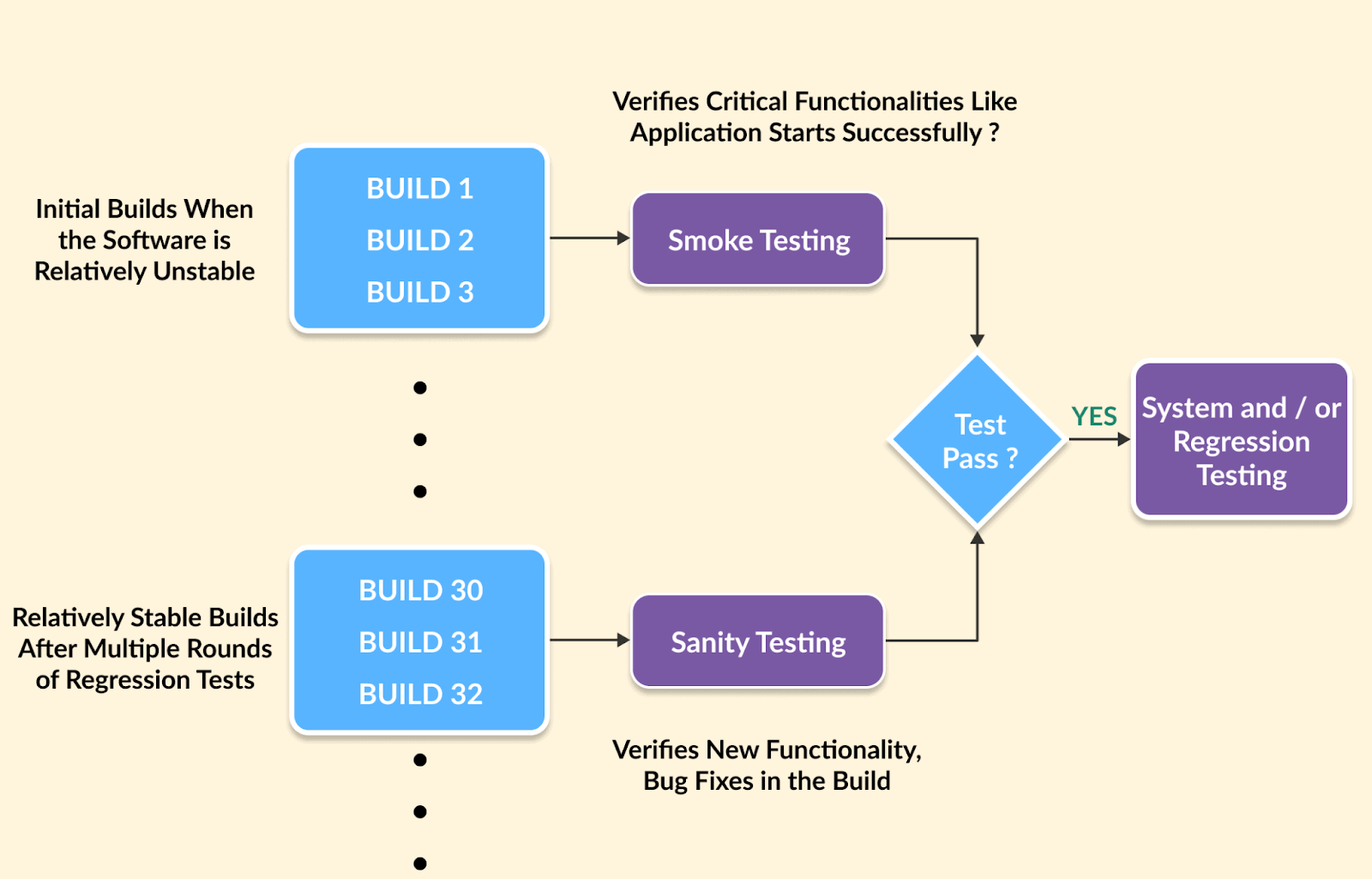
Want to understand the difference between smoke testing vs sanity testing? Here are the key distinctions between them:
| Parameters | Smoke Testing | Sanity Testing |
|---|---|---|
| Goal | The primary objective of smoke testing is to confirm the overall stability of the software. | Sanity testing focuses on ensuring the correctness of specific functionalities in the software. |
| Performed By | Smoke testing is conducted by both software developers and testers. | Sanity testing is usually performed by testers, and sometimes by the developer who made the change. |
| Purpose | Smoke testing aims to verify the critical functionalities of a system to ensure it is ready for more in-depth testing. | Sanity testing aims to confirm the functionality of specific new features, such as bug fixes. |
| Subset Relationship | Smoke testing is often grouped with build verification and acceptance testing. | Sanity testing is a subset of regression testing. |
| Documentation | Smoke testing involves documented or scripted test cases. | Sanity testing is often unscripted or only lightly documented. |
| Verification Scope | In smoke testing, the entire system is verified from end to end. | Sanity testing focuses on verifying only a particular component of the system. |
| Focus | The main focus of smoke testing is on critical functionalities that should work flawlessly. | Sanity testing zeroes in on newly added functionalities and resolves specific issues. |
| Build Stability | Smoke testing may be conducted on both stable and unstable builds. | Sanity testing is typically performed on relatively stable builds. |
| Build Stage | Smoke testing is usually carried out on initial builds. | Sanity testing is conducted on relatively stable builds. |
| Testing Type | Smoke testing is a part of basic testing. | Sanity testing is considered a component of regression testing. |
| Frequency | Smoke testing is generally performed with every new build release. | Sanity testing is strategically planned when there is insufficient time for in-depth testing. |
| Functionalities Coverage | Smoke testing covers the basic end-to-end functionalities of the entire system. | Sanity testing focuses on specific modules where code changes have been made. |
Furthermore, you can use the potential of smoke and sanity testing with AI-native cloud testing platforms like TestMu AI. With access to a remote test lab with 10,000+ real devices and 3,000+ browser and OS combinations, it supports seamless test execution using various test automation frameworks, such as Selenium, Playwright, Cypress, Appium, and more.
In a cloud-based environment, sanity and smoke tests offer benefits such as reducing infrastructure costs, providing scalability for automated tests, fostering team collaboration, and allowing flexibility in the test environment.
Smoke and Sanity Testing on a Real Site
To show the difference in practice, I ran both on the TestMu AI ecommerce playground in Chrome 154 on Windows 11, on the TestMu AI cloud. The smoke suite opens seven different pages and checks only that each one loads its key element. The sanity suite assumes a change was just made to product search and checks only search, but in depth.
| Smoke check (broad, shallow) | Result |
|---|---|
| Home page loads | Pass |
| Category page loads | Pass |
| Product page loads | Pass |
| Cart page loads | Pass |
| Login page loads | Pass |
| Register page loads | Pass |
| Contact page loads | Pass |
| Sanity check on search (narrow, deep) | Result | Detail |
|---|---|---|
| Exact product name returns results | Pass | 4 results |
| Search is case-insensitive | Pass | 4 = 4 |
| Partial term matches | Pass | 4 results |
| Unknown term shows no-results message | Pass | There is no product that matches the search criteria. |
| Special characters do not break the page | Pass | page rendered the term as text |
| Search in descriptions works | Pass | title 15, with description 15 |
The smoke suite touched 7 pages in 18.3 seconds and would stop a broken build before anyone spent time on it. The sanity suite never left search, but it covered case handling, partial matches, the empty-results message, and unsafe characters in 7.4 seconds. In an earlier run, one sanity check failed because my locator pointed at an element the page does not have. The fix was to the test, not the site, which is a common first failure when a sanity check is written quickly after a change.
What Is Smoke Testing?
Smoke testing, also known as Build Verification Testing (BVT), is an initial testing stage that validates the proper functionality of crucial features within a software application. It is executed when a significant modification in the code, like introducing a new feature, ensures the application's core workflows function correctly. In simple terms, we ensure that the critical features of software applications are functional and that there are no significant issues in the code under test.
The main goal is to check if the essential parts of the software work. It helps teams avoid spending time on broken builds. If basic functions fail, deeper testing is not needed. This saves time and effort, making sure only stable versions go for further testing.
Example of Smoke Testing
Let's take an example of developing an eCommerce website and how smoke testing is implemented.
- Scenario - Building a new eCommerce site.
- Smoke Test - User registration, login, product browsing, and shopping cart functionality.
- Execution - Navigate the homepage, register, login, browse categories, add items to the cart, and initiate checkout.
- Outcome - Identify critical issues early (crashes, non-functionality), stop testing if major problems exist, and inform developers of quick fixes.
- Benefit - Simple test ensures basic stability.
What Is Sanity Testing?
Sanity testing checks if small code changes work without causing new issues. It helps confirm that bug fixes or new features are stable. This test focuses only on specific functions, not the whole application. It is usually done before a quick release, like a critical bug fix.
The goal is to see if key features still work after changes. It helps find defects fast and decides if more testing is needed. If the test fails, the build goes back for fixes, saving time and effort.

Example of Sanity Testing
Imagine you're working on a CRM system's initial build. Core functionalities like email integration and task tracking are implemented. After development, testers perform sanity tests. These tests focus on verifying the most critical functions, such as:
- Customer information management - Can you create, edit, and view client information?
- Task tracking - Can you effectively assign tasks, set deadlines, and track progress?
If these initial sanity tests pass, the team moves to the next development stage.
- New feature and regression prevention - Let's say a calendar synchronization feature is added in the next build. It's crucial to ensure this new feature doesn't disrupt existing functionality. Here's where sanity testing helps:
- Testers re-run sanity tests specifically on customer information management and task tracking.
- This targeted approach helps confirm the new calendar synchronization feature hasn't negatively impacted the CRM's core functionalities.
- Bug fix validation - Sanity testing also applies to bug fixes. Suppose a bug is identified later, like an issue with assigning tasks. After the development team fixes the bug, sanity testing becomes vital again:
- Testers run sanity tests on task assignments to validate the fix.
- This ensures the bug is resolved without introducing new complications.
Understanding Smoke Testing
Advantages of Smoke Testing
Some of the advantages of smoke testing are as follows:
- Smoke testing verifies build stability for further testing.
- Early bug detection saves time when fixing critical issues.
- Improved software quality by weeding out major issues early.
- Reduced risk of failures later in development.
- Faster time to market by catching bugs early.
- Smoke tests can be conducted frequently due to minimal resource requirements and simple processes.
- Offers flexibility with manual, automated, and hybrid approaches.
When Should You Perform Smoke Testing?
Smoke testing is performed when new software features are built and integrated with the existing ones to ensure seamless functionality of software applications. It happens when developers deliver a fresh build to the QA teams.
However, smoke testing is not restricted to the initial stages of a new project; even when adding new modules to existing functionality, smoke testing must be executed. Thus, you should run a smoke test when the new build is deployed and if any changes are made during the software development process. This allows us to check whether all critical functionalities of the software are working and stable simultaneously.
How Does Smoke Testing Work?
Smoke testing is performed by QA testers when the software developers give them a new build after following a code review. It is mainly done through manual or automation approaches through pre-existing test scripts.
Upon successfully completing the smoke test, the software is integrated into an existing build within the QA and staging environment. Subsequently, the software build advances to more rigorous tests, including unit and integration tests. Failed smoke tests signal critical issues that require developer attention before further investment in testing.
A general procedure for conducting a smoke test can be outlined as follows:
- Decide on the testing approach - Choose between manual, automated, or a hybrid testing method. Typically, manual testing is the initial preference, and automated tests are introduced as more elements are incorporated into the smoke test.
- Prepare for the tests - Define the scope and objectives, select high-priority test cases, and ensure the testing environment is appropriately configured.
- Develop testing scenarios - QA testers must determine the number of test cases required for each core software feature. Establish pass or fail metrics based on software and organizational requirements and standards.
- Write the smoke tests - Use manual or automated processes to write and create the test suites. Develop concise and targeted test cases, prioritize them based on criticality, and document the necessary test data for execution. Given the focus on core features in smoke testing, ensure the creation of tests essential for verifying these features.
- Execute and document tests - Run the smoke tests and establish a systematic process for recording the results of each test. This documentation can be performed manually or automated.
- Analyze smoke test results - If the software fails the smoke test, return it to the development team for further testing. If it passes the smoke test, it is deemed ready for more extensive functional testing.
Challenges of Smoke Testing
Although smoke testing is important part of the Software Testing Life Cycle (STLC), it has certain drawbacks:
- Focuses only on specific core functionalities and does not cover all aspects of software.
- Some bugs or issues may not be detected through smoke tests, with potential discoveries later in the development process.
- Manual smoke testing takes a longer time to complete, especially in larger software projects.
Best Practices of Smoke Testing
Even if you carefully follow the correct procedures for running smoke tests, it's possible that you will encounter issues. The following best practices can help you save time and effort in such situations:
- Set up the smoke test suite on Continuous Integration (CI) pipelines to automatically execute when a new build is introduced.
- Perform testing early and consistently to ensure the stability of the code build in every sprint.
- Choose the most suitable testing method based on your project's requirements and available resources. If you have a limited budget, opting for a hybrid or automated approach may be more efficient than conducting the tests manually.
- Develop uncomplicated and direct test cases that specifically focus on the core functionalities.
- Regularly review the smoke test suite to verify its alignment with the current software requirements.
- Give significant importance to collaboration between QA teams and developers to facilitate the effective execution of smoke tests.
Understanding Sanity Testing
Advantages of Sanity Testing
Some advantages of sanity testing include:
- Validate core functions after new features, ensuring stability.
- Catch critical issues early, preventing wasted regression testing efforts.
- Fast and focused, sanity tests save development time by pinpointing issues quickly.
- Identify regressions early and keep the development process smooth.
- Act as safety checks, giving developers confidence before further investment.
- Help ensure a high-quality product by focusing regression testing on new areas.
When Should You Perform Sanity Testing?
If compared with the smoke test, the sanity test is executed after its successful completion and approval of the smoke test by the testing team. This is because it mainly targets one or more critical functions within the tested software applications. Therefore, there are other situations as well under which the sanity test should be executed:
- When there are minor modifications in the application's code.
- Upon adding new features that need to be integrated into the software application.
- After completing a series of regression tests and generating a new build.
- After bug fixes to ensure the software application performs as expected.
- Before the production deployment.
Determining the frequency of sanity testing in a Software Development Life Cycle depends on specific requirements and the complexity of the software application.
How Does Sanity Testing Work?
Unlike other testing methods, sanity testing is more flexible. It doesn't rely on rigid scripts or detailed test plans. Instead, testers use their knowledge and experience to quickly check core functionalities and critical features after a code change. They rely on user requirements and specifications as a guide, ensuring the software behaves as expected in these key areas.
When a developer makes a modification, the tester steps in. They act like a typical user, playing around with the software to see if anything seems off. Did the change break something important? Are there any unexpected bugs or errors? Testers keep their eyes on to check for anything unusual and document it. This feedback is then sent to the developers for fixes. This approach is particularly useful for catching major issues early on before they turn into major issues later. It's a great way to ensure the software application stays on track after making changes.
Sanity testing, as mentioned before, is known for its adaptability. Unlike scripted tests, it doesn't require a rigid, pre-defined plan. Testers use their expertise to identify potential issues in critical functionalities. They use user requirements and specifications as a guide to evaluating the core features of the application.
Following are the steps that you can follow to perform a sanity test:
- Identify changes - The first step is understanding what has changed in the new build. This could include new features, bug fixes, or software modifications. You can get this information from developers' notes, code commits, or release documentation.
- Define scope - Based on the identified changes, determine what functionalities need to be sanity tested. Focus on critical areas and core functionalities of the software.
- Create test cases (optional) - Sanity testing is often exploratory, and detailed test cases might not be necessary. However, you can create simple test cases for complex changes or critical functionalities to guide your testing process.
- Setup the test environment - Ensure you have a clean testing environment configured with the new build. This environment should mirror the production setup as closely as possible.
- Execute tests - Run your manual tests or use automation tools to verify the core functionalities identified in Step 2. Focus on checking whether the new features work as expected and whether the changes have not broken existing functionalities.
- Evaluate results - Analyze the test results. If critical functionalities fail or major bugs are found, the build might be unstable and require further development attention before proceeding with formal testing.

Note: Automate your sanity testing across 10,000+ real devices. Try TestMu AI Today!
Challenges of Sanity Testing
Like other types of software testing, sanity testing also has certain disadvantages:
- Cover critical functionalities and missing potential issues in untested areas.
- Lack of documented tests makes it difficult to reproduce issues and track progress.
- Focus on core functions might miss regressions in rarely used features.
- Effectiveness relies on testers' understanding of critical functionalities.
- Unscripted tests make it challenging to reuse them for future builds.
- Though faster than regression testing, sanity testing can still be time-consuming.
Best Practices of Sanity Testing
To address the disadvantages of sanity testing, you can follow below mentioned best practices of sanity testing:
- Perform sanity testing whenever there is a modification or addition to a component or when a bug is fixed.
- Focus on the essential functionalities crucial to the working of your software build.
- If you have the necessary resources, tools, and technical expertise, automating sanity tests can expedite the testing process and standardized testing methodologies.
- Always establish a test plan and review the Software Requirement Specification (SRS) of applications before undertaking sanity testing.
- Ensure that the sanity test is conducted within the framework of a test strategy. The approach is easy, allowing for the integration of thorough testing with the sanity test or regression testing to ensure the proper functioning of the software application.
How Are AI Agents Changing Smoke and Sanity Testing?
AI agents now automate the repetitive parts of smoke and sanity testing: selecting which tests to run, healing broken locators, and clustering failures by root cause.
- Test-impact selection - An AI agent scans the code diff and runs only the smoke tests tied to the changed modules instead of the full suite on every commit.
- Self-healing locators - When a UI element's selector changes, the agent re-resolves it from the DOM tree instead of failing the sanity check outright.
- Failure clustering - A large language model groups failed assertions by root cause, so a tester reviews one defect instead of many unrelated stack traces.
- Natural-language test steps - A tester describes a sanity check in plain English, and the agent converts it into an executable script without a fixed test plan.
Conclusion
Automate a smoke suite of your most critical pages and run it on every build, then write a short sanity check for each bug fix or small change before it ships. Both run faster in parallel on TestMu AI Automation Cloud, which runs Selenium, Playwright, and Cypress suites across 3,000+ browser and OS combinations; the Playwright testing documentation covers a first run.
Author

Nazneen Ahmad
Blogs: 39


Nazneen Ahmad is a freelance Technical Content SEO Writer with over 6 years of experience in crafting high ranking content on software testing, web development, and medical case studies. She has written 60+ technical blogs, including 50+ top-ranking articles focused on software testing and web development. Certified in Automation Basic and Advanced Training - XO 10, she blends subject knowledge with SEO strategies to create user focused, authoritative content. Over time, she has shifted from quick, keyword-heavy drafts to producing content that prioritizes user intent, readability, and topical authority to deliver lasting value.
Reviewer

Mayank Bhola
Reviewer
Mayank Bhola is Co-Founder and Head of Products at TestMu AI (formerly LambdaTest), where he leads the entire product portfolio across KaneAI, Kane CLI, HyperExecute, SmartUI, the Real Device Cloud, Accessibility, and other software testing product lines. As an early Lead Architect he designed and built the company's flagship Tunnel technology from scratch, created the React-based automation platform, and architected the data-intensive pipelines and FAAS services that scale it. He brings more than 10 years of experience in software development and product engineering, with earlier roles as Head of Technology at Juggernaut Books and Senior Software Engineer at PressPlay TV and Zomato. Mayank holds a B.Tech in Computer Engineering from JIIT Noida.
Smoke vs Sanity Testing FAQs
Did you find this page helpful?
More Related Blogs
TestMu AI forEnterprise
Get access to solutions built on Enterprise
grade security, privacy, & compliance
- Advanced access controls
- Advanced data retention rules
- Advanced Local Testing
- Premium Support options
- Early access to beta features
- Private Slack Channel
- Unlimited Manual Accessibility DevTools Tests