

Power Your Software Testing with AI Agents and Cloud
The Native AI-Agentic Cloud Platform to Supercharge Quality Engineering. Test Intelligently and Ship Faster.


- TestMu AI (Formerly LambdaTest)
- /
- Blog
- /
- Agile Teams' Mobile Testing Pyramid Unveiled
Mobile Testing Pyramid For Agile Teams
The Mobile testing pyramid provides a basis for organizing website tests for optimum speed and accuracy. This quick guide to Mobile testing pyramid discusses how it can help agile teams in their Mobile app testing approach.
Last Updated on:
The Mobile Testing Pyramid emerged from Kwo Ding's observation that testers who start on real devices often discover cheaper desktop browser tests could have caught the same bugs faster, especially with 3.5 billion smartphones active worldwide. The broader Mobile App Testing Tutorial covers this strategy in full.
This is where a testing pyramid comes into the picture. Just like the test automation pyramid, the Mobile Testing Pyramid is an organized approach for carrying out automated testing on mobile devices. It was designed specifically for today’s applications, with a growing number of mobile platforms to support.
This post on the Mobile Testing Pyramid discusses how it can help agile teams in their Mobile app testing approach.
Key Takeaways
- The Mobile Testing Pyramid, first introduced by Kwo Ding in 2017, is a strategy for testing apps efficiently by organizing mobile tests into desktop browser, emulator and simulator, and real device segments.
- In the Mobile Testing Pyramid, a broader segment covers more tests, so desktop browser tests form the base with the most tests and real device tests sit at the top.
- Desktop browser testing is fast, scalable, and low-cost, and suits functional system testing, responsive design, cross browser testing, and overall visual layout checks, but desktop browsers cannot reproduce network variations, incoming calls, or device freezes.
- Emulators come after desktop browser tests and suit functional end-user flows, native API integration, high-level visuals, and touch interactions, although emulators cannot accurately report CPU, GPU, or memory usage.
- Real devices give accurate CPU, battery, GPU, and log metrics, and real devices expose manufacturer UI layers such as Samsung One UI and built-in browsers such as Samsung Internet.
- Real devices are costly to own, because the average smartphone price is close to USD 300 according to Statista, so procuring 100 devices costs about USD 30,000 before ongoing maintenance.
- For agile teams, the Mobile Testing Pyramid recommends starting with as many desktop browser tests as possible and using the focus areas of each segment to organize tests and execute them quickly.
- TestMu AI offers a cloud-based real device lab with performance reports, network throttling, screen recording, and an integrated debugger, so teams can test on real devices without purchasing a single device.
What is the Mobile Testing Pyramid?
The Mobile Testing Pyramid is a strategy to test apps on Mobile devices in an efficient way. It was first introduced by Kwo Ding in 2017.
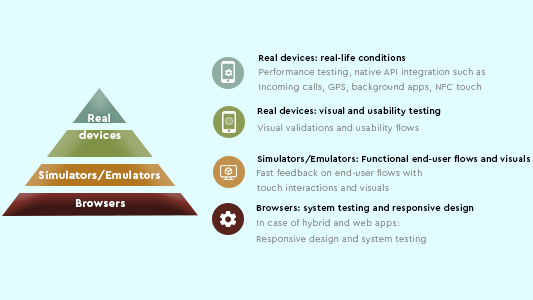
The Mobile Testing Pyramid is divided into three segments: real devices, simulators/emulators and browsers. Their order in the pyramid is decided by the number of tests they should cover under them. The broader a section is, the more tests it should cover. As we see, Ding prefers larger tests to be executed when dealing with browsers (desktop browsers). The reasons for it are explained in their specific segments.
But that’s just what we see and not what we would be using in our testing career. So to understand these sections deeper, we need to understand the inspiration behind the Mobile Testing Pyramid.
Also, Read: Mobile App Testing Basics

Inspiration behind the Mobile Testing Pyramid
Ding’s inspiration behind designing the Mobile Testing Pyramid is the challenges a tester faces with Mobile app testing. Currently, there are 3.5 billion smartphones active globally, and many of them differ from each other in a number of ways.
Initially, we don’t need to worry about that. We just take the list of most used smartphones and probably test ten out of it and release our application. The issue here is that it is not as easy as web testing. Mobile app testing is not just about UI and responsiveness but covers other broad parameters like network conditions, hardware, operating system and much more. Check out our blog on Mobile app testing challenges and solutions.
All of these factors make Mobile app testing more difficult. Exploring various devices without direction and structure can result in adverse user reactions. Furthermore, even if you only started with ten devices at first, you will gradually receive feedback from users about app glitches when used on their devices. So you’d have to increase the number of devices gradually, and your traditional method would fail in such cases. Agile can also burden you in subsequent version releases over time.
A mobile app testing strategy and a mobile app testing checklist are needed to test mobile applications effectively. Hence, what comes to mind is how we have structured our test automation. A slight modification can also help us in Mobile app testing, and hence Kwo Ding modifies the original pyramid to the Mobile Testing Pyramid.
Read More: How To Test Mobile Applications Manually
Focus Areas of the Mobile Testing Pyramid
The following section explains the focus areas of the Mobile Testing Pyramid. The section is arranged in the bottom-to-top order for the testing pyramid.
Desktop browsers
The bottom-most section of the testing pyramid states “browsers,” corresponding to testing the mobile app on the desktop browsers. Since it is the broadest section, it has the maximum number of tests.
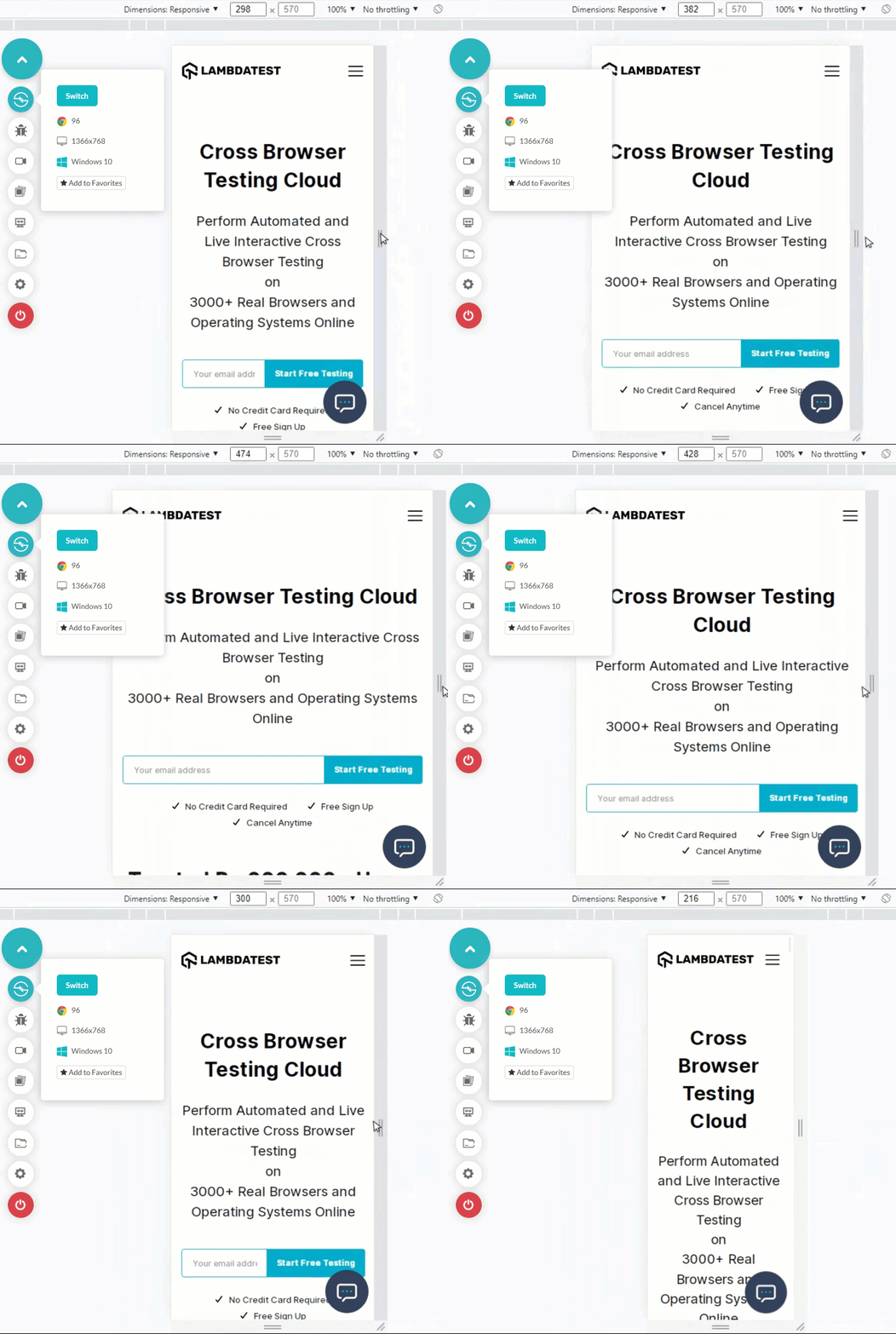
Mobile testing on desktop browsers is not a hard job. Just run the web app on the browsers, rescale them for responsive design test and UI glitches, and you are good to go. It is the best choice to start with when dealing with hybrid applications or pure web apps.
Read: Difference Between Web vs Hybrid vs Native Apps
Shown below is an example of resizing a web app on a desktop browser.
Advantages
- Extremely fast: Using desktop browsers for testing is a speedy job. Using the best automation testing frameworks like Selenium, you can run thousands of parallel test cases and use the headless approach. Refer to our page to know what is Selenium?
- Scalable: As mentioned in the previous point, you can use Parallel testing to cut down test execution time by leveraging a mobile device testing cloud like TestMu AI. New browsers are also easy to acquire as they are available readily.
- Easy for cross-platform: Desktop browsers are easy to work with because you don’t need to install a completely new OS as you would do on a native app. You can use cloud-based cross browser testing platforms to launch browsers from a single platform.
- Feasible and Easily available: Desktop browsers are readily available and are free to use. So you need very little investment to start with.
Disadvantages
- Whatever you do, you are still on a desktop: No matter how rigorously you test on mobile on the desktop browsers, the fact that you are using desktop resources won’t change. This affects how your results appear on the reports and the app’s performance.
- No “mobile-like” behavior: When you use a desktop browser to test an application. There are no network variations, including blockages, no incoming calls in between, no sudden freezing of devices due to lack of resources etc. These things are necessary when performing app testing on mobile as these are normal mobile behavior. Any crash due to these can affect your viewership.
- “Just not a device”: A self-explanatory sentence as said by Kwo Ding: “this is just not a device”.
Also, Read: Best Mobile App Testing Frameworks For Android and iOS Apps
The above-discussed analyses are true. Still, since browsers secure a place in the Mobile Testing Pyramid, they are unique and need to be considered in the testing.
The following focus areas are important while testing mobile apps on desktop browsers.
- Functional System testingDesktop browser tests efficiently perform functional system testing, which could be considered a primary testing method.
- Responsive designOne of the most important outputs of desktop browser tests for mobile apps is to check its responsive web design. Responsiveness is an important characteristic and should be applied in every application you build using a browser.
Also Read: Why Responsive Web Design Is Important?
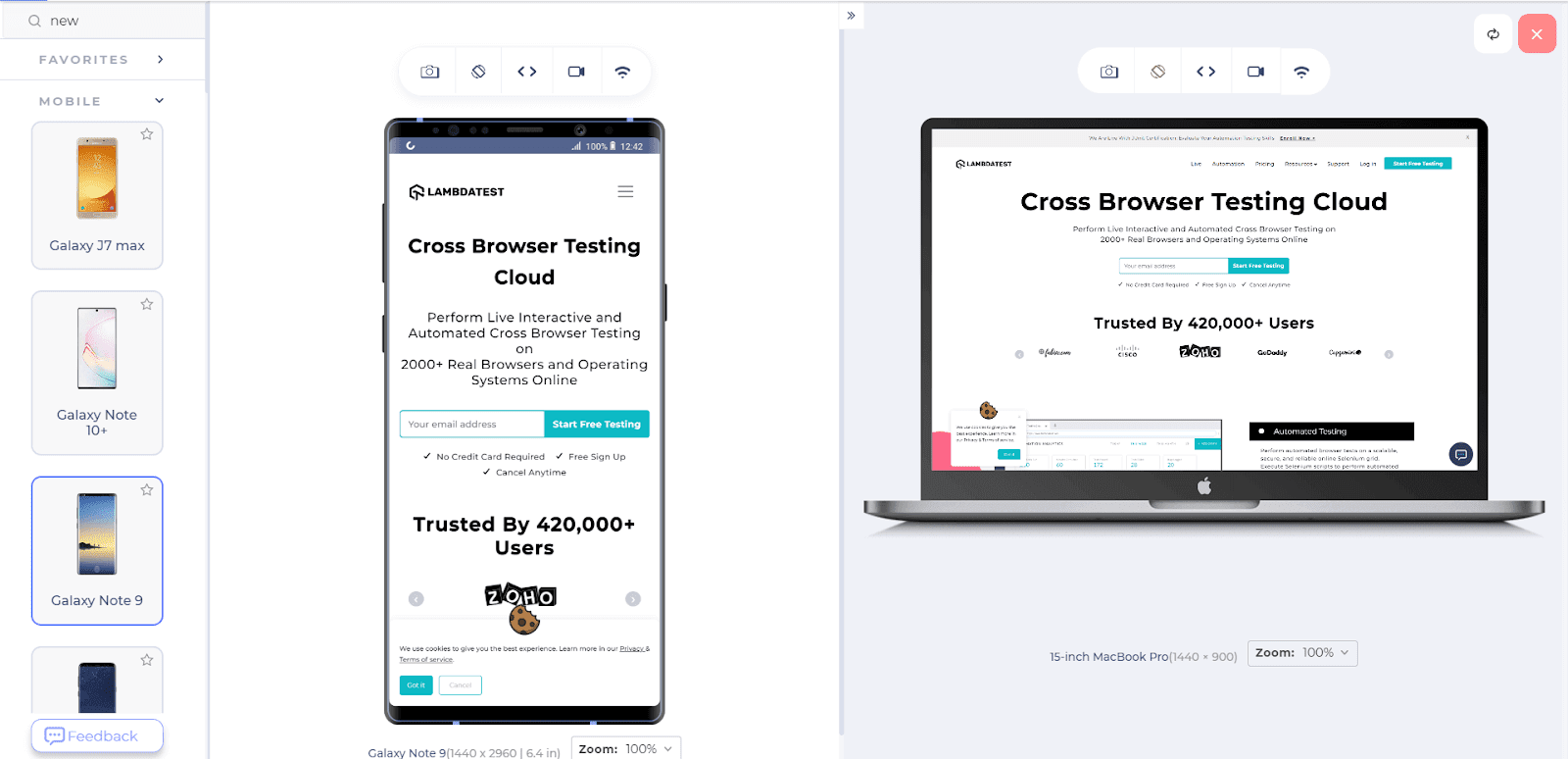
The following image reflects a responsive web app rendered across two different sized screen devices on LT Browser.

Here is the quick rundown of LT Browser.

- Cross Browser TestingCross browser testing ensures the cross browser compatibility property of your mobile app across numerous browsers and operating systems.
- Overall Visual layoutPerforming Visual regression testing on desktop browsers can also help verify the overall visual layout of the mobile app. Kwo Ding ensures to focus on the word “overall” here. This is because desktop browsers cannot be trusted to deliver the accurate UI layout that you would get on a mobile screen. You can get a big picture but not the specifics or minute nuances of the UI elements.
Emulators and Simulators
After reading the desktop browser section, anyone can be convinced that they are probably an excellent way to go through and launch our app without caring too much. If you think of the same question, let’s test an Android app on a mobile app emulator.
Output
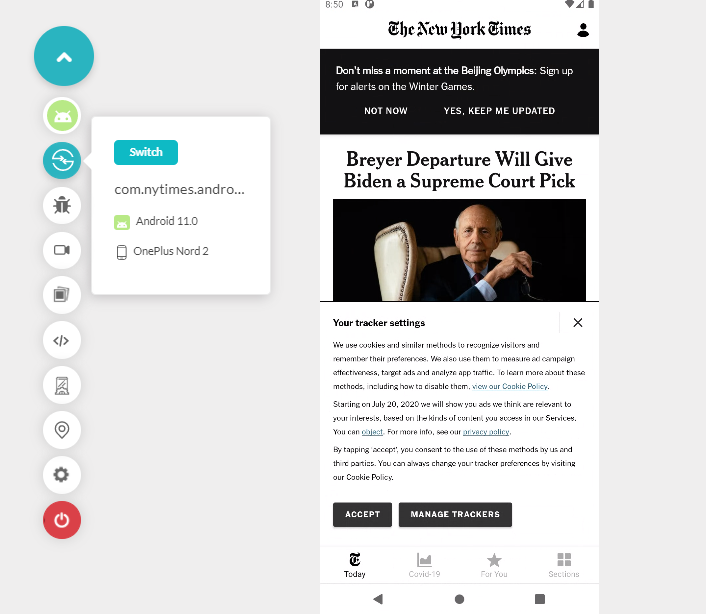
Shown below is the mobile web tested application. It shows glitches in navigation when rendered on a mobile emulator. Such occurrences can happen with you, too, if you rely on desktop browser testing entirely for the mobile app.
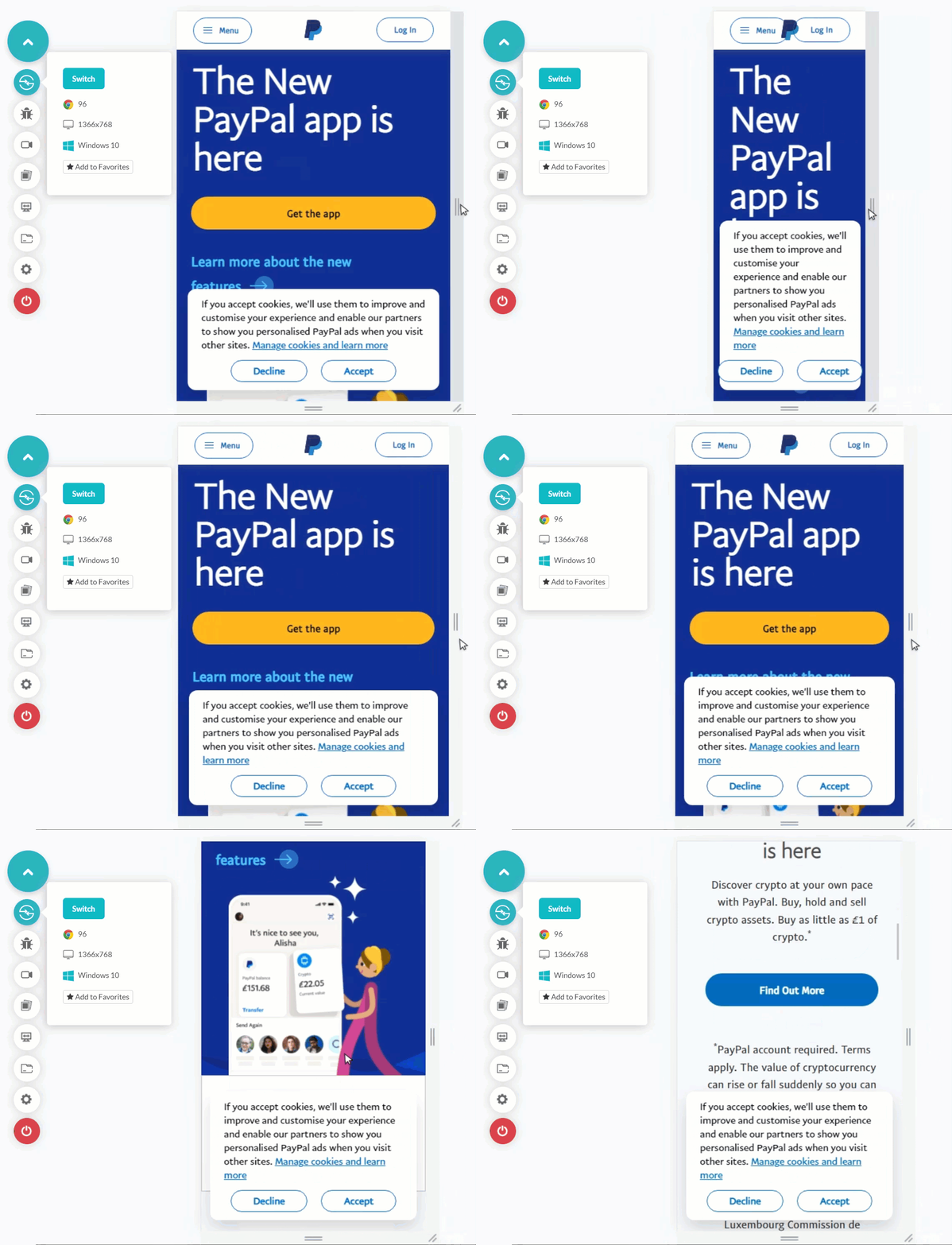
Testing Mobile apps on Emulators and Simulators is more inclined towards mobile devices’ reality (especially the emulator) than desktop browsers. This is because emulators consider hardware while rendering a mobile application or a mobile web. Recent emulators can also mimic certain functionalities of mobile devices like incoming calls and network variation. This provides a better idea of our mobile app execution for the end-user.
Also, Read: Why Android Application Testing Is Important?
Since it is the next segment to browsers, it should be performed after you are convinced with desktop browser tests. If an error is found in a desktop browser, it will reflect different processes. However, its vice versa is not true.
Advantages
- Quick to use: The emulators are straightforward to set up, and you can quickly start testing.
- Scalable: Emulators are easily scalable as you just need to install a new device when it is launched. You don’t need to worry about procuring one.
- Bring a few native functionalities: Emulators bring a few native functionalities into the testing environment, such as receiving calls and messages.
- Debugging facilities: Tests run on emulators are easy to debug as you use a desktop screen to work. In addition, the logs can be saved and analyzed quickly.
- Fast to execute: Emulators are faster to execute the test as you just upload a native binary file or enter a URL to see quick results. You can also use parallelization in emulators to execute tests faster.
- Gives you a head-start: The emulators are available as soon as the device is announced. Sometimes it is available based on rumoured specifications too. So testing on emulators can give you a head start to those waiting to receive the real device when it comes to the market.
Disadvantages
- Can’t imitate each device: Emulators cannot mimic each device in the market. You would find a lot of skins for many devices, but they run on a fixed stock underneath.
- Inaccurate resource usage: Emulators do not accurately picture the resource usage such as CPU, GPU, memory, or others. They provide the metrics, but that is hardly comparable due to the absence of real hardware.
- Absence of native mobile behavior: Emulators are better than desktop browsers in bringing a few mobile-like behaviors to the testing environment. However, it cannot mimic a lot of native mobile device APIs such as camera behavior, Bluetooth behavior, other wireless connections such as NFC etc.
- ARM-based emulators are slow: Kwo Ding mentions that almost all Android devices work on the ARM architecture. But, emulators working on ARM architecture are slower in execution. Therefore, they do not give a precise output from the tests.
Practically, emulators play a vital role in Mobile testing, and therefore, a tester should focus on the following areas while working with the emulators:
- Functional end-user flowsFunctional end-user flows determine whether your application works from path A to path B when navigated like an end-user. Again, emulators are an excellent choice to confirm that.
- Native API integrationA tester can focus on native API integration available in the emulator to verify their correctness with respect to the application. These may include call features, message features, GPS features etc.
- Visuals testingA tester can check the visuals but not go too deep into a device-specific UI. The high-level visuals can be verified here.
- Touch interactionsEmulators are an excellent primary choice to test for touch interactions of the mobile application. Even though it is not as accurate as a real device, it can give an idea about the high-level interaction and mobile app performance.
Real device
Kwo Ding describes the real device section as “the real thing” in his introduction to the Mobile Testing Pyramid. He is right in this statement. The benefit of real devices is that you can test crucial mobile app testing scenarios in real-user conditions.
Read More: Real Device Cloud.
Looking to perform Android and iOS app testing on Real Device Cloud, check out our video below:
But that does not mean they lack any downside. Let’s compare its pros and cons.
Advantages
- All native APIs: A real device has all the native APIs and can be used along with the Mobile app testing.
- Real conditions: A real device presents real conditions to the tester that an actual end-user would face. This gives an accurate idea of the behavior of our mobile application.
- Faster ARM (Android) tests: As discussed earlier, ARM-based emulators are slow in test execution which majorly corresponds to Android devices. Therefore, real device test execution is much faster in Android.
- Everything is real: Ding does not let it slip again that the fact here is that they are real devices, and hence every metric here is accurate. So you get real CPU usage, real battery metric, real GPU usage, real logs etc.
Disadvantages
- Huge costs- Real devices are not easy to acquire as an emulator. They are too costly and can be a significant part of your overall testing budget. The current average cost of one device globally is close to USD 300. Acquiring 100 devices can put USD 30,000 just for procurement which can be a big deal for startups.
- Heavy maintenance: Another major factor in real device testing is the continuous maintenance it asks for from a user. A significant factor here is the continuous release of mobile phones. In 2021, 47 new mobile devices were released worldwide, a below-average number if you follow over the years. As a tester, you need to keep acquiring new devices to raise costs.
Except for cost and maintenance, real devices hardly bring any disadvantages to the table. But, I have a solution to eradicate this anomaly too. Why not try cloud-based real device labs that give you real devices for testing without actually purchasing even a single device.
TestMu AI platform offers a real-device lab with top-notch features integrated into it. With 3000+ screens to test on, TestMu AI real devices provide accurate metrics, device usage and logs in their detailed performance report. Along with it, you get network throttling, screen recording, sharing options and a debugger integrated into the platform. Once done, you can make use of tons of TestMu AI integrations that can facilitate your testing from a single place.

In the Mobile Testing Pyramid image below, notice that the real device section is distributed to two-segments instead of one, like emulators and browsers.
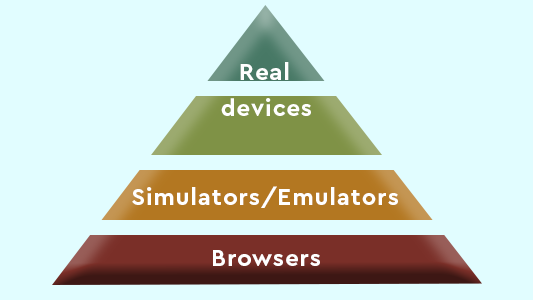
The lower segment containing the word “devices” denotes the usability or functional testing part of the real devices. The upper segment is for the non-functional testing part.
These will also reflect in the following focus area of real devices.
- Usability
The usability of the mobile application can be tested thoroughly and most efficiently in a real device. This may include touch interaction connections such as Bluetooth, NFC and more.
- CPU
Focus on CPU usage and the metrics it generates as they will be accurate according to the device in use.
- Visuals
Kwo Ding refers to this section as the “leftover visuals” you could not see in other testing (segments). Desktop browsers and emulators can clear out most of the visual stuff for your application. But for confirmation, you can focus on this here with lower priority.
- Manufacturer’s sauce
A few manufacturers put up their UI environment on Android. For example, Samsung has its own One UI that comes on top of Android’s UI engine. This could affect your mobile application UI and therefore is a good focus area for a tester.
- Specific built-in browsers
A few device manufacturers also release their devices with specific built-in browsers, such as Samsung with Samsung Internet. They may contain a tiny percentage of users, but it is always a good practice to account for everyone and every scenario before releasing the mobile app.
This was all about the Mobile Testing Pyramid and the detailed exploration of its various segments. The Mobile Testing Pyramid is an excellent reference for structured testing and good performance. A brief analysis can be therefore dictated here for the agile teams.
Effect of the Mobile Testing Pyramid on Agile teams
Agile is the most well-received and adopted SDLC methodology across the world today. It expedites the process and aims at software delivery within four weeks (it can also be 15 days or 45 days, depending on the organization). However, testers are especially under pressure once the development part completes, and there is very little time left for conducting testing and moving the feedback cycle. Some may argue that in-sprint testing is a suitable method but that sometimes puts more pressure if the sprint cycle is not reduced.
Can the Mobile Testing Pyramid help the agile teams in any way? Definitely!
The Mobile Testing Pyramid gives a structure to the testing team. Without a proper structure, you can start testing on real devices first and discover that a few things could have been done much faster if you had chosen desktop browsers before. This is true and therefore determines their place in the testing pyramid.
The Mobile Testing Pyramid describes that testers should always start with browser tests (as many as you can) because they are quick to execute and fast to achieve. If tests do not need real devices, they can be quickly wrapped up as per the testing pyramid’s principle.
The Mobile Testing Pyramid also describes focus areas for each segment. They can prove to be essential when a tester is lost in configuring hundreds of tests and determining which one to use. If a section defines a focus area, that can be a foundation for creating or dividing tests around that. This can help you quickly execute the tests, which is ultimately the goal in an agile environment.
Also, Read: Enabling Agile Software Testing With Automation

What are your thoughts on the Pyramid?
This brings us to the end of this section. Kwo Ding’s testing pyramid represents structured testing that speeds things up and gives clear direction. It is indeed a new thing when it comes to testing mobile apps. As a tester, you would see some differences in your app when run on a desktop browser, emulator and a real device. The challenges we face during Mobile device cloud testing has been the foundational thinking behind devising the testing pyramid based on the automation testing pyramid designed by Mike Cohn.
This post combines my and Ding’s thoughts on the testing pyramid. Either being a tester or a developer, you can incorporate this in practice. I would love to hear your thoughts on the same.
I hope to see some great comments and suggestions in the comment section below.
Thank you for reading, and have a nice day!
To further strengthen your expertise in mobile app development and mobile testing, be sure to check out our comprehensive guide on top asked mobile testing interview questions. This resource will equip you with the knowledge needed to excel in this dynamic field.
Author

Mayank Bhola
Blogs: 8


Mayank Bhola is Co-Founder and Head of Products at TestMu AI (formerly LambdaTest), where he leads the entire product portfolio across KaneAI, Kane CLI, HyperExecute, SmartUI, the Real Device Cloud, Accessibility, and other software testing product lines. As an early Lead Architect he designed and built the company's flagship Tunnel technology from scratch, created the React-based automation platform, and architected the data-intensive pipelines and FAAS services that scale it. He brings more than 10 years of experience in software development and product engineering, with earlier roles as Head of Technology at Juggernaut Books and Senior Software Engineer at PressPlay TV and Zomato. Mayank holds a B.Tech in Computer Engineering from JIIT Noida.
Reviewer

Srinivasan Sekar
Reviewer
Srinivasan Sekar is Director of Engineering at TestMu AI (formerly LambdaTest), where he leads engineering and open-source initiatives behind the Selenium and Appium automation grid and owns TestMu AI's MCP Server. A committer to Appium and a contributor to Selenium, WebdriverIO, Taiko, and AppiumTestDistribution, he brings over 15 years of experience in quality engineering and open-source technologies. He is the author of the Apress book 'The MCP Standard: A Developer's Guide to Building Universal AI Tools with the Model Context Protocol,' a Certified Kubernetes and Cloud Native Associate, and an international conference speaker. Before TestMu AI he spent over eight years at Thoughtworks as a Principal Consultant and Quality Architect. Srinivasan holds a B.Tech in Information Technology from Anna University.


Frequently asked questions
Did you find this page helpful?
More Related Blogs
TestMu AI forEnterprise
Get access to solutions built on Enterprise
grade security, privacy, & compliance
- Advanced access controls
- Advanced data retention rules
- Advanced Local Testing
- Premium Support options
- Early access to beta features
- Private Slack Channel
- Unlimited Manual Accessibility DevTools Tests