

Power Your Software Testing with AI Agents and Cloud
The Native AI-Agentic Cloud Platform to Supercharge Quality Engineering. Test Intelligently and Ship Faster.


- TestMu AI (Formerly LambdaTest)
- /
- Blog
- /
- 12 Key Mobile App Testing Challenges And Solutions [2026]
12 Key Mobile App Testing Challenges And Solutions [2026]
Explore 12 key mobile app testing challenges including device fragmentation, network bandwidth, security, and flaky tests, with practical solutions for each.
Last Updated on:
On This Page
This article is a part of our Content Hub. For more in-depth resources, check out our content hub on Mobile App Testing Tutorial.
Over the last decade, the usage of mobile devices has skyrocketed globally. According to Statista, the number of smartphone subscriptions is forecast to exceed 7.9 billion by 2028. Hence, it is not hard to envision the enormous mobile app testing challenges that the current and future backend teams will be dealing with.
Due to the surge in mobile devices, the demand for mobile applications has escalated worldwide. This has led to large organizations investing heavily in this domain, thereby increasing the need for a more conducive real device testing solution.
12 Key Mobile App Testing Challenges
Mobile app testing is definitely not an easy task. It requires a lot of effort and time to test applications on all platforms. There are various approaches to mobile app testing, but the most important thing for every developer is to build the best quality product that will meet users’ expectations.
The main problem for mobile testers is that there are lots of different ways to test apps. Each approach has its pros and cons, which can be tricky to determine in advance.
1. Too Many Devices Globally
According to Statista, over 1.3 billion smartphones are sold globally each year. This volume means hundreds of active device models at any given time, and testing teams are expected to ensure apps run smoothly across the majority of them.
Each app must be compatible with a majority of mobile variants worldwide. Ensuring this requires an extensive infrastructure, including mobile app testing solutions and access to a physical hub of popular devices. For early-stage startups, this can pose a significant investment challenge.
2. Device Fragmentation
Device fragmentation is one of the biggest challenges in mobile app testing. According to StatCounter, Android has multiple active OS versions simultaneously, with Android 16.0 at 21.61%, Android 15.0 at 20.16%, Android 14.0 at 13.8%, and Android 13.0 still at 14.45% as of March 2026. This fragmentation means apps must be compatible with various OS versions, increasing the complexity for testing teams.
To ensure seamless functionality across different OS versions and devices, testing teams must adopt a cloud-based mobile app testing solution. These platforms provide access to a wide range of real devices and operating systems, enabling efficient compatibility testing without the need for an extensive mobile testing lab.
- Upload the app with just one click,
- Test the app on numerous Android emulators online and iOS simulators.
- Monitor the quality of the apps.
- Rely on the cloud to make speedy deliveries and more.
3. Different Screen Sizes
Companies across the globe design smartphones of varying screen specifications. Multiple variants of the same model have different resolutions and screen sizes to attract a broader range of consumers. Hence, there is a requirement for apps to be developed in conjunction with every new screen specification released in the market.
The screen size affects the way an application will appear on different devices. It is one of the most complicated mobile app testing challenges since developers must now concentrate on its adaptability to various mobile screens. This includes resizing the apps and adjusting to multiple screen resolutions to maintain consistency across all devices. This might turn out to be a challenge unless an application is thoroughly tested.
4. Numerous Types of Mobile Applications
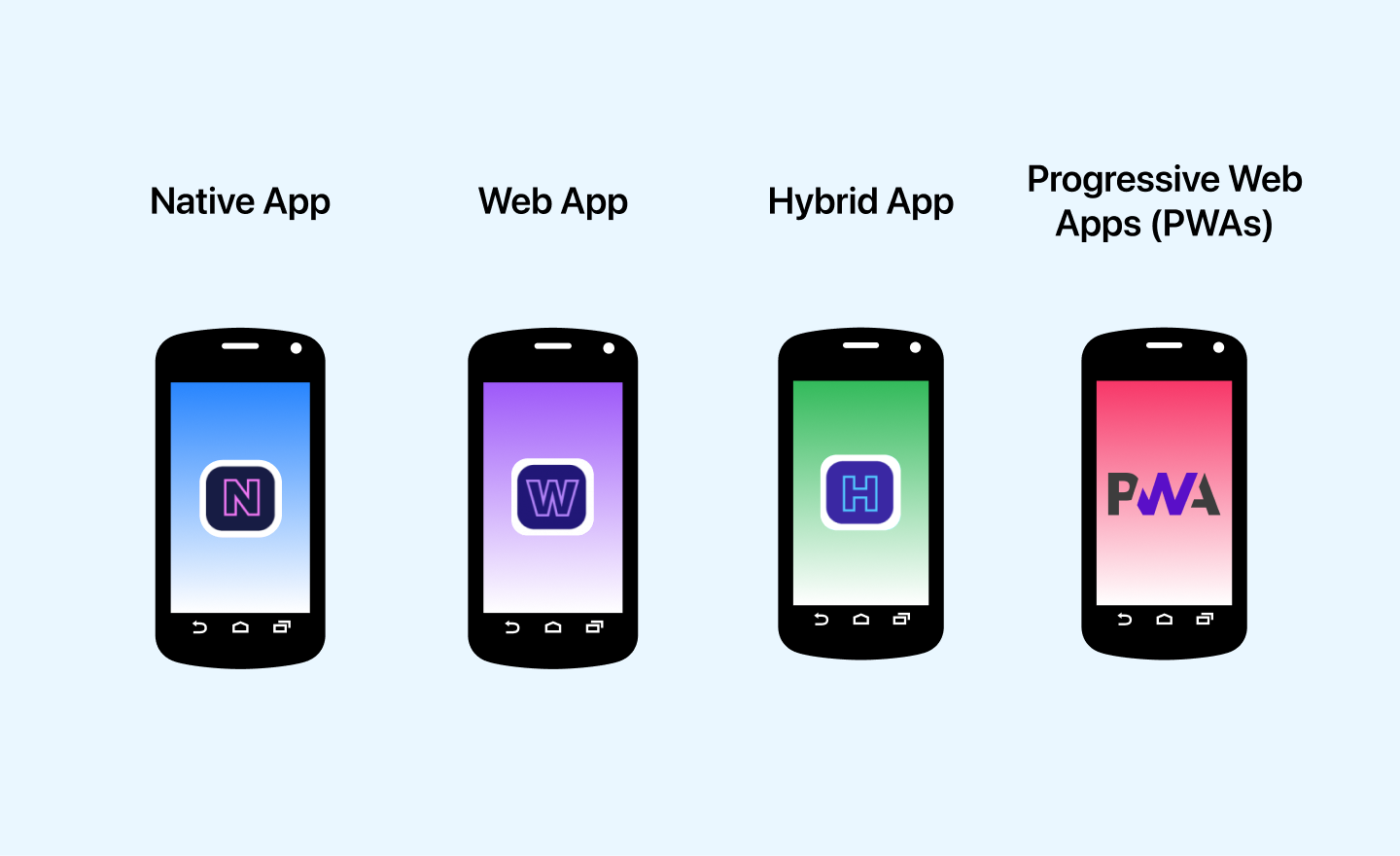
Mobile app development is a great way to increase your brand’s visibility, bring in new customers and provide a better user experience for current customers. With that in mind, let’s take a look at the three main types of mobile apps: native, web, and hybrid.
- Native apps: Native mobile applications are those built for one specific operating system. Hence, apps built for iOS do not work on Android or other OS and vice versa. Native applications are fast, provide better phone-specific features, and have higher efficiency. Here, the mobile app testing challenges include ensuring such qualities are preserved and all features are compatible with the native UI of the device.
- Web apps: Web applications are much like native apps, except users need not explicitly download the former. Instead, these apps are embedded within the website that users can access through web browsers on their phones. Web apps are thus expected to provide excellent performance on all devices. To ensure that they do, testing teams have to thoroughly check the app on a large variety of models. However, this is not only a time-consuming procedure but is also critical since failure to work on a few devices can significantly bring down the company’s business revenues.
- Hybrid apps: Hybrid apps have the facilities of both web and native apps. They are essentially web applications that have been designed like the native ones. Such apps can be maintained easily and have a short loading time. Mobile app testing teams are responsible for ensuring hybrid applications do not lag on some devices. All their features are available on all operating systems with the capability to support said features.
- Progressive web apps: Progressive web apps are web applications that leverage modern web technologies to deliver a native app-like experience. They are fast, responsive, and can work offline using service workers. Unlike traditional web apps, PWAs offer features such as push notifications and home screen installation without requiring an app store download. Testing teams must ensure PWAs function seamlessly across different browsers, devices, and network conditions while maintaining high performance and security standards..
Each type requires different testing strategies, frameworks, and device coverage. Automating repeated regression tests across all app types reduces the manual burden significantly.

Note: Test native, hybrid, and web apps across 10,000+ real devices with TestMu AI's cloud platform. Start testing free!
5. Mobile Network Bandwidth
Mobile network bandwidth testing is a significant part of mobile app testing. Users expect high-speed mobile applications that the backend team must ensure. But that is not all. An application that fumbles to produce faster results also performs poorly in terms of data communication.
An app that is not tested and optimized to suit the bandwidth of a variety of users will lag during the exchange of information between the end-user and the server. Therefore, the testing team should ideally test their apps and mobile websites in various network conditions to understand their response time in each case. This shall make the process a lot more efficient and the app much more sustainable.
6. Mercurial User Expectations
Users constantly demand new features, faster updates, and platform-specific customizations. Each feature request changes the UI, adds new test paths, and may break existing functionality. Testing teams must validate every update across the full device matrix, which extends test cycles. The solution: automated regression testing that runs the full suite on every build, catching regressions before they reach users.
7. Seamless User Experience
An app that works well on a Pixel 9 may render poorly on a Samsung Galaxy A15 or lag on older iPhones. Inconsistent UX across devices directly impacts retention: users uninstall apps that feel broken on their specific device. Testing teams need a mobile app testing strategy that covers visual testing across real device variants, not just emulators, to catch layout shifts, touch target misalignment, and performance degradation on lower-end hardware.
8. Security concerns
Security concerns are a huge roadblock for the mobile app testing team. Although several mobile app testing tools lets you run tests that are secure. There are several concerns that app developers regularly face.
- Easier access to the cache: Mobile devices are more prone to breaches since it is simpler to access the cache. Suspicious programs can therefore find easy routes to private information through mobile applications unless built and tested to nullify the vulnerabilities.
- Poor encryption: Weak or absent encryption in mobile apps leaves user data vulnerable to interception. Sensitive data like authentication tokens, payment details, and personal information must be encrypted both in transit (TLS) and at rest. Testers must verify that the app enforces certificate pinning, uses strong cipher suites, and does not store credentials in plain text or shared preferences.
The process is one of the most crucial mobile app testing challenges since relevant teams have to run all possible test cases to ensure the application is going from the encryption side.
AI-powered test orchestration and execution platforms like TestMu AI, which is GDPR, ISO 27001, CCPA, and SOC2 compliant, can help QA testers to run their mobile app tests on the cloud to assure accuracy and proximity to real users conditions.
9. Strict Deadlines
User demands are often overbearing, making companies run on a strict schedule to deliver apps. Patchwork, bug fixes, and upgrades are other requirements that keep developer and testing teams on their toes. All of this requires constant and fast mobile app testing procedures.
Given the complexity of testing mobile apps, which includes testing not only on mobile app emulators and simulators but also on the available physical devices, testing teams are often in a fix when it comes to deadlines. More often than not, the strict schedules make it difficult for the technical team to perform extensive tests.
10. Heavy Battery Usage
Mobile app testing involves testing for heavy battery usage. This is challenging because a truly diverse application should run on almost any battery without draining the device. Unfortunately, the last few years witnessed a surge in apps that are hard on the battery. To deal with this, mobile manufacturing companies across the globe started providing stronger batteries.
However, user dissatisfaction cannot be neglected in the case of apps that still seem to drain their batteries considerably. One of the significant mobile app testing challenges is testing apps to see they are not drawing power, even heavy. Minimizing battery drainage is of utmost importance to ensure a stellar user experience.
To overcome this, AI-native cloud testing platforms like TestMu AI offer an app profiling feature. With this, you get real-time insights into crucial metrics like CPU usage, memory consumption, and network activity on real devices. To get started, you can check out this guide on using app profiling feature with TestMu AI.
11. Too Many App Testing Tools
The mobile testing ecosystem is fragmented: separate tools for Android vs iOS, manual vs automated, functional vs performance testing. Teams end up stitching together 3-5 tools, each with its own setup, reporting format, and learning curve. This creates maintenance overhead, inconsistent results, and budget bloat from multiple subscriptions. For a detailed comparison, see our mobile app testing tools guide.
The solution is a unified platform that handles both Android and iOS, manual and automated, across real devices and emulators. TestMu AI consolidates test execution, reporting, and device infrastructure into one platform, eliminating the need to coordinate across multiple tools.
12. Dealing With Flaky Tests
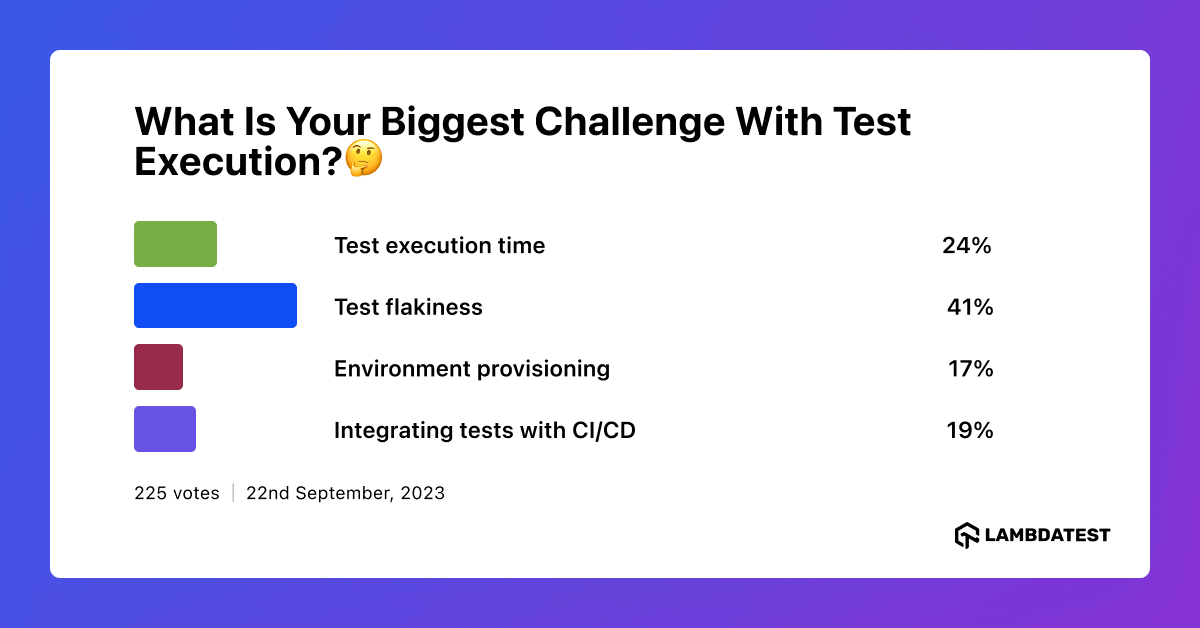
Dealing with flaky tests is a major challenge in mobile app testing, as they yield unpredictable results and undermine the reliability of the testing process. These inconsistencies can disrupt Continuous Integration/Continuous Deployment (CI/CD) pipelines and lead to wasted resources. Debugging flaky tests is often complex and time-consuming, affecting team morale and increasing the risk of overlooking real issues.
To gain a deeper understanding of these challenges and their impact on the testing community, we conducted a social media poll with the question, “What is your biggest challenge with test execution?🤔” The responses shed light on the common hurdles faced during test execution.

Overcoming Mobile App Testing Challenges
The main issue with testing mobile apps is the limited availability of real devices for testing purposes. Here are a few solutions to help you overcome the above mobile app testing challenges.
Many of the challenges above, including selector maintenance and test flakiness, also tie back to framework choice. This comparison of the best mobile app testing frameworks covers how Espresso, UIAutomator2, XCUITest, Appium, Maestro, Detox, and Flutter options handle these challenges differently.
Mobile Emulators (Android and iOS)
Emulators are often used for speedy and cost-effective mobile app testing, but they don’t always provide reliable test results. The whole point of using an emulator is to run the software without actually installing it on a real device. The mobile app emulators can be installed on your development machine, and after that, any number of tests can be run on the emulator without the need to install it on a real device.
Mobile emulators will never replace real devices, but they provide a good way of running initial tests without dealing with all the hardware and OS differences among real devices. You should also remember that emulators can never recreate all the features of a real device, such as touch gestures, accelerometer, etc. However, it’s better to understand the emulator vs simulator difference in detail before deciding which to choose.
Using Standard Protocols Common to All Devices
One way to decrease the complexity of the mobile app testing process is to adhere first to the protocols common to all devices. This can include features like GPS, camera, audio, and video, etc. Prioritizing procedures like localization testing help users operate their apps better irrespective of where and what they are doing. Once the standard tests are performed, tests specific to the operating system or its different versions can be conducted.
Leverage Cloud-Based Platform for Mobile App Testing
For companies with stringent app testing requirements, it might be good to set up an infrastructure to support the demands. For example, a physical lab consisting of mobile devices of various specifications and a cloud-based mobile app testing system can together form a robust combination ideal for in-house testing.
A scalable and efficient approach to mobile app testing is using cloud-based testing platforms. Maintaining an in-house device lab with various smartphones can be expensive and time-consuming. Instead, TestMu AI is a cloud-native test execution platform that lets you perform manual and automated tests across 10,000+ real devices, browsers, and OS combinations.
It allows you to use web and mobile app automation frameworks without managing physical test infrastructure, offering a wide range of Android emulators and iOS simulators, as well as real mobile devices, to help you test and release bug-free and high-performance apps.
With this platform, you can perform Android automation testing, including testing on an Android emulator for Mac, ensuring comprehensive mobile app validation across different environments.
Subscribe to the TestMu AI YouTube Channel and stay up to date with the latest tutorials around mobile app testing, test automation, and more.
Conclusion
Start with the challenge that costs your team the most time. If flaky tests are your bottleneck, set up TestMu AI's Test Intelligence to auto-detect and quarantine them. If device coverage gaps cause production bugs, run your critical test suite across 10,000+ devices in TestMu AI's real device cloud on your next sprint.
For deeper learning, explore our Mobile App Testing Tutorial or prepare for your next role with mobile testing interview questions.

Author

Rileena Sanyal
Blogs: 4


Rileena Sanyal is a community contributor with 4+ years of experience spanning AI engineering, machine learning, and software testing–focused technical content. She specializes in agentic AI, computer vision, and applied machine learning, with hands-on experience in model testing, benchmarking, unit and integration testing, and reliability validation. Rileena has created technical content around mobile app testing, Selenium with Python, cross-browser testing, and AI-driven systems for platforms including TestMu AI, HeadSpin, and Applitools. She holds an MSc in Artificial Intelligence and a Master’s degree in Computer Science, and currently works in AI R&D engineering roles.
Reviewer

Shivam Singh
Reviewer
Shivam Singh is a Lead Member of Technical Staff at TestMu AI (formerly LambdaTest), architecting the Real Device Cloud that runs automated app and web tests on real Android and iOS devices. He designed the architecture for real-device app and web automation and wrote the microservices from scratch in Golang, including the XCUITest and Espresso execution layers for iOS and Android. His platform reached peak parallel concurrency of 150+ for app automation while handling roughly 500,000 tests a month, and he leads the team that keeps the automation grid running. He brings over eight years of engineering experience and holds a B.Tech in Computer Science.


Mobile App Testing Challenges FAQs
Did you find this page helpful?
More Related Blogs
TestMu AI forEnterprise
Get access to solutions built on Enterprise
grade security, privacy, & compliance
- Advanced access controls
- Advanced data retention rules
- Advanced Local Testing
- Premium Support options
- Early access to beta features
- Private Slack Channel
- Unlimited Manual Accessibility DevTools Tests