

Power Your Software Testing with AI Agents and Cloud
The Native AI-Agentic Cloud Platform to Supercharge Quality Engineering. Test Intelligently and Ship Faster.


- TestMu AI (Formerly LambdaTest)
- /
- Blog
- /
- Google Pixel 11 Pro and Pixel 11 Pro XL Are Now Live on TestMu AI Real Device Cloud
Google Pixel 11 Pro and Pixel 11 Pro XL Are Now Live on TestMu AI Real Device Cloud
Google Pixel 11 Pro and Pixel 11 Pro XL are live on TestMu AI Real Device Cloud on Android 17, before the August 20 retail date. Test your site and app first.
Published on:
On August 20, someone will take a Pixel 11 Pro out of the box and open your app on it. What your layout does on that screen is already settled by then, and in a normal launch cycle the first person to find the problem is that customer.
Google announced the Pixel 11 Pro and the Pixel 11 Pro XL on August 12, 2026, and set retail availability for August 20, per its Pixel 11 announcement. Both models are already live on TestMu AI Real Device Cloud, running Android 17.
That leaves seven days of real Pixel hardware you can book before anyone can buy it.
Overview
The Google Pixel 11 Pro and Pixel 11 Pro XL are live on TestMu AI Real Device Cloud on Android 17, seven days before their August 20 retail date. Both models are bookable for live sessions and for Appium automation, so you can validate your site and your app on real Pixel hardware first.
What changes between the Pixel 11 Pro and the Pixel 11 Pro XL?
- Display resolution: The Pixel 11 Pro renders at 1280 x 2856 on a 495 PPI panel, while the Pixel 11 Pro XL renders at 1344 x 2992 at 486 PPI. The XL carries exactly 10 percent more pixels on a lower-density screen.
- Shared 20:9 aspect ratio: Google lists both panels at the same nominal 20:9 shape, which is why a side-by-side spec sheet reads as interchangeable and hides the width difference that actually moves your breakpoints.
- Android 17 build: Each model is offered on one Android 17 build, sitting above a Pixel catalog that reaches back to Android 11 for regression runs against older releases.
How do you run tests on the Pixel 11 Pro today?
Open Real Devices, filter the Android catalog to Google, and pick either model on Android 17. The current list of real devices shows everything bookable right now, including which models are manual only.
What Is New in the Pixel 11 Pro Lineup
The Pixel 11 Pro and the Pixel 11 Pro XL are the same phone at two sizes, which is exactly what makes them easy to get wrong. Specifications below come from Google's Pixel 11 Pro technical specifications.
Pixel 11 Pro
- A 6.3-inch Super Actua display at 1280 x 2856, 495 PPI, on a 20:9 aspect ratio.
- An LTPO panel with Smooth Display from 1 Hz to 120 Hz, and peak brightness up to 3,600 nits.
- Measures 152.7 x 71.9 x 8.4 mm at 204 g.
- Google Tensor G6 with the Titan M3 security coprocessor, launched with Android 17.
Pixel 11 Pro XL
- A 6.8-inch Super Actua display at 1344 x 2992, 486 PPI, on the same 20:9 aspect ratio.
- The same 1 Hz to 120 Hz LTPO panel and the same 3,600 nits peak brightness.
- Measures 162.7 x 76.5 x 8.5 mm at 226 g.
- The same Tensor G6 and Titan M3 pairing, also launched with Android 17.
Run the arithmetic on those two resolutions and the gap is cleaner than the marketing suggests. The XL is exactly 5 percent wider in device pixels, 4.76 percent taller, and carries exactly 10 percent more pixels in total. It does that at a lower pixel density, 486 PPI against 495 PPI, because the panel grew faster than the resolution did.
| Screen | Pixel 11 Pro | Pixel 11 Pro XL |
|---|---|---|
| Display size | 6.3-inch | 6.8-inch |
| Resolution | 1280 x 2856 | 1344 x 2992 |
| Pixel density | 495 PPI | 486 PPI |
| Aspect ratio | 20:9 | 20:9 |
| Android version | 17 | 17 |
Two devices that share a name, a chipset, an operating system, and an aspect ratio still put a different amount of usable width in front of your layout. A breakpoint tuned on one of them is an assumption on the other until you run it.
Test Web Apps Before Launch Day
A matched aspect ratio is what makes this pair risky for mobile web. Nothing in the shape of the viewport warns you that the width changed, so the failures land quietly.
- Breakpoints near the boundary - a rule that switches layout close to the Pixel 11 Pro width can resolve differently on the XL, since the extra 64 device pixels change which side of the boundary the viewport lands on.
- Density-dependent assets - the two panels sit at 495 and 486 PPI, so image sets selected by device pixel ratio are worth checking on both rather than on one and assuming.
- Fixed-width elements - modals, tables, and sticky bars sized against a hardcoded maximum occupy a visibly different share of a 6.8-inch canvas than a 6.3-inch one.
- Text truncation - single-line headings and nav labels that fit the XL can ellipsize on the narrower Pro, which is the failure users report as a broken menu.
- Aspect-ratio media queries will not separate these two devices at all, because both report 20:9. Width and resolution queries are what distinguish them.
For a refresher on structuring breakpoints that hold across a device range this tight, our guide to responsive testing covers the approach.

Note: Test your site and app on a real Pixel 11 Pro and Pixel 11 Pro XL before the devices reach customers. Both models are live on Android 17 with no hardware to buy. Try for free
Test Mobile Apps on Real Pixel Hardware
A new Tensor generation and a new Android release land together here, and neither is reproducible on an emulator. These are the checks worth running first.
- Android 17 behavior changes - permissions, background execution, and notification handling are where a new platform release breaks an app that was correct on Android 16.
- Tensor G6 on-device inference - anything routed through Gemini Nano or the device NPU runs on silicon your suite has never executed against.
- Adaptive refresh rate - the LTPO panel moves between 1 Hz and 120 Hz, so animation timing and frame pacing bugs surface on hardware and not in a simulator.
- Layout across both sizes - run the same suite on the Pro and the Pro XL and diff the results, because that pair is where the width difference shows up as a real defect.
- Camera and sensors - the rebuilt camera stack changes preview surfaces and capture behavior underneath code that assumed the previous generation.
TestMu AI's real device cloud runs these on physical hardware rather than emulated images, across 10,000+ real Android and iOS devices, with Appium, Espresso, XCUITest, and Detox all supported. It also carries the conditions that break launch-day builds in the field: network profiles from 2G through 5G plus offline, and geolocation across 170+ countries.
Our comparison of emulators, simulators, and real devices covers where each option stops being useful.

Start Testing on the Pixel 11 Pro in 3 Steps
- Log in to TestMu AI and open Real Devices, then filter the Android catalog to Google.
- Pick Pixel 11 Pro or Pixel 11 Pro XL, both listed on Android 17.
- Upload your .apk or .aab, or enter a URL for web testing, and start the session.
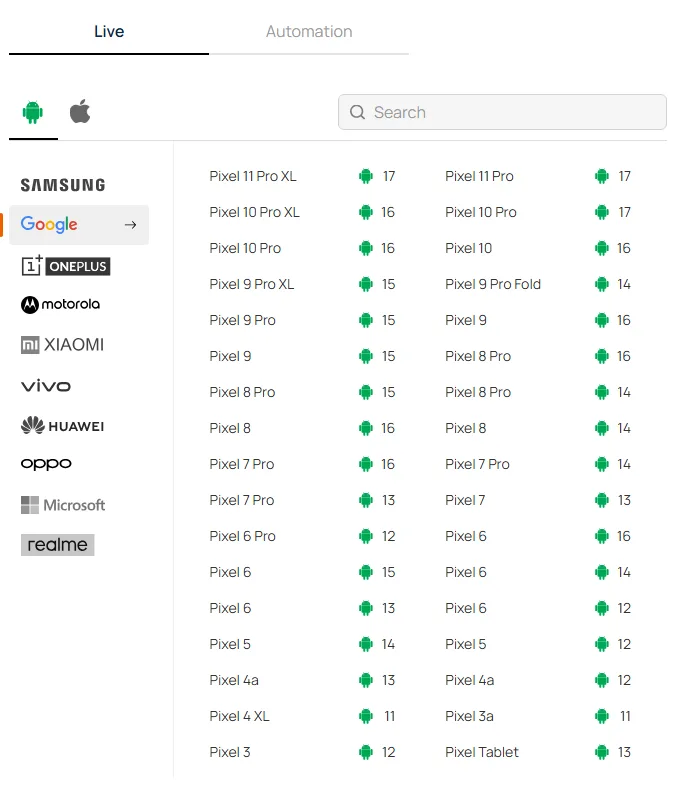
Both models sit at the top of the Google section on Android 17. When we captured this list on August 13, 2026, the section held 34 Pixel entries covering 21 distinct models, from the Pixel 3 up to the Pixel 11 Pro XL, and spanning Android 11 through Android 17. Popular models appear more than once because they are offered on several OS builds.
For automation, both models are addressable through standard Appium capabilities. Real device execution is opt-in, so isRealMobile has to be set explicitly or the session runs against a virtual device instead:
const capabilities = {
  "platformName": "Android",
  "deviceName": "Pixel 11 Pro",
  "platformVersion": "17",
  "isRealMobile": true,
  "app": "lt://APP_ID",
  "build": "Pixel 11 Layout Regression",
  "name": "Launch layout on the 6.3-inch panel",
  "video": true
};

// Real device sessions connect through the mobile hub endpoint
const hubUrl = "https://USERNAME:ACCESS_KEY@mobile-hub.lambdatest.com/wd/hub";
Swap deviceName to Pixel 11 Pro XL to run the same suite against the larger panel, which is the comparison that exposes the width failures. The Appium testing documentation covers app upload and the full capability set, and app automation handles parallel execution once you are running both devices at once.
Note: Both Pixel 11 Pro models are bookable now for live sessions and Appium runs, alongside the rest of the Pixel catalog back to Android 11. Test on Google Pixel devices
Summing Up
Start with the diff. Run your layout suite against the Pixel 11 Pro, repeat it on the Pixel 11 Pro XL, and compare the two result sets. Anything that passes on one and fails on the other is a defect your users would otherwise have reported after August 20.
Both devices are on Android 17 on TestMu AI Real Device Cloud while the shelves are still empty, and the older Pixel entries are there for the regression pass behind them. For related reading, see our write-ups on the Galaxy Z Fold8 launch and Android 17 on real devices.
Author

Vaishali Vatsayan
Blogs: 7

Vaishali Vatsayan is a Community Contributor at TestMu AI with 5+ years of experience in copywriting, content strategy, and UX writing for SaaS and AI products. She is skilled in test automation and mobile automation testing across Android and iOS, and specializes in product copy, onboarding flows, microcopy, UI strings, and brand voice. She worked as a Senior Copywriter at Leena AI.
Reviewer

Sai Krishna
Reviewer
Sai Krishna is Director of Engineering at TestMu AI (formerly LambdaTest), where he leads agentic AI for quality engineering, building AI agents that autonomously drive mobile and conversational test automation. His current focus is Agent Testing and Model Context Protocol (MCP) support for mobile. He is a core contributor and member of the Appium open-source project and the creator of AppiumTestDistribution and appium-device-farm. With over 14 years of experience including more than 9 years at Thoughtworks as a Principal Consultant, he holds a BSc in Electronics and speaks regularly at TestMu and Appium Conf on Appium, mobile automation, and agentic AI in testing.


Pixel 11 Pro Testing FAQs
Did you find this page helpful?
More Related Blogs
TestMu AI forEnterprise
Get access to solutions built on Enterprise
grade security, privacy, & compliance
- Advanced access controls
- Advanced data retention rules
- Advanced Local Testing
- Premium Support options
- Early access to beta features
- Private Slack Channel
- Unlimited Manual Accessibility DevTools Tests