

Power Your Software Testing with AI Agents and Cloud
The Native AI-Agentic Cloud Platform to Supercharge Quality Engineering. Test Intelligently and Ship Faster.


- TestMu AI (Formerly LambdaTest)
- /
- Blog
- /
- Mobile App Testing Checklist: 7 Categories to Cover
Mobile App Testing Checklist: 7 Categories to Cover
A mobile app testing checklist covering 7 categories: functionality, compatibility, security, performance, accessibility, localization, and interrupt handling.
Last Updated on:
This article is a part of our Content Hub. For more in-depth resources, check out our content hub on Mobile App Testing Tutorial.
We pulled the TestMu AI real device catalog on 10 August 2026 and counted the Samsung Galaxy entries alone: 64 device listings running nine consecutive Android major versions, from Android 9 to Android 17. That is a single manufacturer inside a single catalog. A release gate that says "test on Android" does not survive that spread, and neither does one built from memory the night before a store submission.
A mobile app testing checklist fixes that by turning release verification into a list someone can actually execute. The version below is organized into seven categories and written so every row states what to check, how to verify it, and what counts as a pass. Copy the tables into a spreadsheet, add owner and status columns, and it becomes a release gate rather than a reading exercise.
Overview
A mobile app testing checklist is a structured list of verification steps a team runs before every mobile release, grouped by risk area. A complete one covers seven categories: functionality, compatibility, security, performance, accessibility, localization, and interrupt handling. Each item names the check, how to execute it, and the pass criteria.
What Does a Mobile App Testing Checklist Cover?
- Functionality: Core user flows, input validation, permission prompts, and state restoration after the app is backgrounded. Verify against a release build, because debug builds hide code-shrinking failures.
- Compatibility: Device and OS coverage drawn from your own analytics. The Samsung Galaxy entries in the TestMu AI catalog span Android 9 through Android 17, so one pass on the newest Android leaves most users untested.
- Security: The ten risks in the OWASP Mobile Top 10 (2024), with local storage encryption, certificate handling, and authentication fallback checked on hardware rather than in an emulator.
- Performance: Cold start time, memory growth across a long session, and behavior under throttled networks from 2G EDGE at 250 Kbps up to 5G, plus battery drain during sustained use.
- Accessibility: WCAG 2.2 conformance at level AA, TalkBack and VoiceOver navigation order, dynamic text scaling, and touch target sizing measured on real screens.
- Localization: Language, date, number, and currency formatting, layout behavior under right-to-left scripts, and GPS or IP geolocation for region-gated features.
- Interrupt handling: Incoming calls, push notifications, low battery, connectivity loss, and OS upgrade paths, each verified for state preservation when the user returns to the app.
How Do You Run a Mobile App Testing Checklist on Real Devices?
Upload the .apk, .aab, or .ipa to a real device cloud, select the device and OS pairs from your device matrix, then work through each category on physical hardware. TestMu AI provides 10,000+ real Android and iOS devices, and one session covers network throttling, GPS simulation, and biometric prompts without extra tooling.
Getting Started with Mobile App Testing
Two decisions shape the checklist before a single row of it gets written: how much of it runs automatically, and what it runs on. Get those wrong and the list still passes on a machine that no customer owns. Teams that want the wider framing first can read our guide to mobile app testing strategy.
Manual Testing or Automated Testing?
Execution frequency decides this, not preference. A check that runs on every commit earns automation; a check that runs once a quarter usually costs more to automate than to perform. Unit, integration, and functional checks automate first because they repeat unchanged, and regression tests are the clearest case of all, since they execute the same steps against a moving codebase. Which framework carries those repeated checks matters too, and Maestro mobile testing is worth weighing where a YAML flow is quicker to maintain than a compiled test class.
Three categories resist automation and stay manual for most teams: exploratory passes on a new feature, gesture-heavy flows, and anything gated behind a biometric or camera prompt. Those are also the checks most likely to fail in front of a customer, so they stay on the list even though no suite will ever run them.
Mobile App Testing Tools and Frameworks
The framework decides how much of the checklist can be automated and how deep into the app it can reach. Gray-box frameworks see the app internals and give faster, less flaky results on their own platform; black-box frameworks cover both platforms with one suite.
| Framework | Platform | Where it fits in the checklist |
|---|---|---|
| Appium | Android and iOS | One suite across both platforms via the W3C WebDriver protocol; the default for cross-platform functional and compatibility rows. |
| Espresso | Android | Google's native framework, with the deepest Android UI integration and automatic synchronization with the app's main thread. |
| XCUITest | iOS | Apple's native framework and the fastest iOS execution path, which matters when the iOS half of the matrix is the slow one. |
| Detox | React Native | Gray-box testing for React Native builds, where a black-box driver struggles to know when the JavaScript bridge has settled. |
| UI Automator | Android | Reaches system-level UI outside your app, which is what the interrupt and permission-prompt rows need. |
Picking between them is its own decision, and our comparison of the best mobile app testing frameworks weighs Espresso, UIAutomator2, XCUITest, Appium, Maestro, Detox, and Flutter's integration_test on gray-box versus black-box tradeoffs.
Simulators and Emulators vs Real Devices
Emulators and simulators are the right tool for the fast, repetitive part of the checklist: functional flows, layout at various screen sizes, and anything you want running on every commit. They cost nothing per run and reset to a clean state instantly. The distinction between the two matters more than most teams assume, and the emulator vs simulator comparison covers where each one diverges from real hardware.
Five categories of check cannot be trusted on virtual devices at all: battery drain, thermal throttling, real GPU and CPU behavior, biometric hardware, and carrier network conditions. Every one of those appears in the tables below, and every one needs a physical device to produce a result worth acting on.

Mobile App Testing Checklist
Seven categories follow, each as a table with three columns: the check, how to verify it, and the pass criteria. Run all seven before a store release. For a hotfix, run functionality, plus whichever category the fix touched, plus interrupt handling, which is where regressions hide most often.
1. Functionality
Run this category against a release build, not a debug build. Code shrinking and obfuscation strip classes that reflection depends on, so a flow that passes in debug can crash on the exact binary you ship to the store.
| Check | How to verify | Pass criteria |
|---|---|---|
| First launch and install | Install the release build on a device that has never had the app. | App opens to the intended first-run screen with no crash and no blank frame. |
| Core user journeys | Walk each revenue-critical flow end to end, such as sign-up, search, and checkout. | Every step completes and the resulting state is visible in the backend. |
| Input validation | Submit empty fields, maximum-length strings, emoji, and leading or trailing spaces. | Errors are specific and inline; no crash, no silent truncation of user data. |
| Permission prompts | Deny each permission, then re-enter the flow that needs it. | App explains why the permission is needed and stays usable instead of crashing. |
| State after backgrounding | Background the app mid-form, open three other apps, then return. | Entered data and scroll position survive; the user is not silently signed out. |
| Camera and media capture | Capture a photo in-app and upload it, then repeat from the photo library. | Both paths upload, and the file format is accepted by the backend. |
| Deep links | Open a deep link with the app closed, backgrounded, and already open. | All three land on the same destination screen with the correct context. |
| Sign-out and account deletion | Sign out, then sign back in; request account deletion where offered. | Cached personal data is cleared from the device on sign-out. |
2. Compatibility
This is where the device matrix earns its place. The screenshot below is the TestMu AI real device catalog as we captured it on 10 August 2026, filtered to Samsung: 64 Galaxy entries carrying Android version badges from 9 up to 17, alongside vivo, OPPO, Motorola, Huawei, Microsoft, and realme in the manufacturer rail.
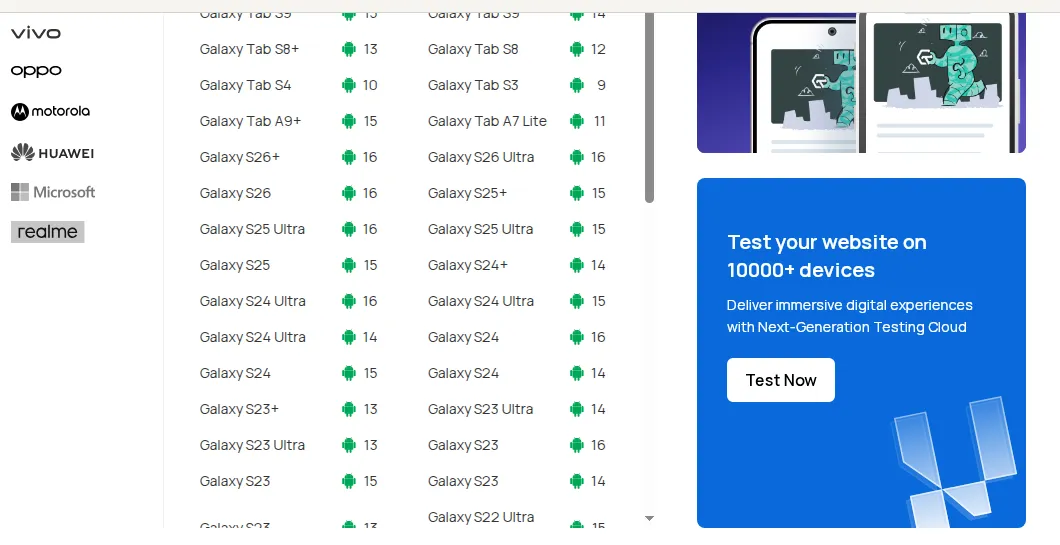
One manufacturer spanning nine Android major versions is the argument against picking devices by intuition. Build the matrix from your own analytics instead: the top eight to twelve device and OS pairs by active users, the oldest OS you still support, and one low-memory handset. Our walkthrough on creating a browser compatibility matrix applies the same method, and cross device testing covers how the passes are sequenced.
| Check | How to verify | Pass criteria |
|---|---|---|
| Minimum supported OS | Install and run core flows on the oldest OS version in your manifest. | No crash and no unstyled screens on the minimum version you advertise. |
| Newest OS version | Run the same flows on the latest public release of each platform. | No deprecated API warnings surfacing as user-visible failures. |
| Screen sizes and densities | Check the smallest and largest devices in the matrix, plus one tablet. | No clipped text, no overlapping controls, no horizontal scrolling. |
| Foldables and aspect ratios | Fold and unfold mid-session on a foldable device. | Layout reflows and the current screen state is preserved across the transition. |
| Orientation change | Rotate on every screen that allows it, including mid-form. | No data loss and no duplicated network request on rotation. |
| Low-memory devices | Run the heaviest screen on the lowest-RAM device in the matrix. | App is not killed by the OS during normal navigation. |
| Manufacturer skins | Repeat core flows on at least two non-stock Android skins. | Background restrictions and custom permission dialogs do not block the flow. |
Running that matrix without owning the hardware is the practical problem, and it is what a real device cloud exists to solve: TestMu AI gives instant access to 10,000+ real Android and iOS devices, with the same session handling app installs from .apk, .aab, and .ipa files. The real device app testing docs cover the upload and session setup.

3. Security
Anchor this category to a published standard rather than a house list. The current release of the OWASP Mobile Top 10 is the 2024 list, which names improper credential usage as M1, insecure authentication and authorization as M3, insecure communication as M5, and insecure data storage as M9. The rows below map to those risks.
| Check | How to verify | Pass criteria |
|---|---|---|
| Local data at rest (M9) | Inspect app storage, shared preferences, and any local database after login. | No tokens, passwords, or personal data readable in plaintext on the device. |
| Credential handling (M1) | Search the build for hardcoded keys and check where session tokens are stored. | Secrets live in the platform keystore or keychain, never in the binary. |
| Transport security (M5) | Route traffic through an intercepting proxy with an untrusted certificate. | App refuses the connection instead of transmitting data over the proxy. |
| Authentication fallback (M3) | Fail the biometric prompt repeatedly until the device locks it out. | App falls back to PIN or password and never silently grants access. |
| Session expiry | Leave the app idle past the configured timeout, then return. | Session is re-authenticated; a stale token is rejected by the backend. |
| Sensitive data in screenshots | Background the app on a payment or account screen and open the app switcher. | The switcher preview is masked rather than showing account details. |
| Logging hygiene | Read the device log while running authentication and payment flows. | No tokens, card data, or personal identifiers written to the system log. |
4. Performance
Office wifi is the least representative network your app will ever run on. Test against defined profiles instead: TestMu AI's network profiles run from 2G EDGE at roughly 250 Kbps down with 300 to 1000 ms latency, through 3G at about 2 Mbps, 4G LTE at about 50 Mbps with 30 to 50 ms latency, up to 5G above 1 Gbps at 1 to 5 ms, plus a full offline mode. Our guide to testing different network conditions covers the same technique for mobile web.
| Check | How to verify | Pass criteria |
|---|---|---|
| Cold start time | Force-stop the app, then launch it and time to first interactive frame. | Meets the budget your team has agreed, measured on the slowest device in the matrix. |
| Behaviour on 2G and 3G | Apply the 2G EDGE profile and repeat the primary user journey. | Loading states appear, requests time out gracefully, and nothing hangs indefinitely. |
| Offline and reconnect | Switch to the offline profile mid-action, then restore connectivity. | Queued actions sync once; no duplicate submissions on reconnect. |
| Memory growth | Navigate the heaviest screens repeatedly for several minutes while profiling. | Memory returns to a stable baseline instead of climbing with each cycle. |
| Battery drain | Run a sustained session on a physical device with battery stats recording. | No wake locks held after the app is backgrounded. |
| Scroll and animation smoothness | Scroll the longest list on a mid-range device, not a flagship. | No visible stutter and no dropped frames during continuous scrolling. |
| Install and update size | Compare the download and installed size against the previous release. | Growth is accounted for; no accidental inclusion of debug assets. |

Note: Running the network, biometric, and battery rows above needs physical hardware, and TestMu AI offers 10,000+ real Android and iOS devices with network throttling and GPS simulation built into the same session. Try it free!
5. Accessibility
Cite the current standard, because a lot of published mobile checklists still reference an older one. WCAG 2.2 became a W3C Recommendation on 5 October 2023 and was updated on 12 December 2024, with success criteria at levels A, AA, and AAA. Level AA is the usual contractual target. For the full treatment, our mobile app accessibility testing checklist goes criterion by criterion.
| Check | How to verify | Pass criteria |
|---|---|---|
| Screen reader navigation | Complete a core journey using TalkBack on Android and VoiceOver on iOS. | Every control is reachable and announced in a logical reading order. |
| Content labels | Move focus onto every icon-only button and image. | Each announces a meaningful label, not a filename or "button". |
| Dynamic text scaling | Raise the system font size to its maximum and revisit key screens. | Text reflows without truncation and no control becomes unreachable. |
| Colour contrast | Measure text and interactive elements against their backgrounds. | Meets the WCAG 2.2 level AA contrast thresholds on real screens. |
| Touch target size | Check the smallest tappable controls on the smallest device in the matrix. | Targets are large enough to hit reliably without zooming. |
| Colour-independent meaning | Review error, warning, and success states in greyscale. | Status is conveyed by text or icon, not colour alone. |
| Orientation and motion | Enable reduce-motion, then use animated transitions and any motion gestures. | Animations respect the setting and a non-motion alternative exists. |
6. Localization
Two independent variables sit behind this category: the device locale, which drives language and formatting, and the apparent location, which drives region-gated content and pricing. They fail separately, so test them separately. Our guides to localization testing and geolocation testing go deeper on each.
| Check | How to verify | Pass criteria |
|---|---|---|
| String coverage | Switch the device to each supported language and walk the core screens. | No untranslated strings and no raw resource keys visible. |
| Text expansion | Review buttons and labels in the most verbose supported language. | Longer translations wrap rather than truncate or break the layout. |
| Right-to-left layout | Set the device to a right-to-left language such as Arabic or Hebrew. | Layout mirrors correctly and directional icons flip with it. |
| Date, number, and currency format | Compare rendered values against each target locale's convention. | Separators, date order, and currency symbols match the locale. |
| IP geolocation | Route the session through an IP in each target country. | Region-gated content and pricing resolve to the correct market. |
| GPS coordinate behavior | Set precise coordinates and cross a geofence boundary. | Location features and geofence triggers fire at the expected point. |
| Time zone handling | Change the device time zone and review scheduled or timestamped content. | Times display in the user's zone with no off-by-one-day errors. |
7. Interrupt Handling
This is the category most checklists omit and the one that produces the most one-star reviews, because every failure here costs the user work they had already done. The pattern is the same in each row: interrupt the app mid-task, return, and confirm nothing was lost.
| Check | How to verify | Pass criteria |
|---|---|---|
| Incoming call | Receive a call while a form is half-completed, then dismiss it. | App resumes on the same screen with entered data intact. |
| Push notification | Deliver a notification with the app open, backgrounded, and closed. | Tapping it opens the correct screen in all three states. |
| Connectivity loss mid-action | Drop the network while a submission is in flight. | User sees a clear failure and can retry without duplicating the action. |
| Low battery and power saver | Enable battery saver mode and continue a background-dependent task. | App degrades predictably and tells the user what is paused. |
| Screen lock and unlock | Lock the device mid-session, wait past the timeout, then unlock. | Re-authentication behaves as configured and no state is lost. |
| App upgrade path | Install the previous release, sign in, create data, then upgrade over it. | Local data migrates and the user stays signed in after the upgrade. |
| OS-level interruptions | Trigger a system dialog or alarm while the app is in the foreground. | App regains focus cleanly with no frozen overlay left behind. |

Conclusion
Start by copying the seven tables into a spreadsheet and adding two columns, owner and status. Then cut the device matrix down to the eight to twelve device and OS pairs your analytics actually show, and pin that list beside the checklist so both are reviewed together at every major OS release.
From there, automate the rows that repeat on every commit and keep the hardware-dependent ones manual. TestMu AI's app automation runs Appium, Espresso, XCUITest, and Detox suites against real devices, while mobile app testing covers the interactive passes that still need a person driving. Each escaped defect earns exactly one new row, which is how the list stays shorter than the bug tracker.

Author

Sai Krishna
Blogs: 24

Sai Krishna is Director of Engineering at TestMu AI (formerly LambdaTest), where he leads agentic AI for quality engineering, building AI agents that autonomously drive mobile and conversational test automation. His current focus is Agent Testing and Model Context Protocol (MCP) support for mobile. He is a core contributor and member of the Appium open-source project and the creator of AppiumTestDistribution and appium-device-farm. With over 14 years of experience including more than 9 years at Thoughtworks as a Principal Consultant, he holds a BSc in Electronics and speaks regularly at TestMu and Appium Conf on Appium, mobile automation, and agentic AI in testing.


Mobile App Testing Checklist FAQs
Did you find this page helpful?
More Related Blogs
TestMu AI forEnterprise
Get access to solutions built on Enterprise
grade security, privacy, & compliance
- Advanced access controls
- Advanced data retention rules
- Advanced Local Testing
- Premium Support options
- Early access to beta features
- Private Slack Channel
- Unlimited Manual Accessibility DevTools Tests