

Power Your Software Testing with AI Agents and Cloud
The Native AI-Agentic Cloud Platform to Supercharge Quality Engineering. Test Intelligently and Ship Faster.


- TestMu AI (Formerly LambdaTest)
- /
- Learning Hub
- /
- WebdriverIO vs Selenium: Key Differences and Best Practices
WebdriverIO vs Selenium: Key Differences and Best Practices
WebdriverIO vs Selenium compared: how the protocols differ now that WebDriver BiDi is the default, plus setup, selectors, waits, and best practices.
Last Updated on:
On This Page
- How WebdriverIO Works
- WebdriverIO vs. Selenium WebDriver
- WebdriverIO Best Practices
- WebdriverIO Tutorial with Example
- Cross Browser Testing
- Run Your First Automation Script
- Browser Commands
- Handling Alerts & Overlay
- WebdriverIO Locators
- Deep Selectors
- Handling Dropdown
- Generate HTML Reports
- Cypress vs WebdriverIO
- WebdriverIO Appium Tutorial
- Certifications
- Monkey Testing
- JavaScript Testing
- Component Testing
- How to Get Started
WebdriverIO is an open-source JavaScript-based automation testing framework for mobile and web applications. WebdriverIO allows you to write unit, component and even end-to-end tests directly within the browser to simulate user behavior and interactions.
As of August 2026 the project has 9,812 stars and 2,672 forks on GitHub.
For how it lines up against the other JavaScript testing frameworks, see our roundup.
WebdriverIO runs tests over the WebDriver protocol, WebDriver BiDi, and Appium for mobile. It extends support to Behavior-Driven Development (BDD) and Test-Driven Development (TDD) frameworks, ensuring flexibility and compatibility with your workflow.
Selenium supports multiple languages like Java, Python, C#, etc., and WebdriverIO is tailored for JavaScript. This makes WebdriverIO a go-to choice for those familiar with JavaScript frameworks. Both frameworks have strengths, and the choice depends on the project's specific needs and the team's expertise.
Overview
WebdriverIO is an open-source Node.js framework for automating web and mobile tests in JavaScript. It and Selenium are two clients for one W3C WebDriver standard: Selenium exposes that protocol to many languages, while WebdriverIO wraps it for Node with a built-in test runner and automatic waiting, and negotiates WebDriver BiDi by default from WebdriverIO v9 (released August 2024) onward.
What Kind of Tests Can WebdriverIO Run?
- Best for JavaScript-based automation: WebdriverIO - Runs unit, component, and end-to-end tests in BDD or TDD style against a real browser. Language: JavaScript and TypeScript. Open source: Yes. Runtime: Node.js 18.20.0 or higher. Java bindings: No.
- Best for mobile automation: Appium - Integrates with WebdriverIO so one Node.js stack covers browsers and devices. Supported mobile OS: iOS and Android. Separate framework required: No, it uses the same WebdriverIO commands and config shape.
Is WebdriverIO the Same as Selenium?
No. WebdriverIO and Selenium are separate projects that implement the same W3C WebDriver protocol. WebdriverIO does not run on top of Selenium and needs no Selenium server. Here is how it compares with Selenium and the other common alternatives:
- Best for multi-language teams: Selenium - Exposes the same WebDriver protocol to Java, Python, C#, Ruby, and JavaScript, unlike WebdriverIO which is Node.js only. Built-in test runner: No, you supply JUnit, TestNG, or Mocha.
- Best for fast front-end tests: Cypress - Cypress runs your test code directly inside the browser alongside the application, whereas WebdriverIO drives the browser from outside over the WebDriver protocol.
- Best for flake-resistant runs: Playwright - Playwright targets modern web applications over a browser-specific Chrome DevTools style protocol. Built-in test runner: Yes. Languages: JavaScript, TypeScript, Python, Java, C#.
How Do You Run WebdriverIO Across Many Browsers?
- Best for parallel cross-browser testing: TestMu AI's HyperExecute - Spins up just-in-time VMs across 60+ Azure regions to run WebdriverIO suites in parallel. Test code changes required: None. Distribution strategies: Matrix, Auto-Split, Hybrid.
How WebdriverIO Works: Architecture and Protocols
WebdriverIO is a Node.js implementation of the automation protocols rather than a browser driver itself. When you run a test, the WebdriverIO test runner (wdio) sends commands over one of two channels. The first is WebDriver BiDi, the bidirectional W3C protocol that WebdriverIO attempts to use by default from version 9 onward. The second is classic W3C WebDriver, the same standard Selenium uses, which talks to a driver binary such as ChromeDriver or GeckoDriver that in turn controls the real browser executable. You can force the classic path with the wdio:enforceWebDriverClassic capability, and read browser.isBidi to see which one a session negotiated, as the WebdriverIO automation protocols documentation sets out.
This matters because the architecture changed in WebdriverIO 9.0.0, released in August 2024. That version removed the devtools package and the automationProtocol option, which had let WebdriverIO drive Chromium directly through Puppeteer. Guides written before that change still describe a Chrome DevTools protocol path the framework no longer ships. WebDriver BiDi replaced it with one standards-track protocol that keeps cross-browser reach while adding the event streaming, network interception, and console capture that previously needed a Chromium-only connection. Puppeteer survives as an opt-in escape hatch through browser.getPuppeteer(). The WebdriverIO v9 release notes record the removal. Selenium inverts that default: it drives browsers over classic W3C WebDriver and treats WebDriver BiDi as opt-in, enabled per session with the webSocketUrl capability, per the Selenium BiDi documentation. WebdriverIO v9 attempts a BiDi session automatically and you opt out with wdio:enforceWebDriverClassic.
- WebDriver BiDi - the default transport in WebdriverIO since v9. A W3C Working Draft that every major browser vendor has committed to, it adds event streaming, network interception, and console capture across browsers rather than in Chromium alone.
- Classic W3C WebDriver - standards-based commands routed through ChromeDriver, GeckoDriver, or a remote grid. Sessions fall back to it when a grid does not yet speak BiDi, or when you set wdio:enforceWebDriverClassic.
- Automatic driver management - since v8.14 WebdriverIO downloads and starts the matching browser driver itself, so local runs need no Selenium server and no separate driver service.
WebdriverIO vs. Selenium WebDriver: Key Differences
A common point of confusion is whether WebdriverIO and Selenium are the same thing. They are not. Selenium WebDriver is a language-agnostic suite that exposes the WebDriver protocol to Java, Python, C#, Ruby, and JavaScript. WebdriverIO is a custom, opinionated implementation of that protocol built specifically for Node.js. In other words, WebdriverIO is a wrapper and test runner sitting on top of the WebDriver protocol, adding a built-in test runner, smart auto-waiting, and a plugin ecosystem that raw Selenium leaves you to assemble yourself.
The table below compares WebdriverIO with Selenium WebDriver and Playwright across the dimensions teams weigh most when choosing a framework.
| Dimension | WebdriverIO | Selenium WebDriver | Playwright |
|---|---|---|---|
| Language support | JavaScript and TypeScript (Node.js) | Java, Python, C#, Ruby, JavaScript | JavaScript, TypeScript, Python, Java, C# |
| Protocol | WebDriver BiDi by default, classic W3C WebDriver on demand | Classic W3C WebDriver, with BiDi support arriving separately | Chrome DevTools style protocol per browser |
| Test runner | Built-in wdio runner with auto-waiting | None, bring your own (JUnit, TestNG, Mocha) | Built-in test runner |
| Setup complexity | Low, guided config wizard | Moderate, manual driver and runner wiring | Low, single installer |
| Driver management | Automatic since v8.14, no Selenium server needed locally | Selenium Manager resolves drivers from Selenium 4.6 | Browsers installed by the Playwright CLI |
| Best fit | JavaScript teams wanting an all-in-one stack | Polyglot teams needing wide language choice | Modern web apps needing fast, flake-resistant runs |
Do You Need Selenium to Run WebdriverIO?
No. WebdriverIO does not need Selenium, a Selenium server, or Selenium Grid to run a test. The belief that it does is the most common misconception about WebdriverIO, and it has been out of date since WebdriverIO v8.14: from that version onward WebdriverIO downloads the matching browser driver, starts it on a free port, and shuts it down after the run. A local suite needs no Selenium server, no ChromeDriver on your PATH, and no driver service in the config. The old @wdio/selenium-standalone-service that used to fill that gap was retired alongside the change and was never published for v9.
A Selenium grid still matters for scale rather than for capability. Point WebdriverIO at one by setting hostname, port, and path in wdio.conf.js, and the same specs that ran locally execute against remote browsers instead. This comparison was verified in August 2026 against WebdriverIO v9.30.1 and Selenium 4.
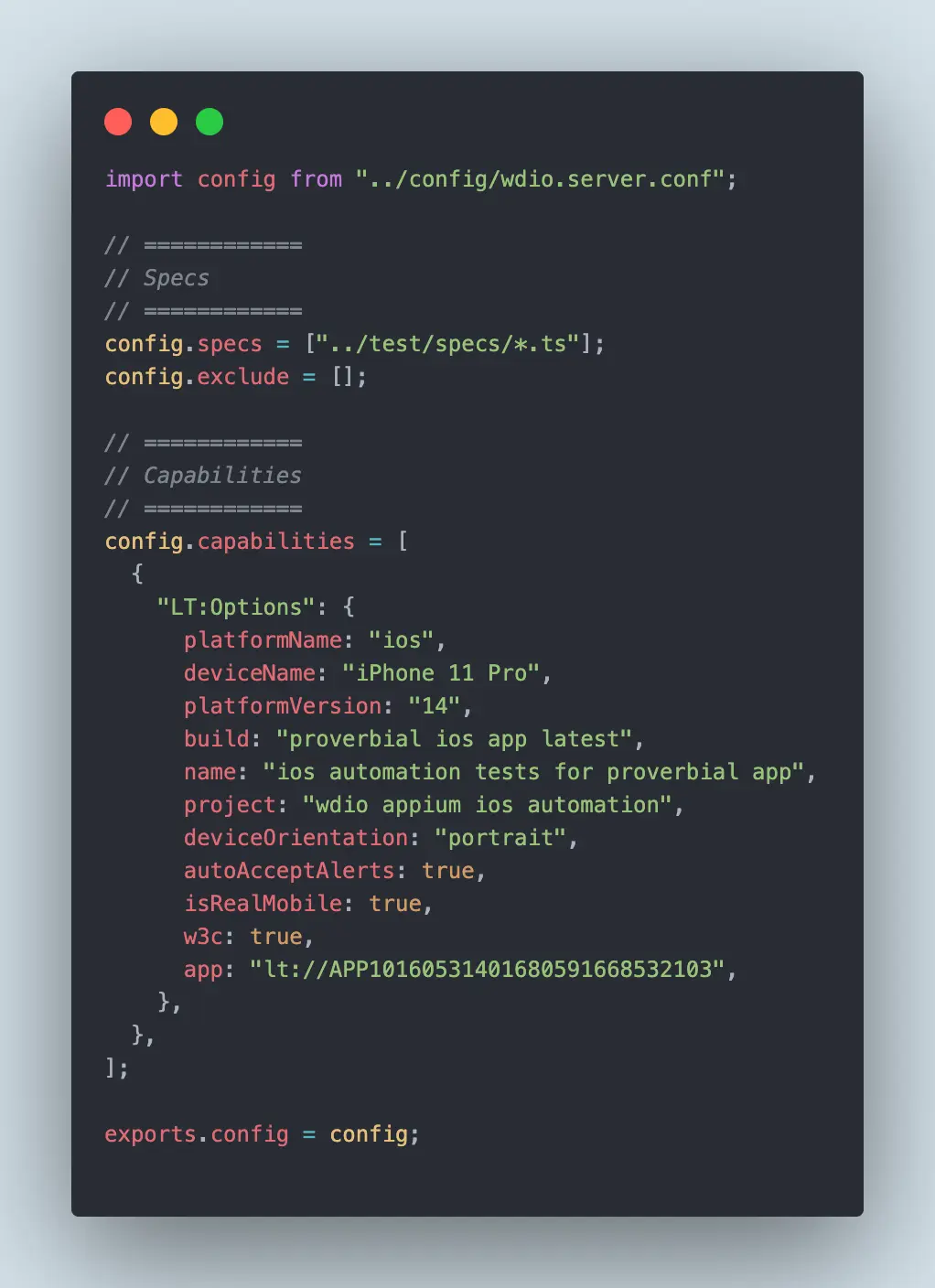
The config above is the shape that change takes: the specs and exclude paths stay where they were, and an LT:Options block inside the capabilities array carries the platform, build, and project values for the remote run. This example targets an iOS device through Appium, and a desktop browser entry uses the same structure with browserName and platformName instead.
Is WebdriverIO Faster Than Selenium?
Not inherently. WebdriverIO and Selenium send the same W3C WebDriver commands to the same driver binaries, so per-command latency is comparable and neither client makes the browser itself respond faster. WebdriverIO saves wall-clock time in other ways: its automatic waiting removes the fixed sleeps that pad a hand-rolled Selenium suite, and its runner shards specs across workers through the maxInstances setting without extra tooling. A Selenium suite reaches the same place with an explicit wait strategy and a parallel runner such as TestNG or pytest-xdist.
The larger factor is where the browsers run, not which client drives them. Suite runtime is dominated by how many tests execute in parallel, which is a function of available machines rather than framework choice.
Should You Use WebdriverIO or Selenium?
Can WebdriverIO replace Selenium? For a team writing only JavaScript or TypeScript, yes: WebdriverIO covers everything a Selenium JavaScript suite does, over the same W3C WebDriver protocol, and adds a runner, automatic waiting, and mobile through Appium. For a team whose suites are written in Java, Python, C#, or Ruby, no: WebdriverIO ships no bindings outside Node.js, so replacing Selenium would mean rewriting those suites rather than migrating them. Pick by the constraint that is hardest to change, which is usually the languages your team already writes:
- Your team writes JavaScript or TypeScript only - choose WebdriverIO. You get the runner, assertions, reporters, and auto-waiting as one installed stack instead of assembling Mocha, a reporter, and a wait strategy around raw Selenium bindings.
- Your test suite spans Java, Python, and C# teams - choose Selenium. WebdriverIO has no bindings outside Node.js, so a polyglot organisation would end up maintaining two automation stacks.
- You need mobile and web in one framework - choose WebdriverIO. It drives Appium sessions with the same commands and config shape as browser sessions, which Selenium does not do natively.
- You are migrating off Protractor - WebdriverIO is the closest structural match. Protractor reached end of life in August 2023 and its repository is archived, so staying put is not an option.
- You maintain an existing Selenium suite that works - keep it. The protocol underneath is the same standard, so the payoff from a rewrite is developer experience, not capability.
WebdriverIO Best Practices: POM, Waits, and Selectors
A few habits keep WebdriverIO suites fast and maintainable as they grow:
- Adopt the Page Object Model - move selectors and page interactions into dedicated page classes so a UI change only needs a fix in one place instead of across every spec file.
- Rely on auto and explicit waits, not static pauses - WebdriverIO auto-waits for elements before acting, and commands like waitForDisplayed let you wait for a specific condition. Avoid hard-coded pause() calls, which slow suites down and still cause flaky failures.
- Use stable selectors - prefer custom data attributes such as data-testid over brittle absolute XPaths that break whenever the DOM structure shifts.
These practices pay off most when tests run at scale. Pointing your wdio config at TestMu AI's test automation cloud lets the same WebdriverIO suite run in parallel across a Selenium grid of real browsers and operating systems, so a POM-structured, well-selected test set finishes in a fraction of the local run time.

Note: WebdriverIO auto-waits before each command, but a remote grid adds network variance a local run never shows. TestMu AI's SmartWait runs actionability checks on the grid side, holding each action until the element is visible, enabled, and stable, and you switch it on with a single smartWait capability set in seconds. Try it free
WebdriverIO Tutorial: Setup, Selectors, and Reporting
The sections below break the framework into the tasks you actually perform: installing the CLI and generating a config, writing and running a first spec, driving the browser, handling alerts and dropdowns, and reading the report.
Cross Browser Testing With WebdriverIO
One WebdriverIO spec file can target dozens of browser and operating system combinations without changing the test code, because the capabilities array in wdio.conf.js defines the matrix and the runner fans the same specs across it. Cross-browser coverage becomes a config change rather than a rewrite. The full cross browser testing tutorial with WebdriverIO works through that capabilities matrix step by step.
Run Your First Automation Script
WebdriverIO setup is quicker to follow than a raw Selenium configuration because the wdio config wizard scaffolds the runner, reporter, and services for you. A first spec using modern async/await syntax looks like this: Our tutorial on running your first WebdriverIO automation script covers the project setup from Node.js onward.
describe('TestMu AI Selenium Playground', () => {
    it('should search and validate the page title', async () => {
        await browser.url('https://www.testmuai.com/selenium-playground/');
        const heading = await $('h1');
        await expect(heading).toBeDisplayed();

        const inputForm = await $('a[href*="input-form-demo"]');
        await inputForm.click();

        await expect($('h1')).toHaveText('Form Demo');
    });
});
Assert against the heading rather than the page title. Running both pages through TestMu AI Browser Cloud shows they serve the identical title string, "Selenium Grid Online | Run Selenium Test On Cloud", so a toHaveTitle check passes without proving the click navigated anywhere. The h1 changes from "Selenium Playground" to "Form Demo", which makes it the assertion that actually catches a broken link. Save the file as test.e2e.js under your spec folder and run it with the wdio test runner.
WebdriverIO Browser Commands
WebdriverIO browser commands perform actions on the browser directly through the global browser object. They let you manage windows, navigate URLs, and control page loads, and they smooth over several of the timing and synchronization challenges you hit when writing raw Selenium automation scripts. See WebdriverIO browser commands for the full reference.
Handling Alerts and Overlays in WebdriverIO
Alerts and pop-ups are common on modern websites. WebdriverIO handles native JavaScript alerts, confirms, and prompts with commands like acceptAlert and dismissAlert, while overlay modals built in the DOM are dismissed by interacting with their elements directly. Knowing which kind you are dealing with is the key to reliable alert handling. Worked examples of each type live in the guide to handling alerts and overlays in WebdriverIO.
WebdriverIO Locators and Selector Strategies
In any automation testing framework, finding elements is the most fundamental activity. We must choose web elements carefully so that automation script execution can handle static and dynamic elements for stable test results. WebdriverIO supports CSS selectors, XPath, link text, and its own extended locators, and prefixing a query lets you switch strategies without changing your command syntax. The guide to how WebdriverIO uses Selenium locators compares each strategy with examples.
Deep Selectors in WebdriverIO for Shadow DOM
Traditional selectors only have visibility into the main document's DOM structure and cannot penetrate the boundaries of the shadow DOM. So, to access elements within modern web applications built with technologies like Polymer or Angular, where shadow DOM encapsulation is commonly used, we use specialized selector strategies like deep selectors. For shadow DOM traversal patterns, see deep selectors in Selenium WebdriverIO.
Deep selectors pierce shadow DOM boundaries by chaining through host elements, letting your tests reach components that standard selectors cannot see.
Handling Dropdowns in WebdriverIO
Dropdowns are used on various websites to conserve space and guide user selections efficiently. And while performing automated browser testing, there will be plenty of times when you'll have to handle the dropdown menu. Both cases are covered in the tutorial on handling dropdowns in WebdriverIO.
WebdriverIO handles native select dropdowns with selectByVisibleText, selectByAttribute, and selectByIndex, while custom dropdowns built from div and li elements are driven by clicking the trigger and then the option.
How To Generate HTML Reports With WebdriverIO?
WebdriverIO reporters fall into two groups: console reporters such as spec, which print results as the run progresses, and file-based reporters such as Allure and the WebdriverIO HTML reporter, which produce a browsable report afterwards. You register them in the reporters array in wdio.conf.js, and several can run at once so a CI job prints to the log and writes an artifact from the same execution. The walkthrough on generating HTML reports with WebdriverIO shows the reporter configuration.

Cypress vs WebdriverIO: Which One To Choose
Cypress runs your test code inside the browser alongside the application, which gives fast feedback and time-travel debugging on a single origin. WebdriverIO drives the browser from the outside over the WebDriver protocol, which costs some speed and buys cross-browser reach, multi-origin navigation, and mobile through Appium. We take that trade-off apart in detail in Cypress vs WebdriverIO.
In short, Cypress runs inside the browser and excels at fast front-end tests, while WebdriverIO drives the browser through the WebDriver protocol and covers a wider range of browsers, mobile, and cross-origin scenarios.
WebdriverIO Appium Tutorial
WebdriverIO offers the ability to test both web and mobile applications. It works with the WebDriver protocol for web automation and with Appium for mobile. The linked tutorial covers automating an iOS application using WebdriverIO and Appium together. Follow the WebdriverIO Appium tutorial to automate an iOS application end to end.
Certifications
TestMu AI runs free certifications covering Selenium 101, Selenium Java 101, and Selenium Advanced. Because WebdriverIO speaks the same WebDriver protocol, the locator strategies, waiting model, and grid concepts these courses teach transfer directly to a wdio suite. Browse the full catalogue of TestMu AI certifications to pick a track.
Each one ends with a proctored exam and a shareable credential.
Automated Monkey Testing with WebdriverIO
We use a testing strategy called Monkey testing to ensure software resilience against unexpected inputs and usage patterns. In monkey testing, software systems are subjected to random, unpredictable inputs, mimicking the behavior of a "monkey" randomly pressing keys or clicking buttons. Pairing it with WebdriverIO lets you script randomized clicks and inputs across a real browser session to surface crashes that scripted paths miss. See monkey testing with WebdriverIO for a randomized input script you can adapt.
Speeding Up JavaScript Testing with WebdriverIO
The levers that actually cut JavaScript suite runtime are parallel execution across multiple capabilities, headless browsers where no visible UI is needed, and structured logging so a failure is diagnosable from the report instead of a rerun. Each technique is measured in our guide to speeding up JavaScript testing with Selenium and WebdriverIO.
Component Testing with WebdriverIO
Component testing checks a single web component in isolation rather than driving a whole application, which makes failures easier to localise and suites faster to run. The WebdriverIO component testing guide shows how to mount one with the browser runner.
WebdriverIO can mount and test individual web components in isolation using its browser runner, so you validate a component's behavior without spinning up the entire application.
How to Get Started With WebdriverIO
Run npx wdio config in an empty project. The wizard scaffolds the runner, reporter, and services, and on version 9 the generated config needs no driver service at all, because WebdriverIO downloads and starts ChromeDriver or GeckoDriver itself. Write one spec against a page you already know, confirm it passes locally, then change the hostname, port, and path values in wdio.conf.js to move that same spec onto a remote grid.
That second step is where the framework choice stops mattering and infrastructure starts to. TestMu AI's WebdriverIO testing runs your existing specs across 3,000+ real browser and OS combinations without edits to the test code, and HyperExecute distributes a suite across parallel just-in-time VMs using autosplit, which is where the up to 70% faster figure comes from. The WebdriverIO on HyperExecute documentation has the full YAML, including the testRunnerCommand and cacheKey settings for a Node project.
Author

Navin Chandra
Blogs: 5

Navin Chandra is a Member of Technical Staff at TestMu AI (formerly LambdaTest), building the open-source automation that powers its Selenium and Appium cloud grid. A committer to both Selenium and Appium, he implemented WebDriver BiDi support in Selenium for real-time browser events and bidirectional control and is developing Apple's iOS RemoteXPC protocol in Appium to enable low-level wireless communication with iOS system services. He contributes to Selenium across multiple language bindings as a member of the Selenium GitHub organization. He has served as a Google Summer of Code mentee and mentor at openSUSE and an LFX mentee at CNCF's KubeArmor, and is a SUSE Certified Deployment Specialist. Navin holds a B.Tech in Computer Science.
Reviewer

Harish Rajora
Reviewer
Harish Rajora is a Software Developer 2 at Oracle India with over 6 years of hands-on experience in Python and cross-platform application development across Windows, macOS, and Linux. He has authored 800 + technical articles published across reputed platforms. He has also worked on several large-scale projects, including GenAI applications, and contributed to core engineering teams responsible for designing and implementing features used by millions. Harish has worked extensively with Django, shell scripting, and has led DevOps initiatives, building CI/CD pipelines using Jenkins, AWS, GitLab, and GitHub. He has completed his post-graduation with an M.Tech in Software Engineering from the Indian Institute of Information Technology (IIIT) Allahabad. Over the years, he has emphasized the importance of planning, documentation, ER diagrams, and system design to write clean, scalable, and maintainable code beyond just implementation.


WebdriverIO FAQs
Did you find this page helpful?
More Related Learning Hubs
TestMu AI forEnterprise
Get access to solutions built on Enterprise
grade security, privacy, & compliance
- Advanced access controls
- Advanced data retention rules
- Advanced Local Testing
- Premium Support options
- Early access to beta features
- Private Slack Channel
- Unlimited Manual Accessibility DevTools Tests