
Fully Agentic Test Case Management Tool
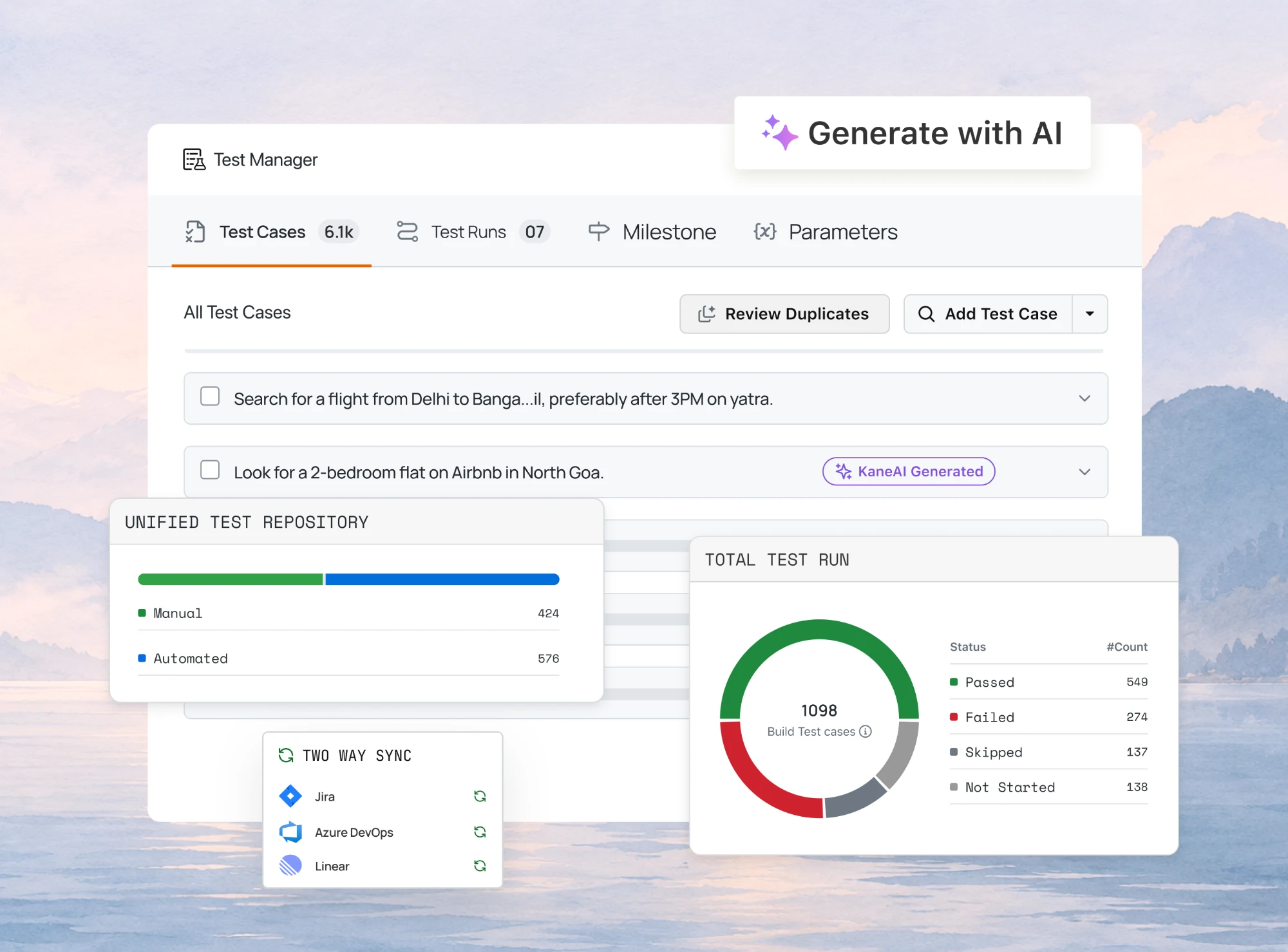
Write, Track and Manage Every Manual or Automated Tests in One Agentic Test Management Platform with TestMu AI Test Manager.

- TestMu AI (Formerly LambdaTest)
- /
- Learning Hub
- /
- Test Case Template: 9 Examples for Manual, API & Agile
Test Case Template: 9 Examples for Manual, API & Agile
Copy 9 filled test case template examples for manual, API, agile and regression testing, plus a 13 field reference and 27 free Excel, Sheets and PDF downloads.
Last Updated on:
A test case template in software testing is a standardized document that outlines the conditions, steps, and expected outcomes to verify a specific functionality or feature for any app or website.
Modern software development requires adaptability, with testing no longer just a phase that follows development. Intelligent test case templates that evolve alongside your project ensure a more effective testing strategy, driving quality, speed, and business value.
Overview
A test case template is a reusable document that fixes the fields every test case records: ID, title, preconditions, test steps, test data, expected result, actual result, and status. This page gives nine worked templates covering manual, automated, API, agile, regression, UAT, integration, security, and mobile testing, plus 27 free Excel and PDF downloads.
Why Use Test Case Templates
- Standardization: Test case templates ensure a consistent format across all test cases to eliminate ambiguity and reduce confusion.
- Comprehensive Coverage: Templates prompt testers to address all scenarios, including edge cases and negative tests, so critical scenarios are not overlooked.
- Time-Saving: Ready-made frameworks accelerate test creation and reduce repetitive work, saving valuable time and effort during fast-paced development cycles.
- Tracking and Reporting: Structured fields streamline the tracking of test results and simplify test execution reporting across the entire QA team.
Key Test Case Components
- Test Case ID: A unique identifier that makes each test case easy to reference and track throughout the software testing lifecycle.
- Test Case Title and Description: A brief summary outlining the objective and goal of the test to ensure clarity for all reviewers.
- Preconditions: The specific setup, environment configurations, or conditions required before executing the sequential test steps to ensure consistent results.
- Test Steps: A detailed, sequential list of actions that the tester must perform to verify a specific feature or functionality.
- Expected and Actual Results: The anticipated outcome compared against the observed outcome to determine if the test passes or fails during execution.
Template Types and Tools
- Manual Test Case Template: Records sequential steps, input data, and expected outcomes for features a person verifies by hand, such as search and filter.
- Automated UI Test Case Template: Adds a script filename and a locator strategy to the standard fields, so a failing end-to-end run traces back to the code that ran it.
- API Test Case Template: Replaces UI steps with a method, endpoint, headers, and body, then asserts on the HTTP status code and the response fields.
- Test management tool: Keeps per-run execution history that a spreadsheet overwrites each cycle. TestMu AI organizes cases into folders and suites and links them to requirements.
- Standards-Based Templates: Align field names with IEEE 829 and ISO/IEC/IEEE 29119-3, which matters when an auditor needs the suite mapped to a recognised documentation standard.
What Is a Test Case Template in Software Testing?
A test case template in software testing is a fixed layout a tester fills in for every case, so two people documenting the same feature produce the same structure. The layout prompts for preconditions, expected results, and negative cases, which is where coverage is usually lost, and the same layout works in Excel or Google Sheets.
A test case is the individual check you run; the template is the reusable shell every case gets written into. Getting that shell right is what lifts test coverage, because a blank page rarely prompts anyone to write the negative case.
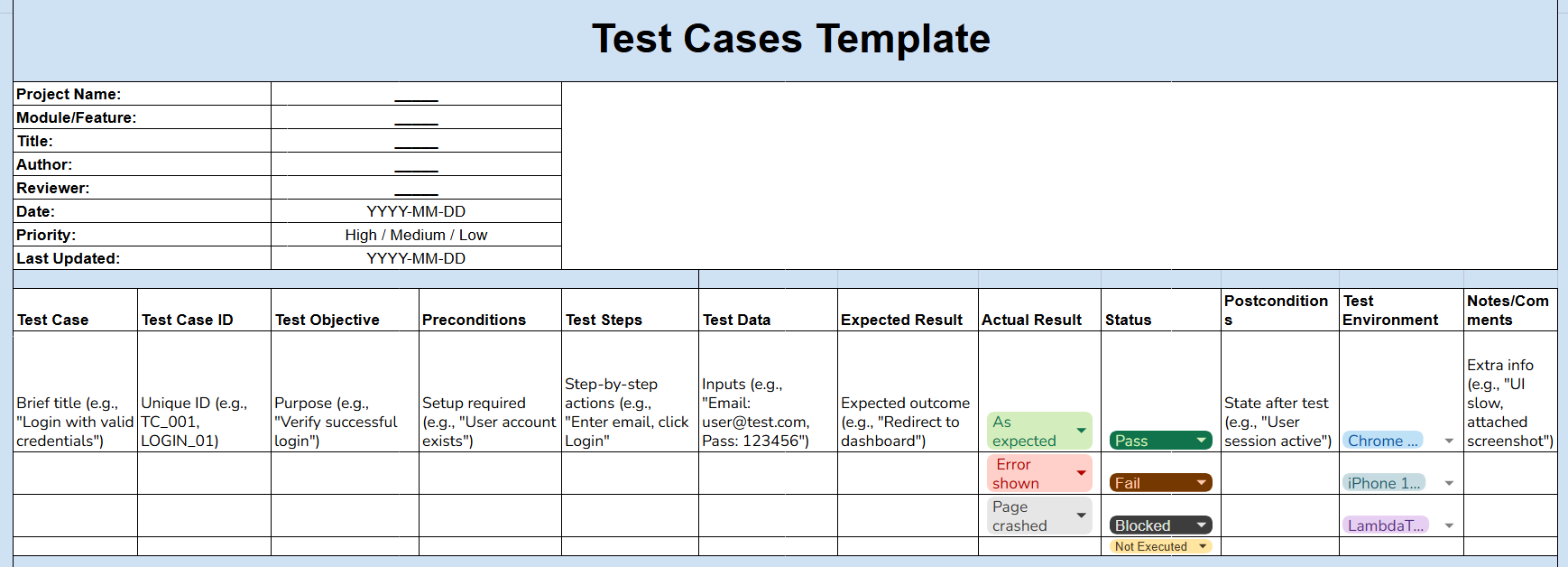

Free Test Case Template
Note: Every field above is already laid out in our free test case template. Grab it as a PDF, an Excel workbook, or a copyable Google Sheet using the links below, then delete the sample rows and start writing.
What Does a Test Case Template Look Like?
A test case template looks like a two-column table, with the field name on the left and a filled example entry on the right, such as Test Case ID and TC001. The nine examples below cover manual, automated UI, API, agile, regression, UAT, integration, security, and mobile testing, and the first three ship as Excel, PDF, and Google Sheets downloads.
1. Manual Test Case Template
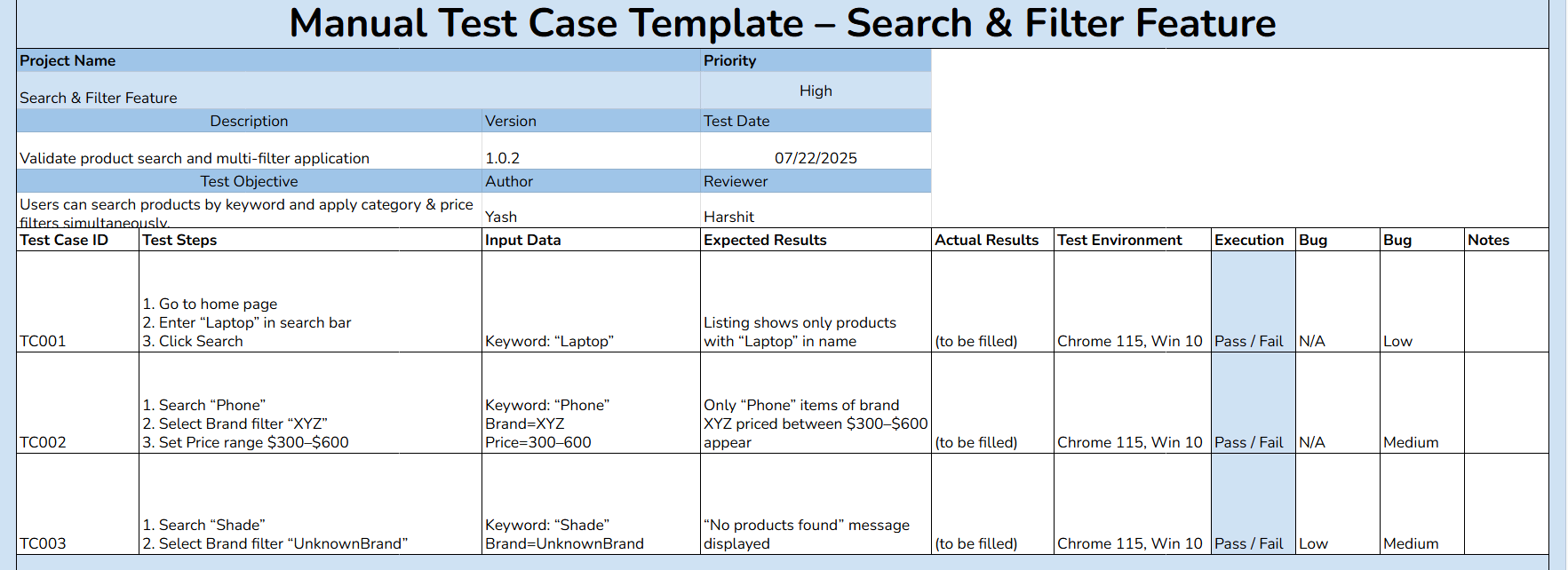
Use this format for features a person verifies by hand, such as search and filtering. Every step is written so a tester who has never seen the feature can still execute it and reach the same verdict.
| Field | Example entry |
|---|---|
| Test Case ID | TC001 |
| Title | Verify keyword search returns only matching products |
| Preconditions | User is logged in and the product catalog is populated |
| Test Steps | 1. Open the store home page. 2. Enter "Laptop" in the search bar. 3. Click Search. |
| Test Data | Keyword: Laptop |
| Expected Result | Result listing shows only products with "Laptop" in the product name |
| Actual Result | To be filled during execution |
| Status | Pass / Fail / Blocked / Not Executed |
| Priority | High |
| Test Environment | Chrome 115, Windows 11 |
2. Automated UI Test Case Template
An automated case needs two things a manual case does not: a stable locator for every element the script touches, and a named script file a reviewer can open. Record both so a failing run is traceable back to code.
| Field | Example entry |
|---|---|
| Test Case ID | TC004 |
| Title | Complete checkout with a valid card and confirm the order ID |
| Preconditions | Authenticated session and at least one item in the cart |
| Test Steps | 1. Navigate to /cart. 2. Click Proceed to Checkout. 3. Fill billing and shipping details. 4. Click Place Order. |
| Test Data | Valid session; sandbox card 4111 1111 1111 1111 |
| Automation Script | checkout.spec.js, test "places order with valid card" |
| Locator Strategy | data-test attributes, no XPath by index |
| Expected Result | Order confirmation page displays an Order ID and a thank-you message |
| Status | Pass / Fail / Blocked / Not Executed |
| Test Environment | Chrome latest on Windows 11, run on the TestMu AI grid |

3. API Test Case Template
An API case replaces UI steps with a request and a contract. Record the method, endpoint, headers, and body, then assert on the status code and the response fields rather than on anything visual.
| Field | Example entry |
|---|---|
| Test Case ID | TC007 |
| Title | Retrieve a user profile by ID |
| Preconditions | API server reachable and a valid auth token issued |
| Method and Endpoint | GET /api/v1/users/12345 |
| Headers | Authorization: Bearer <token>, Accept: application/json |
| Request Body | None for GET |
| Expected Status Code | 200 OK |
| Expected Response | Body contains id, name, email and roles fields |
| Negative Case | Expired token returns 401 with an error message |
| Status | Pass / Fail / Blocked / Not Executed |

Note: Organize, execute, and track your test cases with AI-native test management, all in one unified platform. Try TestMu AI now!
4. Agile Test Case Template
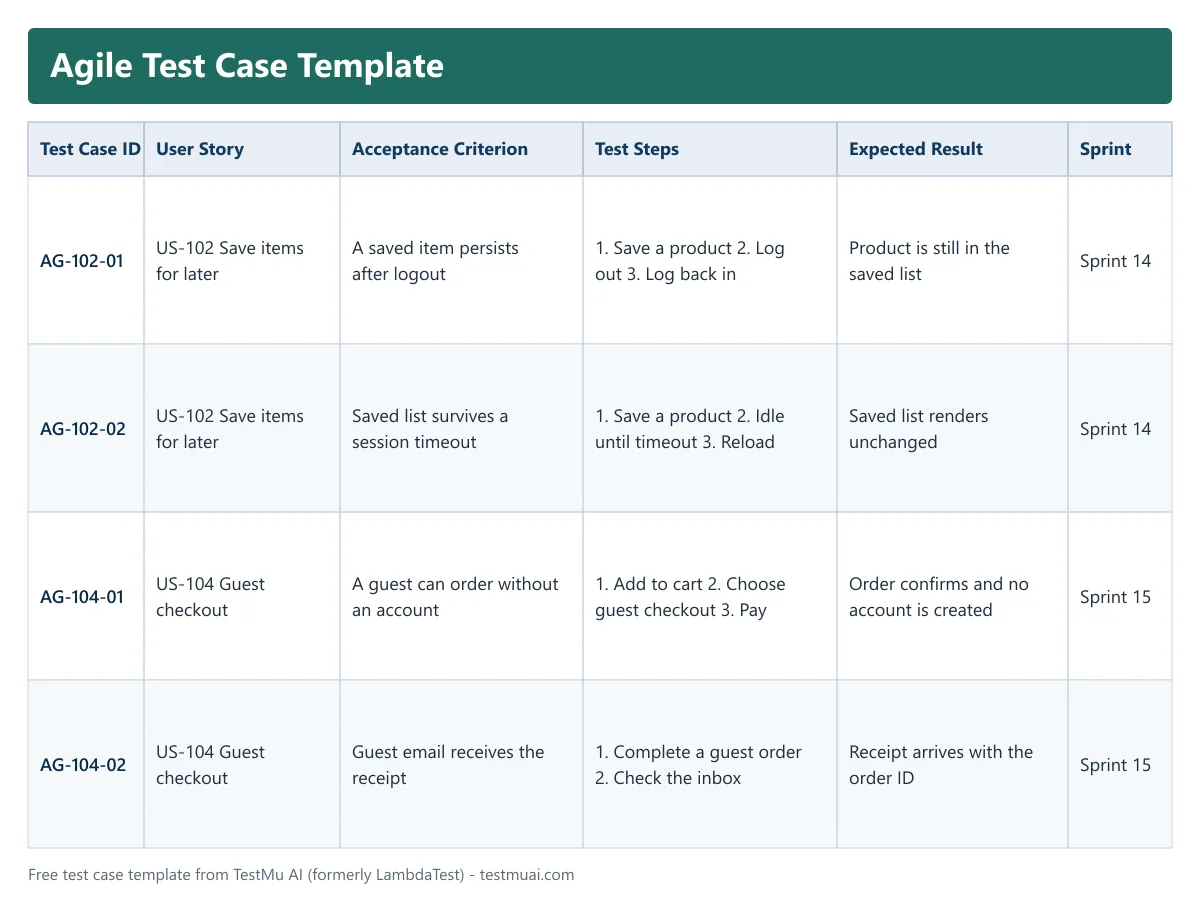
An agile case hangs off a user story instead of a specification document. Keep it short enough to write inside a sprint and tie it to one acceptance criterion so the story cannot be closed until the case passes.
| Field | Example entry |
|---|---|
| Test Case ID | AG-102-01 |
| User Story | US-102: As a returning shopper I want to save items for later |
| Acceptance Criterion | A saved item persists after logout and login |
| Sprint | Sprint 14 |
| Test Steps | 1. Log in and open a product. 2. Click Save for later. 3. Log out and log back in. 4. Open the saved list. |
| Expected Result | The saved product is still present in the saved list |
| Status | Pass / Fail / Blocked / Not Executed |
| Definition of Done | Case passes on Chrome and Safari and the story is demoed |
| Owner | QA engineer assigned to the story |
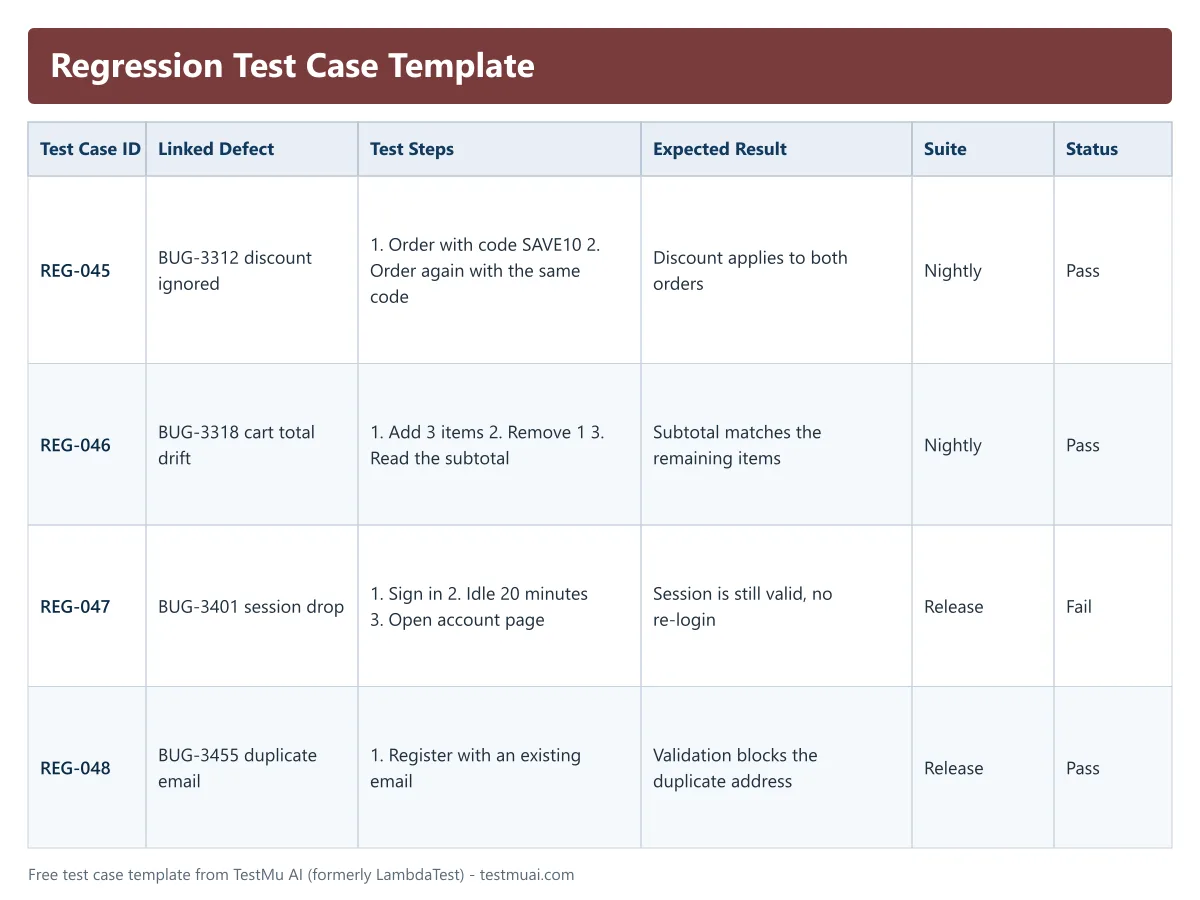
5. Regression Test Case Template
A regression case exists to prove that something which used to work still works. The field that makes it a regression case is the reference to the original defect or release, so nobody deletes it during cleanup.
| Field | Example entry |
|---|---|
| Test Case ID | REG-045 |
| Linked Defect | BUG-3312: discount code ignored on second order |
| Introduced In | Release 4.2 |
| Test Steps | 1. Place an order using discount code SAVE10. 2. Place a second order with the same code. 3. Check the order total. |
| Expected Result | The discount applies to both orders and each total is reduced by 10 percent |
| Suite | Nightly regression |
| Automated | Yes, discount.spec.js |
| Status | Pass / Fail / Blocked / Not Executed |
| Priority | High, revenue affecting |
6. User Acceptance Test Case Template
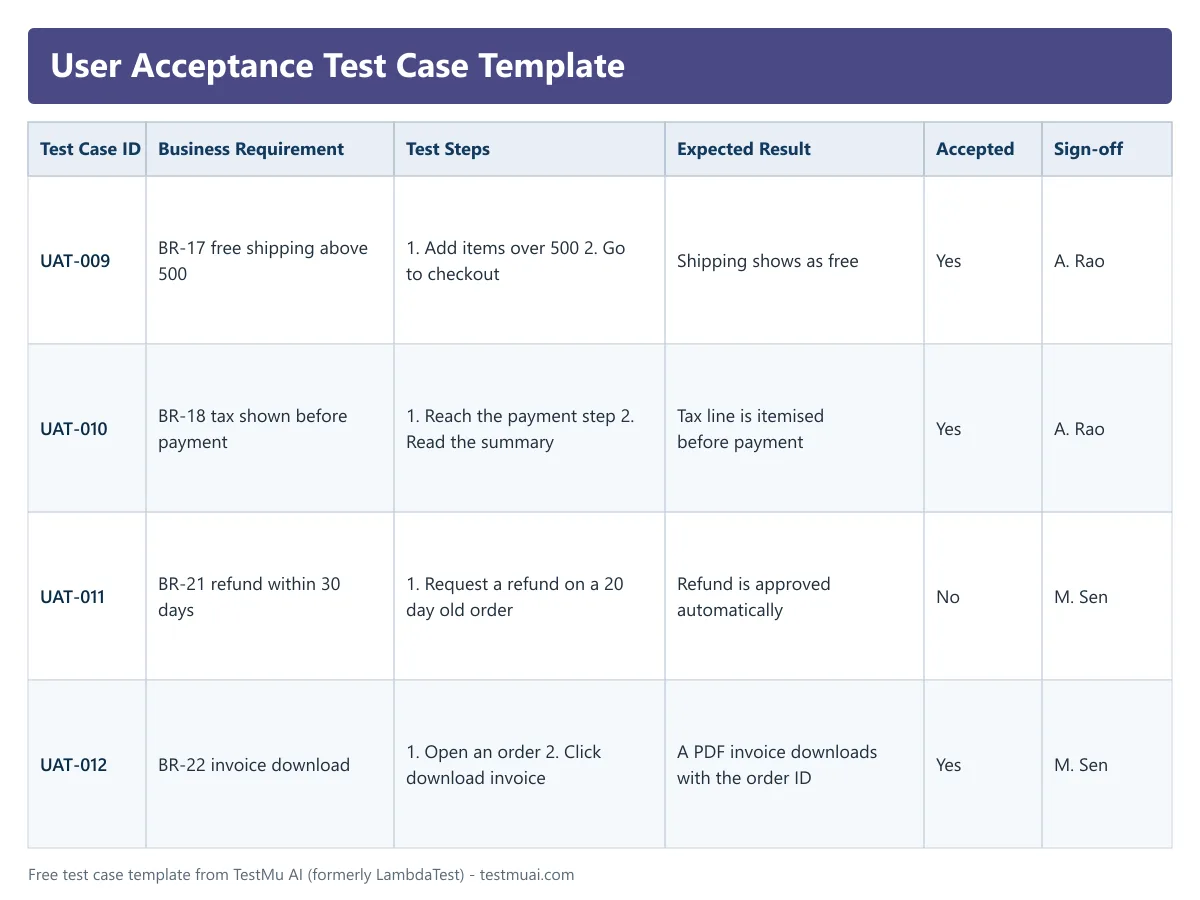
A UAT case is written for a business reviewer, not an engineer. Drop the technical vocabulary, name the business rule being confirmed, and leave a sign-off field, because acceptance is a decision rather than a status.
| Field | Example entry |
|---|---|
| Test Case ID | UAT-009 |
| Business Requirement | BR-17: orders above 500 dollars qualify for free shipping |
| Tested By | Business analyst or product owner |
| Test Steps | 1. Add items totalling more than 500 dollars. 2. Proceed to checkout. 3. Review the shipping line. |
| Expected Result | Shipping shows as free and the order total excludes a shipping charge |
| Acceptance Criteria Met | Yes / No |
| Sign-off | Name and date of the approver |
| Comments | Free text for business feedback |
7. Integration Test Case Template
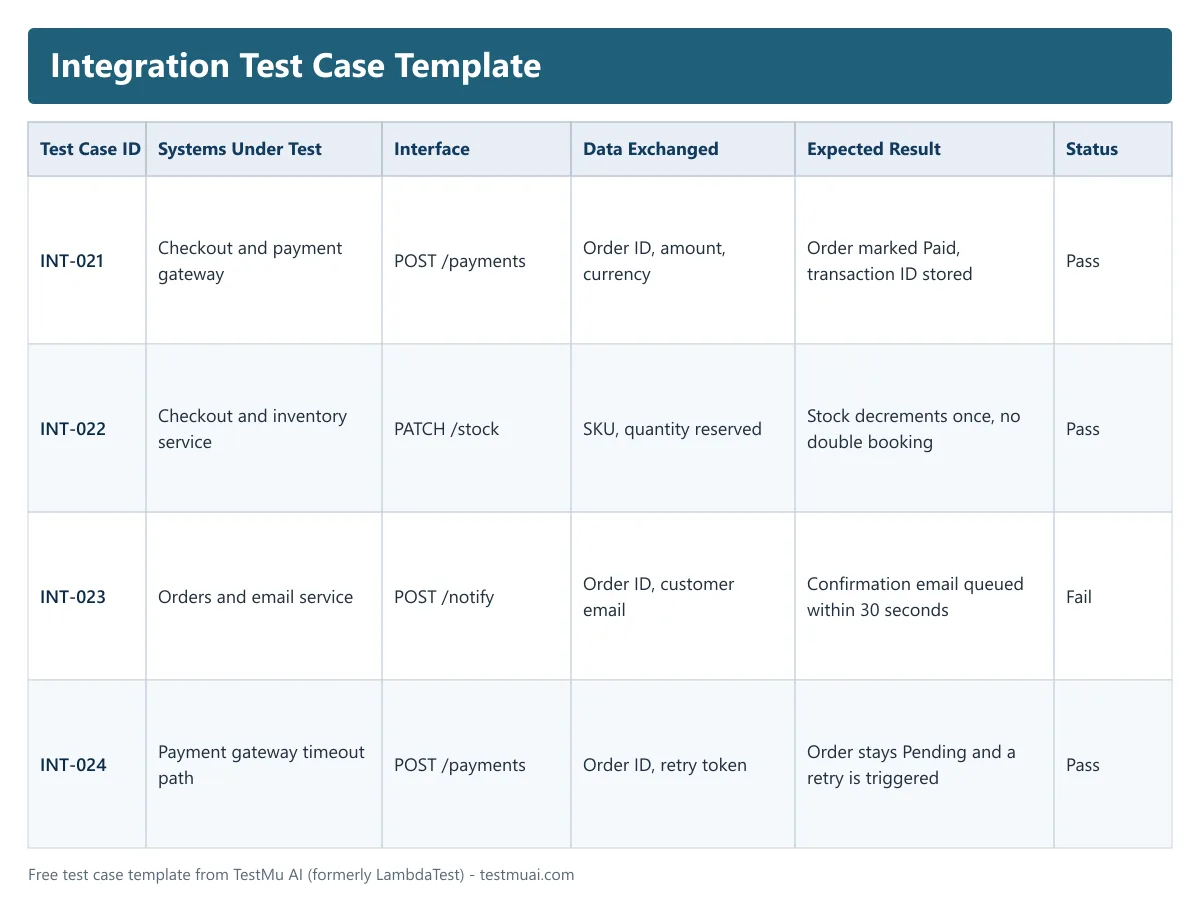
An integration case checks the handoff between two components rather than either component alone. Name both systems and the data that crosses between them, since that boundary is where the failure will occur.
| Field | Example entry |
|---|---|
| Test Case ID | INT-021 |
| Systems Under Test | Checkout service and payment gateway |
| Interface | POST /payments, JSON over HTTPS |
| Preconditions | Both services deployed and the gateway sandbox is reachable |
| Test Steps | 1. Submit an order. 2. Capture the payload sent to the gateway. 3. Return a sandbox approval. 4. Check the order record. |
| Data Exchanged | Order ID, amount, currency, customer reference |
| Expected Result | Order status updates to Paid and the gateway transaction ID is stored against the order |
| Failure Handling | Gateway timeout leaves the order in Pending and triggers a retry |
| Status | Pass / Fail / Blocked / Not Executed |
8. Security Test Case Template
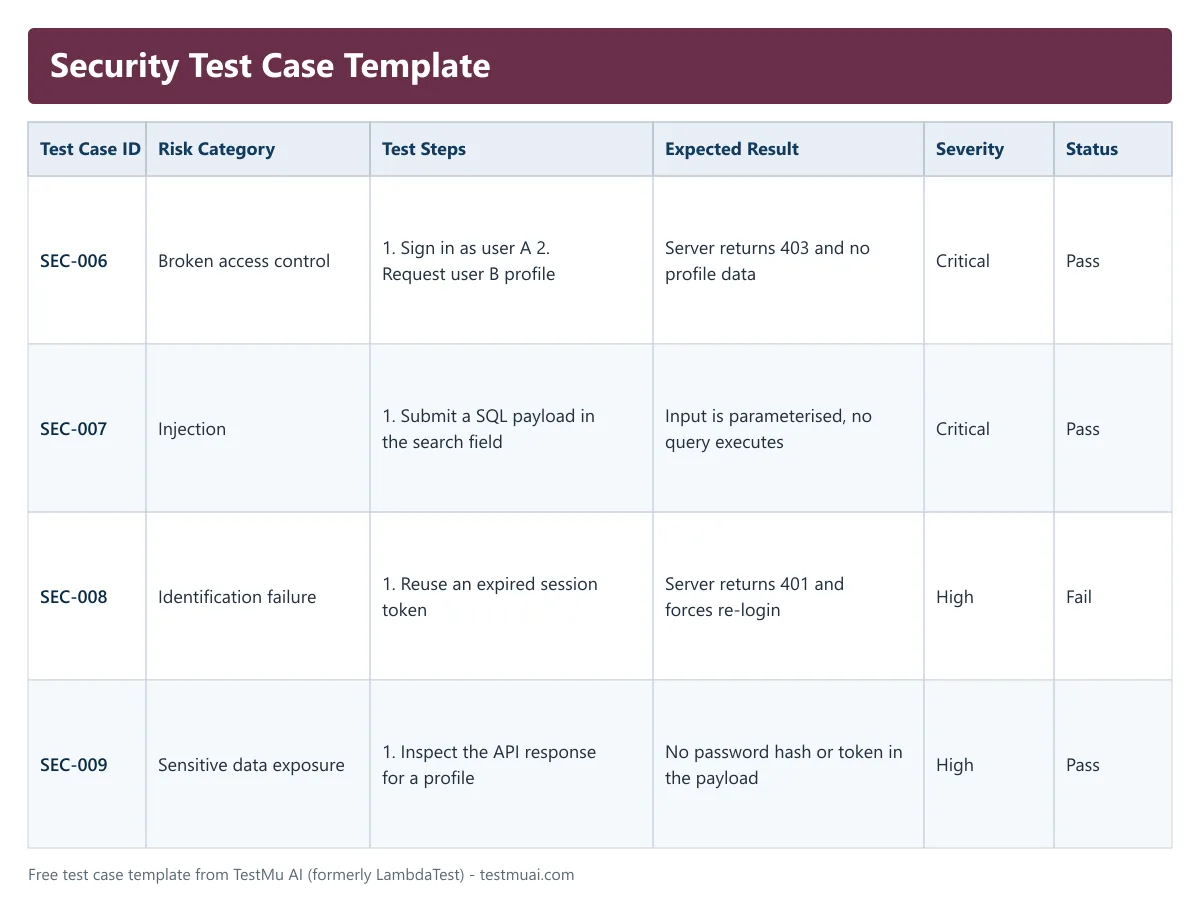
A security case records an attack and the control that should stop it. Reference the specific risk category so the suite can be mapped against a recognised list during an audit.
| Field | Example entry |
|---|---|
| Test Case ID | SEC-006 |
| Risk Category | Broken access control |
| Objective | Confirm a standard user cannot read another user profile |
| Preconditions | Two accounts exist, user A and user B |
| Test Steps | 1. Log in as user A. 2. Request /api/v1/users/<user-B-id>. 3. Inspect the response. |
| Expected Result | Server returns 403 Forbidden and no profile data for user B |
| Severity If Failed | Critical |
| Evidence | Request and response captured in the run log |
| Status | Pass / Fail / Blocked / Not Executed |
9. Mobile App Test Case Template
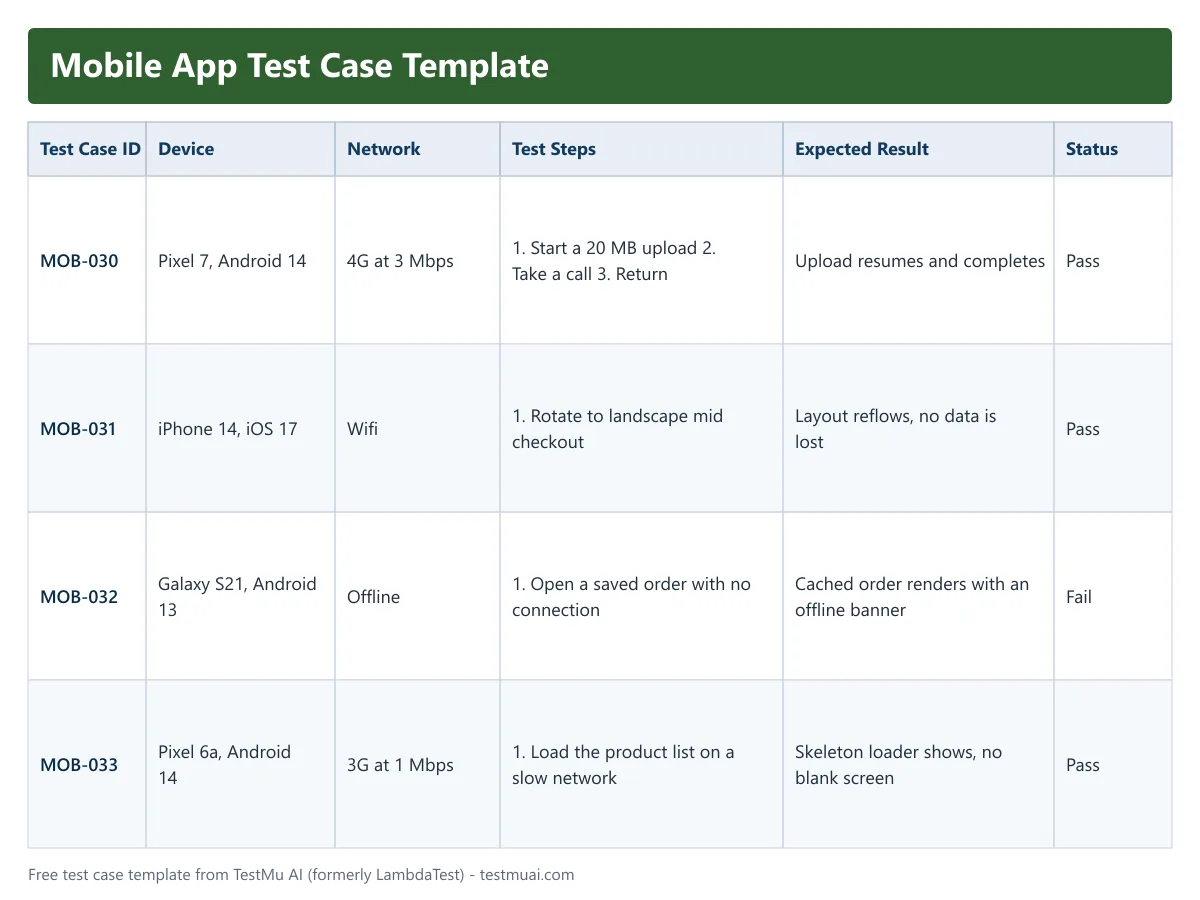
A mobile case needs device context that a browser case never carries. Record the exact device, OS version, and network condition, because a case that passes on a flagship over wifi routinely fails on a mid-range device on 4G.
| Field | Example entry |
|---|---|
| Test Case ID | MOB-030 |
| Title | Resume an interrupted upload after a call |
| Device | Pixel 7, Android 14 |
| Network Condition | 4G, throttled to 3 Mbps |
| Preconditions | User signed in and a 20 MB file selected for upload |
| Test Steps | 1. Start the upload. 2. Receive an incoming call at roughly 50 percent. 3. End the call and return to the app. |
| Expected Result | Upload resumes from where it paused and completes without restarting |
| Orientation | Portrait and landscape |
| Status | Pass / Fail / Blocked / Not Executed |
Where Can I Download Free Test Case Templates in Excel and PDF?
All 27 templates in this test case template library are free to download as an Excel workbook, a PDF, or a Google Sheet you can copy. The templates are grouped by framework, industry, website builder, platform, mobile, CI/CD, and general use, so start with the group closest to your stack.
Framework Specific Test Case Templates:


Industry-Specific Test Case Templates:


Website Builder Testing Templates:


Platform-Specific Test Case Templates:


Mobile Application Testing Templates:


CI/CD Test Case Templates:


General Test Case Templates:


Learn how to write effective test cases to optimize your testing process with actionable insights and best practices.
Why Use a Test Case Template in Software Testing?
A test case template in software testing gives every tester the same field order, so cases stay consistent, faster to write, and reviewable by someone who did not write them. Fixed fields such as Test Case ID, Status and requirement traceability make execution tracking straightforward, prompt coverage of edge and negative cases, and shorten onboarding.
- Reduced Inconsistency and Ambiguity: Standardized templates ensure consistent structure, reducing confusion and ensuring all necessary information is captured clearly.
- Time-Saving: Templates provide a ready-made framework, which speeds up test case creation and reduces repetitive work.
- Thorough Test Coverage: Templates help testers address all test scenarios, including edge cases and negative tests, ensuring nothing important is overlooked.
- Easier Tracking and Reporting: Templates with fields like Test Case ID, Status, and Requirement Traceability streamline test execution tracking and test reporting.
- Faster Onboarding: Templates serve as training tools, making it easier for new testers to understand and maintain consistency in test writing.
- Facilitates Automation: Well-structured manual test cases serve as a foundation for automation scripts, enabling smoother transitions to automated testing frameworks.
- Reviewable by someone who did not write the case - a fixed field order means a peer reviewer knows where to look for preconditions and expected results, so review becomes a scan instead of a reading exercise.

What Fields Should a Test Case Template Include?
A test case template should include thirteen fields: Test Case ID, Title, Test Objective, Preconditions, Test Steps, Test Data, Expected Result, Actual Result, Status, Postconditions, Priority, Test Environment and Requirement ID. The first nine are the working minimum; priority, test environment and requirement ID are what make a suite auditable and reportable.
| Component | What it records | Example |
|---|---|---|
| Test Case ID | Unique identifier used to reference the case in defect reports and traceability matrices | TC-LOGIN-001 |
| Title | One line stating what the case verifies, readable without opening the steps | Verify login fails with an expired password |
| Test Objective | The purpose of the case, useful when the title alone is ambiguous | Confirm expired credentials are rejected |
| Preconditions | Setup that must already be true before step one runs | Account exists with a password older than 90 days |
| Test Steps | Ordered actions, each specific enough that two testers execute them identically | 1. Open login. 2. Enter credentials. 3. Submit. |
| Test Data | The exact input values the steps consume | user@test.com / Expired#2025 |
| Expected Result | The observable outcome if the software behaves correctly | Password expired message and a reset prompt |
| Actual Result | What actually happened, filled in at execution time | Left blank until the run |
| Status | The verdict for this run | Pass, Fail, Blocked or Not Executed |
| Postconditions | The state the system should be left in afterwards | No session created |
| Priority | Execution order when time is short | High, Medium or Low |
| Test Environment | Browser, OS, device or build the case was run against | Chrome 115, Windows 11 |
| Requirement ID | Link back to the requirement, which is what makes the suite auditable | REQ-AUTH-04 |
Standards-Based Template Structure (IEEE & ISO)
Two documentation standards shaped the field set almost every template on this page uses. Knowing which one is current matters the moment an audit asks what your templates conform to.
- IEEE 829-2008 - the IEEE Standard for Software and System Test Documentation, and the last revision of that standard. IEEE's own record lists it as superseded by the ISO/IEC/IEEE 29119 series, so treat it as the origin of the familiar field set rather than the standard to certify against today.
- ISO/IEC/IEEE 29119-3:2021 - Software and systems engineering, Software testing, Part 3: Test documentation. Edition 2, published October 2021, it specifies test documentation templates that ISO states can be used for any organization, project or testing activity. This is the current reference if an auditor asks which standard your templates follow.
Why Standards-Based Test Case Templates Matter:
Adopting a standards-driven test case template creates a unified framework that ensures every test is executed consistently and linked directly to its requirements. This approach not only simplifies audit and compliance processes but also boosts reviewer efficiency and stakeholder confidence.
Should You Use Excel, Google Sheets or a Test Management Tool?
Use Excel for a single tester or small team working offline, Google Sheets when a distributed team needs simultaneous editing and a shareable link, and a test management tool once you need per-run execution history and traceability from requirement to case to defect. Start in a spreadsheet and move when execution history matters. What you are moving into is test case management: one versioned repository where every case, run, and defect stays linked. The move does not have to cost anything; several free test case management tools import spreadsheet cases directly.
| Format | Best suited to | Where it breaks down |
|---|---|---|
| Excel workbook | A single tester or a small team, offline work, and quick filtering with conditional formatting on the status column | Two people editing at once, and no execution history beyond the last run you saved |
| Google Sheets | Distributed teams who need simultaneous editing, comment threads on individual cases, and a shareable link | Large suites get slow, and linking cases to requirements stays manual |
| Test management tool | Suites that need reuse across releases, per-run execution history, and traceability from requirement to case to defect | More setup than a spreadsheet, so it is overkill for a one-off checklist |
A practical rule: start in a spreadsheet, and move when you first need to answer "did this case pass in the last release?" A spreadsheet overwrites that answer every cycle, which is the point at which the format itself becomes the problem.
How Do You Create and Manage Test Cases Using TestMu AI?
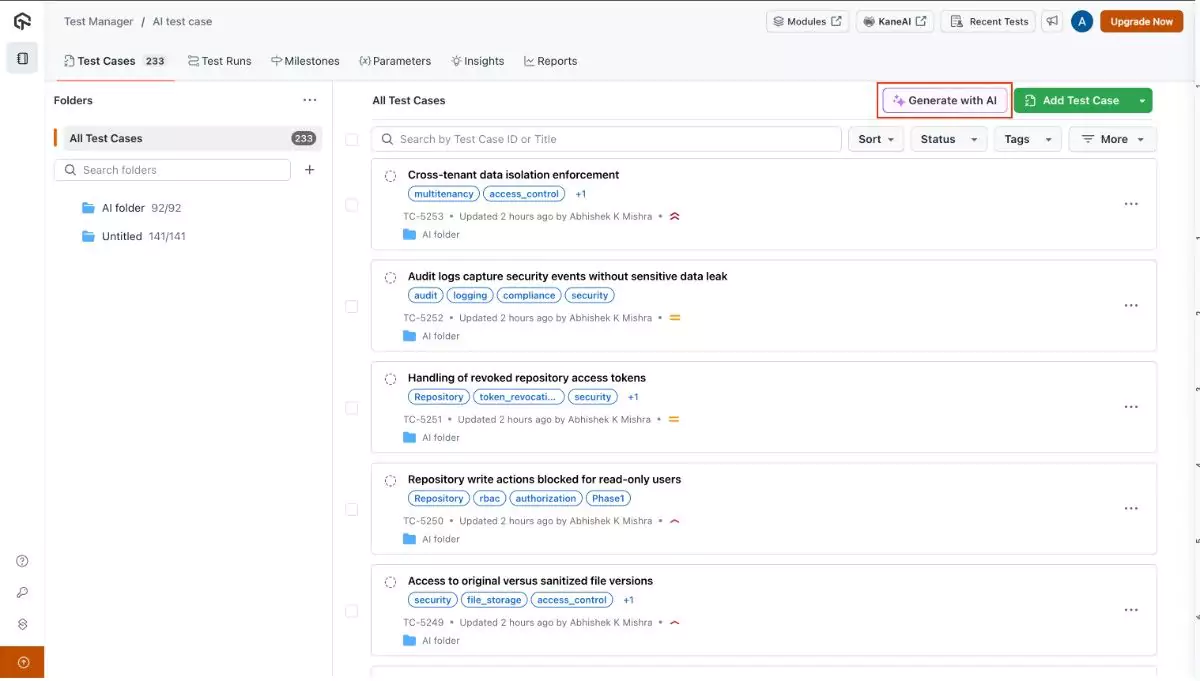
You create and manage test cases in TestMu AI's Test Manager by saving each case to one central folder instead of an Excel file, with preconditions, steps, expected results, priority and test suite. Testers mark each case Pass, Fail or In Progress, and a failing step logs a defect into Jira or Azure DevOps.
With TestMu AI's test management platform , you can eliminate the hassle of managing test cases through fragmented tools like Excel or scattered documentation.
By centralizing all your test case templates and execution results in one powerful platform, it simplifies Test Management and facilitates easier monitoring.
- Organize and Define Test Case Details: Save all your test cases in one central folder and organize them using structured test templates. Clearly outline each test case with detailed steps, expected results, and preconditions to maintain consistency and clarity.
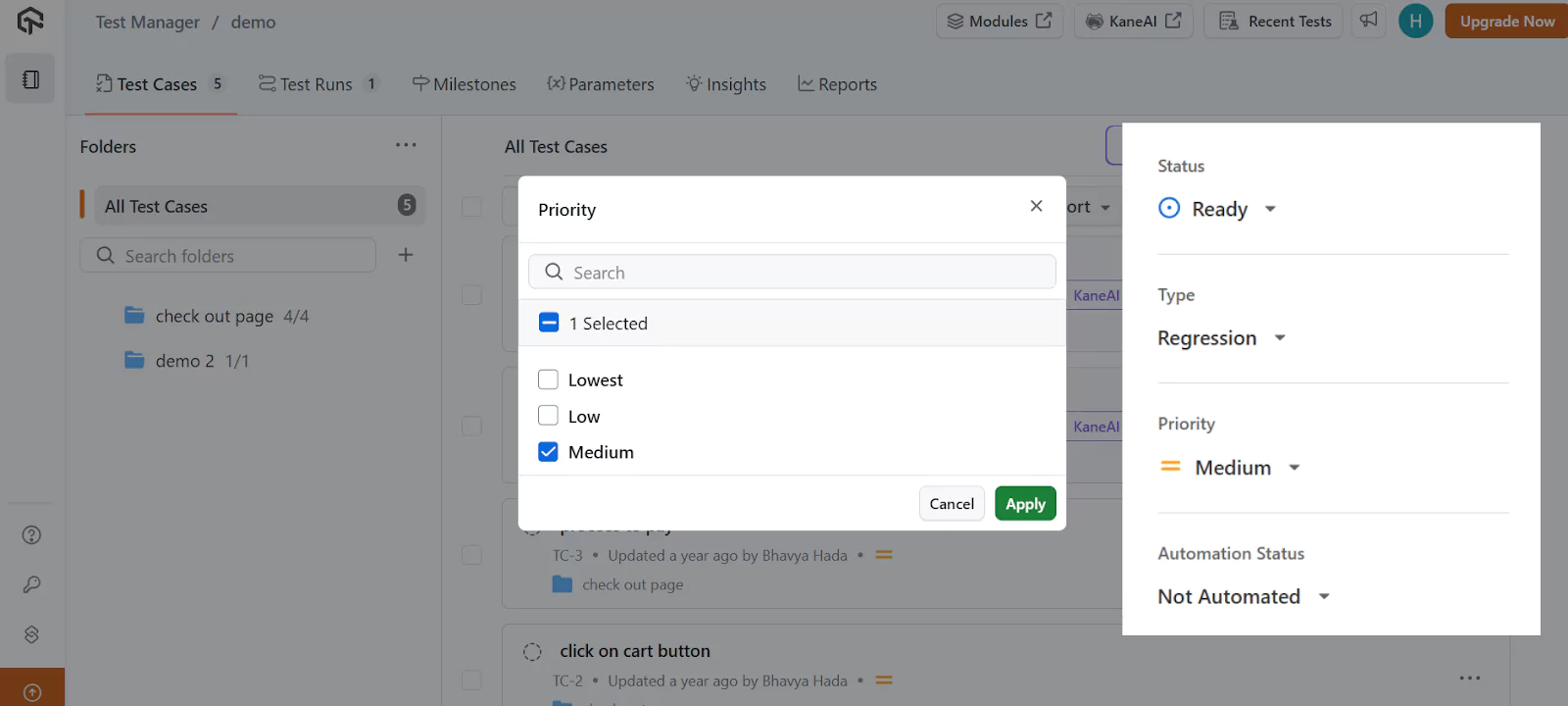
- Set Priority and Status: Choose the priority (e.g., Low, Medium, High) and set the status of the test case (e.g., New, In Progress, Completed) to track progress effectively.
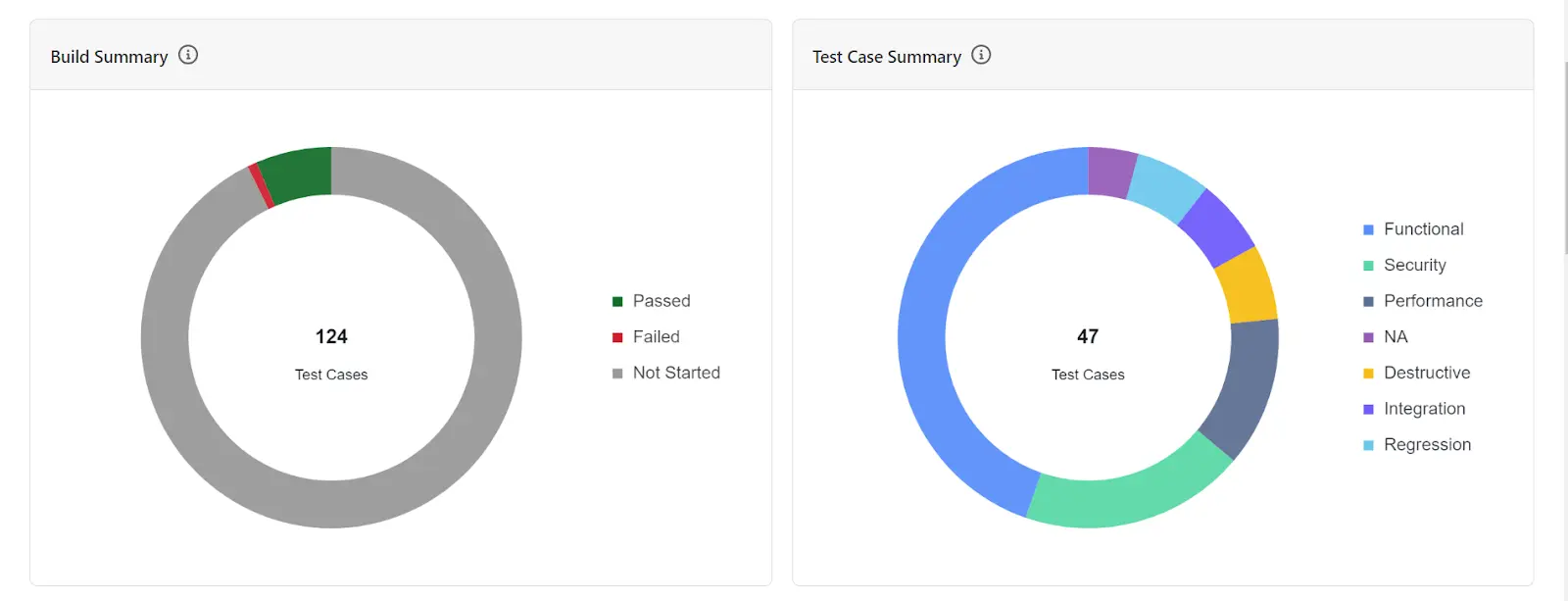
- Organize with Test Suites: Assign each test case to a relevant test suite (e.g., Smoke, Regression, Functional) to categorize and group related test cases for better organization.
- Track Test Execution: TestMu AI's Test Management integrates with your testing environments, allowing you to track the status of each test case during execution. Quickly update with actual results and mark the test case as Pass, Fail, or In Progress.
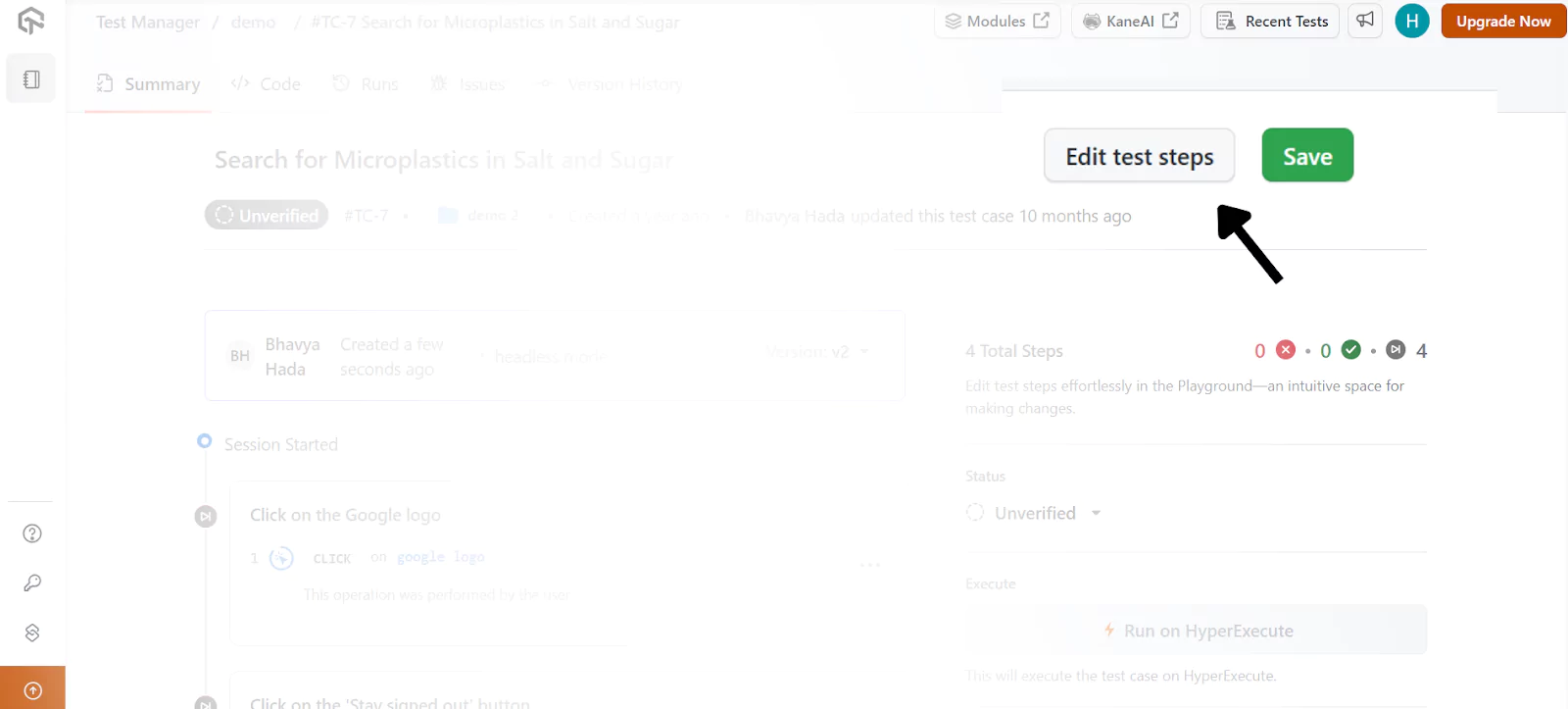
- Edit Test Cases: To modify a test case, go to the Test Manager dashboard, select the test case to edit, and update the test steps, expected results, or add any additional details. Save the changes and update the test case status.
- Log defects without leaving the case - a failing step logs a defect into Jira or Azure DevOps with the case name, steps, expected versus actual, environment and attachments already filled in, and the resolution status syncs back to the linked case automatically.
What Are the Best Practices for Test Case Templates?
The best practices for test case templates are a sprint iteration field, a risk factor rating of Low, Medium or High, and a traceability matrix linking each case to its requirement. Add edge case and exploratory sections, keep cases under version control, and pull test data from live database or API responses.
- Expand Test Coverage and Complexity: Treat test case templates as dynamic documents that grow with the project. Include sections like core testing areas, edge case tests, and exploratory testing for comprehensive coverage.
- Dynamic Data Management: Incorporate real-time data links (e.g., database, API responses) into your test case templates, enabling data-driven testing and repeatability.
- Automate Where Possible: Integrate automation tools (Selenium, Cypress, Playwright) into your templates to automate repetitive steps while leaving room for manual validation. Include test scripts and post-test automation links.
- Test Traceability: Add a traceability matrix to link test cases with requirements and business objectives, enhancing agility and transparency.
- Risk-Based Testing: Prioritize high-risk areas by adding a Risk Factor field (Low, Medium, High) in your templates. This helps allocate resources more effectively to the most critical tests.
- Link to Business KPIs: Connect test cases to business KPIs (e.g., transaction success rate, cart abandonment) to demonstrate how testing impacts business outcomes.
- Version Control for Test Cases: Implement version control to track changes in test cases, making it easier to maintain and adapt them over time as software features evolve.
- Agile Test Case Evolution: In Agile, testing is continuous, so test case templates should evolve with each sprint. Add a "Sprint Iteration" field to track test cases across Agile cycles and ensure alignment with new features.
These best practices will help you evolve your test case templates into powerful tools that align with modern software testing needs.
Which Test Case Template Should You Start With?
Start with the test case template that matches the test you are about to write, copy its field list into a spreadsheet, and delete any column your team will not fill in, because four honest columns beat thirteen empty ones. Move to TestMu AI's Test Manager once you need per-run execution history.
Move off the spreadsheet when you first need to answer whether a case passed in the previous release, because that is the question a file overwrites every cycle. TestMu AI's Test Manager keeps per-run execution history, groups cases into plans and cycles, links each case to its requirement and its defect in JIRA or Azure DevOps, and can draft a structured case from a plain-English description. The AI test case generation docs walk through that first case end to end.
Author

Bhavya Hada
Blogs: 31


Bhavya Hada is a Community Contributor at TestMu AI with over three years of experience in software testing and quality assurance. She has authored 20+ articles on software testing, test automation, QA, and other tech topics. She holds certifications in Automation Testing, KaneAI, Selenium, Appium, Playwright, and Cypress. At TestMu AI, Bhavya leads marketing initiatives around AI-driven test automation and develops technical content across blogs, social media, newsletters, and community forums. On LinkedIn, she is followed by 4,000+ QA engineers, testers, and tech professionals.
Reviewer

Abhishek Mishra
Reviewer
Abhishek Mishra is a Technical Product Manager at TestMu AI, where he owns Test Manager, the test management product. He has over 8 years of experience in product management and market analysis. His expertise spans across AI-native software testing, product strategy, and analytics. Previously, Abhishek served as the Product Lead at IndiaClan and co-founded Gartley618 Technologies, where he led innovative projects in quantitative trading and blockchain. He holds a B.Tech degree.
Test Case Template FAQs
Did you find this page helpful?
More Related Learning Hubs

TestMu AI forEnterprise
Get access to solutions built on Enterprise
grade security, privacy, & compliance
- Advanced access controls
- Advanced data retention rules
- Advanced Local Testing
- Premium Support options
- Early access to beta features
- Private Slack Channel
- Unlimited Manual Accessibility DevTools Tests