

Power Your Software Testing with AI Agents and Cloud
The Native AI-Agentic Cloud Platform to Supercharge Quality Engineering. Test Intelligently and Ship Faster.


- TestMu AI (Formerly LambdaTest)
- /
- Blog
- /
- Self-Healing Test Automation: How It Works & Why It Fails
Self-Healing Test Automation: How It Works & Why It Fails
See how self-healing test automation repairs broken locators automatically, where it still fails, and the tools that do it, in a practical guide for QA teams.
Last Updated on:
Automated tests often fail when the application changes, forcing teams to update the test scripts to match.
Doing that manually eats time and effort, increasing maintenance, reducing coverage, and generating false-positive results.
Self-healing test automation addresses this: the tools detect and automatically fix broken scripts whenever the application under test changes.
This makes automation more resilient and cuts the manual effort of maintaining test scripts.
Key Takeaways
- Self-healing test automation detects broken element locators at runtime and repairs them automatically, so scripts keep passing after a UI change without manual edits.
- Self-healing suits regression, end-to-end, cross-browser and cross-device, and CI/CD testing, where constant UI churn is what keeps breaking element locators.
- A self-healing engine scores several candidate elements at once, weighing DOM structure, visible text, position, and visual rendering, and heals only above a confidence threshold.
- Healing techniques have moved from a single fallback locator, to multi-attribute fingerprints of ID, CSS, XPath, and text, to embedding-based matching on semantic similarity.
- Self-healing repairs how a test finds elements but does not handle changed behavior, so a new required field in a workflow still needs a human update.
- The main risk of self-healing is a silent pass, where an over-eager heal binds to the wrong element, turns a red test green, and ships the bug it should have caught.
- Treat every heal as an unreviewed code change: log it, review it, give tests durable identifiers such as data-testid, and fail the build when heal confidence is low.
- KaneAI from TestMu AI applies auto-heal and smart element detection across web, mobile, API, and database tests, and exports the healed suite to Selenium, Playwright, Cypress, and Appium.
What Is Self-Healing Test Automation
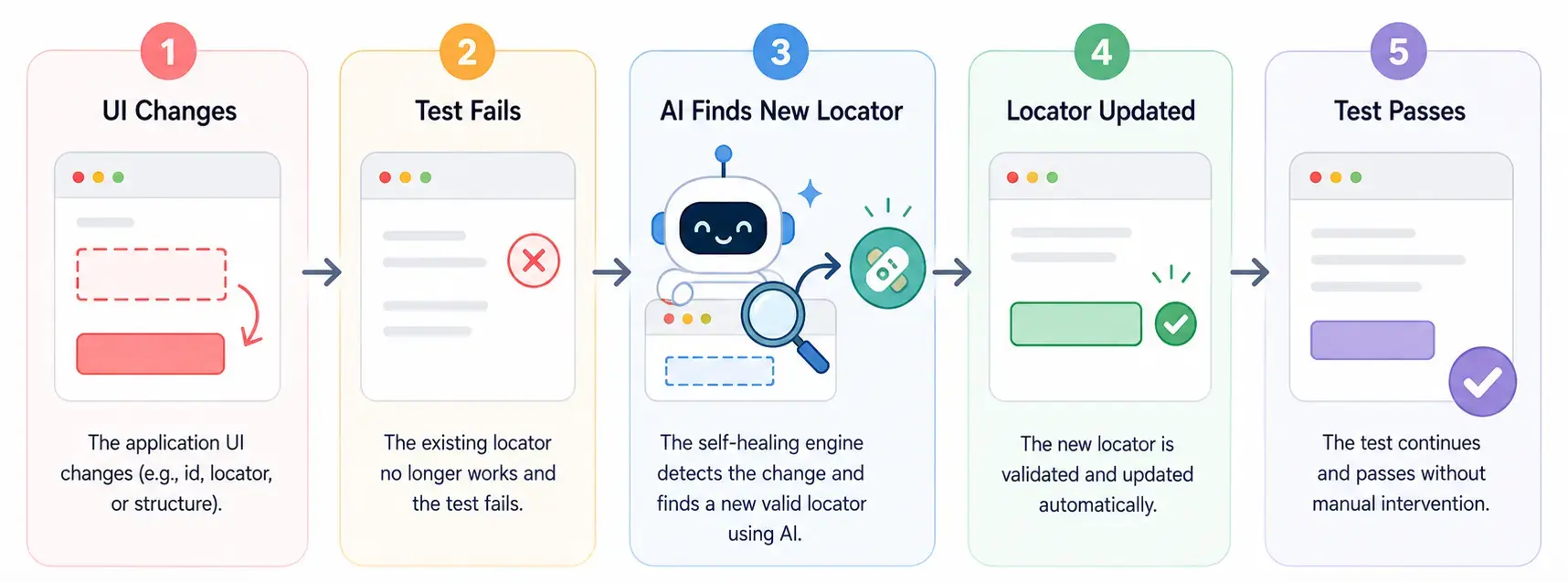
Self-healing test automation automatically detects and fixes broken test scripts when code-level changes break them, keeping automated tests accurate and reliable without manual updates.
It reduces test maintenance by adapting to change. Whether a new feature ships or existing functionality updates, self-healing keeps test scripts aligned with the application.
This modern approach to automated testing solves the maintenance challenges that traditional test automation leaves to engineers.
Healing repairs a locator after it breaks. Intent-based testing attacks the same problem earlier, by binding the test to the outcome so a renamed element never breaks the locator in the first place.
What Is Self-Healing Test Automation Used For
Self-healing test automation keeps large, frequently changing suites stable, most often in regression, end-to-end, cross-browser, and CI testing, where UI churn constantly breaks element locators.
Each of these testing types breaks in a different way that healing absorbs:
- Regression Testing - Large regression suites break constantly as the UI evolves; self-healing keeps them green without manual selector fixes each run.
- End-to-End Testing - Long user-journey tests touch many elements, so one locator change can fail the flow; healing keeps the journey intact.
- Cross-Browser and Cross-Device Testing - Rendering differences shift attributes across browsers and devices; self-healing adapts locators so one script runs everywhere.
- CI/CD Pipelines - Self-healing cuts flaky failures that block automated builds, so pipelines stay green and releases ship on time.
Why Use Self-Healing Test Automation
Teams adopt self-healing test automation to keep test suites stable as the UI changes, cutting the maintenance burden and flaky failures that slow down releases. Its major benefits include:
- Prevents Object Locator Flakiness - Missing locators throw errors like NoSuchElementException; self-healing updates the script automatically, lowering failures from broken object locators.
- Improves Test Coverage - By reducing redundant execution, self-healing frees teams to test new and updated features thoroughly, raising overall software quality.
- Lowers Test Maintenance - Traditional suites need manual script updates on every application change; self-healing adapts automatically and removes most of that work.
- Minimizes Test Failure - Poor maintenance drives most failures; automating script upkeep lets QA focus on real defects instead of patching brittle tests.
- Faster Feedback Loop - Self-healing speeds the feedback loop, letting developers detect and fix issues early in development.
- Integrates With AI Technologies - Machine learning and AI extend self-healing to predict and handle issues, making test automation smarter over time.
- Trims Down Costs - Adapting to changes automatically cuts maintenance time and effort, and catching issues earlier avoids the cost of late fixes.
A concrete implementation of this approach is Cypress AI, which applies self-healing directly to cy.prompt()-generated tests, automatically regenerating selectors when the UI changes between runs so teams reduce maintenance without giving up Cypress's familiar API.
To put a figure on the maintenance hours self-healing gives back, you can model the savings with this test automation ROI calculator.

Note: Perform self-healing test automation with Selenium on the cloud. Try TestMu AI Today!
Example of Self-Healing Test Automation
Take a login flow automated with Selenium. The login button starts with the class btn-login:
<button class="btn-login">Login</button>The test locates and clicks it by that class:
# Locate the login button by its class
driver.find_element(By.CSS_SELECTOR, "button.btn-login").click()
A developer later renames the class to login-btn. On the next run, plain Selenium cannot find the old selector and fails:
NoSuchElementException: Unable to locate element: {"method":"css selector","selector":"button.btn-login"}With self-healing enabled, the runner relocates the button by its text and role, updates the locator, and logs the fix before continuing:
[auto-heal] button.btn-login not found; matched button.login-btn (text "Login", confidence 0.94); locator updatedThe test passes, the script now points at login-btn, and no one had to touch the code.
This same healing also layers onto existing Selenium suites through Selenium AI workflows.
How Does Self-Healing Test Automation Work
Self-healing test automation works through a series of organized steps: it locates elements, runs the test, detects broken locators, and repairs the script automatically. The key steps are:
- Identify the Element - Self-healing gathers many attributes (ID, name, CSS selector, XPath), not one, so elements stay findable when some change.
- Perform Test Execution - Tests run predefined steps; if a primary identifier fails, the tool searches secondary attributes to stay on the scenario.
- Identify Issues - If the primary attribute fails, the tool tries secondary identifiers or its position relative to stable elements.
- Implement Self-Healing - After relocating the element, the tool continues and updates the script so future runs use the correct identifier.
Rather than relying on one backup locator, most self-healing automation engines score several candidates at once, weighing DOM structure, visible text, position, and visual rendering, then heal only above a confidence threshold.
The techniques have evolved: from a single fallback locator, to multi-attribute fingerprints (ID, CSS, XPath, text), to embedding-based healing that encodes each element's context as a vector and matches by semantic similarity.
Newer tools store each step's intent beside its locator and re-resolve the element from it. This is why self-healing tests survive a renamed class, yet a removed feature still fails, as it should.
How Does KaneAI Help With Self-Healing Test Automation
KaneAI helps with self-healing test automation in two layers: Auto-Heal updates a broken locator at runtime so the run continues, and Self-maintenance handles the steps Auto-Heal cannot recover by re-authoring them into a new test version you approve.
Built by TestMu AI, KaneAI is a GenAI-native testing agent whose auto-heal and smart element detection keep tests running across web, mobile, API, and database as the UI shifts, and it catches and recovers from failures mid-run the way its error handling in KaneAI lays out.
Because it exports generated tests to Selenium, Playwright, Cypress, and Appium, the healed suite stays ordinary code your team owns, with no vendor lock-in.

Auto-Heal and Self-maintenance are separate controls: Auto-Heal works on the locator during the run, and Self-maintenance decides what happens to a step Auto-Heal could not recover. Its three strategies answer that question in different ways, so selecting one clears the others. Self-maintenance is off by default, and both Adaptive Heal and Dynamic Test run on the New Experience authoring engine.
A few KaneAI capabilities matter most for self-healing:
- Auto-Heal - Smart element detection spots a broken locator and updates it at runtime, so UI changes stop breaking runs. It repairs the lookup, not the step.
- Adaptive Heal - When an objective fails to replay, it re-authors that objective and every one after it, so the run continues instead of stopping at the failure.
- Dynamic Test - Authors every objective from scratch on each run instead of replaying recorded steps, which fits flows that change constantly and spends authoring credits every run.
- Retry on Failure - Re-runs the whole test from the start after it fails, up to a maximum you set. Nothing about the test changes, so there is nothing to approve.
- Intelligent Test Generation - Create and evolve tests in natural language, so technical and manual testers alike can contribute.
- Multi-Language Code Export - Export generated tests to Selenium, Playwright, Cypress, and Appium, avoiding vendor lock-in.
- Smart Versioning - Track test changes across versions with full history. A re-authored test lands in Version History as a draft that becomes current only once you approve it, because Auto-approve changes ships off.
- Broad Coverage - Heal across web, mobile, API, and database tests in one flow, on 10,000+ real devices.
To get started, check out this guide on auto-healing with KaneAI, then this one on healing and dynamic test for the Self-maintenance settings.

Traditional vs. Self-Healing vs. Agentic Test Automation
The table below compares how traditional, self-healing, and agentic approaches each handle the changes that break automated tests.
| Scenario | Traditional Automation | Self-Healing Automation | Agentic Self-Healing |
|---|---|---|---|
| Locator renamed or changed | Test fails; engineer fixes it manually | Relocates via backup attributes and updates the script | Auto-Heal re-derives the element from the step's intent at runtime |
| UI redesigned | Tests rewritten from scratch | Often still fails; layout moved too far | Adaptive Heal re-authors the failing objective and every one after it, then continues |
| Logic or workflow change | Manual test update | Not handled; only fixes locators | Dynamic Test authors each objective from the goal on every run, so the new behavior is picked up without a recorded step to replay |
| Maintenance effort | High | Low | Lowest, moved from rewriting to reviewing each draft version |
| When humans step in | After every broken run | To review automatic heals | To approve or decline each re-authored version, because Auto-approve changes ships off |
| What the fix leaves behind | A hand-edited script in version control | A runtime substitution, often with no lasting record | A new test version in Version History, marked so the record shows whether a person reviewed it |
How Is Agentic AI Changing Self-Healing Test Automation
Traditional self-healing is reactive: a locator breaks and the tool patches it. Agentic AI goes further, understanding the intent behind each test step rather than just its selectors.
Instead of asking only which element matches a locator, an agentic system asks what the step was trying to accomplish. It can re-derive the right action when the UI is redesigned or a label changes.
In practice, healing extends beyond web locators to mobile, API, and database steps, so self-healing tests adapt to product changes with far less manual rewriting.
KaneAI is one implementation of that shift. As a GenAI-native testing agent, it takes the goal from a plain-English prompt, a PRD, or a ticket, keeps that intent attached to each step, and re-resolves the element through smart element detection when the UI moves, running the suite on the TestMu AI grid. The tester's job becomes reviewing what the agent re-derived instead of rewriting the locator by hand.
That review is a real queue, not a figure of speech. KaneAI groups the re-authoring strategies under one Self-maintenance setting, which is off by default and applies at the organization, project or single-run level. When Adaptive Heal or Dynamic Test changes a test, the result is held in Version History as a draft that becomes current only after approval.
This intent-aware approach is where modern AI testing tools are heading, turning self-healing from patching locators into preserving what each test set out to verify.
What Are the Challenges of Self-Healing Test Automation
Self-healing removes much of the maintenance pain, but it is not a set-and-forget switch. Knowing its limits stops you from trading flaky tests for silent, false confidence. The main challenges are:
- Masking Real Bugs - An over-eager heal can re-point a test and pass it, hiding a defect that should have failed the build.
- Wrong-Element Matches - When elements look alike, the engine can heal to the wrong one, so it runs but checks the wrong thing.
- Logic Changes - Self-healing repairs how a test finds elements, not changed behavior; a new required field still needs a human update.
- Setup and Trust - Teams need time to tune thresholds, and every automatic fix should still be reviewed before it enters the suite.
The real danger of self-healing is not that it fails loudly, but that it passes quietly.
A heal that binds to the wrong element turns a red test green and ships the exact bug it should have caught.
One of the worst self-healing failures I have debugged was not a failure at all: a green build was quietly hiding a broken checkout.
Treat every heal as an unreviewed code change: log it, diff it, and fail the build when confidence is low, so healing never becomes a silent pass.
Best Practices for Self-Healing Test Automation
To get the maintenance savings without losing test reliability, treat self-healing automation as an assist to good test design rather than a replacement for it. These practices keep heals accurate and auditable:
- Start With Stable Locators - Give tests durable identifiers such as dedicated data-testid attributes so healing stays the exception.
- Review Every Heal - Check automatic heals before merging, so a wrong match or a masked bug is caught early rather than shipped.
- Watch the Heal Logs - Track where tests self-heal; a locator that heals every run needs a real fix, not a patch.
- Tune Confidence Thresholds - Set the bar high enough that low-confidence matches fail loudly instead of healing to the wrong element.
- Don't Hide Regressions - Pair self-healing with behavior and content assertions, so a passing test still means the feature actually works.
On one suite I inherited, a single button healed on every run; that was the signal its selector needed a real fix, not another patch.
Conclusion
Self-healing test automation is a modern solution to the challenge of maintaining automated tests. Self-healing tests cut manual updates and keep test execution smooth.
The approach saves time, improves test coverage, and raises the overall quality of the software you ship.
With these benefits, self-healing test automation can also be integrated with AI technologies, which greatly increases the efficiency of software testing.
Testμ 2026 had a session on exactly this, AI Systems That Generate Execute Heal Learn and Govern Quality.
Author

Saurabh Prakash
Blogs: 19

Saurabh Prakash is an Engineering Manager at TestMu AI (formerly LambdaTest), where he leads engineering on agentic AI development and scalable system architecture for the quality engineering platform. He has also contributed to Test at Scale, the company's open-source test intelligence platform. He brings over 9 years of experience across Node.js, Java, Spring, MVC, data structures, algorithms, and scalable system design, with earlier roles as SDE 2 at Zomato, Senior Software Engineer at LogicHub, and Software Development Engineer at Directi. Saurabh holds a B.Tech in Computer Science and Engineering from Delhi Technological University.
Reviewer

Sandeep Yadav
Reviewer
Sandeep Yadav is a Senior Software Engineer at TestMu AI (formerly LambdaTest), where he builds the platform's test intelligence and AI-native engineering systems. He has architected autonomous GitHub Apps, vector-search code intelligence, and self-diagnosing QA workflows, and designed distributed platforms that process 2M+ daily test executions and 1B+ events, turning high-volume test, log, and code data into intelligent, self-optimizing systems. He works on embedding reasoning models into production infrastructure to power autonomous review, root-cause analysis, and analytics workflows. He brings over four years of engineering experience with deep expertise in the Elastic Stack, Apache Kafka, and Redis. Earlier he engineered a GDPR-compliant, end-to-end-encrypted secure web-chat application at Mithi. A Facebook Hackercup 2021 Round 2 qualifier and merit-scholarship recipient, Sandeep holds a B.Tech in Electrical Engineering from Delhi Technological University.


Self-Healing Test Automation FAQs
Did you find this page helpful?
More Related Blogs
TestMu AI forEnterprise
Get access to solutions built on Enterprise
grade security, privacy, & compliance
- Advanced access controls
- Advanced data retention rules
- Advanced Local Testing
- Premium Support options
- Early access to beta features
- Private Slack Channel
- Unlimited Manual Accessibility DevTools Tests