

Power Your Software Testing with AI Agents and Cloud
The Native AI-Agentic Cloud Platform to Supercharge Quality Engineering. Test Intelligently and Ship Faster.


- TestMu AI (Formerly LambdaTest)
- /
- Learning Hub
- /
- DevOps Testing: Strategies and Best Practices
DevOps Testing: Strategies and Best Practices
In this guide, explore DevOps testing to boost software quality. Learn how automation, CI/CD, and validation speed up secure, reliable releases.
Last Updated on:
On This Page
- What Is DevOps Testing?
- How Does Continuous Testing Differ From Traditional Testing?
- What Are the Characteristics of DevOps Testing?
- What Are the Key DevOps Testing Strategies?
- What Types of Testing Are Used in DevOps?
- How Do the Test Automation Pyramid and Test as Code Apply to DevOps?
- What Is Shift-Right Testing in DevOps?
- How Do You Scale DevOps Testing With TestMu AI HyperExecute?
- What Are the Best Practices for DevOps Testing?
- How Is AI Changing DevOps Testing?
- How Should a Team Start With DevOps Testing?
- What Sources Does This DevOps Testing Guide Cite?
DevOps testing is a modern approach that ensures software remains in a releasable state by embedding continuous, automated testing throughout the development pipeline. It promotes shared quality ownership across cross-functional teams and follows a “shift-left” strategy to catch defects early.
Overview
To achieve successful DevOps testing, teams must embed automated, continuous testing throughout the software development lifecycle and shift testing left to catch defects early. This strategy ensures continuous delivery, faster releases, and high-quality software with minimal risks by establishing shared quality ownership across cross-functional teams.
What Makes DevOps Testing Different?
- Best for early defect detection: Shift-left testing - Embeds testing early in the development cycle to reduce downstream defects and improve product stability.
- Best for team alignment: Collaborative culture - Encourages shared ownership of quality across developers, testers, and operations to resolve issues faster.
How Is It Different From Traditional Testing?
- Traditional testing acts as a late phase that slows releases, whereas continuous testing runs automatically at every commit to provide immediate feedback while the code change is fresh.
Which Strategies Actually Work?
- Best for CI/CD automation: Jenkins - Automates test execution within the delivery pipeline to provide faster feedback and reduce release risks.
- Best for integrated pipelines: GitLab - Runs automated test scripts continuously to detect defects early and ensure software stability.
- Best for rapid feedback: CircleCI - Executes automated checks at every pipeline stage to enable quick fixes and minimize downtime.
- Best for suite optimization: The test pyramid - Pushes each check to the cheapest layer that can catch the bug to keep execution fast.
- Best for real-time visibility: Continuous monitoring - Tracks performance and errors in production to react quickly to failures.
Does Testing Stop at Deployment?
- Best for production safety: Shift-right techniques - Uses canary deployments, feature flags, and chaos engineering to cover failures that test environments cannot reproduce.
- Best for high-speed execution: TestMu AI HyperExecute - Runs automated test suites at speed to prevent pipeline bottlenecks and keep feedback loops fast.
What Is DevOps Testing?
DevOps testing is a technique to detect and fix defects in a proactive way so that the software is always in a releasable state and the quality is not compromised. This approach of quality being owned by a single QA team is now completely changed and requires collective responsibility from every member of the cross-functional DevOps team.
The core principle of DevOps software testing is outlined in shift left testing which means going down the testing route as soon as possible in the SDLC. This allows the issues to be found and fixed at an earlier stage. The value of software quality is not seen as a reactive cost center but as a proactive driver of great business outcomes due to this strategic reorientation of testing.
New to DevOps? Check out this guide on what is DevOps.
How Does Continuous Testing Differ From Traditional Testing?
The clearest way to understand DevOps testing is to see what it replaced. Traditional testing is a phase: development finishes, the build is handed to QA, and testing happens at the end. That works until release frequency rises, at which point the phase becomes the bottleneck, because the queue in front of it grows faster than the team can drain it.
Continuous testing is not a phase. It executes automated checks at every stage of the pipeline, so feedback arrives while the developer still has the change in their head rather than two weeks later.
| Dimension | Traditional Testing | Continuous Testing |
|---|---|---|
| When it runs | A phase after development is complete | At every commit and pipeline stage |
| Trigger | A handoff, scheduled by a release plan | A code change, triggered automatically |
| Feedback latency | Days to weeks after the code was written | Minutes, while the change is still fresh |
| Ownership | A separate QA team owns quality | The whole team owns it; QA builds the safety net |
| Effect on release speed | A gate that slows as the suite grows | A constraint that scales with parallel execution |
| Failure cost | High: defects found far from their cause | Low: the failing commit is usually obvious |
The honest caveat: continuous testing does not remove the bottleneck, it moves it. A suite that takes 90 minutes still blocks a team that deploys hourly. That is why execution speed, not test count, is the metric that decides whether continuous testing actually works for you.
What Are the Characteristics of DevOps Testing?
DevOps testing is continuous, automated, shift-left, shared by the whole team, and wired into the CI/CD pipeline so every commit gets fast quality feedback.
As organizations adopt DevOps to supplement Agile, the testing becomes from a standalone late phase to a more continuous, integrated, and shared responsibility along the software delivery pipeline.
Some of the main characteristics of DevOps testing are:
- Automated and Continuous Testing: Testing is not manual anymore, and it is also not isolated. Automated test scripts are run continuously at every stage, from code commit to deployment, thus providing faster feedback, wider coverage, and early defect detection.
- Testing at Every Stage of the SDLC: DevOps is the best proponent of the “shift-left” mindset, where testing happens during coding and is continuous all the way through integration, staging, and post-deployment. This leads to issue identification at the early stages of product development, hence product stability is better.
- Faster Feedback and Quick Rollbacks: Integration with CI/CD tools allows test results to be there in real-time. The teams get to respond quickly with the issue fix implementation or rolling back of the deployment that is not correct, thus downtime is reduced while risks are minimized.
- Shared Ownership of Quality: Quality assurance is definitely not a separate QA team's job. Developers, testers, and operations teams collaborate on writing, executing, and maintaining tests. This collaborative responsibility is what brings forth an overall quality enhancement in the lifecycle.
- Risk-Based and Business-Aligned Testing: One of the principles of DevOps is the stressing of business impact and risk in the planning phase and then prioritizing tests based on these factors. Teams often make use of domain experts and actual usage patterns to zero in on the critical workflows, thereby eliminating redundant and low-value testing.
- Toolchain Integration: Modern DevOps software testing environments connect with Continuous Integration tools such as Jenkins or GitHub Actions and also make use of DevOps testing tools or cloud testing platforms like TestMu AI for running tests across various environments.

Note: Run automated tests across 3000+ desktop & mobile browsers. Try TestMu AI Now!
What Are the Key DevOps Testing Strategies?
The key DevOps testing strategies are shift-left testing, test automation, continuous testing in CI/CD, parallel execution, and monitoring in production.
Implementing a robust DevOps testing strategy ensures that quality is built into every stage of software delivery. It emphasizes collaboration, automation, monitoring, and continuous feedback, reducing defects, accelerating releases, and aligning technical practices with business objectives.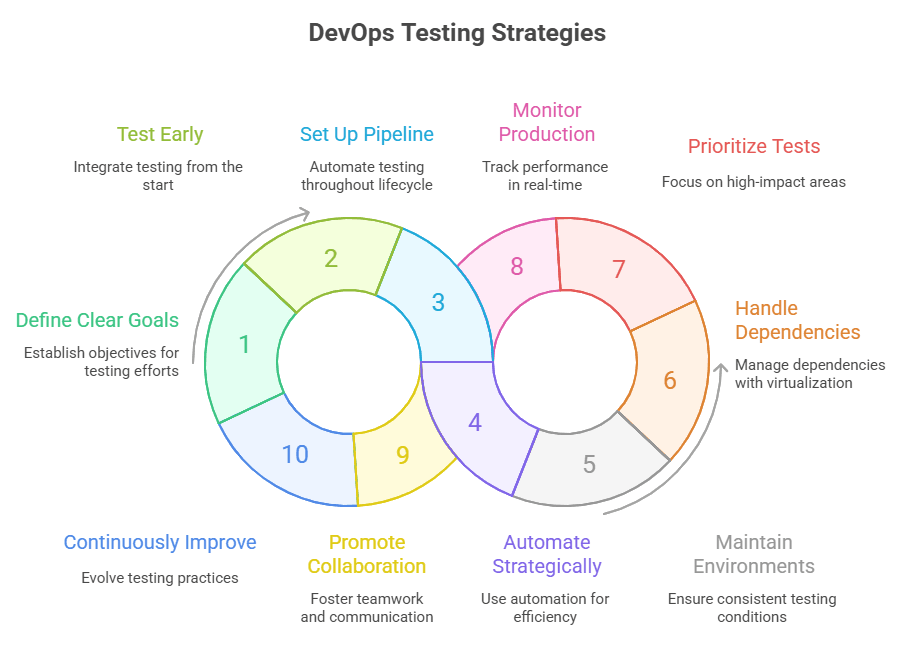
1. Define Clear Testing Goals
Establishing clear testing goals ensures the team focuses on results that truly impact product quality, release velocity, and operational reliability. Goals serve as a reference to prioritize tests, measure success, and prevent wasted effort on low-value checks.
- Quality Assurance: Ensure critical functionalities are tested to prevent defects from reaching production.
- Release Confidence: Enable faster deployments while maintaining high levels of reliability.
- Risk Prioritization: Focus testing on components with the highest potential impact on users and operations.
- Efficiency Measurement: Track defect detection rates and testing coverage to assess value delivered by testing efforts.
2. Test Early in the Process
Integrating testing from requirements and design phases allows issues to be detected before they propagate. Early testing ensures that features are implemented correctly, reduces rework, and builds a culture of shared responsibility for quality across the team.
- Requirement Validation: Ensure that specifications are complete and testable to prevent ambiguous implementations.
- Unit Testing: Catch logic errors within individual modules immediately as code is written.
- Continuous Integration Testing: Execute automated tests on every commit to detect defects early.
- Design Collaboration: Encourage QA to participate in design reviews to anticipate testing challenges.
3. Set Up a Continuous Testing Pipeline
A continuous testing pipeline embeds quality checks throughout the development lifecycle. It provides automated verification at multiple levels, ensures early defect detection, and enables consistent feedback for developers and operations teams, supporting both speed and reliability.
- Unit Level Checks:Test individual components to catch regressions early.
- Integration Testing: Confirm correct interaction between multiple software modules.
- Functional Verification: Test end-to-end workflows to ensure features meet requirements.
- Regression Tests: Run automated tests on critical paths to detect unintended changes.
- Automated Feedback: Provide real-time insights to developers for quick corrective action.
4. Use Test Automation Strategically
Automation accelerates regression cycles, improves repeatability, and reduces human error. Strategic selection of what to automate ensures maximum impact, prevents maintenance overhead, and focuses resources on high-risk areas where failures are most costly.
- Critical Path Automation: Cover essential workflows such as authentication and payments.
- Repeatable Tasks: Automate routine verification that consumes significant manual effort.
- Maintenance Practices: Update test scripts regularly to avoid outdated coverage and false results.
- Cross-Platform Testing: Ensure features function consistently across devices, browsers, and environments.
5. Maintain Consistent Test Environments
Accurate testing depends on environments that closely mirror production. Consistency eliminates false positives, reduces debugging time, and ensures that test outcomes reflect real user experiences, enabling reliable deployments and meaningful defect detection.
- Scripted Provisioning: Use automation to create identical test environments consistently.
- Production Parity: Match OS, database versions, and network configurations to production.
- Parallel Testing: Run multiple suites simultaneously to accelerate feedback.
- Environment Isolation: Prevent conflicts between test runs for reliable results.
6. Handle Dependencies With Virtualization
Dependencies often delay testing when services are unavailable or incomplete. Virtualization and service simulation allow isolated testing, reduce bottlenecks, and ensure that development progress continues without waiting for all system components to be ready.
- Service Simulation: Replace unavailable services with mocks or stubs.
- Component Isolation: Validate each module independently to prevent blockage.
- Parallel Execution: Run multiple tests simultaneously without dependencies.
- Early Detection: Identify integration issues before full system availability.
7. Prioritize Tests
Not all tests are equal in impact. Prioritizing tests ensures the team focuses on high-risk, high-value areas first. This approach reduces wasted effort, accelerates defect detection, and ensures critical functionality is verified before less significant components.
- High-Risk Modules: Focus on components where failures have the largest user or business impact.
- Recent Changes: Test areas affected by new code to quickly catch regressions.
- Frequent Workflows: Validate core user journeys that are used most often.
- Resource Optimization: Allocate testing effort where it delivers maximum value.
- Periodic Review: Reassess test priorities as features evolve and new risks emerge.
8. Monitor in Production
Testing does not end at deployment. Continuous monitoring in production helps detect issues under real user conditions, identify performance bottlenecks, and provide actionable feedback, ensuring rapid response to failures and maintaining high service reliability.
- Performance Tracking: Monitor response times, throughput, and latency to ensure service quality.
- Error Detection: Capture exceptions, failed transactions, and critical errors in real time.
- User Experience Monitoring: Observe actual workflows to identify unexpected behaviors or bottlenecks.
- Alerting: Implement automated alerts for critical failures to accelerate remediation.
- Usage Analytics: Analyze trends and patterns to anticipate future risks or areas for improvement.
9. Promote Collaboration
Collaboration between development, QA, and operations ensures shared ownership of quality. Open communication, synchronized processes, and knowledge sharing prevent siloed work, accelerate problem-solving, and ensure testing aligns with business priorities and technical requirements.
- Cross-Functional Teams: Include developers, testers, and operations for collective accountability.
- Shared Metrics: Use common dashboards to track progress and defects transparently.
- Knowledge Transfer: Encourage team members to share domain expertise and testing techniques.
- Continuous Feedback: Maintain regular communication loops to resolve blockers efficiently.
- Collaborative Planning: Align on priorities, risks, and resource allocation before development cycles.
10. Continuously Improve
Continuous improvement ensures testing evolves with software and business changes. Reviewing outcomes, metrics, and workflows identifies inefficiencies, enables process refinement, and keeps the team aligned with best practices, emerging technologies, and evolving customer expectations.
- Retrospectives: Review each cycle to identify successes and areas for enhancement.
- Metrics Analysis: Measure coverage, defect detection rate, and test execution efficiency.
- Process Refinement: Update workflows, automation strategies, and documentation based on lessons learned.
- Tool Evaluation: Adopt new tools or frameworks that enhance speed, accuracy, or visibility.
- Knowledge Sharing: Disseminate learnings across teams to improve overall testing maturity.
What Types of Testing Are Used in DevOps?
DevOps uses unit, integration, API, end-to-end, performance, security, and regression testing, most of them automated and triggered by the pipeline.
DevOps includes several types of testing, each with its purpose within the continuous delivery pipeline:
- Unit Testing: Validates a single component or function in isolation. In DevOps, these tests run fast and provide immediate feedback in local development and CI pipelines, helping developers catch issues before code merges.
- Integration Testing: Runs automatically in the Continuous Integration (CI) environment whenever code is pushed to the shared repository. These tests confirm that services, APIs, and modules work correctly together.
- Functional Testing: Functional tests in a DevOps pipeline ensure consistent application behavior across releases, aligning with specifications and user expectations.
- Performance Testing: Integrated into the pipeline to simulate load and stress scenarios. Performance tests detect bottlenecks and regressions early, long before production.
- Acceptance Testing: Executes in staging or production-like environments to validate that the software meets business requirements. In DevOps, this step bridges development output with stakeholder approval.
- Regression Testing: Regression suites safeguard existing functionality by verifying that new changes do not reintroduce old bugs. This enables safe, frequent releases.
- End-to-End Testing: Typically run less frequently due to cost and duration. In a DevOps pipeline, these tests validate critical user workflows across the full stack, providing confidence before major releases.
- Security Testing: Built directly into the CI/CD pipeline, security tests checks for vulnerabilities and misconfigurations. This shifts security left so it becomes part of development rather than an afterthought.
How Do the Test Automation Pyramid and Test as Code Apply to DevOps?
Knowing which tests to run is only half the problem. The other half is proportion, and getting it wrong is the single most common reason a DevOps pipeline becomes too slow to deploy on.
The Test Automation Pyramid describes the shape a healthy suite should have. Three layers, widest at the bottom:
- Unit tests (the base): The most numerous and the fastest. Unit tests run in milliseconds, need no environment, and pinpoint the exact function that broke. They should be the bulk of the suite.
- Integration tests (the middle): Fewer, slower, and broader. Integration tests verify that components, services, and databases actually talk to each other, which unit tests deliberately mock away.
- UI and end-to-end tests (the tip): The fewest. They exercise the real user journey through a browser or device, so they catch what nothing else can, but they are the slowest and the most sensitive to timing and environment.
Invert the pyramid, and you get the shape most struggling teams actually have: a thick layer of end-to-end tests, few unit tests, and a pipeline that takes an hour to tell a developer they missed a null check. The failure mode is predictable. The suite gets slow, so people stop running it on every commit, so it stops catching regressions, so it gets ignored, so it rots.
The pyramid is a heuristic, not a law. What it really encodes is a cost rule: push each check to the cheapest layer that can still catch the bug. If a business rule can be proven by a unit test, proving it through the UI is a choice to pay more for the same information, several times a day, forever.
Test as Code
Test as Code is the practice of treating test scripts exactly like application code: written in a real language, version-controlled in the same repository, reviewed in the same pull request, and executed by the same pipeline. The tests ship with the change they verify.
That co-location is the whole point, and it is what test cases stored in a separate tool cannot give you:
- Tests and code cannot drift apart: A change that breaks its tests fails the same review. There is no window in which the spec says one thing and the code does another.
- Review catches bad tests: A test asserting the wrong thing is a defect. Putting it in the pull request means a second person reads it before it becomes a false green.
- History is diffable: When a test starts failing, git blame tells you which change altered the expectation and why.
- Environments come along: The pipeline config and test data live beside the tests, so a fresh clone can run the suite without tribal knowledge.
What Is Shift-Right Testing in DevOps?
Shift-left moves testing earlier. Shift-right accepts a fact that no amount of pre-release testing removes: some conditions only exist in production. Real traffic patterns, real data volumes, real third-party latency, and real hardware do not fit in a test environment, so shift-right testing continues after deployment rather than stopping at it.
It is not a replacement for the pipeline gate. It is coverage for the class of failure the gate structurally cannot see. Three techniques carry it:
- Canary deployments: Route a small slice of live traffic to the new version while everyone else stays on the old one, then compare error rates between the two populations. If the canary degrades, shift traffic back before most users notice. Our guide to canary testing covers the rollout mechanics.
- Feature flags: Separate deploying code from releasing behavior. The new path ships turned off, gets enabled for a cohort, and gets switched off the moment metrics move the wrong way. The rollback is a config change, not a redeploy, which is why it takes seconds instead of a release cycle.
- Chaos engineering: Deliberately inject failure to find out whether the system survives it, before reality runs the same experiment unannounced.
Chaos engineering is the least understood of the three, and the name does it no favours: it is not random breakage. The Principles of Chaos Engineering defines it as "the discipline of experimenting on a system in order to build confidence in the system's capability to withstand turbulent conditions in production". Every word there is load-bearing. It is an experiment with a hypothesis, not a stunt.
The method is disciplined: define a steady state you can measure, hypothesize that it holds, introduce a real-world event such as a server crash or a network failure, and try to disprove the hypothesis. The principle teams skip at their peril is minimize blast radius: run the smallest experiment that could still teach you something, so a failed hypothesis costs you a contained incident rather than an outage.
One prerequisite governs all three techniques. Each depends on being able to detect degradation fast and reverse without a deploy. A canary with no metric behind it is just a slower rollout, and a feature flag with no monitoring is a hidden branch running in production. Build the observability first, then testing in production becomes a controlled practice rather than a gamble.
How Do You Scale DevOps Testing With TestMu AI HyperExecute?
You scale DevOps testing with TestMu AI HyperExecute by running test suites in parallel on its cloud, with smart test ordering and retries that shorten pipeline time.
Scaling DevOps testing requires speed, reliability, and the ability to handle complex pipelines without slowing down delivery. TestMu AI HyperExecute helps teams achieve this by providing a cloud-based test execution environment that is both fast and highly scalable. Unlike traditional test runners, HyperExecute intelligently distributes tests across multiple environments, reducing bottlenecks and enabling near real-time feedback.
Features:
- AI-Native, High-Speed Execution: Executes tests up to 70% faster with intelligent orchestration.
- Smart Test Splitting and Multiplexing: Distributes tests efficiently across environments using Auto Split, Matrix, or Hybrid strategies.
- Fail-Fast and Job Prioritization: Halts runs on critical failures and ensures high-priority jobs run first.
- Detailed Logs and Reporting: Delivers real-time logs, detailed reports, metrics, and artifact management.
- Automatic Healing and Root Cause Analysis: Uses AI to recover from failures and classify errors for faster debugging.
- Projects and Workflow Scheduling: Organizes tests into projects, enables scheduling, and integrates smoothly with CI/CD pipelines.
- CLI Integration and Secure Tunnels: Supports command-line execution and secure testing for private apps.
- Broad Framework and Language Support: Compatible with Selenium, Cypress, Playwright, and multiple languages.
- Enterprise-Grade Security: Provides SOC2, GDPR, and CCPA compliance with encryption and secure deployments.
- MCP Server Automation: Automates setup, YAML creation, and test commands with AI-driven MCP Server.
To begin with, head over to this HyperExecute guide.

What Are the Best Practices for DevOps Testing?
The best practices for DevOps testing are to automate early, keep tests fast and isolated, run them on every commit, fix flaky tests quickly, and track quality metrics.
Implementing effective DevOps best practices for testing is crucial for ensuring quality and reliability in a DevOps environment. Following established best practices helps teams detect issues early, streamline workflows, and maintain continuous delivery with confidence.
- Automate Early and Often: Automated tests must be integrated at every stage of coding. One must start writing unit and integration tests as soon as something is developed in order to catch defects early and give quick feedback.
- Shift Left Testing: Testing activities should be done early in the development process and promote collaboration among developers and testers on test cases that are run before integration, to avoid surprises later.
- Build a Test Environment that Is Realistic and Consistent: Use container- or cloud-based solutions to simulate production in every way possible, thus minimizing environment-specific bugs and maximizing reliability.
- Fast and Reliable Feedback Is Key: Ensure there is a test suite that is fast yet clear. Initiate tests in parallel where applicable; cut down on flaky, slow, or irrelevant test cases to boost teams' confidence in the results given.
- Build a Collaborative Culture: Break down silos by combining every stakeholder, developers, testers, and ops. Promote shared quality ownership by activities such as pair testing and deep communication across the whole pipeline.
- Maintain Proper Documentation: Proper documentation supports transparency, traceability, and consistency in DevOps software testing. Successful DevOps teams usually maintain Quality Management Plans (QMP), test case specifications, test summary reports, regression test reports, and risk assessment reports.
How Is AI Changing DevOps Testing?
AI is changing DevOps testing by generating tests from requirements, selecting which tests to run for each commit, healing broken locators, and triaging pipeline failures.
The effect on delivery is mixed. The 2024 DORA report found that a 25% increase in AI adoption tracked with a 7.2% drop in delivery stability, which makes automated tests in the pipeline more important as AI writes more of the code.
Start with AI features that shorten feedback without hiding failures, such as test impact analysis and failure clustering, and keep humans approving any auto-healed test. Our roundup of devops ai tools compares the options.
How Should a Team Start With DevOps Testing?
Start DevOps testing by automating unit and API tests in the CI pipeline, adding end-to-end checks for critical flows, and expanding coverage as the pipeline matures.
For many organizations, DevOps is not just a buzzword. To stay competitive in an ever-changing marketplace, it is a must-have. Continuous testing is at the heart of DevOps, ensuring fast delivery of high-quality and reliable software through automated validation at every stage of the CI/CD pipeline.
However, DevOps Testing can only generate value if certain best practices are implemented. Here, automation, collaboration, documentation, and tools are integral elements. When done right, new-age testing breeds innovation and stability.
What Sources Does This DevOps Testing Guide Cite?
This DevOps testing guide cites the research paper DevOps Capabilities, Practices, and Challenges, linked below.
- DevOps Capabilities, Practices, and Challenges: https://arxiv.org/pdf/1907.10201
Author

Chandrika Deb
Blogs: 13


Chandrika Deb is a Community Contributor with over 4 years of experience in DevOps, JUnit, and application testing frameworks. She built a Face Mask Detection System using OpenCV and Keras/TensorFlow, applying deep learning and computer vision to detect masks in static images and real-time video streams. The project has earned over 1.6k stars on GitHub. With 2,000+ followers on GitHub and more than 9,000 on Twitter, she actively engages with the developer communities. She has completed B.Tech in Computer Science from BIT Mesra.
Reviewer

Japneet Singh Chawla
Reviewer
Japneet Singh Chawla is an Engineering Manager at TestMu AI (formerly LambdaTest), where he leads a team driving HyperExecute, the AI-native Test Orchestration Cloud Platform, and integrations with Cypress, Provar, Tosca, and Selenium, improving test execution efficiency and driving adoption across 500+ enterprise clients. He also spearheaded zero-downtime deployments that cut release-related downtime by 90%, and mentors new engineers into productive contributors. He brings 9+ years of experience building and scaling distributed systems, SaaS platforms, and developer tools, with deep hands-on backend engineering across Golang, Python, Node.js, Kafka, and Redis. Earlier at Sumo Logic he built award-winning developer tools, including a VS Code Parser Linter, and at Indus Valley Partners he was a founding member of the Sentiment Analyzer team, building ML-powered solutions for financial clients. Japneet holds an MCA in Computer Science from GGSIPU.


DevOps Testing FAQs
Did you find this page helpful?
More Related Learning Hubs
TestMu AI forEnterprise
Get access to solutions built on Enterprise
grade security, privacy, & compliance
- Advanced access controls
- Advanced data retention rules
- Advanced Local Testing
- Premium Support options
- Early access to beta features
- Private Slack Channel
- Unlimited Manual Accessibility DevTools Tests