
Run Tests Up to 70% Faster than Traditional Test Grids
HyperExecute Is an AI-Native Test Orchestration Platform to Run Your Automation Test Suites with Blazing Fast Speed.

LocalStack's 2026 State of AI in Cloud Development survey found that 42% of respondents wait more than 10 minutes for a staging environment to pick up each code update, and 97% report production failures that staging environments could not reliably catch, as reported by Help Net Security.
Ephemeral environments take that queue away. Every pull request gets its own short-lived copy of the application, with its own URL and its own data, and the copy is deleted when the pull request merges or closes.
Most guides stop once the environment exists. This one follows the tests: how they find the URL, wait for readiness, reach a private preview and keep their evidence after teardown, measured on four pull request environments that I created, tested on TestMu AI cloud browsers and destroyed. It builds on the ephemeral section of the test environment management guide.
TL;DR
An ephemeral environment is a short-lived, isolated copy of an application that a pipeline creates for one pull request or test run and destroys when the change merges or closes. Each copy gets its own URL, data and configuration, so tests never wait for a shared staging server and the environment cannot drift.
How Do You Test an Ephemeral Environment?
- URL hand-off: The deploy step publishes the ephemeral environment's address, and the test job reads it from that output instead of a hard-coded staging URL, so every run targets the copy built for its own pull request.
- Readiness gate: Tests against an ephemeral environment start only after its health endpoint answers. A fixed sleep either wastes time on fast deploys or starts the tests before a slow deploy can serve a page.
- Identity check: The first assertion confirms the ephemeral environment belongs to the pull request under test, for example through a banner with the PR number, so a stale URL fails loudly instead of passing against older code.
- Private access: A preview reachable only inside a CI runner or private network needs a tunnel. TestMu AI's tunnel gives each pull request its own named route, so cloud browsers can open the private URL.
- Evidence before teardown: Screenshots, logs and cloud session IDs have to be stored outside the environment, because nothing on the environment survives its deletion.
What Is an Ephemeral Environment?
An ephemeral environment is a temporary, isolated deployment of an application and its dependencies, created automatically for a single change and destroyed when that change merges, closes or expires. The same idea goes by preview environment, pull request environment, review app and on-demand environment.
CI pipelines already treat build machines this way. GitHub's runner documentation states that, apart from single-CPU runners, each GitHub-hosted runner is a new virtual machine. An ephemeral environment applies the same rule to the application under test.
Compared with a shared, long-lived environment, each copy is:
- Triggered by a change - a pull request opening, or a CI job starting, creates it, so nobody files a ticket or books a slot.
- Isolated - its own URL, database and configuration mean two pull requests cannot overwrite each other's data or deploys.
- Built from code - the same container images, manifests or templates build every copy, so no copy carries a hand-made fix the others lack.
- Disposable - deletion on merge, close or a time limit is also why it cannot drift away from what the code describes.
Ephemeral Environments vs Staging, Preview and Sandbox Environments
The terms overlap, so separate them by lifetime and by the question each environment answers.
| Environment | Lifetime | Created by | Question it answers |
|---|---|---|---|
| Ephemeral | One pull request or one test run | The pipeline, automatically | Does this change work end to end, on its own? |
| Preview | Same as ephemeral | A deploy step that also posts a shareable URL | What does this change look like to a reviewer or product owner? |
| Staging | Long-lived, refreshed per release | A platform or release team | Do all merged changes work together on production-like infrastructure? |
| QA | Long-lived, shared by testers | A QA or platform team | Does the integrated build pass regression and exploratory testing? |
| Sandbox | Varies, often per developer or per vendor account | A developer or a third-party provider | What does this code or API do without real side effects? |
A preview environment is an ephemeral environment whose URL is shared for review, so the two terms usually describe the same copy. The long-lived tiers keep their jobs: the staging environment still checks the merged release, the QA environment still hosts regression and exploratory passes, and a sandbox environment still isolates experiments and third-party test modes.
How the Ephemeral Environment Lifecycle Works
Every ephemeral environment runs the same lifecycle, and the test job owns two of its steps: waiting for readiness and running the suite.
- Trigger - a pull request opens or receives a new commit. In GitHub Actions, GitHub's events reference says a
pull_requestworkflow runs on theopened,synchronizeandreopenedactivity types by default. - Provision - the pipeline builds the image for that commit and creates a namespace, Compose project or stack named after the pull request number.
- Seed - migrations run and a small, known dataset loads, so tests can assert on exact records.
- Ready - a health check passes and the deploy step publishes the URL.
- Test - smoke and targeted end-to-end tests run against that URL, and human reviewers open the same address.
- Update - each new commit redeploys the same environment and cancels the run for the commit it replaces.
- Destroy - merge, close or a time limit deletes everything, data included.
Teardown needs its own trigger. The default activity types do not include closed, so a teardown workflow has to list it explicitly.
The update step needs a guard too. A concurrency group keyed on the pull request number, with cancel-in-progress: true, stops two commits from deploying into the same environment at once.
Ways to Build an Ephemeral Environment
Pick the approach that matches what you already deploy. Each one isolates a copy with a different unit, and that unit decides what the copy includes.
| Approach | Isolation unit | What each copy includes | Fits |
|---|---|---|---|
| Namespace per pull request | A Kubernetes namespace | Every service in the pull request's manifests, on a shared cluster | Teams that already deploy to Kubernetes |
| Compose project per pull request | A Compose project name | The whole stack on one runner or VM | Small stacks and monoliths |
| Platform preview deployment | The hosting platform's per-branch deploy | The frontend and its serverless functions, with backends usually shared | Frontend-heavy apps |
| Infrastructure-as-code stack per pull request | A separate state per pull request | Managed cloud resources such as databases and queues | Apps built on managed cloud services |
| Changed services only | Request routing on a shared cluster | Only the services the pull request changed | Large microservice estates where a full copy costs too much |
On Kubernetes, the namespace is the natural unit. The Kubernetes documentation on namespaces describes them as a mechanism for isolating groups of resources within a single cluster, so one namespace per pull request keeps each copy's services apart.
For a Compose stack, the project name does the same job. Docker's Compose documentation says Compose uses a project name to isolate environments from each other, and suggests a unique build number as the project name on a CI server.
GitOps tooling can create these environments straight from Git. Argo CD's ApplicationSet controller has a Pull Request generator built for this pattern, and its documentation notes that the controller polls for pull request changes every 30 minutes by default, so add a webhook or shorten the interval if that delay is too slow for your reviewers.
In the CNCF's 2025 Annual Cloud Native Survey, 58% of cloud native innovators use GitOps principles extensively, compared with 23% of adopters.

Austin Siewert
Co-Founder, Steadfast Systems
Discovered @TestMu AI yesterday. Best browser testing tool I've found for my use case. Great pricing model for the limited testing I do 👏
3M+ Devs and QAs rely on TestMu AI
Deliver immersive digital experiences with Next-Generation Mobile Apps and Cross Browser Testing Cloud

How to Test in an Ephemeral Environment
A suite written for a fixed staging URL assumes the address, the data and the uptime never change. On an ephemeral environment all three change on every run. The readiness, tunnel and identity checks below all ran in the measured run later on this page.
Hand Over the URL From the Deploy Step
Read the base URL from the environment, never from the test code. In Playwright that is one line of config, use: { baseURL: process.env.PREVIEW_URL }, and the deploy step that created the environment sets PREVIEW_URL.
If your hosting platform reports deployments back to GitHub, the test workflow can start on the deployment_status event, which GitHub's events reference describes as running when a third party provides a deployment status. The guide to running automated tests against Vercel preview URLs builds a full workflow on that trigger.
Wait for Readiness, Not a Fixed Sleep
Gate the suite on a health endpoint. A fixed sleep turns the suite into a flaky test by design: long enough on a fast deploy, too short on a slow one, and the failure looks random.
In my runs, the first health check request was refused on every pull request, and the app answered 112 to 159 milliseconds after the environment's creation began. A test fired at the moment of deploy would have failed every time.
The tunnel needs a gate of its own. Its info API answered HTTP 500 with Server not initialized until the tunnel connected, which took 3.90 to 4.21 seconds across my runs, and HTTP 200 after that.
Reach Private Previews From Cloud Browsers
A preview that only listens inside a CI runner or a private network is invisible to a cloud browser. TestMu AI's tunnel binary connects out from the runner, and cloud browsers that set tunnel: true with the same tunnelName reach the private URL through it.
Name the tunnel per pull request. The tunnel modifiers reference lists --tunnelName, --allowHosts to send only the listed hosts through the tunnel, and --infoAPIPort to expose the status API that the gate below polls. For tunnel basics, see local website testing with a tunnel.
Vercel's Protection Bypass for Automation covers the other case, a hosted preview behind deployment protection: on all plans, automated tests send an x-vercel-protection-bypass header with a project secret instead of signing in.
The script below is the CI gate I ran for pull request 205. It starts a tunnel named for the pull request, waits for the app and then the tunnel, runs the suite, and closes the tunnel on exit; it passed 4 of 4 tests and exited 0 after 34 seconds.
# preview-gate.sh: test one PR environment, then close its tunnel
set -euo pipefail
TUNNEL="pr-${PR_NUMBER}-${GITHUB_RUN_ID:-local}"
"${LT_BIN:-./LT}" --user "$LT_USERNAME" --key "$LT_ACCESS_KEY" \
  --tunnelName "$TUNNEL" --infoAPIPort 8000 --allowHosts localhost \
  > tunnel.log 2>&1 &
trap 'curl -s -X DELETE http://127.0.0.1:8000/api/v1.0/stop' EXIT

# Readiness gates: the app first, then the tunnel (HTTP 500 until up)
curl -sf --retry 30 --retry-connrefused --retry-delay 1 \
  "$PREVIEW_URL/healthz"
curl -sf --retry 30 --retry-connrefused --retry-delay 1 \
  http://127.0.0.1:8000/api/v1.0/info > /dev/null

LT_TUNNEL_NAME="$TUNNEL" LT_BUILD="preview pr-${PR_NUMBER}" \
  npx playwright test
The Playwright fixture follows the pattern in the TestMu AI Playwright agent skill, with the tunnel added. Part 1 builds the capabilities from the Playwright project name:
// lambdatest-setup.ts, part 1 of 3: capabilities for this PR's run
import { test as base } from '@playwright/test';
import { chromium } from 'playwright';
import { execSync } from 'child_process';

const pwVersion = execSync('npx playwright --version')
  .toString().trim().split(' ')[1];

export const test = base.extend<{}>({
  page: async ({}, use, testInfo) => {
    const project = testInfo.project.name.split('@lambdatest')[0];
    const [browserName, browserVersion, platform] = project.split(':');
    const capabilities = {
      browserName,
      browserVersion,
      'LT:Options': {
        platform,
        build: process.env.LT_BUILD,
Part 2 routes the session through the pull request's tunnel and connects:
        // part 2 of 3: route the cloud browser through the PR's tunnel
        name: testInfo.title,
        user: process.env.LT_USERNAME,
        accessKey: process.env.LT_ACCESS_KEY,
        tunnel: true,
        tunnelName: process.env.LT_TUNNEL_NAME,
        video: true,
        playwrightClientVersion: pwVersion,
      },
    };
    const wsEndpoint = 'wss://cdp.lambdatest.com/playwright'
      + `?capabilities=${encodeURIComponent(JSON.stringify(capabilities))}`;
    const browser = await chromium.connect({ wsEndpoint });
    const context = await browser.newContext(testInfo.project.use);
    const ltPage = await context.newPage();

    await use(ltPage);
Part 3 stores the cloud session ID in the test report before anything is torn down, then reports pass or fail:
    // part 3 of 3: keep the session ID, report status, close the browser
    const action = (a: object) => `lambdatest_action: ${JSON.stringify(a)}`;
    const details = JSON.parse(await ltPage.evaluate(
      (_: any) => {}, action({ action: 'getTestDetails' })) as string);
    testInfo.annotations.push(
      { type: 'testmu-session', description: details.data.session_id });

    const status = testInfo.status === 'passed' ? 'passed' : 'failed';
    await ltPage.evaluate((_: any) => {}, action({
      action: 'setTestStatus',
      arguments: { status, remark: testInfo.error?.message || 'OK' },
    }));
    await context.close();
    await browser.close();
  },
});

export { expect } from '@playwright/test';
The config reads the preview URL and runs both browsers, with every test in its own worker:
import { defineConfig } from '@playwright/test';

export default defineConfig({
  testDir: './tests',
  fullyParallel: true,
  workers: 4,
  timeout: 90_000,
  use: { baseURL: process.env.PREVIEW_URL },
  projects: [
    { name: 'Chrome:latest:Windows 11@lambdatest' },
    { name: 'pw-webkit:latest:macOS Sequoia@lambdatest' },
  ],
});
Assert Which Environment You Are Testing
With several environments alive at once, a stale URL or a mis-set variable sends the suite to the wrong copy, and generic assertions pass against it. Make the first test check the environment's identity: the demo app prints Preview of PR #<number>, and the spec compares it with PR_NUMBER.
import { test, expect } from '../lambdatest-setup';

const pr = process.env.PR_NUMBER;

test('preview serves this pull request', async ({ page }) => {
  await page.goto('/');
  await expect(page.getByTestId('env-banner'))
    .toHaveText(`Preview of PR #${pr}`);
});

test('seeded catalog and cart work', async ({ page }, testInfo) => {
  await page.goto('/');
  await expect(page.getByRole('listitem')).toHaveCount(3);
  await page.getByRole('button', { name: 'Add to cart' }).first().click();
  await expect(page.getByTestId('cart-count')).toHaveText('1');
  await page.screenshot({ path: testInfo.outputPath('preview.png') });
});
To check that the guard works, I pointed PR 106's tests at PR 105's environment. The identity test failed on Chrome instead of passing against the wrong copy, and Playwright exited 1:
Error: expect(locator).toHaveText(expected) failed

Locator:  getByTestId('env-banner')
Expected: "Preview of PR #106"
Received: "Preview of PR #105"
Timeout:  5000ms
Choose What to Run Per Pull Request
A per-PR environment is sized for one change and a handful of users. Run the tests that answer whether this change works, and leave release-wide checks to staging.
| Test type | Per-PR environment | Staging | Reason |
|---|---|---|---|
| Smoke tests | Every commit | Every release candidate | Fast proof that the build serves its pages and core APIs |
| End-to-end flows | Flows the pull request touches | The full suite | Catches regressions in the changed path while the author still has context |
| Cross-browser checks | Critical pages on two or three browsers | The full browser matrix | Rendering bugs are cheapest to fix in the pull request that caused them |
| Visual comparison | Changed pages | All baselined pages | A diff scoped to one change is quick to review |
| Load and soak tests | No | Yes, or a dedicated performance environment | Results only mean something on production-sized infrastructure |
| Payment and email providers | Mocked | Real sandbox accounts | Many environments sharing one provider sandbox throttle each other, as the Limits section shows |
A Measured Run: Four Pull Request Environments, Create to Destroy
I ran the full lifecycle on November 23, 2026, one pull request at a time. Each environment was a copy of a small Node.js store app with its own seeded catalog, port and tunnel, tested by Playwright 1.65.1 on two TestMu AI cloud browsers: Chrome on Windows 11 and WebKit on macOS Sequoia.
PRs 201 to 203 used the config above, with every test in its own worker. PR 204 used the same code with test files run serially, which is Playwright's default. The app is 34 lines, so its startup time is a floor; a real stack with a database and migrations takes longer to become ready.
| PR | App ready | Tunnel up | Tests (4 sessions) | Teardown | Total | Tests' share |
|---|---|---|---|---|---|---|
| 201 | 114 ms | 3.94 s | 46.9 s | 1.43 s | 52.4 s | 89% |
| 202 | 159 ms | 3.90 s | 29.0 s | 1.47 s | 34.5 s | 84% |
| 203 | 112 ms | 3.94 s | 28.1 s | 1.47 s | 33.7 s | 84% |
| 204 (serial files) | 145 ms | 4.21 s | 50.1 s | 1.49 s | 56.0 s | 90% |
- Browser sessions dominate - the test stage took most of every cycle, while the environment itself answered in under 0.2 seconds. On a stack this small, shortening session time pays more than shortening provisioning.
- Parallel test files shorten the stage - with
fullyParallel: true, four sessions ran at once and the stage took 28.1 to 29.0 seconds in PRs 202 and 203, against 50.1 seconds with serial files in PR 204. - Session start time varies - one Chrome session in PR 201 took 42.6 seconds, against 13.2 to 17.8 seconds for every other Chrome session, and it stretched that cycle to 52.4 seconds. Size test timeouts for the slow case; mine was 90 seconds.
- The slowest browser sets the gate - WebKit sessions on macOS Sequoia took 21.2 to 24.5 seconds, so in PRs 202 and 203 the gate waited on WebKit after Chrome had finished.
- Teardown leaves only the evidence - stopping the tunnel and the app and deleting the data took 1.43 to 1.49 seconds. Afterwards the preview URL refused connections, the tunnel no longer appeared in the tunnels API, and the session record I fetched for each pull request still held its video and screenshots.
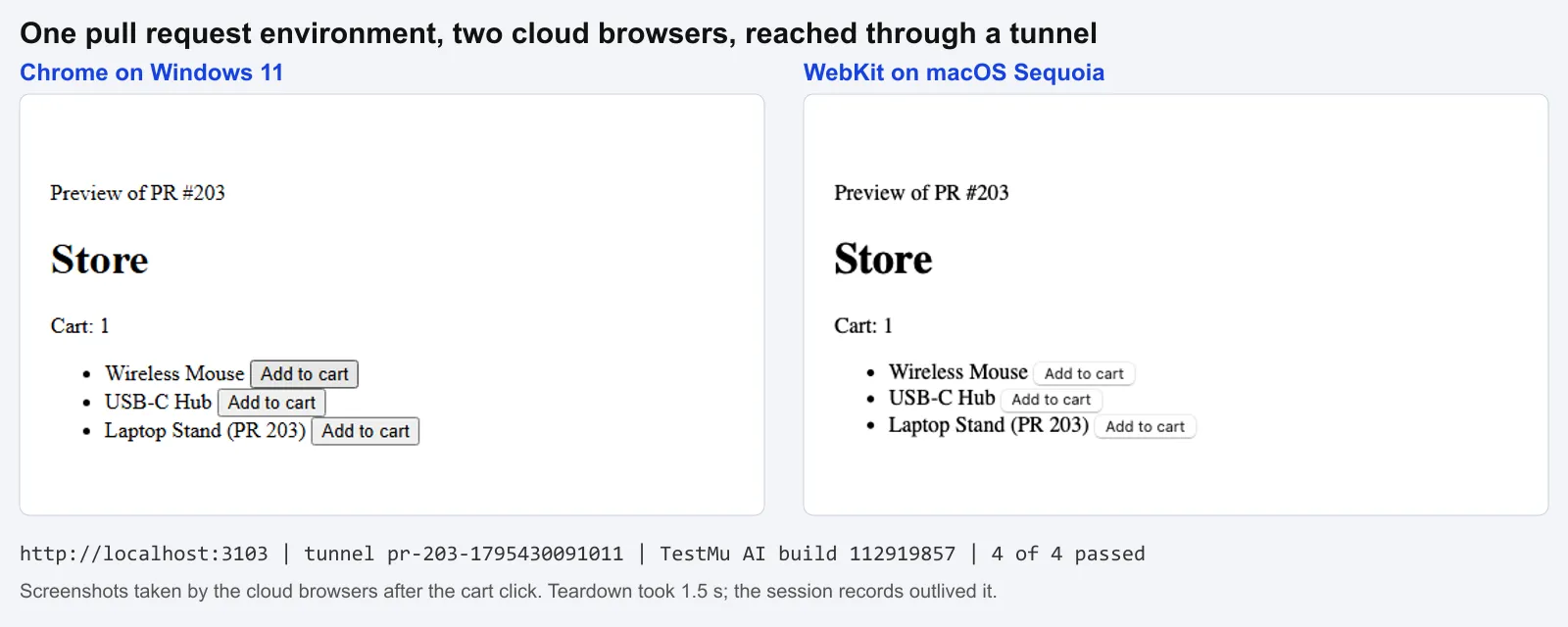
I fetched the session record below from the TestMu AI sessions API after PR 203's environment had been deleted. The fields are copied from the response; its video and screenshot URLs, also present, are signed links and are left out.
{
  "test_id": "DA-WIN-17458-1795430100908904480QOG",
  "build_name": "ephemeral-env pr-203",
  "status_ind": "passed",
  "browser": "chrome",
  "platform": "win11",
  "tunnel": true,
  "tunnel_name": "pr-203-1795430091011"
}
Note: TestMu AI runs Playwright, Selenium and Cypress suites on cloud browsers that can reach a private preview through a tunnel, and each session's video stays available after the environment is gone. Start testing free
Testing Ephemeral Environments With TestMu AI
The run above used the tunnel and cloud browsers from one machine. Two TestMu AI products cover the parts of the lifecycle around it.
HyperExecute runs each test task on a fresh virtual machine provisioned for that task and torn down afterwards, across 60+ regions, so the test infrastructure is ephemeral as well. Its Background Services start an app server, database or mock on the same VM as the tests, which turns one job into a self-contained ephemeral environment for stacks small enough to run on one machine.
KaneAI works at the pull request itself. With the TestMu AI GitHub App installed, a comment such as @TestMuAI Validate this PR --url https://preview-123.your-app.com --tunnel my-tunnel-name has KaneAI read the diff, generate targeted end-to-end tests, run them against that preview through the named tunnel, and post results with root cause analysis back to the pull request.
The GitHub App documentation describes --url as useful for ephemeral preview environments where the deployment URL changes per pull request, and --tunnel as the per-PR override for the tunnel name.
Limits of Ephemeral Environments
Ephemeral environments cost provisioning time on every pull request, and a few kinds of testing do not fit them.
- Shared third-party sandboxes - every environment that calls a provider's test mode shares one account's limits. Stripe's rate limits allow 25 requests per second in a sandbox against 100 in live mode, so several pull request environments running checkout tests at once can throttle each other. Mock the provider per pull request and keep real sandbox calls for staging.
- Production-scale data and load - a copy sized for one change cannot show how the release behaves under real traffic or a full dataset, so load tests, soak tests and migration rehearsals stay in staging or a performance environment.
- Combined changes - two pull requests can pass separately and fail together, because each environment sees only its own branch. The merged result still needs a staging or merge-queue check.
- Long manual sign-off - a business review that runs for days belongs in a UAT environment with stable data, rather than a copy that disappears when the branch merges.
- Forgotten copies - an environment whose pull request goes quiet keeps billing. A time limit that deletes idle environments catches what the close trigger misses.
Conclusion
Start with one gate on your next pull request: its own copy, a health check before the suite, and a first test that asserts the copy's identity. Then add the tunnel and the session-ID capture from the fixture above, so private previews stay reachable and failures stay debuggable after teardown.
To run the same suite on cloud browsers, TestMu AI's automation cloud runs Playwright, Selenium and Cypress tests in parallel, and the tunnel setup guide covers installing the tunnel binary on your CI runner.
Author

Devansh Bhardwaj
Blogs: 79


Devansh Bhardwaj is a Community Evangelist at TestMu AI with 4+ years of experience in the tech industry. He has authored 30+ technical blogs on web development and automation testing and holds certifications in Automation Testing, KaneAI, Selenium, Appium, Playwright, and Cypress. Devansh has contributed to end-to-end testing of a major banking application, spanning UI, API, mobile, visual, and cross-browser testing, demonstrating hands-on expertise across modern testing workflows.
Reviewer

Anmol Gupta
Reviewer
Anmol Gupta is Vice President of Product Management at TestMu AI, driving HyperExecute, the test orchestration cloud that runs and accelerates automated test execution. He led the development of the Unified Test Execution Cloud Platform and now leads a 30-member cross-functional product organization across product lines contributing $7M+ in revenue. He brings over nine years of experience and previously co-founded the SaaS company Timble as CTO, where he grew the team from 5 to 40 and launched an AI KYC platform that processed 600K+ applications in five months while cutting verification time from 12 minutes to under 30 seconds. Anmol holds an MTech and BTech from IIT Delhi.


Ephemeral Environments FAQs
Did you find this page helpful?
More Related Learning Hubs


TestMu AI forEnterprise
Get access to solutions built on Enterprise
grade security, privacy, & compliance
- Advanced access controls
- Advanced data retention rules
- Advanced Local Testing
- Premium Support options
- Early access to beta features
- Private Slack Channel
- Unlimited Manual Accessibility DevTools Tests