

Power Your Software Testing with AI Agents and Cloud
The Native AI-Agentic Cloud Platform to Supercharge Quality Engineering. Test Intelligently and Ship Faster.


- TestMu AI (Formerly LambdaTest)
- /
- Blog
- /
- Root Cause Analysis (RCA) in Software Testing
Root Cause Analysis (RCA) in Software Testing
Root cause analysis in software testing finds why defects happen and prevents recurrence. Learn the 5 Whys, Fishbone, FTA, and FMEA techniques with examples.
Last Updated on:
On This Page
- What are Software Defects?
- What is Root Cause Analysis (RCA) in Software Testing?
- Types of Root Causes
- 3Rs of Root Cause Analysis (RCA)
- How to Perform Root Cause Analysis (RCA) in Software Testing?
- Postmortem-Driven Testing
- Popular Techniques of Root Cause Analysis
- Benefits of Root Cause Analysis (RCA)
- Common Challenges Faced in Root Cause Analysis (RCA)
- Performing Root Cause Analysis on the Cloud
- Conclusion
TL;DR
Root cause analysis (RCA) in software testing is the process of tracing a defect past its symptom to the underlying condition that produced it, then fixing that condition so the defect cannot recur. It runs in six steps, from defining the problem to preventive action, using techniques such as the 5 Whys, Fishbone diagrams, Fault Tree Analysis, and FMEA.
Choosing an RCA Technique
- 5 Whys - iterative questioning that stops when an answer names a condition you can change. It is the fastest to run and needs no tooling, which makes it the default for a single well-scoped defect in triage.
- Fishbone diagram - groups candidate causes into categories such as code, environment, data, and process before any of them are tested. Use it when a defect has several plausible origins and the team cannot agree which to investigate first.
- Fault Tree Analysis - works backwards from the failure through AND and OR logic to the combinations of events that produce it. It suits defects that only appear when several conditions coincide.
- FMEA - scores each failure mode on severity, occurrence, and detection and multiplies them into a Risk Priority Number, so the highest-scoring modes are addressed first. Use it to prioritize across many known failure modes.
Running RCA at Scale
An RCA stalls when the evidence is scattered across machines or the failure will not reproduce. TestMu AI keeps each run, its logs, and its history in one place, and its Test Intelligence layer correlates network, console, and framework logs to localize a likely cause for an engineer to confirm.
Bugs or Defects are common challenges in software development. Detecting bugs or defects is vital, and understanding why they occurred is equally important. Identifying the underlying cause of issues is important for preventing their recurrence. It allows developers to implement potential solutions rather than applying temporary fixes.
What are Software Defects?
Software defects refer to the deviation from the expected behavior to the actual behavior of a software application. These deviations can occur at any software development life cycle stage, from data collection to coding, testing, and deployment.
Eager to understand more about software bugs? Take a walk through the bug life cycle in software testing, where glitches become tales.
Causes of Software Defects
Some of the causes of software defects are:-
- Inadequate Requirements - Software defects often arise from incomplete requirements, giving rise to misunderstandings and implementation errors during the development process.
- Limited Test Coverage - Software defects may arise due to poor test coverage, where more testing is needed to sufficiently explore and validate different aspects of the software, leaving potential defects undetected.
- Lack of an Effective Defect Management Process - Inadequate defect management processes can lead to the prolonged existence of software defects, hampering the overall quality and user experience due to delayed resolutions and untracked issues.
- Communication gap - Software flaws occasionally result from poor communication between developers, testers, and other stakeholders.
Learn how to get practical details from PMs to reduce defects and missing requirements and work effectively with product managers.
What is Root Cause Analysis (RCA) in Software Testing?
Root Cause Analysis (RCA) in software testing is an effective process to identify the root causes of software defects or problems during the software development life cycle. It identifies the underlying causes of the issues over the surface-level syntax and apparent anomalies in the system.
Types of Root Causes
Root causes that can affect a problem fall into three types:
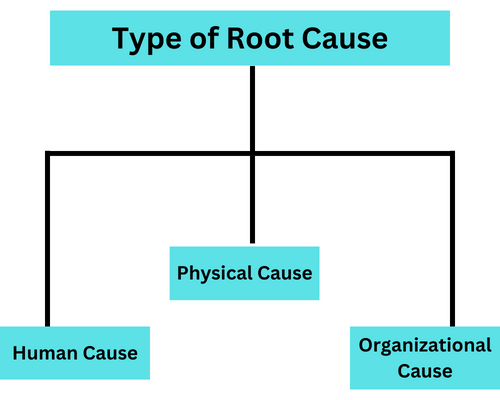
- Human Cause - Factors attributed to human actions, decisions, or knowledge. For example, Data entry error in the Database.
- Physical Cause - Factor related to malfunctioning or breakdown of hardware. For Example, hard disk failure.
- Organizational Cause - Factor that arises from problems within organizations. For Example, poor communication and weak policies.
3Rs of Root Cause Analysis (RCA)
The 3R's of Root Cause Analysis (RCA) are "Recognize," "Rectify," and "Replicate". They are the key steps in Root Cause Analysis used to identify and address the underlying causes of a problem.
- Recognize - This initial step involves acknowledging a problem or defect in the software. It requires keen observation and effective communication between team members to ensure that issues are identified and not overlooked.
- Rectify - After identifying the issue, the next step is to take corrective action to deal with the underlying causes. This entails implementing fixes that won't just address the current problem but also stop it from happening again.
- Replicate - This phase ensures the identified root cause is effectively rectified and allows thorough software testing to prevent any future recurrence of issues.

How to Perform Root Cause Analysis (RCA) in Software Testing?
The essential steps to perform the Root Cause Analysis (RCA) in software testing are:-

- Define the Problem - The first step is identifying and defining the problem or defect during software testing.
- Collect Data - After finding the problem, collect problem evidence, such as problem test cases, logs, screenshots, and reports.
- Identify Possible Causes - List all potential causes contributing to the problem or defects.
- Identify the Root Cause - Employ various Root Cause Analysis (RCA) techniques to identify the underlying issue accurately.
- Implement Root Cause Corrective Action (RCCA) - After identifying the root cause, implement corrective action to address identified root causes and proactively prevent the recurrence of issues.
- Implement Root Cause Prevention Action (RCPA) - After resolving the root cause, implement preventive measures such as improved testing procedures or process enhancements to avoid similar issues in the future.
Postmortem-Driven Testing: RCA After a Defect Reaches Production
The six steps above assume the defect was caught in test. When one escapes to production, the same loop runs with a different trigger: the incident postmortem takes the place of the failed test case, and the prevention step (RCPA) produces a regression test committed to the suite rather than a process change.
Postmortem-driven testing is the name this article uses for that variant. It is a descriptive label rather than an established industry term, but the practice underneath it is documented.
The AWS Well-Architected reliability pillar states it in two sentences, under REL12-BP02 Perform post-incident analysis: "Assess why existing testing did not find the issue. Add tests for this case if tests do not already exist."
Google's SRE Book chapter on testing for reliability describes the same mechanism one level down, for bugs rather than for incidents: "One way to establish a strong testing culture is to start documenting all reported bugs as test cases." Each converted bug fails until the fix lands, and the accumulated set becomes the regression suite.
Applied to an incident, the loop is short:
- Take every contributing factor the postmortem recorded, not only the single headline cause.
- Ask why the existing suite did not catch it. That is the 5 Whys question covered below, pointed at your tests instead of at your code.
- Write a test that fails against the pre-fix build and passes after the fix, so the assertion is anchored to observed behavior rather than to a description of it.
- Run it in regression testing on every build, so recurrence is blocked by the pipeline instead of by whoever remembers the incident.
Not every finding converts. A contributing factor such as a missing runbook or an unclear escalation path has no executable form, and forcing one produces a test that asserts nothing. Convert the factors that have an observable failure condition and route the rest to the process changes RCPA already covers. Where the failure signal is already sitting in your logs, part of that conversion can be automated: turning production logs into tests walks through going from a production error to a verified reproduction test.
Popular Techniques of Root Cause Analysis
Some of the most popular techniques of Root Cause Analysis are:-
The 5 Whys Technique
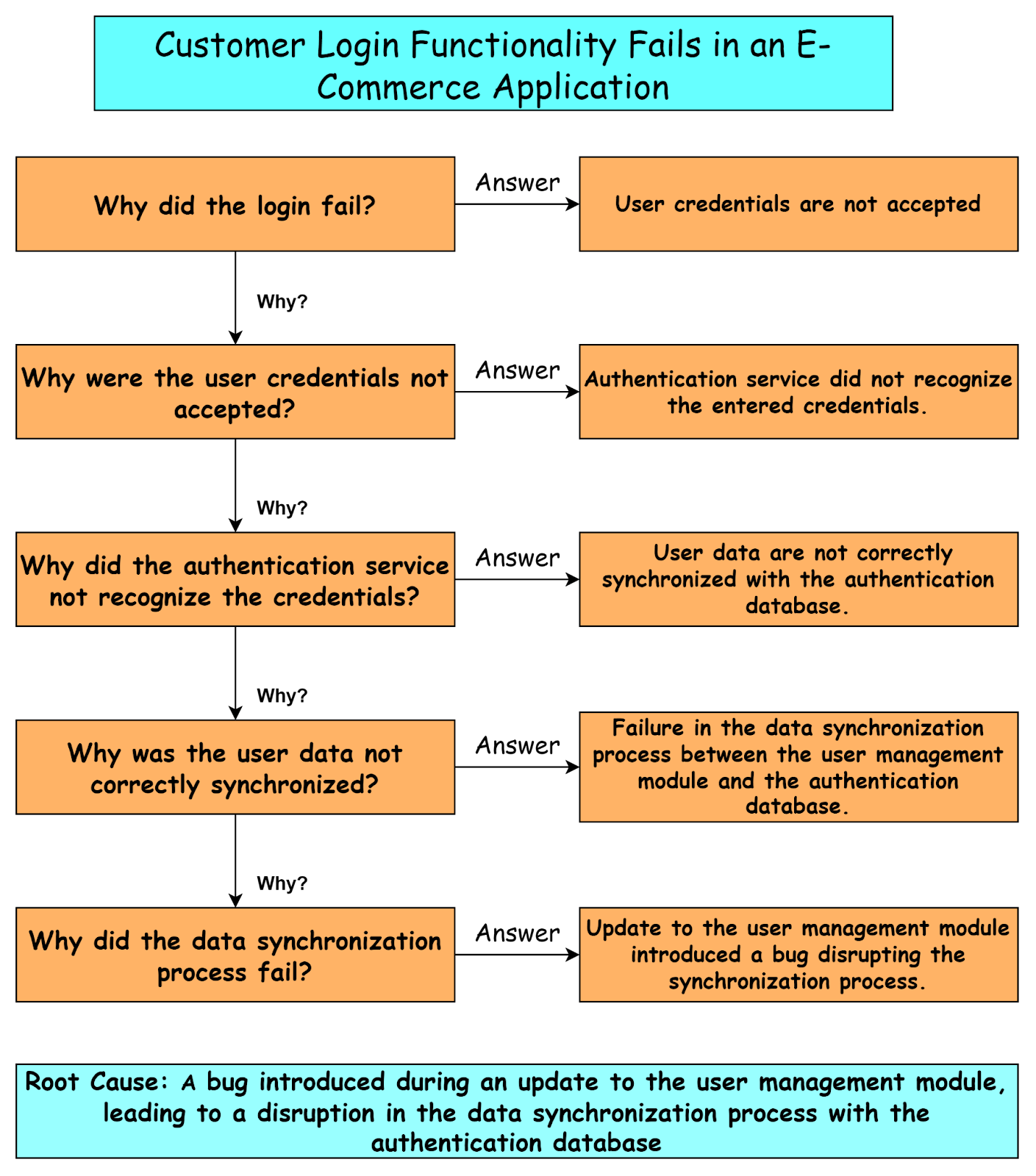
The "5 Whys" is a Root Cause Analysis technique involving iterative questioning to uncover the fundamental cause of a defect in the software development phase. Asking "why" multiple times helps identify underlying issues rather than just addressing surface-level issues.
Let's see the example of how the "5 Whys" technique will be applied to investigate a user login failure of an e-commerce application.
Advantages of using the 5 Whys technique:
- Finds deeper causes - each answer becomes the next question, so the chain stops at a cause you can act on rather than at the first plausible explanation.
- Avoids superficial fixes - it stops the team treating a symptom while leaving the original condition in place, which is what lets the same defect return.
- Needs no tooling - it runs in a defect triage call with a whiteboard, which makes it the technique teams actually reach for under time pressure.
5 Whys Example: A Failing Test on a Real Site
Here is a 5 Whys analysis of a real failure from a test suite I ran on the TestMu AI cloud. A check on the TestMu AI ecommerce playground, "an unknown search term shows the no-results message," failed with a 30-second locator timeout while every other search check passed.
| Why? | Answer | Evidence |
|---|---|---|
| Why did the test fail? | The step waiting for the results area timed out after 30,000 ms | Test log: locator.innerText timeout |
| Why did the locator time out? | The selector #content matched nothing on the search page | The page DOM has no element with that ID |
| Why did the test use #content? | The locator was written from the default store template, not the live page | The site uses a customized theme with a different page structure |
| Why was it not caught before the run? | The locator was never checked against the live DOM in DevTools | No review step for new locators |
| Why is there no review step? | New checks were written quickly after a change, without a locator review | Root cause: a process gap, not an application defect |
The fix was to locate the message by its text, "There is no product that matches the search criteria," and the check passed on the next run. The preventive action is a locator review against the live page before new checks merge. The analysis also shows why RCA matters for test failures: the application was working correctly, and treating the failure as a product bug would have sent developers after a defect that did not exist.
Fault Tree Analysis (FTA)
Fault Tree Analysis (FTA) is a deductive technique that uses boolean logic such as AND, OR, and NOT and a graphical representation, the "Fault Tree," used to find critical events concerning fault introduction in the software development process. It helps analyze logical relationships leading to undesirable events, helping in effective risk mitigation and software reliability enhancement.
The Fault Tree Analysis (FTA) involves three key stages:-
- Develop a Fault Tree Diagram.
- Examine the diagram by examining failure events, initiating events, and contributing factors.
- Examine the connections between failures and initiating events (or contributing factors).
A fault tree diagram uses symbols known as events, conditions, or states that can occur at any point in time during system operation. Lines connect these symbols to illustrate how one issue might lead to another, eventually resulting in a problem, or "fault," in the system. The faults represent what can go wrong in our system. Below is a general example of how these diagrams can look.
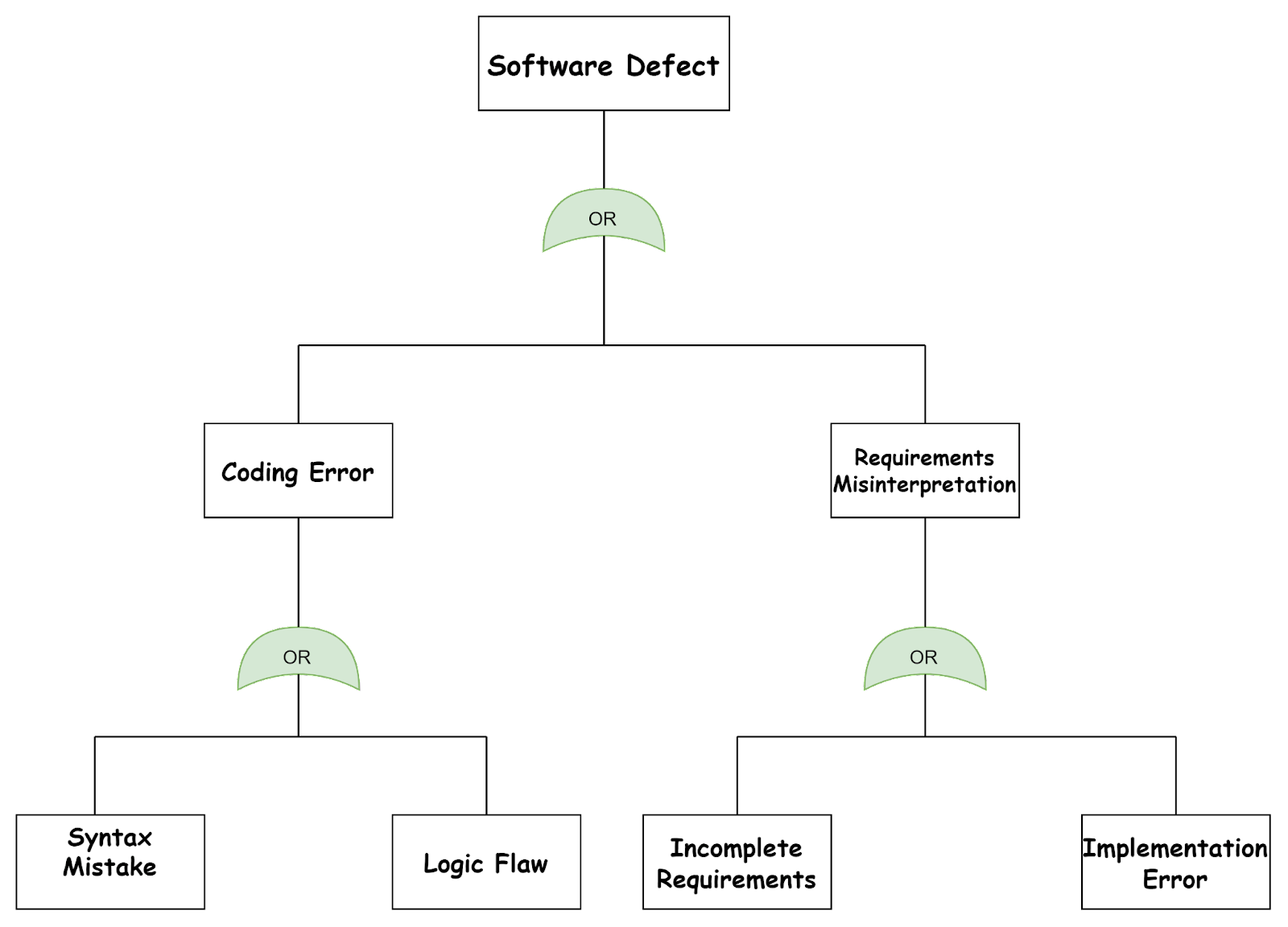
In the fault tree diagram above, the top event is a Software Defect that arises from initiating events like "Coding Errors" or "Requirements Misinterpretation" by the developer in the Software Development phase. To the left of the fault tree diagram is "Coding Errors," and we can see "syntax mistakes" or "logic flaw" events failure. Similarly to the right "Requirements Misinterpretation," we can see "Incomplete Requirements" or "Implementation Errors."
Advantages of using the Fault Tree Analysis:
- Structured Analysis for problem isolation - The Fault Tree offers a structured visual representation of the analysis process, helping teams systematically investigate the causes of an event leading to failure.
- Action Prioritization - The analysis helps prioritize action items, assisting teams in determining which aspects require immediate attention for problem resolution.
The Fishbone Diagram
The Fishbone Diagram called the Ishikawa Diagram or the Cause-and-Effect Diagram, is a visual representation of a problem's potential causes. Dr. Kaoru Ishikawa, a Japanese expert in quality control, created it. It is widely used for Root Cause Analysis(RCA) in testing to pinpoint the root causes of a persistent performance issue, identifying factors related to code, hardware, network, database, and configuration.
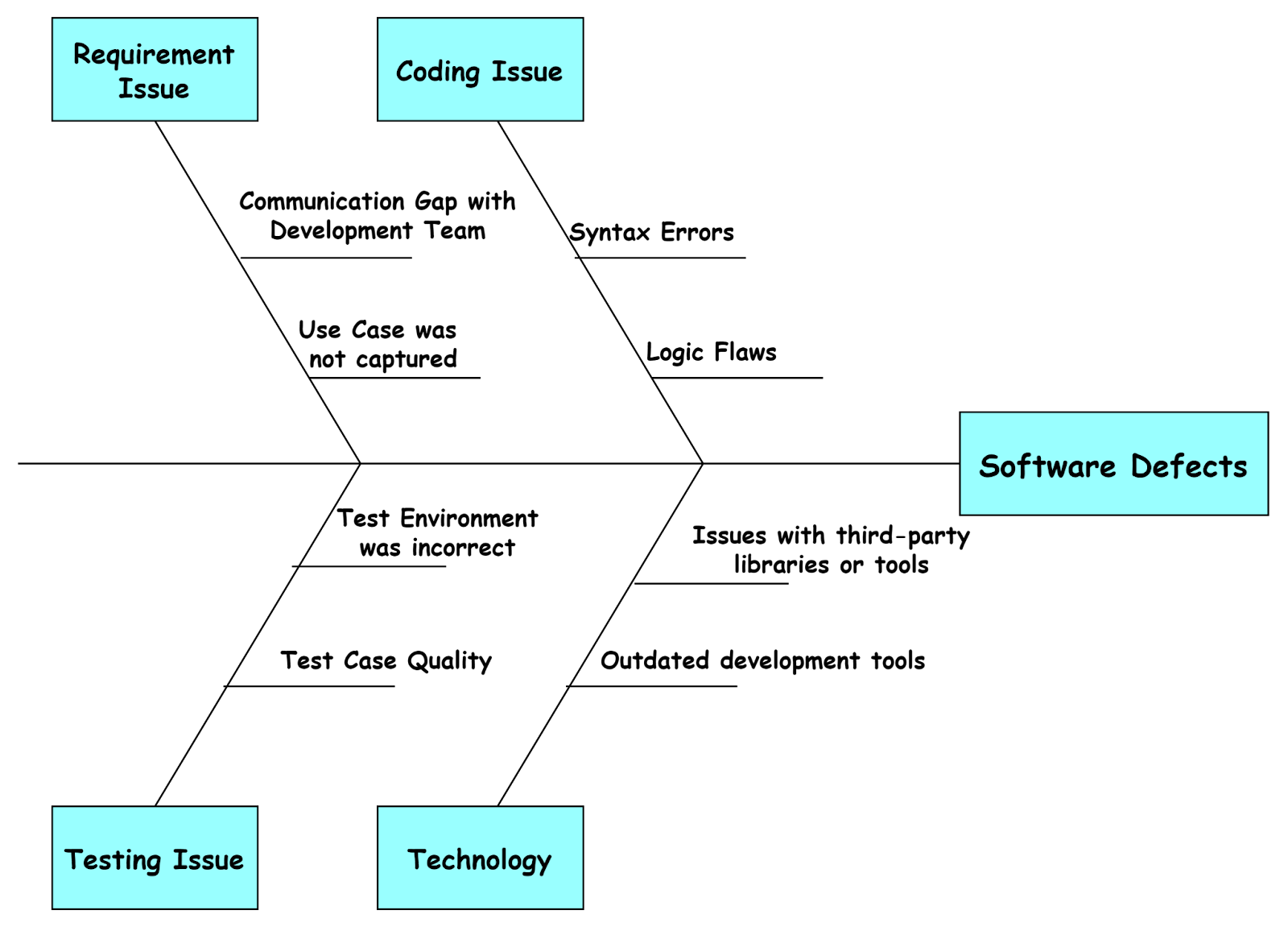
It resembles the structure of a fish's skeleton, where the problem is the fish's head, the category of cause is written at the end of the bone, and the causes under each category are at the spines of the fish.
For example, in the diagram below, the fish head represents the Software Defects, the main problem. Causes of software defects include requirement issues, coding issues, testing issues, and environmental issues at the end of the bone. Factors attributed to all the causes of software defects are represented in the spins of the fish.
Advantages of using the Fishbone Diagram:
- Display relationships clearly and logically - The Fishbone Diagram presents a clear and organized depiction of the connections between potential causes and their corresponding outcomes. A logical categorization makes the correlations between cause and their outcomes easily understandable.
- Clarity in Communication - It enhances communication by presenting complex issues clearly and organized, helping in effective discussions and decision-making.
Scatter Diagram
The scatter diagram, also known as the correlation diagram, is a graphical representation that shows the relationship between two variables that may cause a problem. It helps us to test hypotheses, identify outliers, and discover potential root causes.
In software testing, a scatter diagram helps identify the process parameter (independent variable) causing issues with the system (dependent variable). The x and y axes represent these variables, enabling a visual analysis to pinpoint the root cause of problems.
For example, in the scatter diagram below, the y-axis represents the number of defects in software, and the x-axis represents the time allocated to testing. Each data point on the scatter diagram represents a specific module. Analyzing the above scatter diagram allows us to determine whether testing time and the number of defects are correlated. This helps in making well-informed decisions regarding resource allocation and refining testing strategies.

Advantages of using the Scatter Diagram:
- Facilitates Data Interpretation - The scatter diagram assists in data interpretation by visually displaying the distribution and clustering of data points, allowing a deep understanding of the root cause.
- Supports Informed Decision-Making - It helps understand the impact of one variable on another, thus providing informed decisions about which variables to investigate further to find the root cause.
Failure Mode and Effects Analysis (FMEA)
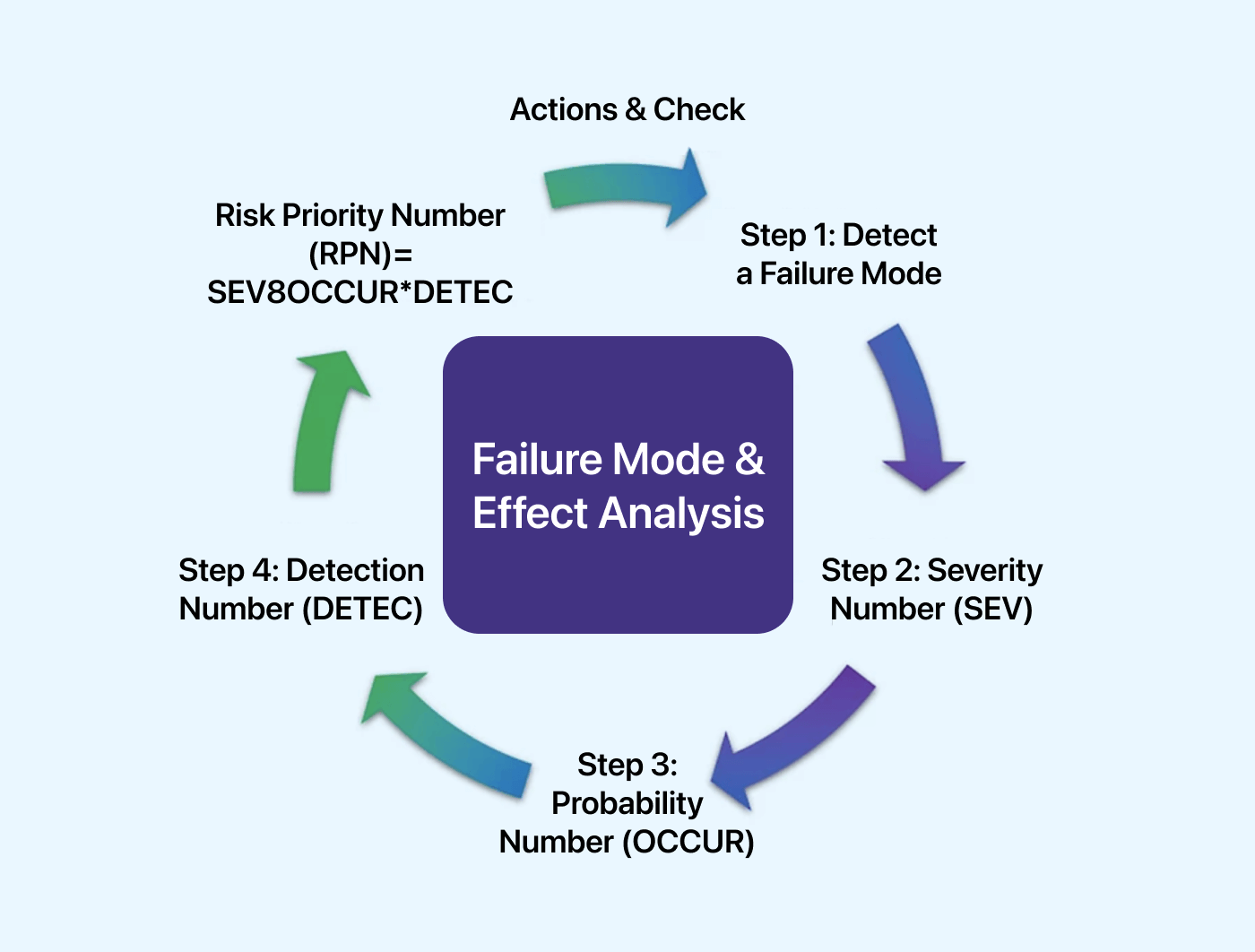
In software, "Failure Mode" encompasses potential issues such as bugs, errors, crashes, and security vulnerabilities, and "Effects Analysis" examines the consequences of these failures, assessing their severity and impact on end-users, system reliability, data integrity, and business operations.
In this method, each failure mode is assessed for:
- Severity (S)
- Occurrence (O)
- Detection (D)
A Risk Priority Number (RPN) is the product of the three ratings, RPN = Severity × Occurrence × Detection. The higher the RPN, the higher the risk, so the failure modes with the largest RPN are the ones to address first.
Advantages of using the Failure Mode and Effective Analysis:
- FMEA systematically identifies and evaluates potential failure modes in software, helping teams proactively mitigate risks before they impact software quality.
- FMEA provides justification for not doing certain tests i.e. where the probability of failure is least.
Affinity Diagram
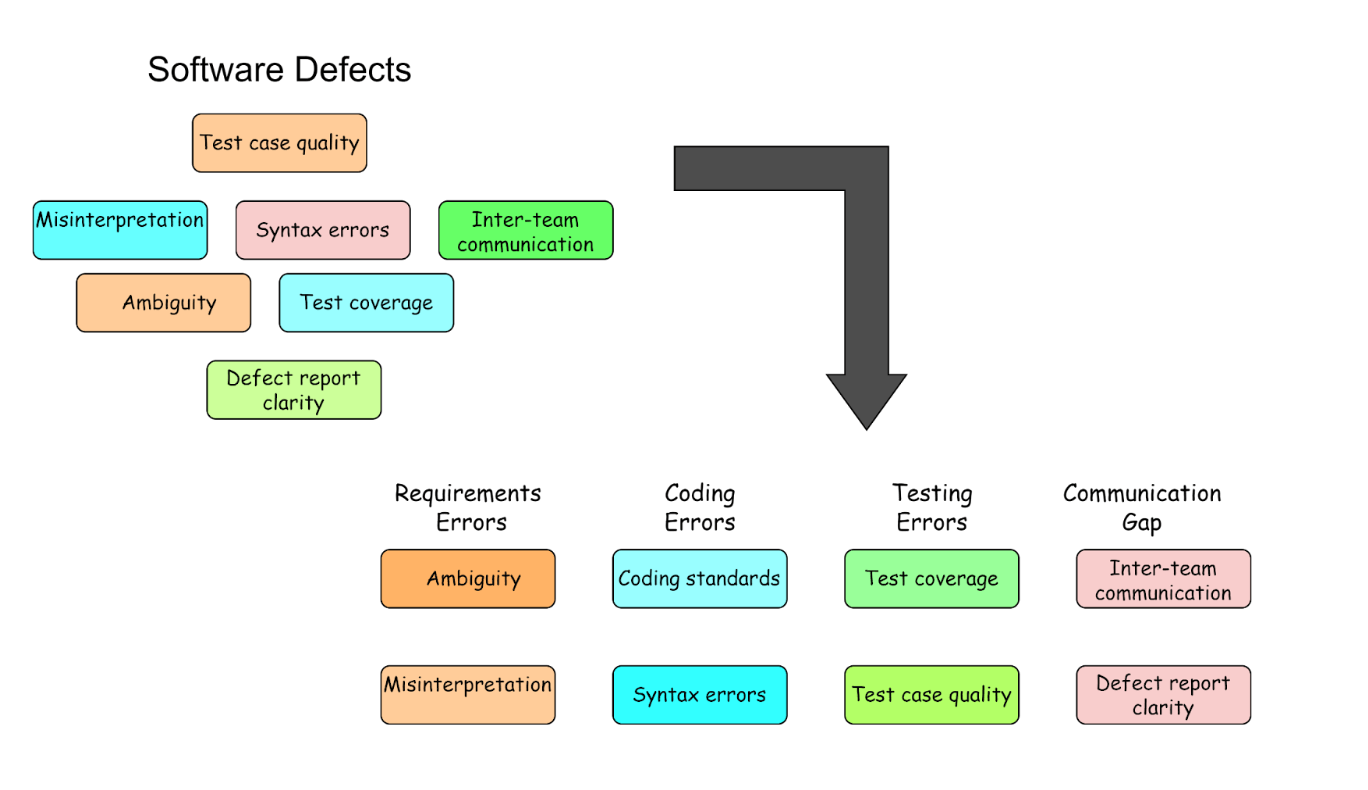
Affinity Diagram, also called KJ Diagram, is a technique to arrange and classify various aspects that contribute to problems methodically. This can help provide a thorough understanding of the underlying problems and guide successful problem-solving techniques.
The diagram below shows how an affinity diagram can be applied to group the defects in the software development process according to their nature. It helps teams visualize and understand the commonalities among different defects, leading to more targeted and effective improvements in the defect management process.
Advantages of using the Affinity Diagram:
- Visual Representation - It provides a visual representation of the information, allowing for a clear and structured view of the problem, which helps better understand and analyze the root cause.
- Promotes Collaboration - It encourages team members to work together in categorizing and prioritizing ideas or potential causes, fostering a collaborative problem-solving approach.
Benefits of Root Cause Analysis (RCA)
Some of the benefits of Root Cause Analysis (RCA) are:-
- Improved Software Quality - Root Cause Analysis (RCA) improves software quality by eliminating systemic problems and enhancing the effectiveness of software testing processes.
- Risk Reduction - Root Cause Analysis (RCA) in testing mitigates future incidents by pinpointing and rectifying core causes, thus reducing associated risks. This is especially important in fields where dependability and safety are top priorities.
- Prevention of Recurring Defects - Root Cause Analysis (RCA) helps to prevent the recurrence of similar issues by identifying and addressing the root causes of defects. This reduces the need for repeated debugging and fixes, saving time and resources. AI debugging accelerates this further by automating root cause detection across logs, stack traces, and code changes, cutting down the manual investigation that traditional RCA requires.
- Data-Driven Decision Making - Root Cause Analysis (RCA) employs data and evidence to find the underlying reasons. This encourages decision-making and problem-solving that is more informed and objective.

Note: Run the same suite across 3,000+ browser and OS combinations and 10,000+ real devices on TestMu AI, so an RCA never stalls on "cannot reproduce". Try TestMu AI today!
Common Challenges Faced in Root Cause Analysis (RCA)
Some common challenges faced in Root Cause Analysis (RCA) are:-
- Limited Data Availability - Sometimes, it can take time to gather complete and reliable data. This may obstruct the exhaustive investigation for Root Cause Analysis (RCA). Ensure that data-gathering procedures are reliable and all pertinent information is available.
- Complex Systems and Interactions - Finding the precise root cause in complicated systems can be complex. The interactions between different elements could make it challenging to identify the precise cause of the issue. For an accurate Root Cause Analysis (RCA), it is imperative to comprehend these interactions.
- Time Constraints - Conducting a thorough Root Cause Analysis (RCA) requires dedicated time and effort, especially for complex or multifaceted issues. So, balancing the need for a comprehensive analysis with time constraints is challenging. Prioritizing tasks and allocating resources effectively is crucial.
- Human error and factors - The Root Cause Analysis (RCA) process may contain flaws brought by human error during data gathering or processing. Additionally, the results may be impacted by assumptions or prejudices held by participants. An effective Root Cause Analysis (RCA) must address human aspects and ensure strict technique.
Every challenge above shares a cause: the evidence needed for the analysis is scattered across environments, machines, and log systems. That is the gap a cloud testing platform closes, by keeping the run, its logs, and its history in one place so the investigation starts with the data already assembled.
Performing Root Cause Analysis on the Cloud
Every technique above assumes you can get to the evidence. TestMu AI's Test Intelligence layer does that correlation for you: its agentic Root Cause Analysis reads a failed test and correlates its network logs, console logs, and framework or Selenium logs to localize a likely cause, rather than making you hunt across three separate log systems. The use case on how to find the root cause of a failed test with AI walks through generating, reading and automating that analysis.
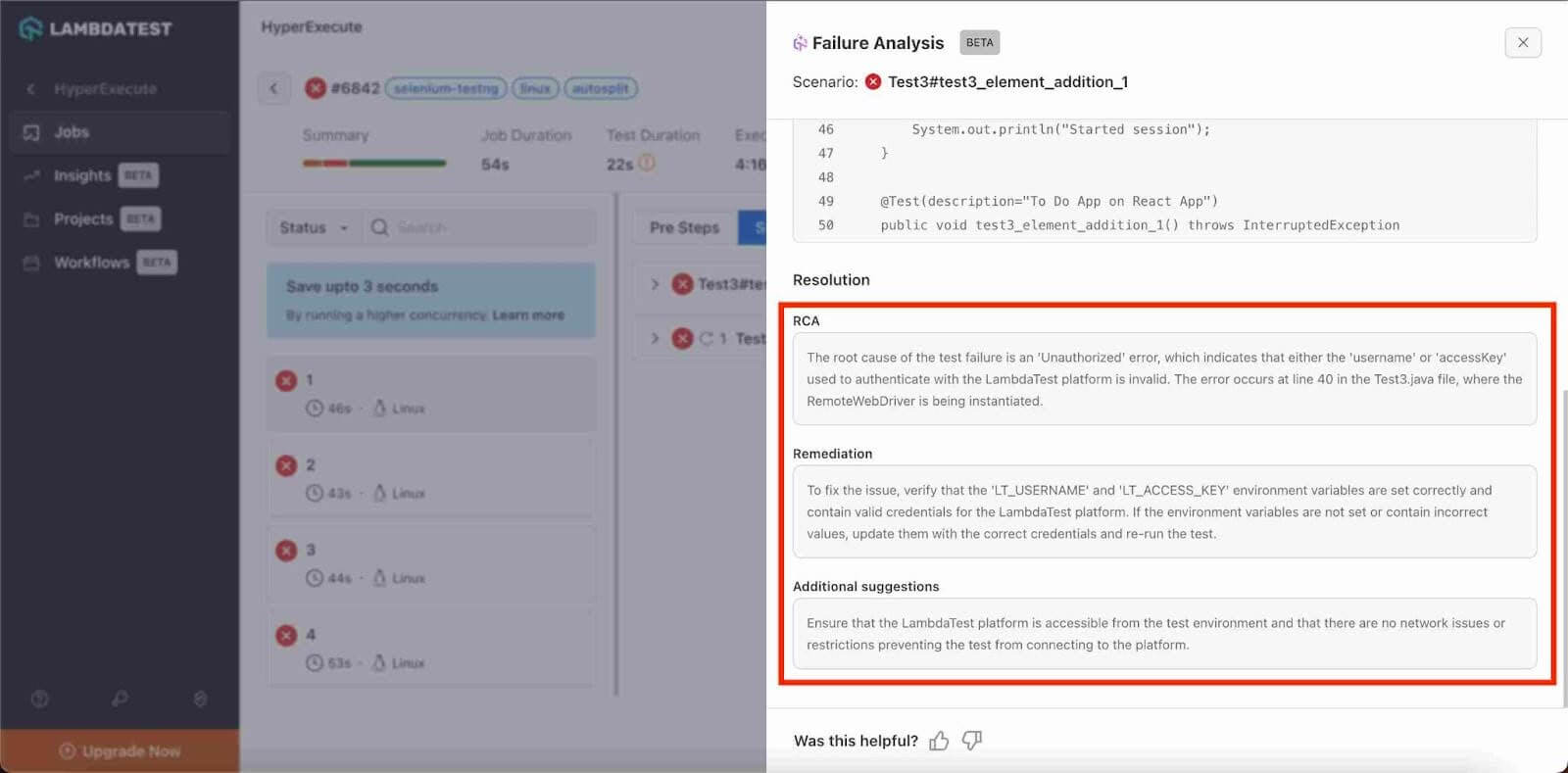
The report names a failure category and a root-cause type, gives a one-line error summary with the file location, and lays out an event timeline that labels each step as a likely root cause or a likely effect, followed by numbered remediation guidance. It is generated on demand against a specific failure rather than on every red test, and it is built to be a lead rather than a verdict: treat the localized cause as the fastest place to start looking, then confirm it before you act.
You can generate it from three places: a test instance in Test Manager, a failed task inside a HyperExecute job, or the Insights Dashboard, where the RCA Category Trends widget aggregates outcomes so you can see which failure categories keep recurring across builds instead of triaging one red run at a time. The AI root cause analysis documentation walks through generating a report, and on HyperExecute you can pull the same analysis programmatically via the API to fetch the RCA of your task.

Conclusion
Start with the last defect that escaped to production. Pull its postmortem, run the 5 Whys against your test suite rather than against the code, and convert every contributing factor that has an observable failure condition into a regression test. That single pass usually says more about where your coverage is thin than a quarter of test-plan review does.
After that, the constraint is evidence rather than method. TestMu AI's Test Manager keeps test runs, test instances, and their execution history together with requirement traceability, so an analysis starts against a specific instance with its evidence already attached instead of beginning with a hunt for the run that failed.
Author

Ayush Mishra
Blogs: 6

Ayush Mishra is a Tech Community Contributor and Specialist Programmer at Infosys with over four years of experience. He works on software testing, automation, and quality assurance, along with front-end web development and machine learning. On TestMu AI (formerly LambdaTest), he has authored testing articles on Selenium Grid, Selenium RC, root cause analysis, and end-to-end versus integration testing, and he publishes companion Selenium automation code on GitHub.
Reviewer

Sandeep Yadav
Reviewer
Sandeep Yadav is a Senior Software Engineer at TestMu AI (formerly LambdaTest), where he builds the platform's test intelligence and AI-native engineering systems. He has architected autonomous GitHub Apps, vector-search code intelligence, and self-diagnosing QA workflows, and designed distributed platforms that process 2M+ daily test executions and 1B+ events, turning high-volume test, log, and code data into intelligent, self-optimizing systems. He works on embedding reasoning models into production infrastructure to power autonomous review, root-cause analysis, and analytics workflows. He brings over four years of engineering experience with deep expertise in the Elastic Stack, Apache Kafka, and Redis. Earlier he engineered a GDPR-compliant, end-to-end-encrypted secure web-chat application at Mithi. A Facebook Hackercup 2021 Round 2 qualifier and merit-scholarship recipient, Sandeep holds a B.Tech in Electrical Engineering from Delhi Technological University.


Root Cause Analysis FAQs
Did you find this page helpful?
More Related Blogs
TestMu AI forEnterprise
Get access to solutions built on Enterprise
grade security, privacy, & compliance
- Advanced access controls
- Advanced data retention rules
- Advanced Local Testing
- Premium Support options
- Early access to beta features
- Private Slack Channel
- Unlimited Manual Accessibility DevTools Tests