

Power Your Software Testing with AI Agents and Cloud
The Native AI-Agentic Cloud Platform to Supercharge Quality Engineering. Test Intelligently and Ship Faster.


- TestMu AI (Formerly LambdaTest)
- /
- Learning Hub
- /
- Front End Testing: A Comprehensive Guide
Front End Testing: A Comprehensive Guide
A comprehensive tutorial covering front-end testing, its types, benefits, and how to perform it with examples.
Last Updated on:
On This Page
- What is Front end testing
- Why Front end testing
- Front end testing vs. Back end testing
- Benefits of Front end testing
- Types of Front end testing
- Unit vs Component vs E2E
- The 80/20 Performance Rule
- AI-Driven E2E Testing
- End-to-End Mobile Testing
- What aspects to test in the Front end
- Devising a Front end testing plan
- Challenges of Front end testing
- Front end testing tools
- How to perform Front end testing
- Best Practices of Front end testing
Front end testing is the technique of validating the graphical interface of websites or mobile applications to ensure they are free of defects. This testing helps users have a seamless experience using the application and helps them navigate through it quickly.
In general, front end developers create the graphical user interface (GUI) of a website using different technologies (e.g., HTML, CSS, or JavaScript) so users can interact with it. In essence, the front end is any part of a digital web product that a user can access and interact with.
As technology changes constantly and the online marketplace becomes more competitive, organizations strive to develop high-quality web products. To maintain the standard quality for end users, front end testing is an essential component of the test cycle.
Overview
To optimize user experience, modern front-end testing must target unit, component, and end-to-end layers. Teams can use Cypress Component Testing to isolate UI elements and leverage TestMu AI's autonomous testing platform to scale end-to-end test coverage efficiently.
What Does Front-End Testing Cover?
- User Interface Validation: Front-end testing ensures a seamless user experience by validating everything users see and interact with, including layout, functionality, visual rendering, performance, and accessibility across browsers.
Which Layers Should You Test At?
- Unit Testing: This lowest-level testing isolates and validates individual functions, calculations, and input validations quickly without rendering UI elements.
- Component Testing: Cypress Component Testing and Storybook render and test single UI elements, like dropdowns or buttons, in isolation to catch broken click handlers and props.
- End-to-End Testing: This layer validates complete user journeys through a real browser to catch integration and flow failures across the entire application.
Where Does Most of the Slowness Live?
- Performance Optimization: Lighthouse audits front-end performance against Core Web Vitals like LCP, INP, and CLS, targeting the 80% to 90% of response time spent loading client-side resources.
How Do Modern Teams Scale It?
- AI-Driven Automation: KaneAI by TestMu AI authors and maintains end-to-end tests from natural language, using self-healing scripts and agentic workflows to eliminate manual selector maintenance.
What is Front end testing?
A web-based application typically has a three-tier design. The front end or presentation layer is the first layer, while the back end or database layer is the third tier. The front end can be defined as the user side of any software. It includes everything that is accessible when using an application.
While testing the front end, the objectives are to evaluate features and check whether the presentation layer of a website or app is free of bugs or errors. It assesses the graphical user interface (GUI), functionality, and usability of online applications or software.
Let's say you're testing a shopping application. The front end tester ensures that the website's look and feel align with the user's requirements. Furthermore, they check if the required features, like adding items to the shopping cart or menu click events, are working correctly.
Why Front end testing?
TEnd users are generally unaware of how the back end functions. They only pay attention when there is a UI issue with the application. Therefore, when developing an application, one of the most crucial things developers look out for is ensuring that the developed application is error-free and functions without hiccups.
Here's why you must perform front end testing.
- Client-side development and browsers can deliver unexpected results due to changes in browser rendering engines. This leads to browser compatibility issues and an unpleasant user experience. As a result, front end testing is required to ensure your website renders uniformly across browsers, devices, and operating systems.
- With the growing popularity of Software as a Service (SaaS), you are bound to interact with third-party services and face issues that arise during a project's life cycle. Hence, running a front end test is crucial based on the third-party applications you wish to integrate with.
- Various countries provide free Wi-Fi hotspots in different locations where individuals can use the internet without a login and password. That means that even minor errors on the front end may impact your branding.

Your competitors will keep an eye on your product, especially if you are in a competitive market. They are more likely to notice your flaws than others! As a result, executing website front end testing becomes a critical task you can't overlook.
Front end testing vs. Back end testing
We know from the previous section that front end testing deals with the user experience. Now let's discuss how it differs from back-end testing.
| Front End Testing | Back End Testing |
|---|---|
| It is performed on the front end. | The process involves testing databases and business logic. |
| The tester must be aware of both the use of the automation testing frameworks and the business requirements. | The tester needs to have a solid understanding of SQL and database concepts. |
| It doesn't require any data to be stored in a database. | It requires data to be stored in the database. |
| It helps to test the application's overall functionality. | It helps check for deadlock, data loss, and so on. |
| It includes unit testing, user acceptance testing, regression testing, etc. | It includes API testing, SQL testing, etc. |
Benefits of Front end testing
Running a front end test on your web and apps has several advantages. A few of them are discussed below.
- Enhancing performance: It majorly focuses on improving the functionality and performance of software applications. More particular, it gives the interface a consistent appearance across multiple devices and browsers, ensures that the application's content is presented appropriately, and reduces the load time.
- Confirm functionality across browsers and devices: Since browser technology constantly changes, these trends tend to cause compatibility problems. Verifying how websites and apps behave across browsers, browser iterations, and devices is a critical component of a front end test. It assists in validating the application's functionality and responsiveness across various browsers, devices, and OS combinations.
- Detecting bugs and errors: Not only does testing the front end enable QA teams to assess the product from the user's perspective, but development teams also identify issues on the client side to ensure they don't impact critical application operations.

Types of Front end testing
The term front end testing encompasses a broad category of testing approaches. The most prominent types are briefly discussed in this section.
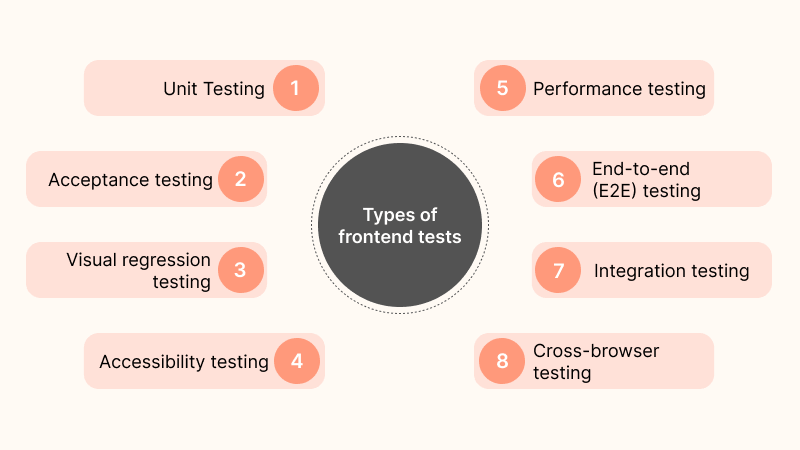
- Unit testing: A unit test checks the functioning of an application's smallest "unit" or component (such as input validations, computations, and other UI element activities) to ensure they work correctly. Among the several testing kinds, it is the lowest-level testing.
- Visual regression testing: When there are system changes, we need to ensure they do not conflict with existing functionality or code architecture. This is where regression testing plays a key role. Visual regression tests are distinct and another form of regression testing. It focuses on the UI by taking screenshots and comparing them to the baseline screenshots to find any visual mismatches.
- Cross browser testing: Cross browser compatibility testing is the most significant kind of front end testing. Testers can determine if a website functions as intended when viewed using various browsers/devices/OS combinations. In addition, cross browser testing makes it possible for people to experience the same thing across multiple browsers.
- Integration testing: The interface between two software units or modules is tested through integration testing. If these services' interactions aren't tested, the user experience could be compromised. By doing integration tests, you can ensure that the UI and API of your application communicate effectively.
- Accessibility testing: Testing for accessibility ensures that a website or app is accessible for all internet users, including those with special needs or impairments. In practice this means testing against the WCAG (Web Content Accessibility Guidelines) from the W3C, the standard that defines whether content is perceivable, operable, understandable, and robust, and confirming your application works with tools like screen readers.
- Acceptance testing: Acceptance testing determines the adherence of a system to all the predetermined business requirements. By executing acceptance tests, development teams can guarantee the efficient functioning of user inputs, user flows, and intended actions.
- performance testing: Determining the performance of an application is of utmost importance. Performance testing establishes a product's stability, responsiveness, and speed. It also looks at how a device performs in diverse circumstances. Performance testing may be done with tools that are easy to use and readily available.
- End to end testing: End to end testing ensures that the application performs as expected throughout its use case. In addition, it helps testers locate system dependencies and resolve setup or system-related issues. This determines the smooth flow of applications from beginning to end.
Before creating a significant feature, unit testing ensures that specific code sets perform as expected.
Component Testing vs. Unit Testing in Modern Frontends
Modern front-end suites sit on three layers, and the middle one, component testing, is the layer most teams skip and later regret. It is a distinct level between unit and end-to-end testing: it renders a single UI element, a dropdown or a date picker, in isolation and checks that it displays correctly and responds to real interaction, without spinning up the whole app.
| Layer | What it tests | Speed | Catches |
|---|---|---|---|
| Unit | A single function or logic unit, no rendering | Fastest | Broken calculations, bad validation logic |
| Component | One UI element rendered and interacted with in isolation | Fast | A button that renders but does not fire its click handler; a broken prop |
| End-to-end | A full user journey through a real browser | Slowest | Integration and flow failures across the whole app |
The gap component testing fills: a unit test proves a function returns the right value, but not that the button wired to it actually renders and calls it. An end-to-end test would catch that, but slowly and flakily. Component testing catches it in isolation, fast. Tools like Storybook (which renders components in isolation as a living catalog) and Cypress Component Testing are built specifically for this layer, and pairing them with visual snapshots turns each component into a regression check.
The 80/20 Rule of Front-End Performance Testing
When a page feels slow, engineers instinctively blame the server. Performance pioneer Steve Souders showed the opposite: his 80/20 performance rule holds that 80% to 90% of end-user response time is spent on the front end, loading and rendering stylesheets, scripts, images, and fonts, not waiting on the backend. The practical consequence is that optimizing a fast backend further is often wasted effort while an unoptimized front end is where the real seconds are.
You measure this with Core Web Vitals, Google's user-centric metrics, which are also the ones that affect search ranking:
- LCP (Largest Contentful Paint): How long until the main content is visible. Loading speed, as the user perceives it.
- INP (Interaction to Next Paint): How quickly the page responds after the user clicks or types. Responsiveness. INP replaced First Input Delay as a Core Web Vital in 2024.
- CLS (Cumulative Layout Shift): How much the layout jumps around while loading. Visual stability, the reason a button moves just as you tap it.
Tools like Lighthouse (built into Chrome DevTools) audit a page against these metrics and produce a score plus specific fixes. Run it in CI so a performance regression fails the build the same way a broken test does, rather than being discovered by users.
AI-Driven End-to-End Testing and Agentic Workflows
End-to-end tests catch the most, but they are also the most expensive to maintain, because every UI change can break a locator and send a developer chasing selectors instead of shipping. AI is aimed squarely at that maintenance problem, and it changes front-end testing in two ways.
- Self-healing tests: When a locator breaks because a button moved or an id changed, a self-healing script infers the element from its other attributes and updates the selector automatically, instead of failing. It removes the single largest source of E2E flakiness and busywork.
- Agentic workflows: Instead of scripting every step, you give an AI agent a goal ("test the checkout flow") and it explores the interface on its own, discovering and exercising user journeys, including edge paths a human author would not have scripted.
This is where TestMu AI Test Manager and the platform's GenAI agent fit: KaneAI authors end-to-end tests from a plain-English description, self-heals them as the UI evolves, and runs them across the browser and device matrix, so the suite keeps pace with the front end instead of falling behind it.
End-to-End Mobile Testing: Web vs. Native Apps
Front-end testing on mobile is not just desktop testing on a smaller screen. Mobile adds constraints a desktop browser never has, and end-to-end mobile testing has to account for all of them:
- Gestures: Taps, swipes, pinch-to-zoom, and long-press are inputs a mouse cannot produce, and they have to be tested as first-class interactions.
- Network throttling: Mobile users move through 5G, 3G, and dead zones in a single session. A flow that works on office Wi-Fi can time out on a train, so testing under constrained and flaky networks is mandatory, not optional.
- OS fragmentation: The Android device and OS-version matrix is vast, and each combination can render or behave differently. This is the single biggest coverage challenge in mobile.
The practical answer is a mix. Emulators and simulators are cheap and fast for early, broad checks, but they cannot reproduce real touch behavior, sensor input, or true network conditions. A real device cloud covers the cases that only appear on physical hardware. Mature mobile suites run the fast, broad pass on virtual devices and reserve real devices for the flows and configurations where fidelity actually matters.
What aspects to test in the Front end?
Front end testing is a critical component of performance optimization and enhancing the user experience. With the advent of Web 2.0 technologies, web applications are now dynamic, which means that processing is now split between the server and the browser. There is now a greater need to optimize the frontend code as well.
When it comes to front end testing, there are many aspects that you need to test. The following are the ones.
- Test your website or app in different real browsers, devices, and operating systems.
- Test your application for accessibility to check if it is user-friendly, even for those with visual or auditory impairments.
- Run end-to-end application workflow checks by testing it in real user environments.
- Most websites and apps have images- from standard display images to logos and banners. They increase the size of the app significantly, so you need to run tests to see where you can optimize the images to help it run faster.
- Run tests to ensure the performance of two major CSS elements: syntax and display. The syntax's displayed views should be verified for regression.
Devising a Front end testing plan
A front end testing plan tells you what your project needs and how to get it done. Let's look at how to create a front end test plan.
- Decide on the budget: It is crucial to decide on the budget beforehand. And if you're on a limited budget, ensure you're getting the best quality within that budget. Let's say you wish to perform cross browser testing of your web application. Therefore, using a cloud-based cross browser testing platform can save you the cost of creating your own test infrastructure.
- Create a timeline: It is possible to have a limited time window with an agile framework. Also, front end testing requires coverage of many aspects. Thus, it's important to set a timeline before you begin testing.
- Select the right tools: Different tasks require different tools. So, choosing the right tools prior will help you make the testing process much easier and faster.
- Scope of a project: Identity what device/browser/OS your target audience uses. It is important to have clarity on the project scope to cut down costs. Furthermore, it will reduce your development time.

Incorporating a front end testing checklist when running tests can prevent burnout at later stages and ensure the result is sustainable. It will help beginners and senior developers to understand and maintain a basic set of guidelines for ensuring quality from the beginning to the end of the project.
Challenges of Front end testing
Let’s look at some of the challenges involved during front end testing.
- User demands and expectations: Due to the release of new devices, browsers, and OSs every few months, it becomes necessary for the testers to meet the constantly changing needs of the consumers. And therefore, the testers need to make sure that any recent user requests must be identified and put into practice immediately.
- Identifying cross-browser and cross-device problems: To prepare a website or app for real-world use, testers must cover a wide range of browser and device types, which number in the thousands. Since new browser and device versions are continuously being introduced, this might be difficult.
- Selecting the right automation testing tool: Due to the wide range of automated testing tools available, selecting the right one can be challenging, depending on the skillsets of your team and the project requirements. This will require time and effort to conduct dedicated research.
- UI upgrades: With the constant launch of new upgrades becoming a part of the testing world, all components, especially automated testing tools, need to be regularly updated and handled within increasingly short timelines.
Front end testing tools
There are thousands of front end testing tools in the market, and choosing the right tool for your test can be difficult. Here are some of the most common and efficient front end testing tools for your needs. For a ranked breakdown with verified versions and real scan data, see our guide to the best front end testing tools.
- Selenium: Selenium is an open-source tool for automated browser testing. It supports various languages, browsers, and operating systems. With Selenium, you can create automated front end tests to check whether your web app is working correctly.
- Cypress: Cypress is an end-to-end testing framework for web test automation. As one of the most widely used programming languages for website development, it enables frontend developers to create automated web tests. In addition, Cypress is a tool that developers find particularly appealing due to its usage of JavaScript.
- Playwright: Playwright is a Node.js framework for creating, running, and debugging functional tests for your web applications. You can quickly write front end tests that simulate user interactions with your website without involving the server or database.
- Jest: Jest is one of the most well-liked JavaScript testing frameworks. It can successfully execute your tests in parallel if you ensure each test has a distinct global state. In addition, Jest runs previously failed tests first and re-arranges runs based on how long test files take to make things go quickly. It also provides simple mimicking tools and strong code coverage.
How to perform Front end testing?
The ultimate aim of front end testing is to test users’ behavior in real-world conditions. To ensure the ultimate front end experience of your web and mobile apps, it's recommended to test them on real browsers, devices, and operating systems.
Continuous quality testing platforms such as TestMu AI enable you to perform manual and automated front end testing of your websites and apps on an online device farm of 3,000+ browser and OS combinations along with 10,000+ real devices. You can also leverage the TestMu AI virtual testing platform of cloud-based Android emulator online and iOS Simulators to test your mobile apps. It also provides test automation frameworks like Selenium, Cypress, TestCafe, Appium, and more.
Subscribe to the TestMu AI YouTube Channel and stay updated with the latest tutorials around Selenium testing, Cypress testing, and more.
Let’s look at how to perform front end testing using TestMu AI platform.
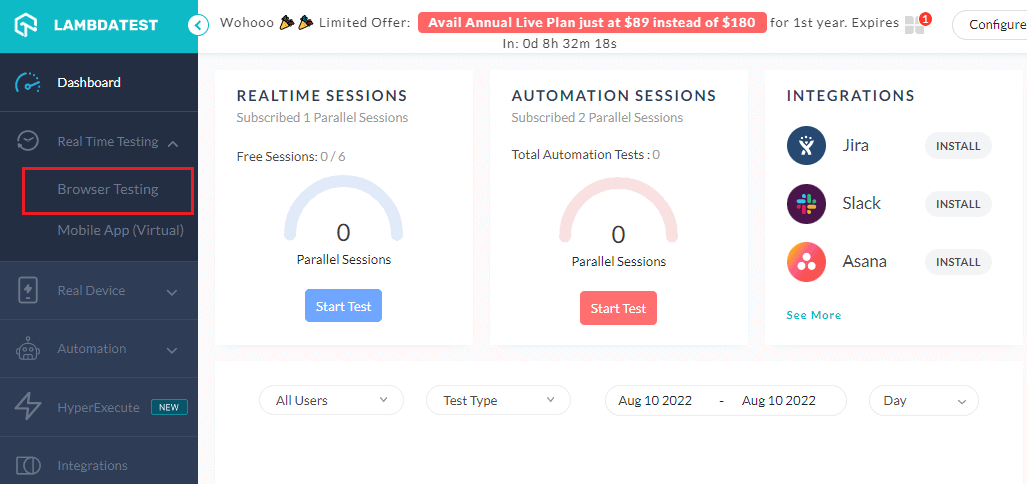
- Sign up for free and log in to your TestMu AI account.
- From the left sidebar menu, visit Real Time Testing> Browser Testing.
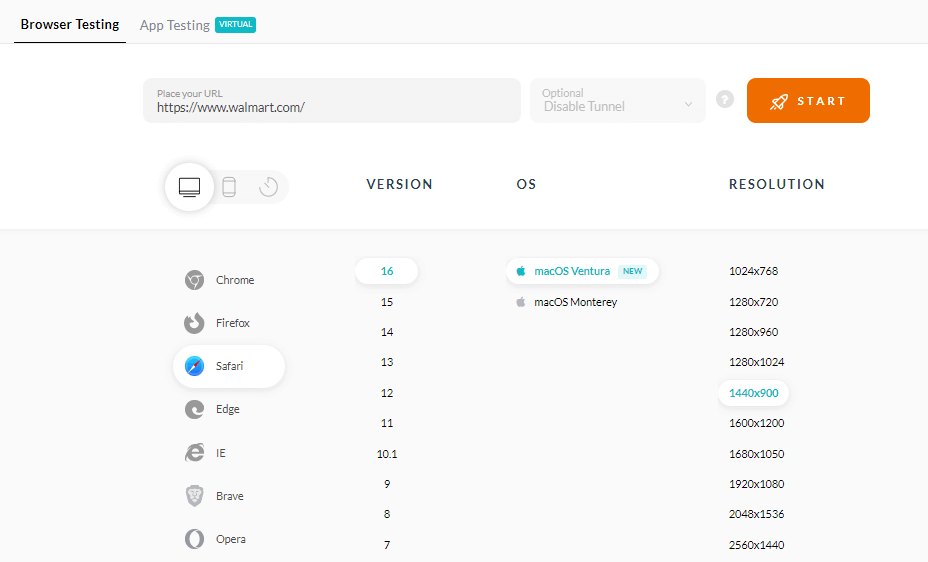
A cloud-based machine will fire up where you can run front tests of your web apps.

In addition to real-time testing, you can automate front end tests for your websites or mobile apps.
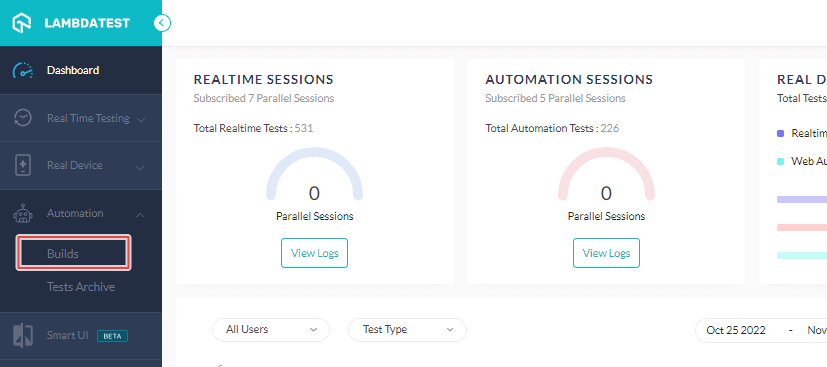
- Once you are in the TestMu AI user Dashboard, navigate to Automation > Builds.
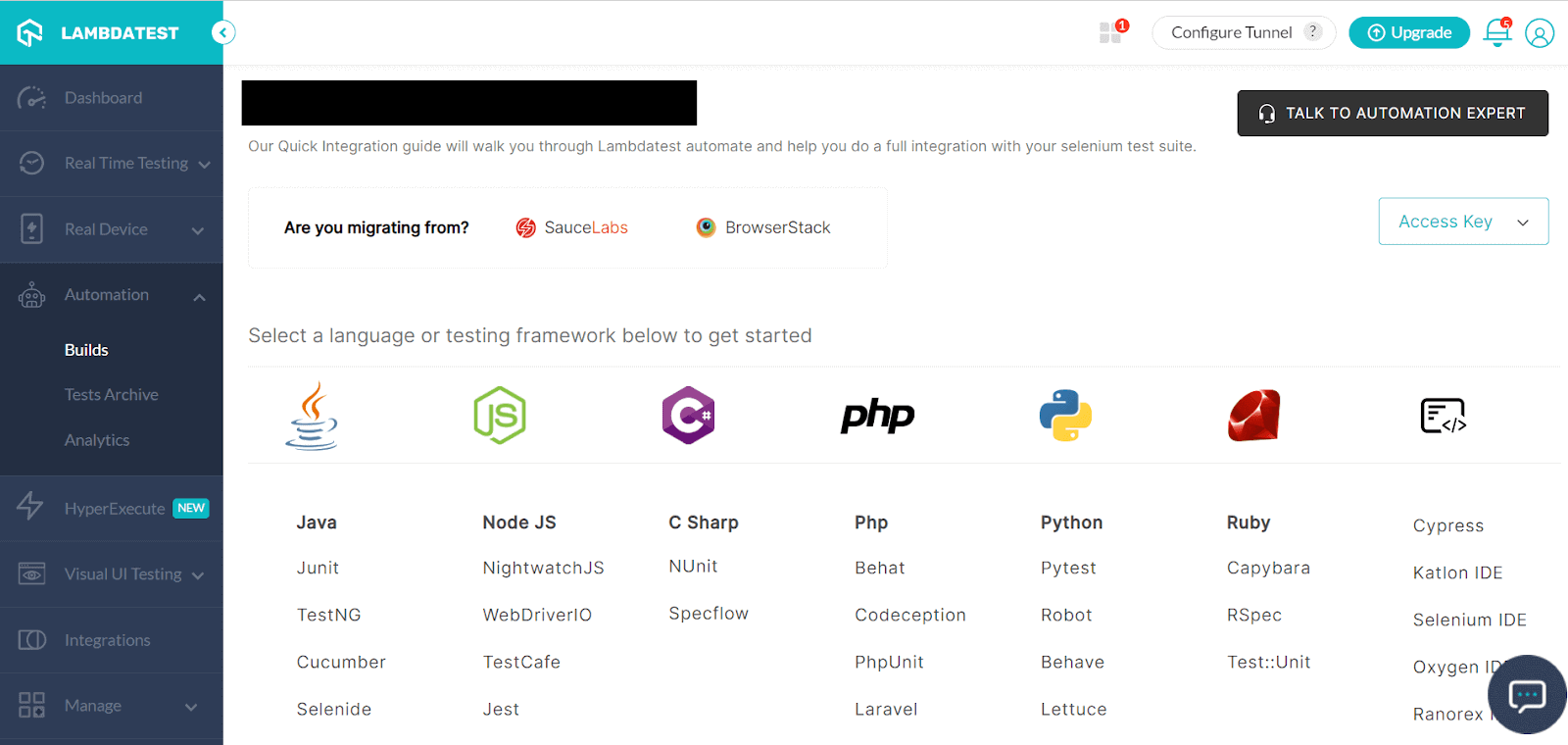
- Now, choose your preferred programming language and frameworks and start testing the right way.
Automate your Front end tests across 3000+ browser environments. Try TestMu AI Now!
Best Practices of Front end testing
So far, it is needless to say that front end testing is a crucial part of any testing pipeline. Here are a few practices to ensure you provide the best possible experience for your end users.
- Navigating with a test blueprint: Starting with front end testing can be hard to navigate. To help testers access high test coverage, a test pyramid can be the best guide. The testing pyramid will help plan all steps of the testing architecture, from setting up unit testing to executing E2E tests.
- Selecting the right front end testing tool: Whether choosing a free or paid testing tool, evaluating its features is the most crucial stage. An effective front end testing tool should have capabilities like seamless integration, simple script maintenance, codeless automation, etc.
- Modelling the real-world scenarios: Predicting actual user perspective can be one of the hardest things for testers to do when using the application. It might be challenging for testers to anticipate how a user would utilize a page or feature. As a result, testers and their teams can create scenarios that authentically represent actual usage scenarios.
Wrapping up
As we know, even the most minute flaws can harm a business’s reputation. And to avoid losing any users, front end testing is an essential task for an organization to ensure that everything a potential user interacts with functions properly. Cross browser testing is also crucial to ensure your website works flawlessly on all popular browsers. However, automated front end testing will give you a competitive edge and entice users to return to your website.
Author

Salman Khan
Blogs: 138


Salman is a Test Automation Evangelist and Community Contributor at TestMu AI, with over 6 years of hands-on experience in software testing and automation. He has completed his Master of Technology in Computer Science and Engineering, demonstrating strong technical expertise in software development, testing, AI agents and LLMs. He is certified in KaneAI, Automation Testing, Selenium, Cypress, Playwright, and Appium, with deep experience in CI/CD pipelines, cross-browser testing, AI in testing, and mobile automation. Salman works closely with engineering teams to convert complex testing concepts into actionable, developer-first content. Salman has authored 120+ technical tutorials, guides, and documentation on test automation, web development, and related domains, making him a strong voice in the QA and testing community.
Reviewer

Devansh Bhardwaj
Reviewer
Devansh Bhardwaj is a Community Evangelist at TestMu AI with 4+ years of experience in the tech industry. He has authored 30+ technical blogs on web development and automation testing and holds certifications in Automation Testing, KaneAI, Selenium, Appium, Playwright, and Cypress. Devansh has contributed to end-to-end testing of a major banking application, spanning UI, API, mobile, visual, and cross-browser testing, demonstrating hands-on expertise across modern testing workflows.


Frequently asked questions
Did you find this page helpful?
More Related Learning Hubs
TestMu AI forEnterprise
Get access to solutions built on Enterprise
grade security, privacy, & compliance
- Advanced access controls
- Advanced data retention rules
- Advanced Local Testing
- Premium Support options
- Early access to beta features
- Private Slack Channel
- Unlimited Manual Accessibility DevTools Tests