

Power Your Software Testing with AI Agents and Cloud
The Native AI-Agentic Cloud Platform to Supercharge Quality Engineering. Test Intelligently and Ship Faster.


- TestMu AI (Formerly LambdaTest)
- /
- Blog
- /
- Android Emulator vs Real Device vs Simulator: What Each Catches
Android Emulator vs Real Device vs Simulator: What Each Catches
Android emulator vs real device vs simulator: which bug classes each one catches, a side-by-side table, and a decision matrix mapping app type to environment.
Last Updated on:
An emulator replicates the behavior of a specific piece of hardware or software in another system and behaves like the original system, while a simulator mimics the behavior of a system without replicating it exactly - it only approximates it. Choosing between the two, or using real physical devices, is one of the most consequential decisions in a mobile testing strategy.
Key Takeaways
- Emulators replicate the hardware and software of a real device and are typically used for Android, while simulators only mimic device behavior, are primarily used for iOS, and run faster because simulators skip binary translation.
- Emulators and simulators reliably catch layout breakage, navigation faults, rotation crashes, localization defects, and API or business-logic faults, which make up the bulk of most regression suites.
- Only real devices catch GPU driver defects, battery drain, thermal throttling, cellular handover issues, and manufacturer skin behavior, because those bugs depend on physical silicon and radios.
- Startup time and frame timings measured on an emulator or simulator reflect the host machine rather than the phone, so mobile performance validation needs real devices.
- A hybrid mobile testing strategy runs emulator and simulator tests on every commit for fast, low-cost feedback, then gates each release on real-device test runs.
- Apps with payment, biometric, camera, video streaming, or GPS tracking flows need real devices for those hardware-sensitive paths, while content and news apps can rely mostly on emulators and simulators.
- Emulators and simulators cover a new OS release only after the platform vendor ships an updated system image, so a hosted real device fleet that adds new OS builds on release day closes that testing gap.
- TestMu AI gives on-demand access to 10,000+ real Android and iOS devices plus emulators and simulators through its real device cloud, so teams avoid setting up and maintaining a physical device lab.
As smartphone adoption grows and app downloads rise, so does the complexity of mobile app testing. The critical part of a robust testing process is choosing the right device environment - one that covers the widest range of devices, operating systems, and hardware without breaking the budget.
What Are the Types of Mobile Device Testing Solutions?
The field of mobile testing has evolved alongside device fragmentation, giving teams three distinct testing environments to work with:
- Emulators
- Simulators
- Real Devices
What is Virtual Device Testing?
Virtual devices are software programs that replicate the environment of a real phone without requiring physical hardware. They fall into two categories:
What are Emulators?
An emulator is a software program that mimics the features of another software, hardware, or OS of the target device. It lets you test your app by emulating a real device.
Emulators are used in automation, unit testing, and debugging. Software is typically platform-specific, so developers make separate applications for Android, iOS, Windows, and Mac.
Different types of emulators use various emulation techniques. Regardless, the final aim is always the same: to simulate the experience of using the original hardware or application.
Some emulators outperform the authentic product in terms of performance and incorporate extra features. Several online APK emulators are available to run app tests on various devices and OS versions without needing to configure and install them on the machine.
What are Simulators?
A simulator is also a software program that allows your device to run specific programs built for different operating systems. Simulators are written in high-level languages and are primarily used for iOS devices. iOS Simulators for app testing are often used to ensure that the application works correctly across different environments as intended.
For example, to evaluate an app's capacity to transfer data to another app - the underlying hardware configuration is unlikely to influence data transfers significantly, so a simulated environment will usually be sufficient.
Simulated testing environments are also useful for ensuring that an application's interface renders correctly across multiple screen resolutions.

Note: Run the same suite on emulators, simulators, and 10,000+ real Android and iOS devices from one platform, so hardware-class bugs surface before your users find them. Try TestMu AI free!
What are the Key Differences Between Emulator and Simulator?
Emulators are virtual tools that replicate both hardware and software features of a real device, typically optimized for Android app development. On the other hand, simulators provide an environment that imitates the behaviors, variables, and configurations found in an iOS app's production setting.
Though emulators and simulators are virtual testing devices serving similar purposes, they differ from each other in several ways, as shown below:
| Emulators | Simulators |
|---|---|
| It duplicates all the software, hardware, and operating systems of an actual device. | It creates an environment that mimics the behavior and configuration of a real device |
| The emulator is usually a complete re-implementation of the original software. | The simulator is a partial re-implementation of the existing software. |
| Manufacturers or OEMs typically provide emulators for their platforms. | Manufacturers or other organizations provide simulators. |
| Programs are written in Machine-level assembly language. | Programs are written in High-level language. |
| Emulators are more reliable and suitable for debugging. | Simulators can be difficult for debugging purposes. |
| Binary translation makes them slow. | Simulators work faster as there is no binary translation. |
| Example of the emulator: Android SDK. | Example of simulator: iOS simulator. |
What Are the Pros and Cons of Testing on Emulators and Simulators?
Advantages
- Cost - The most obvious advantage is that virtual device testing is cheaper and applies to local and cloud-based solutions.
- Capturing Results -Working on a virtual device lets the user capture results easily by taking a screenshot of the bug observations.
- Variety - Virtual device testing allows you to test your application across various platforms and use cases that require multiple devices and operating systems.
- Availability - Simulators and Emulators are readily available for use without any constraints.
Disadvantages
- Virtual devices are accessible only for specific platforms. They sometimes can be incompatible with your application. For example, emulators can test only Android devices, not supporting different operating systems.
- Virtual device testing cannot replicate hardware configurations.
- Performance validation is unreliable since these observations may vary with the OS enhancements. Even if the testing goes perfectly, you cannot be sure that your result can be accurate on a real device.
Is App Automation feasible on Emulators and Simulators?
Automating mobile apps on emulators and simulators cannot address all of the issues that may arise during a real-world scenario; thus, real device testing is essential. Customers will seek other solutions owing to common difficulties such as low battery life, app incompatibility, or an inconveniently placed search bar.
Below are the challenges of emulators and simulators for running app test automation:
- May impact the tester's confidence on the arrival of the new version of OS.
- Beta OS versions may remain unavailable, causing specific testing restrictions.
- The screenshot of the issues identified while building the app may render differently if the new version of the OS is released.
- Internal storage and related issues can easily hinder mobile app performance.
- Mobile automation testing with emulators and simulators does not always yield excellent results as performance validations fluctuate with OS upgrades.
- Battery issues, network connectivity, GPS sensors, and gestures cannot be replicated.
- Impossible to test app behavior while receiving calls or texts or simulate touch screen issues.
The mobile testing pyramid offers a structured approach for agile teams: unit and integration tests at the base, emulator/simulator tests in the middle, and real-device tests at the top before release. This keeps automation fast without sacrificing pre-launch coverage.
What is Real Device Testing?
Real device testing is the process of testing your web, hybrid, and native applications on physical handsets - the exact devices your end-users carry. Unlike emulators and simulators, real devices surface hardware-specific behavior that virtual environments cannot replicate.
Factors like temperature, incoming calls, battery drain, and screen lock all affect app behavior and can only be validated on real hardware. The tradeoff is cost - maintaining a lab of physical devices across frequent release cycles is expensive.
What Are the Pros and Cons of Real Device Testing?
Advantages
- Accuracy - Real device testing provides more accurate and reliable measurements. The testing is typically performed in a live environment. This is important since network-related actions might affect the quality of your app. For example, what happens when a user gets a call or text in the middle of a transaction? How is the performance of your app impacted in such a scenario? These types of defects cannot be detected using emulators.
- Better user experience -Testing on real devices will help you understand the user experience by taking memory, size, CPU, and so on into consideration.
- Expose performance issues -It is easier to expose performance defects with real devices.
Disadvantages
- High Costs -Real device testing is more expensive. The cost involved in procuring devices and managing physical hardware across frequent release cycles adds up quickly.
- Slow debugging -Testing on real devices can slow down the debugging process during the initial software development stages.
- Device fragmentation -Multiple devices types getting released in the market, different operating systems, and frequent software upgrades make testing on real devices more difficult.
You can refer to the below video tutorial on how to perform real-time testing on real devices.

Emulator vs Simulator vs Real Device: Side-by-Side Comparison
Mobile applications are used on actual smartphones and not on emulators. You will achieve better quality when testing is done on real devices. However, considering cost and convenience, testing real devices for every application you develop is not feasible.
The more useful question is not which environment is better overall, but which class of defect each one is capable of surfacing. Sorted that way, the boundary is sharp: anything that lives above the hardware line is reproducible virtually, and anything that depends on physical silicon or radios is not.
| Bug class | Android emulator | iOS simulator | Real device |
|---|---|---|---|
| Layout breakage and rendering defects | Catches | Catches | Catches |
| Navigation, state loss, rotation crashes | Catches | Catches | Catches |
| Localization, RTL, text overflow | Catches | Catches | Catches |
| API and business-logic faults | Catches | Catches | Catches |
| Low-memory and background-kill behaviour | Partially, host RAM distorts it | Misses, shares the Mac memory space | Catches |
| GPU driver and shader defects | Misses | Misses | Catches |
| Battery drain and thermal throttling | Misses | Misses | Catches |
| Camera, biometrics, NFC, Bluetooth | Simulated event only | Simulated event only | Catches |
| Cellular handover, weak signal, roaming | Misses | Misses | Catches |
| Manufacturer skin and OEM power management | Misses | Not applicable | Catches |
| True startup time and frame timings | Misses, reflects the host | Misses, reflects the host | Catches |
Read the table as a coverage map rather than a verdict. The first four rows are the bulk of most regression suites, which is why virtual environments carry so much of the day-to-day load. The rows below them are the reason a release gate on emulators alone eventually ships a defect that only users see.
| Emulators and Simulators | Real devices |
|---|---|
| The emulators and simulators are not an actual phone. It is the software that gives the same functionality as a real phone. | Real device testing is testing performed on physical devices. |
| The emulators and simulators cannot simulate the battery and other performance issues. | Real device testing can perform these tests seamlessly. |
| It is primarily suitable for certain types of functional test case executions | It is more suitable to perform real-time performance testing. |
| Minimal cost is involved. | Real device testing is costly since you have to buy multiple devices to test your application. |
| Emulators and Simulators testing, in most cases, is open source and free. | It is not free or open-source. You need to buy actual devices to see how your app works on that device. |
| Real performance issues such as network or battery issues cannot be performed with emulators/simulators. | It allows real-time performance testing issues such as network, battery, location, notifications, etc. |
| Cross-platform testing can be conducted seamlessly. | Cross-platform testing is not supported. |
| Less reliable -emulators and simulators only mimic the real device, and hardware or software conditions might change regularly. | It gives accurate results and is more reliable. |
When Should You Use Emulator, Simulator, or Real Device Testing?
The right testing environment depends on the stage of development, the type of defect you are hunting, and your team's cost constraints. Use the decision matrix below, then pair it with the mobile app testing checklist to cover all scenario types.
| Testing Scenario | Recommended Method | Why |
|---|---|---|
| Early development, UI iteration | Emulator or Simulator | Fast feedback loop, no device procurement needed, fresh instance every run |
| Android-specific debugging | Emulator (Android SDK) | Full hardware and software replication; breakpoints work reliably at OS level |
| iOS UI and logic testing | Simulator (Xcode) | No binary translation overhead; faster than emulator for software-layer checks |
| Battery, GPS, network interruptions | Real Device | Hardware sensors cannot be replicated in software; virtual devices will produce false passes |
| Performance under real-world conditions | Real Device | Memory pressure, CPU throttling, and network latency vary significantly from emulated environments |
| Cross-device, cross-OS regression | Real Device Cloud | Parallel execution across 100+ device-OS combinations in one test run; no in-house lab required |
| Pre-launch acceptance testing | Real Device (minimum 5-10 top market devices) | App store review catches hardware-specific crashes that emulators miss; ships what users actually experience |
A practical approach for agile teams is to run emulator and simulator tests on every commit for speed, then gate releases on real-device runs.
That gate matters most when the hardware is brand new, since no emulator image exists for a chipset that has not shipped yet. The Pixel 11 Pro and Pixel 11 Pro XL are testable on real hardware ahead of their retail date.
How much real-device coverage you actually need depends less on team size than on what your app touches. An app that never opens the camera or takes a payment carries far less hardware risk than one that does both, so the split below is by app type rather than by headcount.
| App type | Dominant hardware risk | Where the coverage belongs |
|---|---|---|
| Content, news, and reference apps | Low. Mostly layout, fonts, and offline caching. | Emulator or simulator heavy. A small real-device pass on the two most common screen sizes. |
| Ecommerce and checkout | Payment sheets, autofill, and biometric confirmation, none of which behave identically virtually. | Virtual for catalogue and cart. Real devices for the entire payment path. |
| Banking and fintech | Biometrics, secure hardware storage, device attestation, and root or jailbreak detection. | Real devices for authentication and attestation. Virtual environments frequently fail attestation outright. |
| Media and video streaming | Hardware codecs, DRM, thermal throttling on long playback, and audio focus. | Real devices for anything past a short playback smoke test. |
| Camera-first and social apps | Sensor quality, autofocus, orientation metadata, and gallery permissions. | Real devices for capture flows. Virtual for feed, profile, and messaging screens. |
| Maps, delivery, and ride-hailing | GPS drift, cellular handover, and background location under power management. | Real devices for tracking accuracy. Virtual for the booking and account screens. |
| Games and graphics-heavy apps | GPU drivers, frame pacing, and sustained thermal load. | Real devices for anything performance-related. Emulator value is limited to menus and logic. |
| Internal and enterprise line-of-business | Usually a narrow, known device fleet with MDM policies applied. | Real devices matching the exact managed fleet. Broad virtual coverage adds little. |
Two patterns repeat across the rows. The hardware-sensitive surface is usually a minority of screens, and it is almost always the revenue-carrying minority, which is why the cheapest useful policy is virtual coverage everywhere plus real devices on the path to payment or capture.
How Do You Choose the Optimal Testing Strategy?
Most teams find that a hybrid approach produces the best results: use emulators and simulators for fast, low-cost testing on every commit, then graduate to real devices before release. The key is not to treat these as either-or choices but as complementary layers of a sound mobile app testing strategy.
The main challenge with real devices is scale. Buying and maintaining even 20 physical handsets covering diverse Android versions, OEM skins, and iOS generations is expensive and operationally heavy.
A cloud-based real device platform solves this by letting teams run parallel test suites across hundreds of device-OS combinations simultaneously - without procuring a single device.
- Parallel execution: Run the same test suite across multiple devices simultaneously to reduce total test time from hours to minutes.
- Framework flexibility: Cloud platforms support the full range of mobile app testing frameworks - Appium, Espresso, XCUITest, and others - so no migration cost.
- Manual and automated in one place: Teams can combine manual app testing with full automation, using the same device inventory.
- Private cloud options: Regulated industries that need data isolation can use a private real device cloud without compromising security.
How Does TestMu AI Support Emulator, Simulator, and Real Device Testing?
TestMu AI is an AI-powered test orchestration and execution platform that supports all three testing methods in one place. It provides on-demand access to 10,000+ real Android and iOS devices, plus emulators and simulators, through its online device farm, alongside emulators and simulators, so teams do not need separate infrastructure for each testing tier.
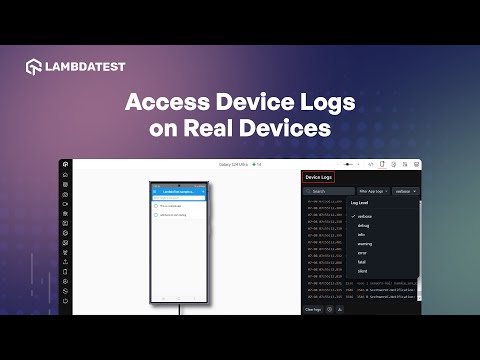
There is no device lab to set up or maintain. TestMu AI lets you start a real device session instantly, capture device logs, and run both manual and automated tests side by side at no additional maintenance cost.
For app automation, TestMu AI's Appium testing platform lets you test native app features, gestures and interactions, and geolocation testing on real devices. The platform also supports a TestMu AI tunnel to test locally hosted apps and connects to third-party integrations including CI/CD pipelines, test management tools, and bug trackers.

Why New OS Releases Expose the Emulator Gap
Every major OS release opens a window where your users are on a build your tests are not. Physical hardware in an in-house lab has to be updated device by device, and virtual environments only cover a new release once the platform vendor ships an updated system image, which can trail the public release. During that gap the bug reports arriving from users cannot be reproduced anywhere in your own setup.
This is where a hosted fleet changes the timing rather than the technique, because the provider absorbs the update work. The screenshot below was captured on TestMu AI's device selection panel on the day a new OS build shipped, showing it already listed alongside the existing catalogue. The example is a desktop release, but the same day-zero pattern is what matters on Android and iOS, where fragmentation makes the gap wider and the affected user base larger.
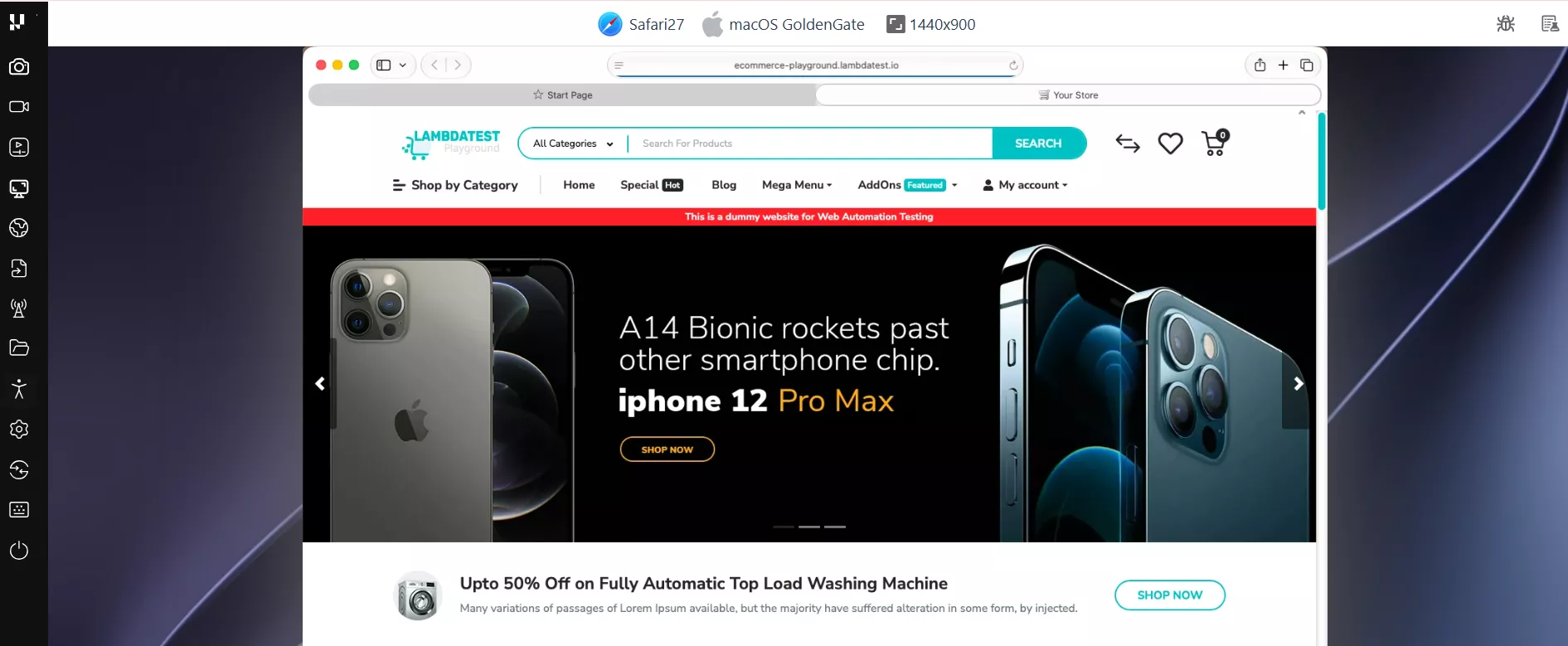
New OS versions like Golden Gate and iOS 26 introduce rendering changes, updated permission models, and hardware API shifts. These are exactly the kind of regressions that only surface on real hardware - not on simulators or older emulator builds. The practical workflow to test against a new OS release:
- Select the OS and device - filter by OS version in the device panel to target the specific release you want to validate against.
- Run a smoke test first - execute your highest-risk test cases manually on the new OS before running the full automated suite. This surfaces obvious regressions quickly without committing full CI time.
- Compare against the previous OS - run the same test on the previous OS version in parallel. Side-by-side results isolate which failures are OS-specific versus pre-existing.
- Log and capture - device logs, network activity, and screenshots are captured per session. Use the Capabilities Generator to replicate the same environment in your automation framework once the manual validation passes.
Conclusion
Start with emulators and simulators during development for speed, then run your pre-release acceptance suite on real devices to catch hardware-specific issues. For teams that need scale, a real device cloud removes the bottleneck entirely. For Android, you can run your Espresso automation tests before promoting to real hardware.
To get started with TestMu AI, configure your automation framework for the cloud grid using the Capabilities Generator, then follow the Appium setup docs to run your first mobile test on a real device. TestMu AI's real device cloud gives instant access to 10,000+ devices - Android emulators, iOS simulators, and physical handsets - with no lab to maintain.
If you want to go deeper, the guides on Android emulator online testing and the iOS simulator cover platform-specific workflows in detail.
Author

Siddhant Sinha
Blogs: 7

Siddhant Sinha is a Lead Member of Technical Staff at TestMu AI architecting Kane CLI, the command-line tool for browser automation from the terminal, where natural-language flows run in a real Chrome browser and return pass or fail with shareable proof. He has spent over three years at TestMu AI (formerly LambdaTest) building scalable platforms that run tests at scale on real Android and iOS devices. His expertise covers platform architecture, large-scale distributed systems, and CLI design, shaped by earlier cloud-native engineering at Semut.io, including building Elasticsearch as a service.
Reviewer

Shubham Soni
Reviewer
Shubham Soni is a Senior Member of Technical Staff at TestMu AI (formerly LambdaTest), building the Real Device Cloud and real-time testing infrastructure. He optimized the WebRTC services that power live testing to sub-100ms latency with adaptive bitrate streaming, led a frontend migration from Angular to React that cut page load time from 5-6 seconds to 1-1.5 seconds, and contributes to the official Device SDK. He led a team of four to build an accessibility testing product covering manual and automated testing and mentored a team of six on a real-time testing product. He brings over eight years of experience and earlier scaled a cloud code platform to 200K+ monthly users. Shubham holds a B.Tech in Computer Science.


Emulator vs Simulator FAQs
Did you find this page helpful?
More Related Blogs
TestMu AI forEnterprise
Get access to solutions built on Enterprise
grade security, privacy, & compliance
- Advanced access controls
- Advanced data retention rules
- Advanced Local Testing
- Premium Support options
- Early access to beta features
- Private Slack Channel
- Unlimited Manual Accessibility DevTools Tests