

Power Your Software Testing with AI Agents and Cloud
The Native AI-Agentic Cloud Platform to Supercharge Quality Engineering. Test Intelligently and Ship Faster.


- TestMu AI (Formerly LambdaTest)
- /
- Learning Hub
- /
- Automated Regression Testing: Steps, Tools, and Examples
Automated Regression Testing: Steps, Tools, and Examples
Automated regression testing reruns your tests after every change. Learn the 9 steps, which cases to automate first, top tools, and an e-commerce example.
Last Updated on:
On This Page
- What Is Automated Regression Testing?
- Why Automate Regression Testing?
- How Do You Automate Regression Tests?
- Which Test Cases Should You Automate First?
- What Does an Automated E-Commerce Regression Suite Look Like?
- What Are the Best Automated Regression Testing Tools?
- What Are the Common Mistakes, and How Do You Fix Flaky Tests?
- How Does Regression Testing Work for SAP, Oracle, and Salesforce?
- How Do You Run Automated Regression Tests at Scale?
- How Is AI Changing Automated Regression Testing?
- Where Should You Start With Automated Regression Testing?
Automated regression testing re-runs your existing test suite automatically after every code change, confirming that new work has not broken features that already worked.
This guide covers how to automate a regression suite, which cases to prioritize first, a worked e-commerce example, and running it on the cloud.
New to the fundamentals? Start with our regression testing guide, then come back here to automate it.
TL;DR
Automated regression testing re-runs your existing suite after each code change to catch breaks before release. The trick is automating the right tests and running them fast.
- Run on every commit - automated regression tests widen coverage and make frequent releases safer.
- Cover high-value flows - prioritize stable, revenue-critical journeys and skip volatile screens.
- Design for resilience - use explicit waits and stable locators, and quarantine flaky tests.
- Run in parallel - TestMu AI's Automation Cloud runs suites across browser and OS combos, cutting run time sharply.
What Is Automated Regression Testing?
Automated regression testing uses scripts and tools to re-run existing test cases after every code change, confirming that recent updates have not broken features that already worked.
An automation framework drives the browser or API, compares actual results against expected outcomes, and reports pass or fail, with no manual walkthrough.
That is the difference between a regression check that runs on every commit and one that happens only when someone has time.
Automated vs Manual Regression Testing
Both approaches verify that existing features still work, but they differ sharply on speed, cost, and where each one fits best.
| Aspect | Manual Regression | Automated Regression |
|---|---|---|
| Speed | Slow, hours to days per cycle | Fast, minutes, runs in parallel |
| Best for | Exploratory, one-off, or unstable UI checks | Stable, repetitive, high-value flows |
| Coverage | Limited by tester time | Broad, hundreds of cases per run |
| Consistency | Prone to human error | Identical steps every run |
| Cost over time | Rises with every release | High upfront, low per run |
| Feedback | Late, batched before release | Immediate, on every commit |
Regression testing is also often confused with retesting, which re-runs only the specific tests that previously failed. See our retesting guide for that distinction.

Note: Run your automated regression suite across thousands of browser and OS combinations. Try TestMu AI Today!
Why Automate Regression Testing?
Automate regression testing when manual retesting can no longer keep up with how often your code changes, because running a growing suite by hand turns slow, costly, and error-prone.
Moving the suite to automation changes the economics of every release:
- Speed and efficiency - run hundreds of cases in parallel in minutes, freeing testers for exploratory work.
- Consistency - scripts execute identical steps every run, removing human error and variability.
- Broader coverage - automate more flows, browsers, and OS combinations than manual testing can reach.
- CI/CD feedback - trigger the suite on every commit so regressions surface the moment they appear.
- Reusable assets - update scripts as the product evolves instead of rewriting cases from scratch.
The payoff is a suite that catches regressions early, keeps a fast release cadence safe, and scales with the codebase rather than fighting it.
How Do You Automate Regression Tests?
Automating regression tests comes down to a repeatable, nine-step loop:
- Identify test cases - Favor stable cases with a high likelihood of regression that cover crucial edge cases and a broad test range.
- Configure the framework - Select a test automation framework compatible with your application code and stack, then import the tools, libraries, and dependencies you need.
- Generate test scripts - Write scripts in a framework like Selenium, Cypress, or Playwright to imitate user interactions, input data, and expected results.
- Prepare test data - Collect the datasets used during execution, whether synthetic data, test data files, or data from existing sources.
- Configure the environment - Set up a test environment as close to production as feasible, installing the software, databases, servers, and dependencies the application needs.
- Execute and report - Run the suite, monitor progress, and record pass or fail status, error messages, and other details in reports for tracking.
- Maintain the tests - Review and update scripts regularly to keep pace with code and environment changes.
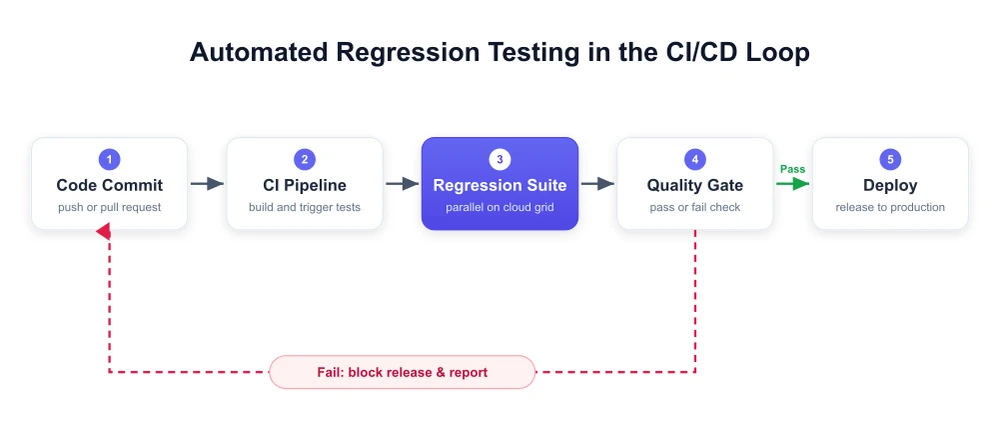
- Integrate with CI/CD - Wire the suite into your continuous integration and continuous delivery (CI/CD) pipeline so tests trigger on every change.
- Improve continuously - Evaluate the suite regularly, act on feedback, raise coverage, and prune redundant cases to keep it fast and trustworthy.
The diagram below shows how these steps sit inside a CI/CD loop, where each commit triggers the suite and a failed quality gate blocks the release:

Which Test Cases Should You Automate First?
Automate the test cases that are stable, high-value, and run often first: a strong candidate covers a revenue-critical or frequent flow, has a predictable outcome, and rarely changes.
Prioritize cases in roughly this order:
- Revenue-critical paths - login, search, add-to-cart, checkout, and payment: anything that costs money when it breaks.
- High-frequency flows - the features most users touch on every visit.
- Regression-prone areas - modules that break repeatedly, even with small changes.
- Stable UIs - screens whose markup has settled, so scripts do not need constant rework.
- Data-driven cases - the same flow across many input combinations, where automation scales best.
- Integration points - flows that cross modules or services, where a late change can break message passing or data integrity.
Hold back on two kinds of cases early on, because they burn more maintenance time than they save:
- Volatile, still-changing screens - the script rots faster than the feature stabilizes.
- One-off or exploratory checks - these stay cheaper and sharper as manual tests.
A traceability matrix helps: map each requirement to the cases covering it, automate the critical ones first, and grow the suite outward from there.
What Does an Automated E-Commerce Regression Suite Look Like?
An e-commerce regression suite must protect the revenue path: log in, add a product, check out, and log out on every release.
You can practice this against an open e-commerce demo site. The suite breaks down into a few ordered steps, each with a clear assertion:
- User Login - navigate to the login page, enter valid credentials, submit, and assert that the account dashboard (or a "My Account" element) is displayed.
- Add to Cart - open a product page, click Add to Cart, and assert that the cart counter increments.
- Checkout - proceed to checkout, fill in shipping and payment details, place the order, and assert that an order-confirmation message and order number appear.
- Logout - sign out and assert that the login link reappears, confirming the session ended cleanly.
Expressed with Selenium and TestNG, the login and add-to-cart assertions look like this:
import org.openqa.selenium.By;
import org.openqa.selenium.WebDriver;
import org.openqa.selenium.WebElement;
import org.openqa.selenium.chrome.ChromeDriver;
import org.openqa.selenium.support.ui.ExpectedConditions;
import org.openqa.selenium.support.ui.WebDriverWait;
import java.time.Duration;
import org.testng.Assert;
import org.testng.annotations.AfterMethod;
import org.testng.annotations.BeforeMethod;
import org.testng.annotations.Test;

public class EcommerceRegressionTest {
    WebDriver driver;

    @BeforeMethod
    public void setUp() {
        driver = new ChromeDriver();
        driver.manage().window().maximize();
    }

    @Test
    public void loginAndAddToCart() {
        driver.get("https://ecommerce-playground.lambdatest.io/");
        // Login
        driver.findElement(By.id("input-email")).sendKeys("user@example.com");
        driver.findElement(By.id("input-password")).sendKeys("password");
        driver.findElement(By.cssSelector("input[value='Login']")).click();
        Assert.assertTrue(driver.getPageSource().contains("My Account"),
            "Login should land on the account page");

        // Add to Cart
        driver.findElement(By.cssSelector(".product-thumb a")).click();
        driver.findElement(By.cssSelector("button[title='Add to Cart']")).click();
        WebElement toast = new WebDriverWait(driver, Duration.ofSeconds(10))
            .until(ExpectedConditions.visibilityOfElementLocated(
                By.cssSelector(".alert-success")));
        Assert.assertTrue(toast.getText().contains("Success"),
            "Product should be added to the cart");
    }

    @AfterMethod
    public void tearDown() {
        if (driver != null) driver.quit();
    }
}
On a green run, TestNG reports both assertions as passed:
===============================================
Default Suite
Total tests run: 1, Passes: 1, Failures: 0, Skips: 0
===============================================
Chaining the four steps into a single ordered suite gives you a repeatable regression check that fails fast the moment a release breaks the buying flow.
What Are the Best Automated Regression Testing Tools?
The most used regression testing tools are Selenium, Playwright, and Cypress for web apps, Appium for mobile, and REST Assured for API regression.
Match a tool to your stack and skills, not to hype. The table below compares popular regression tools on type, best fit, and strength:
| Tool | Type | Best For | Notable Strength |
|---|---|---|---|
| Selenium | Code-first, web | Cross-browser web regression | Broadest language and browser support |
| Playwright | Code-first, web | Modern SPAs, fast end-to-end | Built-in auto-wait and parallelism |
| Cypress | Code-first, web | JS component and E2E tests | Fast feedback, rich debugging |
| Appium | Code-first, mobile | Native and hybrid mobile apps | Single API for iOS and Android |
| REST Assured | Code-first, API | REST API regression | Fluent request and response checks |
| KaneAI | Codeless, AI-native | Low-maintenance suites | Natural-language, self-healing tests |
Test runners like TestNG and JUnit organize these scripts, while a CI server like Jenkins schedules and triggers the suite on every change.
Code-First vs Codeless Tools
The tools above split into two camps, and the right camp depends on who maintains the suite:
- Code-first - Selenium, Playwright, and Cypress give engineers full control and version the suite with the app. Best for strong programming teams.
- Codeless and AI-driven - testers write checks in plain language while AI self-heals locators. TestMu AI's KaneAI turns that intent into self-maintaining flows.
Most mature teams blend both: code-first suites for core flows owned by engineers, and codeless authoring so QA specialists and less technical contributors can extend coverage quickly.
Author Regression Tests With KaneAI
For the codeless path, KaneAI by TestMu AI turns plain-English intent into runnable regression tests. It self-heals when the UI shifts, so QA grows coverage without scripting or constant upkeep.
- Natural-language authoring - describe a test in plain English and KaneAI turns it into runnable, editable steps.
- Intelligent test planner - generate test cases and steps automatically from a high-level objective.
- Auto-healing - tests self-heal when locators or the UI change, cutting flaky maintenance.
- Multi-language export - export tests to Selenium, Playwright, Appium, and more.
- Two-way editing - edit in natural language or code and keep both in sync.
See the KaneAI documentation to set it up, then start authoring.

What Are the Common Mistakes, and How Do You Fix Flaky Tests?
The common mistakes are thin test data, uncontrolled environments, neglected maintenance, skipped result analysis, ignored root causes, and tolerated flaky tests, which need isolating and fixing.
A few recurring mistakes quietly erode the value of an automated regression suite. Watch for these:
- Thin test data - too little or too uniform data leaves gaps in coverage and hides defects that only appear on edge inputs.
- Uncontrolled environments - inconsistent setups or dependencies produce unreliable results; keep the test environment regulated and repeatable.
- Neglected maintenance - scripts that are not updated with the code drift into false positives and negatives until nobody trusts them.
- Skipping result analysis - running the suite is not enough; unread results let real defects pass unnoticed.
- Ignoring failure root cause - logging a failure without diagnosing it leaves the underlying issue unsolved.
- Tolerating flaky tests - tests that pass and fail without a code change erode trust until the team starts ignoring red builds altogether.
Fixing flaky tests: treat flakiness as a first-class bug, not background noise. Replace static waits with explicit waits on stable conditions, and target elements with resilient locators or test attributes instead of brittle XPaths.
Quarantine a flaky test so it stops blocking the pipeline, then prune tests that no longer map to a real user flow.
A consistent cloud grid removes local environment drift, a top source of false positives, so a red result reliably means a real regression.
How Does Regression Testing Work for SAP, Oracle, and Salesforce?
Regression testing changes shape at the enterprise level. Large packaged applications like SAP, Oracle, and Salesforce ship vendor updates on a monthly or quarterly cadence.
Those updates routinely break the custom integrations and workflows built on top. The risk is how your customizations react, not the vendor's core code.
- High change frequency, high blast radius - a single SAP or Salesforce release can touch dozens of processes, so suites must cover end-to-end business flows.
- Dynamic, generated UIs - enterprise platforms render dynamic element IDs that break brittle locators, which makes stable selectors and self-healing automation especially valuable here.
- Compliance and data sensitivity - finance, HR, and CRM data mean regression runs need controlled, masked test data and auditable results.
The fix is a business-process-level regression suite that runs automatically before each vendor update reaches production, catching broken customizations before users are affected.
SAP is the hardest of the three to scope, because it splits into an ABAP backend and a Fiori or SAPUI5 web layer that need different tools.
This guide to SAP testing covers the seven ERP testing types, which tool maps to which layer, and how to keep a Fiori regression pack maintainable across quarterly releases.
How Do You Run Automated Regression Tests at Scale?
Running automated regression tests on a cloud grid lets you execute the suite in parallel across many browser and OS combinations instead of one machine at a time.
It integrates with CI/CD, so tests trigger automatically on every change, and it removes the local environment drift that causes flaky results.
TestMu AI's Automation Cloud runs your Selenium, Cypress, and Playwright suites on a scalable grid, cutting a regression cycle from hours to minutes. For the largest regression suites, TestMu AI's HyperExecute adds test orchestration on top, splitting the run across parallel virtual machines and merging the results into a single report.
- Parallel execution - run hundreds of regression tests at once across browser and OS combinations to cut long cycles to a fraction.
- Real device and browser coverage - validate flows across 10,000+ real devices, browsers, and operating systems.
- CI/CD integrations - trigger suites from Jenkins, GitHub Actions, and other pipelines on every commit.
- Rich debugging - capture logs, screenshots, and video recordings for every run to diagnose failures fast.
The Selenium testing documentation walks through wiring your grid capabilities and credentials.
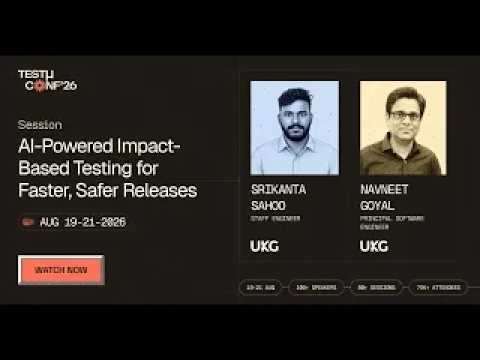
Parallel execution is one lever on cycle time. Choosing which tests to run is the other. In this TestMu Conf 2026 session, AI-Powered Impact-Based Testing for Faster, Safer Releases, Srikanta Sahoo and Navneet Goyal walk through a Smart Engine that reads code modifications, dependencies, historical test results, semantic relationships, and test reliability to predict impact and run only the tests each change actually touches.
Note: Run your Selenium, Cypress, and Playwright regression suites in parallel on the cloud. Try TestMu AI Today!
How Is AI Changing Automated Regression Testing?
AI shrinks regression cycles by choosing which tests to run for a change, repairing broken locators, and separating flaky failures from real regressions.
Test selection: Develocity's Predictive Test Selection uses machine learning on past runs to skip tests unlikely to fail for a given code change, so large suites give feedback in minutes instead of running everything on every commit.
Flaky-failure triage: Retries hide real regressions. Google reported that about 84% of the pass-to-fail transitions its CI saw involved a flaky test, so AI tools that classify failures by root cause save more time than blind reruns. The same models power visual regression testing that ignores rendering noise.
Keep a full, unselected run on a schedule, such as nightly, because predictive selection trades a small risk of a missed failure for speed on each commit.
Where Should You Start With Automated Regression Testing?
Start by automating the stable, revenue-critical flows you retest every release, run them on every pull request, and grow the suite only as fast as you can keep it green.
Automated regression testing is what keeps a fast release cadence safe: it re-runs your existing suite on every change so regressions surface immediately rather than in production.
The payoff comes from automating the right cases, the stable, high-value flows, and keeping the suite lean enough that a red result always means a real bug.
Start with your revenue-critical path, wire the suite into CI/CD, and run it in parallel on the cloud so coverage scales with the codebase instead of slowing you down.
Author

Akash Nagpal
Blogs: 7


Akash Nagpal is a Software Engineer with 4+ years of experience in software development and technical writing. He specializes in React.js, Node.js, MongoDB, RESTful APIs, JavaScript, CSS, and HTML for building dynamic user interfaces. Akash has published 70+ technical blogs on data structures, algorithms, and modern frameworks during his time at Coding Ninjas. At TestMu AI, he has authored 10+ articles on software testing, automation testing, automated regression testing, performance testing, Selenium, and API testing.
Reviewer

Abhishek Mishra
Reviewer
Abhishek Mishra is a Technical Product Manager at TestMu AI, where he owns Test Manager, the test management product. He has over 8 years of experience in product management and market analysis. His expertise spans across AI-native software testing, product strategy, and analytics. Previously, Abhishek served as the Product Lead at IndiaClan and co-founded Gartley618 Technologies, where he led innovative projects in quantitative trading and blockchain. He holds a B.Tech degree.


Automated Regression Testing FAQs
Did you find this page helpful?
More Related Learning Hubs
TestMu AI forEnterprise
Get access to solutions built on Enterprise
grade security, privacy, & compliance
- Advanced access controls
- Advanced data retention rules
- Advanced Local Testing
- Premium Support options
- Early access to beta features
- Private Slack Channel
- Unlimited Manual Accessibility DevTools Tests