

Power Your Software Testing with AI Agents and Cloud
The Native AI-Agentic Cloud Platform to Supercharge Quality Engineering. Test Intelligently and Ship Faster.


- TestMu AI (Formerly LambdaTest)
- /
- Blog
- /
- Getting Started With DevOps - A Beginner's Guide
Getting Started With DevOps - A Beginner's Guide
DevOps gives development and operations shared responsibility for delivery. Learn the roadmap, skills, CI/CD, monitoring, and cloud basics to get started.
Last Updated on:
On This Page
- What is DevOps?
- The Contrast: Before DevOps vs After DevOps
- Getting started with DevOps from Scratch
- Continuous Integration & Continuous Deployment
- Know-How of Monitoring Tools
- Possessing Foundational Cloud Knowledge
- Which Version Control and Infrastructure as Code Skills Do You Need?
- Key Factors to consider before Getting Started with DevOps
- Best Practices of a DevOps Champion
- How Does AI Change How You Get Started With DevOps?
Getting started with DevOps means adopting a culture of shared delivery responsibility, then learning one back-end language such as Python, Linux and shell scripting, version control, CI/CD, and one cloud platform. Continuous Integration checks that every commit merges into the shared repository without errors, and tools such as Terraform or Ansible turn server setup into configuration files a team can review. This guide covers what DevOps is, the before and after contrast, starting from scratch, CI/CD, monitoring, cloud knowledge, version control, infrastructure as code, best practices, and AI in DevOps.
Key Takeaways
- DevOps is a culture and set of practices that replaces the wall between development and operations teams with shared responsibility for delivery, so releases ship faster and recovery from a bad release becomes a routine step.
- Getting started with DevOps begins with foundations rather than tools: one back-end programming language such as Python or Java, operating system and Linux basics, shell scripting, and networking protocols such as TCP/IP, HTTP, and SSL/TLS.
- DevOps depends on two pipelines: Continuous Integration checks that new code merges into the shared master repository without errors, and Continuous Deployment runs automation tests on a release scope.
- Infrastructure and application monitoring with tools such as Prometheus, Grafana, Datadog, and New Relic gives a DevOps team the metrics and feedback needed to fix defects before users run into them.
- A beginner DevOps engineer needs hands-on work with at least one cloud platform, because Amazon Web Services, Microsoft Azure, and Google Cloud lead the infrastructure market and appear in most DevOps job postings.
- Learning Git first and then one infrastructure as code tool such as Terraform or Ansible turns server setup into configuration files a team can review instead of manual clicks in a cloud console.
What is DevOps?
DevOps is a culture that acts as an enabler of agility. It bridges the gap between the developers and the maintainers by implementing practices of collective responsibility. Traditionally, these teams had a barrier between them, and software packages were metaphorically thrown past the wall. But, with DevOps processes, that barrier is no longer in existence.
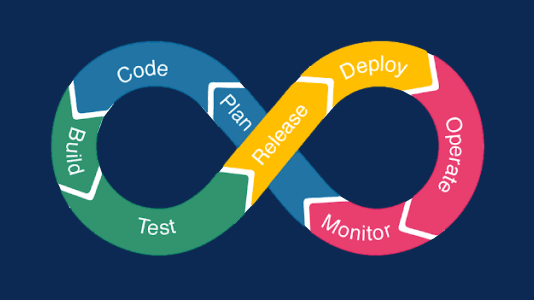
Collaboration is one of the guiding pillars of DevOps, which eventually results in faster deployments. In DevOps culture, teams come together and share responsibilities of streamlined builds catalyzed by continuous deployments, automation, and production infrastructure. A cross-functional team improves engagement and communication over traditional silos of perpetual disagreement and time-consuming ticketing processes.
Nowadays, the term DevSecOps is also a buzzword. This flavor of DevOps culture involves maintaining the security compliance of the software right from the project initiation phase till its delivery.
However, in this blog on getting started with DevOps, we will only deal with "DevOps" and explore how to get started with it.

Key Takeaway: DevOps is a culture of collective responsibility that removes the barrier between developers and maintainers, and the DevSecOps variant extends DevOps by maintaining security compliance from project initiation through delivery.
The Contrast: Before DevOps vs After DevOps
Before DevOps came into the picture, software companies followed the traditional Waterfall methodology that worked well for many projects like CRM, inventory management, etc. Yet it has its own set of drawbacks. However, when DevOps came into the picture, it completely changed the software development concept.
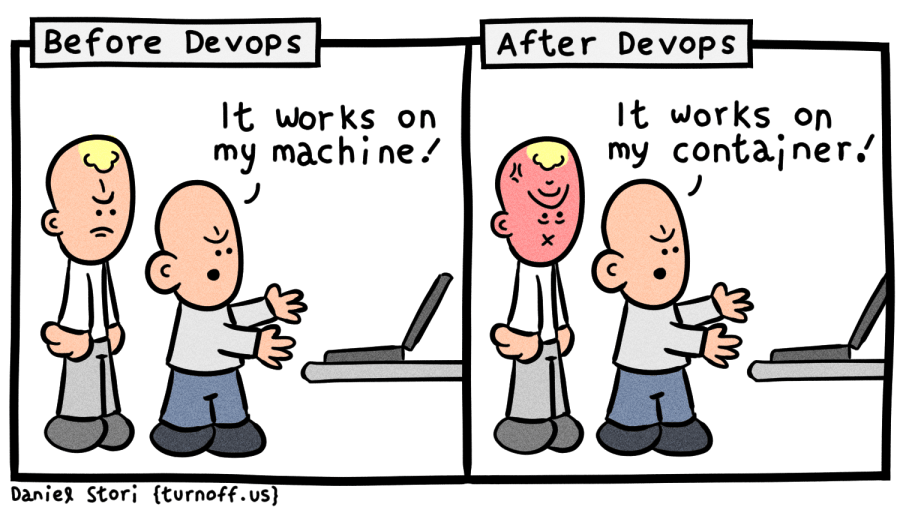
This short comparison is enough to let you know why the 'Waterfall model' is the thing of the past and why 'DevOps culture' is the way forward:
| Waterfall approach for product delivery | Continuous Software Delivery |
| Slow launches | Faster feature shipments |
| Higher downtimes | Faster resolution times |
| Low productivity due to less transparency | Enhances team productivity |
| No scope of having green environments | Stable Dev and Prod environments |
| Difficult to manage and less flexible | Efficient management |
| Lack of documentation due to less collaboration between teams | Common documentation - Dev and Ops team |
| Less accountability | Higher rate of satisfaction |
| Lack of team coordination | Improved collaboration |
| Less efficient engagement | Higher rate of communication |
| Less room for improvement | Improved Quality |
| Haphazard code merge | Speedy execution |
DevOps practices have enhanced the collaboration between Development and Operations teams. This collaboration helped in continuous business planning. This collaboration was one of the missing pieces in the 'Before DevOps' era, and I have witnessed both eras!
DevOps Practices (Thread)
— Ankit Mehta 🇮🇳🇹🇭 (@ankyitm) June 17, 2022
To build effective #DevOps culture, best practices need to be followed. pic.twitter.com/q1PTbVmEFY
DevOps culture has excelled at cutting short and redefining the complex SDLC processes. DevOps helps keep everyone connected to the process so each team member can be more involved in the success of the software deployment.
Key Takeaway: Moving from the Waterfall model to DevOps replaces slow launches, higher downtime, and haphazard code merges with continuous software delivery, faster resolution times, and stable development and production environments.
Getting started with DevOps from Scratch
The journey of DevOps is quite a long one! For an entry-level DevOps Engineer role, you need to equip yourself with some basic concepts of programming and network or cloud infrastructure.
DevOps Roadmap
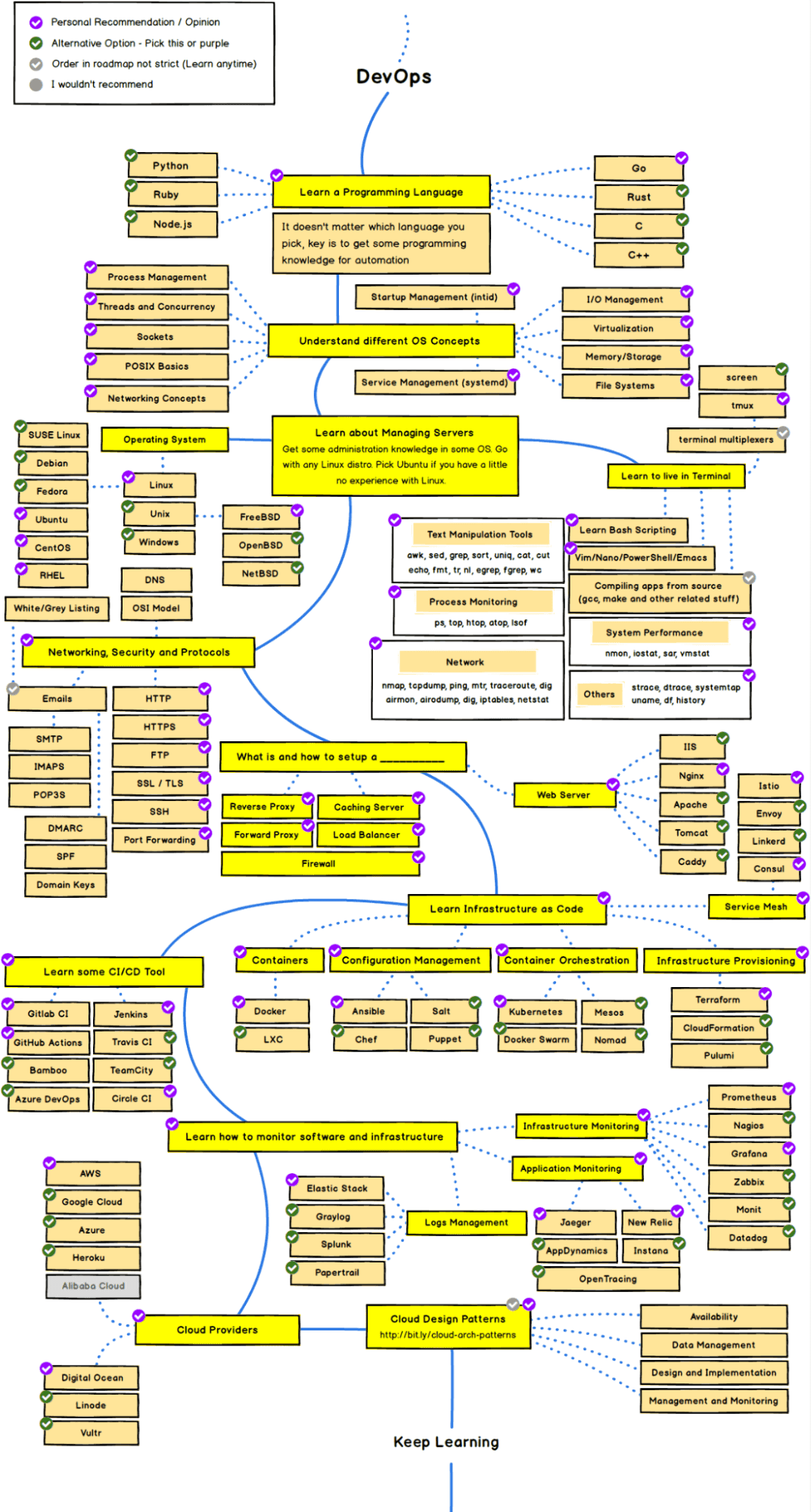
Don't be overwhelmed with this complicated roadmap. Below I have curated a brief step-by-step guide for getting started with DevOps.
Strengthening the Foundational Knowledge
It is essential to know the right tools, practices, and concepts for the DevOps team. As per my experience, it is good if the team members know the nuances of the Software Development Life Cycle (SDLC).
Below mentioned are a few of the common roles and responsibilities of a DevOps engineer.
- Planning of the Project
- Development and Deployment within deadlines
- Quality Assurance along with proper Testing
- Security Compliance and Automation
- Effective collaboration with developers, IT, admins, etc.
- Software Maintenance, Troubleshooting, etc.
Choosing a Programming Language
It is mandatory to learn a programming language as the first step in your DevOps journey. The popular back-end languages to start your DevOps journey are Python, Ruby, JavaScript, Go, Java, etc.
If you are a novice in the programming field, you can begin with Java or Python. Many cloud providers like Azure, AWS, Google Cloud, etc., have compatible SDKs for these languages. It enables the integration of codebases, lets you debug services/microservices, or automating processes & deployments.
Keeping up with all the changes in the technology industry is an enormous challenge, and organizations, therefore, need to automate repetitive testing processes to ensure that software performs according to expectations and provides value in no time. That's where a cloud-based automation testing platform like TestMu AI comes to the rescue!
Using TestMu AI, you can perform manual and automated cross browser testing at scale over an online device farm of 3000+ real devices and operating systems. Test automation platform like TestMu AI allow you to harness the power of cloud-based online Selenium Grids in conjunction with our local grid setups.
Automation testing frameworks like Selenium, Cypress, and Playwright can be run in a Continuous Integration pipeline on the TestMu AI Grid.

The concepts of scalability, modularity, and efficiency are the key areas to focus on as a DevOps engineer when selecting a programming language.
Understanding Fundamentals of Operating Systems
An operating system (OS) is defined as an interface between the user and the hardware. It is essential to learn a bit about OS concepts as you will work with servers and applications. Hence, it is crucial to know for which OS you will write the code.
Kernel and memory management, threading, concurrency, sockets, POSIX basics, file and I/O management, software virtualization, etc., are some of the important OS concepts. Understanding these OS concepts gives you an edge over others as a DevOps engineer in terms of memory and disk usage, optimization, allocation of resources, processes, etc.
At present, Linux is the most used OS in the IT industry. Other examples of OS are Windows, Ubuntu, Fedora, Unix, CentOS, etc. Most build agents, container images, and cloud instances that a DevOps engineer manages run Linux, so fluency with the Linux command line carries the most weight.
Containers are the next step after operating system fundamentals. In the 2025 Stack Overflow Developer Survey, 73.8% of professional developers reported using Docker and 30.1% reported using Kubernetes in the past year. Learn Docker first, covering images, layers, volumes, and registries, then move on to Kubernetes objects such as pods, deployments, and services once you can build and run your own images.
Knowing Basics of Terminal and Shell Scripting
Getting comfortable with terminal commands is a prerequisite to being a DevOps engineer. Practicing these commands daily for process monitoring and manipulation of system performance polishes your scripting skills.
Terminal lets you accomplish different tasks without the use of a Graphical User Interface (GUI). It is also known as console or command line.
Below are some of the basic shell scripting functions to learn to get started with DevOps:
- Text Manipulation
- Compilation
- Bash or Shell Scripting
- System Performance
- Powershell/VIM, etc.
Understanding Networking Concepts
When running an interconnected system of servers, apps, and resources on a network, it is crucial to learn about the networking and security concepts to diagnose any troubleshooting issues or network issues.
A few of the networking concepts that you must get familiar with are stated below:
- TCP/IP network protocols
- HTTP and HTTPS
- SMTP and FTP
- SSL/TLS
- Network Forwarding
- Firewall and Proxy
Understanding networking allows you to create an environment where you can test your functions and put continuous integration and delivery pipelines in place. Let's explore the continuous integration and deployment concept in the next section of this article on getting started with DevOps.

Note: Accelerate the delivery pipeline with your favorite CI/CD tools. Try TestMu AI Now!
Key Takeaway: An entry-level DevOps engineer builds a base in one programming language such as Python or Java, operating system and Linux fundamentals, terminal and shell scripting, and networking protocols before moving on to containers like Docker and Kubernetes.
Continuous Integration & Continuous Deployment
The main keywords associated with DevOps are Continuous Integration (CI) and Continuous Deployment (CD). It is a norm to implement these practices to adopt the DevOps culture. Without these, DevOps is incomplete!
These pipelines matter more now that AI assistants generate a large share of the code that reaches review. The 2025 DORA report from Google Cloud surveyed nearly 5,000 technology professionals, found that 90% of them use AI at work, and reported that AI adoption lifted software delivery throughput while it weakened delivery stability. The same report names strong automated testing, mature version control, and fast feedback loops as the controls that keep the extra change volume safe, so put those in place before you add AI tooling on top of your pipeline.
This aspect of DevOps helps to make frequent stable deliveries while maintaining the code quality. A Continuous Integration pipeline often runs on the feature and master branches of a code repository. It ensures that your bits of code produce no error when integrated into the shared master repository.
A Continuous Deployment pipeline runs automation tests on the code for a particular release scope. This helps with reducing costs, accelerates delivery timelines, and reduces effort. It also helps to enhance the overall efficiency and team productivity.
The value of Continuous Testing to any DevOps pipeline is incalculable. As much as this is true, it's also the case that a Continuous testing strategy is the foundation of an effective pipeline.
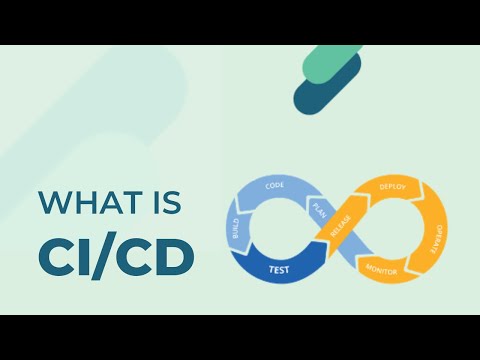
You can also Subscribe to the TestMu AI YouTube Channel and stay updated with the latest tutorials around Selenium testing, Cypress E2E testing, CI/CD, and more.
Some commonly used best CI/CD tools are Jenkins, GitHub, Bamboo, Ansible, TravisCI, CircleCI, Teamcity, Google Cloud, etc.

Key Takeaway: A Continuous Integration pipeline confirms that code integrates into the shared master repository without errors, and a Continuous Deployment pipeline runs automation tests for a release scope to cut cost and delivery timelines.
Know-How of Monitoring Tools
Having an understanding of Infrastructure and application monitoring is one of the key requirements for stepping into the world of DevOps. Collecting data from servers, network devices, and other services helps you monitor basic metrics such as disk space, throughput, latency, etc. This help finds room for improvement, defect resolution, and health monitoring.
Application monitoring tools help improve efficiency and fix bugs in the apps before users perform some functions. As it is necessary to act upon and send feedback immediately whenever there is any issue, DevOps teams should be proactive and have robust monitoring techniques.
Example tools for infrastructure monitoring are Prometheus, Grafana, Datadog, Nagios, Splunk, etc. For application monitoring, some example tools are AppDynamics, New Relic, Sumo Logic, etc. Learn OpenTelemetry alongside them, because it is the vendor neutral standard for emitting traces, metrics, and logs, and it lets you change monitoring backends without re-instrumenting your services.
Key Takeaway: Infrastructure monitoring tools such as Prometheus, Grafana, and Datadog track metrics like disk space, throughput, and latency, while OpenTelemetry keeps instrumentation vendor neutral so a team can change monitoring backends without re-instrumenting services.
Possessing Foundational Cloud Knowledge
As a beginner DevOps engineer, you need a basic understanding of the cloud. Amazon Web Services, Microsoft Azure, and Google Cloud lead the infrastructure market, and most DevOps job postings ask for hands-on work with at least one of them. For getting started with DevOps, you need to understand the backing services, advantages, product requirements, and providers related to Cloud technology in your organization.
There are several popular Cloud providers like Microsoft Azure, Google Cloud, Amazon AWS, Digital Ocean, etc. These providers have the options of different pricing packages depending on the services offered, memory, CPU requirements, security compliances, etc.
Cloud technologies provide better flexibility, dynamic configurations, controlling web servers and databases, etc. Cloud deployment ensures that you need not rewrite configuration files, and scaling up and down the servers takes place dynamically. Softwares like Nginx can help you manage your servers more efficiently.
Furthermore, several relevant standardized DevOps certifications are available online to help kick off your career as a DevOps Engineer. DevOps Certifications not only enhance your knowledge but also validates your skills in a particular domain that is beneficial for moving ahead in your career graph.
Key Takeaway: Foundational cloud knowledge for a DevOps engineer means hands-on work with one provider such as Amazon AWS, Microsoft Azure, or Google Cloud, covering backing services, pricing packages, and servers that scale up and down dynamically.
Which Version Control and Infrastructure as Code Skills Do You Need?
Learn Git first, then one infrastructure as code tool such as Terraform or Ansible. Git is where a pipeline run begins, and infrastructure as code turns server setup into files your team can review. Branching, pull requests, merge conflicts, and tags are daily work for a DevOps engineer rather than optional extras. The command worth learning early is git revert, which the Git documentation describes as recording new commits that reverse the effect of earlier commits. That is the safe way to undo a bad release, because git reset --hard throws uncommitted work away instead of leaving the reversal in the history for the rest of the team to see.
Infrastructure as code replaces manual clicks in a cloud console with configuration files that sit in the same repository as your application. Terraform declares the resources you want to exist and then creates them, and the concept that slows beginners down is state. The Terraform documentation explains that Terraform stores each workspace's state in a local file named terraform.tfstate, and uses that state to map real world resources to your configuration and to decide which changes to make. Move that file to remote storage before a second person runs the same configuration, because two local copies will disagree about what already exists.
Ansible handles the other half of the job, configuring machines that already exist. Its official introduction describes it as decentralized, using SSH with existing OS credentials to reach remote machines, so you avoid installing extra software across your infrastructure. Licensing is worth checking before you commit to a tool. OpenTofu is a drop-in replacement for Terraform under the Linux Foundation's stewardship, created after HashiCorp switched Terraform from an open source license to the BUSL. Start with one cloud account, write a small configuration, apply it, destroy it, and read the plan output every time before you run it against anything shared.
Key Takeaway: A DevOps engineer needs Git for daily branching, pull requests, and merge conflicts, plus one infrastructure as code tool such as Terraform or Ansible that turns server setup into configuration files stored beside the application code.
Key Factors to consider before Getting Started with DevOps
The demand for DevOps is always at an all-time high in the IT industry. Hence, it is necessary to understand what DevOps is and, more importantly, what it is not. Organizations often struggle to implement collaboration, agility, and orchestration in their attempt for DevOps evolution.
Therefore, to utilize the metrics-based results that DevOps tools and technologies offer, the organization must be willing to adopt a few incremental changes as mentioned below over the years.
Technological Automation
Learning about automation is an important part of DevOps. The ability to automate hefty processes of managing servers and deployments is something that recruiters look for in an ideal DevOps candidate.
Automation certifications and courses may help to understand the details of automating processes. The approach should be to automate anything you perform manually more than two times. The best practices of CI/CD pipelines and everything-as-code helps you and your organization adopt the DevOps culture better. You can learn more about it by going through these articles on the importance of automation testing in DevOps and the role of automation testing in the CI/CD pipeline. In a nutshell, automating testing is a backbone for DevOps. Another aspect that can be optimized is database management. With the implementation of DevOps practices and tools like Liquibase, database management tasks can be automated, leading to more efficient development processes.
Processes and Practices
The main purpose of DevOps is to regularly deliver small incremental value products or services to the customer. To achieve this feat, one must comply with the chief practices of DevOps - Continuous Integration (CI) and Continuous Deployment (CD). These small units of incremental delivery are also operationally supported in the production phase.
Shift to DevOps Culture
DevOps is not simply a project that has a definite deadline. Instead, DevOps is a culture that comes with major organizational and technological changes. DevOps teams break down silos by having cross-functional teams and reducing hand-offs, handovers, ticket queuing systems, and dependency mapping. DevOps is a movement or culture shift in application or software development.
The goal of DevOps is to make everyone accountable and work together with full responsibility to break silos or resolve bottlenecks in the whole process and not just the developers. That accountability reaches the top of the organization, so a lasting shift depends on how you keep CEOs deeply invested in DevOps.
Inspect, Adapt, & Learn!
DevOps culture gets driven by the motivation to improve continuously. Retrospective meetings help companies to inspect the setbacks and bottlenecks. "Lessons Learned" meetings help to adapt to the continuous delivery pattern in organizations with DevOps culture in practice. And, knowledge sharing week lets the team learn from each other.
A few certifications like Azure or AWS can help you a lot in climbing up the DevOps ladder. To get started, below are a few accredited certifications that one can complete to begin their DevOps job hunt!
- Docker Certified Associate (now administered by Mirantis)
- Certified Kubernetes Application Developer
- AWS Certified DevOps Engineer
- Microsoft Certified: DevOps Engineer Expert (exam AZ-400)
- Udacity Cloud DevOps Nanodegree
Note: Perform reliable automated testing across 3000+ browser environments. Try TestMu AI Now!
Key Takeaway: Adopting DevOps requires incremental organizational change across four areas: automating any task performed manually more than twice, practicing Continuous Integration and Continuous Deployment, building cross-functional teams that cut hand-offs and ticket queues, and running retrospectives to keep improving.
Best Practices of a DevOps Champion
While the organization should adopt the DevOps culture and practices and be collaborative, everyone in the team need not be an expert in the DevOps technologies. Companies such as Google, Amazon, Microsoft, Salesforce, RedHat, etc., are constantly hunting for experienced or senior DevOps engineers, often known as DevOps Champions, who would drive the team's success by implementing DevOps in the correct order!
However, DevOps adoption is not the responsibility of a single person in the team. Instead, it is the job of the whole organization to embrace DevOps as a culture and part of their daily work. Collaboration, communication, and cross-functional approach help you get started with the DevOps mindset of "constant improvement". Once implemented across teams, DevOps can help you break silos and only focus on delivering value MVP (Minimal Viable Product).
As a DevOps Champion, you will serve as a technical expert on solutions and a voice and champion for users, prospects, and partners, driving feedback to engineers and product management.
Below are some of the characteristics of a DevOps Champion that are usually expected in the IT industry to help the team embrace the culture shift to DevOps.
DevOps Knowledge
DevOps is a hard path to go down, and empowering teams is a long-term process. A learning curve will certainly arise with or without a DevOps champion, but speed and clarity of goals will greatly improve with an expert champion on board. Overall, DevOps Champions should encourage developers, quality analysts, business analysts, system administrators, and many others to share a collaborative, iterative, and committed approach to their work.
Basic Everyday Responsibilities
The DevOps Champion is the person responsible for bringing in a DevOps culture. They are accountable for ensuring the success and implementation of all DevOps processes and team identity.
Daily duties of a DevOps Champion usually consist of:
- Promoting the benefits of DevOps Culture
- Ensure buy-in from both developmental and operational teams
- Determining the key roles for success
- Ensuring all team members are trained well
Other Important Practices
Once the entire team understands the culture and practices of collaboration-based work, the DevOps Champions can move on to help other areas of your organization. They can turn their focus to implementing sophisticated techniques, such as autoscaling, complex monitoring, and high availability.
Key Takeaway: A DevOps Champion drives adoption by promoting DevOps culture, securing buy-in from development and operations teams, determining key roles, and ensuring team members are trained, though DevOps adoption stays the responsibility of the whole organization.
How Does AI Change How You Get Started With DevOps?
AI changes how you get started with DevOps by writing much of the code, pipeline YAML, and infrastructure manifests you will be asked to review, so reviewing and verifying now matter more than typing speed. Assistants such as GitHub Copilot, Gemini Code Assist, and Claude Code draft build files, Dockerfiles, and Terraform configuration from a prompt. Treat that output the way you treat a pull request from a new teammate: read the plan, run the pipeline, and apply the change in a throwaway environment before it reaches anything shared.
The limits are documented rather than theoretical. DORA's 2025 research reports that more than 80% of respondents believe AI has increased their productivity, while 30% report little or no trust in the code it generates, and that AI adoption keeps a negative relationship with software delivery stability even as throughput rises. The same research describes AI as an amplifier that magnifies an organization's existing strengths and weaknesses instead of repairing them, and it found that 90% of organizations have adopted at least one internal platform.
For a beginner the learning order does not change. Learn Linux, Git, one programming language, and one CI/CD tool first, because those are what let you read an AI-generated pipeline and tell whether it is wrong. Add AI assistance after your automated tests, code review, and rollback path already work, not before. An agent that opens pull requests is only as safe as the checks those pull requests have to pass.
Key Takeaway: AI tools draft pipelines, Dockerfiles, and Terraform configuration, but DORA's 2025 research ties AI adoption to weaker delivery stability, so build automated tests, review, and a rollback path before you add AI on top.
Conclusion
While it may sound tempting to hire a team of DevOps experts and quickly deploy the technologies, there are no cutting corners when transitioning to DevOps. Implementing cultural change in an organization is no easy feat. But in taking the time to correctly help your team embrace the DevOps culture, one day, you may notice and realize that everyone at your organization is, in fact, a DevOps champion.
In this DevOps tutorial on getting started with DevOps, we have presented a brief overview of how to get started with the DevOps buzzword and what your responsibilities will be like as a DevOps engineer. We explored the definition of DevOps, its comparison to traditional processes, skills and certification required, etc. We also discussed the factors to consider before restructuring your organization in a cross-functional way and adopting the DevOps culture. Lastly, we took a look at who are DevOps Champions.
If you are looking to test your knowledge or prepare for career opportunities in this field, don't miss our comprehensive guide on DevOps interview questions. It will help you connect the concepts from this tutorial with the type of practical and scenario-based questions often asked in real interviews.
Author

Chandrika Deb
Blogs: 13


Chandrika Deb is a Community Contributor with over 4 years of experience in DevOps, JUnit, and application testing frameworks. She built a Face Mask Detection System using OpenCV and Keras/TensorFlow, applying deep learning and computer vision to detect masks in static images and real-time video streams. The project has earned over 1.6k stars on GitHub. With 2,000+ followers on GitHub and more than 9,000 on Twitter, she actively engages with the developer communities. She has completed B.Tech in Computer Science from BIT Mesra.


DevOps FAQs
Did you find this page helpful?
More Related Blogs
TestMu AI forEnterprise
Get access to solutions built on Enterprise
grade security, privacy, & compliance
- Advanced access controls
- Advanced data retention rules
- Advanced Local Testing
- Premium Support options
- Early access to beta features
- Private Slack Channel
- Unlimited Manual Accessibility DevTools Tests