

Power Your Software Testing with AI Agents and Cloud
The Native AI-Agentic Cloud Platform to Supercharge Quality Engineering. Test Intelligently and Ship Faster.


- TestMu AI (Formerly LambdaTest)
- /
- Learning Hub
- /
- What Is Static Code Analysis: Techniques and Best Practices
What Is Static Code Analysis: Techniques and Best Practices
Learn what static code analysis is, explore key techniques, and discover best practices to improve code quality, security, and maintainability.
Last Updated on:
On This Page
- What Is Static Code Analysis?
- Why Use Static Code Analysis?
- What Are the Techniques Used in Static Code Analysis?
- How Does Static Code Analysis Work?
- What Are the Best Static Code Analysis Tools?
- Challenges of Static Code Analysis
- How Do AI Coding Assistants Work With Static Analyzers?
- Best Practices for Implementing Static Code Analysis
- Conclusion
- Citations
Static code analysis inspects source code without running it to find defects, security vulnerabilities, and coding standard violations before compilation. Tools such as SonarQube, ESLint, and Coverity parse the code into an abstract syntax tree and apply data flow and control flow rules, so a scan runs on every commit. This guide covers what static code analysis is, why teams use it, the techniques involved, how the scan works, the best tools, the challenges, how AI coding assistants work with static analyzers, and best practices for implementation.
Key Takeaways
- Static code analysis examines source code without executing it to find defects, security vulnerabilities, and coding standard violations before the code runs.
- Early static code analysis catches uninitialized variables, null pointer risks, and memory leaks before they spread across modules and become expensive to fix.
- The techniques used in static code analysis are lexical analysis, control flow analysis, data flow analysis, pattern-based analysis, abstract syntax tree analysis, symbolic execution, metric-based analysis, and formal verification.
- A static code analysis workflow runs in six steps: select a tool, configure rules, scan the code, report issues by severity, review and act on the findings, and integrate the scan into CI/CD.
- Widely used static code analysis tools include SonarQube, Snyk, ESLint, Qodo, Codacy, Veracode, and Coverity, and the right choice depends on the programming languages and development setup in use.
- Static code analysis reports false positives and misses defects that appear only at runtime, so manual code reviews and runtime testing are still required.
What Is Static Code Analysis?
Static code analysis is the process of examining your source code without running it. It lets you find potential errors, security risks, or deviations from coding standards early in the development process. Unlike testing that observes how your software behaves when it runs, static analysis focuses on the code structure, syntax, and overall quality of the code itself.
You can leverage tools like linters, static analyzers, or security scanners to identify issues such as uninitialized variables, unreachable code, or potential security vulnerabilities before your code even reaches compilation.
Key Takeaway: Static code analysis inspects the structure, syntax, and quality of source code without running it, using linters, static analyzers, and security scanners to surface problems before compilation.
Why Use Static Code Analysis?
Static code analysis is a core component of static testing. It moves defect detection ahead of the build, so teams fix problems before the code reaches a test environment.
Here are the benefits of using static code analysis:
- Early Detection of Defects: Static analysis identifies potential defects before the code runs. It flags uninitialized variables, null pointer risks, memory leaks, and other coding issues during software development process. Detecting defects early prevents them from spreading across modules and reduces the cost and effort of fixing them later.
- Consistency Across Teams: Large teams often experience drifting coding styles and inconsistent practices. Static analysis enforces coding standards objectively, reducing the need for subjective manual reviews. This leads to a more uniform codebase, making it easier for new developers to understand and maintain the code.
- Enhanced Security: Many software vulnerabilities stem from coding errors that could have been identified through static analysis. Security-focused tools detect issues such as SQL injection, cross-site scripting, and unsafe cryptographic usage.
- Improved Maintainability: Legacy code often feels fragile because hidden defects make modifications risky. Regular static analysis highlights vulnerable areas, allowing teams to fix defects incrementally. Over time, this reduces technical debt, simplifies future changes, and increases confidence in modifying existing code.
- Integration with Continuous Development: Static analysis integrates smoothly with CI/CD pipelines, automatically running checks on each commit or pull request. This ensures that code quality remains high as the project scales, providing immediate feedback to developers and preventing defects from becoming entrenched.
- Objective Feedback for Developers: Manual code reviews can be subjective. Static analysis offers repeatable, unbiased feedback. This not only improves code quality but also reduces friction between reviewers and developers, since the tool consistently enforces standards and highlights defects.
Key Takeaway: Static code analysis moves defect detection ahead of the build and enforces coding standards objectively, which improves security, maintainability, and consistency across large teams.

Note: Test websites and mobile apps across 3000+ environments. Try TestMu AI Now!
What Are the Techniques Used in Static Code Analysis?
Static code analysis examines source code without running it to find errors, bugs, security flaws, and quality problems during development.
The common techniques include:
- Lexical Analysis: Scans source code into tokens, such as keywords, operators, and identifiers. It detects syntax errors, naming inconsistencies, unused variables, redundant code, and insecure hard-coded values.
- Control Flow Analysis: Examines all execution paths to identify unreachable statements, infinite loops, incorrect branching, and missed exception handling. This ensures reliability and improves overall test coverage.
- Data Flow Analysis: Tracks how variables and data move throughout the codebase. It detects uninitialized variables, improper assignments, tainted input, and sensitive data exposure, promoting safe, consistent handling.
- Pattern-Based Analysis: Matches source code against predefined templates to reveal anti-patterns, coding mistakes, or known security vulnerabilities. It enforces best practices, reduces technical debt, and maintains quality.
- Abstract Syntax Tree (AST) Analysis: Represents the code hierarchically to detect structural issues, enforce coding standards, and uncover subtle defects. It also supports automated refactoring and maintenance.
- Symbolic Execution: Simulates execution with symbolic inputs to uncover edge cases, complex bugs, and potential vulnerabilities. It identifies issues that conventional testing techniques might miss.
- Metric-Based Analysis: Evaluates complexity, coupling, cohesion, and maintainability. This highlights defect-prone areas, guides refactoring, prevents technical debt, and tracks enhancements in software quality.
- Formal Verification: Uses mathematical proofs to ensure correctness under all conditions. It detects subtle logic errors or race conditions, ensuring reliability and safety in critical software applications.
Key Takeaway: The techniques used in static code analysis are lexical analysis, control flow analysis, data flow analysis, pattern-based analysis, abstract syntax tree analysis, symbolic execution, metric-based analysis, and formal verification.
How Does Static Code Analysis Work?
Static code analysis ensures teams develop clean, secure, and reliable code throughout the Software Development Life Cycle (SDLC). The process involves a structured approach from tool selection to continuous integration, creating a cycle of ongoing quality improvement.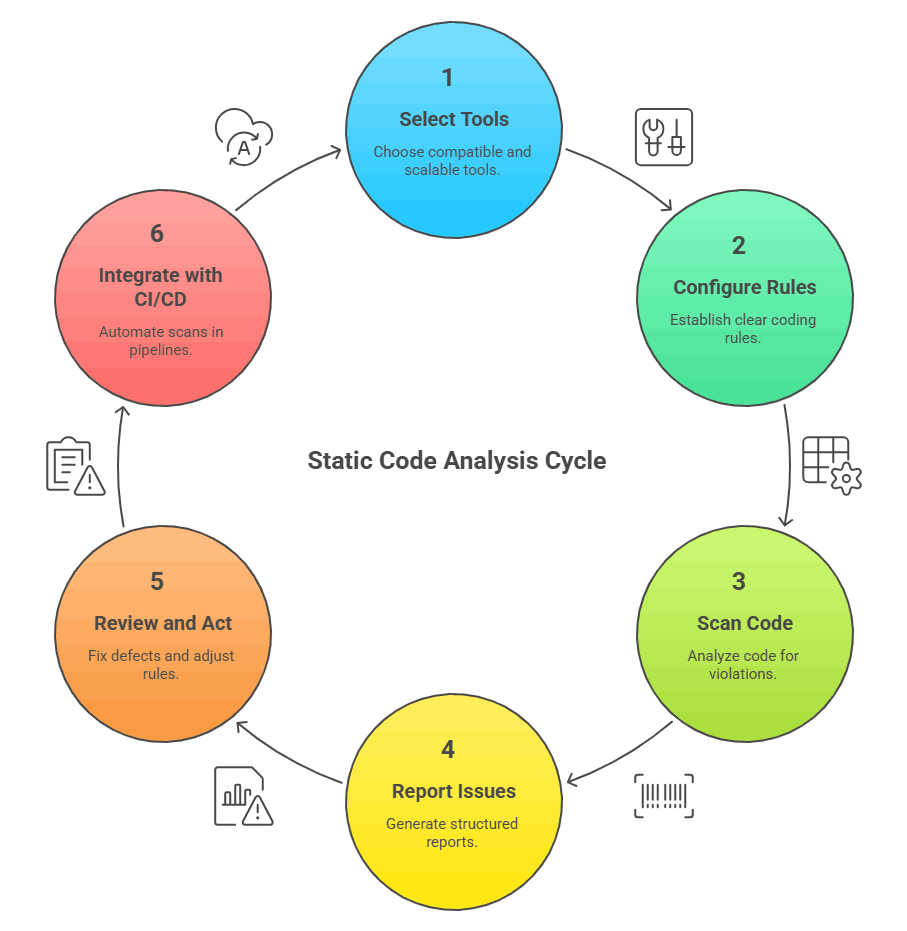
Select Tools
Choosing the right static analysis tool is critical for efficiency and long-term project health. The tool should fit the programming language, integrate smoothly with workflows, and scale as the codebase grows.
- Compatibility: The tool must fully support the programming language and frameworks in use, ensuring accurate and comprehensive analysis. It should avoid the need for workarounds that complicate development.
- Integration: It should integrate naturally with IDEs, build tools, and version control, minimizing disruption to existing processes and developer habits.
- Scalability: The tool must handle growing codebases and increasingly complex projects without performance degradation. This ensures long-term utility.
- Usability: A user-friendly tool encourages adoption, making static analysis a helpful, non-intrusive part of the workflow.
Configure Rules
Before scanning, teams must establish clear coding rules to maintain consistency and reduce defects. Rules should align with project needs and industry standards, focusing on quality and security priorities.
- Standards Alignment: Rules should follow industry best practices or be tailored to the project's needs, ensuring code is maintainable and reliable. Customization allows flexibility without losing quality.
- Focus Areas: Rules should target code consistency, defect prevention, and security issues, maximizing the value of each scan. This prioritization ensures effort is effective.
- Rule Refinement: Regularly review and adjust rules based on practical findings and team experience, keeping them relevant and actionable over time.
- Manageability: Avoid overly complex or excessive rules that overwhelm developers. Focus on checks that are actionable and impactful.
Scan Code
With rules in place, the code is analyzed file by file without execution. This approach identifies defects and risky patterns before they can propagate or affect other components.
- Violation Detection: The scan highlights code that breaks rules, ensuring consistency and reducing potential defects. Early visibility prevents future complications.
- Defect Identification: Detect issues like uninitialized variables, logic errors, or unsafe operations before they reach production. Early fixes save time and resources.
- Security Pattern Recognition: Identify patterns that could lead to vulnerabilities such as injection risks, unsafe data handling, or improper access control.
- Efficiency: Scanning without executing code saves time and avoids unintended side effects that could complicate debugging.
Report Issues
After scanning, the tool produces a structured report with issues categorized by severity. Clear explanations and actionable guidance help developers in effective defect tracking.
- Severity Categorization: Issues are prioritized by impact, allowing teams to focus on critical defects before less significant warnings appear.
- Explanations: Each issue includes context to help developers understand why it's a problem and how it affects code functionality or security.
- Guidance: The report often suggests concrete steps to resolve defects, streamlining remediation and reducing guesswork.
- Continuous Improvement: Teams can track recurring issues, refine coding standards, and improve future scans using insights from reports.
Most analyzers can also emit their findings as SARIF, the Static Analysis Results Interchange Format that OASIS published as a 2.1.0 standard. A shared format matters once a team runs several analyzers at once, because every report arrives in the same structure instead of a vendor-specific one. GitHub code scanning accepts SARIF 2.1.0 uploads, so results from any compliant tool appear next to the code in the repository rather than in a separate dashboard. Check whether a tool can write SARIF before you adopt it, because that decides whether its findings can be aggregated later.
Review and Act
Developers examine the report, fixing critical defects and adjusting rules for future scans. This step reinforces good practices and ensures learning from past mistakes.
- Critical Fixes: Address high-priority defects and security vulnerabilities immediately, reducing risk and stabilizing the codebase.
- Rule Adjustment: Modify rules based on non-critical warnings to focus future scans on meaningful issues and reduce noise.
- Team Learning: Discuss findings to reinforce coding best practices and share knowledge across the team.
- Continuous Feedback: Use review insights to enhance code quality and improve the effectiveness of future static analysis.
Integrate With CI/CD
Static analysis is embedded into Continuous Integration And Continuous Delivery(CI/CD) to ensure ongoing quality. Automated scanning for every commit maintains reliability without slowing development.
- Automatic Scans: Every code change or commit is automatically scanned, preventing issues from accumulating and ensuring consistent quality.
- Prevent Escalation: Detect minor defects early before they escalate into larger, more costly problems that affect stability or security.
- Workflow Integration: Fit analysis seamlessly into existing CI/CD processes to maintain velocity while enforcing quality standards.
- Consistent Quality: Continuous checking ensures security and coding standards are consistently applied across the project.
Key Takeaway: Static code analysis works in six stages: select a compatible tool, configure rules, scan the code without executing it, report issues by severity, review and fix the findings, and run the scan on every commit in CI/CD.
What Are the Best Static Code Analysis Tools?
Developers have lots of static code analysis tools to choose from. These tools find bugs, security issues, and code problems during development. Which tool works best depends on what programming languages you use, how it connects with your current setup, and how your team works.
Here are some of the best static code analysis tools you can use:
- Qodo: It combines static code analysis with AI capabilities to provide deep analysis of pull requests at the component level. It works across various programming languages and supports interactive code review features.
- Snyk: It is a developer-first Static Application Security Testing (SAST) tool that focuses on code vulnerability scanning and auto-remediation. It seamlessly integrates security analysis into the development workflow.
- SonarQube: It is a widely used platform for continuous code quality inspection through automated static code analysis. Its languages overview lists more than 60 languages and infrastructure-as-code formats, and the exact set depends on the edition in use. It helps teams identify bugs, vulnerabilities, code smells, and maintain coding standards.
- Codacy: It automates code quality checks and static analysis across many programming languages, evaluating code at every commit and pull request. It promotes early finding and fixing of errors to streamline development.
- ESLint: It is the leading static analysis tool for identifying problematic patterns in JavaScript, TypeScript, and JSX code. It is highly configurable and supports custom rule sets to enforce coding style and quality standards.
- Veracode: It is a comprehensive, cloud-based platform for automated static application security testing. It supports scanning of both source and binary code to uncover security flaws before deployment.
- Coverity: It provides deep, accurate static analysis and SAST for code quality and security. It is scalable for large codebases and integrates with critical development tools to fit into agile workflows.
Static analysis no longer stops at application source code. The same analyzers now read infrastructure definitions, so a misconfigured resource is caught in review rather than after it is provisioned. SonarQube documents Terraform, CloudFormation, Kubernetes and Helm, Docker, Ansible, GitHub Actions, and Azure Pipelines among the formats it scans, alongside a secrets detector for credentials committed to the repository. If your team keeps infrastructure in the same repository as the application, check that the analyzer you pick reads those files too, because a rule set tuned only for application code will walk straight past them.
Furthermore, code review tools build on this foundation by adding a human layer that focuses on architectural decisions, complex logic, and contextual judgment. When integrated properly, these three elements create a continuous, reinforcing feedback loop that improves quality, maintainability, and security.
Key Takeaway: SonarQube, Snyk, ESLint, Qodo, Codacy, Veracode, and Coverity are among the best static code analysis tools, and the right pick depends on the programming languages used, the existing toolchain, and how the team works.
Challenges of Static Code Analysis
Static code analysis improves code quality but comes with several challenges and limitations that developers must understand.
- False Positives: Tools frequently mark good code as faulty. These can flood developers with useless alerts and make them lose confidence in the analysis. Teams need to spend time adjusting rules to reduce these false alarms.
- False Negatives: Analysis misses real bugs, particularly those requiring runtime conditions or specific user inputs. Since tools only examine code without running it, they cannot catch defects that show up during actual execution or complex system interactions.
- Performance Issues: Large codebases take significant time and computing resources to analyze completely. This can slow down development workflows, especially when tools aren't optimized properly. Incremental scanning helps but doesn't solve the problem entirely.
- Modern Code Challenges: Today's programming languages use dynamic features like reflection, code generation, and heavy templating. These advanced constructs often confuse static analyzers, causing incomplete scans or missed problems.
- Business Logic Gaps: Tools check code structure and syntax, but cannot determine if software meets actual business needs or works correctly for users. Manual reviews and functional testing remain necessary for this validation.
- Setup Complexity: Getting static analysis working properly takes considerable expertise and effort. Writing custom rules, configuring tools, and connecting to build tools creates barriers that can delay implementation and reduce early benefits.
- Incomplete Solution: Static analysis cannot replace other quality methods. It works best alongside manual code reviews, runtime testing, and security audits to provide thorough code quality assurance.
Those gaps widen as more code is machine generated. In this TestMu Conf 2026 session, Neelmani Verma covers The Trust Problem: Designing Quality Frameworks for AI-Generated Code, and what it takes to test software you did not write and cannot fully predict.

Key Takeaway: Static code analysis produces false positives, misses defects that surface only at runtime, and cannot judge business logic, so manual reviews, runtime testing, and security audits stay necessary.
How Do AI Coding Assistants Work With Static Analyzers?
AI coding assistants call static analyzers directly through Model Context Protocol (MCP) servers, so generated code is checked against your existing rules before it reaches a pull request. ESLint publishes an official MCP server as the @eslint/mcp package, started with npx @eslint/mcp@latest, which lets an assistant check a file for linting errors, fix those errors, and explain why a rule fired, per the ESLint MCP server documentation. SonarSource ships the SonarQube MCP Server, whose analyze_code_snippet tool inspects file content for quality and security issues, alongside tools that search issues in a project and read quality gate status. The assistant then sees the same findings your CI scan would report, while the code is still being written.
The flow also runs the other way, with analyzer output used as model input. GitHub Copilot Autofix assembles its prompt from the CodeQL alert in SARIF form, the surrounding code, and the query help text, then returns a suggested patch with an explanation. GitHub documents fix generation for C#, C and C++, Go, Java and Kotlin, Swift, JavaScript and TypeScript, Python, Ruby, and Rust, across a subset of the default and security-extended CodeQL queries.
Treat every suggested patch as a draft. GitHub's guidance on responsible use of Copilot Autofix states that developers must evaluate each suggestion and verify it keeps the intended behavior, and warns that the generated output can be inaccurate or incomplete. Keep the pipeline scan as the deciding gate. An assistant can be told to skip a check, but a scan that runs on the build applies the same rules to every commit.
Key Takeaway: AI coding assistants reach static analyzers through MCP servers such as @eslint/mcp and the SonarQube MCP Server, and Copilot Autofix turns CodeQL alerts into patch suggestions that a developer must still verify.
Best Practices for Implementing Static Code Analysis
While static code analysis offers valuable insights, it also comes with challenges and limitations that can impact its effectiveness. Following best practices helps teams overcome these hurdles, ensuring that static analysis is well-integrated into the development process and delivers meaningful, manageable results.
- Integrate Early: Start static code analysis at the beginning of development. Detecting defects early prevents them from escalating into costly or complex issues later.
- Automate Checks: Implement code automation to run static analysis in CI/CD pipelines. Every commit is scanned automatically, catching bugs, vulnerabilities, and code smells consistently.
- Tailor Rules: Configure tool rules to align with your team's coding standards and project requirements. Regularly review and adjust settings to keep alerts accurate and relevant.
- Prioritize Issues: Focus on high-impact vulnerabilities or major defects first. Minor style warnings and non-critical issues can be addressed afterward.
- Select the Right Tool: Choose analysis tools compatible with your programming languages and development environment. Test detection accuracy and integration effort before adoption.
- Educate and Collaborate: Train your team to interpret reports correctly and encourage collaboration on recurring or complex issues. Shared understanding improves remediation efficiency.
- Combine Approaches: Use static analysis alongside manual code reviews. Tools handle routine bugs, while humans focus on design decisions, architectural concerns, and complex logic issues.
A large existing codebase floods the first scan with findings, which is the usual reason adoption stalls. Set a baseline instead, and hold only new and changed code to the full standard. SonarQube works this way by default: its Sonar way quality gate defines conditions that apply to new code only, so a pull request fails on issues a developer just introduced while older findings stay visible without blocking the build. The legacy backlog then clears gradually as routine feature work touches those files.
Pro-tip: High code quality ensures software is reliable, maintainable, and secure, but quality alone doesn't ensure correct behavior. Testing across multiple environments validates that code works consistently under real-world conditions.
Cloud testing platform such as TestMu AI allows you to perform manual and automation testing of websites and mobile applications across multiple browsers, real devices and operating systems. This ensures your website or mobile app works as intended across different browser and device environments.
Key Takeaway: Static code analysis works best when it starts early, runs automatically in CI/CD, uses rules tailored to the project, and holds only new and changed code to the full standard on a large legacy codebase.

Conclusion
Static code analysis has become necessary for software testing. It catches bugs, security issues, and coding errors before code runs, which saves time and prevents risks while making code better. Teams that skip this step often face expensive fixes later that could have been avoided easily during development. Static code analysis tools can fit in your build pipelines, giving faster feedback that helps develop software faster and with fewer issues.
One point to note here is that static code analysis doesn't replace other testing approaches, but it catches code issues early in development. This early detection builds developer confidence and prevents bugs from reaching production. When teams combine it with runtime testing and manual reviews, they get complete coverage that protects software quality throughout the entire development cycle.
Citations
- Static Code Analysis Tools - A Systematic Literature Review: https://www.researchgate.net/publication/347383785
- Static Analysis Results Interchange Format (SARIF) Version 2.1.0, OASIS Standard: https://docs.oasis-open.org/sarif/sarif/v2.1.0/sarif-v2.1.0.html
- SARIF support for code scanning, GitHub Docs: https://docs.github.com/en/code-security/code-scanning/integrating-with-code-scanning/sarif-support-for-code-scanning
- Languages overview, SonarQube Server Documentation: https://docs.sonarsource.com/sonarqube-server/analyzing-source-code/languages/overview/
- Quality standards and new code, Sonar Documentation: https://docs.sonarsource.com/sonarqube-server/user-guide/about-new-code
- ESLint MCP Server, ESLint Documentation: https://eslint.org/docs/latest/use/mcp
- SonarQube MCP Server, SonarSource: https://github.com/SonarSource/sonarqube-mcp-server
- Responsible use of Copilot Autofix for code scanning, GitHub Docs: https://docs.github.com/en/code-security/code-scanning/managing-code-scanning-alerts/responsible-use-autofix-code-scanning
Author

Zikra Mohammadi
Blogs: 18


Zikra brings 5+ years of hands-on expertise in AI, web development, and software testing to her role as a technical content strategist. Certified in AI, manual, and automation testing, she breaks down complex ideas into step-by-step guides, tutorials, and reference docs, helping teams unlock the full power of AI-driven, codeless automation on web and mobile.


Static Code Analysis FAQs
Did you find this page helpful?
More Related Learning Hubs
TestMu AI forEnterprise
Get access to solutions built on Enterprise
grade security, privacy, & compliance
- Advanced access controls
- Advanced data retention rules
- Advanced Local Testing
- Premium Support options
- Early access to beta features
- Private Slack Channel
- Unlimited Manual Accessibility DevTools Tests