

Power Your Software Testing with AI Agents and Cloud
The Native AI-Agentic Cloud Platform to Supercharge Quality Engineering. Test Intelligently and Ship Faster.


- TestMu AI (Formerly LambdaTest)
- /
- Learning Hub
- /
- Benchmark Testing: Process, Metrics, Tools, Best Practices
Benchmark Testing: Process, Metrics, Tools, Best Practices
Benchmark testing measures software performance against defined standards. Learn the process, key metrics, tools, CI/CD setup, and best practices.
Last Updated on:
On This Page
- What is Benchmark Testing?
- What Does Benchmark Testing Mean in Software, Hardware, and Education?
- What Is the Difference Between Benchmark Testing and Performance Testing?
- What Are the 7 Steps of the Benchmarking Process?
- What Are the Objectives of Benchmark Testing?
- Why is Benchmark Testing Important?
- What Are the Advantages of Benchmark Testing?
- Where Is Benchmark Testing Applied in Software?
- What is Baseline Testing?
- What Is the Difference Between Benchmark and Baseline Testing?
- What Are Real-World Applications of Benchmark Testing?
- What Metrics Does Benchmark Testing Measure?
- What Are the Types of Benchmark Testing?
- What Are the Components of Benchmark Testing?
- What Are the Prerequisites for Benchmark Testing?
- How Do You Create a Benchmark Test Plan?
- What Are the Phases of Benchmark Testing?
- How Do You Perform Benchmark Testing?
- How Do You Run Benchmark Tests in a CI/CD Pipeline?
- What Factors Influence Benchmark Test Results?
- What Should You Consider Before Running Benchmark Tests?
- How Do You Interpret Benchmark Test Results?
- What Makes a Good Benchmark Test?
- What Are the Best Benchmark Testing Tools?
- How Is AI Changing Benchmark Testing?
- What Are the Challenges in Benchmark Testing?
- What Are the Best Practices for Benchmark Testing?
- Where Should You Start With Benchmark Testing?
OVERVIEW
Benchmark testing is the process of verifying and validating a software application’s performance against standardized criteria called benchmarks. These criteria include throughput, error rate, and server response time. Benchmark testing allows you to check how well the application performs by establishing a baseline for comparison under different testing conditions.
Setting a baseline allows developers to measure whether a software application meets the pre-determined standards, both functionally and non-functionally. It is essential because it helps ensure that the application meets quality standards. In software development, functional and non-functional tests are performed for every application. Benchmark testing assesses the application's stability and scalability, ensuring no quality issues.
In this tutorial, we will thoroughly discuss benchmark testing and highlight its type, importance, phases, and process to perform, as well as its best practices, relevance in quality assurance, and more.
What is Benchmark Testing?
Benchmark testing is a systematic method that evaluates a software application performance, efficiency, and capacity by comparing systems, hardware, software, or components against a set standard.
What is a benchmark in this test, exactly?
It is a standard metric or reference point for comparing software applications or services to measure their quality. It establishes a standardized criterion for evaluating the quality of software applications.
Using the benchmarks, developers and testers check whether the software meets user requirements. They compare the application's previous, current, and future updates against a predefined reference.
The development team, stakeholders, or user specification documents can establish the benchmark.
Some key points on benchmark testing:
- It addresses software, hardware, and network performance, primarily focusing on a software application's present and future releases to uphold high-quality standards.
- It evaluates a repeatable set of quantifiable results as a reference point for comparing applications or services.
- It is not confined to software testing alone; it also includes hardware testing, a crucial task in business.
- To be effective, benchmark testing must be both repeatable and quantifiable, setting a benchmark to estimate performance in each iteration.
- It involves a collaborative effort between application developers and Database Administrators (DBAs).
- It helps in understanding how the database manager responds to different conditions.
What Does Benchmark Testing Mean in Software, Hardware, and Education?
In software QA, benchmark testing measures an application against SLAs or baselines; in hardware, it scores CPUs, GPUs, and RAM; in education, it means standardized assessments.
The phrase "benchmark testing" carries different meanings depending on who uses it. In software QA, it measures how an application performs against defined SLAs or baselines.
In the hardware and PC world, it scores components like the CPU, GPU, and RAM. In education, it refers to standardized assessments that track student progress against grade-level expectations.
This tutorial focuses on the software QA context. The table below clarifies how the term shifts across fields, so you always know which sense is in play.
| Context | What It Measures | Typical Tools or Standards |
|---|---|---|
| Software QA | Application performance against SLAs, prior releases, or a defined baseline. | Load and performance testing frameworks such as JMeter and Gatling. |
| Hardware / PC | CPU, GPU, and RAM performance expressed as comparable scores. | Scoring utilities such as PassMark and Geekbench. |
| Education | Student progress measured against grade-level or curriculum standards. | Standardized benchmark assessments and progress tests. |
What Is the Difference Between Benchmark Testing and Performance Testing?
Performance testing measures how fast and stable a system is under a given load, while benchmark testing compares those measurements against a fixed standard, baseline, or competitor.
Benchmark testing and performance testing are closely related, but not identical. Performance testing measures how fast and stable a system is under a given workload, covering load, stress, and scalability checks.
Benchmark testing is a subset of that discipline. It takes the same measurements and compares them against a reference point: an industry standard, a competitor baseline, or a prior release of your own product.
In practice, every benchmark test is a performance test, but not every performance test is a benchmark test. Benchmarking's defining trait is comparison against a known standard, which turns raw numbers into a verdict.
To run performance and load benchmarks at scale, the HyperExecute test orchestration platform executes them on just-in-time cloud infrastructure across many regions.
What Are the 7 Steps of the Benchmarking Process?
The seven benchmarking steps are identifying the subject, defining metrics, choosing standards, collecting baseline data, analyzing gaps, setting targets, and monitoring changes.
Benchmarking follows a repeatable sequence that keeps comparisons fair and actionable. The seven steps below apply whether you are benchmarking an application, a hardware component, or a business process.
- Identify the subject: Decide exactly what you are benchmarking, such as an API, a checkout flow, or a database query.
- Define metrics: Choose the measurable indicators that matter, such as response time, throughput, and error rate.
- Identify standards or competitors: Select the reference point, whether an industry standard, a competitor, or a prior release.
- Collect baseline data: Run the tests and record current performance under controlled, repeatable conditions.
- Analyze gaps: Compare your results against the reference to find where you lead or lag.
- Set new targets: Translate the gaps into concrete, achievable performance goals.
- Implement and monitor: Apply improvements, then re-run benchmarks regularly to confirm progress and catch regressions.
What Are the Objectives of Benchmark Testing?
Benchmark testing aims to measure performance against SLAs, find bottlenecks early, verify performance after hardware or software changes, and find the load at which an application breaks.
Benchmark testing is integrated into the Software Testing Life Cycle (STLC) because it allows the identification of strengths and weaknesses in software applications, highlighting areas for enhancement. However, it is not limited to this. It also has several different objectives, which are mentioned below.
- It helps consider the performance during the development phase, testing new software applications to identify areas for improvement before market release.
- It evaluates the performance of existing software applications, identifying optimization opportunities for improved functionality.
- It verifies the application's performance after hardware upgrades.
- It ensures the application meets the minimum response time, user load, and other performance requirements set in the Service-Level Agreement (SLA).
- It can be used as a comprehensive quality assurance component, ensuring software applications meet users' performance expectations.
- It determines the threshold at which a software application will be fully exhausted by adding a new load.
Why is Benchmark Testing Important?
Benchmark testing matters because it verifies that a software application meets its performance standards as the user base grows, exposes bottlenecks early, and validates quality before each release.
It is an essential activity throughout the software development process. The following points highlight its significance.
- It evaluates every performance aspect, ensuring the application stays consistent and meets required standards as the user base expands.
- It verifies that your software application adheres to established best practices and specific standards applicable to all users.
- It checks the performance of a web-based application in comparison to its competitors.
- It allows for evaluating third-party service providers before finalizing a contracting decision.
- It measures the quality of the software applications by identifying performance bottlenecks, bugs, and issues.
- It allows us to define areas for improvement and optimization based on the test results from benchmark testing.
- It allows validation of the performance of the software applications before deploying system upgrades and updates.
- It analyzes resource utilization like CPU, memory, and disk usage, which gives information on system efficiency.
To understand it better, let's take a conceptual example of performing benchmark testing for a Database Management System (DBMS).
Scenario: Suppose you are developing an application that depends on database interaction. With the team, you set a benchmark for the DBMS covering data retrieval speed, complex query efficiency, and simultaneous transaction volume.
Criteria: You have a defined benchmark that DBMS should recover at least 1000 records in less than one second and execute complex queries with multiple joins within two seconds.
Based on the defined criteria, you test the DBMS in various scenarios, such as high-volume simultaneous read and write operations, and measure its performance against the established criteria.
During this test, you quickly identify performance, scalability, or other errors. Using this information, you improve the database management system for better performance and efficiency.
In the following section, let us learn the various advantages benchmark testing offers.
What Are the Advantages of Benchmark Testing?
It offers several advantages, including providing comparison standards to help identify performance bottlenecks and make informed decisions about system improvements. Below are some of these advantages.
- It assists in recognizing and resolving performance issues proactively, guaranteeing a positive and consistent experience for software application users.
- It targets specific areas within the application that contribute to performance slowdowns, ensuring optimal functionality.
- It evaluates how well the application manages current workload and reveals its growth potential, helping teams plan for future demands.
- It evaluates explicitly how well a software application performs during peak internet traffic, ensuring it meets specified standards and continually enhances quality.
- In addition to performance evaluation, it validates the software's functionality.

Note: Identify your software application's performance and functionality bottlenecks and improve them efficiently. Try TestMu AI Now
In the following section, we will examine the applications where benchmarking is highly used in the software testing industry.
Where Is Benchmark Testing Applied in Software?
Benchmark testing is applied to browser compatibility, broken links, link popularity, page load time, and the overall accessibility of an application, alongside core performance checks.
Benchmark testing is widely adopted in the software industry because it has many uses. It is used for:
- Evaluating browser compatibility
- Analyzing broken links
- Verifying browser compatibility
- Appraising link popularity
- Considering load time and the overall accessibility of the application.

What is Baseline Testing?
Baseline testing evaluates a system's performance or a component's characteristics, serving as a reference point for future comparisons. During this testing, application performance metrics are carefully recorded and documented.
These metrics provide a snapshot of the system's performance under defined conditions, such as workload, user interactions, and environmental factors.
The following section will examine the difference between benchmark and baseline testing.
What Is the Difference Between Benchmark and Baseline Testing?
Baseline testing records a system's own current performance as a reference point, while benchmark testing compares performance against an external standard, SLA, or competitor.
Though benchmark and baseline testing may appear quite similar, the following points will clarify the distinction between the two.
| Aspects | Benchmark Testing | Baseline Testing |
|---|---|---|
| Definition | The process of comparing application performance against an application with similar functionalities. | The practice of executing a set of tests to capture performance metrics results. |
| Purpose | To assess the application's performance against industry norms. | To establish a performance baseline for future comparisons. |
| Performance Metrics | Compares performance metrics against established benchmarks or industry standards. | Captures performance statistics such as response time, throughput, CPU utilization, etc., as a baseline for comparison. |
| Scope | Encompasses all software applications in the organization. | Specific to a particular software application. |
| Timing | It can be conducted at any stage to measure performance against established standards or to evaluate improvements. | Typically conducted in the early phases of SDLC to establish a performance reference point. |
| Goal | To achieve or exceed the performance level already accomplished | To determine the performance of the application in comparison with future testing. |
| Comparison with Industry | Focuses on comparing performance with industry standards or competitors. | Primarily focuses on internal performance comparisons and improvements. |
| Usage | Provides insights into how well an application performs compared to industry benchmarks, aiding decision-making and performance optimization. | It helps identify performance issues and track improvements over time within a specific application. |
| Timing of Metrics Documentation | Frequently predetermined to measure performance. | Documented after performance testing of applications. |
| Perspective of Testing | Carried out from a business and Service-Level Agreement (SLA) standpoint | From the perspective of the application and user experience. |
| Examples | Comparing the response time of a new website feature with industry benchmarks to assess its competitiveness. | Testing the initial version of a web application to establish performance metrics. |
What Are Real-World Applications of Benchmark Testing?
Real-world uses of benchmark testing include software development, to compare releases, hardware procurement, to compare devices, and system optimization, to tune configurations.
In real-world scenarios, benchmark testing gives insight into the performance metrics and functionality of a software application. Knowing its practical applications helps you spot where benchmarking fits in software testing. Here are some examples:
- Software development: It monitors how a software application performs under different test environments and scenarios. Developers use benchmark results to compare various algorithms, coding techniques, and libraries to determine which works best for their applications.
- Hardware procurement: It enables comparing hardware functionality, performance, and features of products from different vendors or manufacturers. By considering performance metrics, it helps evaluate hardware's cost-effectiveness.
- System optimization: It helps to understand how different hardware components, such as the CPU, memory, and storage devices, work together. It also helps identify the limits of the scalability of software applications that can run effectively on the hardware.
In the section below, we will learn the various key metrics and parameters of benchmarking and how these key metrics help us gain detailed insights into software application performance.
What Metrics Does Benchmark Testing Measure?
Benchmark testing measures performance metrics such as throughput, latency, and response time, plus system parameters such as CPU utilization, memory usage, and disk I/O.
The key metrics and parameters are crucial for benchmarking. They give insight into application performance and make comparison straightforward under different conditions:
Some performance metrics are mentioned below.
- Throughput: It measures the quantity of information a system can process within a specific timeframe.
- Latency: It is a metric in network performance that evaluates the time required to transfer data from one point to another.
- Response time: It calculates the time taken to respond to input. It includes the total wait time (queue) and service time (request fulfillment).
Some system parameters are mentioned below.
- CPU utilization: It indicates the workload managed by individual processor cores to execute various computer programs.
- Memory usage: It measures the amount of RAM the software application uses in working conditions.
- Disk I/O: It involves all read, write, and input/output operations associated with a physical disc, measured in KB/s. It monitors the active disc I/O time or the speed data moves from the hard drive to the RAM.
In the following section, we will learn about the various types of benchmarking that are helpful for multiple purposes.
What Are the Types of Benchmark Testing?
The main types of benchmark testing are system, application, hardware, network, and storage benchmarks, each measuring a different layer of performance.
Evaluating different performance metrics is essential to test complex software thoroughly. More than a single benchmark test is required, as each application has its own set of metrics.
Below are the different types of benchmark testing; you can choose the appropriate one and run one or more as per your requirements.
- System: This evaluates the overall system's performance, covering hardware, network, and software elements.
- Application: Use this to measure the performance of specific applications, including databases and web applications.
- Hardware: This type of benchmark test mainly focuses on verifying the system's hardware components, which include processors, graphic cards, and memory.
- Network: This benchmark test evaluates the performance of network systems, including the Local Area Network (LAN) and Wide Area Network (WAN).
- Storage: This testing type evaluates the performance of storage systems, such as hard drives, SSDs, and Storage Area Networks (SANs).
Note: Run each benchmark type across real browsers, devices, and operating systems at scale. Try TestMu AI Now
What Are the Components of Benchmark Testing?
Benchmark testing has three core components: workload specifications, metric specifications, and measurement specifications that define how results are collected.
It has several components that are essential in executing the test process. Here are three major components:
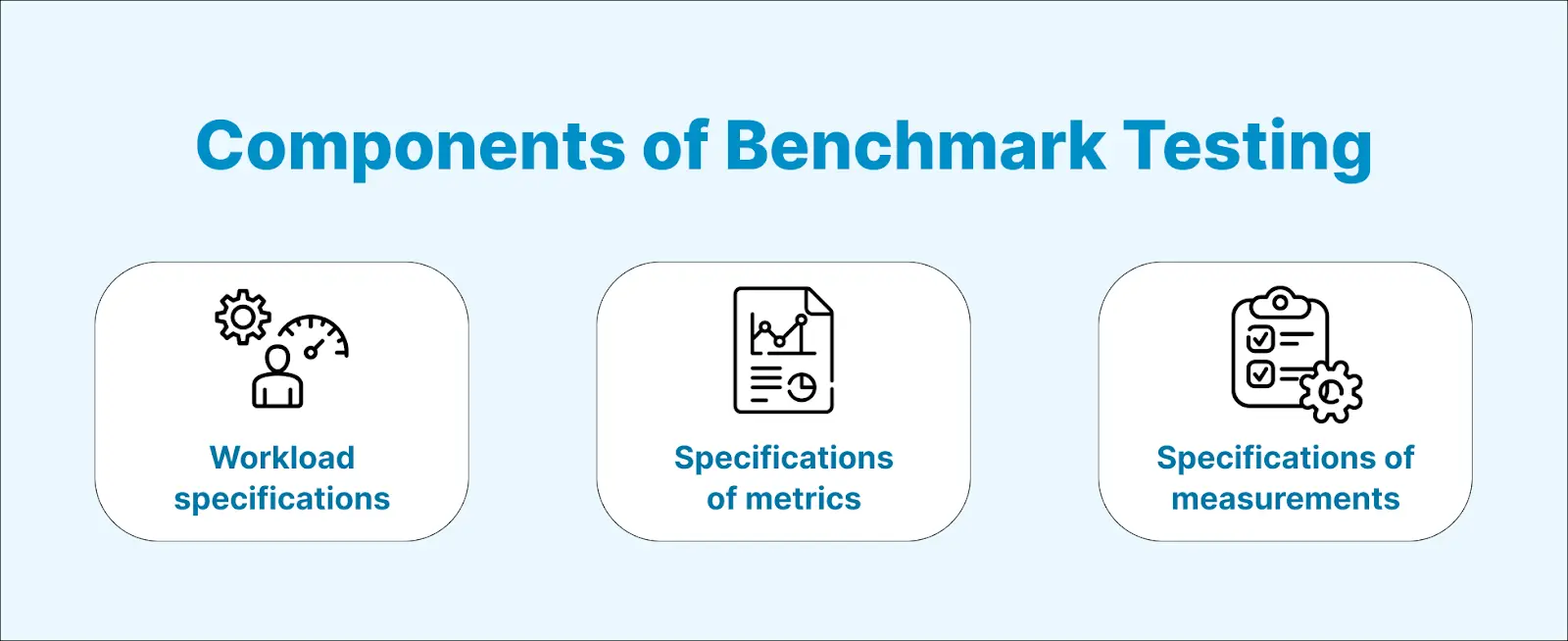
- Workload specifications: This process involves identifying the type and frequency of requests submitted to the System Under Test (SUT).
Outlined below are the considerations when defining workload conditions:
- Hardware configuration that includes database, elastic, coordinating, and cluster nodes.
- Network configuration and security.
- Operating system version.
- Patch levels.
- Servers.
- Libraries and software packages, and others.
- Specification of metrics: Testers and developers highlight the critical elements to measure, such as download speed, application code, and SQL query efficiency.
- Specification of measurements: It establishes a method for measuring the specified metrics or elements to determine the anticipated and suitable results values.
Before we delve into benchmarking, it's crucial to understand the prerequisites. It ensures we have all the necessary components or libraries to conduct benchmark testing successfully. Let's explore these prerequisites in the following section.
What Are the Prerequisites for Benchmark Testing?
Before benchmark testing, you need an experienced test engineer, clear performance goals, meaningful test cases, suitable tools, a production-like environment, and a written test plan.
Before performing any test, specific prerequisites need to be considered. Here are some of those for benchmark testing:
- Ensure the availability of a qualified software test engineer with relevant experience.
- If not fixed, seek clarity on the preferred performance goals.
- Develop meaningful test cases.
- Select and use appropriate software testing tools.
- Whenever possible, replicate production scenarios.
- Finally, formulate a robust test plan.
Now that you have the prerequisite in the following section, we will learn how to create a test plan to start with benchmark testing.
How Do You Create a Benchmark Test Plan?
Create a benchmark test plan by stating its purpose, listing the components to test, documenting metrics and standards, choosing tools, defining the workload, and planning metric collection.
Before creating the test plan for benchmark testing, you have to follow these steps to have a robust testing process:
- Clarify the purpose of your testing and document your application's desired testing and verification.
- Identify the components to be tested, determining whether they fall under hardware/software/application categories.
- Document the specific metrics and the appropriate standards for evaluating components through your chosen benchmark testing type.
- After establishing the purpose, testing type, and metrics, choose performance testing tools, commercial or open-source, based on your requirements.
When you have all set the test plan for testing, the next step comes to develop an actual test plan. You can create the test plan by following these simple processes:
- Determine the scale at which the test runs. Define the workload: the number of users, transactions, and other factors the application handles.
- Define a method for collecting metrics like response time, throughput, latency, and resource utilization. Use the right tool to capture them.
- Define the benchmark test's duration and specify the test process's starting and ending times in the test plan.
- Anticipate barriers in the test process. Prepare a backup plan for unexpected issues, such as system crashes or test plan failures.
- Clearly define who decides when the test ends, based on predefined criteria such as performance goals, critical failures, or planned duration.
In the section below, we will learn the various phases of benchmark testing.
What Are the Phases of Benchmark Testing?
Benchmark testing runs in four phases: planning, analysis, integration, and action, which move from setting goals to acting on the results.
It consists of four crucial phases. These phases allow testers to plan, organize, and ensure that the results meet the client's expectations.
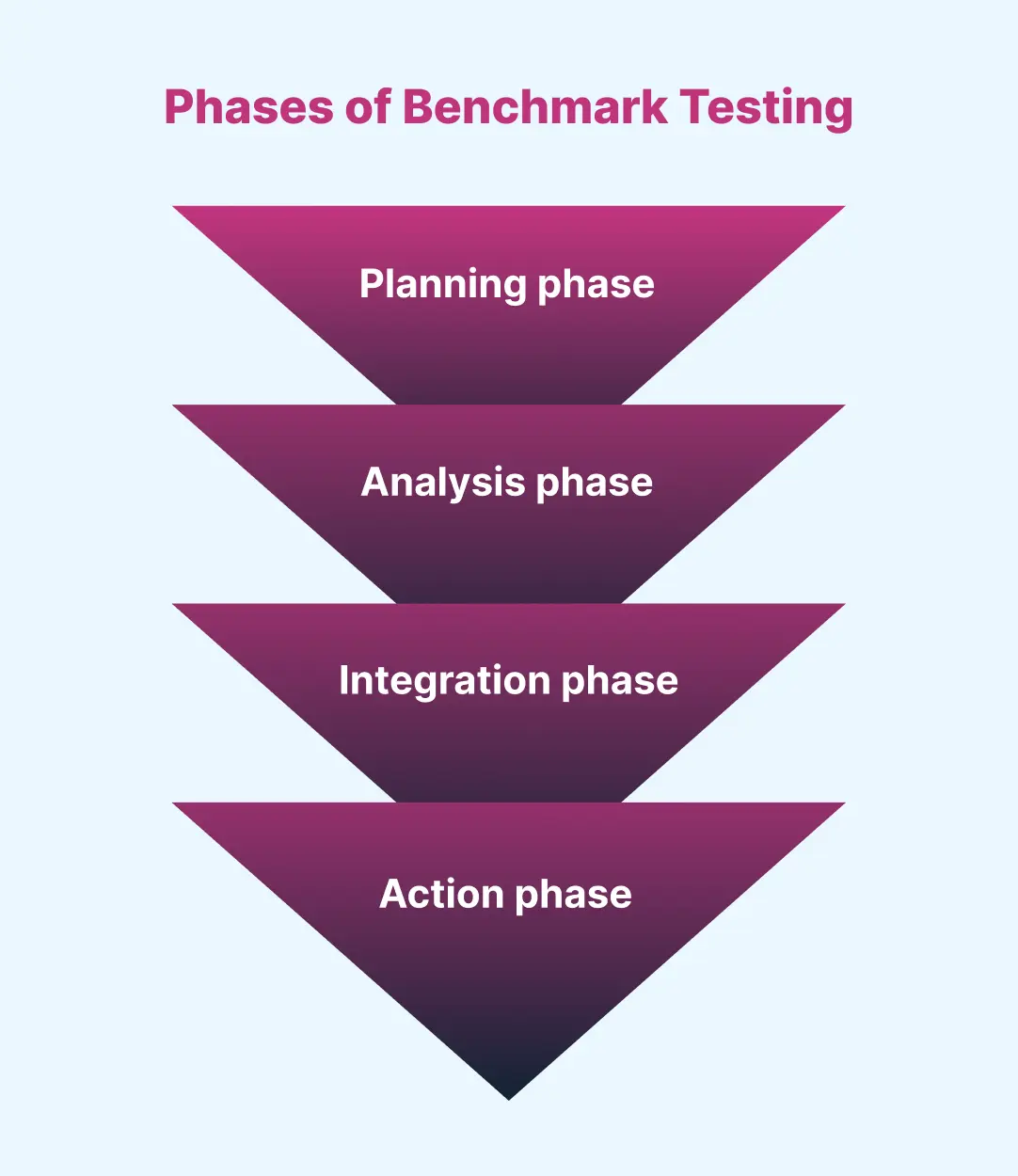
- Planning phase: The testing team identifies the best standards and requirements, establishing the benchmark criteria and the steps needed to determine them.
- Analysis phase: This phase includes setting goals that the company decides after the benchmark is in place. Once the benchmark is set, the team analyzes the information gathered during test planning. It aims to identify the root cause of errors and find ways to enhance quality.
After deciding on the desired appearance and features of the application, the next step is to implement these plans and develop the software accordingly.
- Integration phase: In this phase, the team shares the results with the development and database teams based on the analysis. After stakeholders and managers approve the suggestions from the planning and application phases, the team establishes functional goals for the next phase.
Approval means signing off on the final design and feature documents, then developing the application with these plans as the benchmark. Once secured, an action plan monitors and evaluates the final results.
- Action phase: The team creates the test plan, executes the actions decided during integration, and monitors progress until every goal is met.
Now that we know the four phases, we will learn the process in detail in the next section.
How Do You Perform Benchmark Testing?
Perform benchmark testing by gathering requirements, planning tests, preparing data, setting up a production-like environment, executing runs, comparing results with benchmarks, and iterating.
The following are the steps that must be followed when performing benchmark testing.
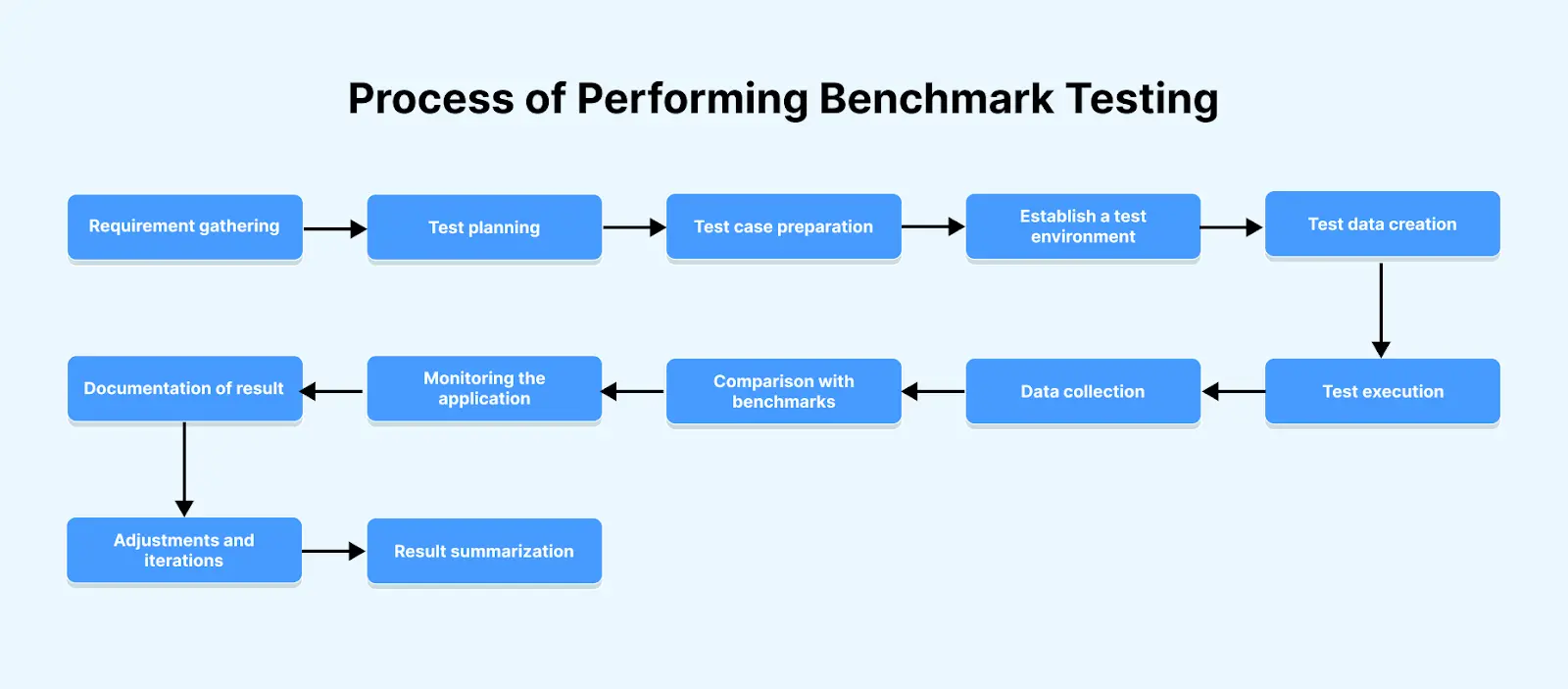
- Requirement gathering: Review and analyze the needs and specifications of the web application, identifying its essential features, functionality, and performance targets.
- Test planning: Prepare and update the test plan documents by defining the test scope, objective, entry, and existing criteria of benchmark testing.
- Test case preparation: Create test cases from end-user requirements and objectives, identifying inputs, expected outputs, test data, techniques, and methodologies.
- Establish a test environment: Configure the hardware, software, and network components to mimic real-world conditions and test the application accurately.
- Test data creation: Create test data reflecting the expected workload and scenarios. It must be diverse, realistic, and cover all use cases.
- Test execution: Execute the test per the plan, applying specific workloads, transactions, or scenarios to evaluate behavior under different conditions.
- Data collection: After running the test, collect data on the application's performance, including metrics like response time, throughput, and error rate.
- Comparison with benchmarks: Compare the collected metrics against established benchmarks: industry standards, previous baselines, or predefined targets for acceptable performance.
- Monitoring the application: Track the performance metrics during test execution, as this provides real-time insight into the application's functionality.
- Documentation of result: Document each test iteration as data is collected, capturing raw performance metrics, unexpected behavior, and other variations.
- Adjustments and iterations: Adjust the test environment or cases as needed during execution. This flexibility helps identify and resolve issues that arise.
- Result summarization: Summarize the result and give any recommendations for improvement.
How Do You Run Benchmark Tests in a CI/CD Pipeline?
Run benchmark tests in CI/CD by adding a performance stage that replays a fixed workload on each merge and fails the build when results regress past a set threshold.
Keep the environment fixed: the same instance type, dataset, and warm-up period on every run, or run-to-run noise will hide real regressions. Store each run's results so the stage compares against a rolling baseline instead of one old number.
Most tools can gate a pipeline. JMeter runs headless from its command line, Gatling supports assertions on response time and error rate, and k6 thresholds fail the test with a non-zero exit code when a condition such as a 95th percentile response time under 200 ms is missed.
What Factors Influence Benchmark Test Results?
Benchmark results depend on system configuration, the operating system and drivers, the workload applied, and environmental factors such as background processes and network conditions.
Numerous factors can significantly impact the outcomes of benchmark testing. It is crucial to consider the following key factors when conducting benchmark tests to ensure precise and meaningful results:
- System configuration: Memory quantity, processor type, speed, and storage capacity can collectively impact performance.
- Operating system and drivers: Updated drivers and an optimized OS enhance performance, while outdated or misconfigured ones degrade it.
- Workload: Varied workloads impose distinct demands and produce diverse results. A representative workload that mirrors intended system use is crucial.
- Testing methodology: Check for the correct sequence of test scenarios, the test duration, and test parameters that can impact the test result.
- Environmental factors: Aspects like temperature and humidity can affect the performance of hardware components.

What Should You Consider Before Running Benchmark Tests?
Before running benchmark tests, ensure consistency and control, understand the system architecture, calibrate static data to user volume, and confirm every component is operational.
The following aspects should be considered to ensure successful benchmark testing.
- Ensuring consistency and control are crucial measures for performing benchmark testing.
- Comprehending the system architecture to formulate test criteria and test data.
- Evaluating the initial static data and adjusting it based on the number of users is essential.
- Verifying the presence of the 'Reset' functionality where needed and defining the per-second transaction rate (specifically addressing users' transactions against a database).
- Dividing the system elements according to their functionalities.
- Recognizing that each system possesses a distinct architecture and design, which must be acknowledged during benchmark testing.
- Ensuring all software components are in operational condition.
- Ensuring all software and hardware components align with the production environment requirements.
- Verifying the accuracy of the operating system and supporting drivers.
- Ensuring the test cases are consistent and proper control measures are utilized.
- Deleting the prefetch and temporary files system before initiating a benchmark.
- Ending all processes and applications running in the background.
- Checking for operating system updates and real-world configurations.
How Do You Interpret Benchmark Test Results?
Interpret benchmark results by checking the test's specific goal, comparing against benchmarks built for similar components, and reviewing every metric rather than one headline score.
Interpreting benchmark test results can be challenging and requires a comprehensive understanding of the tested system, the executed benchmark tests, and the resulting outcomes. Here are some ways to interpret benchmark test results:
- Look for the benchmark test's specific goal, including evaluating CPU performance, speed, and other factors.
- Compare the benchmark used in the test with similar components relevant to the use case, as benchmarks may focus on different aspects.
- Evaluate all the individual metrics is essential to understand the benchmark test results comprehensively.
- Review the benchmark test results, paying attention to the overall performance score and the outcomes of individual tests.
- Once testing completes, use the results to make specific recommendations for the desired software quality outcomes.
- Some benchmarks focus on synthetic testing tasks that don't reflect real usage. Choose benchmarks that align with your intended applications or workload.
The challenge in benchmark testing is the complexity of interpreting results and deciding on actionable insight. Testers need help identifying performance and making better decisions based on the benchmark test results.
To overcome this challenge, you can use cloud-based solutions that give testers a clear platform to validate performance bottlenecks and make informed decisions from the benchmark results.
One such platform is TestMu AI, an AI-Native test orchestration and execution platform that runs manual and automated tests at scale across 10,000+ real devices, browsers, and OS combinations.
It runs diverse tests through its real-device cloud infrastructure, supports web application testing, and provides a mobile device lab for real device testing.
The platform offers detailed performance reports and metrics that are straightforward to interpret. Testers can quickly identify performance issues, track improvements over time, and make data-driven decisions to enhance software quality.
Comprehensive browser and device coverage ensures benchmark tests resemble real-world user environments, so testers achieve more accurate and meaningful results.
To learn more about this platform and its features, follow this detailed video tutorial and get valuable insights.

You can also streamline the gathering and analysis of test execution data through TestMu AI's Test Observability feature. A single dashboard surfaces real-time insights for informed testing decisions.
Some key features:
Test Analytics: Unifies test execution data from various TestMu AI products for real-time insights, including:
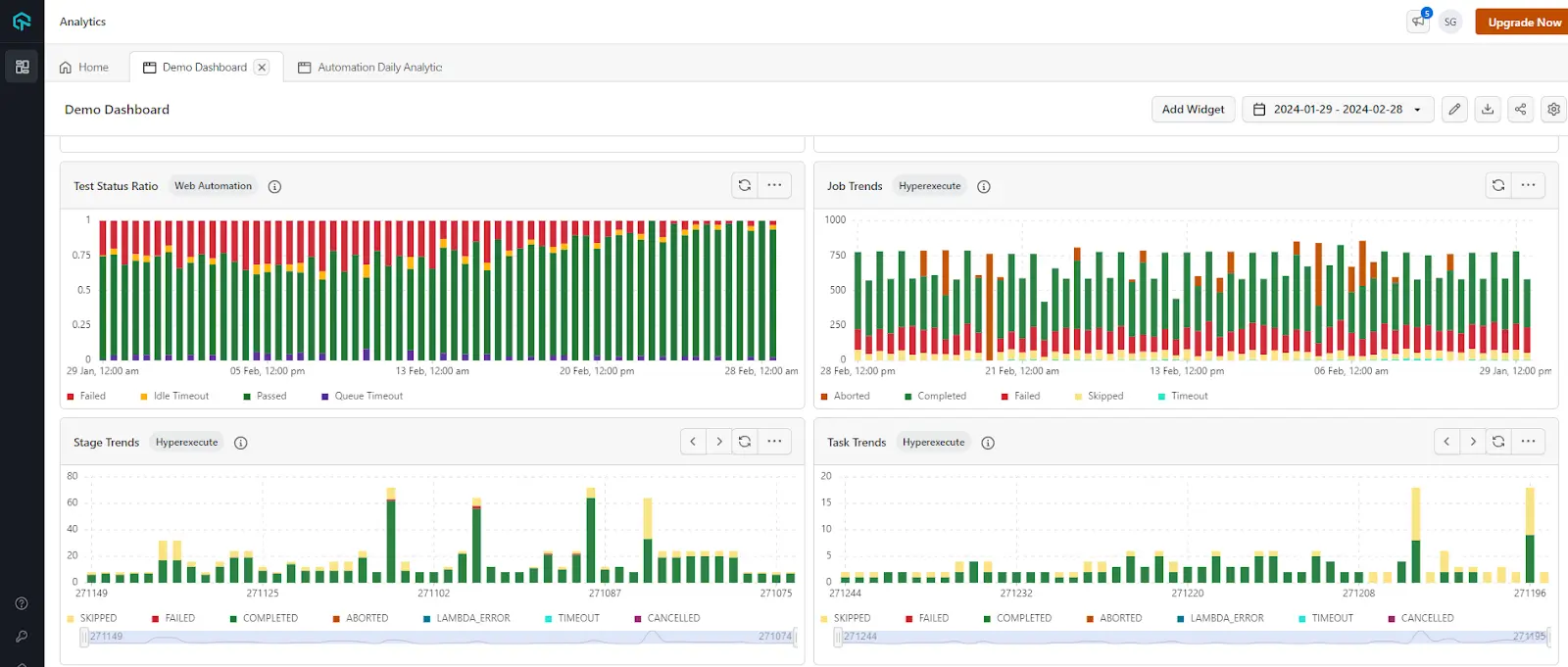
- Test case health summary: It identifies inconsistent tests that sometimes pass and sometimes fail, flagging potential issues in their design or execution.
- Overall test summary: Provides an overview of the number of tests executed, categorized by status (e.g., pass, fail, skip).
- Distribution of tests across operating systems and devices: It helps detect potential OS or device compatibility problems.
- Performance trends over time: It identifies trends in pass/fail rates and potential improvements in the testing process.
- Detailed error information: It provides insights into errors encountered during testing.
- Resource usage insights: It offers insights into how your team uses TestMu AI resources.
- Error distribution analysis: It pinpoints the nature and distribution of errors across test categories, enabling focused debugging and quicker resolution.
- HyperExecute platform-specific data analysis: It analyzes data specific to the HyperExecute platform (cloud-based test execution).
It provides a comprehensive view of testing data, helping testers improve efficiency and effectiveness in their testing processes.
What Makes a Good Benchmark Test?
A good benchmark test is repeatable, starts from the same system state each run, reflects real-world usage, runs in isolation, and matches production hardware and software.
A well-executed benchmark test evaluates the performance of various systems, devices, or software applications consistently and impartially. To be effective, it should exhibit several key characteristics.
- Ensure that the tests can be repeated reliably.
- Begin each iteration of a test in the same system state.
- Ensure that the benchmark is relevant and reflects real-world usage scenarios.
- Ensure that no other functions or applications unintentionally operate in the system during benchmark testing.
- Ensure that the hardware and software used for benchmark testing align with your production environment.
- Adhere to standardized industry methodologies for benchmark testing.
- Use clear metrics with interpretable scores to evaluate performance.
In the following section, we will look into the framework used to help perform benchmark testing.
What Are the Best Benchmark Testing Tools?
Popular benchmark testing tools include Apache JMeter, Gatling, and NeoLoad for applications, stress-ng for systems, and 3DMark and PassMark for hardware. For application benchmarks, TestMu AI's cloud load testing runs the JMeter and Gatling plans a team already maintains on managed load generators, so the benchmark does not need a dedicated lab of load machines.
Various benchmark testing frameworks and tools are available to assist in creating and performing benchmark tests. Some popular benchmark testing tools are:
- Apache JMeter: This open-source software testing tool performs load, performance, and benchmark testing efficiently.
- Gatling: Allows distributed testing, real-time reporting, and detailed results with this open-source load testing framework.
- Grinder: This versatile open-source load-testing framework runs benchmark tests across systems, including web applications and databases.
- stress-ng: It is a Linux-based stress testing tool that allows benchmark tests on system components, such as CPU, memory, and I/O.
- Benchmark Framework 2.0: Developed by Alfresco, this framework executes highly scalable, Java-based load and benchmark tests.
- TechEmpower: An open-source framework that performs benchmark tasks, requiring the correct configuration of the test environment.
- 3DMark: Compatible with Windows, Android, and iOS, it evaluates 3D graphics cards and CPU processing, designed specifically for gaming systems.
- PassMark: A PC benchmark and software testing tool that evaluates system performance through CPU, memory, and disk performance tests.
- SmartMeter.io: A performance and load testing tool offering enterprise-level features with an interface similar to JMeter.
- NeoLoad: An automated performance testing tool that addresses API and end-to-end application testing.
Now that we have learned the tools and frameworks needed to start benchmarking tests, let's examine the challenges faced in the following section.
How Is AI Changing Benchmark Testing?
AI changes benchmark testing in two ways: models help spot regressions in noisy performance data, and AI systems themselves now need benchmarks for speed, cost, and accuracy.
Finding regressions: Run-to-run noise hides small slowdowns, so teams are replacing fixed thresholds with statistical detection. Apache Otava (incubating), built by performance engineers from MongoDB, DataStax, and others, analyzes stored performance test results with change point detection and flags where a regression began.
Benchmarking AI: MLCommons publishes the MLPerf benchmark suites, the industry reference for how fast systems train and run AI models, and LLM applications add their own metrics such as time to first token and tokens per second. For agentic systems, see these agent performance metrics and benchmarks.
AI assistants also draft load scripts and summarize run reports, but keep a person on the pass or fail call, because a model can describe a regression without proving its cause.
What Are the Challenges in Benchmark Testing?
The main benchmark testing challenges are matching real-world use, keeping configurations stable, choosing the right reference, keeping pace with frequent releases, and picking suitable tools.
Apart from its advantages, benchmark testing also presents several challenges that you should be aware of when evaluating the performance of the software application; below are specific challenges mentioned.
- It is challenging to set a benchmark that can represent a real-world scenario.
- Because real-world workloads vary, standardized benchmark criteria may miss diverse usage patterns, often leading to inaccuracies in the test process.
- Benchmark tests include hardware and software configuration; any changes cause incorrect test benchmarks.
- Establishing the proper benchmark needs time, patience, and full project understanding. An incorrect reference can compromise the entire testing process.
- Software applications regularly require updates and new releases. Therefore, performing benchmark testing that aligns with their current updates is a continuous challenge.
- Choosing appropriate tools for benchmark testing is crucial, demanding adequate time, financial resources, and effort to ensure a suitable long-term selection.
What Are the Best Practices for Benchmark Testing?
Benchmark testing best practices are testing early and iteratively, knowing system capacity, running multiple rounds, testing components individually, and using production-like environments.
The following are some of the best practices of benchmark tests that can help address its challenges:
- Adopt an agile approach, using iterative testing throughout the development life cycle.
- Measuring application performance requires understanding system capacity: concurrent users, simultaneous requests, average sessions, and server utilization during peak periods.
- Start testing as early as possible in the development process; avoid delaying and rushing Benchmark Testing as the project nears completion.
- Execute multiple benchmark tests to ensure consistent findings and determine metric averages.
- Since applications often involve multiple systems, such as databases, servers, and services, they test individual units separately and collectively.
- It is most effective in test environments closely resembling production systems.
- To evaluate software application performance accurately, it is crucial to run benchmark tests multiple times on various devices with different configurations.
Where Should You Start With Benchmark Testing?
Start benchmark testing by recording a baseline for your most critical user flow, picking three or four metrics that matter, and rerunning the same benchmark after every significant change.
Benchmark testing is crucial in performance optimization, as it measures and compares performance across various systems. This information supports informed decisions and serves as a baseline for evaluating the impact of system changes.
Regular benchmark tests reveal how system modifications affect performance, guiding informed decisions on further optimization. They also expose bottlenecks and areas that need improvement, helping teams prioritize optimization efforts.
Benchmark testing evaluates your software's overall speed, stability, and efficiency. However, achieving the desired results necessitates an optimal test environment.
For accurate testing outcomes, you can always rely on a real device cloud such as TestMu AI. Accessing over 10,000+ real devices and desktop browsers ensures effective results.
Author

Nazneen Ahmad
Blogs: 39


Nazneen Ahmad is a freelance Technical Content SEO Writer with over 6 years of experience in crafting high ranking content on software testing, web development, and medical case studies. She has written 60+ technical blogs, including 50+ top-ranking articles focused on software testing and web development. Certified in Automation Basic and Advanced Training - XO 10, she blends subject knowledge with SEO strategies to create user focused, authoritative content. Over time, she has shifted from quick, keyword-heavy drafts to producing content that prioritizes user intent, readability, and topical authority to deliver lasting value.
Reviewer

Sri Harsha
Reviewer
Sri Harsha is Engineering Manager of the Open Source Program Office at TestMu AI (formerly LambdaTest), where he leads open-source engineering behind the Selenium and Appium automation grid and builds agentic AI systems for quality engineering. He is a member of the Selenium Technical Leadership Committee and a committer to WebdriverIO and Appium, and was recognized with the LambdaTest Delta Award 2023 for Best Contributor in open-source testing. He brings over 10 years of experience in software testing and automation, with earlier roles at EPAM Systems and ZenQ. Sri Harsha holds a B.Tech in Computer Science from Jawaharlal Nehru Technological University.


Benchmark Testing FAQs
Did you find this page helpful?
More Related Learning Hubs
TestMu AI forEnterprise
Get access to solutions built on Enterprise
grade security, privacy, & compliance
- Advanced access controls
- Advanced data retention rules
- Advanced Local Testing
- Premium Support options
- Early access to beta features
- Private Slack Channel
- Unlimited Manual Accessibility DevTools Tests