

Power Your Software Testing with AI Agents and Cloud
The Native AI-Agentic Cloud Platform to Supercharge Quality Engineering. Test Intelligently and Ship Faster.


- TestMu AI (Formerly LambdaTest)
- /
- Blog
- /
- Website Testing: How to Test a Website (Step-by-Step Guide)
Website Testing: How to Test a Website (Step-by-Step Guide)
Learn how to test a website step by step: functional, cross-browser, performance, security, and accessibility checks, plus a 9-point website testing checklist.
Last Updated on:
Website testing is the process of checking a website or web application for functional, performance, security, usability, and compatibility defects before and after release. A complete pass covers seven areas: functional, cross-browser, responsive, performance, security, accessibility, and visual regression testing, run on real browsers and devices rather than emulators alone.
This guide gives you the full website testing workflow in the order a QA team actually runs it: a nine-step process you can follow on your own site today, a checklist mapping each test type to what it catches, the six website architectures that need different treatment, and where AI agents now remove the slowest part of the job.
If you are building rather than testing, start with the web development frameworks comparison, then come back here. If your site is not deployed yet, you can still follow every step by testing locally hosted websites through a secure tunnel, and cover the code layer with unit testing frameworks.
TL;DR
Website testing is the process of checking a website for functional, performance, security, usability, and compatibility defects before and after release. A full pass runs seven test types across real browsers and devices, starting with functional checks on forms and navigation and ending with visual regression on the rendered UI.
The nine steps, in order: define scope, write test cases, run functional tests, test across browsers, verify responsiveness on real devices, measure Core Web Vitals, run security checks, audit accessibility, then catch visual regressions. Order matters, because functional defects invalidate any performance or visual result collected before they are fixed.
The seven test types, and what each one alone catches:
- Functional: broken forms, dead links, failed logins, checkouts that silently drop orders.
- Cross-browser: CSS and JS engine differences, most often Safari rendering what Chrome does not.
- Responsive: horizontal scroll and unreachable tap targets on real mobile viewports.
- Performance: slow Largest Contentful Paint and layout shift, which Google counts as ranking signals.
- Security: injection, broken authentication, and misconfiguration, per the OWASP Top 10.
- Accessibility: missing alt text, unlabeled fields, and contrast failures against WCAG.
- Visual regression: pixel-level UI breaks that functional tests pass, because the element is present but rendered wrong.
When to run it: the full pass before a release, functional and visual suites on every pull request, cross-browser and visual checks after any dependency or CMS update, and uptime plus Core Web Vitals continuously in production.
What it takes to run: steps three to nine each need a browser, OS, or device you do not have on your desk, so they are usually run on a cloud grid such as TestMu AI rather than a local device lab.
What Is Website Testing?
Website testing or web testing is checking your web application or website for potential bugs before it is made live and is accessible to the general public. Web testing, or web application testing, checks for functionality, usability, security, compatibility, and performance of the website or the web application.
During this stage, issues such as web application security, the site's functioning, access to a person with impairments, and its ability to handle traffic are checked.

Why Is Website Testing Necessary?
The International Telecommunication Union estimates that 6 billion people, or 74 percent of the world's population, were using the internet in 2025. Your website is competing for attention inside that population on hardware and browsers you do not control, and every untested combination is a segment that may simply never convert.
Skipping website testing has four measurable consequences, and each one shows up in a different report:
- Lost revenue - A checkout that fails only in Safari takes every iOS order with it, and analytics reports it as an abandoned cart rather than a defect, so the bug can run for weeks before anyone traces it.
- Lost rankings - Core Web Vitals are part of Google's page experience signals, so a layout that shifts while loading is both a UX problem and a ranking problem.
- Legal exposure - Accessibility defects are measured against the W3C's WCAG success criteria, which underpin ADA and Section 508 obligations for many organizations.
- Breach risk - Injection, broken authentication, and misconfiguration are all tracked in the OWASP Top 10, and all three are findable before release with routine security testing.
The difficulty is breadth rather than depth. A single release has to hold up across cross browser compatibility, performance under load, security, accessibility, and user acceptance at the same time, which is why the nine-step process below runs them as an ordered sequence instead of a single sweep.
For a longer per-page version of the gate below, use the website testing checklist.
For a complete breakdown of the specific tools that cover each testing type, from automation frameworks like Selenium and Playwright to performance, accessibility, and security scanners, see the guide to the best website testing tools.

Note: Spruce up web testing across 3,000+ browser and OS combinations. Try TestMu AI Now!
Types of Website Testing
Seven test types cover a production website. They are not interchangeable: each one catches a defect class the others pass straight through, which is why a suite that is 90% functional tests still ships broken layouts.
| Test type | What it verifies | Defect it catches that others miss |
|---|---|---|
| Functional testing | Forms, links, logins, search, cart and checkout behave per requirements. | A submit button that posts to the wrong endpoint. Nothing else in the suite exercises the business rule. |
| Cross-browser testing | Identical rendering and behaviour across Chrome, Safari, Firefox, and Edge. | A CSS property supported in Blink but not WebKit. Functional tests on Chrome alone pass. |
| Responsive testing | Layout, tap targets, and navigation at real mobile viewports. | Horizontal scroll on a 360px screen. Desktop-only runs never render that viewport. |
| Performance testing | Load time, Core Web Vitals, and behaviour under concurrent traffic. | A page that works but takes eight seconds. Every functional assertion still passes. |
| Security testing | Injection, authentication, session handling, and configuration. | An input field that accepts a payload. Valid-input tests never send one. |
| Accessibility testing | Screen-reader semantics, keyboard paths, contrast, and labels against WCAG. | An icon-only button with no accessible name. It is clickable, so functional tests pass it. |
| Visual regression testing | Rendered pixels against an approved baseline. | An overlapping element after a CSS change. The DOM is intact, so assertions pass. |
Read the last column as a coverage argument. If your pipeline runs only the first row, six of these defect classes reach production unchallenged.
How to Test a Website: A 9-Step Process
Run these nine steps in order. The sequence matters: functional defects invalidate performance numbers, and a layout that breaks in Safari makes visual baselines useless, so each step assumes the previous one passed.
- Define the test scope - List the pages and flows that carry business value: home, search, product detail, cart, checkout, login, and account. Add the browsers, OS versions, and viewports you will support, taken from your own analytics rather than a generic popularity list. Anything outside this list is explicitly out of scope, which is what keeps the pass finite.
- Write the test cases - For each flow, record the precondition, the steps, and the expected result. A case that says "check the cart works" is not testable; one that says "add two units of an in-stock item, expect subtotal to equal unit price times two" is. Keep them in a shared repository so results are traceable to requirements.
- Run functional tests first - Exercise every form, link, and interactive element. Cover the negative paths too: submit an empty required field, use an expired coupon, and enter an invalid card number. Broken links and 404s belong here, not in a later SEO pass.
- Test across browsers and operating systems - Repeat the critical flows on Chrome, Safari, Firefox, and Edge, and on both Windows and macOS. Safari is the highest-yield target because its WebKit engine diverges most from the Chromium browsers most teams develop on.
- Verify responsiveness on real devices - Check layout, tap-target size, and navigation at mobile and tablet viewports. A resized desktop window is not a substitute: it does not reproduce mobile font rendering, touch behaviour, or device pixel ratio, so a real device or a real-device cloud is required for a trustworthy result.
- Measure performance and Core Web Vitals - Record Largest Contentful Paint, Cumulative Layout Shift, and Interaction to Next Paint on a throttled connection, not on office wifi. Then run a load test at your expected peak concurrency to confirm response times hold.
- Run security checks - Test input validation, authentication, session expiry, and access control on every role. Confirm HTTPS is enforced, cookies carry the Secure and HttpOnly flags, and error messages do not leak stack traces. The OWASP Top 10 is the reference list for what to cover.
- Audit accessibility - Run an automated WCAG scan for contrast, alt text, and form labels, then do the manual half an automated tool cannot: navigate the whole flow with only the keyboard, and confirm focus order is logical and focus is always visible.
- Catch visual regressions last - Once behaviour is correct, capture screenshots of each page state and diff them against an approved baseline. Run this on every release so an unrelated CSS change cannot silently move an element that all your functional assertions still pass.
Steps four through nine are the ones that need infrastructure rather than effort, because each requires a different browser, OS, or device that you do not have on your desk. Running them on TestMu AI's test orchestration cloud covers 3,000+ browser and OS combinations without a local device lab, and the same test scripts run unchanged against Selenium, Cypress, Playwright, Puppeteer, and Appium.
Website Testing Checklist
Use this as the pre-release gate. Every row is a pass or fail, and the frequency column tells you which rows belong in CI rather than in a manual pass.
| Area | Check | Run it |
|---|---|---|
| Links and navigation | No 404s, no redirect chains, breadcrumb and menu paths resolve. | Every build |
| Forms | Required-field validation, error messages, successful submission, and the confirmation state. | Every build |
| Authentication | Login, logout, password reset, session timeout, and role-based access. | Every build |
| Checkout and payment | Cart totals, tax and shipping, coupon rules, declined-card handling, order confirmation. | Every release |
| Cross-browser | Critical flows on Chrome, Safari, Firefox, and Edge across Windows and macOS. | Every release |
| Responsive | No horizontal scroll, tap targets reachable, images scale, menu collapses correctly. | Every release |
| Performance | Core Web Vitals within threshold on throttled mobile, plus a load test at peak concurrency. | Every release |
| Security | HTTPS enforced, secure cookie flags, input validation, no stack traces in errors. | Every release |
| Accessibility | Automated WCAG scan plus a full keyboard-only pass with visible focus. | Every release |
Nine rows is the minimum viable gate for a content or marketing site. If you run a transactional site, expand the checkout row into its own set of cases before anything else, since that is where a defect converts directly into lost revenue.
Website Testing Challenges
Website testing comes up with its challenges that businesses need to consider. Let's take a look at the top ones among them:
- Firewall interactionYou'll face several instances where a port or a firewall can block a website since it has issues regarding security certificates. You must test your application across different firewalls to stay safe from such incidents.
- Web Services validationModern-day web applications depend thoroughly upon the web service layers such as XML/SOAP or REST/JSON for exchanging data between different applications or systems. Hence there is a huge scope to test all these applications. To test these web services, you must pick the right tool from your web testing tools.
- Consistency maintenance across different browsersMajority of the users prefer reliable, flexible, and interactive web apps. If a user comes across any inconsistency when they surf on browsers, it becomes a huge headache for enterprises. When you perform usability testing, your developer has to monitor the scalability and interactivity of your application across various browsers through different hardware.
- Overcoming performance issuesYour website should load fast- That's what people expect next to a user-friendly experience. This is also one of the primary goals of website testing. I realized this from the results I achieved from the poll. To overcome this challenge, testers must keenly focus on performance testing with interoperability, extended application, and integration issues.
- Security threatsWe live in times where digitization has become the norm. We are witnessing an overwhelming rate of cyberattacks. To avoid data breaches and information loss, we must regulate how we conduct security testing. This can help you out when you want to avoid security issues regarding DDoS attacks along with cyber attacks.
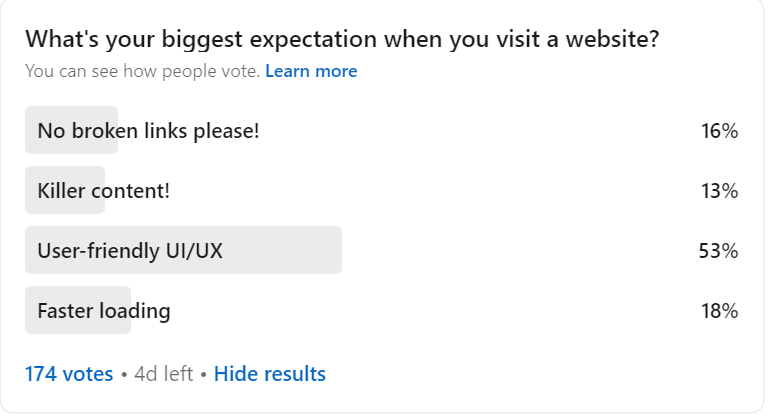
When I conducted a LinkedIn poll asking the biggest expectation people have when they visit any website, out of 174 people, 53% of them indicated user-friendly UI/UX on the web. Nobody wants to spend time on a crumpled website with zig-zag text and images. Developers and testers need to take special care of this matter.
Website Testing Best Practices
Before we understand the best website testing practices, let's touch base with the basics. This is the structure of a web application:
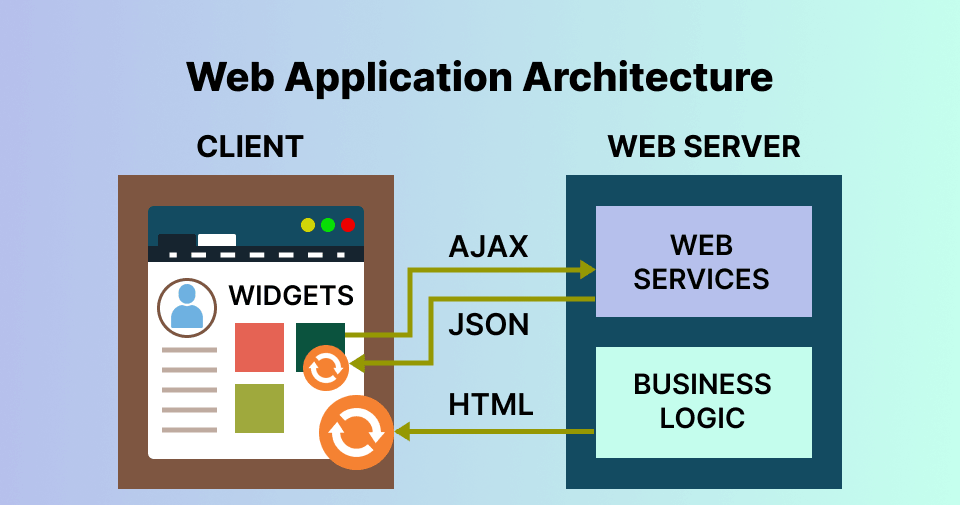
The architecture of a web application would describe different interactions between databases, applications, and middleware systems. This is done to make sure that different apps function on a simultaneous basis. Before we open a web page, we type the URL of the website in the web browser's address bar. The server would send many files to the browser in response to your request. After that, the user would be able to carry out web interactions. The functioning of a web app is quite similar.
When we deal with any web application, it involves different codes or sub-programs that run parallelly. These are
- Client-side Code - The browser-side code that responds to a few user inputs.
- Server-side Code - The server-side code that responds directly to the HTTP requests.
The architecture of a web application is vital in modern days since a vast portion of the network traffic globally, along with devices and apps, leverages web-oriented communication. The web app architecture should inevitably deal with factors such as scalability, efficiency, robustness, security, and reliability. That's where website testing software comes into the picture.
Website testing is going to grow from strength to strength with these industry-led practices. It's apparent that your website audience would eulogize you if you follow these practices:
- Everything starts with DocumentationDuring website testing and web app testing, the tester shouldn't ignore the importance of documentation. After doing a clear study, they need to document the needed facts in requirements, test cases, test plan, and traceability matrix. Your document would act as a source of truth. Hence you need to be careful when you write it.
- Check for Website FunctionalityAutomated functionality testing is one of the top testing processes to test how the website or web app would sync up with pre-set requirements. It's all about using black-box testing techniques when a tester wouldn't be aware of the internal system logic. This also includes validation, links/URL, cookies, and error message testing. You must thoroughly analyze and perform all these tests using the right tool and team.
- Leverage Cross Browser CompatibilityUsers reach the same page through dozens of browser, OS, and viewport combinations, and each one renders it slightly differently. Cross browser compatibility testing checks that the layout, scripts, and interactive elements behave identically on every combination you support, which is what makes a responsive design actually responsive in the field rather than only in the design file.
- Conduct Performance Testing under different conditionsAn application shouldn't crash when put under heavy loads. It should work like a pro on every browser and device. But, alas! A minor design or coding flaw is all it takes to affect the performance of the website on a negative note. Hence you need to perform load testing and check how your website performs under different loads. Get your fingers on the pulse with the best automation load testing tools in the market.
- Choose the top parameters for Usability testingUsability testing and user experience go hand in hand when you want to engage your audience, leads, and visitors and eventually convert them into clients and customers. Evaluating the application's usability on important parameters such as speed, content readability, accessibility, navigability, and UI design is of utmost importance.
- Make use of Geolocation testingThe web is a global, universal platform where a user from the USA can read a blog from an Armenian website. Hence, it's always better to test your website's appearance under different geo-locations. Geolocation testing can also be a secret sauce for nailing SEO aspects since you can easily resolve any bug in the website version of a particular nation on time.
- Kickstart Interface testingThe method of interface testing confirms that these three major web application components are running perfectly fine- database, web browser, and the web server. We use this testing to check for any interruption when transferring the data. When we do this, we can check if we can check the communication happening between different interfaces. Check out our list of the best UI testing tools and techniques in the market.
- Check for Security IssuesIt's a recipe for disaster when you ignore the red flags of web security. A single vulnerability can translate to a high-end data breach, well enough to bring down the big giants to mud. This can lead to a misbalance in morale along with financial consequences. People would lose their trust in your brand eventually.
- Avoid skipping confirmation testWe can always perform change-related testing for tracking the bugs and confirming that they have gotten fixed. It's always a must to write efficient test cases. Then you need to run and re-run the test cases to ensure that your code is bug-free. Making changes to the code shouldn't lead to any defects. To affirm this, you can use regression testing, another retesting form in website testing.
- Integrate Exploratory Testing with Software Development Life CycleExploratory testing reduces time and levels up the bug discovery process. Testers take some time to write and execute every test case on a simultaneous basis. When you fail to understand the setbacks of exploratory testing, you are prone to more bugs and defects. You can get done with the limitations imposed by website testing by integrating white-hat and black-hat software testing techniques. The integration can produce the most needed test results for your team and go on to reduce the time you take to test.
- Accessibility Testing is importantYour website should be accessible to a wide range of users across the globe. A person with impairments should be able to access a particular website more easily. Hence it's a must to perform accessibility testing to ensure that, for example, your text is also available in audio format through a screen reader and your image contains ALT text.
- Perform Database TestingPerforming database testing is a must to check for query execution, query response time, reflection of test data, and avoiding data integrity. For example, when you want to perform Oracle testing, things get easier since you can connect Oracle cloud to different databases via networks. A database management system such as Oracle can help you manage your data and ensure fewer errors in your website database. You can also perform browser compatibility tests of SQL databases.
- Conduct Beta TestingWe perform beta testing with the help of limited, real-time users. It's a must to understand what your user thinks about your product.
With responsive web design, you can ensure mobile-friendly and user-friendly applications that work amazingly on every browser, OS, and device. While developers slay it with responsive websites to ensure that the websites and web apps are accessible on different web browser versions, testers can perform cross browser compatibility tests to ensure they are on track.
Learn how to deal with responsive testing with TestMu AI.
Hence it's a must to test your web apps and websites concerning security. Define your quality controls and coding standards. Bring in a cross-functional approach to building policies. Come up with strategies to face both internal as well as external challenges. Keep up with industry standards. Use them as benchmarks during website testing.
Beta testing is an inseparable part of website testing. Learn how to perform beta testing for apps.
Approaches by Website Type
The nine-step process is the same for every site, but where you spend your time inside it changes with the architecture. Six categories cover almost every website, and each one shifts the weight of the pass somewhere different.
| Website type | Where the testing effort goes | Highest-risk defect |
|---|---|---|
| Simple static | Visual and layout checks, broken links, contact form. | A CSS break that only appears at one viewport. |
| Dynamic / CMS | Functional flows, session and state handling, error pages, plugin updates. | A theme or plugin update silently changing rendered markup. |
| E-commerce | Cart, payment gateway, coupons, tax and shipping rules, order confirmation. | A checkout failure on one browser, which reads as an abandoned cart. |
| Mobile website | Real-device responsiveness, touch targets, network throttling. | Layout that only breaks on real hardware, not in a resized window. |
| Animated | Frame behaviour on scroll and gesture, plus reduced-motion preferences. | Animation that blocks interaction or spikes Cumulative Layout Shift. |
| Rich Internet application | Async state, partial page updates, and regression coverage on AJAX flows. | A race condition that only appears under slow network conditions. |
Find your row, then weight the checklist accordingly. The sections below expand each category.
- Simple Static Website testingA simple static website displays the exact content without any alterations to different visitors. The dependency of these websites primarily lies upon UI and very few functionalities.
- Dynamic web app or CMS website testingWhen we talk about a dynamic web application, we usually mean content that requires frequent updating. This can also mean a combination of frontend and backend programming or a content management system such as WordPress, which requires WordPress testing. Examples of front-end languages include HTML and CSS. The most popular backend programming languages would cover PHP, JavaScript, Angular, Python, etc.
- E-commerce website testingE-commerce websites are a combo of different features and pages. A tester shouldn't ignore any of these facts. A tester must check if the products listed in the e-commerce app are directed to the right category. They should also check if the expanded view of the product image works properly. Some important features include logout, login, payment mode, coupons, discounts, etc. You can learn more about it from our earlier blog on e-commerce website testing.
- Mobile website testingFor mobile website testing, the tester needs to check for cross browser, cross OS, and cross device compatibility. The site should be compatible with every device, OS, and browser. The best way is to test your website on a real device cloud to check if the website is responsive directly. Your website should fit on every device without horizontal scrolling. Look for important features when you test a mobile website, such as spatial navigation, text truncation, image display, chatbot, etc.
To test any static website, you should check various design elements on the web page. The GUI elements include spacing, font size, color, and font style. You should also check for aspects such as broken links, contact form functioning, image display, and so on.
To test dynamic web pages and applications, it must ensure that the buttons are functioning correctly and available in a standard format. When something isn't working, the user should get an error message such as a 404 error. Don't upload an image without testing it. Check the features for text input. Since dynamic websites would cover single-page apps, you need to keep an eye on session storage.
To ensure this, you can use a real device cloud for native app testing tools such as TestMu AI. This can make your website testing and web app testing process simpler and easier.

- Animated web applications testingAn animated website allows you to create the needed animations with the capability to run in your browser. You can also inspect and manipulate these animations with declarative means such as CSS. Many developers love After Effects combined with Photoshop when they want to develop animations. It's powerful enough to do things that JavaScript cannot do.
- Rich Internet web applications testingRIAs are here to represent the new gen web apps, which provide you with interactive, richer, user-friendly, and dynamic user interfaces compared to traditional ones. The best example is Microsoft Silverlight, the most powerful development tool to create the most interactive and engaging user experiences for mobile and web applications. Another example would be Google Gears, an open-source browser extension for developers to create offline web applications.
- Through a manual testing approach based on interaction analysis with an RIA of testers or real users.
- Interactions with RIA consisting of testers or real users.
- Through an automated approach based on Crawling techniques.
Subscribe to the TestMu AI YouTube channel if you want to gather firsthand information on automated browser testing, mobile app testing, and responsive test online.
The most preferred industry method is to sit with an interaction designer and a front-end developer to build an After Effects-powered prototype in JavaScript and CSS. Then you need to conduct unit and integration testing to check for bugs. You can leverage JavaScript libraries such as jQuery or Flash when you want to animate UI elements. You can also create this prototype using Powerpoint to share for user feedback or testing.
Check if the backgrounds, shapes, buttons, icons, and text are performing their duty sincerely. You also need to check if the website or web app is responsive to users when they scroll or use gestures.
Please read through this tutorial on CSS Animations to deep dive into this.
Rich Internet web applications often use AJAX (Asynchronous JavaScript and XML), which includes a cluster of technologies such as XML, JavaScript, and XMLHttpRequest objects. All these enhancements make it tough to test RIAs regarding testability or interface complexity. To find the exact processes and techniques for efficient RIA interface testing is quite daunting. There is a need for regression testing most of the time. We can also use the execution trace data to check the new statement order when executing the test cases. Using the execution logs, we can get each test case output and know if it's passed or failed.
You can collect Execution traces:
Enabling an online Selenium automation test is the best practice for any AJAX application. You can also use Selenium WebDriver to eliminate "Automated Waiting". It's quick, logical, versatile, and concise when you want to conduct website and web app testing.
AI and Agentic Website Testing
Two parts of the nine-step process have always consumed the most time and delivered the least insight: writing the test cases in step two, and repairing them every time the UI changes. Those are the two parts AI has actually moved, and it is worth being precise about which claims hold up.
What AI genuinely changes today
- Natural-language test authoring - Tests are described in plain English instead of written as code, so a manual tester or product manager can author a flow without knowing Selenium or Playwright syntax. This removes the bottleneck where every new test waits on the small number of engineers who can write automation.
- Self-healing element detection - When a selector breaks because the DOM changed, the agent re-anchors the step against the element's surrounding context instead of failing the run. Maintenance shifts from rewriting the test to reviewing the heal, which is the difference between a suite that grows and one that rots.
- Requirement-to-test generation - A Jira ticket, a PRD, or a screen recording becomes a draft test plan, so step two starts from your existing artifacts rather than a blank file.
- Cross-layer flows in one test - A single run can chain a UI action, an API assertion, a database check, and an accessibility audit, instead of splitting one user journey across four tools that never share a result.
What still needs a human
AI does not decide what is worth testing. Step one, defining scope against business value, is still a judgement call, and an agent that generates 400 tests from a PRD will happily generate 300 that assert nothing important. Exploratory testing, usability judgement, and the keyboard-only accessibility pass in step eight also stay human, because each depends on knowing what a frustrated user would do rather than what the DOM permits.
TestMu AI's KaneAI is the agent built for this. It is end-to-end rather than an authoring assistant: it plans cases from a requirement, authors and executes them, self-heals them as the application changes, and validates UI, API, database, network, accessibility, and visual layers in one connected run. Generated tests export to Selenium, Playwright, Cypress, or Appium, so adopting it does not lock your suite into a proprietary format. The KaneAI documentation covers the setup path.
Top Trends in Website Testing
Website testing trends abound. But what trends have caught the attention of the developers and testers like never before? Let's look at the top 10 trends in website testing:
- Agile and DevOpsMany organizations use Agile methodology to tackle faster, ever-changing demands and requirements. On the other hand, DevOps is viewed as a de facto way to manage speed.
- Test AutomationGlobal Market Insights values the automation testing market at USD 35.4 billion in 2025, growing to USD 40.6 billion in 2026 and a projected USD 132.5 billion by 2035, a 14 percent CAGR.
- API and Services Test AutomationIt's a recent trend to decouple the server and the client for mobile and web applications. We reuse API and services in more than a single component or application. All these changes would require you to test API and services independently from the app they use.
- Artificial Intelligence for TestingEven though using the approaches involved in AI and ML has been practiced for ages, recent days have proven to be the golden age for software testing with the implementation of the latest AI/ML technologies. The AI/ML application in testing is currently in its early stages. These algorithms function well to write better test cases and generate test data, test scripts, and test reports.
- Mobile Test AutomationThe mobile app testing trends are growing continuously, and so are mobile-optimized website and web app testing trends. For supporting DevOps 100%, mobile automation testing should always play a role in DevOps toolchains. Optimizing your website and web app for your mobile device is a test. You shouldn't fail to test them using the right mobile app testing tools.
- Cross Browser testingOnline cross browser testing has revolutionized how you test your website or web app. It's not a cakewalk when you want to test your website manually with emulators and simulators. Do you need proof? Here is a comparison of emulator vs simulator vs real device. Depending upon online browser emulators like Android SDK and simulators like Apple Xcode would make it difficult for testers since you need to code manually and follow many processes.
- Conduct Real Device TestingTesting on emulators and simulators has its cons, such as the inability to mimic or simulate a real-time environment, lack of Bluetooth support, battery consumption monitoring, etc. That's where cloud testing comes into play. With real device cloud testing, you can test your websites and apps to simulate or mimic real-time circumstances such as controls and gestures. You can test your website for reliability, compatibility, and scalability, which shortens the overall test cycle.
- Integration of Tools and ActivitiesCommunication gap would occur when you aren't integrating your website testing tool with other applications. Every software team should integrate the needed tools they use for development activities and phases. For example, test automation platform like TestMu AI integrates with over 120+ platforms. The notable one is the integration of TestMu AI with JIRA, Slack, and ASANA.
- Screenshot testingNobody wants to go through a vicious test cycle where they expect a certain test result but receive something else in return. Communicating the bug to the developer on what you expected and received is a lot of work.
- Responsiveness testingTest how your website responds to different network conditions, resolutions, and gestures. Google's Core Web Vitals thresholds give you concrete pass marks to test against rather than a vague speed goal: Largest Contentful Paint within 2.5 seconds, Interaction to Next Paint within 200 milliseconds, and Cumulative Layout Shift below 0.1. Measure all three on a throttled mobile connection, since that is the condition most of your users are actually on.
DevOps brings in rules, practices, features, and tools for integrating development and operational activities to spare some time. It's the best-rated solution for organizations needing to reduce the software lifecycles from development to operation and delivery.
With the adoption of DevOps and Agile, teams across the globe are looking forward to developing and delivering high-quality software at high speed. This is the motto behind "Quality of Speed". This adoption has been gaining more traction in recent days.
Continuous testing can reduce the time and resources invested in finding and fixing defects through shift-left testing.
Global Market Insights attributes that growth to Agile and DevOps adoption, which pushes automation testing demand hardest in automotive, financial services, public sector, and telecom, the industries where release frequency rose fastest.
To implement continuous testing in DevOps practices effectively, every software team should emphasize the importance of DevOps in test automation since it plays a key role in the DevOps process. Finding the best opportunities to replace manual testing methods with automation is a must. Since many portray automation testing as a DevOps bottleneck, we need to automate regression testing mainly with the right continuous testing strategy.
Tools such as Selenium and Cypress have regularly updated with an eye on the latest market trends. Take a look at our list of best automation testing tools in the market.
When we use API and services across different client applications and components, we should test them rather than the client. We have a huge need for API testing and service test automation. Hence, it must use the right API testing tool to perform API test automation.
With predictive models, you can know and decide when and how to test your data, which is the core principle of test orchestration. Let's wait for more AI/ML applications in testing for quality prediction, bug tracking, smart visual UI testing, prioritization of test cases, bug classification, and much more.
To test your website on different browsers, OS, and devices on these emulators, you should write the test script, inject it and run the tests. No more fussy processes! With the help of live testing, anybody can test their website within a few steps. No need to code or write test scripts!
Why not make use of automated browser screenshot testing? You can easily capture the screenshots from a single URL. You can easily compare this with the actual and expected results.
How to Test a Website on TestMu AI
TestMu AI is a cross browser testing platform covering 3,000+ browser and OS combinations and 10,000+ real devices. Rather than one tool, it is a set of products that each own a different step of the process above, so the table below maps the nine steps to the product that runs them.
| Step | TestMu AI product | What it does for that step |
|---|---|---|
| 1-2. Scope and test cases | Test Manager | Holds cases, cycles, and requirement-to-defect traceability so results tie back to what you agreed to test. |
| 2-9. End-to-end coverage | KaneAI | Plans, authors, executes, and evolves tests from a PRD or ticket, spanning UI, API, database, network, accessibility, and visual checks in one connected flow. |
| 3-4, 6. Functional, cross-browser, and execution at scale | HyperExecute | Runs Selenium, Cypress, Playwright, Puppeteer, and Appium suites across the browser and OS matrix, orchestrated on just-in-time infrastructure at up to 70% faster than a traditional hub-and-node grid. |
| 3-5. Manual, exploratory, and real-device responsiveness | Real Device Cloud | Hands-on sessions on physical Android and iOS hardware, which is what makes touch behaviour and device pixel ratio trustworthy. |
| 8. Accessibility | Accessibility Testing | Axe-core scans mapped to WCAG success criteria, available in DevTools, CI/CD, and scheduled monitoring. |
| 9. Visual regression | SmartUI | Captures and diffs screenshots, filtering anti-aliasing and dynamic-content noise so the failures you review are real. |
| After the run | Test Insights | Aggregates every product's runs into trends, flakiness signal, and agentic root cause analysis. |
Step 7, security testing, is the one step this list does not own end to end. Use a dedicated scanner for the OWASP Top 10 checks and treat the platform as where the resulting regression tests then run.
The walkthroughs below cover the surfaces you will use most on a website. All of them run from the same account, and you can also perform automated browser testing against a locally hosted build through a secure tunnel.
How to Test a Website with KaneAI
Most of the nine-step process can run as one connected flow here rather than as separate jobs in separate tools. The practical difference on a website is that a checkout journey, the API call behind it, the database write it produces, the accessibility of the confirmation page, and its visual diff all get validated in a single pass, so the seams where website bugs actually hide are covered by the same test.
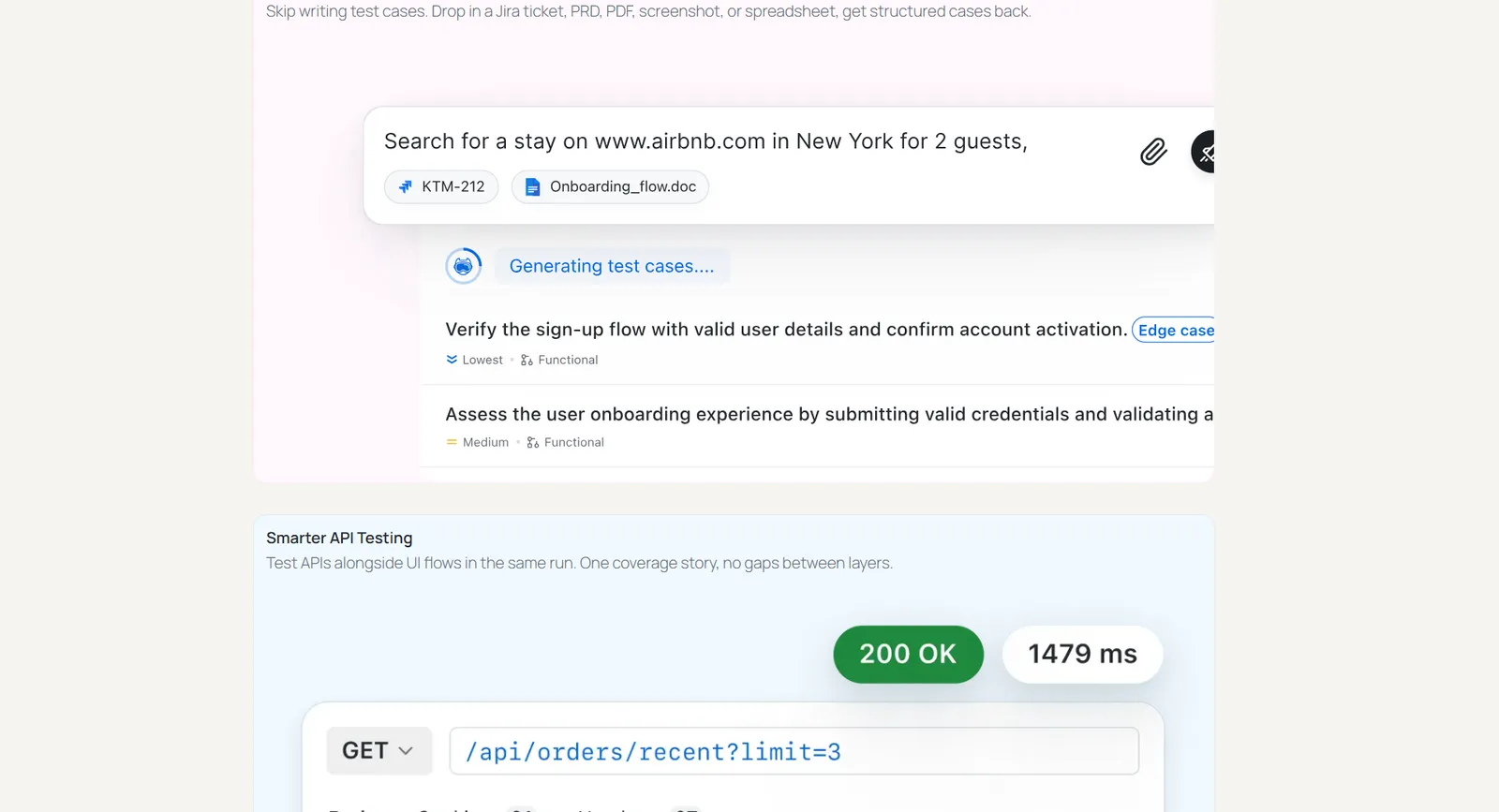
Testing a website end to end runs like this:
- Start from what you already wrote - Attach the Jira ticket or spec for the page instead of opening a blank test. It comes back as scenarios and cases with assertions proposed, which covers step two of the process without anyone re-reading the requirement into test steps by hand.
- Describe the journey, not the selectors - "Log in, add the second product to the cart, apply coupon SAVE10, and confirm the subtotal drops by 10 percent." Cookie banners, A/B variants, and logged-out states are handled with plain-English if/else rather than branching code, which is what makes real website flows testable without scripting.
- Assert past the UI - Add checks on the API response behind the page and the database record it creates. This is where website defects that pass a UI-only test get caught: the order confirmation renders correctly while the order never persisted.
- Cover browsers and devices from the same test - Run the finished flow across the browser and OS matrix, and on real devices for the mobile view. The test is not bound to the browser it was authored on, so steps four and five stop being a separate rewrite.
- Fold accessibility and visual checks in - Attach a WCAG audit and a visual diff to the same run so steps eight and nine happen against the page you just exercised, not against a stale baseline captured in a different job.
- Keep it green as the site changes - A theme update, a CMS change, or a redesign normally breaks selectors. Steps re-anchor by surrounding context instead, so a marketing edit to the hero section does not turn the checkout suite red.
Benefits that matter specifically for website testing:
- Coverage stops being rationed - Marketing sites and web apps change weekly, but automation capacity does not. Plain-English authoring lets manual testers and PMs cover pages that would otherwise wait behind an automation engineer's backlog.
- CMS and theme churn stops costing a sprint - The most common cause of a red website suite is a DOM change nobody in QA made. Self-healing turns that from a rewrite into an approval.
- Seam bugs surface before users find them - UI, API, and data checks in one flow catch the class of website defect where each layer works alone and the journey still fails.
- No lock-in on the suite you already own - Generated tests export to Selenium, Playwright, Cypress, or Appium, so adopting the agent does not mean abandoning an existing website test suite.
Two limits worth stating plainly. Maintenance drops substantially but does not disappear, and the agent does not decide what is worth testing: scope, strategy, and release sign-off stay human, and your input overrides an agent decision. The KaneAI guided walkthrough covers the first-run setup in detail.
How to Check Responsiveness on Real Devices
This is step five, and it is the step most often faked by resizing a desktop window. Real hardware matters because touch behaviour, device pixel ratio, and font rendering are exactly what a resized window does not reproduce, and those three account for most mobile layout bugs that reach production unnoticed.

Running the check on your own site:
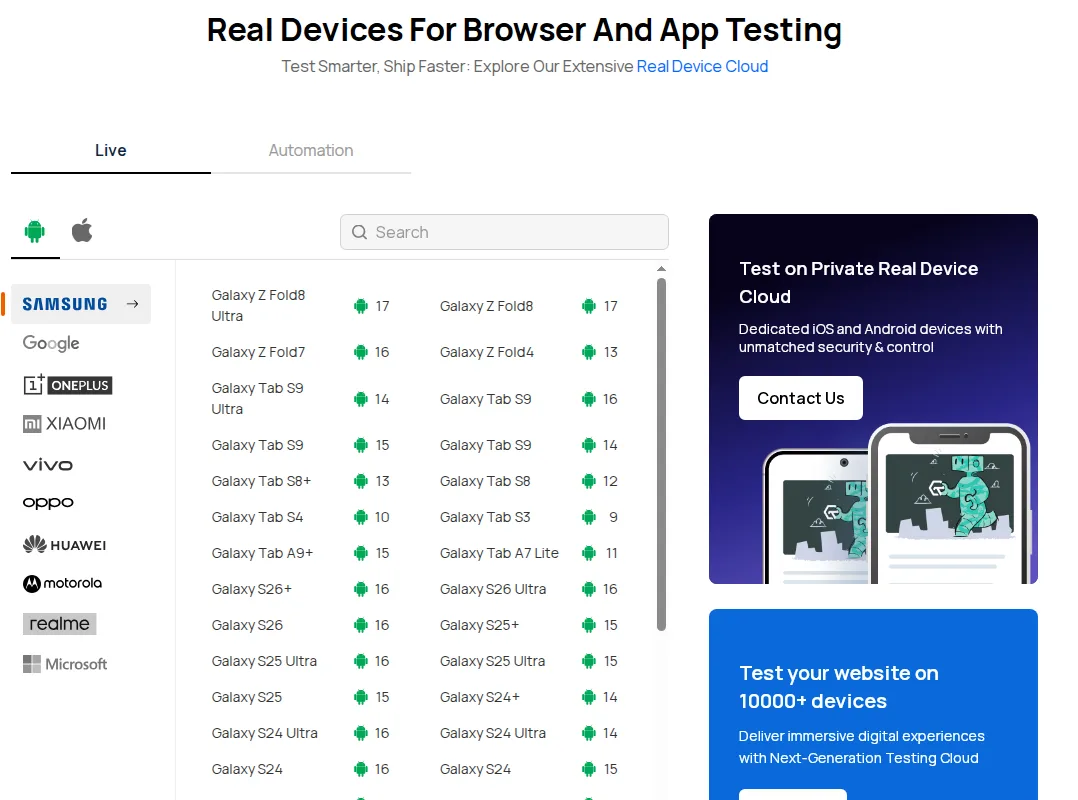
- Pick the session type - Live for a hands-on pass where you drive the site yourself, Automation when you want your scripted suite to run on the same hardware.
- Match the device to your analytics, not to the newest handset - Filter by manufacturer and choose the exact model and OS version your visitors actually use. The list spans Samsung, Google, OnePlus, Xiaomi, vivo, OPPO, Huawei, Motorola, realme, and Microsoft hardware with the OS version shown against each entry.
- Walk the revenue path first - Load the page, then work through search, product detail, cart, and checkout. Watch for horizontal scroll, text truncation, tap targets too small or too close together, and a menu that fails to collapse.
- Reproduce the reported bug on the reported device - When a customer says the site breaks on a specific phone, open that exact model and OS rather than an approximation, since the point of the session is to confirm or dismiss their configuration.
What this changes for a website team:
- No device lab to buy or maintain - Mobile coverage stops being a hardware budget question, which is what usually caps how many real devices a website is ever tested on.
- Bug reports become reproducible - "Broken on my phone" turns into a session on that phone, so tickets get closed on evidence instead of guesswork.
- Foldables and odd viewports are covered - A Galaxy Z Fold has two distinct viewports depending on whether it is open or closed, so a layout that passes at one width can break at the other, and neither state is reachable by resizing a browser.
How to Run Cross-Browser Tests at Scale
Steps three and four are cheap on one browser and expensive across a matrix. Once a website suite is large enough to block a merge, the constraint stops being coverage and becomes wall-clock time, which is the point at which how the tests are distributed matters more than how they are written.

Wiring your existing website suite to it:
- Commit a config file, not a dashboard setting - A single HyperExecute.yaml lives alongside your tests, so the run configuration is reviewable in a pull request and changes to it are visible in history.
- Set the four keys that decide runtime - concurrency for how many parallel tasks, autosplit to let the platform divide the suite, cacheKey and cacheDirectories to skip reinstalling dependencies on every job, and testDiscovery for how tests are found.
- Keep your framework - Selenium, Cypress, Puppeteer, Playwright, and Appium suites run unchanged across 3,000+ browser and OS combinations, so this is a config change rather than a migration.
- Read the result by phase - Output is grouped as pre-steps, scenarios, and post-steps with per-test duration, which makes a suite that is slow because of setup rather than tests obvious at a glance.
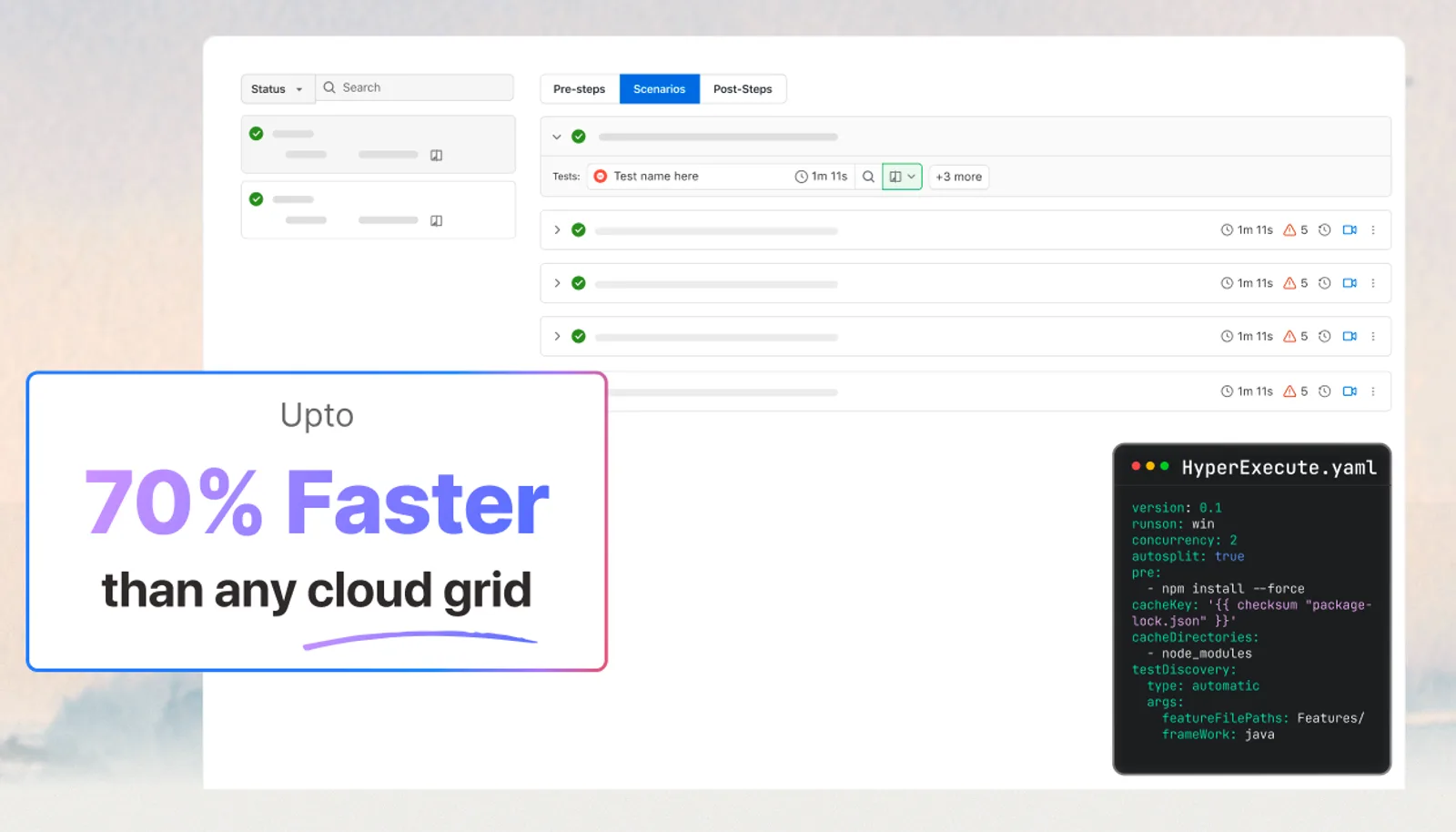
Why this matters on a large website suite:
- Cross-browser coverage stops being the slow step - Test script and execution components sit in one isolated environment instead of each scenario travelling between a hub and a node, which is where conventional grids lose time to network hops.
- The suite can gate a merge - When a full cross-browser pass finishes in minutes rather than hours, it can run on every pull request instead of nightly, so regressions are caught before they land.
- Runs stay clean - Machines are provisioned just in time and wiped after each job, so a failure is a real failure rather than state left behind by the previous run.
- Every failure arrives with evidence - Terminal output, network and console logs, screenshots, and video are captured per test, which is the raw material root cause analysis reads.
The published benchmark is up to 70 percent faster than a traditional hub-and-node grid. Treat that as a ceiling rather than a promise for your suite, and run yours both ways before quoting a number internally.
How to Catch Visual Regressions on Your Pages
Step nine catches the defect class every other step passes: the element is present, clickable, and correct in the DOM, but rendered wrong. On a website that usually means an overlapping element after a CSS change, a hero image that stopped loading, or a font swap that pushed a call to action below the fold.
Setting it up on a website:
- Choose the pages worth a baseline - Home, category, product detail, cart, checkout, and any landing page carrying paid traffic. Templates matter more than individual URLs, since one broken template breaks every page built on it.
- Capture across the matrix in one run - A single run covers Chrome, Firefox, Edge, Safari, and mobile browsers together, so you are not re-executing the suite once per browser to find rendering gaps.
- Approve the baseline deliberately - Every later run is diffed against the approved baseline rather than against the previous run, which is what stops a defect that slipped through once from silently becoming the new normal.
- Review only what is flagged - Each difference is reported with where it happened, how large it is, and whether it is a layout shift, a colour change, an element removal, or positional drift.
What you get on a live website:
- Triage stays about bugs, not noise - A plain pixel diff flags anti-aliasing, macOS versus Windows font rendering, timestamps, and dynamic content as failures. The AI engine filters those, which is the difference between a check the team keeps running and one it switches off after a fortnight.
- Marketing edits get a safety net - Content and CSS changes ship to websites constantly and rarely go through QA. A visual gate catches the ones that break a template.
- Cross-browser rendering gaps surface without extra runs - The same capture proves the page renders identically in Safari and Chrome, which is where most reported website layout bugs originate.
Run this last, after behaviour is correct. A baseline captured while functional defects are still open just bakes the defect into the baseline.
How to Audit a Website for WCAG Compliance
Step eight is the one with legal weight attached, since WCAG conformance is the technical foundation of ADA, Section 508, AODA, and EAA obligations. It is also the step teams most often run once before a launch and never again, which is how a compliant site drifts out of compliance over a year of content edits.
Auditing your pages:
- Scan while you build - Run an Axe-core scan from browser DevTools on the page you are working on, so contrast, alt text, and label violations are fixed before review rather than found in an audit.
- Gate the build - Add the scan to CI so a merge cannot introduce a new violation. This is what stops accessibility debt accumulating invisibly in the codebase.
- Schedule recurring scans - A website changes through its CMS without touching code, so a scheduled scan catches the regressions a build-time gate never sees.
- Work the report by severity - Each violation carries its WCAG reference, severity, the element it sits on, and specific fix guidance, so remediation can be ordered rather than triaged one row at a time.
- Then do the manual half - Navigate the full flow with only the keyboard, confirm focus order is logical and focus is always visible, and check that screen reader announcements make sense.
Why this matters for a site that keeps changing:
- Compliance becomes continuous, not an annual audit - A comprehensive manual WCAG audit of a large site takes weeks, which is why it is rarely repeated. Automated scanning in the workflow keeps the baseline current between audits.
- Violations arrive with a fix, not just a flag - Element-level location plus remediation guidance is what lets a developer who has never read WCAG close the ticket correctly.
- The audience is larger than most teams assume - Over 1.3 billion people worldwide live with some form of disability, so accessibility defects exclude real traffic rather than a rounding error.
Worth being blunt about the ceiling, because it changes how you plan this step: automated tooling used in isolation catches roughly 30 to 40 percent of accessibility issues. No scanner can judge whether focus order is logical, whether a screen reader announcement is meaningful, or whether an ARIA pattern behaves correctly for a real user. The remaining 60 to 70 percent is why the manual keyboard pass above is not optional.
How to Decide Whether the Website Is Ready to Ship
A single run answers one question: did this pass? The questions that actually gate a website release only appear across runs, and they are the ones a per-job report cannot reach.
Reading a suite rather than a run:
- Check the trend before the build - Is quality improving or decaying across the last few weeks? A green build on a declining trend is a different decision from a green build on a stable one.
- Separate real failures from flakiness - A red website suite can equally be a genuine regression, an environment blip, or a data problem. Stability signal tells you which kind of red you are looking at before anyone starts debugging.
- Fix flaky tests by frequency, not by volume of complaint - Ranking flaky tests by how often they actually fail puts cleanup effort where the data points rather than where the loudest person points.
- Use root cause analysis as a lead - Network, console, and framework logs are correlated to localize a likely cause. Treat it as a strong starting point to verify, not a verdict.
What this changes at release time:
- Release calls stop being gut feel - "Are we improving?" gets answered from frequency data instead of from the last failure anyone remembers.
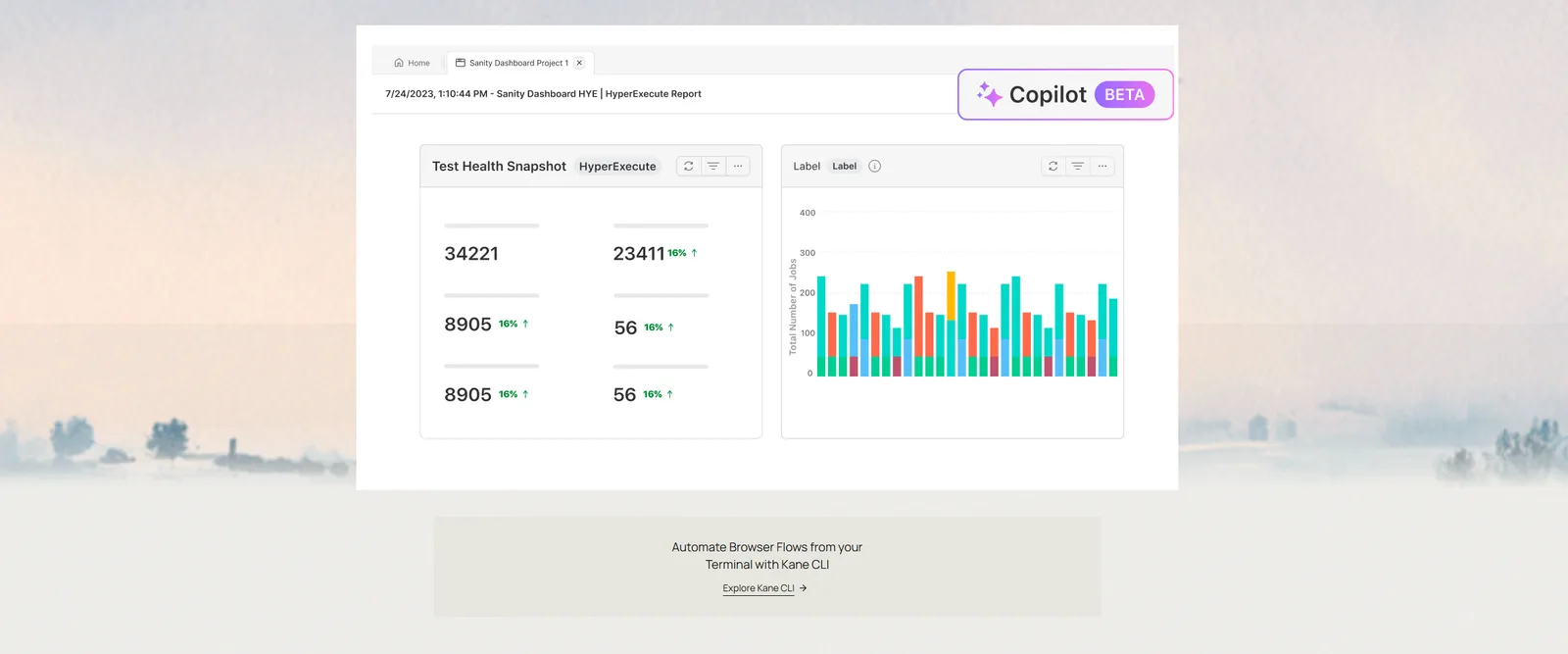
- One view across every surface - Cross-browser runs, real-device sessions, visual checks, and accessibility scans all report into the same place, so the website's quality picture is not split across four dashboards.
- Triage time shrinks - Correlated logs mean a failed checkout test starts with a probable cause attached rather than a stack trace and a video to scrub through.

Conclusion
Start with step three on the page that matters most to your business, usually checkout or signup. Run its functional cases on Chrome and Safari, then repeat them at a 360px viewport on a real device. Most teams find their first real defect inside that hour, because those two combinations are where desktop-only testing leaves the largest gap.
Once that flow is green, work outward through the nine-step process and promote the rows marked "every build" in the checklist into CI so regressions cannot re-enter. An online browser farm removes the hardware problem from steps four and five, and the automation testing documentation walks through wiring your existing Selenium, Cypress, or Playwright suite to the cloud grid without rewriting tests.
If test authoring rather than infrastructure is your bottleneck, start KaneAI on the same flow and compare the time it takes to author in plain English against writing the equivalent script by hand.
Author

Harish Rajora
Blogs: 100


Harish Rajora is a software developer at TestMu AI with over 6 years of hands-on experience in Python and cross-platform application development across Windows, macOS, and Linux. He has authored 800+ technical articles and worked on large-scale projects, including GenAI applications and core engineering features used by millions. Harish has led DevOps initiatives building CI/CD pipelines with Jenkins, AWS, GitLab, and GitHub, and holds an M.Tech in Software Engineering from IIIT Allahabad.
Reviewer

Himanshu Sheth
Reviewer
Himanshu Sheth is the Director of Marketing (Technical Content) at TestMu AI, with over 8 years of hands-on experience in Selenium, Cypress, and other test automation frameworks. He has authored more than 130 technical blogs for TestMu AI, covering software testing, automation strategy, and CI/CD. At TestMu AI, he leads the technical content efforts across blogs, YouTube, and social media, while closely collaborating with contributors to enhance content quality and product feedback loops. He has done his graduation with a B.E. in Computer Engineering from Mumbai University. Before TestMu AI, Himanshu led engineering teams in embedded software domains at companies like Samsung Research, Motorola, and NXP Semiconductors. He is a core member of DZone and has been a speaker at several unconferences focused on technical writing and software quality.


Website Testing FAQs
Did you find this page helpful?
More Related Blogs
TestMu AI forEnterprise
Get access to solutions built on Enterprise
grade security, privacy, & compliance
- Advanced access controls
- Advanced data retention rules
- Advanced Local Testing
- Premium Support options
- Early access to beta features
- Private Slack Channel
- Unlimited Manual Accessibility DevTools Tests