

Power Your Software Testing with AI Agents and Cloud
The Native AI-Agentic Cloud Platform to Supercharge Quality Engineering. Test Intelligently and Ship Faster.


- TestMu AI (Formerly LambdaTest)
- /
- Blog
- /
- Benefits Of Cloud Testing And Best Practices
Benefits Of Cloud Testing And Best Practices
A detailed guide on the benefits of cloud testing and best practices. It also discusses the cloud testing types, various tools, and challenges.
Last Updated on:
Cloud testing cuts costs because teams pay only for the resources they use, and it removes location limits since any device with a network connection can access the testing environment around the clock. It also scales computing resources up or down on demand and simplifies disaster recovery through remote, virtual access to files.
Virtualization became a catchphrase in the market a few years ago, and it developed, evolved, and eventually grew as Cloud computing. Cloud testing was carried out to ensure the quality of everything that is rendered in the cloud environment, using either manual or automated testing, or both. So what really is the cloud?
TL;DR
- Cloud testing runs software tests on cloud infrastructure instead of an in-house lab of devices and browsers.
- Cloud testing lowers cost because teams pay for the testing resources they use rather than buying hardware.
- Cloud testing scales resources up or down with demand and lets distributed teams share one test environment.
- Security, multi-cloud complexity, and bandwidth limits are the main challenges of cloud testing.
- A cloud testing provider should be checked for browser and device coverage, security certifications, and support.
What is the Cloud?
Cloud is one of the basic requirements of the world today. Servers located across the world help you access resources online. This is typically what the cloud is. As a user, you are spared the horror of managing your own physical servers and using all your software on your machines. Moreover, you can use your files and tools from any device synced with the cloud, thereby helping you save local memory.
Cloud computing makes the technology much cheaper and more manageable for the IT industry. Servers no longer need updating and maintenance, infrastructure does not have to be strictly internal, and international operations take place with convenience. Therefore, clouds eliminate the boundaries. Remember the famous quote: ‘the world is a small place’? It is the cloud that makes it that.
What is Cloud Computing?
Cloud computing refers to cloud-based services offered by third-party providers. These services can include databases, networking, servers, intelligence, storage and aim to optimize resource utilization, promote flexibility and facilitate scalability. As a result, cloud computing lowers operational expenses while providing a powerful ecosystem for better IT-related tasks.
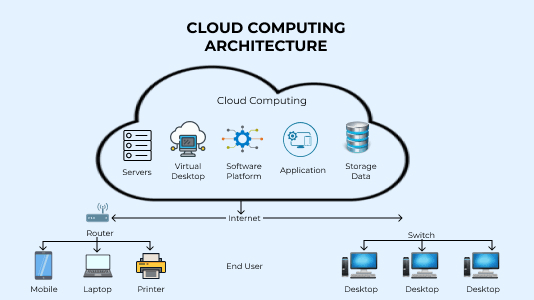
The services hosted on the cloud can be broadly divided into three categories. These are as follows:
- Infrastructure as a Service or IaaS: Often referred to as ‘the building block of the cloud’. In IaaS, companies aim to provide servers, network devices, and storage to their consumers as a form of service.
- Platform as a Service or PaaS: Platform as a Service was developed to help users explore the possibilities of developing, running, and managing multiple applications on the cloud, without interrupting or utilizing the inherent capabilities of the device’s operating system.
- Software as a Service or SaaS: Probably the most popular cloud computing service. Hosts allow their consumers to use certain centrally hosted applications against a subscription fee.
These are the three kinds of cloud computing services that are provided across the globe.
What is Cloud Testing?
In essence, cloud testing allows you to test your software on the cloud. This means you get to use your entire testing infrastructure on the cloud for web testing and application testing. Cross browser testing is made simpler using cloud infrastructure. Cloud-based platforms like TestMu AI offer cross-browser cloud testing services that help execute automated test scripts on the scalable cloud grid.

You can also Subscribe to the TestMu AI YouTube Channel and stay updated with the latest tutorials around Selenium testing, Cypress testing, CI/CD, and more.
Cross-browser website testing on a remote Selenium Grid cloud, for example, can be quite advantageous because automated tests can be run in parallel on the Grid. Without cloud testing, you need to maintain multiple devices with multiple browsers in multiple locations to test one software! Test orchestration clouds such as TestMu AI's HyperExecute push this further by running each test on a just-in-time virtual machine next to its browser.
Also read: 19 Best Cross Browser Testing Hacks For Faster Release
Cloud testing, therefore, reduces the usage of resources like time, money, and workforce engagement. This is especially crucial for IT companies who have a limited amount of resources, thereby eliminating the burden of the manual testing process. Cloud testing can be broadly divided into three approaches.
- Testing resources of the cloud: Here, the cloud is treated as an entity of its own, and its resources are used for testing purposes, like performance and functionality. Such procedures involve testing the cloud provider’s services like PaaS (Platform as a Service) or IaaS (Infrastructure as a Service). Tests for disaster recovery, scalability, and data privacy may be performed in this process.
- Testing software native to the cloud: This refers to testing the SaaS (Software as a Service) products of a company that are stored in the cloud, which has its own SaaS testing tools for each quality layer.
- Testing software with tools based on the cloud: Here, testing teams use tools that are based on the cloud to conduct their QA testing procedures. TestMu AI helps you test your websites and applications using automated scripts on the cloud grid. You can also use our cloud testing platform to conduct live testing on actual online browser ecosystems.
Why is Cloud Testing needed?
Cloud testing, on a broad spectrum, is of great use. It can reduce resource utilization, save time, money, and manual intervention on a big scale. Here are a few reasons why cloud testing is in much demand in the software development ecosystem around the globe.
- Cloud testing works wonders in reducing the testing time required for heavy applications. The ROI for automated cloud testing is massive compared to more traditional methodologies, owing to the flexibility and scalability offered by this process. Moreover, the resources consumed are drastically reduced in the case of cloud testing, thereby adding to the ROI. Hence, it is better to calculate the ROI of automation testing besides deciding on the budget.
- Cloud testing can be made available for several users on different devices for each, without any participating component interrupting another. This dramatically decreases the need for hefty infrastructure that would have required a company to shed a good amount of its pockets.
- Cloud testing is highly cost-effective due to its flexibility and compatibility with various ecosystems. Cloud testing can also be used by remote teams situated in multiple locations around the globe.
- Cloud testing offers high scalability and a more efficient testing cycle. Increased scalability demands quicker, more robust testing procedures that can often send traditional methods crashing down. Cloud testing, on the other hand, is well-equipped to handle such requirements.
- Cloud testing also offers increased mobility. Physical restrictions do not interrupt the development and testing procedures when the cloud is involved.

Challenges of Cloud Testing
Although a convenient method to perform complex procedures, cloud testing can still be challenging in many cases. This section on the benefits of cloud testing outlines a few things that users should be cautious about while performing tests on the cloud.
- Security and issues around data privacy: Security and data privacy issues may be looming behind unless the cloud is carefully monitored and precautions are taken to preserve privacy. Security is always hard to retain in a shared environment. However, plenty of cloud testing providers like TestMu AI provide robust security solutions to their users. TestMu AI is also compliant with leading security and privacy standards, including SOC 2 Type II, ISO 27001, GDPR, and CCPA.
- Problems of using multi-cloud models: Multi-cloud models typically consist of various kinds of cloud, like public, private, and hybrid. Complexities around security, synchronization and other issues arise when several cloud providers are associated together.
- Ecosystem development: There may be plenty of issues around specific configurations of the server, network, and storage that can hinder cloud operations. It is additionally cumbersome to replicate a user’s ecosystem as it is not always possible to circumvent discrepancies. Furthermore, the modules that must be tested may be on the outskirts of the testing environment’s control limits.
- Bandwidth troubles: Bandwidth issues can arise due to shared resources on the provider’s end. Unless managed with greater efficiency and maximum tech support, it may be tough to handle heavy traffic with limited infrastructure.
Also, Read - Top 9 Challenges In Automation Testing
Key Takeaway: Cloud testing challenges include security and data privacy risks, multi-cloud complexity, difficulty replicating user environments, and bandwidth issues from shared provider resources.
Types of Cloud Testing
Cloud testing is a vast subject under cloud operations. It can further be divided into the following types:
- Functional testing: Functional testing in a cloud environment entails testing all of the system’s features and functionalities, including hardware and software. It is usually carried out on a fully integrated software platform to ensure that it complies with the standards.
- System Testing: System testing ensures that an application in the cloud performs well under a given range of system requirements.
- Interoperability Testing: Interoperability testing checks if an application present in the cloud is flexible and compatible enough to keep performing with the same efficiency after a change in infrastructure.
- Acceptance Testing: Acceptance testing ensures a particular application on the cloud is aligned with the expectations of the consumer base.
- Availability Testing: Availability testing is more of an admin’s job where they are to ensure the cloud services are available round the clock and other things happening in the cloud do not interrupt the functionality of the application in concern.
- Multi-tenancy Testing: Multi-tenancy tests check if an application present in the cloud is performing the way it should in spite of heavy traffic and multiple user requests appearing simultaneously.
- Performance Testing: Performance testing can typically be divided into two categories- Stress testing and Load testing. These tests ensure that an application present in the cloud is competent to handle a given number of user requests. The cloud must also have a certain degree of elasticity to allow an increase in usage demands if required.
- Security Testing: Security testing ensures only individuals with proper authorization can access some data, and the information stored in the cloud always has extra layers of protection. For example, TestMu AI is a cloud testing platform with SOC 2 Type II and ISO 27001 certifications and is compliant with GDPR and CCPA. This means that all our services are covered by SOC 2 Type II controls, ensuring our client data’s safety, management, and privacy.
- Disaster Recovery Testing: Sometimes, it may so happen that the data stored in the cloud may be lost due to unforeseen circumstances. Disaster recovery testing checks to see how fast this data can be recovered and to what extent.
What are the Benefits of Cloud Testing

By Sathwik Prabhu
The benefits of cloud testing include the following:
- Cost-effective: Since consumers only pay for the resources they use, cloud testing tends to be a lot more cost-effective than traditional methods of testing apps.
- Availability: If there is a network connection, resources can be easily accessed anywhere and from any device. Therefore, physical restrictions like location are completely eliminated from the QA testing procedure. Moreover, testing teams can collaborate in real-time to work on the cloud testing process owing to the in-built tools present to facilitate collaboration.
- Scalability: Cloud testing has the provision to facilitate the scaling up or down of computing resources, as per the requirements of the testing procedure. For example, you can use the TestMu AI Concurrency Calculator in determining how many concurrent sessions you’ll require to speed up your test build process.
- Quicker testing process: Cloud testing processes are much faster than traditional testing procedures. This leads to a quicker initiation of the marketing process.
- Disaster recovery is much simpler: Disaster recovery methods are simpler for the cloud than they are for traditional procedures. Cloud disaster recovery (CDR) is a service that is offered to help firms recover critical data after a mishap- like data breaches. A safe virtual environment is used to remotely access the files. This makes disaster recovery a fairly simple process, eliminating extra hassles.
Cloud Testing Tools
Cloud testing is a simple, convenient method for mobile application testing and web application testing without worrying about the local cyberinfrastructure available to you. Cloud mobile testing helps you utilize different machines and various ecosystems online without exhausting your resources on eliminating limitations like OS coverage, devices, and browsers.
You can test your website from different locations. There are cloud testing platforms like TestMu AI that offer 3,000+ browser and OS combinations and 10,000+ real devices on the cloud. TestMu AI’s cloud-based Selenium test automation platform also integrates with popular test management and reporting tools, allowing you to analyze which tasks can be automated.

Here are a few tools that facilitate the automation of cloud testing procedures to make the process infinitely more manageable and scalable for you. You can select the best test automation tools based on your desire and budget and categorize them depending on the applications you are willing to test.
- Akamai CloudTest (formerly SOASTA CloudTest): CloudTest is a cloud load and performance testing tool, acquired by Akamai with SOASTA in 2017, that allows four kinds of automated performance and automated functional testing.
- Functional cloud testing for mobile devices
- Performance cloud testing for mobile devices
- Functional cloud testing for web-based applications
- Performance cloud testing for web-based applications
CloudTest facilitates the simulation of more than a million users across the globe to check the load handling capacity and performance of an application or website.
The tool also provides data analytics in real-time and seamless integration of testing, monitoring, and reporting modules to facilitate efficient cloud testing procedures.
- LoadStorm: LoadStorm is a perfect choice to test the load-taking capabilities of mobile and web applications. The tool is user-friendly and affordable. LoadStorm has high scalability with the power to simulate multiple users to reach the breaking point of the app. Load testing scenarios on LoadStorm can also be customized to suit the unique requirements of the application.
- Nessus: Nessus is a great tool for scanning vulnerabilities, missing modules, and poorly or incorrectly configured features in a variety of devices, cloud infrastructure, firewalls, etc. Testing teams and developers can use it to detect the presence of malicious elements like malware and web services linked to questionable sources. Nessus also supports compliance auditing, a crucial service for the banking and healthcare sectors. All the reports and recommendations that the tool generates are in easy-to-use formats, including emails for targeted users.
Real-World Example of Cloud Testing
Developers build websites and applications all the time. When the main features of a project have been developed, the website or app must be tested thoroughly to ensure they are ready for the real world. Tests are conducted to check functionality, compatibility, security, performance, scalability, reliability, etc.
However, owing to massive levels of device fragmentation on a global level, the tests must be run on real devices and in the real-world ecosystem to ensure they will not falter when a human uses them. When we talk about mobile device fragmentation, we almost always refer to the Android operating system. Android alone runs across many OS versions and thousands of device models at once.
Setting up an infrastructure consisting of thousands of actual devices to check one website or app sounds witless.
To avoid this, cloud testing was introduced. Here, testers get access to almost all the devices being used across the globe and to multiple tools that can help them carry out all their tests in less time. Cloud testing spares companies the resources that a device lab would have demanded and makes a simple process much simpler and more exhaustive.
Also refer: How To Deal With iOS Version Fragmentation
Looking to perform Android and iOS app testing on Real Device Cloud, check out our video below.
Choosing the Best Cloud Testing Provider
In this section on the benefits of cloud testing, we look at the factors to consider when selecting the cloud testing provider.
- As a first step, it is imperative for developers and testers to narrow down to one platform that provides all the devices and browsers that are popularly used across the globe, especially by the target audience of the enterprise in question. For example, TestMu AI provides an online browser farm of 3,000+ browser and OS combinations to run tests on. These are real machines, operating systems, and browsers that ensure an application is aligned with the demands of its desired end-users.
- However, before choosing the ideal cloud testing partner, extensive research must be put in to understand if the company is providing a secure environment, round the clock tech support, and the tests are being conducted quickly and efficiently. The ideal partner should stand true to the real purpose of moving tests to the cloud- a faster testing process without any compromise on quality or security.
- Additionally, a cloud testing provider must also have provisions to incorporate a team of testers and a manager to keep track of the progress. And this entire suite should not be expensive as that would defeat the purpose of moving to the cloud.
Watch this webinar to learn about enterprise-wide actionable strategies, the dos and don’ts of automation testing and DevOps tooling that will help you improve the release and test velocity.

Key Takeaway: A good cloud testing provider offers the devices and browsers your audience uses, a secure environment, round-the-clock support, fast tests, team management features, and affordable pricing.
Summary
Cloud testing pays off when a team needs more devices, browsers, or parallel capacity than an in-house lab can maintain at a reasonable cost.
Before choosing a provider, weigh the tradeoffs this guide covered:
| Check | Why it matters |
|---|---|
| Device and browser coverage | The platform must match what your audience actually uses |
| Security certifications | Shared infrastructure raises data privacy questions |
| Parallel capacity and speed | Faster runs are a major return on cloud testing |
| Support and team features | Remote teams need shared access and quick help |
Weigh coverage and security before price, since gaps in either are costly to fix later. Cloud testing also eases the biggest remote testing challenges for distributed teams.

Author

Rileena Sanyal
Blogs: 4


Rileena Sanyal is a community contributor with 4+ years of experience spanning AI engineering, machine learning, and software testing–focused technical content. She specializes in agentic AI, computer vision, and applied machine learning, with hands-on experience in model testing, benchmarking, unit and integration testing, and reliability validation. Rileena has created technical content around mobile app testing, Selenium with Python, cross-browser testing, and AI-driven systems for platforms including TestMu AI, HeadSpin, and Applitools. She holds an MSc in Artificial Intelligence and a Master’s degree in Computer Science, and currently works in AI R&D engineering roles.
Reviewer

Harshit Paul
Reviewer
Harshit Paul is Director of Product Marketing at TestMu AI (formerly LambdaTest), with over 8 years of experience in product and growth marketing for developer and QA tools, leading the Agentic AI in Quality Engineering space. He has authored 80+ technical articles for TestMu AI on software testing and automation, and hosted webinars on Selenium, automation testing, browser compatibility, DevOps, and continuous testing. He has led go-to-market and technical marketing initiatives across software testing products, contributing to SEO, content strategy, and developer marketing. He began his career as a certified Salesforce developer at Wipro Technologies, where he worked for 2 years before moving into marketing. Harshit holds a degree in computer programming from Vivekananda Institute of Professional Studies.


Frequently asked questions
Did you find this page helpful?
More Related Blogs
TestMu AI forEnterprise
Get access to solutions built on Enterprise
grade security, privacy, & compliance
- Advanced access controls
- Advanced data retention rules
- Advanced Local Testing
- Premium Support options
- Early access to beta features
- Private Slack Channel
- Unlimited Manual Accessibility DevTools Tests