

Power Your Software Testing with AI Agents and Cloud
The Native AI-Agentic Cloud Platform to Supercharge Quality Engineering. Test Intelligently and Ship Faster.


- TestMu AI (Formerly LambdaTest)
- /
- Learning Hub
- /
- What Is WCAG Testing and Why It Matters for Web Accessibility
What Is WCAG Testing and Why It Matters for Web Accessibility
Learn WCAG testing essentials such as principles, levels, best practices, and how TestMu AI Accessibility Suite helps ensure full web accessibility compliance.
Last Updated on:
On This Page
- What Is WCAG Testing?
- Why Perform WCAG Testing?
- What Are the Four Principles of WCAG?
- What Are the Conformance Levels of WCAG?
- What's New in WCAG 2.2 AA?
- WCAG vs ADA vs Section 508
- ADA Title II Compliance Deadlines
- What Are the Different WCAG Testing Approaches?
- WCAG Testing Checklist
- How to Perform WCAG Testing With TestMu AI Accessibility Suite?
- Common WCAG Compliance Challenges
- Best Practices for Effective WCAG Testing
- Future of WCAG Testing
- Conclusion
- Citations
WCAG testing checks a website against the Web Content Accessibility Guidelines to find barriers that block people with disabilities. WCAG 2.2, the current W3C Recommendation, adds six success criteria at Level A or AA, including a 24-by-24-pixel minimum target size.
This guide covers WCAG's four principles, conformance levels, legal requirements under the ADA and Section 508, testing approaches, and a step-by-step compliance checklist.
Overview
WCAG testing identifies web accessibility barriers for users with impairments to ensure legal compliance and inclusive digital experiences. To achieve this, perform on-demand manual checks using TestMu AI Accessibility DevTools and run automated CI/CD pipeline tests with TestMu AI Accessibility Automation.
- Perceivable: Web content must be available through multiple senses, which includes providing alternative text for images, captions for videos, and transcripts for audio to assist users with vision or hearing impairments.
- Operable: Users must be able to navigate and interact with the interface using different input methods, including keyboard navigation and assistive devices, while avoiding features that trigger seizures.
- Understandable: Information and user interface operations must be clear and predictable, utilizing simple language, consistent navigation, and helpful error messages to prevent user confusion.
- Robust: Web content must work reliably across various browsers, devices, and assistive technologies by using proper semantic markup and following established web standards.
- Level A: This basic conformance level covers essential accessibility needs, such as alternative text for images, keyboard access, and basic usability for users with disabilities.
- Level AA: This standard conformance level builds on Level A by requiring sufficient color contrast, visible focus indicators, and consistent layouts to satisfy common legal requirements.
- Level AAA: This advanced conformance level represents the highest accessibility standard, incorporating features like sign language videos and very high contrast, though it is often costly to implement.
- TestMu AI Accessibility DevTools: This Chrome extension runs on-demand scans, highlights accessibility issues, and checks screen reader and keyboard navigation compatibility to generate detailed reports with WCAG guidance.
- TestMu AI Accessibility Automation: This tool enables automated accessibility testing using frameworks like Selenium, Cypress, and Playwright, providing detailed compliance reports.
What Is WCAG Testing?
WCAG testing involves checking whether a website is accessible to people with impairments. It combines automated tools that detect accessibility issues with manual checks to meet accessibility standards.
Running these tests during development catches issues early, saving time and ensuring compliance with WCAG 2.1 and 2.2. The guidelines cover vision, hearing, movement, and cognitive challenges that ensure easier accessibility, making web applications usable for everyone.
Why Perform WCAG Testing?
WCAG testing ensures web applications are accessible to people with disabilities. It reduces legal risk, improves usability, expands market reach, and prevents expensive fixes when issues are caught early.
- Global Market Requirements: Most developed countries require or encourage WCAG compliance. Following universal standards simplifies operations, reduces costs, and ensures web applications serve users across languages, cultures, and assistive technologies consistently.
- Legal and Compliance Requirements: Laws like ADA and Section 508 Compliance require accessibility. Ignoring requirements can lead to lawsuits and financial penalties. Compliance also supports diversity and inclusion within organizational operations.
- Better User Experiences: Accessible design enhances navigation, readability, and interaction. Features like captions, keyboard access, and clear hierarchy improve usability, benefiting all users, not just those with disabilities.
- Business Growth and Market Access: People with disabilities hold significant purchasing power globally. Web accessibility improves reach and engagement. Design improvements often benefit all users and enhance search engine visibility.
- Code Quality and Development: WCAG encourages semantic code, proper labels, and structured forms. Automation testing catches issues early, simplifies debugging, and reduces long-term maintenance costs for development teams.
- Financial Considerations: Addressing accessibility during development costs less than retroactive fixes. Simple issues are inexpensive to resolve early, while ignoring them leads to expensive redesigns and compliance-driven deadlines.
- Brand Trust and Corporate Reputation: Genuine accessibility builds trust. Users recognize superficial compliance. Strong accessibility practices improve reputation, attract inclusion-focused clients, and meet government or B2B contracting expectations effectively.

Note: Run manual and automated WCAG tests online. Try TestMu AI Now!
What Are the Four Principles of WCAG?
Perceivable, Operable, Understandable, and Robust. These ensure content is accessible to the senses, usable with different inputs, easy to follow, and compatible across technologies.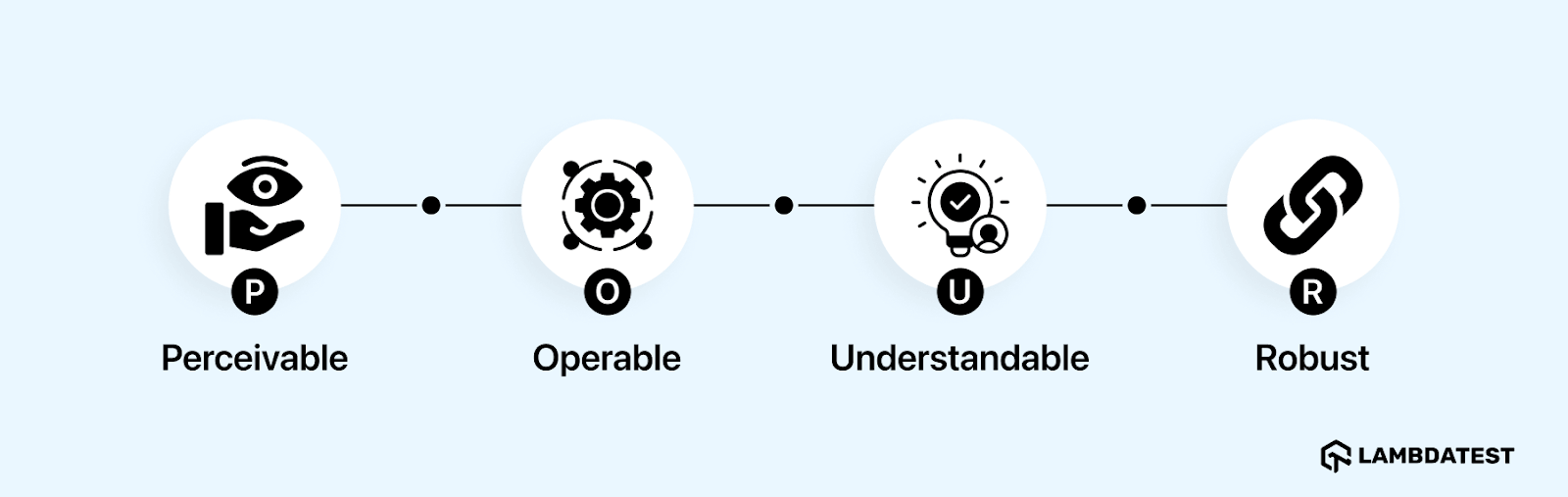
- Perceivable: All content must be available through multiple senses. Images need alternative text, videos require captions, and audio should have transcripts. This ensures users with vision or hearing impairments can access the same information.
- Operable: Users must be able to interact with the interface using different input methods. Keyboard navigation, assistive devices, and adjustable time limits are essential. Avoid features that could trigger seizures or motion-related issues.
- Understandable: Information and interface behavior should be clear and predictable. Use plain language, consistent navigation, and provide guidance for errors to help users interact without confusion.
- Robust: Content should work across different web applications, browsers, and assistive technologies. Proper semantic markup and adherence to standards ensure compatibility now and in the future.
What Are the Conformance Levels of WCAG?
WCAG defines three conformance levels to guide accessibility goals and ensure digital content meets legal and usability standards. Each level builds on the previous one, so higher levels include all requirements from lower levels.
- Level A - Basic Accessibility: Covers the minimum needed to make content usable. Includes essential features like alt text for images and keyboard navigation. Without these, many users with disabilities cannot access the application at all.
- Level AA - Standard Accessibility: Adds usability improvements to Level A. Requires a color contrast ratio of at least 4.5:1 for normal text and 3:1 for large text (WCAG 1.4.3), visible focus indicators, and consistent layouts. Most organizations aim for this level because it satisfies legal requirements and is practical to implement.
- Level AAA - Highest Accessibility: Represents the highest standard with comprehensive accessibility features. Includes advanced requirements like sign language videos and very high contrast ratios. Achieving full AAA compliance across an entire application is usually impractical due to cost and complexity.
What's New in WCAG 2.2 AA?
WCAG 2.2 became a W3C Recommendation in October 2023. It adds nine new success criteria and removes the outdated 4.1.1 Parsing criterion. Six of the new criteria apply at Level A or AA, so they are part of what a page must meet to conform to WCAG 2.2 AA. Here is what QA testers should validate:
- Focus Not Obscured (Minimum) - 2.4.11 (AA): When an element receives keyboard focus, it must not be entirely hidden by other content such as a sticky header or cookie banner. Test by tabbing through the page and confirming the focused element stays at least partially visible.
- Dragging Movements - 2.5.7 (AA): Any action that uses dragging, such as sliders or drag-and-drop, must offer a single-pointer alternative like a tap or click. Verify you can complete the action without dragging.
- Target Size (Minimum) - 2.5.8 (AA): Interactive targets must be at least 24 by 24 CSS pixels, or have sufficient spacing, with limited exceptions. Measure buttons, links, and icons, especially on mobile.
- Consistent Help - 3.2.6 (Level A): If help mechanisms such as contact details, chat, or a help link appear across multiple pages, they must appear in the same relative order. Check that help placement is consistent site-wide.
- Redundant Entry - 3.3.7 (Level A): Information a user already entered in a process must not be requested again in the same session, unless it is essential. Test multi-step forms for repeated data entry.
- Accessible Authentication (Minimum) - 3.3.8 (AA): Logins must not force a cognitive test like memorizing or transcribing a code, unless an alternative is available (for example, allowing password managers or copy-paste). Confirm authentication does not rely on memory or puzzle-solving alone.
For the authoritative list, see the W3C summary of what's new in WCAG 2.2. Note that "Focus Appearance" (2.4.13) and the "Enhanced" variants of these criteria sit at Level AAA and are not required for AA conformance.
WCAG 2.1 AA vs WCAG 2.2 AA at a glance:
| Aspect | WCAG 2.1 AA | WCAG 2.2 AA |
|---|---|---|
| Status | W3C Recommendation (2018) | W3C Recommendation (October 2023), the current version |
| New A/AA criteria | Baseline (added items like reflow and non-text contrast over 2.0) | Adds six: Focus Not Obscured (Min), Dragging Movements, Target Size (Min), Consistent Help, Redundant Entry, Accessible Authentication (Min) |
| Focus visibility | 2.4.7 Focus Visible | Adds 2.4.11 Focus Not Obscured (Minimum) |
| Minimum touch target | No minimum-size rule at AA | 24 by 24 CSS pixels (2.5.8) |
| 4.1.1 Parsing | Included | Removed as obsolete |
| Backward compatibility | - | Additive: a page meeting 2.2 AA also meets 2.1 AA (aside from the removed Parsing rule) |
WCAG vs. ADA vs. Section 508: Understanding Legal Compliance
These three are often confused. WCAG is the technical standard; the ADA and Section 508 are the laws that point to it. Knowing the difference tells you what you are actually required to meet.
- WCAG (the standard): The Web Content Accessibility Guidelines, published by the W3C, define in technical terms what makes digital content accessible. WCAG itself is not a law; it is the benchmark that laws reference.
- ADA (US civil rights law): The Americans with Disabilities Act prohibits disability discrimination. In April 2024, the Department of Justice's Title II rule set WCAG 2.1 Level AA as the technical standard for state and local governments. For private businesses under Title III, no specific WCAG version is codified, though courts commonly reference WCAG 2.1 AA.
- Section 508 (US federal law): Requires US federal agencies' information technology to be accessible. The 2017 Revised 508 Standards incorporate WCAG 2.0 Level AA by reference.
Is WCAG 2.2 a legal requirement? Generally not yet. As of now, the ADA Title II rule adopts WCAG 2.1 AA and Section 508 references WCAG 2.0 AA, so WCAG 2.2, though the current W3C Recommendation, is not mandated by these US laws. Outside the US, the EU standard EN 301 549 (referenced by the European Accessibility Act, in effect since June 2025) aligns with WCAG, and WCAG 2.0 is also published as ISO/IEC 40500. Because regulations trend toward newer versions, meeting WCAG 2.2 AA is the safest way to stay ahead of compliance.
When Must State and Local Governments Meet ADA Title II Web Rules?
State and local governments must meet WCAG 2.1 Level AA for their web content and mobile apps by April 26, 2027, or April 26, 2028, based on population size.
- Population 50,000 or more: State and local governments serving 50,000 or more residents must bring their web content and mobile apps into conformance with WCAG 2.1 Level AA by April 26, 2027.
- Under 50,000 and special districts: Smaller public entities and any special district government, such as a utility or school district, have until April 26, 2028 to meet the same standard.
- What the rule covers: Web content and mobile apps a public entity provides directly or through a vendor, with narrow exceptions for archived content and some preexisting documents.
- After the deadline: Conformance is ongoing, not a one-time fix. Entities must keep meeting WCAG 2.1 AA as they publish new pages or update existing ones.
What Are the Different WCAG Testing Approaches?
Accessibility testing often fails when teams rely on a single method. Effective organizations use a mix of automated, manual, or hybrid strategies to ensure digital content meets WCAG standards. Each approach has its own benefits and limitations.
Manual Accessibility Testing
Manual testing involves interacting with the application like a user with disabilities would. Testers navigate with keyboards, check form errors, and ensure dynamic content is announced correctly by screen readers.
This method identifies issues that automated tools miss. For example, a button labeled “Submit” might pass code checks but confuse users if the form context is unclear. Manual testing verifies real-world usability.
Automated Accessibility Testing
Automated accessibility testing involves using automated accessibility testing tools that scan code for accessibility violations such as missing alt text, heading order issues, or low color contrast. They are fast and effective for detecting obvious coding errors. For a quick check without setup, you can run an online accessibility checker for WCAG directly in the browser.
These tools excel in large web applications or frequent development cycles. They generate reports that show patterns across web pages and can integrate into build processes to catch issues early.
However, automated tools cannot assess context, reading order, or whether alt text is meaningful. They may flag false positives while missing real usability barriers detectable only by humans.
Hybrid (Mixed) Accessibility Testing
Hybrid testing combines automated scans with manual evaluation. Automated checks catch low-hanging technical issues first, while manual testing focuses on complex interactions and user experience.
Some teams include real assistive technology, like screen readers, voice recognition, or magnifiers. This uncovers issues that simulated testing cannot detect, ensuring the web application works for actual users.
Hybrid testing helps prioritize fixes. Automated results show widespread technical issues, while manual testing highlights issues that block task completion. High-impact issues can be addressed first, making the process efficient.
Step-by-Step WCAG Testing Checklist for Functional QA Teams
Accessibility does not need a separate test cycle. QA teams can fold these checks into existing functional test execution and run them while validating each feature:
- Keyboard operability and traps: Tab through the entire flow. Every control must be reachable and operable by keyboard, and focus must never get trapped in a component. A modal, for example, must let you tab out or close with the Escape key.
- Logical focus order: Confirm the tab order follows the visual and reading order, and that focus moves predictably after actions like opening a dialog or submitting a form.
- Visible focus: Check that the focused element always shows a clear focus indicator and is not hidden behind sticky headers or overlays, per WCAG 2.2 Focus Not Obscured.
- Form validation and errors: Submit invalid data. Errors must be identified in text rather than color alone, programmatically linked to the field, and describe how to fix the problem.
- Labels and instructions: Every input needs a persistent, programmatic label. Verify that placeholder text is not used as the only label.
- Dynamic content updates: Trigger asynchronous updates such as search results, cart changes, or inline errors. Confirm they are announced to screen readers through ARIA live regions, not just shown visually.
- Images and media: Meaningful images need descriptive alt text, decorative images should be hidden from assistive technology, and video needs captions.
- Color and contrast: Verify text meets the 4.5:1 (normal) and 3:1 (large) contrast ratios, and that information is never conveyed by color alone.
- Zoom and reflow: Zoom to 200% and 400%. Content must reflow without loss of information or horizontal scrolling.
Automated tools handle the technical checks such as contrast, alt text, and ARIA quickly, which leaves testers free to focus on the judgment-based checks like focus order, error clarity, and real screen reader behavior.
How to Perform WCAG Testing With TestMu AI Accessibility Suite?
To perform WCAG testing, you can leverage platforms such as TestMu AI Accessibility Suite that provides an integrated solution for accessibility testing, helping teams build inclusive digital experiences.
TestMu AI Accessibility DevTools
TestMu AI Accessibility DevTools is a comprehensive solution for evaluating web accessibility in real time. This WCAG accessibility Chrome extension goes beyond basic automated checks by providing deep, contextual insights into how elements behave for users with disabilities.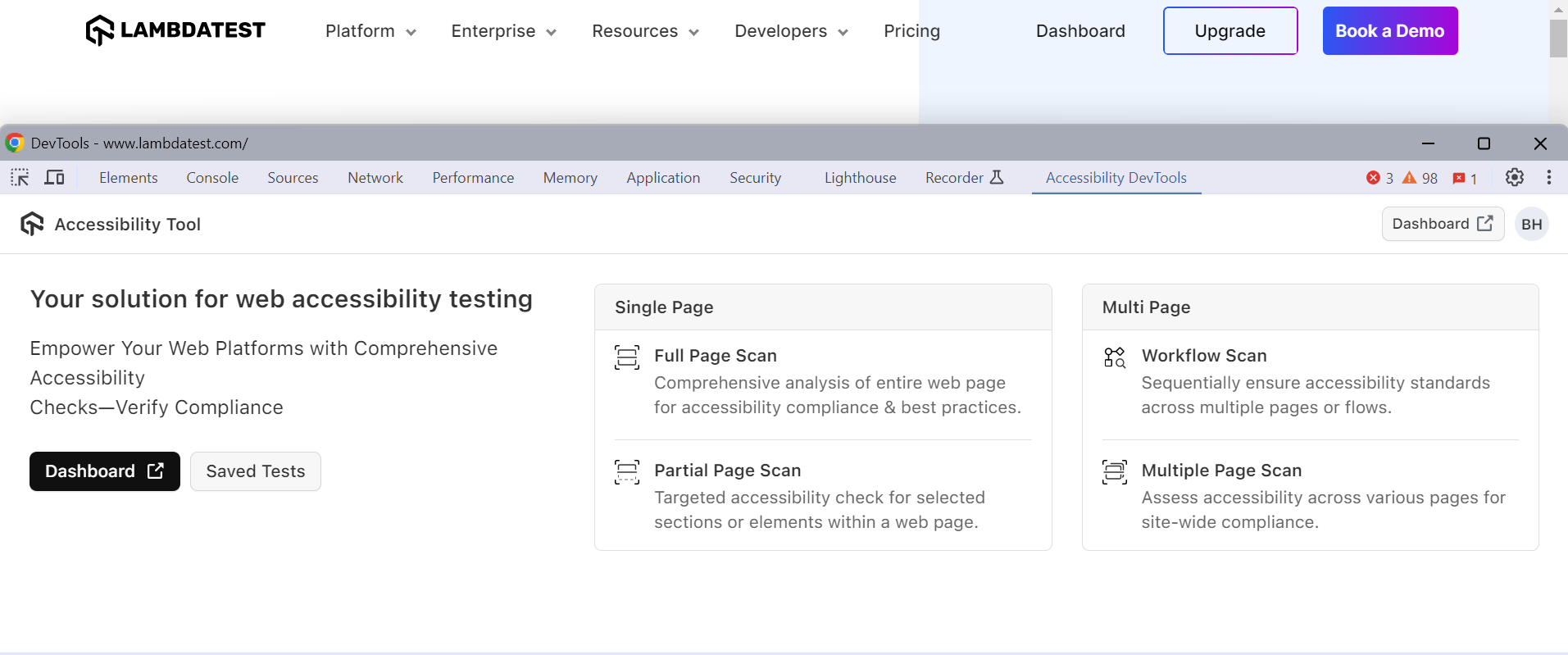
Key Features:
- On-Demand Scans: Run instant accessibility scans on any page within the TestMu AI virtual machine. Violations are identified and presented clearly.
- Visual Highlighting: Problematic elements are highlighted on-screen, showing which WCAG criteria fail, such as missing alt text or improper ARIA attributes.
- Detailed Issue Reporting: Each issue includes a description, WCAG reference, and practical remediation steps to accelerate fixes.
- Screen Reader Testing: Test compatibility with popular screen readers like NVDA and JAWS directly in the cloud environment.
- Keyboard Navigation Testing: Validate that all interactive elements are fully accessible using only a keyboard.
To get started, refer to the TestMu AI Accessibility DevTools documentation.
TestMu AI Accessibility Automation
TestMu AI allows you to perform accessibility automation using frameworks such as Selenium, Cypress, and Playwright.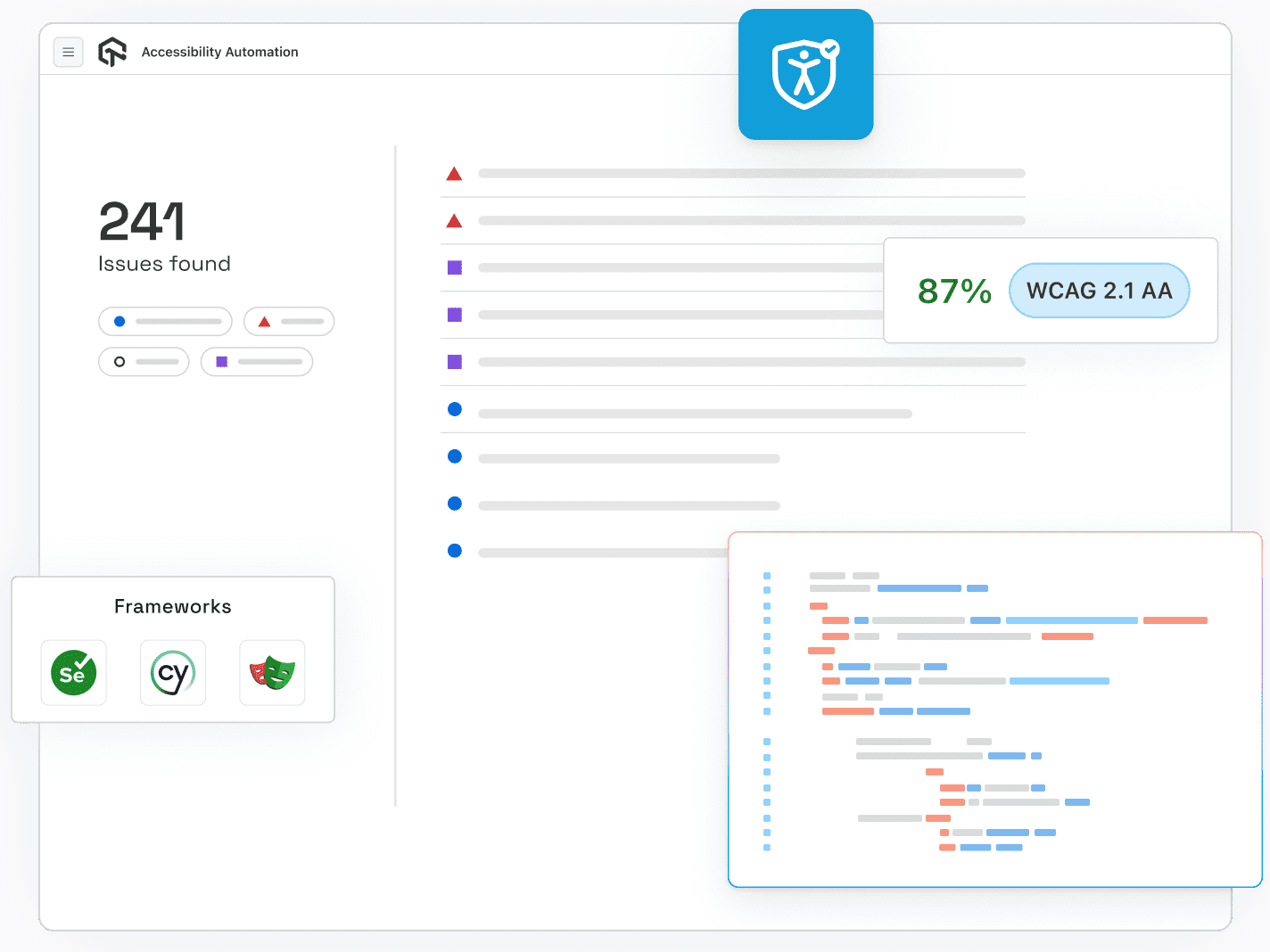
Key Features:
- Accessibility Testing with MCP Server: TestMu AI MCP Server connects AI to your project and instantly finds, explains, and helps fix accessibility issues directly in your editor.
- CI/CD Integration: Run accessibility tests with frameworks like Selenium, Cypress, Playwright, or Puppeteer. Catch issues early in development.
- Automated Scans on Deployments: Trigger tests automatically on each build across hundreds of browser and OS combinations.
- Detailed Automation Reports: Comprehensive execution reports show every passed and failed checkpoint for tracking and stakeholder reporting.
To begin with, visit the TestMu AI Accessibility Automation documentation.
Common WCAG Compliance Challenges
Achieving WCAG compliance is difficult for many organizations due to technical complexities. Frequent issues like low contrast text, missing alt text, and incomplete form labeling continue to block accessibility. Understanding these challenges helps prioritize fixes that make the most impact.
- Color and Visual Design: Low contrast text or information conveyed by color alone makes content unreadable or confusing for users with vision impairments.
You can explore more about color contrast accessibility and how it affects UI design.
- Keyboard Navigation: Interactive elements must support keyboard input, visible focus indicators, and proper focus management; missing these blocks users from completing tasks.
- Alternative Text and Media: Missing or generic alt text, uncaptioned videos, and absent audio descriptions prevent screen reader users from accessing important content.
Learn more about how to perform screen reader accessibility testing.
- Forms: Unlabeled fields, poor error messages, missing required indicators, and illogical grouping confuse users and make form completion difficult or impossible.
- Complex Interactive Components: Custom widgets, dynamic updates, tooltips, or auto-advancing carousels without proper ARIA support or announcements create barriers for assistive technology users.
- Mobile and Responsive Design: Tiny touch targets, broken layouts across devices, and disabled zoom prevent users with motor or vision impairments from interacting effectively.
- Technical Implementation: Non-semantic HTML, broken heading hierarchy, missing skip links, and inaccessible PDFs reduce compatibility with screen readers and other assistive technologies.
- Testing and Organizational Processes: Relying on automated tools alone, late-stage testing, inconsistent procedures, and limited internal expertise creates undetected accessibility issues.
Best Practices for Effective WCAG Testing
Following best practices uncovers hidden barriers and improves usability across devices, browsers, and assistive technologies.
- Define Clear Objectives Early: Set specific goals before testing. Decide which WCAG level(s) to target. Prioritize critical flows, high-traffic pages, and key functionality such as forms, navigation, or media.
- Choose a Representative Sample of Pages: Select a varied set of pages, including different templates, content types, and key workflows such as checkout, search, or interactive elements. Capture both common and edge-case issues.
- Educate and Engage the Entire Team: Train designers, developers, QA, and content creators in accessibility principles. Cross-functional understanding ensures accessibility is integrated consistently and prevents last-minute issues.
- Combine Automated and Manual Testing: Use accessibility testing tools for automation to catch technical issues like missing alt text or poor contrast. Follow up with manual testing for usability, navigation order, and assistive technology compatibility.
- Include Real-User Testing with Disabilities: Engage users with visual, auditory, cognitive, or motor disabilities to test actual workflows. Their feedback reveals real-world issues that automated and expert reviews may miss.
- Test Across Devices, Viewports, and User Agents: Check web applications on desktop, tablet, and mobile using multiple browsers and assistive technologies to detect device- or web accessibility issues.
- Check Keyboard Accessibility and Navigation Order: Ensure all interactive elements are accessible via keyboard, focus indicators are visible, and tab order is logical. These are common points of failure.
- Ensure Clear and Consistent Communication: Use meaningful labels, concise instructions, descriptive links, captions, transcripts, and helpful error messages. Clear communication reduces cognitive load and benefits all users.
- Prioritize by Severity and Impact: Focus first on issues that block user flows or critical functionality. Fixing high-impact issues delivers the greatest benefit to users and overall accessibility.
- Iterate, Retest, and Maintain Documentation: Accessibility is ongoing. Retest after fixes and maintain records of issues, resolutions, and priorities to track progress and guide future improvements.
Also, it is important to keep a web accessibility checklist handy to make sure your content and design work for everyone, including people who rely on assistive technologies.
Future of WCAG Testing
The future of WCAG testing is driven by AI-powered automation, adaptive accessibility standards, and an expanded focus on user-centered and immersive experiences across all digital platforms.
Here are some of the major trends shaping WCAG testing:
- AI and Machine Learning Integration: AI and accessibility are making it easier to spot and anticipate WCAG violations. These tools enable automated, real-time testing and can adapt to new accessibility patterns, covering edge cases missed by manual and static tools.
- Voice, Gesture, and XR Accessibility: Testing will increasingly address voice navigation, gesture-based interactions, and accessibility in AR/VR (extended reality) environments. This ensures inclusivity not just for websites and apps, but for emerging digital platforms.
- Shift-Left and Continuous Testing: Accessibility testing is becoming an intrinsic part of development workflows, integrated from the earliest design stages and maintained throughout every update or release. This minimizes last-minute accessibility risks and increases overall quality.
- Comprehensive Regulatory Coverage: Countries and states are updating laws to mandate stricter, ongoing accessibility checks, the European Accessibility Act and expanded ADA rules, for example, now require active documentation and process transparency, not just initial compliance.
- Focus on Mobile and Neurodiverse Users: Mobile accessibility and designing for neurodiversity are at the forefront, with newer guidelines emphasizing large tap targets, reduced cognitive overload, and age‑friendly navigation features.
- Inclusive Usability and Real User Testing: WCAG testing will rely more on feedback from people with disabilities, ensuring that updates address actual user needs in addition to technical compliance.

Conclusion
WCAG testing is essential for building inclusive digital experiences and meeting global accessibility standards. By understanding its principles, conformance levels, and testing approaches, teams can identify barriers that affect users with disabilities.
Using platforms like the TestMu AI Accessibility Suite simplifies the process through automation, monitoring, and actionable insights. Although challenges exist, following best practices and embracing future advancements in AI and automation will help organizations deliver more accessible, user-friendly, and compliant digital products.
Citations
- WCAG 2 Overview: https://www.w3.org/WAI/standards-guidelines/wcag/
Author

Salman Khan
Blogs: 138


Salman is a Test Automation Evangelist and Community Contributor at TestMu AI, with over 6 years of hands-on experience in software testing and automation. He has completed his Master of Technology in Computer Science and Engineering, demonstrating strong technical expertise in software development, testing, AI agents and LLMs. He is certified in KaneAI, Automation Testing, Selenium, Cypress, Playwright, and Appium, with deep experience in CI/CD pipelines, cross-browser testing, AI in testing, and mobile automation. Salman works closely with engineering teams to convert complex testing concepts into actionable, developer-first content. Salman has authored 120+ technical tutorials, guides, and documentation on test automation, web development, and related domains, making him a strong voice in the QA and testing community.


Frequently asked questions
Did you find this page helpful?
More Related Learning Hubs
TestMu AI forEnterprise
Get access to solutions built on Enterprise
grade security, privacy, & compliance
- Advanced access controls
- Advanced data retention rules
- Advanced Local Testing
- Premium Support options
- Early access to beta features
- Private Slack Channel
- Unlimited Manual Accessibility DevTools Tests