
Power Your Software Testing with AI Agents and Cloud
The Native AI-Agentic Cloud Platform to Supercharge Quality Engineering. Test Intelligently and Ship Faster.


- TestMu AI (Formerly LambdaTest)
- /
- Blog
- /
- ADA Compliant Website: Requirements & How to Comply
ADA Compliant Website: Requirements & How to Comply
An ADA compliant website meets WCAG 2.1 AA so people with disabilities can use it. See who must comply, what the DOJ says, lawsuit data, and how to fix gaps.
Published on:
Plaintiffs filed 5,006 ADA Title III lawsuits in federal court in the first half of 2026, 9% more than in the same period of 2025, according to the Seyfarth Shaw 2026 mid-year report. Title III covers businesses open to the public, and a growing share of those suits target websites.
This guide explains what an ADA compliant website is, which rule applies to your organization, what the Department of Justice actually says about websites, and the steps to get compliant. It also shows a real scan I ran on a contact form, because forms are where small markup mistakes lock screen reader users out.
TL;DR
An ADA compliant website lets people with disabilities use it as fully as anyone else. The ADA sets no technical standard for business websites, but the Department of Justice points to WCAG, and its rule for state and local governments requires WCAG 2.1 Level AA, which is the practical target for everyone.
- Who must comply: Businesses open to the public fall under Title III, state and local governments under Title II, and federal agencies under Section 508.
- Legal risk: Federal Title III filings rose 9% in the first half of 2026, and website suits are a large share of them.
- How to comply: Scan key pages against WCAG 2.1 AA, fix the code, test with a keyboard and screen reader, and rescan after each release.
What Is an ADA Compliant Website?
An ADA compliant website is one that people with disabilities can perceive, operate, and understand with the assistive technology they already use. A blind visitor hears every button named by a screen reader, a deaf visitor follows videos through captions, and a visitor who cannot use a mouse completes a purchase with the keyboard.
The Americans with Disabilities Act is a civil rights law, not a technical specification. The measurable yardstick is the W3C's Web Content Accessibility Guidelines, organized under four principles: perceivable, operable, understandable, and robust. Each success criterion sits at Level A, AA, or AAA, and Level AA is the level legal requirements reference.
Does My Website Need to Be ADA Compliant?
Yes, if you serve the public in the United States. Which rule applies depends on who you are:
| Your organization | Rule that applies | Technical standard | Deadline |
|---|---|---|---|
| Business open to the public (retail, restaurants, banks, healthcare, hotels) | ADA Title III | None written into a rule; WCAG 2.1 or 2.2 AA is the benchmark | None set; the obligation already applies |
| State or local government (cities, counties, public schools, public universities) | ADA Title II | WCAG 2.1 Level AA | April 26, 2027 (50,000+ population) or April 26, 2028 (smaller entities) |
| Federal agency, or a vendor selling to one | Section 508 | WCAG 2.0 Level AA | In force since the Revised 508 Standards took effect in 2018 |
If you are a public body, the ADA Title II checklist walks through the new rule step by step, and federal teams should start with Section 508 compliance. The rest of this guide focuses on businesses under Title III.
ADA and DOJ Guidance on Websites
The clearest federal statement is the Department of Justice's Guidance on Web Accessibility and the ADA, published March 18, 2022. Its main points:
- Websites are covered - the DOJ has consistently held that Title III applies to all the goods and services a public accommodation offers, including those offered on the web.
- No detailed Title III standard - the DOJ states it has no regulation setting out detailed web standards for businesses, so you have flexibility in how you comply.
- WCAG as guidance - the guidance names WCAG as an existing technical standard that helps you make site features accessible.
- Named barriers - poor color contrast, images without alt text, videos without captions, and mouse-only navigation.
The guidance itself has no binding legal effect, and the DOJ later adopted WCAG 2.1 AA in its Title II web rule for governments. Businesses read that rule as the clearest signal of the standard regulators expect, which is why WCAG 2.1 AA is the working definition of an ADA compliant website.
What Happens If a Website Is Not ADA Compliant?
There is no ADA website inspector. Enforcement comes from private lawsuits, demand letters, and occasional DOJ action, and the volume is high:
- 8,667 federal ADA Title III lawsuits were filed in 2025, per Seyfarth Shaw's 2025 website lawsuit analysis, which tracks how many of them concern websites.
- Florida saw 961 federal website accessibility suits in 2025, almost double its 470 filings in 2024, according to the same analysis.
- State courts are not in those numbers. Seyfarth notes that a significant number of demand letters and state court suits sit outside its federal count.
A suit does not prove a violation, but responding to one costs legal fees, remediation work, and often a settlement. Fixing the site before a letter arrives is the cheaper path, and documented testing helps show good faith if one does.
What Makes a Website ADA Compliant in Practice?
WCAG 2.1 AA has dozens of success criteria, but most real barriers fall into a handful of areas. Each row below names the criterion from the WCAG 2.2 guidelines and the failure that usually breaks it:
| Area | WCAG criterion (level) | Common failure |
|---|---|---|
| Images | 1.1.1 Non-text Content (A) | Product photos and icon buttons with no alt text |
| Forms | 1.3.1 Info and Relationships (A), 3.3.2 Labels or Instructions (A), 4.1.2 Name, Role, Value (A) | Visible label text that is not connected to its input |
| Color | 1.4.3 Contrast (Minimum) (AA) | Body text below a 4.5:1 contrast ratio against its background |
| Keyboard | 2.1.1 Keyboard (A), 2.4.7 Focus Visible (AA) | Menus or date pickers that only open on mouse hover, focus outlines removed in CSS |
| Media | 1.2.2 Captions (Prerecorded) (A) | Product and training videos with no captions |
| Mobile layout | 1.4.10 Reflow (AA) | Pages that need sideways scrolling at 320 CSS pixels wide |
| Language | 3.1.1 Language of Page (A) | No lang attribute, so screen readers pick the wrong pronunciation |
The color contrast checker tests any text and background pair against the AA and AAA ratios in seconds, which makes the color row the fastest one to clear.
Form Failure Example: My Scan
To show how an invisible markup mistake becomes an ADA barrier, I scanned the Selenium Playground Ajax form in October 2026 with axe-core 4.10.2, limited to WCAG 2.0 and 2.1 Level A and AA rules. It is a two-field contact form, the kind every small business site has.
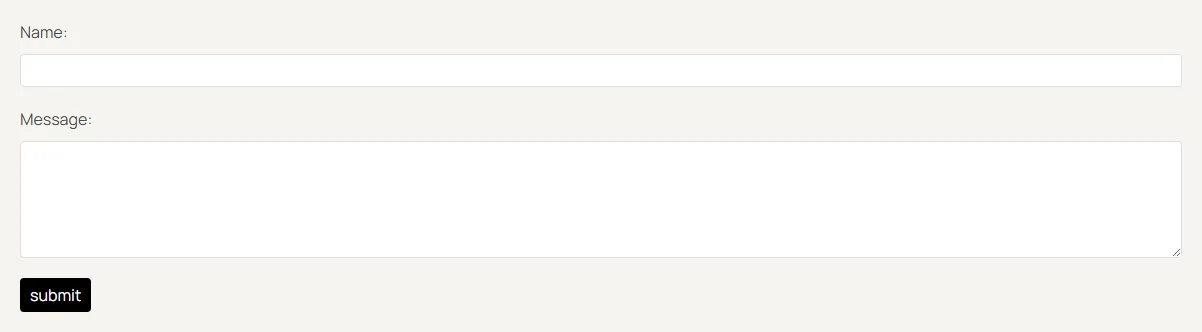
Visually, nothing is wrong: "Name:" and "Message:" sit above their fields. The scan disagreed:
- 1 violation, critical - the "label" rule failed on 2 elements, the Name input and the Message textarea, mapped to WCAG 4.1.2.
- 25 rules passed and 1 was marked for manual review.
- Accessible name: empty - reading Chrome's accessibility tree for both fields returned a textbox role with a blank name, so a screen reader announces only that there is an edit field, with no hint of what to type.
The cause is two missing attributes. The label elements exist but have no for attribute pointing at an input id, so the browser never connects them. The fix takes one line per field:
<!-- Before: label and field are siblings, not connected -->
<label>Name:</label>
<input type="text" name="title" id="title">

<!-- After: for matches the input id, so screen readers announce "Name" -->
<label for="title">Name:</label>
<input type="text" name="title" id="title">
The lesson for compliance: a form can look finished and still be unusable for a screen reader user, and only a scan or a screen reader pass reveals it. The accessibility testing guide covers the manual passes that go with a scan.
How to Make Your Website ADA Compliant
Work through these in order. The early steps define scope; the later ones keep you compliant after launch.
- List your critical journeys - homepage, search, product or service pages, account sign-up, contact forms, and checkout or booking. These are what customers, and plaintiffs, try first.
- Scan against WCAG 2.1 AA - run the WCAG accessibility checker on each journey and export the failures by severity.
- Fix in the source - correct labels, alt text, contrast, and keyboard handling in your templates and components, so one fix repairs every page that uses them.
- Test what scanners cannot - tab through every journey with the keyboard alone, then listen to it with NVDA or VoiceOver to confirm labels and alt text make sense.
- Publish an accessibility statement - state your WCAG target, known gaps, and a phone number or email for people who hit a barrier.
- Rescan on a schedule - new products, blog posts, and marketing pages reintroduce failures, so test after every release.
If you are choosing software for steps 2 and 6, the ADA compliance tools roundup compares nine options I tested.

Austin Siewert
Co-Founder, Steadfast Systems
Discovered @TestMu AI yesterday. Best browser testing tool I've found for my use case. Great pricing model for the limited testing I do 👏
3M+ Devs and QAs rely on TestMu AI
Deliver immersive digital experiences with Next-Generation Mobile Apps and Cross Browser Testing Cloud

Do Accessibility Overlays Make a Website ADA Compliant?
Overlays are scripts that add a toolbar or try to repair a page in the visitor's browser. They are marketed as a one-line route to compliance, and regulators have pushed back on that claim.
In April 2025 the FTC approved a final order requiring accessiBe to pay $1 million. The FTC's complaint alleged that the company's claim that its tool could make any website WCAG compliant was false, misleading, or unsubstantiated.
The form in my scan shows why: the missing for attribute lives in the site's HTML, and the reliable fix is to change that HTML. Treat any tool as a way to find problems, not as a substitute for fixing them.
Start With Your Checkout and Contact Forms
Scan the journeys that make you money and the forms people use to reach you, fix the critical failures this week, and put a recurring scan in place before the next release. If you receive a demand letter, involve an attorney before you reply.
TestMu AI Accessibility Testing runs Full Page, Multi-Page, Workflow, and Keyboard scans against WCAG and ranks every violation by severity with the failing element and fix. Website accessibility monitoring then rescans URLs from your sitemap, a CSV, or a crawler on a recurring schedule and alerts you by email or Slack when new violations appear. The accessibility testing documentation shows how to run your first scan.
Author

Mythili Raju
Blogs: 56


Mythili is a Community Contributor at TestMu AI with 3+ years of experience in software testing and marketing. She holds certifications in Automation Testing, KaneAI, Selenium, Appium, Playwright, and Cypress. At TestMu AI, she leads go-to-market (GTM) strategies, collaborates on feature launches, and creates SEO optimized content that bridges technical depth with business relevance. A graduate of St. Joseph’s University, Bangalore, Mythili has authored 35+ blogs and learning hubs on AI-driven test automation and quality engineering. Her work focuses on making complex QA topics accessible while aligning content strategy with product and business goals.
Reviewer

Shahzeb Hoda
Reviewer
Shahzeb Hoda is the Associate Director of Marketing and a Community Contributor at TestMu AI, leading strategic initiatives in developer marketing, content, and community growth. With 10+ years of experience in quality engineering, software testing, automation testing, and e-learning, he has authored and reviewed 70+ technical articles on software testing and automation. Shahzeb holds an M.Tech in Computer Science from BIT, Mesra, and is certified in Selenium, Cypress, Playwright, Appium, and KaneAI. He brings deep expertise in CI/CD pipeline automation, cross-browser testing, AI-driven testing practices, and framework documentation. On LinkedIn, he is followed by 3,700+ engineers, developers, DevOps professionals, tech leaders, and enthusiasts.


ADA Compliant Website FAQs
Did you find this page helpful?
More Related Blogs

TestMu AI forEnterprise
Get access to solutions built on Enterprise
grade security, privacy, & compliance
- Advanced access controls
- Advanced data retention rules
- Advanced Local Testing
- Premium Support options
- Early access to beta features
- Private Slack Channel
- Unlimited Manual Accessibility DevTools Tests