

Next-Gen App & Browser Testing Cloud
Trusted by 2 Mn+ QAs & Devs to accelerate their release cycles


Website Testing: A Detailed Guide
Do you need to gather more knowledge on website testing? TestMu AI is here to explain further.

Amrita Angappa
February 24, 2026
Websites and web apps are growing in number day by day, and so are the expectations of people for a pleasant web experience. Even though the World Wide Web (WWW) was invented only in 1989 (32 years back), this technology has revolutionized the world we know back then. The best part is that it has made life easier for us. You no longer have to stand in long queues to pay your bills. You can get that done within a few minutes by visiting their website, web app, or mobile app.
Building a website is also easier with endless web development frameworks in the market. Needless to say, the advent of the web has made life we know so far simple and comfortable for us.
If so many websites and web apps exist, wouldn’t we need to test them? That’s where website testing plays an important role. Be it using unit testing frameworks for Selenium automation or user acceptance testing, it’s a long journey ahead when you get into website testing!
In this blog, we will take a deep look into website testing, the structure of web applications, common website testing methods, testing locally hosted websites, and much more.
AI Overview
What Is Website Testing?
Website testing is the process of evaluating a website or web application to ensure it functions correctly, loads quickly, remains secure, and works seamlessly across different browsers and devices before launch.
It helps businesses improve user experience, protect data, increase conversions, and maintain search engine rankings.
Why Is Website Testing Important?
Website testing is essential because it prevents revenue loss caused by broken features, improves Core Web Vitals performance, reduces bounce rates, enhances user trust and security, ensures mobile responsiveness, and protects against cyber threats.
Search engines prioritize fast, stable, and secure websites — making testing critical for SEO performance.
How Does Website Testing Work?
- Functional Testing: Validates forms, checkout flows, navigation, and login systems.
- Cross-Browser Testing: Ensures compatibility across Chrome, Safari, Firefox, and Edge.
- Responsive Testing: Verifies layouts across desktop, tablet, and mobile devices.
- Performance Testing: Measures speed, load time, and scalability.
- Security Testing: Identifies vulnerabilities and data risks.
- Usability Testing: Evaluates user experience and accessibility.
- Visual Regression Testing: Detects UI inconsistencies automatically.
When Should Organizations Perform Website Testing?
- Before launching a new website or feature.
- When releasing frequent updates.
- When UI changes impact layouts or functionality.
- When performance issues affect user experience.
- When ensuring cross-device and cross-browser compatibility.
- When addressing security and compliance requirements.
What Are the Benefits of Website Testing?
- Improved User Experience: Ensures smooth functionality across devices and browsers.
- Higher Conversions: Reduces friction in user journeys.
- Better Performance: Optimizes speed and Core Web Vitals.
- Stronger Security: Protects user data and business assets.
- Reduced Risks: Identifies issues before they impact customers.
What Is the Future of Website Testing?
- AI-Driven Automation: Smarter test creation and maintenance.
- Shift-Left Testing: Earlier defect detection in development cycles.
- CI/CD Integration: Continuous testing within deployment pipelines.
- Real-Device Cloud Testing: Scalable infrastructure for global validation.
What is website testing?
Website testing or web testing is checking your web application or website for potential bugs before it is made live and is accessible to the general public. Web testing, or web application testing, checks for functionality, usability, security, compatibility, and performance of the website or the web application.
During this stage, issues such as web application security, the site’s functioning, access to a person with impairments, and its ability to handle traffic are checked.

Why is website testing necessary?
Do you know? You are one among the 5 billion digital users across the globe.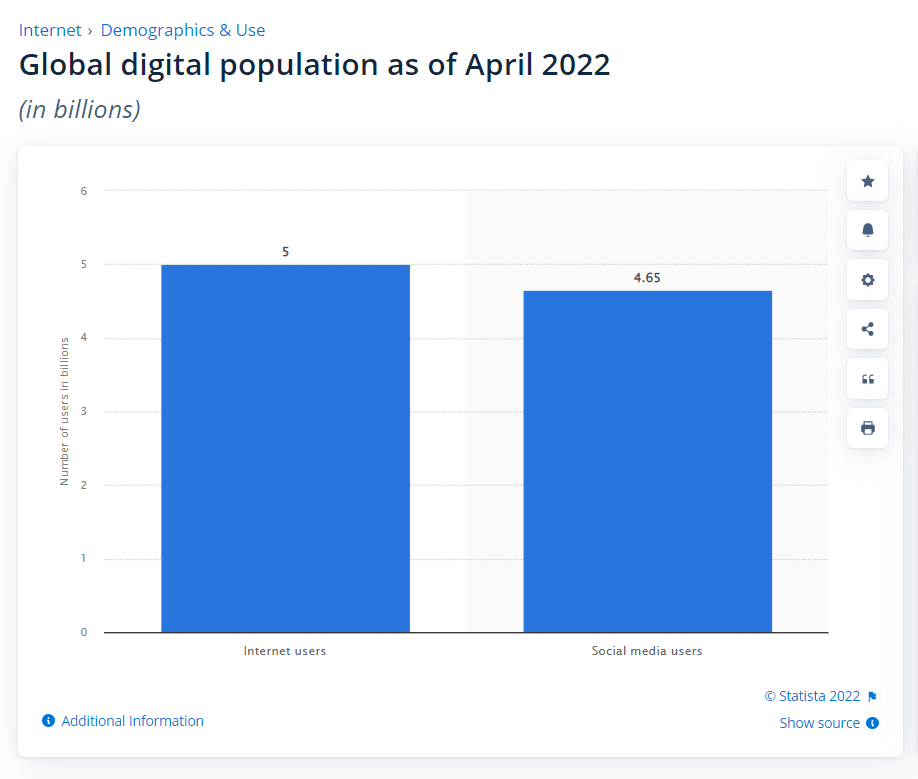
Websites have started playing a common role in every organization. Even many individuals are keen on starting their blogging website. With technological progress, building a website is of foremost importance to businesses of any size. The best part is the ability to get things done by yourself, be it content, design, or development, using free and open source content management tools in the market.
From a multi-billion dollar company to your next street home baker, everyone can flourish in their career through their online presence. That’s the most loved part about digital marketing.
But, wait! When your website is live and gaining audience traction, what if you come across comments like “I am not able to view it on Safari” or “The pages take too long to load”, it’s going to lead to unnecessary judgments.
That’s why you must carry out website or web app testing.
Website testing is the best way to ensure that your website is error-free and the bugs are discovered and derailed before your web product is live. Website testing means testing many aspects of your website and web application to check how they function.
You need to remember that website testing isn’t simple. So many factors such as cross browser compatibility, performance, reliability, user acceptance, security, and performance come into play.
The enterprises should bring in the best testers for assessing different web aspects across various platforms, devices, and browsers. Testers shouldn’t hesitate to implement best testing practices when they want to skyrocket their web performance. All they need to do is to remember a few pointers in this website testing checklist.

Note: Spruce up web testing! Try TestMu AI Now!
What are the challenges faced in website testing?
Website testing comes up with its challenges that businesses need to consider. Let’s take a look at the top ones among them:
- Firewall interactionYou’ll face several instances where a port or a firewall can block a website since it has issues regarding security certificates. You must test your application across different firewalls to stay safe from such incidents.
- Web Services validationModern-day web applications depend thoroughly upon the web service layers such as XML/SOAP or REST/JSON for exchanging data between different applications or systems. Hence there is a huge scope to test all these applications. To test these web services, you must pick the right tool from your web testing tools.
- Consistency maintenance across different browsersMajority of the users prefer reliable, flexible, and interactive web apps. If a user comes across any inconsistency when they surf on browsers, it becomes a huge headache for enterprises. When you perform usability testing, your developer has to monitor the scalability and interactivity of your application across various browsers through different hardware.
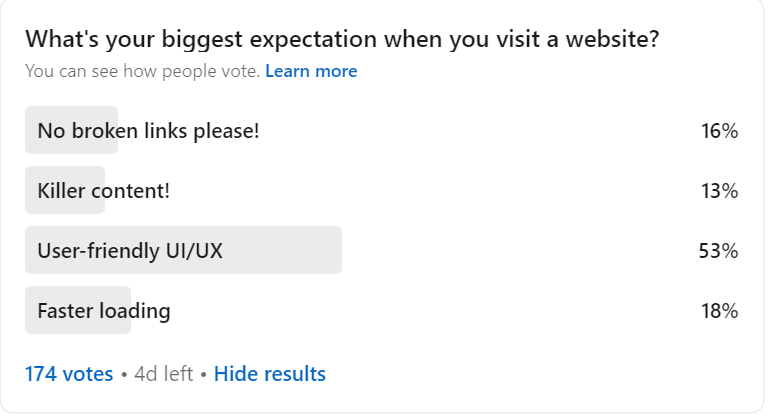
- Overcoming performance issuesYour website should load fast- That’s what people expect next to a user-friendly experience. This is also one of the primary goals of website testing. I realized this from the results I achieved from the poll. To overcome this challenge, testers must keenly focus on performance testing with interoperability, extended application, and integration issues.
- Security threatsWe live in times where digitization has become the norm. We are witnessing an overwhelming rate of cyberattacks. To avoid data breaches and information loss, we must regulate how we conduct security testing. This can help you out when you want to avoid security issues regarding DDoS attacks along with cyber attacks.
When I conducted a LinkedIn poll asking the biggest expectation people have when they visit any website, out of 174 people, 53% of them indicated user-friendly UI/UX on the web. Nobody wants to spend time on a crumpled website with zig-zag text and images. Developers and testers need to take special care of this matter.
Best Websites and web app testing practices
Before we understand the best website testing practices, let’s touch base with the basics. This is the structure of a web application:
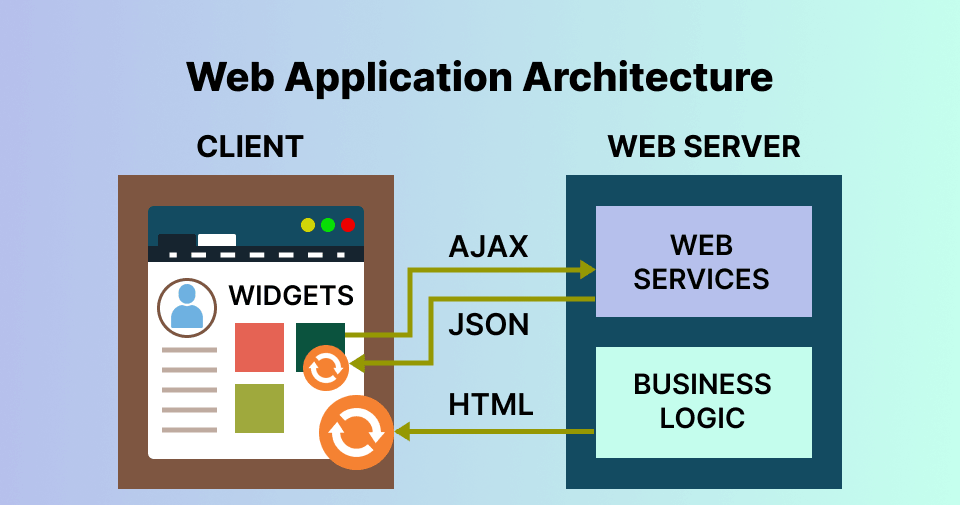
The architecture of a web application would describe different interactions between databases, applications, and middleware systems. This is done to make sure that different apps function on a simultaneous basis. Before we open a web page, we type the URL of the website in the web browser’s address bar. The server would send many files to the browser in response to your request. After that, the user would be able to carry out web interactions. The functioning of a web app is quite similar.
When we deal with any web application, it involves different codes or sub-programs that run parallelly. These are
- Client-side Code – The browser-side code that responds to a few user inputs.
- Server-side Code – The server-side code that responds directly to the HTTP requests.
The architecture of a web application is vital in modern days since a vast portion of the network traffic globally, along with devices and apps, leverages web-oriented communication. The web app architecture should inevitably deal with factors such as scalability, efficiency, robustness, security, and reliability. That’s where website testing software comes into the picture.
Website testing is going to grow from strength to strength with these industry-led practices. It’s apparent that your website audience would eulogize you if you follow these practices:
- Everything starts with DocumentationDuring website testing and web app testing, the tester shouldn’t ignore the importance of documentation. After doing a clear study, they need to document the needed facts in requirements, test cases, test plan, and traceability matrix. Your document would act as a source of truth. Hence you need to be careful when you write it.
- Check for Website FunctionalityAutomated functionality testing is one of the top testing processes to test how the website or web app would sync up with pre-set requirements. It’s all about using black-box testing techniques when a tester wouldn’t be aware of the internal system logic. This also includes validation, links/URL, cookies, and error message testing. You must thoroughly analyze and perform all these tests using the right tool and team.
- Leverage Cross Browser CompatibilityWith thousands of users accessing websites and web apps on their tablets and mobile phones, enterprises have found a symphony of features and options to impress their audience. Cross browser compatibility tests want to do what Silicon valley did to budding startups in the 1970s and 80s to your websites and web apps. Cross browser compatibility test during website testing aims to make your website responsive.
- Conduct Performance Testing under different conditionsAn application shouldn’t crash when put under heavy loads. It should work like a pro on every browser and device. But, alas! A minor design or coding flaw is all it takes to affect the performance of the website on a negative note. Hence you need to perform load testing and check how your website performs under different loads. Get your fingers on the pulse with the best automation load testing tools in the market.
- Choose the top parameters for Usability testingUsability testing and user experience go hand in hand when you want to engage your audience, leads, and visitors and eventually convert them into clients and customers. Evaluating the application’s usability on important parameters such as speed, content readability, accessibility, navigability, and UI design is of utmost importance.
- Make use of Geolocation testingThe web is a global, universal platform where a user from the USA can read a blog from an Armenian website. Hence, it’s always better to test your website’s appearance under different geo-locations. Geolocation testing can also be a secret sauce for nailing SEO aspects since you can easily resolve any bug in the website version of a particular nation on time.
- Kickstart Interface testingThe method of interface testing confirms that these three major web application components are running perfectly fine- database, web browser, and the web server. We use this testing to check for any interruption when transferring the data. When we do this, we can check if we can check the communication happening between different interfaces. Check out our list of the best UI testing tools and techniques in the market.
- Check for Security IssuesIt’s a recipe for disaster when you ignore the red flags of web security. A single vulnerability can translate to a high-end data breach, well enough to bring down the big giants to mud. This can lead to a misbalance in morale along with financial consequences. People would lose their trust in your brand eventually.
- Avoid skipping confirmation testWe can always perform change-related testing for tracking the bugs and confirming that they have gotten fixed. It’s always a must to write efficient test cases. Then you need to run and re-run the test cases to ensure that your code is bug-free. Making changes to the code shouldn’t lead to any defects. To affirm this, you can use regression testing, another retesting form in website testing.
- Integrate Exploratory Testing with Software Development Life CycleExploratory testing reduces time and levels up the bug discovery process. Testers take some time to write and execute every test case on a simultaneous basis. When you fail to understand the setbacks of exploratory testing, you are prone to more bugs and defects. You can get done with the limitations imposed by website testing by integrating white-hat and black-hat software testing techniques. The integration can produce the most needed test results for your team and go on to reduce the time you take to test.
- Accessibility Testing is importantYour website should be accessible to a wide range of users across the globe. A person with impairments should be able to access a particular website more easily. Hence it’s a must to perform accessibility testing to ensure that, for example, your text is also available in audio format through a screen reader and your image contains ALT text.
- Perform Database TestingPerforming database testing is a must to check for query execution, query response time, reflection of test data, and avoiding data integrity. For example, when you want to perform Oracle testing, things get easier since you can connect Oracle cloud to different databases via networks. A database management system such as Oracle can help you manage your data and ensure fewer errors in your website database. You can also perform browser compatibility tests of SQL databases.
- Conduct Beta TestingWe perform beta testing with the help of limited, real-time users. It’s a must to understand what your user thinks about your product.
With responsive web design, you can ensure mobile-friendly and user-friendly applications that work amazingly on every browser, OS, and device. While developers slay it with responsive websites to ensure that the websites and web apps are accessible on different web browser versions, testers can perform cross browser compatibility tests to ensure they are on track.
Learn how to deal with responsive testing with TestMu AI.
Hence it’s a must to test your web apps and websites concerning security. Define your quality controls and coding standards. Bring in a cross-functional approach to building policies. Come up with strategies to face both internal as well as external challenges. Keep up with industry standards. Use them as benchmarks during website testing.
Do you want to delve deeper into beta testing, an inseparable part of website testing? Learn how to perform beta testing for apps.
Different approaches to website testing
There are plenty of websites with different approaches to testing them. Websites are broadly classified into these six categories, and so does their testing: Simple static websites, Dynamic web apps, E-commerce websites, Mobile websites, Animated web applications, and Rich Internet web applications.
- Simple Static Website testingA simple static website displays the exact content without any alterations to different visitors. The dependency of these websites primarily lies upon UI and very few functionalities.
- Dynamic web app or CMS website testingWhen we talk about a dynamic web application, we usually mean content that requires frequent updating. This can also mean a combination of frontend and backend programming or a content management system such as WordPress, which requires WordPress testing. Examples of front-end languages include HTML and CSS. The most popular backend programming languages would cover PHP, JavaScript, Angular, Python, etc.
- E-commerce website testingE-commerce websites are a combo of different features and pages. A tester shouldn’t ignore any of these facts. A tester must check if the products listed in the e-commerce app are directed to the right category. They should also check if the expanded view of the product image works properly. Some important features include logout, login, payment mode, coupons, discounts, etc. You can learn more about it from our earlier blog on e-commerce website testing.
- Mobile website testingFor mobile website testing, the tester needs to check for cross browser, cross OS, and cross device compatibility. The site should be compatible with every device, OS, and browser. The best way is to test your website on a real device cloud to check if the website is responsive directly. Your website should fit on every device without horizontal scrolling. Look for important features when you test a mobile website, such as spatial navigation, text truncation, image display, chatbot, etc.
To test any static website, you should check various design elements on the web page. The GUI elements include spacing, font size, color, and font style. You should also check for aspects such as broken links, contact form functioning, image display, and so on.
To test dynamic web pages and applications, it must ensure that the buttons are functioning correctly and available in a standard format. When something isn’t working, the user should get an error message such as a 404 error. Don’t upload an image without testing it. Check the features for text input. Since dynamic websites would cover single-page apps, you need to keep an eye on session storage.
To ensure this, you can use a real device cloud for native app testing tools such as TestMu AI. This can make your website testing and web app testing process simpler and easier.
- Animated web applications testingAn animated website allows you to create the needed animations with the capability to run in your browser. You can also inspect and manipulate these animations with declarative means such as CSS. Many developers love After Effects combined with Photoshop when they want to develop animations. It’s powerful enough to do things that JavaScript cannot do.
- Rich Internet web applications testingRIAs are here to represent the new gen web apps, which provide you with interactive, richer, user-friendly, and dynamic user interfaces compared to traditional ones. The best example is Microsoft Silverlight, the most powerful development tool to create the most interactive and engaging user experiences for mobile and web applications. Another example would be Google Gears, an open-source browser extension for developers to create offline web applications.
- Through a manual testing approach based on interaction analysis with an RIA of testers or real users.
- Interactions with RIA consisting of testers or real users.
- Through an automated approach based on Crawling techniques.
Subscribe to the TestMu AI YouTube channel if you want to gather firsthand information on automated browser testing, mobile app testing, and responsive test online.
The most preferred industry method is to sit with an interaction designer and a front-end developer to build an After Effects-powered prototype in JavaScript and CSS. Then you need to conduct unit and integration testing to check for bugs. You can leverage JavaScript libraries such as jQuery or Flash when you want to animate UI elements. You can also create this prototype using Powerpoint to share for user feedback or testing.
Check if the backgrounds, shapes, buttons, icons, and text are performing their duty sincerely. You also need to check if the website or web app is responsive to users when they scroll or use gestures.
Please read through this tutorial on CSS Animations to deep dive into this.
Rich Internet web applications often use AJAX (Asynchronous JavaScript and XML), which includes a cluster of technologies such as XML, JavaScript, and XMLHttpRequest objects. All these enhancements make it tough to test RIAs regarding testability or interface complexity. To find the exact processes and techniques for efficient RIA interface testing is quite daunting. There is a need for regression testing most of the time. We can also use the execution trace data to check the new statement order when executing the test cases. Using the execution logs, we can get each test case output and know if it’s passed or failed.
You can collect Execution traces:
Enabling an online Selenium automation test is the best practice for any AJAX application. You can also use Selenium WebDriver to eliminate “Automated Waiting”. It’s quick, logical, versatile, and concise when you want to conduct website and web app testing.
Note: Run Automation scripts on 3000+ Desktop and Mobile devices. Try TestMu AI Now!
Top trends in website testing
Website testing trends abound. But what trends have caught the attention of the developers and testers like never before? Let’s look at the top 10 trends in website testing:
- Agile and DevOpsMany organizations use Agile methodology to tackle faster, ever-changing demands and requirements. On the other hand, DevOps is viewed as a de facto way to manage speed.
- Test AutomationHere is a statistic by GMInsights, showing the prominence of the test automation market:
- API and Services Test AutomationIt’s a recent trend to decouple the server and the client for mobile and web applications. We reuse API and services in more than a single component or application. All these changes would require you to test API and services independently from the app they use.
- Artificial Intelligence for TestingEven though using the approaches involved in AI and ML has been practiced for ages, recent days have proven to be the golden age for software testing with the implementation of the latest AI/ML technologies. The AI/ML application in testing is currently in its early stages. These algorithms function well to write better test cases and generate test data, test scripts, and test reports.
- Mobile Test AutomationThe mobile app testing trends are growing continuously, and so are mobile-optimized website and web app testing trends. For supporting DevOps 100%, mobile automation testing should always play a role in DevOps toolchains. Optimizing your website and web app for your mobile device is a test. You shouldn’t fail to test them using the right mobile app testing tools.
- Cross Browser testingOnline cross browser testing has revolutionized how you test your website or web app. It’s not a cakewalk when you want to test your website manually with emulators and simulators. Do you need proof? Here is a comparison of emulator vs simulator vs real device. Depending upon online browser emulators like Android SDK and simulators like Apple Xcode would make it difficult for testers since you need to code manually and follow many processes.
- Conduct Real Device TestingTesting on emulators and simulators has its cons, such as the inability to mimic or simulate a real-time environment, lack of Bluetooth support, battery consumption monitoring, etc. That’s where cloud testing comes into play. With real device cloud testing, you can test your websites and apps to simulate or mimic real-time circumstances such as controls and gestures. You can test your website for reliability, compatibility, and scalability. This can also improve your testing speed. Needless to say, this will improve the test cycle speed.
- Integration of Tools and ActivitiesCommunication gap would occur when you aren’t integrating your website testing tool with other applications. Every software team should integrate the needed tools they use for development activities and phases. For example, automation testing tools like TestMu AI integrate with over 120+ platforms. The notable one is the integration of TestMu AI with JIRA, Slack, and ASANA.
- Screenshot testingNobody wants to go through a vicious test cycle where they expect a certain test result but receive something else in return. Communicating the bug to the developer on what you expected and received is a lot of work.
- Responsiveness testingIt’s a must to test how your website responds to different network conditions, resolution, gestures, and so on. As we know, a single-second page response delay can bring down 7% of conversions. Around 40% of website visitors wouldn’t return if the website loading time exceeded three seconds. Keeping all these facts in mind, we must conduct responsive testing without fail.
DevOps brings in rules, practices, features, and tools for integrating development and operational activities to spare some time. It’s the best-rated solution for organizations needing to reduce the software lifecycles from development to operation and delivery.
With the adoption of DevOps and Agile, teams across the globe are looking forward to developing and delivering high-quality software at high speed. This is the motto behind “Quality of Speed”. This adoption has been gaining more traction in recent days.
Continuous testing can reduce the time and resources invested in finding and fixing defects through shift-left testing.

According to their research, the Agile and DevOps methods have proven their mettle concerning quick bug removal, integration of sudden software changes, and post-deployment troubleshooting. All these benefits can skyrocket the agile & DevOps-oriented automation testing demand in automotive, financial services, government & public sectors, and telecom sectors. GMInsights team also highlights that many market players are stressing more about developing automation testing platforms based on Agile and DevOps methodologies for competitive advantages.
Agile and DevOps have indeed been a backbone for continuous testing.
To implement continuous testing in DevOps practices effectively, every software team should emphasize the importance of DevOps in test automation since it plays a key role in the DevOps process. Finding the best opportunities to replace manual testing methods with automation is a must. Since many portray automation testing as a DevOps bottleneck, we need to automate regression testing mainly with the right continuous testing strategy.
Tools such as Selenium and Cypress have regularly updated with an eye on the latest market trends. Take a look at our list of best automation testing tools in the market.
When we use API and services across different client applications and components, we should test them rather than the client. We have a huge need for API testing and service test automation. Hence, it must use the right API testing tool to perform API test automation.
With predictive models, you can know and decide when and how to test your data, which is the core principle of test orchestration. Let’s wait for more AI/ML applications in testing for quality prediction, bug tracking, smart visual UI testing, prioritization of test cases, bug classification, and much more.
To test your website on different browsers, OS, and devices on these emulators, you should write the test script, inject it and run the tests. No more fussy processes! With the help of live testing, anybody can test their website within a few steps. No need to code or write test scripts!
Why not make use of automated browser screenshot testing? You can easily capture the screenshots from a single URL. You can easily compare this with the actual and expected results.
How to test a website?
You can perform website testing in two major ways: manual and automated. It’s tiresome to manually check your website, given the number of factors you need to consider to test it. When you consider physical device vs real device cloud testing, the winner is real device testing in most cases.
How to perform real-time testing and real device testing? That’s where TestMu AI comes to your aid!
This is how you can test your website:
- Cross-browser compatibility
- Responsiveness testing
- Functionality testing
- Broken link testing
- Security testing
- Payment gateway testing
- Cookie testing
To test your website, you can also use digital experience platforms such as TestMu AI to perform real-time testing and real device testing.
TestMu AI is a platform that allows you to test your website on 3000+ browsers, devices, hardware configuration, and OS. With TestMu AI, you can perform automated browser testing on a more secure, scalable, and reliable automation cloud platform.
What’s more? You can easily perform real time testing, real device cloud testing, automation testing, screenshot testing, visual UI testing, and responsiveness testing with TestMu AI.
Real Time Testing using TestMu AI
Test your sites for compatibility across different browsers and operating systems to ensure your customers have the best experience possible using the real time online browser testing feature provided by TestMu AI.
Here are the top three steps to perform real time testing:
Step 1: Sign up for free on TestMu AI and login to your account.
Step 2: Click the Realtime Testing card on the modal box.
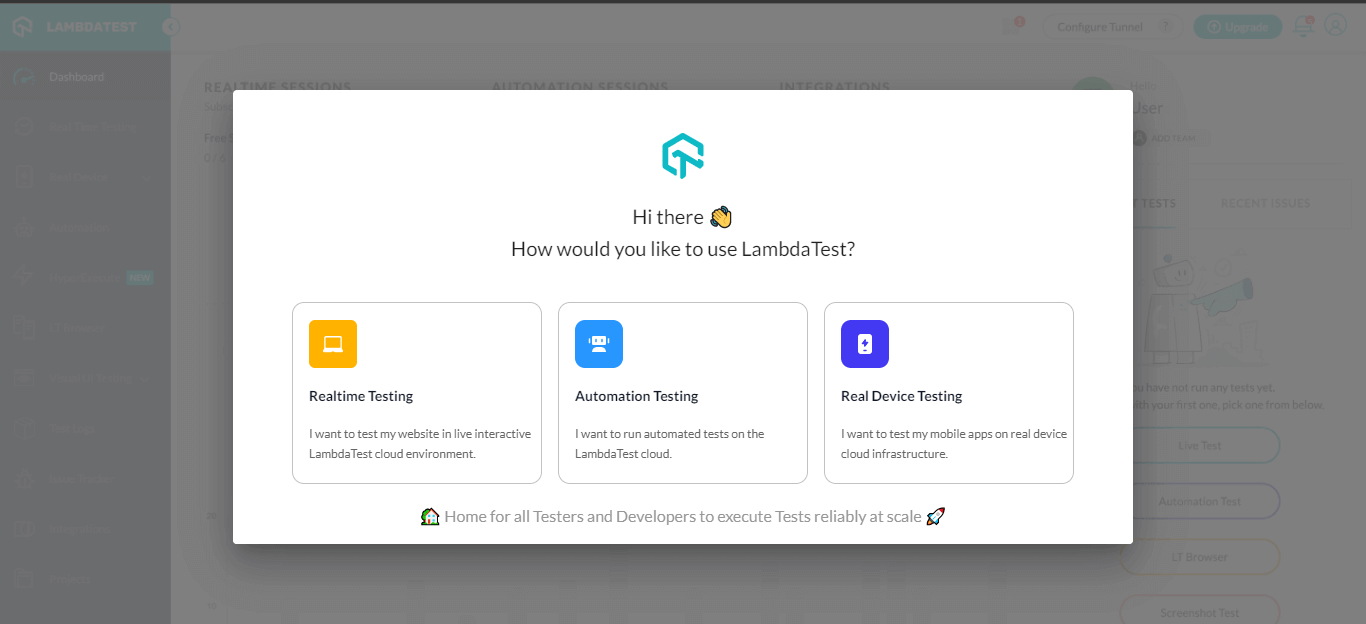
It will guide you to the Real Time Browser Testing console.
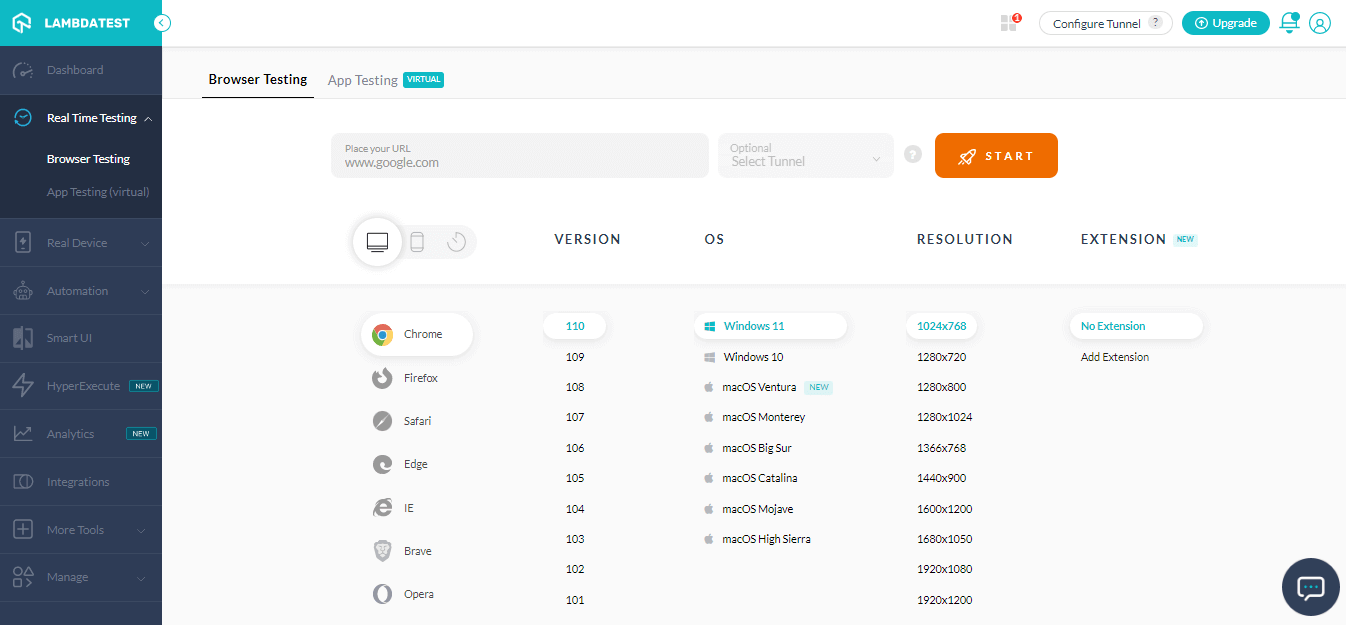
Step 3: Select the configurations on which you want to test like VERSION, OS, RESOLUTION. Now, click START.
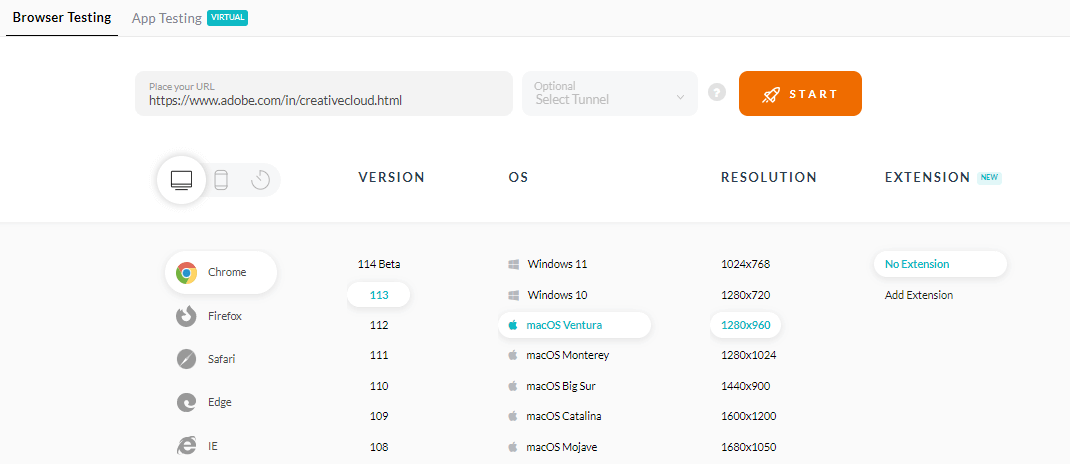
It will fire up a cloud-based real operating system to perform website testing.
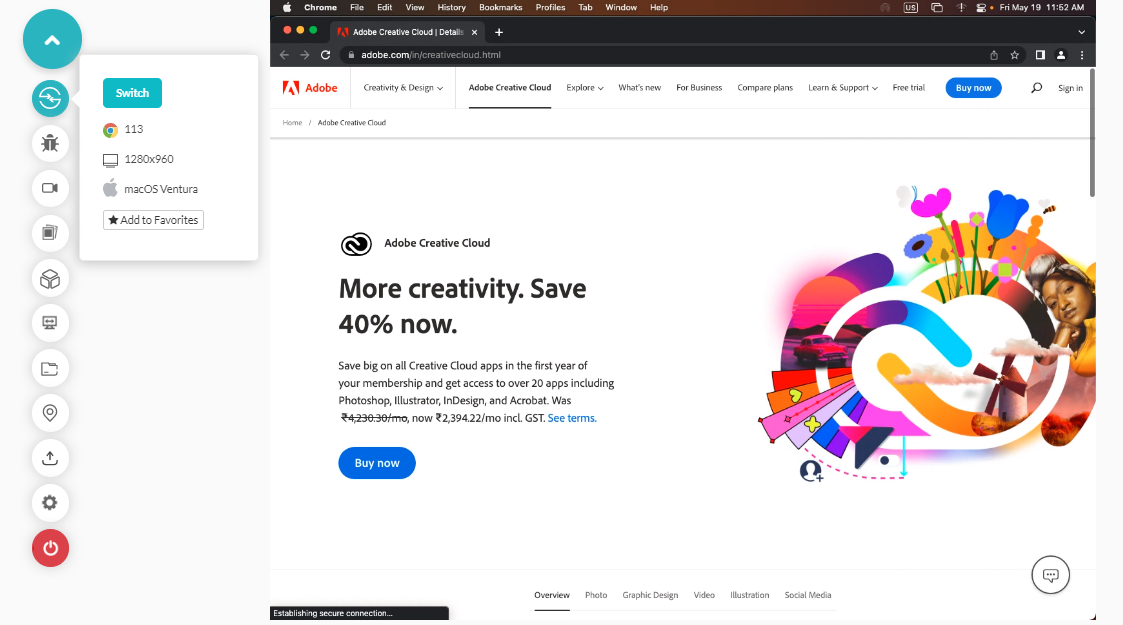
Real Device Testing using TestMu AI
TestMu AI provides a wide range of real devices to support your development processes. You can test your applications on our real devices and get a great end-user experience.
Here are the four easy steps for real device testing:
Step 1: Login to TestMu AI by entering your credentials.
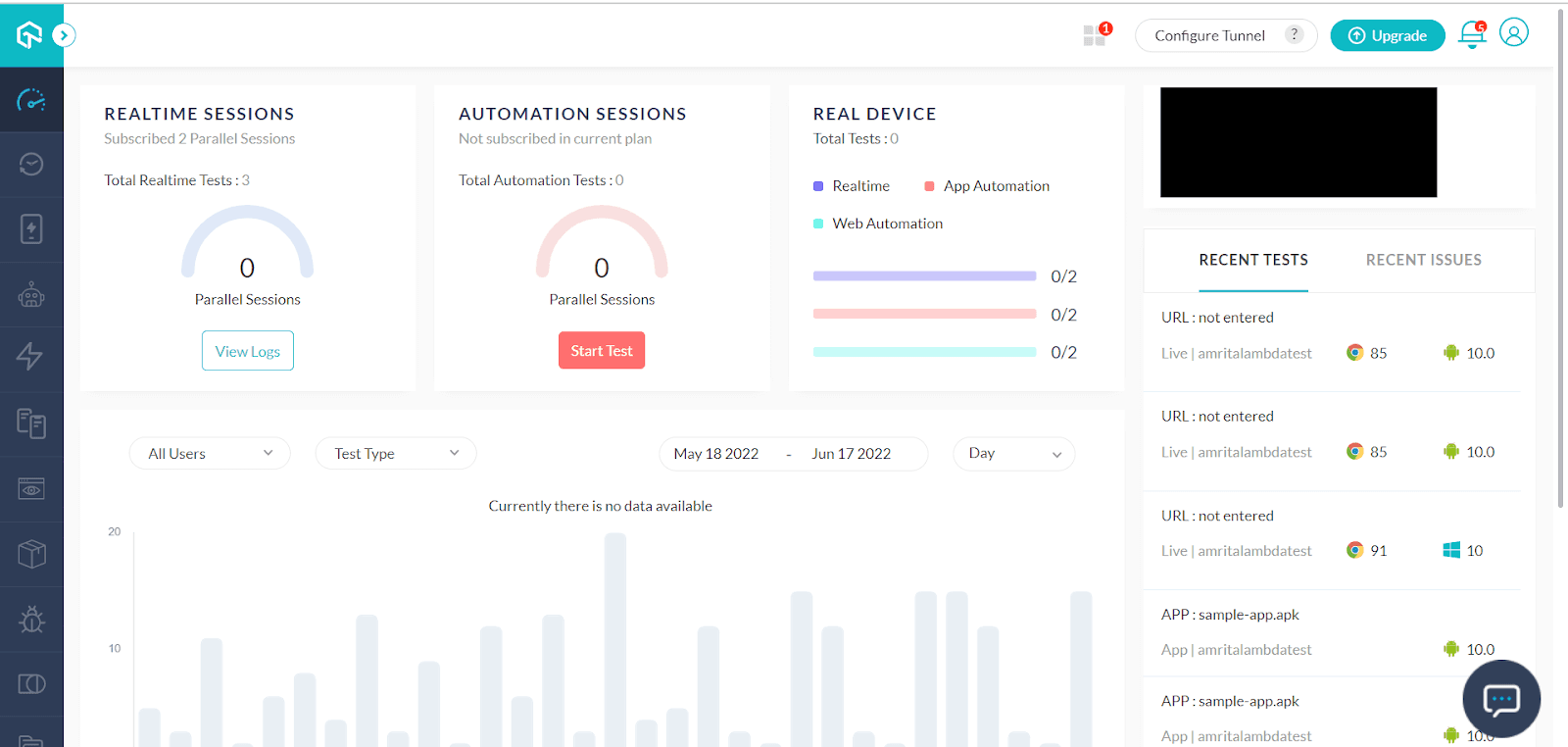
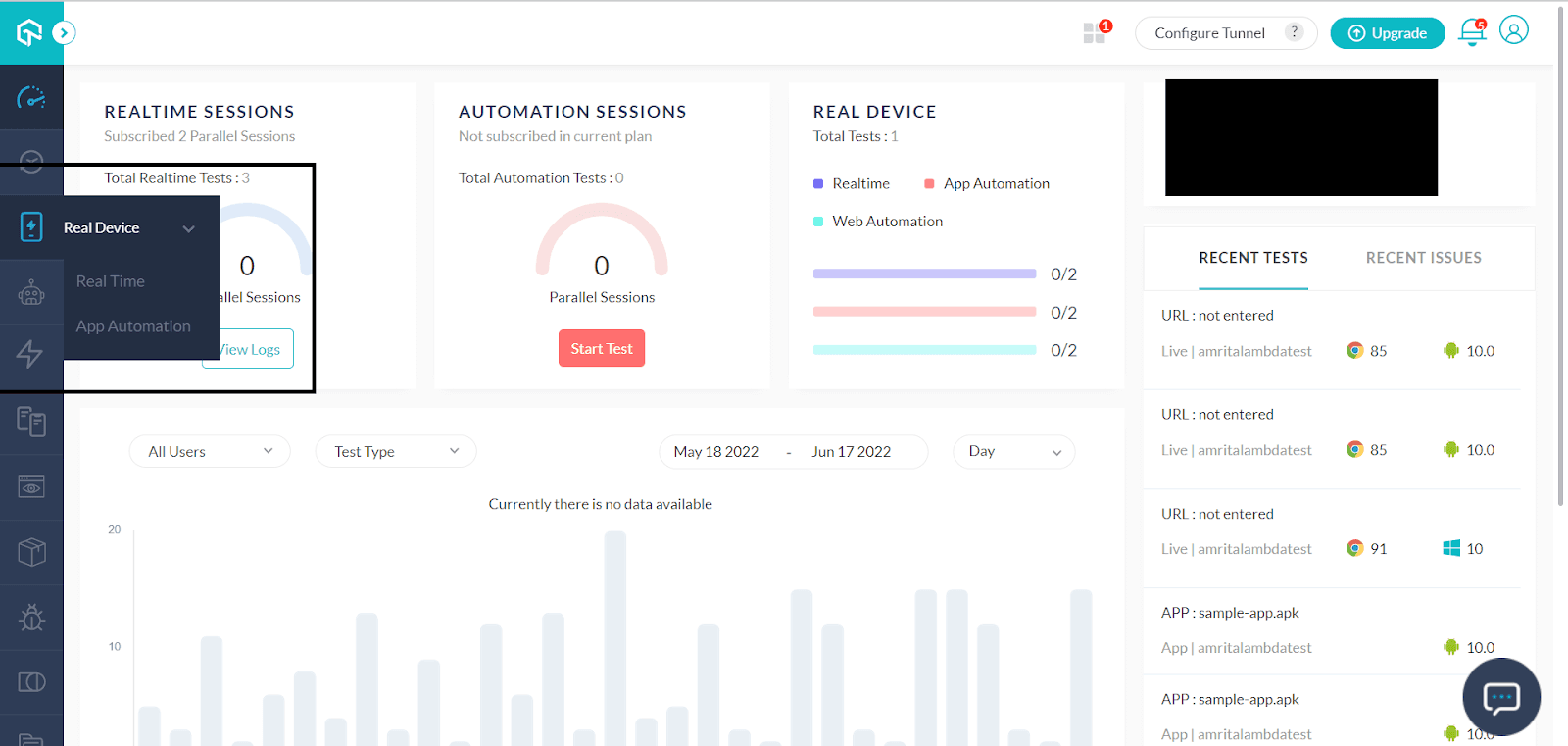
Step 2: Select Real Device from the left panel. Choose Real Time for conducting real time website testing.
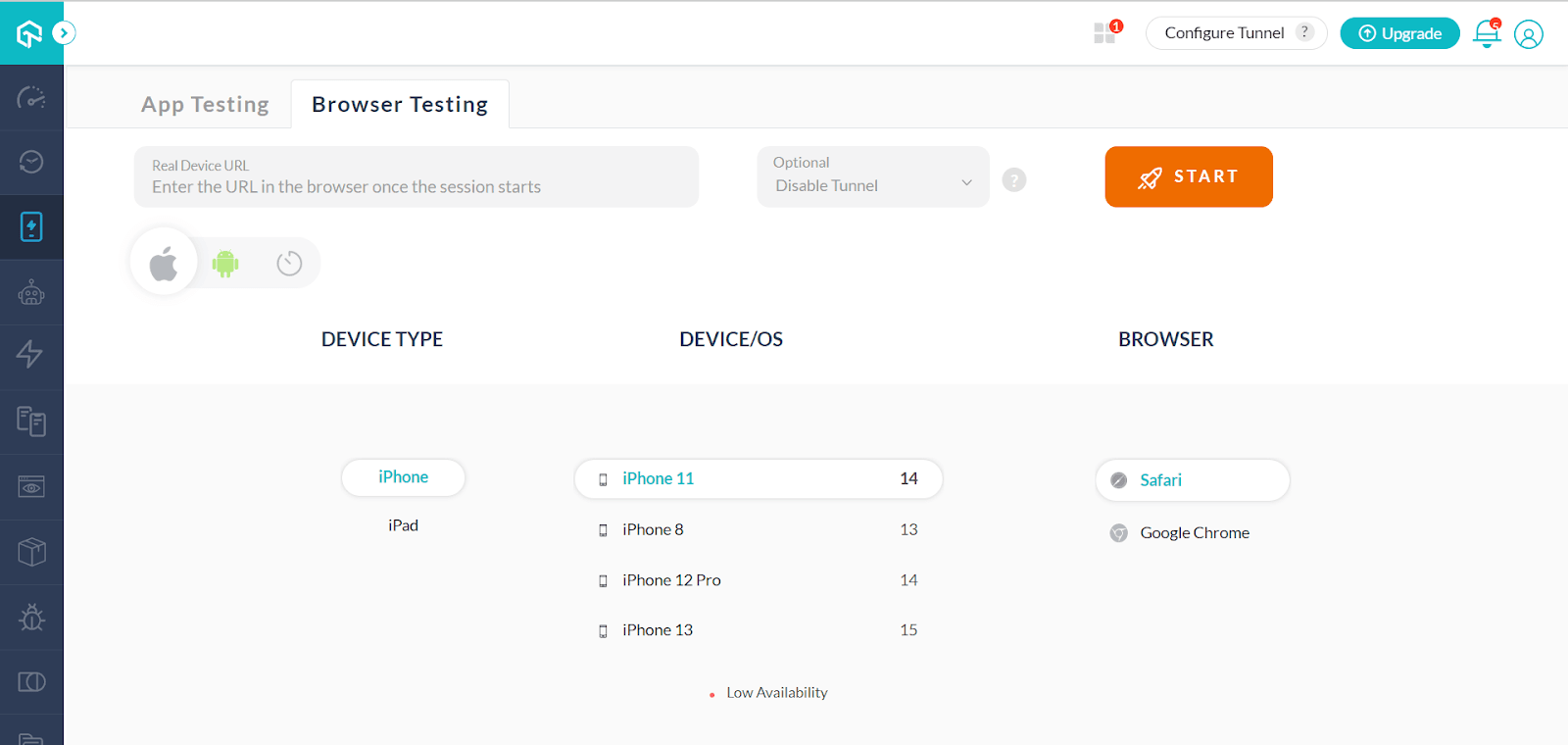
Step 3: Select Browser Testing. You can provide the URL later when you start the session. Click START after providing the BROWSER, DEVICE TYPE, and DEVICE/OS.
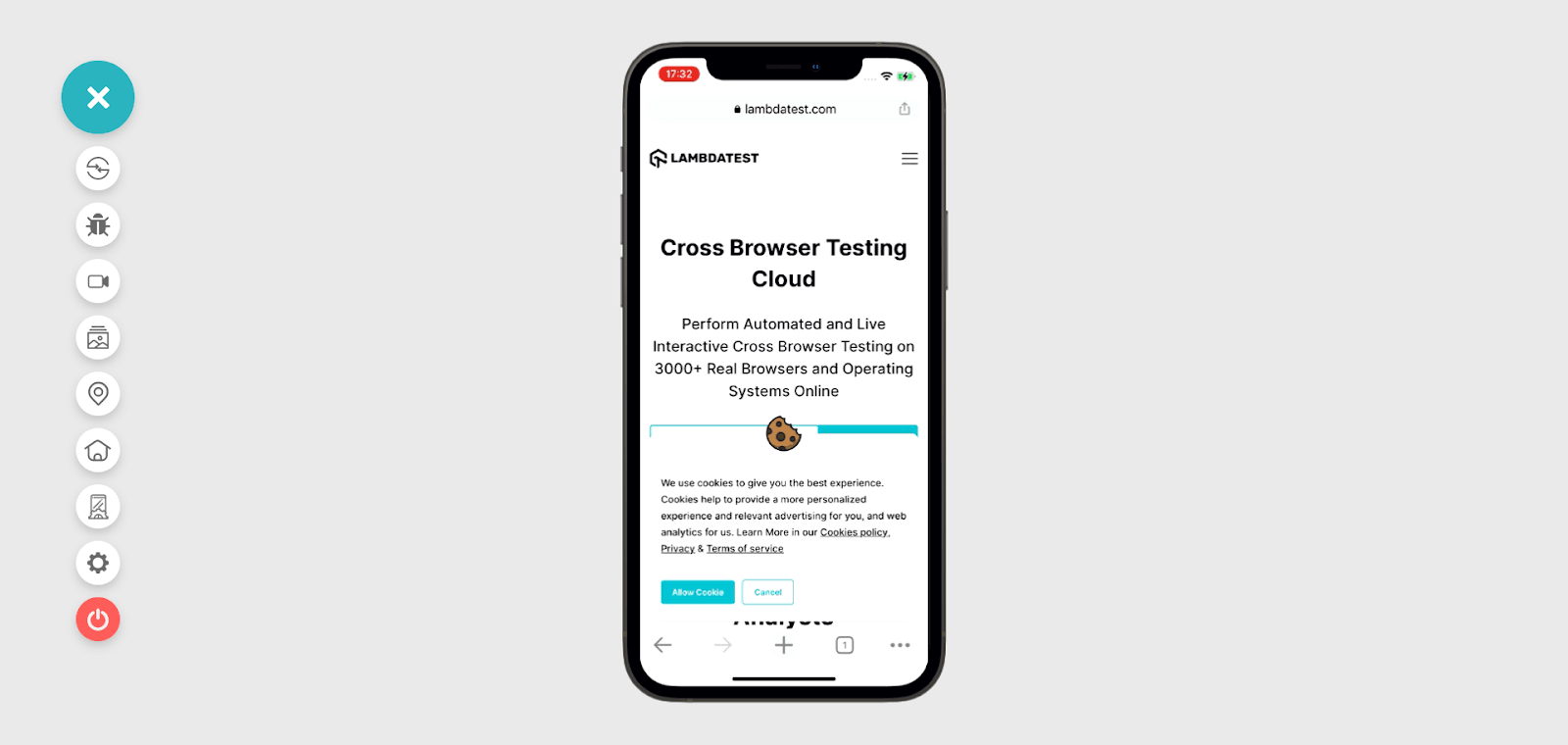
Step 4: The website you want to test would open on your cloud-based real device launched by TestMu AI. Time to test!
Automation Testing using TestMu AI
With the TestMu AI cloud grid, you can get instant on-demand access to 3000+ desktop and mobile environments to run Selenium, Cypress, Puppeteer, Playwright, and Appium automation tests on reliable, scalable, and secure cloud-based infrastructure.
Here are the steps to perform automation testing on the TestMu AI platform.
Step 1: Sign up or Log in to your TestMu AI account.
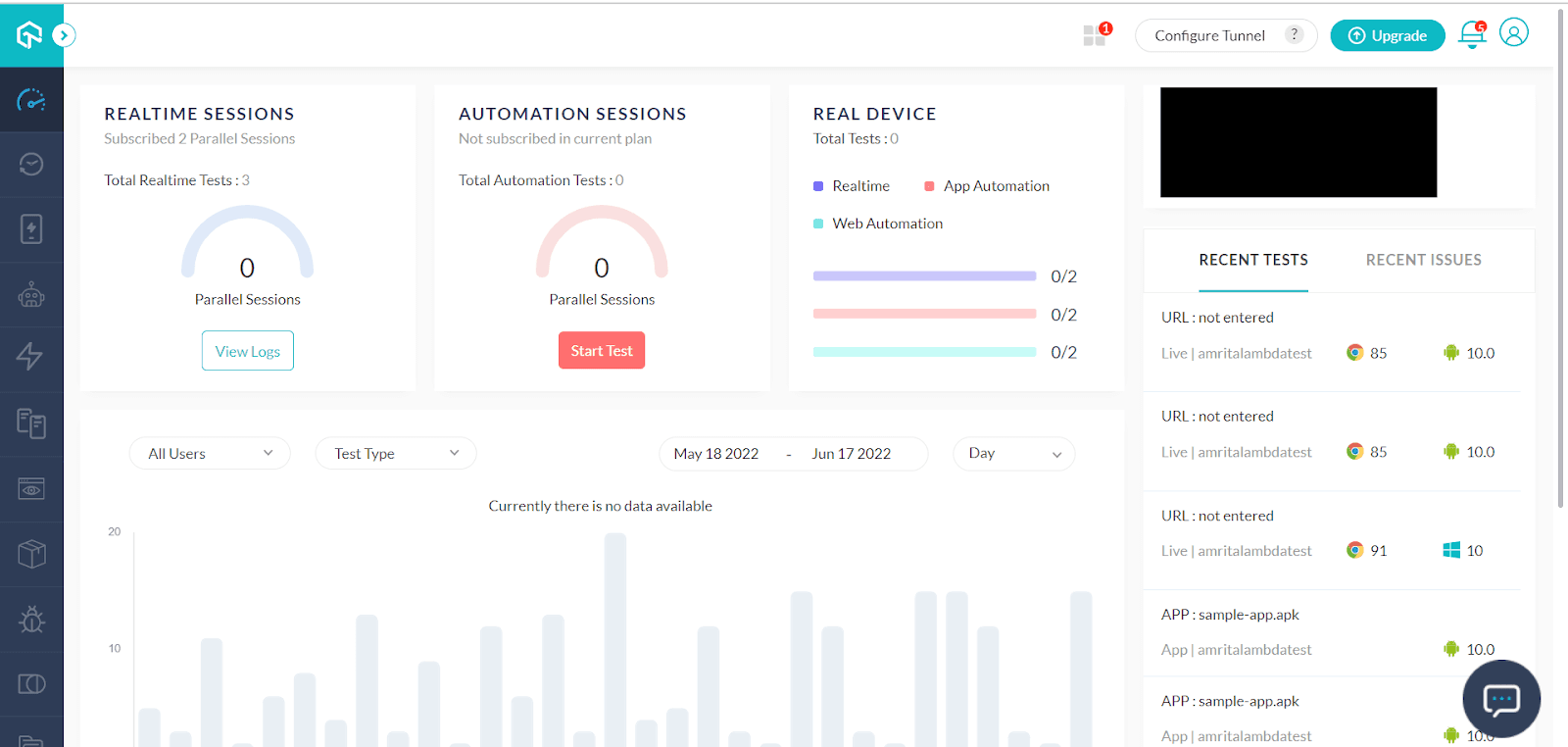
Step 2: You can click the Automation tab in the left navigation, which allows the following options: Builds, Test Archive, Analytics.
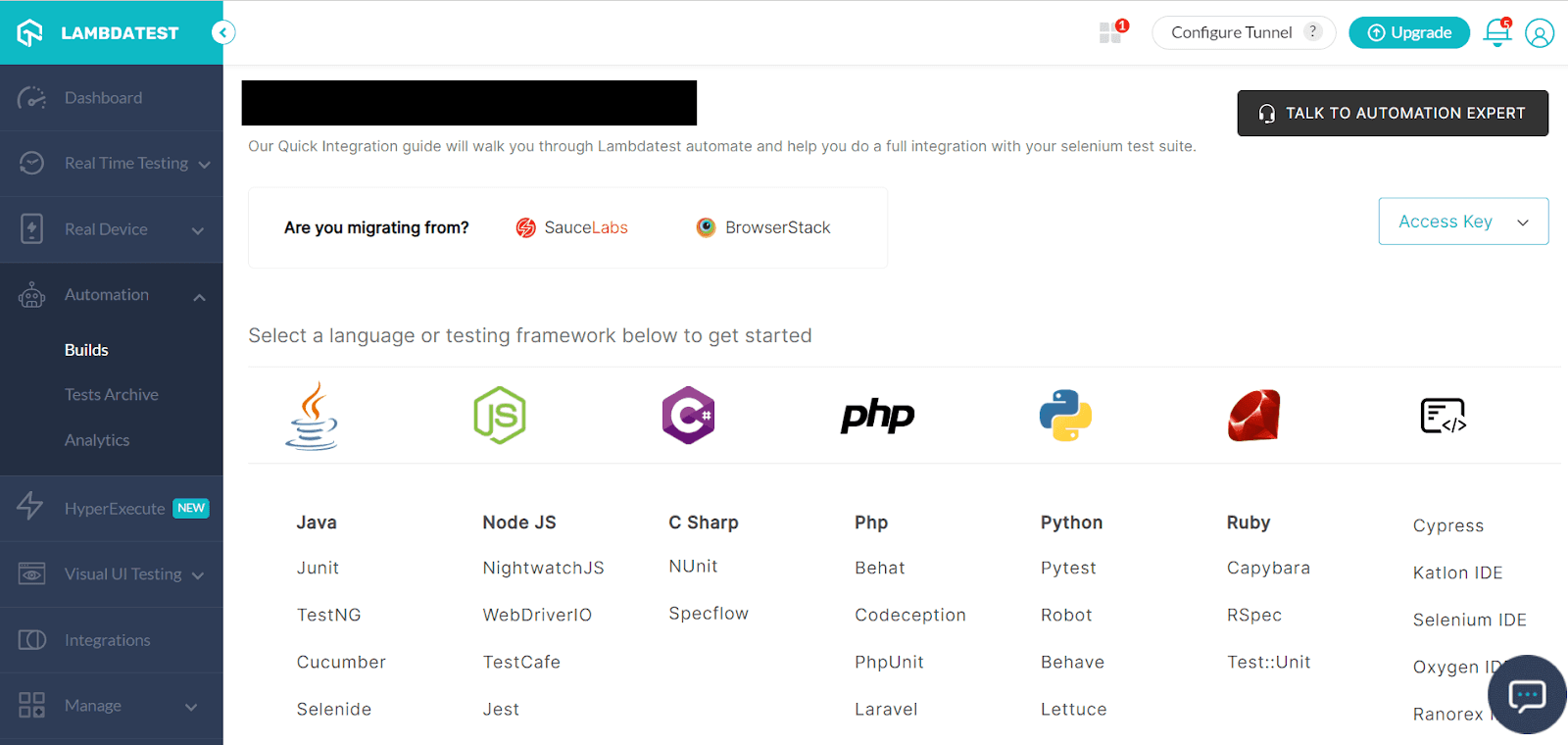
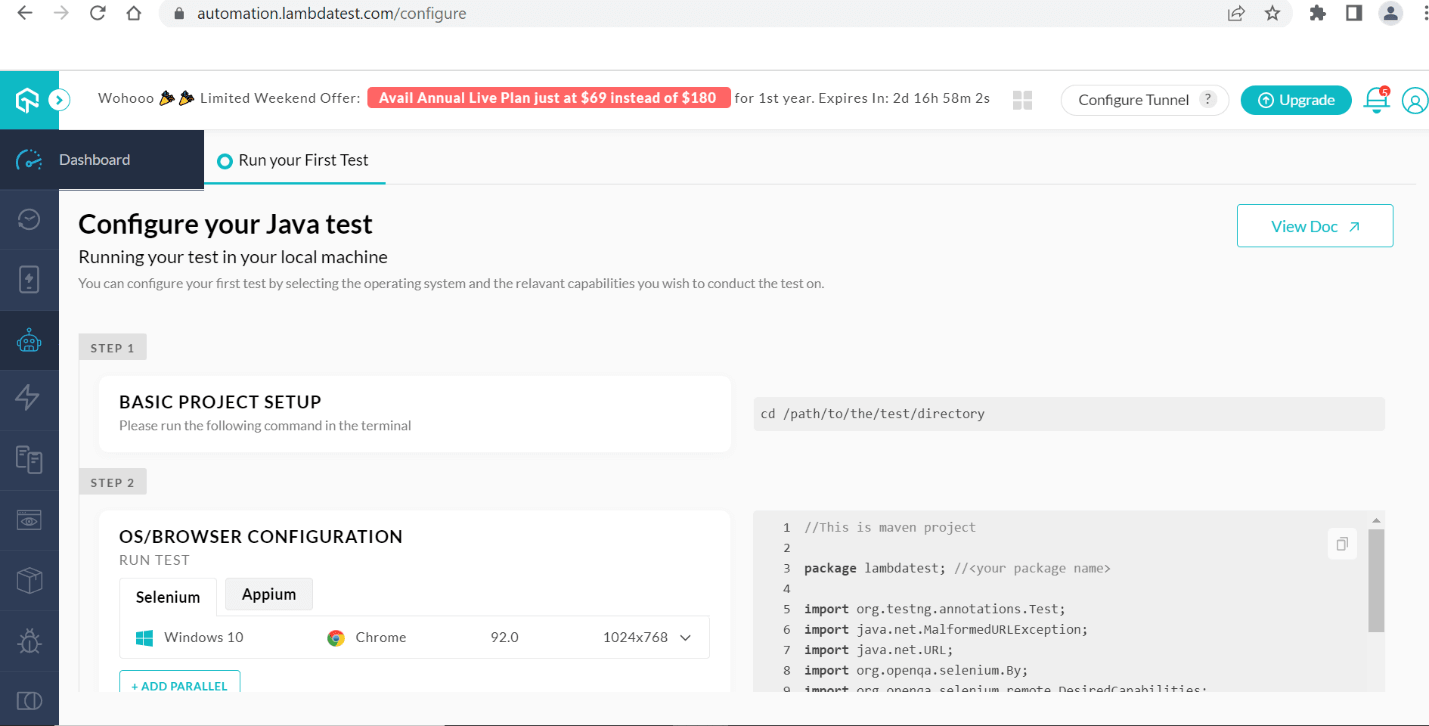
Step 3: You can select the language of your choice and must configure the environment as per it. For example, for Java, you can configure the required details as given below.
Screenshot Testing using TestMu AI
TestMu AI allows you to take screenshots of your website or web applications in a single click.
Here are the steps to perform screenshot testing on the TestMu AI platform.
Step 1: Visit the TestMu AI platform.
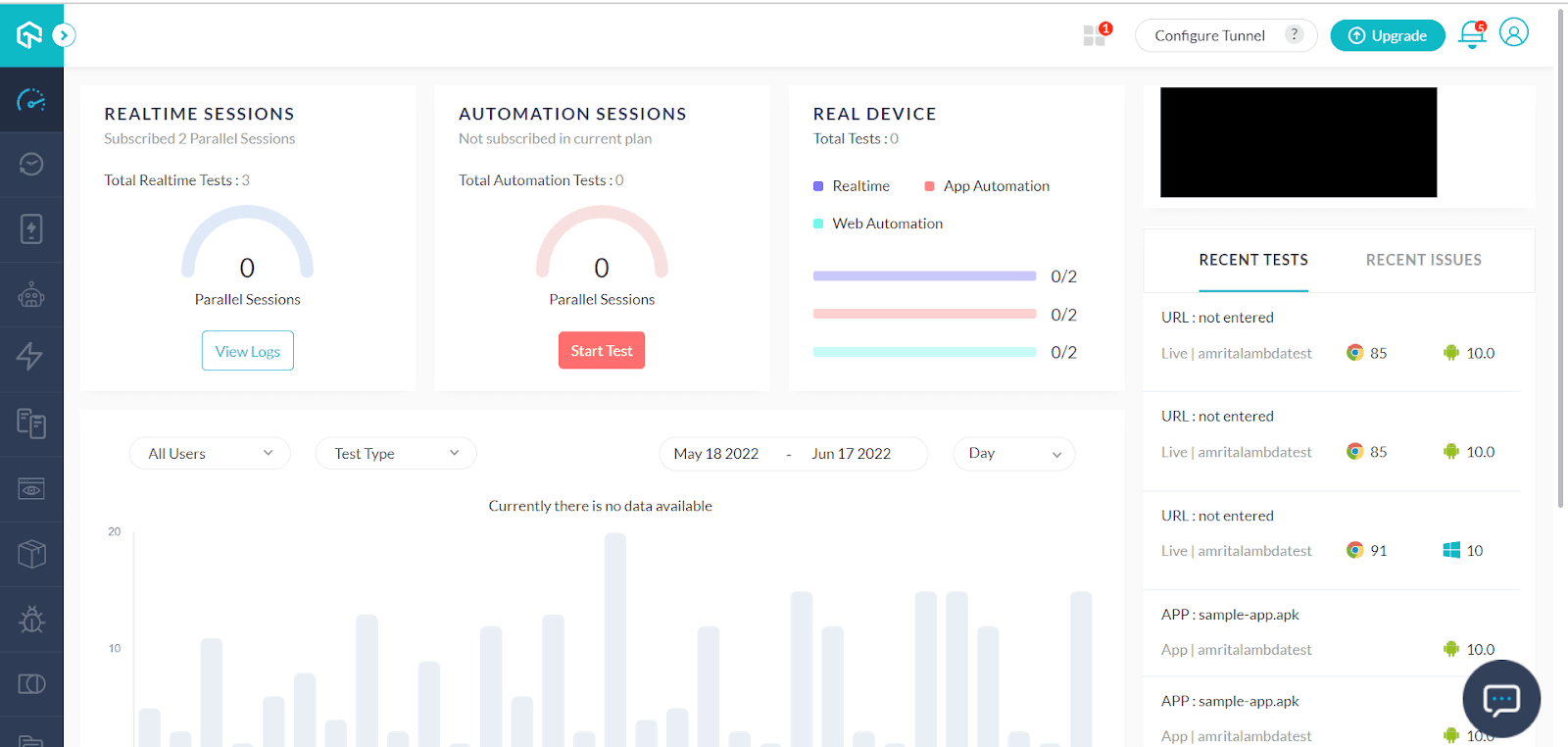
Step 2: From More Tools, choose Screenshot in the left panel.
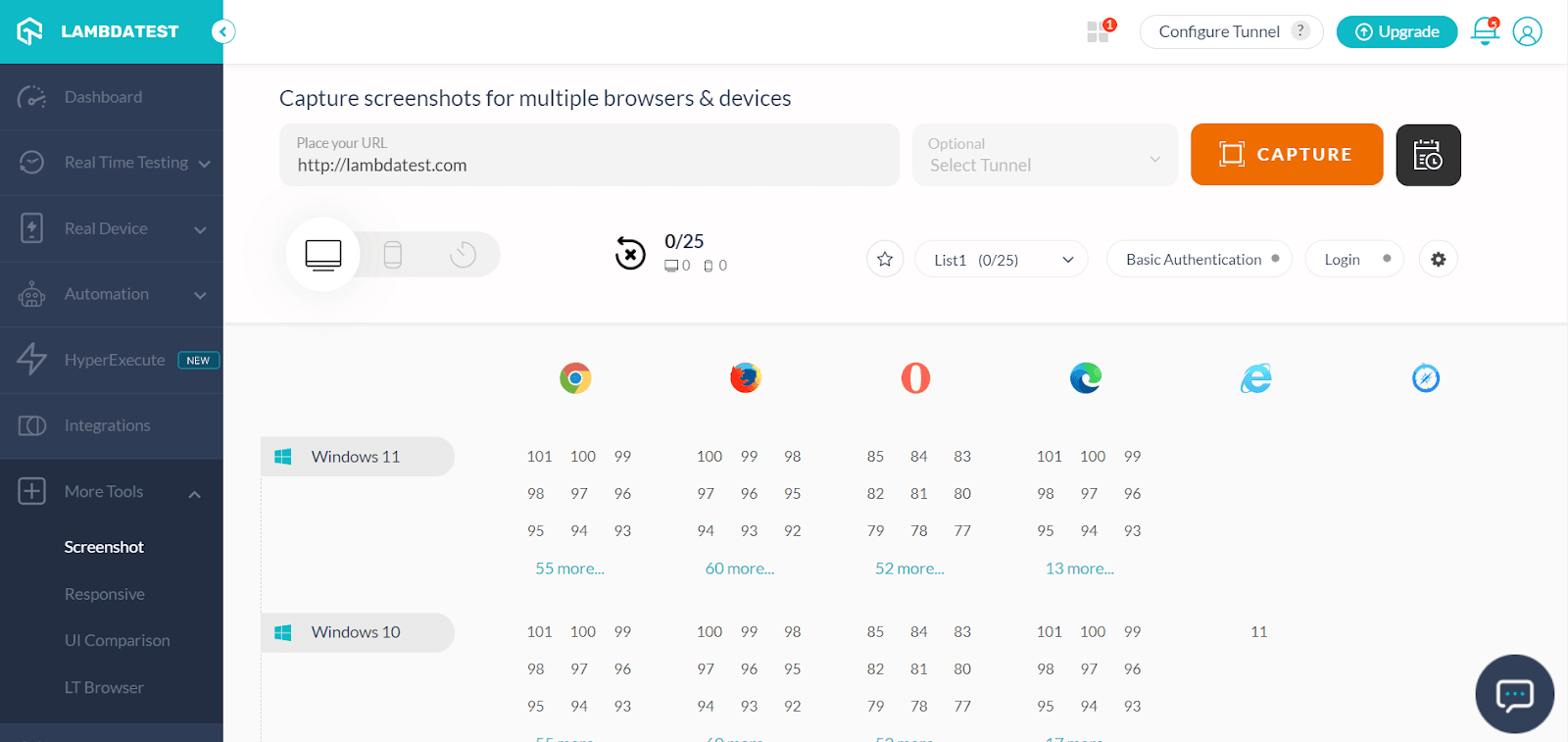
Step 3: Provide the URL to test. Choose the browser version for comparing different screenshots.
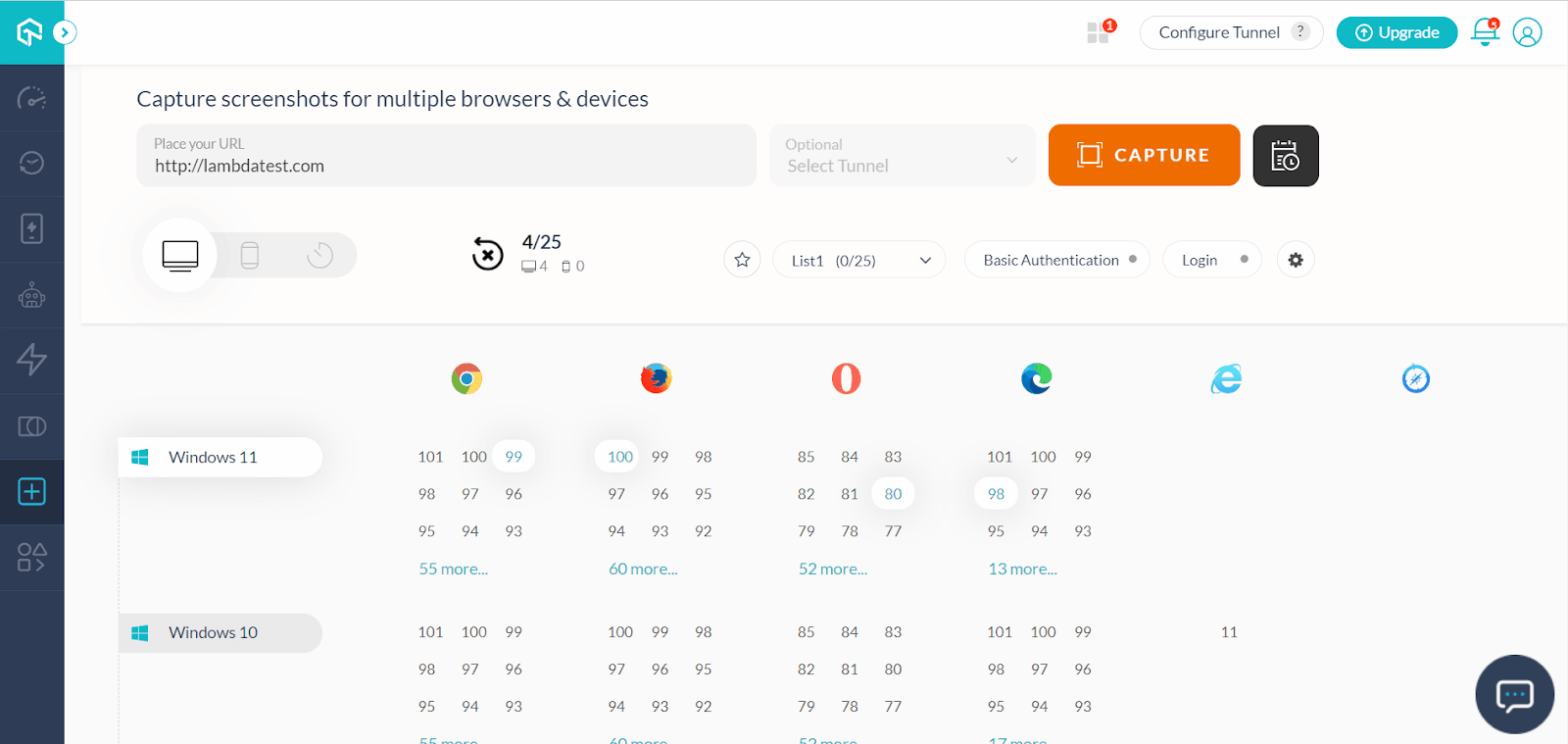
Step 4: It’s time for you to download and compare the screenshots.
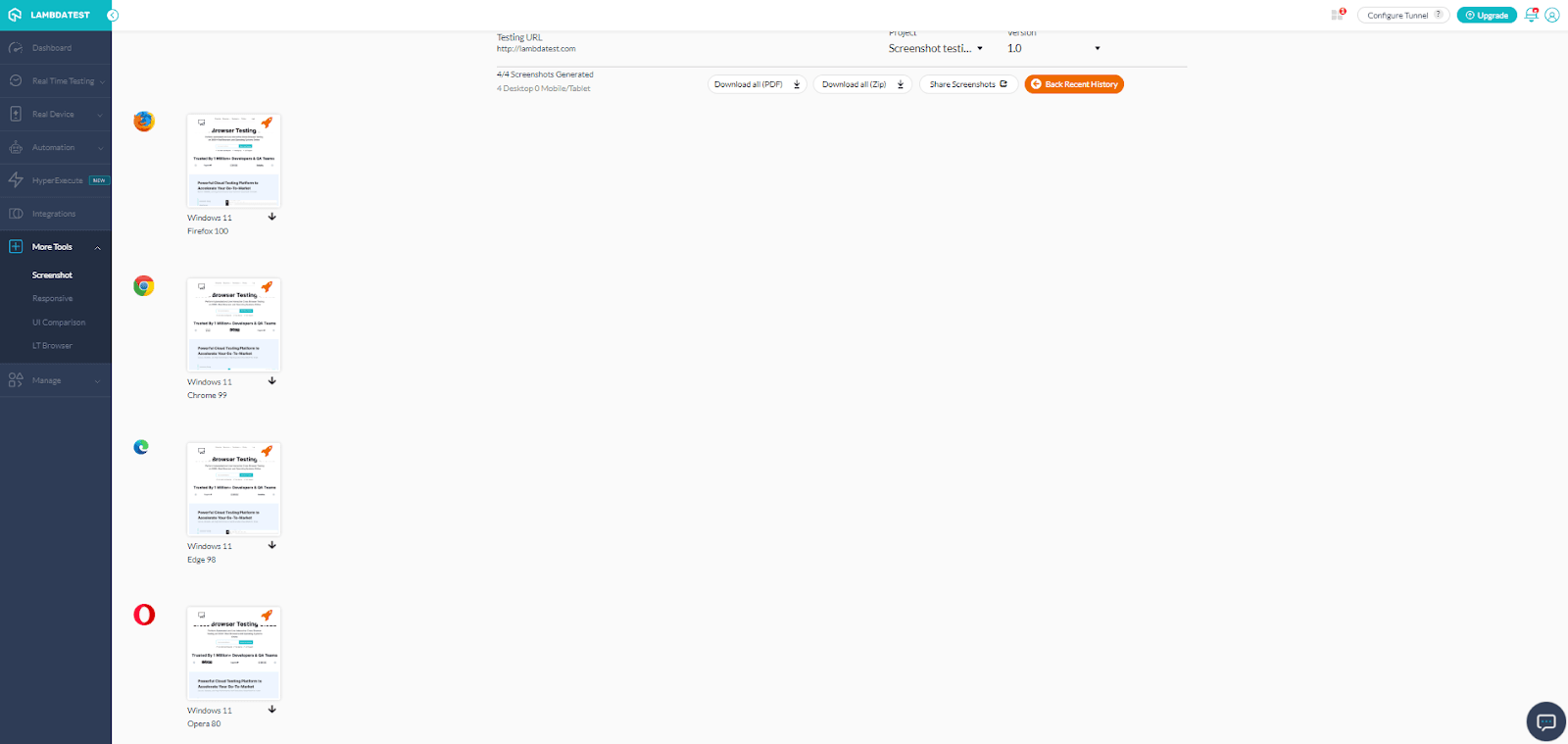
Visual UI Testing using TestMu AI
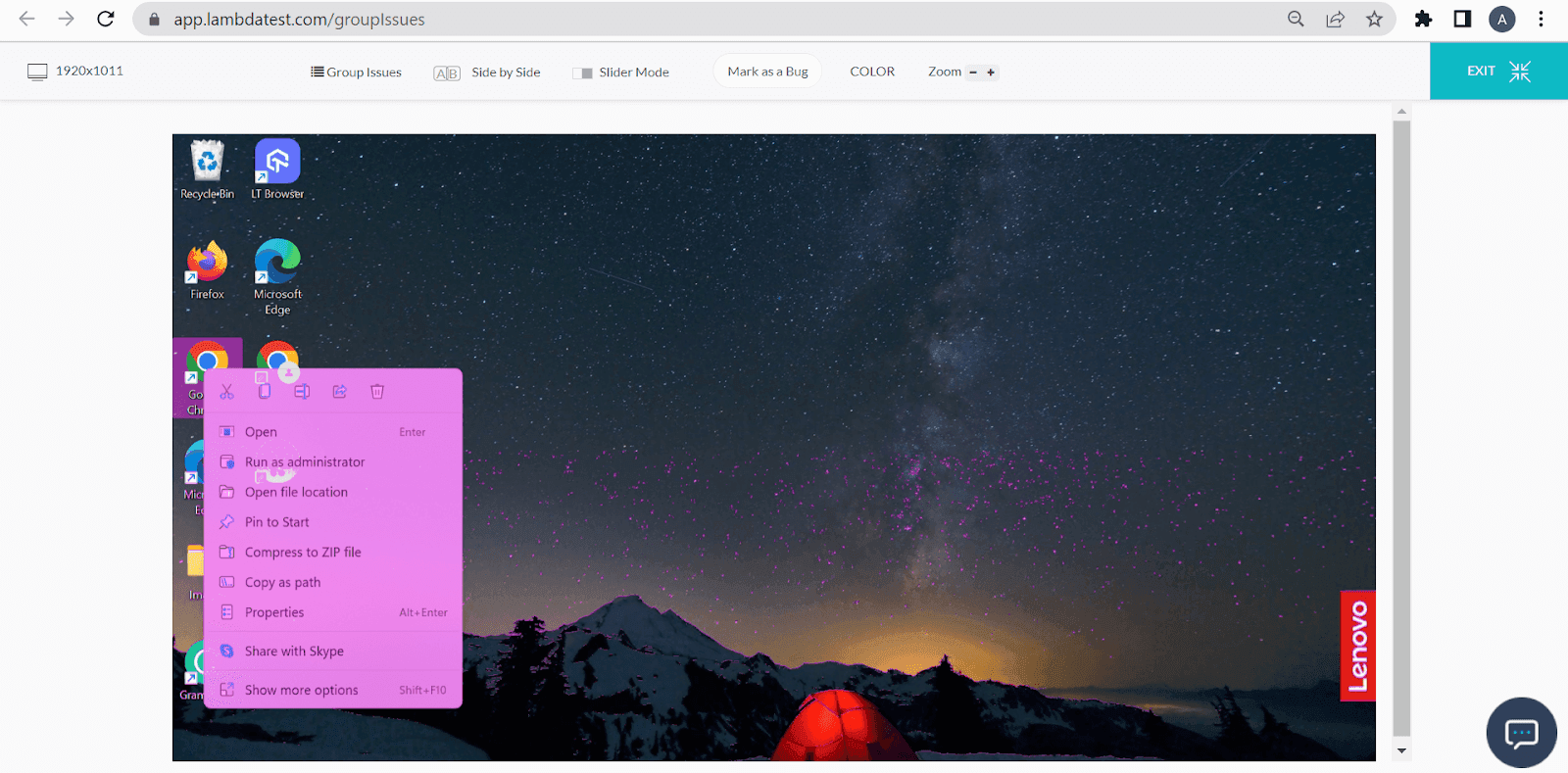
Sometimes, we might miss out on a petty visual bug when we test in haste. With UI comparison, you can check how your web page looks and automatically get the data on errors without any manual processes. It’s as simple as this:
Here are the steps to perform Smart Visual UI testing on TestMu AI (assuming you are already on the Dashboard):
Step 1: Go to More Tools -> UI Comparison
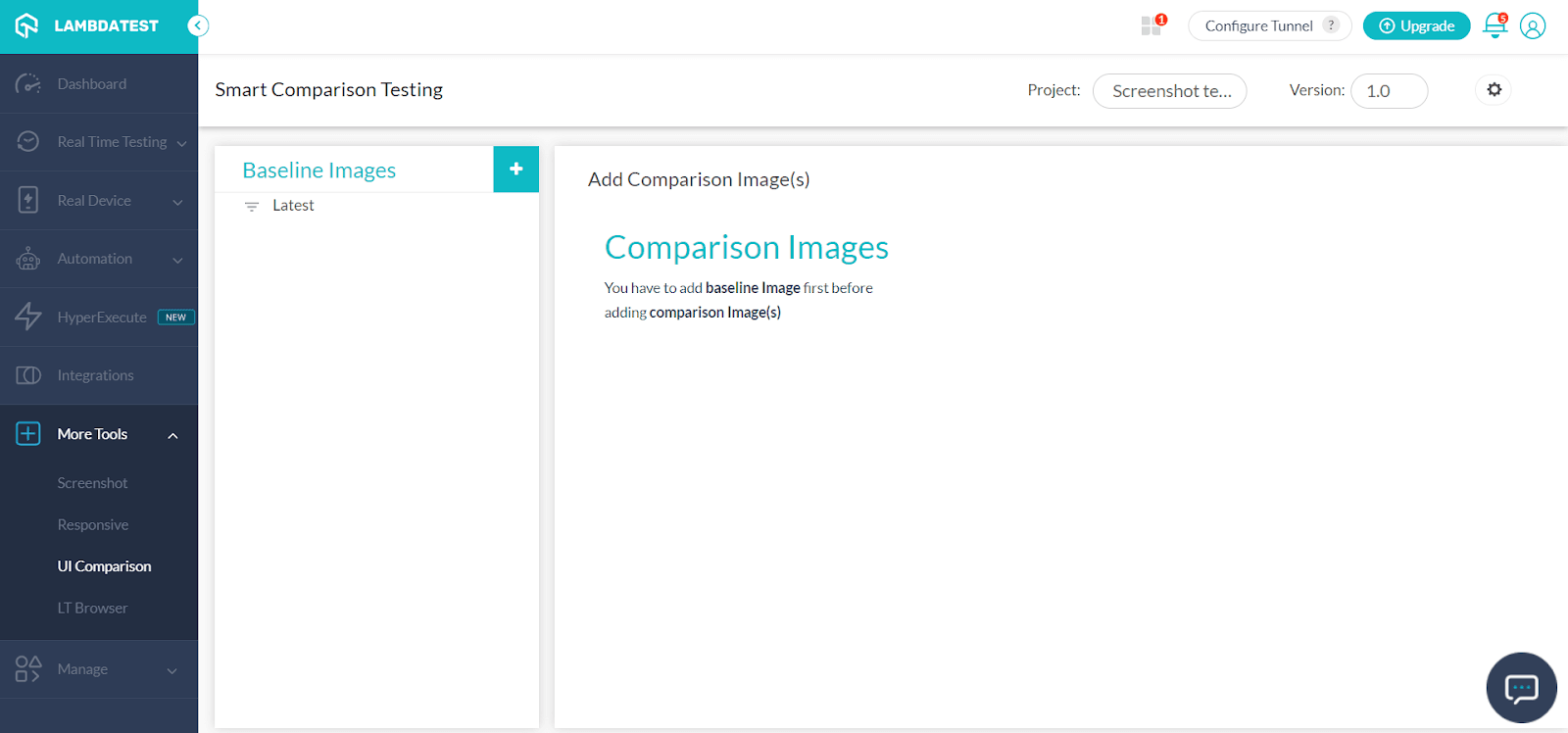
Step 2: Provide the images you want to compare with the baseline image.
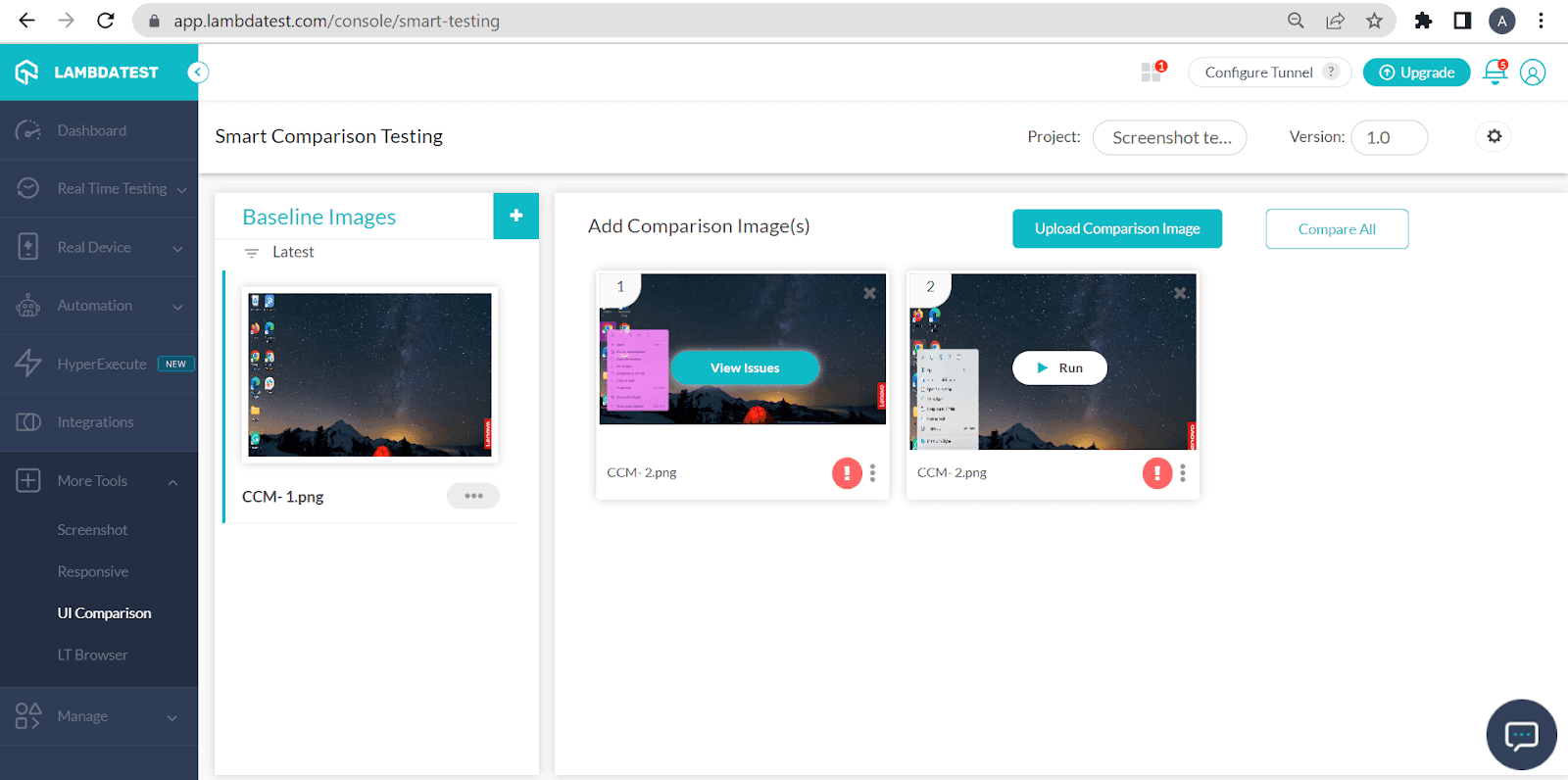
Step 3: Take a look at the difference. Compare it with the expected results.
Responsive Testing using TestMu AI
With responsive testing, you can see the website’s mobile view on various Android and iOS resolutions. You can also perform website testing on different pre-installed mobile device viewports.
You can follow the below steps to perform responsive testing on TestMu AI (assuming you are already on the Dashboard):
Step 1: Go to More Tools -> Responsive
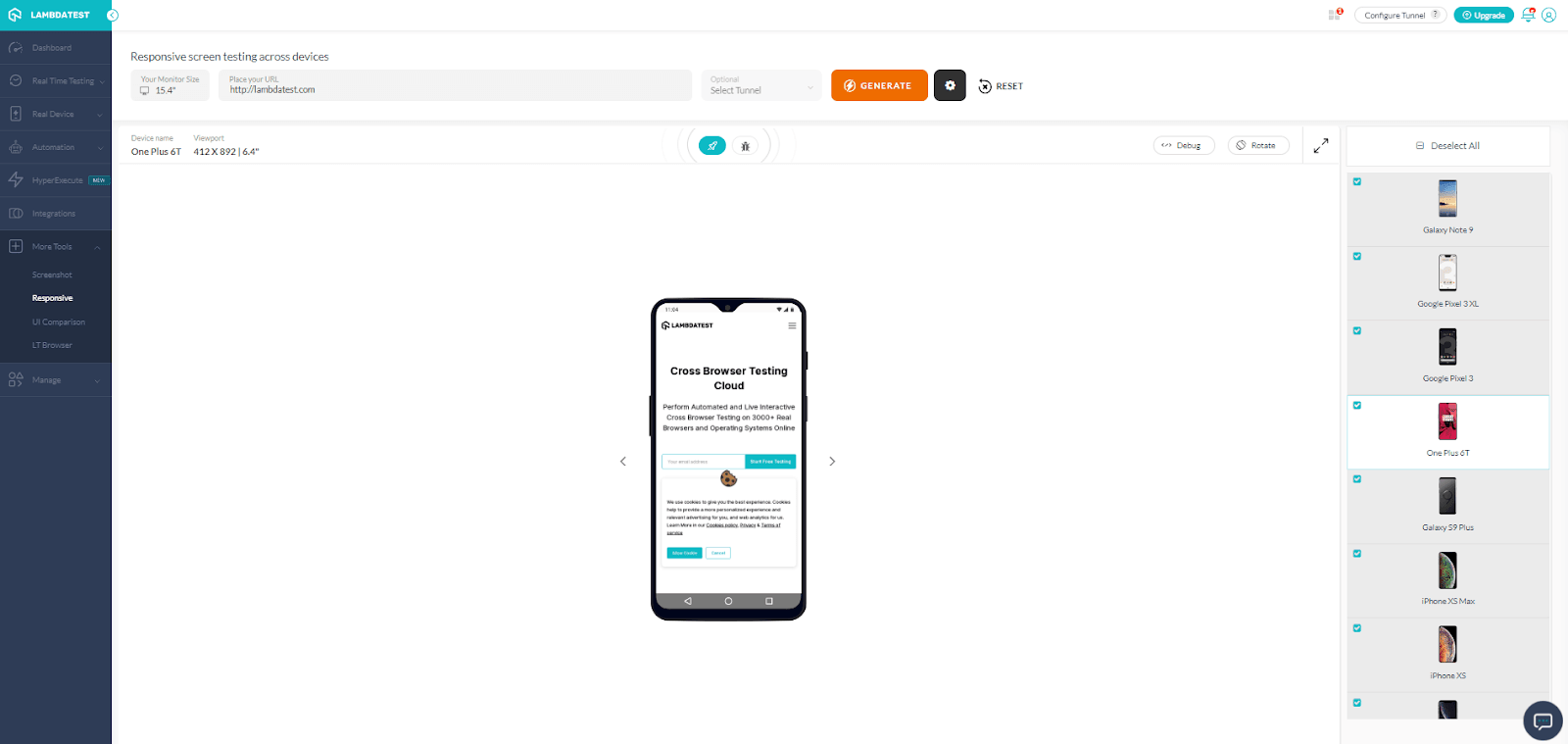
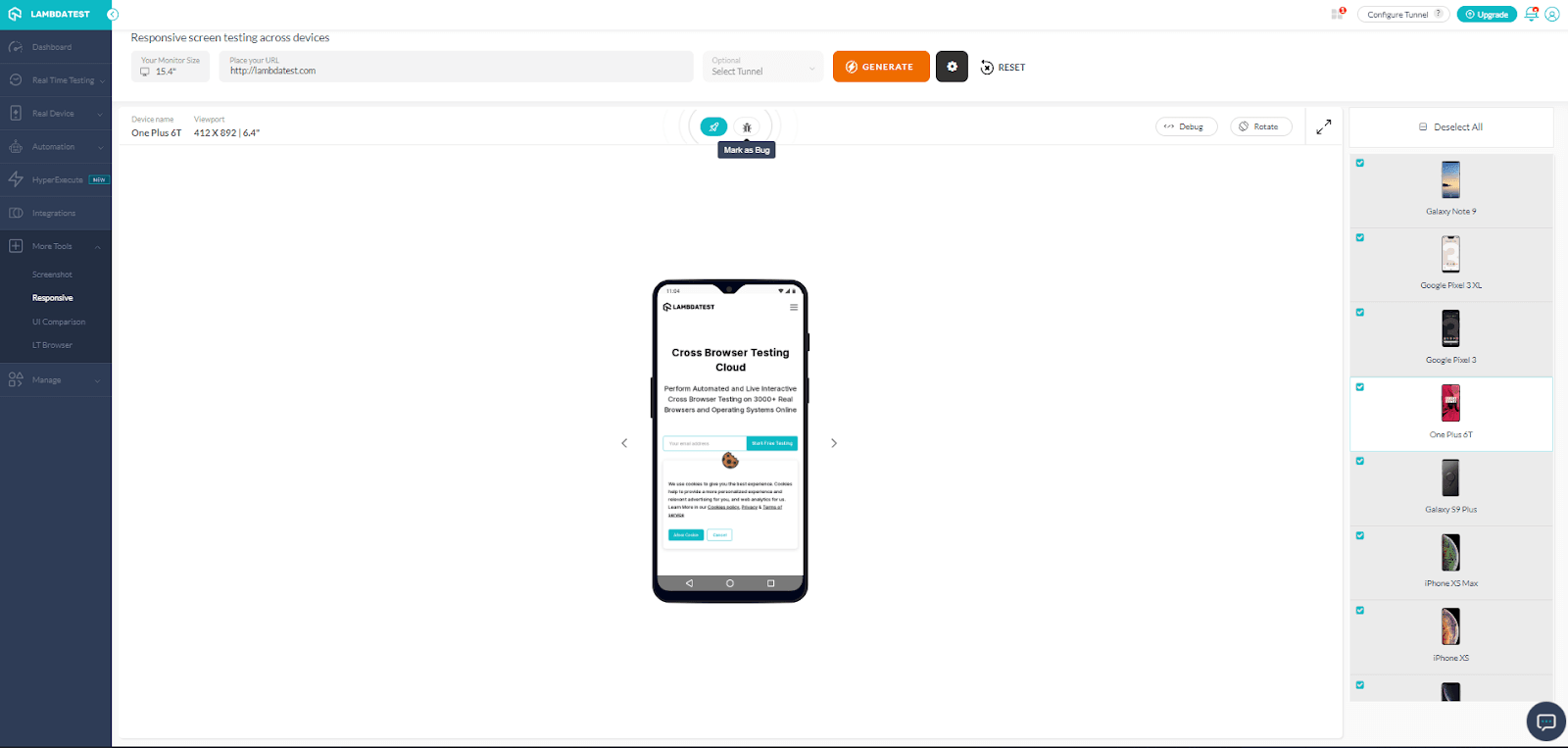
Step 2: Provide the URL of your choice. Choose the device name and resolution of your choice to test. Click Generate. You can also use the Mark as Bug feature to mark the defects and bugs and report them.
Responsive Testing using LT Browser
LT Browser is our mobile-friendly test tool for checking the website’s responsiveness.
Test your website on major devices with the needed viewports. Type the URL and open the website in the LT Browser platform to test responsiveness across 50+ pre-installed device viewports.
This is how you can work on LT Browser from TestMu AI (assuming you are already on the Dashboard):
Step 1: Visit More Tools-> LT Browser. Download LT Browser For Windows. Click on Download Now.
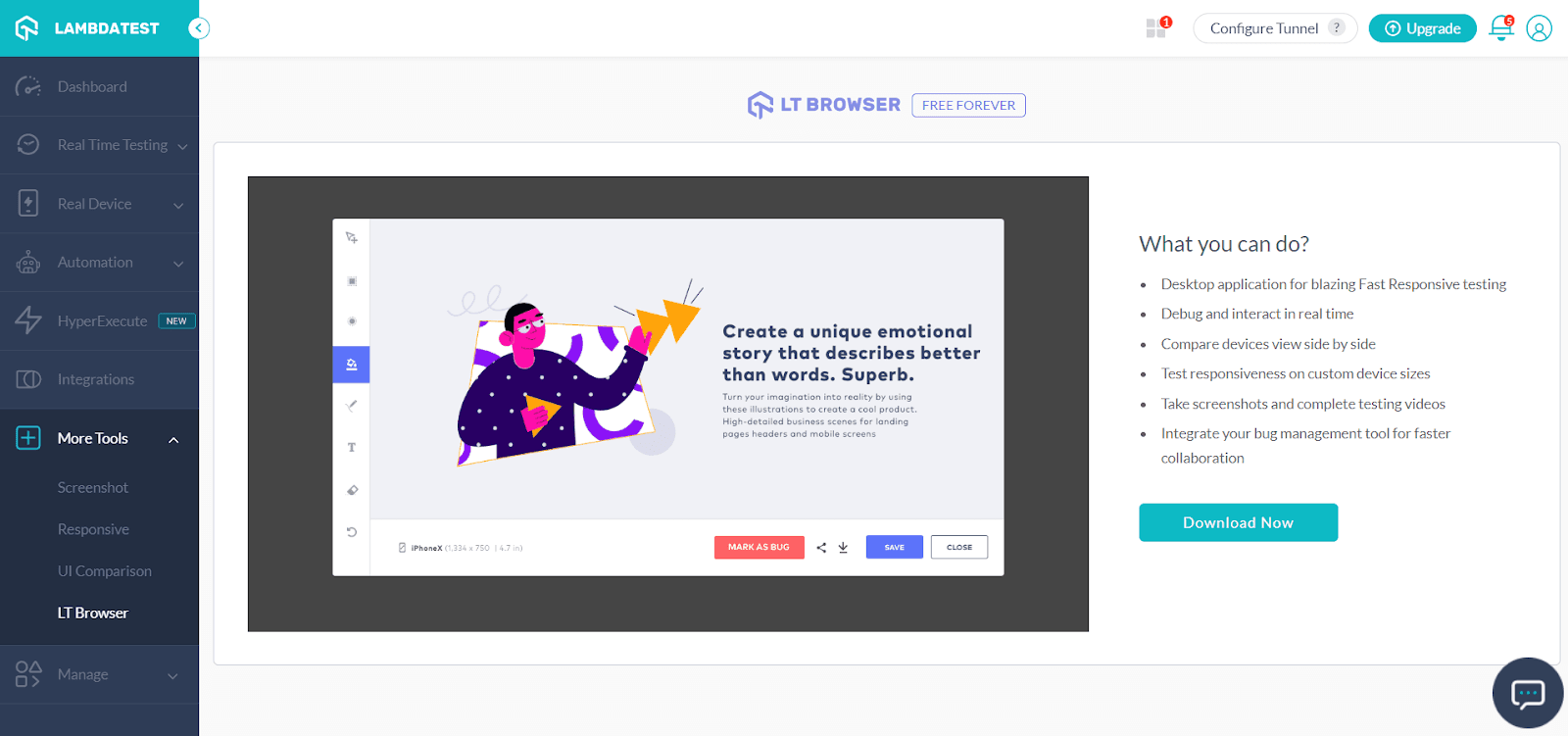
Step 2: You can install LT Browser.
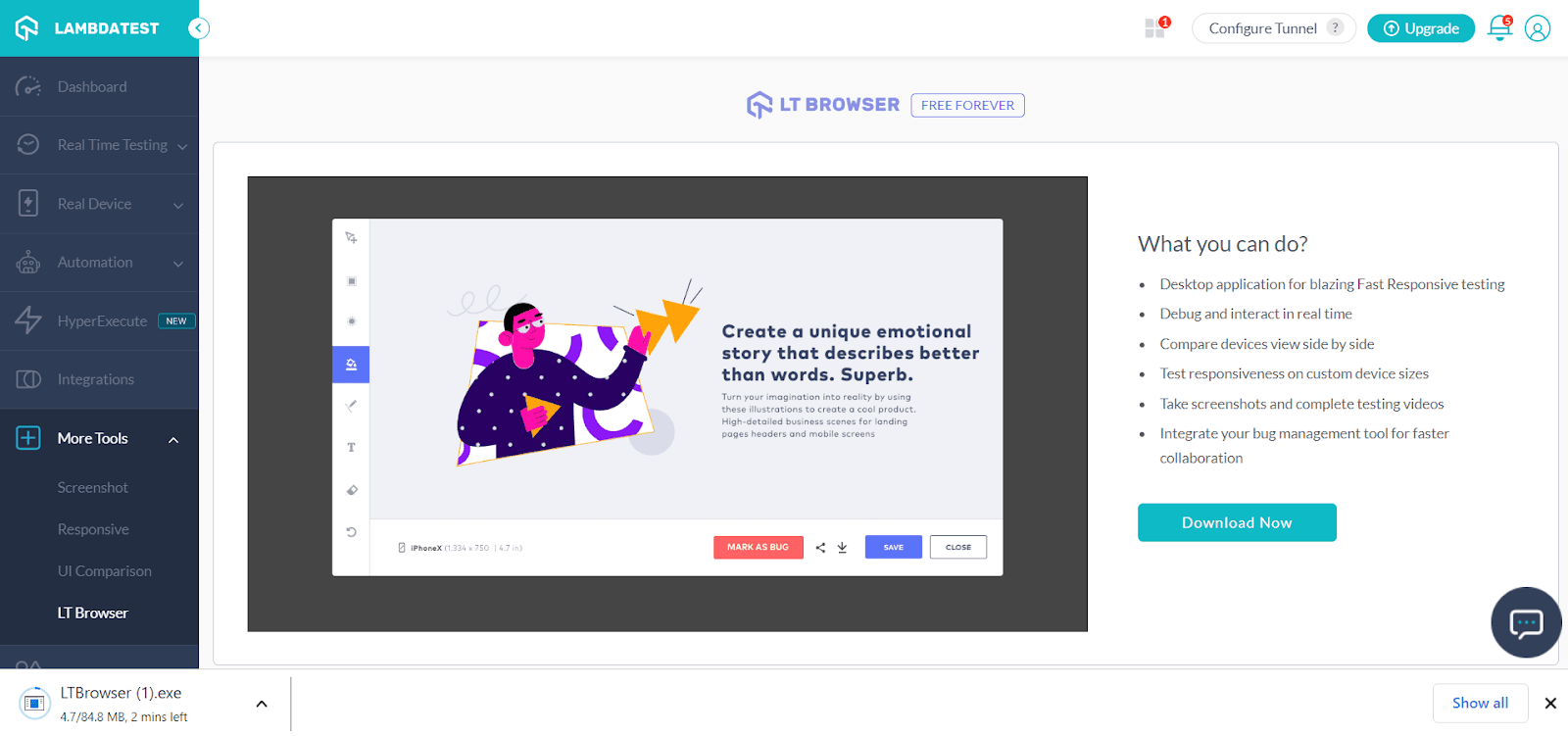
Step 3: Install LT Browser. To perform website testing, provide the URL on your tab. Next, select the device for testing your website.
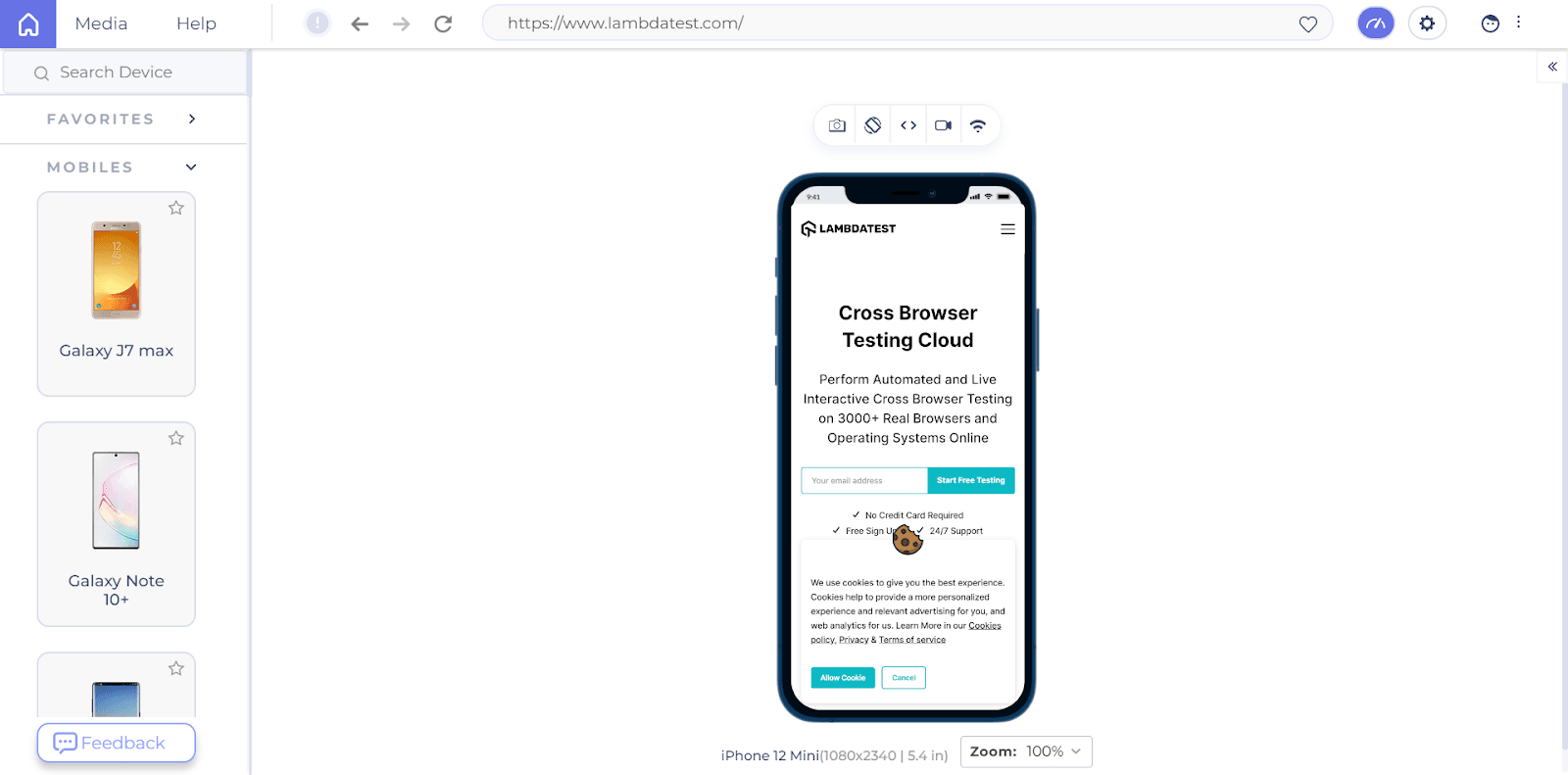
Step 4: All done! You can also test two devices simultaneously. Click on the three-dotted lines at the top right corner. Select the New tab.
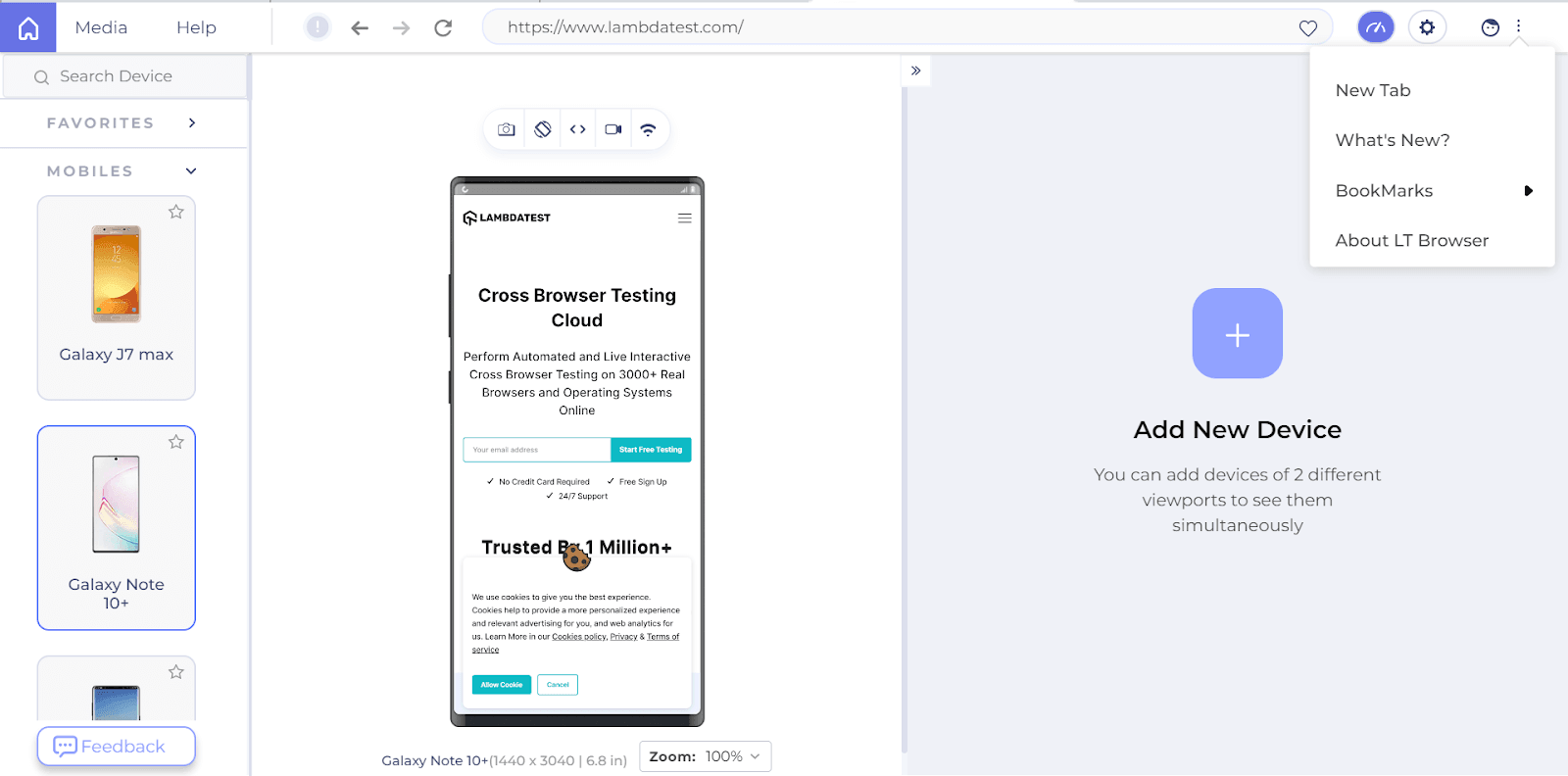
Step 5: Choose the desired device configuration or add your custom device by entering the user agent details.
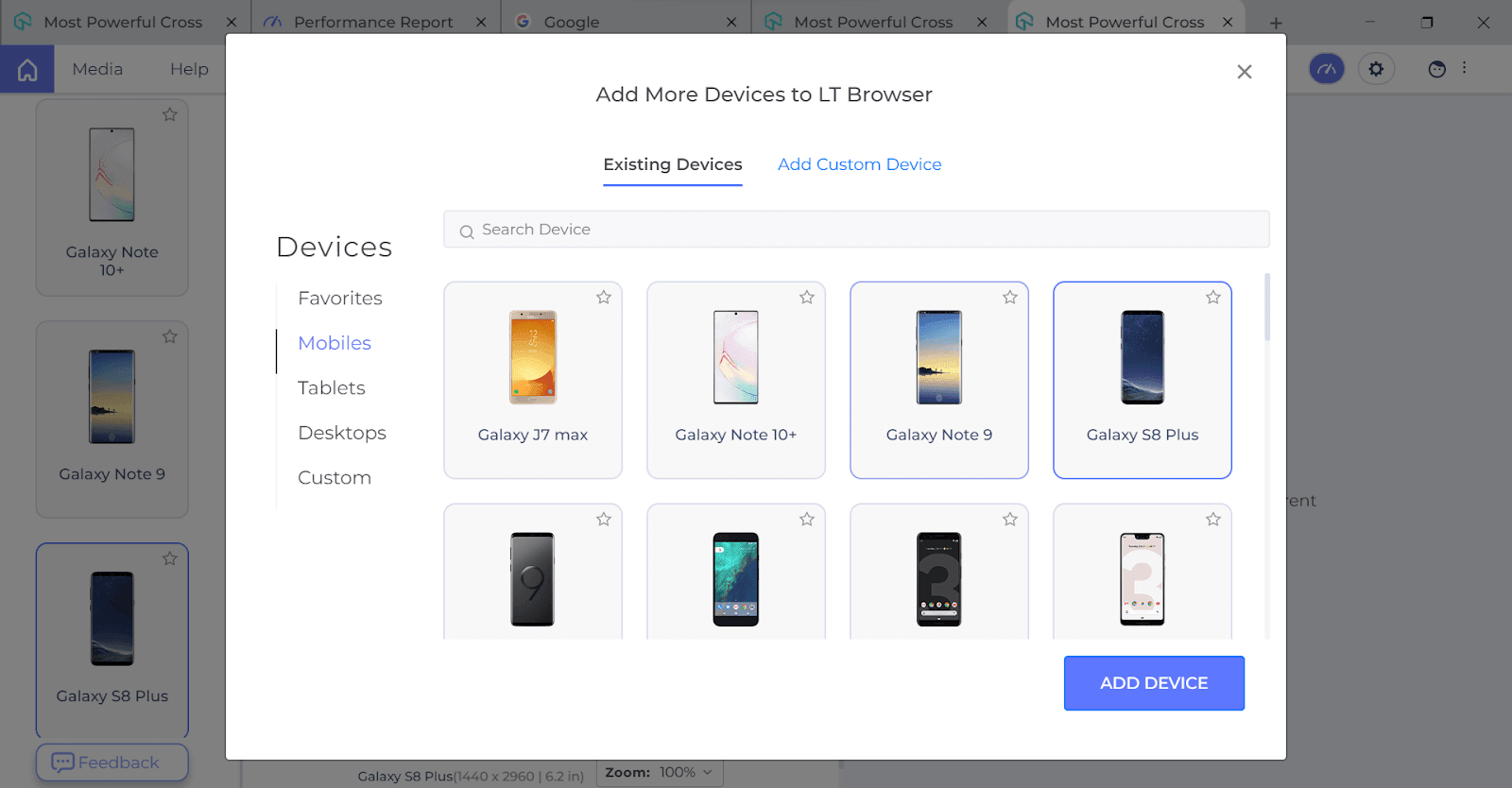
Step 6: You can also test two devices simultaneously.
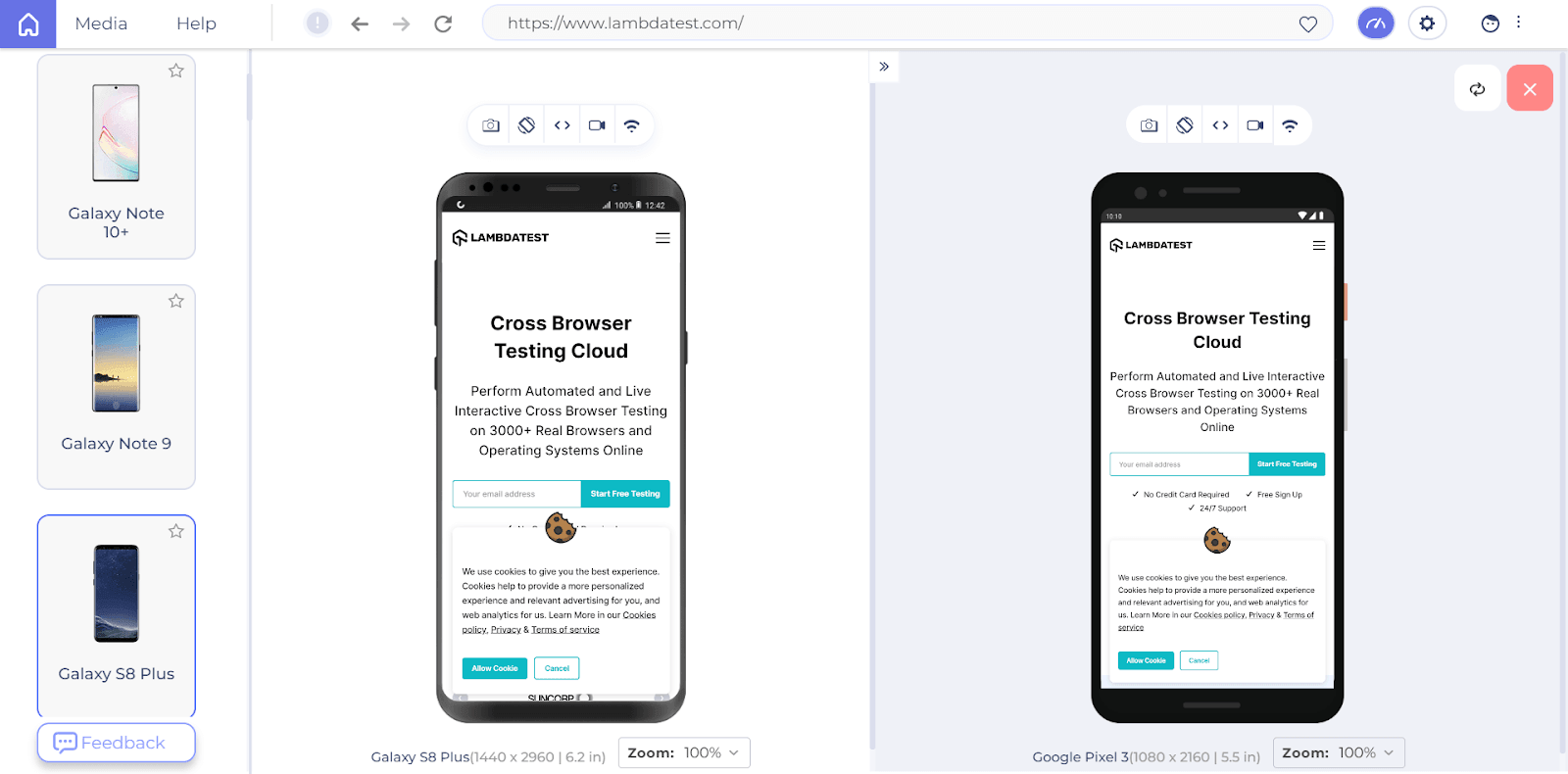
Step 7: Click on the camera icon to take screenshots. Compare the test results with the expected results.
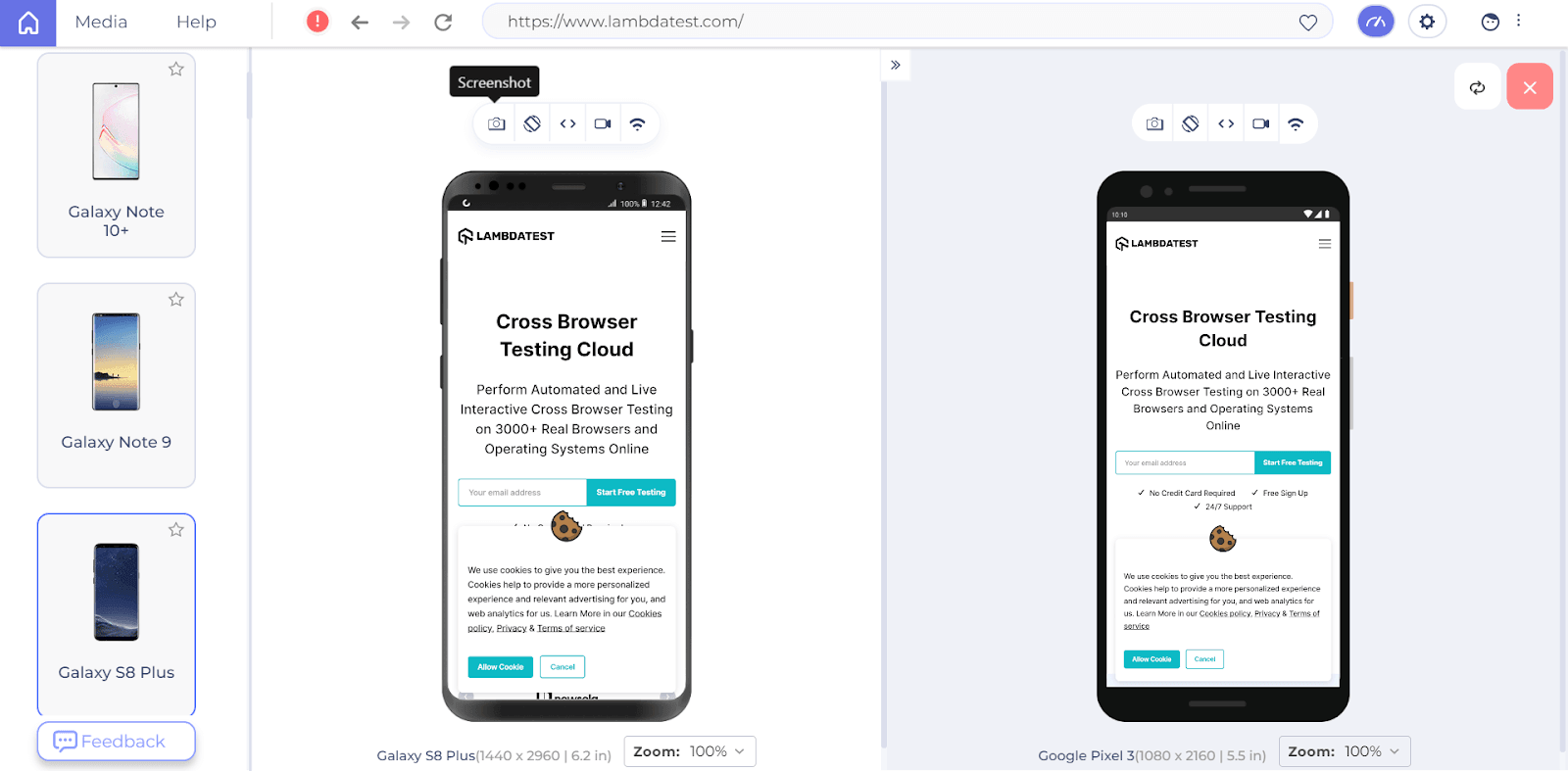
Step 8: You can rotate the device by clicking on the Rotate icon to check how your website would respond.
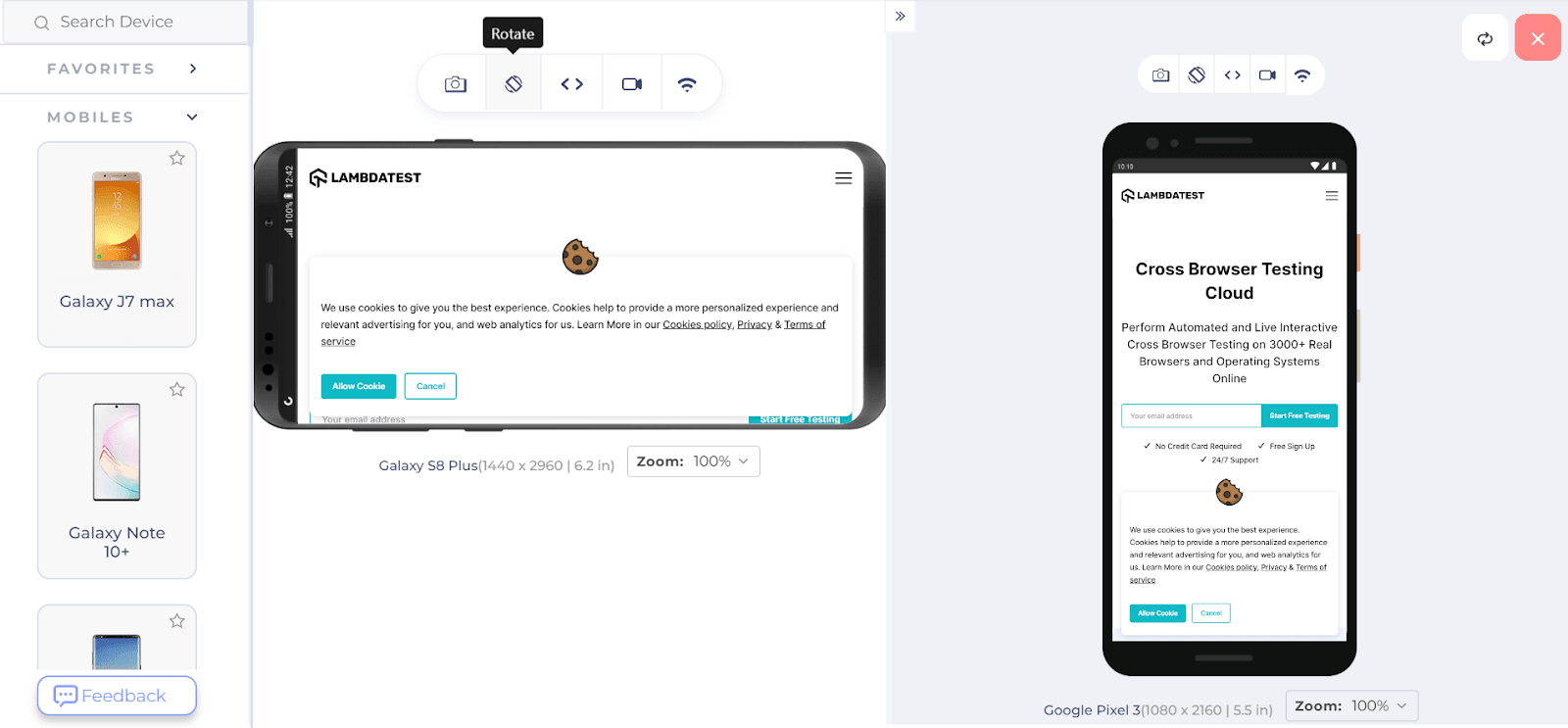
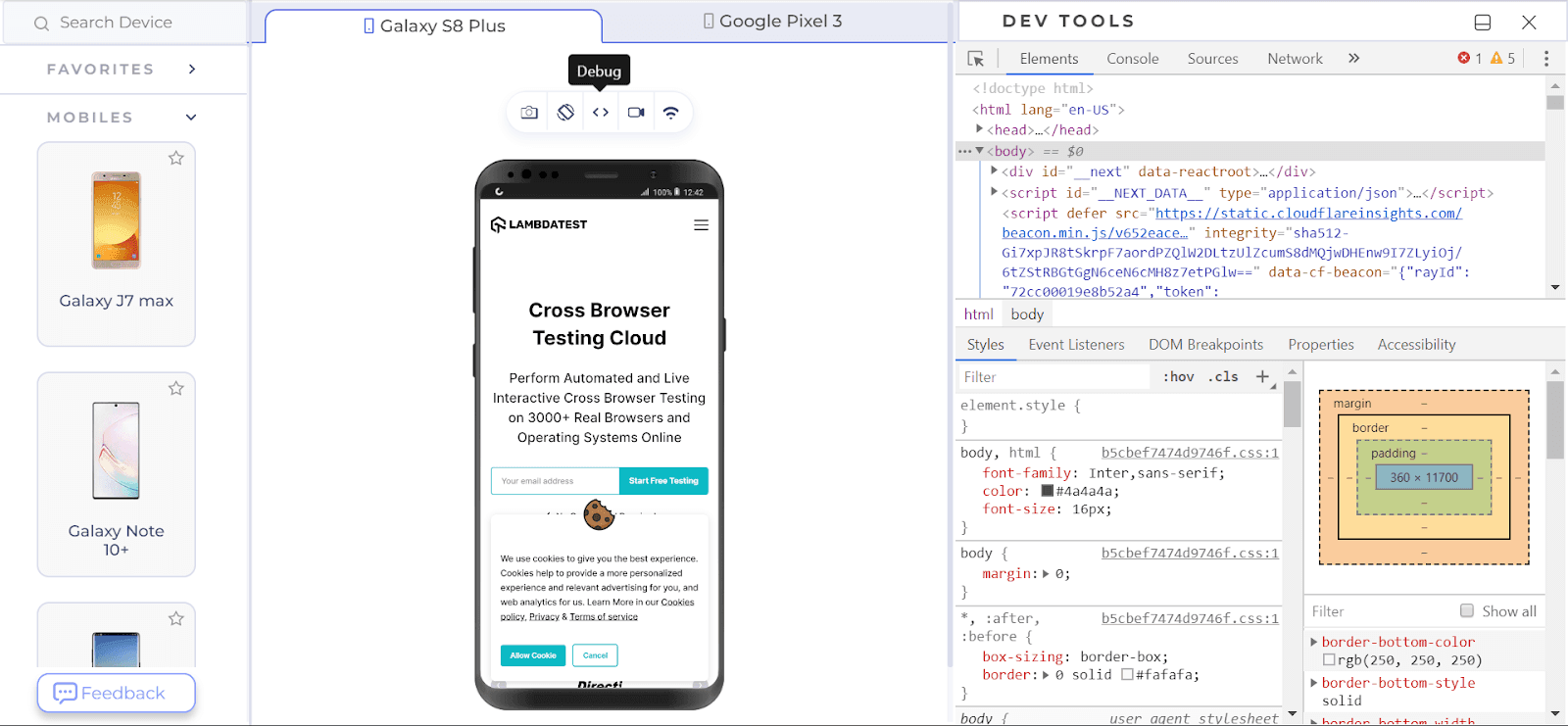
Step 9: Click on the Debug icon to debug your website. You get access to Chrome Dev Tools.
Step 10: To check how your website responds to different network speeds, choose Network Throttling. Choose the network speed you need.
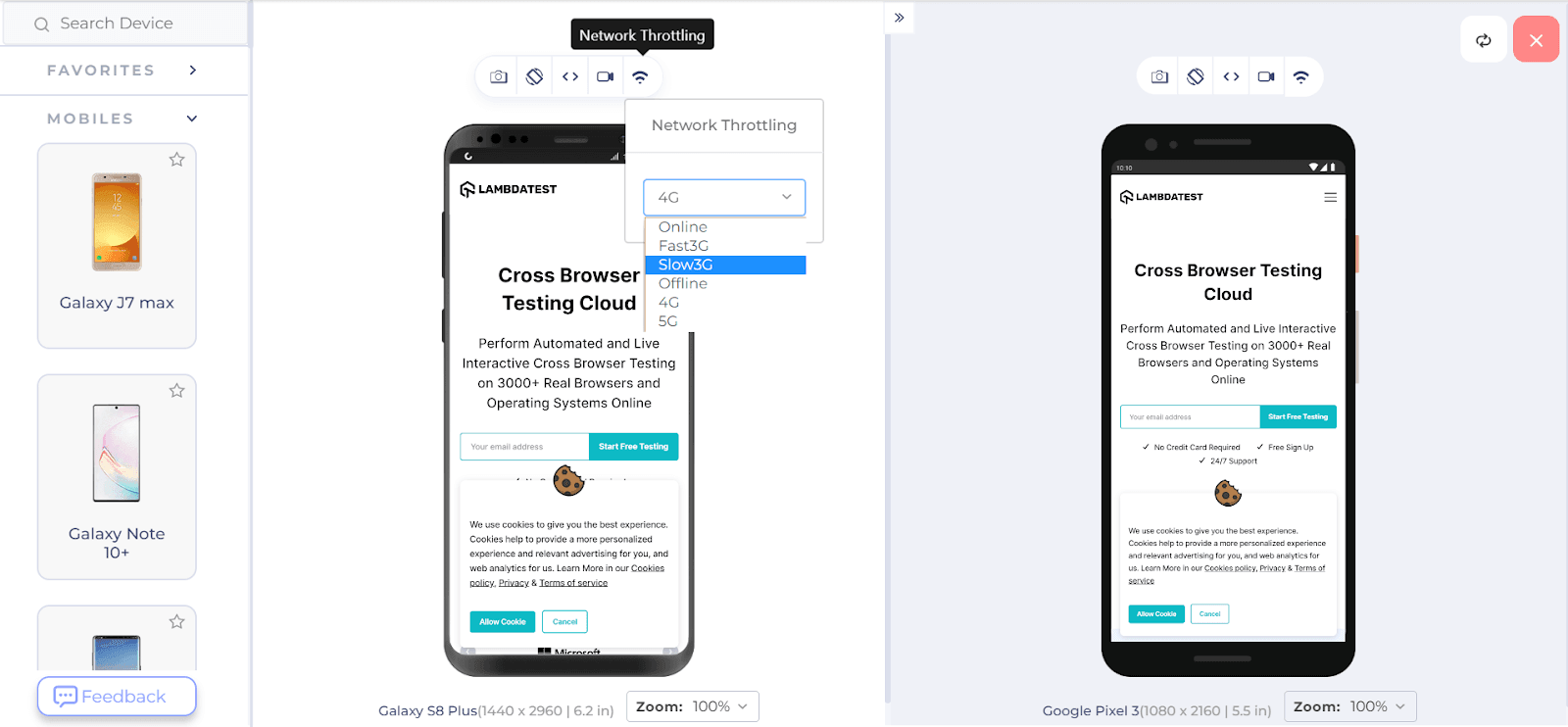
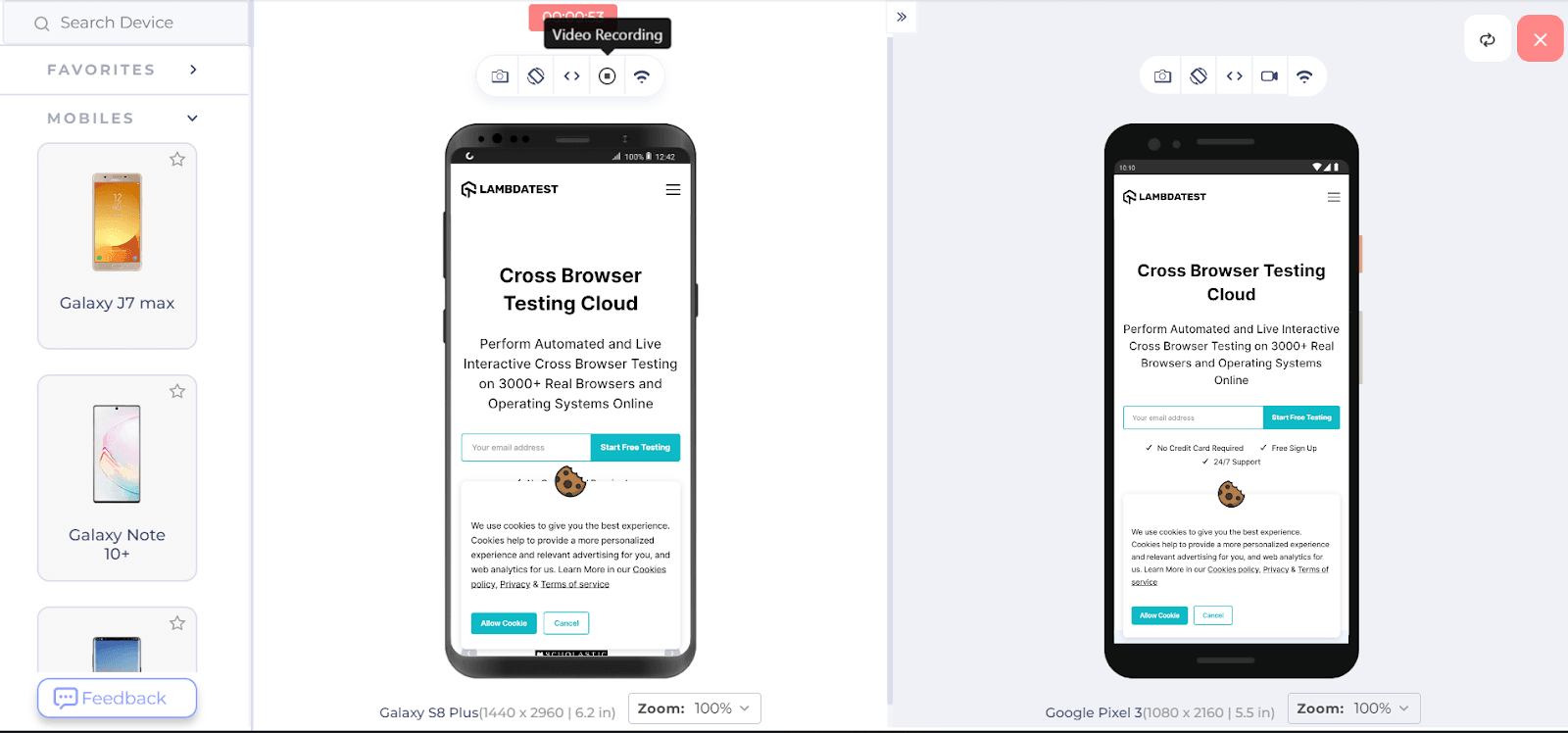
Step 11: Do you want to record how your website performs at different speeds? You can use the Video Recording option.
All these processes will hasten up your test cycle. At TestMu AI, you can leverage website testing on Vivo devices.

Conclusion
With increased websites and web apps, you would always have to test them under different conditions.
I hope you have found our web testing guide useful! You can always depend upon an online browser farm to test your websites and web apps under different browsers, OS, and devices. With the increase in cloud testing, TestMu AI users are gearing towards an advanced phase of web testing.
It’s always best to depend upon a website testing checklist and a top-class cross-browser compatibility testing tool to fulfill your web testing needs. TestMu AI is the name you can always trust!
Happy testing!


Frequently asked questions
Did you find this page helpful?
More Related Hubs
TestMu AI forEnterprise
Get access to solutions built on Enterprise
grade security, privacy, & compliance
- Advanced access controls
- Advanced data retention rules
- Advanced Local Testing
- Premium Support options
- Early access to beta features
- Private Slack Channel
- Unlimited Manual Accessibility DevTools Tests