
Power Your Software Testing with AI Agents and Cloud
The Native AI-Agentic Cloud Platform to Supercharge Quality Engineering. Test Intelligently and Ship Faster.


- TestMu AI (Formerly LambdaTest)
- /
- Learning Hub
- /
- Load Testing: How to Plan, Run, and Read the Results
Load Testing: How to Plan, Run, and Read the Results
Load testing explained: how to run one step by step, the metrics that matter, load vs stress testing, and how to pick a tool. With JMeter and Gatling at scale.
Last Updated on:
On This Page
- What Is Load Testing?
- Why Load Testing Matters
- Examples of Load Testing
- How Load Testing Works
- Load Testing Architecture
- Types of Load Testing
- Load vs Stress Testing
- Functional vs Load Testing
- How to Run a Load Test
- Metrics to Track
- Load Testing Best Practices
- Types of Load Testing Tools
- How to Choose a Tool
- Load Testing Tools
- Running Tests at Scale
- Limitations of Load Testing
- Conclusion
Load testing answers one question: how many concurrent users can this system carry before it slows down or falls over? You find that out by simulating the traffic deliberately, in an environment you control, rather than discovering it on a launch day when real users supply the load for you.
It is the performance test most teams run first, because capacity is usually the constraint that shows up soonest in production. This guide covers what load testing is, how to run one step by step, the metrics worth collecting, how it differs from stress and functional testing, and how to choose a tool.
TL;DR
- Load testing measures how a system behaves under expected and peak load. The output is not a pass or fail, it is the concurrency level at which response time, throughput, or error rate starts to degrade.
- It is not stress testing. Load testing stays within the limits you expect to hit; stress testing deliberately pushes past them to find the breaking point and watch the recovery.
- A load test is only as trustworthy as the environment it runs in. Results from a rig that does not resemble production mostly tell you about the rig.
- The metrics that matter are response time, throughput, error rate, and concurrency, read alongside CPU, memory, disk I/O, and network I/O so you can see which resource saturates first.
- Tool choice splits three ways, across open source such as JMeter, Gatling, Locust, and k6, commercial platforms, and cloud services that generate distributed load on demand.
- The load generator is itself a constraint. One machine cannot simulate ten thousand users, so anything at real scale runs from distributed VMs.
- TestMu AI runs JMeter and Gatling suites on HyperExecute across parallel cloud VMs, so the generating side scales without a lab to maintain.
What Is Load Testing?
Load testing serves as a crucial pillar of performance testing, aiming to create a mirror of the likely load on any given software, application, or website. Its principal goal is to highlight and tackle any performance choke points prior to a software product becoming publicly accessible or before a system is fully operational, and is a core practice within broader performance engineering.
In this process, the system is exposed to a simulated load that closely mimics the real-world usage conditions. This could entail a large number of users interacting with the system at the same time, significant data input volumes, or intricate operations that the system needs to execute.
The importance of load testing lies in its ability to reveal how a system performs under extreme conditions and make sure whether it can manage peak user interaction. It becomes important in eliminating potential problems that could hamper the system's performance and negatively impact the user experience, like slow response times, increased error rates, or even system breakdowns. Recognizing these issues before the system is fully operational allows them to be rectified, ensuring users enjoy a seamless and efficient user experience.
Why is Load Testing Important?
Though load testing may seem complex at first glance, its fundamental purpose is straightforward: to confirm that your software or system is equipped to simultaneously accommodate a large volume of users or tasks without breaking. The reasons come down to six:
- Guarantee of Performance - When a system is tested under extensive load, you're able to verify its ability to handle practical use cases. This is particularly crucial for systems projected to receive high traffic, like e-commerce websites during a sale or applications rolling out a new feature.
- Spotting Bottlenecks - Load testing enables you to pinpoint performance blockages or areas within the system where data flow is compromised or limited. Having this understanding aids in resolving these issues, which in turn enhances the system's overall performance.
- Assessing Scalability - Load testing plays a key role in determining the system's scalability. As your user base expands, it's fundamental to understand the extent of additional load your system can take before performance begins to suffer.
- Enhanced User Experience - A system that hasn't undergone load testing may encounter crashes, delayed response times or errors during periods of high traffic, resulting in a subpar user experience. By detecting these issues ahead of time, they can be addressed, ensuring users enjoy a seamless experience.
- Cost Efficiency - Addressing performance issues post-deployment can be expensive and time-consuming. Load testing facilitates a proactive approach to these problems, saving you valuable resources in the long term.
- Release Confidence - Load testing gives a sense of trust in the robustness and performance of the software or system before it's rolled out live. This confidence is key for stakeholders and can contribute to a successful launch.

Examples of Load Testing
Load testing finds its application in a wide array of scenarios across diverse industries and applications. Here are several instances where load testing proves crucial:
- Online Retail Sites - For online retail websites, load testing is done to mimic heavy user activity during peak shopping seasons like Black Friday or Cyber Monday. This process verifies the website's ability to handle high traffic and transaction volumes without experiencing slow-downs or crashes.
- Online Gaming Platforms - Load testing in online multiplayer games simulates thousands of simultaneous players interacting with the game. This helps to confirm that the game servers can manage this load without any lags or downtime, thereby offering a smooth gaming experience.
- Streaming Platforms - In the case of streaming services, load testing emulates thousands of users streaming content at the same time. This ensures the service can offer high-quality streaming without any buffering, even during peak viewing hours.
- Banking Applications - For banking applications, load testing can replicate scenarios such as high transaction loads at the end of the month. This makes sure the application can manage the surge in activity without encountering any errors or delays.
- Mobile Apps - Load testing can mimic many users interacting with a mobile application simultaneously. This helps ensure the app stays responsive and stable even under heavy load.
- Web Services or APIs - Load testing can be employed to test web services and APIs. This is achieved by sending a large number of requests to check if the service or API can manage the load and respond promptly.
How Does Load Testing Work?
Load testing replaces real users with simulated ones. A tool opens many concurrent virtual users, each running a scripted journey through the system, while recording response time, throughput, and error rate at every step. The load ramps up on a schedule rather than arriving all at once, so you can see the exact concurrency level at which a metric starts to degrade.
That degradation point is the output, not a pass or fail result. A load test does not tell you the system works. It tells you the system holds up to roughly N concurrent users, and that response time doubles somewhere past that.
Because the load is generated outside the system under test, the machine generating it becomes a variable in its own right. One laptop cannot produce the traffic of ten thousand users, which is why load tests at any real scale run from distributed machines or cloud VMs rather than a developer workstation.
Load Testing Architecture
In understanding the structure of load testing, one must first conceptualize the architecture involved. In a typical scenario, multiple users are accessing an application through the internet. Each user sends a request that traverses through a firewall before reaching the system. From there, a load balancer distributes the user requests across various web servers. These requests are then processed by the application server and ultimately reach the database server to fetch the necessary information corresponding to the user request.
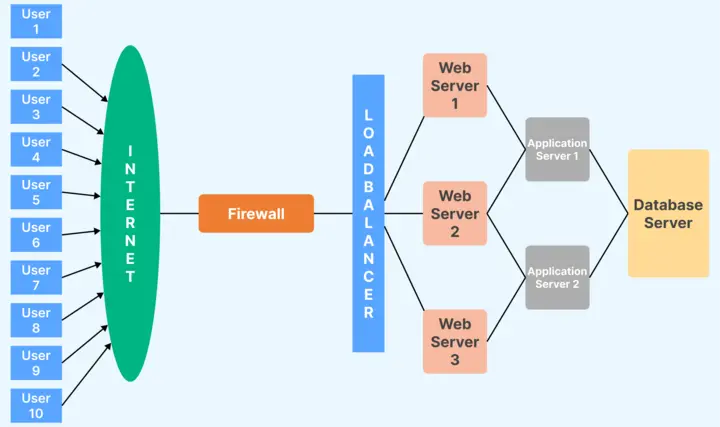
Load testing can be performed manually or using automated tools. However, manual load testing is not the most efficient approach when testing for high load scenarios. For instance, testing an application's response to 10 users can feasibly be done manually, but if the load increases to 1500 users, automation testing becomes necessary. Automated load testing replaces manual users with an automation tool that mimics real-time user actions, significantly saving resources and time.
The goal of load testing is multi-faceted, helping to understand several key aspects of the system under load:
- The maximum number of users the system can handle and its scalability.
- The response time of each transaction.
- The behavior of each system component (application server components, web server components, database components, etc.) under load.
- The optimal server configuration to handle the load.
- Whether the current hardware is sufficient or if additional hardware is needed.
- Identification of bottlenecks such as CPU utilization, Memory Usage, Network delays, etc.
When conducting a load test, it is crucial to have a dedicated testing environment that mirrors the production environment as closely as possible. This allows for the most accurate and relevant results. In cases where third-party applications are involved, these can be replaced with stubs for testing purposes. Tools such as Puppet and Docker can assist in setting up and managing the testing environment.
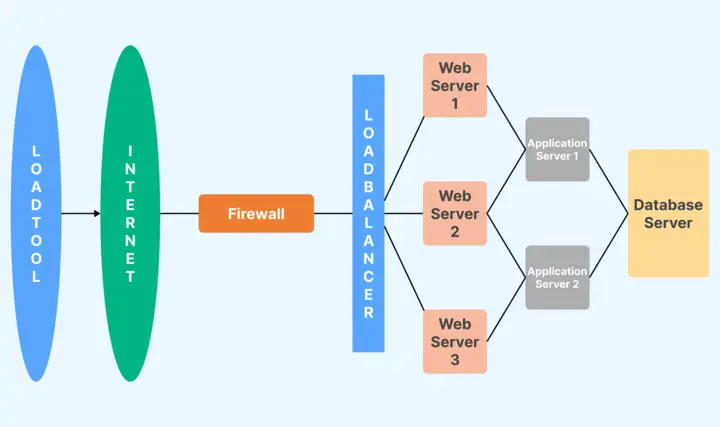
Before starting a load test, it's important to gather information about the system and its capabilities. This includes understanding if any load testing has been done previously, what the response times were, how many users the system could handle, etc. The approach to load testing can then be developed, which may involve manual testing or the use of open source or commercial tools, depending on the project's requirements and budget.
Strategies of Load Testing
Load testing methods can be quite diverse, tailored to meet the unique objectives and circumstances of the system under scrutiny. Here are some prevalent load testing tactics:
- Baseline Testing - In this approach, testing occurs with a normal load level to set a standard for performance. This becomes the benchmark for contrasting future tests, helping to pinpoint any performance discrepancies.
- Peak Load Testing - In this case, the system is examined under loads that meet or exceed its anticipated maximum capacity. This helps verify whether the system can withstand peak levels of user activity.
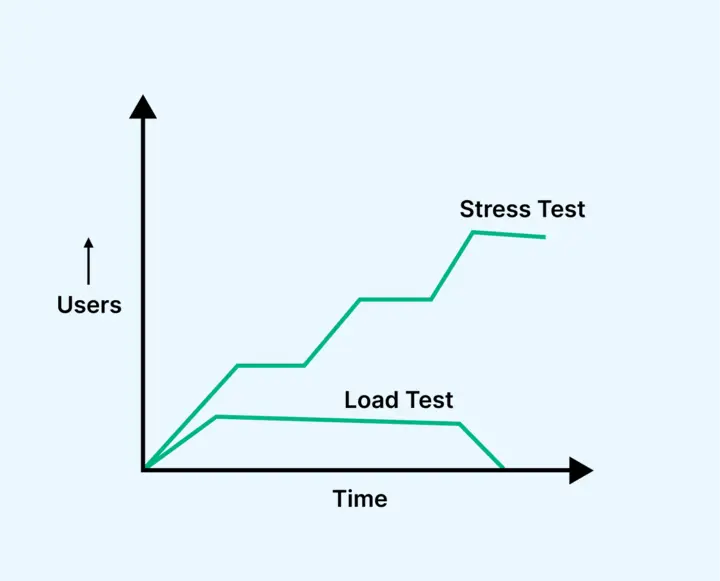
- Stress Testing - This tactic involves pushing the system past its expected limits to detect its breaking point and observe how it recovers after the load is reduced. This is helpful for understanding the system's boundaries and resilience.
- Soak Testing - Also known as endurance testing, this approach entails testing the system with a normal load over a prolonged time. This aids in the detection of issues like memory leaks or system degradation over time. On a phone system, a soak run can also surface port exhaustion, as the guide to IVR performance testing explains.
- Spike Testing - This involves abruptly ramping up or scaling down the load on the system to test its response to sudden demand shifts.
- Scalability Testing - This approach entails progressively increasing the load on the system to observe its scalability and pinpoint the point where performance begins to deteriorate.
- Isolation Testing - If an issue is detected, this tactic entails separating the system components to uncover the root cause of the problem.
Difference between Load and Stress Testing
While both load testing and stress testing fall under the umbrella of performance testing, they serve distinct purposes and help uncover different types of issues. Understanding these differences can significantly improve the effectiveness of your testing process and help ensure the performance and stability of your system. The table below compares their key aspects:
| Load Testing | Stress Testing |
|---|---|
| Determine how the system behaves under expected and peak loads. | Understand the system's behavior and identify its breaking point under extreme conditions. |
| Ensures the system can handle expected user load and helps identify bottlenecks that can impact performance. | Pushes the system beyond its capacity to understand how it fails and recovers, ensuring system robustness. |
| Simulates normal to peak load conditions. | Applies loads that go beyond peak, pushing to the system's breaking point. |
| Simulates a high number of users accessing the application simultaneously during peak usage times. | Simulates a situation where the system is stressed with extreme loads, potentially causing it to fail. |
| Helps to identify performance bottlenecks, establish a performance baseline, and validate that the system can handle high load. | Helps to identify how the system handles failure, its recovery process, and its maximum capacity. |
Difference between Functional and Load Testing
Functional and load testing each play critical roles in the software testing lifecycle, yet they serve vastly different purposes. Where functional testing is used to confirm that a system behaves as expected, load testing measures the system's performance and ability to handle user load. Both types of testing contribute to building a robust and user-friendly application. To better understand the differences and unique aspects of each, the table below sets them side by side:
| Functional Testing | Load Testing |
|---|---|
| To verify that the functionality of an application or system operates as expected. | To check how the system behaves under a specific expected load. |
| Focuses on verifying the functionalities of the system such as user interfaces, APIs, database, security, client/server applications, etc. | Simulates real users' load and measures the response times, throughput rates, resource utilization to identify the system's performance under varying loads. |
| Inputs are provided, and outputs are compared against the expected results. Test cases are developed based on the system's functional requirements. | A load is applied to the system, and its performance and behavior under this load are observed and analyzed. |
| Involves executing the features of the system with appropriate inputs and validating the output against expected results. | Simulates a high number of users accessing the application simultaneously, testing the system's capacity and response times. |
| Ensures that the system behaves as expected, improves the quality of the product, reduces risks and fixing costs. | Helps to identify performance bottlenecks, ensure system can handle high load, and improve user experience. |
How to Run a Load Test: Step by Step
Load testing is a methodical process rather than an impulsive one, and skipping the preparation is what produces numbers nobody trusts. These eight steps cover a full cycle.
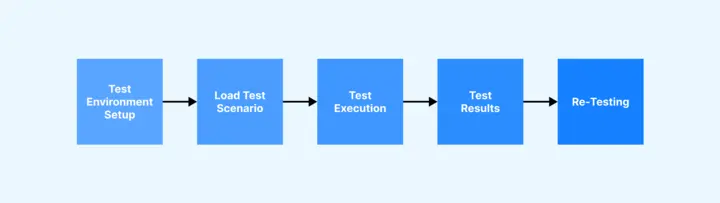
- Understand the system - Know the architecture, the technologies in play, and how data moves between components. You cannot design a realistic load without this, and every later step depends on it.
- Set goals and acceptance criteria - Decide whether you are measuring maximum capacity or behavior under everyday load, then fix the KPIs you will judge it by: response time limits, throughput expectations, concurrent user counts, and an acceptable error rate.
- Choose the scenarios - Pick the journeys that are business-critical or expected to carry high traffic. For an application already in production, server logs are the most honest source for which flows actually matter.
- Model the workload - Set the number of virtual users, data volumes, and think times, then shape the run into ramp-up, steady-state, and ramp-down phases. Ramping lets the system adjust gradually and shows you where degradation begins; steady state is the load you expect it to sustain.
- Prepare the test data - Generate enough login details, product records, and other inputs that scenarios do not keep reusing the same rows, which would otherwise let caching hide a real problem.
- Set up the test environment - Mirror production as closely as you can across hardware, software, network configuration, and databases. Third-party systems you do not control can be replaced with stubs. The closer the test environment sits to production, the more the results are worth.
- Execute and monitor - Run the scenarios with a tool that generates the load, using automated tools to simulate concurrent users. Watch CPU, memory, disk I/O, and network I/O live rather than reading them afterwards, so you can see which resource saturates first.
- Analyze, fix, and retest - Compare the results against the benchmarks from step two, find the bottleneck behind any miss, fix it, and run again. This loop usually repeats several times before the numbers settle.
Load testing works best as a standing part of the development cycle rather than a gate at the end, so performance stays visible as features land and user load shifts.
Metrics of Load Testing
When running a load test, several performance metrics are collected to assess the system's behavior under different load conditions. These metrics provide critical insights and help highlight potential performance issues. Here's a look at some common metrics used in load testing:
- Throughput - Throughput refers to the volume of data your application can process within a specific time. It could be measured in requests per second, transactions per second, or volume of data per second.
- Response Time - Response time is the duration the system takes to respond to a request. It includes processing time as well as network latency. Longer response times might suggest performance problems.
- Error Rate - This metric is the proportion of requests that result in errors. An increased error rate might point to issues with the application or the underlying infrastructure.
- Concurrency - Concurrency represents the number of users that the system can accommodate simultaneously without substantial performance degradation.
- CPU Utilization - CPU utilization is the percentage of the CPU capacity being used. If the CPU utilization is consistently high, it might signal a performance bottleneck.
- Memory Utilization - Memory utilization measures the amount of memory the system is using. If the system consistently shows high memory utilization or if it increases over time, it could suggest a memory leak.
- Disk I/O - Disk I/O measures the speed at which data is being read from or written to the disk. High disk I/O can lead to sluggish performance.
- Network I/O - Network I/O assesses the amount of data being transferred over the network. If the Network I/O is high, it could suggest a network bottleneck.
- Load vs. Response Time - This metric plots the system's response time against the load. It helps identify the point at which the system's response time begins to deteriorate under increasing load.
Collecting these metrics is the easy part, deciding what they say about the next release is harder. In this TestMu Conf 2026 session, Stephan Mousset covers that gap in From Load Testing to Reliability Engineering: Making Performance Testing Predict Production Behavior, on why teams run load tests, collect huge amounts of data, and generate detailed reports, yet still struggle to answer whether a change is safe in production.

Guidelines for Load Testing
Here are some practical tips to ensure that your load testing efforts are successful and yield meaningful insights:
- Establish Precise Goals - Before you dive into load testing, have a clear understanding of your goals. This could be determining your system's maximum load capacity, identifying potential bottlenecks, or ensuring recent changes have not negatively impacted the performance.
- Mirror Real-Life Scenarios - Your test scenarios should emulate real-world user behaviors as accurately as possible. This includes varying user behaviors, data volumes, and usage patterns.
- Choose Suitable Load Levels - Ensure you're testing at a range of load levels, encompassing both average and peak user loads, to fully understand how your system behaves under various circumstances.
- Begin with Lower Loads, Then Increase - Start the testing process with a small user load and incrementally raise the load. This method lets you observe how your system responds and scales as the load amplifies.
- Implement Testing Throughout the Development Cycle - Don't hold off on load testing until your application is completely developed. Making it a consistent part of your development process helps identify and rectify issues promptly.
- Keep an Eye on System Resources - Keep track of system resources like CPU usage, memory usage, disk I/O, and network I/O during testing. This can help spotlight resource-related bottlenecks.
- Analyze and Repeat Tests - After conducting each test, examine the results, pinpoint any issues, implement the necessary changes, and retest. Load testing is an iterative procedure.
- Maintain Documentation - Document every aspect of your testing process, including the test plan, scenarios, results, and any system modifications made as a result of testing. This documentation is vital for future testing and for comprehending the system's performance history.

Types of Load Testing Tools
There are various types of load testing tools available, both open-source and commercial. These tools offer different capabilities and are used to simulate loads and analyze the performance of your system. Here are some categories:
- Open-Source Load Testing Tools - These are free to use and typically have a community of developers that contribute to their ongoing improvement. Examples include JMeter, Gatling, and Locust. These tools provide robust load testing capabilities, but they may require more technical expertise to use effectively.
- Commercial Load Testing Tools - These tools are often more user-friendly and come with professional support and additional features, such as detailed reporting, real-time performance monitoring, and advanced scripting capabilities. Examples include LoadRunner and Silk Performer, both now under OpenText.
- Cloud-Based Load Testing Tools - These tools provide on-demand, scalable load testing capabilities that can simulate a massive number of concurrent users. They often include features for distributed testing and results analysis. Examples include BlazeMeter, LoadView, and TestMu AI's cloud load testing, which runs existing JMeter and Gatling plans on managed load generators.
- Load Testing Tools for Specific Applications - Some tools are designed to load test specific types of applications or systems, such as web applications, APIs, databases, etc. Examples include Postman (for API testing), HammerDB (for databases), and Selenium (for web applications). Phone systems have their own tools too, and the roundup of IVR testing tools covers the ones that simulate high call volumes.
How to Choose a Load Testing Tool?
Selecting the right load testing tool for your unique situation can seem daunting because it relies on a variety of factors, including the nature of your application, the technical skill set of your team, your budget, and your particular testing requirements. You might want to take into account the following key points while deciding:
- Applicability to Your Application - Make sure the load testing tool you choose can effectively test your specific application, be it a web-based, desktop, mobile, or API application.
- User-Friendliness - It's worth considering how intuitive the tool is. Some load testing tools can be quite complex and require significant programming skills. If your team is not very technical, a more user-friendly tool might be the better choice.
- Capacity for Load Generation - Your chosen tool needs to be capable of producing enough load to rigorously test your application. In other words, it needs to be able to mimic the number of users or connections your application is expected to accommodate.
- Test Development and Management - Examine how straightforward it is to create, run, and manage tests. Some tools offer a graphical interface for test creation, while others might necessitate scripting. A generator such as Thunder can write the first JMeter or k6 script from a recording or an API spec.
- Reporting and Data Analysis - High-quality reporting and results analysis features are crucial. Your tool of choice should provide comprehensive reports and make it simple to spot performance issues.
- Support Resources and Community Engagement - Opt for a tool with robust documentation, dependable support, and an engaged community. This could be particularly vital if you decide on an open-source tool.
- Budget Constraints - Costs always matter. Open-source tools come free of charge but may incur hidden expenses in terms of the time and resources necessary to learn and effectively use them. On the other hand, commercial tools might come with a hefty price tag but could potentially save you time and offer a broader range of features and support.
- Integration Capability - A load testing tool that can integrate seamlessly with other tools used in your development and testing process, such as CI/CD tools, bug tracking systems, version control systems, and so on, can be quite beneficial.
Load Testing Tools
Load testing tools are invaluable software utilities that assist in generating demand on a system or application to assess its performance under various load conditions. These tools mimic the actions of many simultaneous users, enabling the observation of system response times, the discovery of bottlenecks, and the assurance of real-world usability.
The ones below are worth knowing first, in no particular order. For a wider comparison across pricing, protocol support, and reporting, see the full roundup of load testing tools.
- Apache JMeter - This tool is an open-source application built on Java, designed specifically to test load functionality and performance. Developed by the Apache Software Foundation, JMeter is versatile, able to simulate loads across a wide range of services and protocols such as HTTP, HTTPS, JDBC, LDAP, and SOAP. With an extensible core that can be tailored with plugins, it provides the flexibility needed for different testing scenarios. Its intuitive GUI makes it easy for testers to design test plans and visualize the results in various ways.
- WebLOAD - WebLOAD by RadView is a commercial tool aimed at performance engineers, with a correlation engine for handling dynamic session values, real-time analytics during a run, and scripting in JavaScript rather than a proprietary language.
- LoadRunner - Now part of OpenText following its acquisition of Micro Focus, LoadRunner is a long-established commercial load testing tool. Its primary function is to simulate real-life load conditions on your system, detect performance bottlenecks, and predict system behavior. With support for a broad spectrum of application environments, platforms, and databases, LoadRunner is a versatile choice for diverse load testing requirements. It offers detailed performance metrics beneficial for tuning and optimizing system performance.
- Gatling - An open-source load and performance testing tool primarily designed for web applications, Gatling utilizes a simple domain-specific language (DSL) for creating and maintaining test scripts. It supports HTTP/2 and allows recording and generation of scenarios directly from a browser. The tool also provides detailed performance reports that are easy to analyze.
- k6 - An open-source tool from Grafana Labs, k6 is written in Go and scripted in JavaScript, which makes it a common choice for teams that want load tests living in the same repository as application code. It is built around running in CI pipelines and exports results to Grafana dashboards for teams already using that stack.
- Locust - Another open-source tool, Locust is particularly flexible due to its support for Python scripts. It can conduct load tests across multiple machines, making it possible to simulate millions of users simultaneously. An exceptional feature of Locust is its web-based UI, which allows real-time tracking of performance metrics during test execution.
- Tsung - Developed in Erlang, Tsung is a multi-protocol distributed load testing tool. It can stress a variety of protocols, including HTTP, WebDAV, SOAP, PostgreSQL, MySQL, LDAP, and MQTT, among others. It is capable of simulating a large number of users per server, making it the ideal choice for high-load systems. Tsung also includes a comprehensive performance tracking dashboard and facilitates real-time statistics gathering and graph plotting.
You can also perform load testing with Python Locust to evaluate how your application behaves under heavy traffic, customize user scenarios, and gain deeper insights into system performance in a scalable way.
Every tool mentioned above has unique strengths and is more suitable for certain load testing scenarios. The choice of tool will depend on your specific requirements and your team's expertise.
Running JMeter and Gatling Tests at Scale
The part teams underestimate is the generator. A test plan that works fine against a hundred virtual users hits a wall when the target is ten thousand, because a single machine runs out of CPU and open sockets long before the system under test does. At that point you are running distributed load generation, which means provisioning machines, keeping them identically configured, and stitching results back together from all of them.
TestMu AI orchestrates JMeter load testing and Gatling load testing runs on HyperExecute across just-in-time cloud VMs, so the generating side scales with the test instead of capping it. Because the test script and its execution components sit together in a single isolated environment rather than round-tripping between a hub and separate nodes, runs complete up to 70% faster than on a traditional grid, and results come back as unified logs and reports with AI root cause analysis on failures.
The practical effect is that the load test stops being a special event that needs its own infrastructure booked in advance, and becomes something a pipeline can trigger. The JMeter on HyperExecute documentation covers the YAML configuration for a first run.

Note: Run your JMeter and Gatling load tests across parallel cloud VMs. Get started free
Disadvantages of Load Testing
Load testing plays a vital role in understanding your system's ability to manage high demand and pinpoint potential performance problems. However, it's not without its challenges:
- Time Commitment - The process of load testing isn't quick. It demands thoughtful planning, designing test scenarios, running those tests, and evaluating the results. This can add time to your development cycle.
- Expense - The cost can vary based on the system's complexity. Simulating heavy load can require substantial infrastructure which might be pricey. While free tools can be found, they might not cover more sophisticated or particular needs. In these cases, commercial tools, which have an associated cost, may be necessary.
- Technical Knowledge Required - Load testing is more than just flooding the system with high traffic; it needs a nuanced approach to designing and implementing tests and understanding the outcomes. This often requires specialized skills and might necessitate additional training or the hiring of skilled personnel.
- Not All-Inclusive - Load testing is great for finding performance problems under significant load, but it might miss other issues, like functional errors or issues that crop up under average load. Therefore, load testing should be part of a holistic testing strategy, not the sole testing method.
- Simulating Real-World Conditions Is Challenging - Despite advances in testing techniques, reproducing the exact conditions of real-world usage and user behavior can be tough. Factors such as network latency, user interaction patterns, and simultaneous actions can be challenging to replicate in a test environment.
Conclusion
In the world of software development, overlooking load testing is a misstep one cannot afford to make. Load testing, by emulating real-world user load, equips developers with the means to spot and rectify performance glitches before they start influencing the user experience.
Adopting this method brings us a step closer to ensuring that our application is equipped to meet real-world demands. Given the expectations of today's users for flawless performance, falling short in any way can have ramifications on the reputation and profitability of your business.
So, let it be a new application in the works or improvements to an existing one, load testing must be a non-negotiable element in your strategy. Consider it an investment that will reward you with a more robust, reliable application and enhanced user satisfaction.
Author

Swapnil Biswas
Blogs: 8


Swapnil Biswas is a Product Marketing Manager at TestMu AI, leading product marketing for KaneAI and HyperExecute while orchestrating GTM campaigns and product launches. With 5+ years of experience in product marketing and growth strategy, he specializes in AI, SEO, and content marketing. Certified in Selenium, Cypress, Playwright, Appium, KaneAI, and Automation Testing, Swapnil brings hands-on expertise across web and mobile automation. He has authored 20+ technical blogs and 10+ high-ranking articles on CI/CD, API testing, and defect management, enabling 70K+ testers to improve automation maturity. His work earned him multiple awards, including Top Performer, Value of Agility, and Wall of Fame. Swapnil holds a PG Certificate in Digital Marketing & Growth Strategy from IIM Visakhapatnam and a BBA in Marketing from Amity University.
Reviewer

Harish Rajora
Reviewer
Harish Rajora is a software developer at TestMu AI with over 6 years of hands-on experience in Python and cross-platform application development across Windows, macOS, and Linux. He has authored 800+ technical articles and worked on large-scale projects, including GenAI applications and core engineering features used by millions. Harish has led DevOps initiatives building CI/CD pipelines with Jenkins, AWS, GitLab, and GitHub, and holds an M.Tech in Software Engineering from IIIT Allahabad.


Load Testing FAQs
Did you find this page helpful?
More Related Learning Hubs

TestMu AI forEnterprise
Get access to solutions built on Enterprise
grade security, privacy, & compliance
- Advanced access controls
- Advanced data retention rules
- Advanced Local Testing
- Premium Support options
- Early access to beta features
- Private Slack Channel
- Unlimited Manual Accessibility DevTools Tests