

Next-Gen App & Browser Testing Cloud
Trusted by 2 Mn+ QAs & Devs to accelerate their release cycles


On This Page
- What are Software Testing Techniques?
- Why are Software Testing Techniques Important?
- Advantages of Using Software Testing Techniques
- Limitations of Software Testing Techniques
- Software Testing Techniques Based on Codebase
- Software Testing Techniques Based on Approach
- Selecting the Right Software Testing Techniques
- Best Practices While Using Software Testing Techniques

Software Testing Techniques: Types and Best Practices
In this blog, discover different software testing techniques and best practices to ensure the quality, reliability, and security of software applications.

Nazneen Ahmad
December 25, 2025
When developing software applications, it is important to ensure that their functionality and performance meet the end-user’s requirements. This requires robust software application evaluation through software testing. To achieve this, testers use various software testing techniques to find issues or bugs in software applications.
Different software testing techniques can be used, depending on the requirements of the software application. Hence, you need to choose the right software testing techniques to ensure that it meets the requirements of the end-users.
In this blog, we will walk you through the different software testing techniques.
What are Software Testing Techniques?
Software testing techniques include a variety of testing methodologies to verify that software functions as intended. Technically, these techniques are used to test the software application against the functional or non-functional requirements gathered from business stakeholders.
Each testing technique aims to detect specific types of defects. For example, while certain techniques may uncover structural defects, they may not be effective in identifying defects within the end-to-end business flow. Consequently, multiple testing techniques are typically utilized in testing projects to ensure the optimum software quality.
Why are Software Testing Techniques Important?
Software testing techniques are used for multiple purposes to ensure the quality and reliability of software applications. Here is why testing techniques are important:
- Identify and uncover any bugs or defects present in the software application. By systematically testing various aspects of the software, testers can pinpoint areas where the application does not behave as expected or where errors occur.
- Contributes significantly to the quality assurance process. By verifying that the software functions according to the Software Requirements Specification (SRS), testers ensure that it meets the specified criteria and performs its intended functions correctly. This helps to maintain the overall quality of the software and enhances user satisfaction.
- Tests the functionality of the software application from the perspective of end-users. This involves testing the software’s features, user interface, and interactions to ensure they meet user expectations and perform the desired tasks accurately and efficiently.
- Helps to identify and mitigate risks associated with the software development and deployment process. By uncovering potential issues early in the development life cycle, testers can address them before they escalate into more significant issues that could impact the success of the project or the stability of the software in production environments.
- Assists testers in optimizing their testing efforts by focusing on the components of the software application that are more likely to contain defects. By prioritizing testing activities based on risk factors, critical functionality, and areas of frequent change, testers can allocate their resources effectively and maximize the efficiency of the testing process.

Advantages of Using Software Testing Techniques
Software testing techniques offer several advantages that contribute to the overall success and efficiency of software development projects:
- Performing thorough testing of the software, developers, and stakeholders can gain confidence that the software meets the requirements and works as intended. This reduces the risk of releasing a product with critical bugs that could damage the brand’s reputation.
- Identifying and fixing defects early in the development process makes it easier to maintain and update the software in the future. Well-tested software has a more modular design and is easier to understand, which makes it simpler for developers to add new features or fix bugs in future releases.
- Using techniques like usability testing help identify usability issues and improve the overall user experience. Usability testing involves real users interacting with the software and providing feedback on its ease of use, learnability, and efficiency. This feedback helps developers identify areas where the software can be improved to make it more user-friendly.
Limitations of Software Testing Techniques
Besides the advantages of software testing techniques, there are also some limitations. Some of those are:
- It can take forever, especially if you aim to find every single bug. This can push back your deadlines and slow down development. Plus, skilled testers and fancy tools aren’t cheap, adding to the project cost.
- It might be tricky to track down exactly what’s causing the issue, leading to long debugging sessions. On top of that, with today’s complex software, predicting how everything will work together can be a real head-scratcher.
- No matter how much you test, there’s always a chance a sneaky bug will slip through and surprise you after release. Software is complicated, and sometimes, unexpected user interactions or situations you never thought of can expose issues.
Software Testing Techniques Based on Codebase
Software testing techniques are broadly classified into two main categories based on the running of the codebase. Those are as follows:
- Static testing
- Dynamic testing
Static Testing
Static testing is mainly used to find the error or flaw in the software application without actually running the code. In other words, static testing is a software testing approach that involves reviewing and analyzing software documentation, design, or code without executing the software. It’s a method of checking for errors and defects in the software by inspecting it in a static state rather than during active operation.
This technique is implemented early in the Software Development Life Cycle (SDLC). By identifying defects early, static testing helps enhance the overall quality and reliability of the software application. Furthermore, it improves maintainability and leads to long-term time and cost savings.
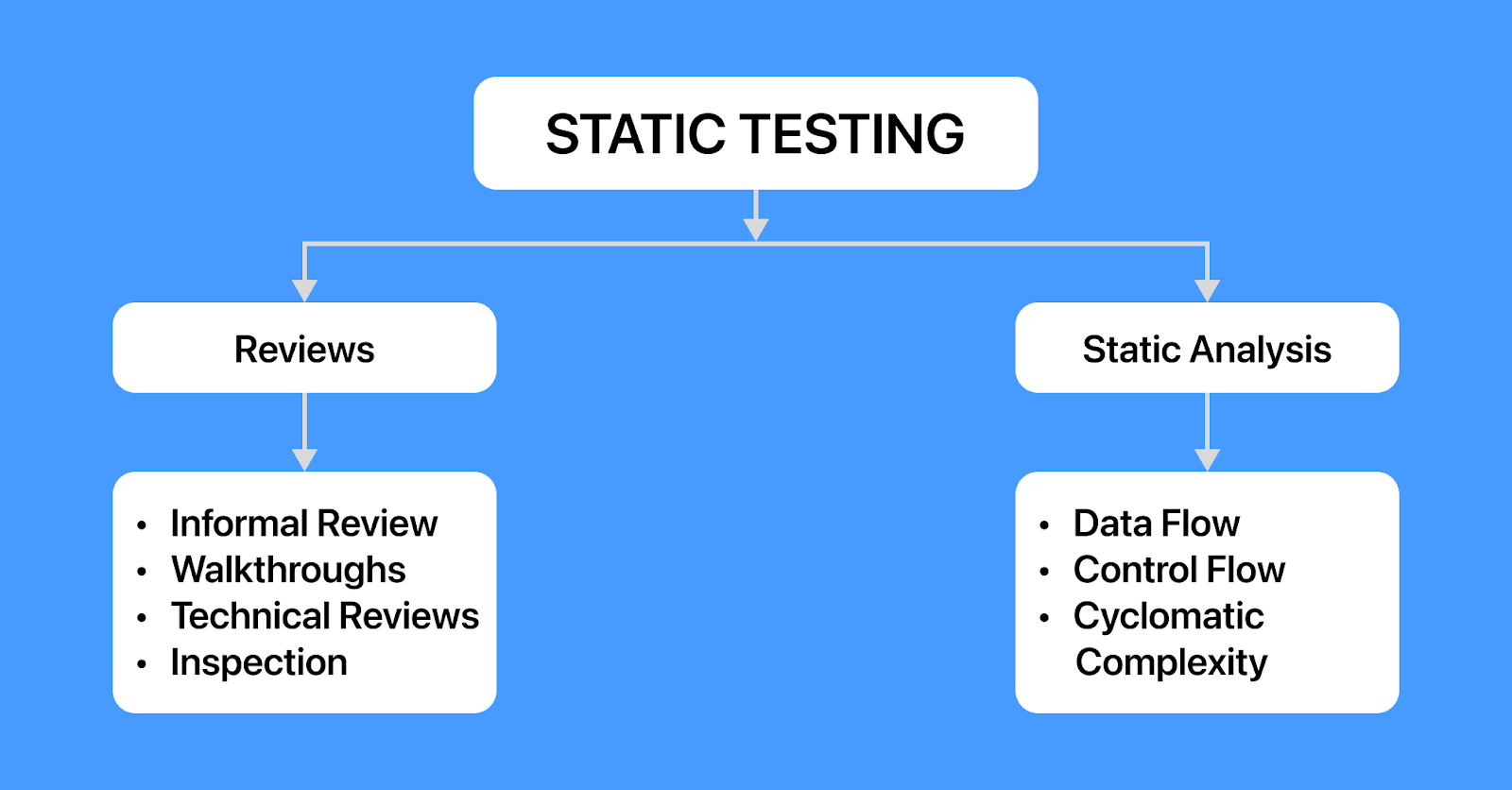
Static testing includes two techniques:
- Reviews
- Static Analysis
Reviews
Reviews are a crucial aspect of static testing, ranging from informal peer reviews between developers/testers on artefacts (code/test cases/test data) to formal inspections. They allow testers to identify defects and issues in documentation, such as requirements and design, at an early stage. Reviews are executed manually by various project members, including architects, designers, managers, moderators, and reviewers.
The following are the different types of reviews:
- Informal reviews: Quick and effective code or documentation review by another developer or team member. Feedback is captured without generating a report, and necessary implementations are made.
- Walkthroughs: Authors and other associates gather to discuss software defects. Questions, comments, and answers are exchanged until all members are satisfied, leading to conclusions.
- Technical reviews: Formal review by a trained moderator or technical expert. Qualified personnel review the software application for discrepancies from specifications and standards, focusing on technical concept corrections and identifying alternatives if necessary.
- Inspections: Formal type of review that follows a strict process to detect defects. Reviewers use a checklist to review the software product, and a trained moderator leads the meeting. Each defect is recorded, and participants are informed to rectify errors.
Static Analysis
Static analysis, a software testing technique, involves reviewing code without executing it. Essentially, it’s a form of code analysis performed to understand the code structure and adhere to coding standards. Mainly, it is regarded as the debugging process that aims to test the source code to find any structural error in the developer’s code:
- Unused variables
- Syntax violations
- Non-compliance with coding standards
- Dead code
Developers commonly utilize code analysis tools like PyCharm, Checkstyle, and SourceMeter to analyze code and identify issues, which helps detect structural issues and implement coding standards.
The following are the different types under static analysis:
- Data flow analysis: This technique verifies the data structures, variable definitions, and their usage without code execution, focusing on where variables are defined and used to identify and eliminate potential issues that could disrupt data flow, resulting in program malfunctions or incorrect outputs.
- Control flow analysis: This technique analyzes the control flow of the programming language, defined in a control flow graph, to verify the functions, modules, and subroutines and ensure the correctness of process flows.
- Cyclomatic complexity: This technique identifies how many different directions a software application can go, and it creates test cases to explore each direction effectively. This makes testing more efficient and thorough.
Dynamic Testing
Dynamic testing involves analyzing the dynamic behavior of code within a software application. During this process, it’s crucial to provide input and output values as expected when executing a test case. This can be done manually or through automation. Additionally, compiling and executing the software code is necessary.
The main objective of dynamic testing is to validate the software, ensuring it functions correctly without any defects post-installation. Essentially, dynamic testing verifies the overall functionality and performance of the software application, aiming for stability and consistency.
Dynamic testing includes three techniques:
- White box testing
- Black box testing
- Grey box testing
White Box Testing
White box testing involves verifying the internal structure and code of the software. This necessitates coding expertise as it includes evaluating the internal code implementation and algorithms of software applications. Testers have access to the underlying code and leverage this knowledge to create test cases targeting specific code paths, logic branches, and conditions. In this testing approach, the code is executed line by line to identify any associated errors and evaluate the performance of software applications based on the code.
Following are the different software testing techniques under white box testing:
- Statement coverage: A primary objective of white box testing is to have a maximum portion of the source code. Code coverage indicates the extent to which an application’s code is subjected to unit tests that verify its functionality.
- Branch coverage: In programming, a branch refers to a point in the code where the program’s execution flow can diverge and follow different paths based on certain conditions. Consequently, in branch coverage, we verify whether each branch is executed at least once.
- Path coverage: In this software testing technique, all the paths within the software application are explicitly tested. This technique ensures that each potential application path is traversed at least once, offering more effectiveness compared to branch coverage. It’s especially valuable for testing intricate applications.
- Decision coverage: It is a technique that verifies the true or false outcomes of every boolean expression in the source code. Decision coverage aim is to cover and validate all available source codes by ensuring that each branch of every potential decision point is visited at least once.
- Condition coverage: This software testing technique is also known as expression coverage. It evaluates the variables or sub-expressions in a conditional statement. Its goal is to evaluate the outcome of each logical condition. This coverage focuses solely on expressions with logical operands, where an operand outputs either true or false. However, it doesn’t ensure complete decision coverage.
- Multiple condition coverage: This testing method evaluates all possible combinations of conditions for each decision.
By using concepts like statement coverage, branch coverage, and path coverage, it becomes possible to evaluate the extent to which an application’s logic is executed and validated by the unit test suite.
Statement coverage=(Total number of statements/Number of executed statements)×100
In the case of an if statement, two test conditions arise: one is used to validate the “true” branch, whereas the other is used to validate the “false” branch.
Branch coverage=(Total number of branches/Number of executed branches)×100
A decision point arises when multiple outcomes are possible from control flow statements like if statements, do-while statements, or switch case statements.
For example, consider the expression:
if (A||B)
then
print C
In this scenario, the test cases would be:
TEST CASE1: A=TRUE, B=TRUE
TEST CASE2: A=TRUE, B=FALSE
TEST CASE3: A=FALSE, B=TRUE
TEST CASE4: A=FALSE, B=FALSE
Note that in this example, with 2 expressions, A and B, there are 4 test cases. Similarly, for 3 conditions, there would be 8 test cases, following the general formula: for n conditions, there will be 2n test cases.
It is mainly used in unit testing, and test cases are depicted using the program’s control graph. The control flow graph comprises nodes, edges, decision nodes, and junction nodes for all execution paths.
Black Box Testing
Black box testing involves validating the software application without access to its internal structure, code, or design. Thus, programming expertise is not required for this testing method. Its goal is to confirm the functionality of software applications under test and execute the entire test suite without programming knowledge, adhering to requirements and specifications.
In black box testing, the software is treated as a “black box,” testing is based solely on inputs and expected outputs without considering internal functions. For instance, inputting values into a system categorizes it into different classes or groups based on similar outcomes to those values. Consequently, one value can be used to test the outcomes of multiple groups or classes, known as Equivalence Class Partitioning (ECP), which is a black box testing technique.
Following are the different software testing techniques under black box testing:
- Boundary value analysis: This testing technique focuses on values at the boundaries of input ranges to verify if a system handles extreme values within acceptable ranges correctly. By testing values like the minimum, maximum, and just beyond these boundaries, testers can uncover potential issues related to boundary conditions. It proves particularly beneficial when inputs are anticipated to fall within specific ranges, such as age limits or numerical constraints.
- Inner boundary testing: It focuses on input values just inside the input domain, including the minimum and maximum allowed values.
- Outer boundary testing: It focuses on input values slightly outside the input domain, such as values slightly above or below the minimum and maximum allowed values.
- Equivalence class partitioning: This technique functions as a method in software testing for dividing potential inputs into sets of equivalence classes, aiming to identify and test a representative selection of inputs from each class. Each element within an equivalence class should produce the same output, simplifying testing to just one value from each set.
- No value (valid partition)
- Values between 1 and 10 (valid partition)
- Values smaller than 1 (invalid partition)
- Values higher than 10 (invalid partition)
- Decision table-based testing: This technique is used to visually illustrate various combinations of inputs and outputs, focusing more on business rules. It’s employed in scenarios where diverse combinations of test input conditions yield different outputs.
- State transition testing: This technique ensures software application behaves as expected during transitions between different system states. Initially, it identifies a finite set of states the software application can occupy and then tests how it transitions between them based on varying input conditions. This technique applies to various systems, such as vending machines, traffic lights, and web applications, provided their behavior can be defined as a finite state machine.
- Cause-effect graphing: It identifies and tests various input combinations leading to specific outputs or events.
- Stateflow: It models and simulates state-based systems that are useful for developing and verifying state-based algorithms and control logic.
- State transition diagram: It is a graphical representation of the system’s states and the events causing transitions between them.
- State transition table: It is a tabular representation of the system’s states, events leading to state transitions, and resulting actions or outputs.
- Pairwise testing: This technique is used where all possible pairs of input parameters are tested together. It creates test cases that cover every pair of combinations of input values for a specific set of parameters. It is used when a large number of inputs are present, making it challenging to test every possible combination separately.
- Error guessing: This technique is used in software testing to discover possible defects or errors. Testers use their expertise, domain knowledge, and intuition to predict and discover flaws in software applications. This method goes beyond formal test cases and planned scenarios, allowing testers to mimic users’ views and anticipate the software application’s performance. This type of testing adds a human element to the process and promotes analytical thinking, improving application quality by finding errors that may not be caught otherwise.
For instance, testing a software application accepting integers between 1 and 100 would involve boundary values like 1 and 100 and values slightly outside the range, such as 0 and 101.
Grey Box Testing
Grey box testing involves integrating aspects of both white box and black box testing. Here, testers engage in both types of testing procedures, hence the term “grey box.” In this approach, testers have partial visibility into the internal coding, resembling a semi-transparent grey box.
A practical illustration of grey box testing is evident in database testing. Here, evaluation includes both the front-end and back-end elements of the database. The front end involves user interface (UI) operations, such as login functionalities. No programming knowledge is required in this context, aligning with black box testing principles.
Conversely, the back-end pertains to the internal architecture of the database, necessitating an understanding of table structures. By writing and executing SQL commands, testers can verify modifications within the tables, similar to white box testing practices. Through this combined approach, grey box testing is effectively performed.
Following are the different software testing techniques under grey box testing:
- Matrix testing: It involves evaluating business and technical risks developers identify in software applications. Developers specify all program variables, each carrying inherent technical and business risks and potentially utilized with varying frequencies throughout its lifecycle.
- Pattern testing: It involves analysis to determine the root causes within the code. The analysis template includes defect reasons, facilitating proactive identification of potential failures before production.
- Orthogonal array testing: It involves numerous permutations and combinations of test data. It is used when maximal coverage is necessary with few test cases and extensive test data, proving valuable in evaluating complex software applications.
- Regression testing: It involves evaluating software applications after each change to ensure that modifications or new functionalities do not adversely impact existing software application workings. It also confirms that rectifying defects does not disrupt other software functionalities.
- API testing: It involves testing the software applications’ exposed interfaces. The primary aim is to verify that the API accepts various input formats and functions as intended.
Software Testing Techniques Based on Approach
Software testing techniques are broadly classified into two main categories based on the approach. These are as follows:
- Manual Testing
- Automated Testing
Manual Testing
Manual testing refers to the process of testing software applications by human testers, who carefully execute test cases without using testing tools. In manual testing, testers simulate end-user behavior to ensure that the software functions correctly and meets the specified requirements.
During manual testing, testers follow predefined test cases and execute various test scenarios to identify software application bugs, defects, or inconsistencies. They document their findings, including any defects discovered during the testing process, to facilitate communication with developers for resolution.
Characteristics:
- It is particularly effective for testing user interfaces and experience, as testers can directly interact with the UI elements to assess usability, accessibility, and responsiveness.
- It helps detect usability issues such as navigation difficulties, confusing workflows, and inconsistent design elements, which might not be easily detectable through automated testing alone.
- It is highly flexible and can quickly adapt to changes in requirements, making it suitable for dynamic and evolving projects where automated tests may be impractical or inefficient.
- It can provide subjective software quality assessments, offering insights beyond what automated tests can detect. They can evaluate aspects like user experience, aesthetics, and intuitiveness.
Automated Testing
Automated testing refers to the process of automating repetitive test cases to ensure the software meets requirements before release, eliminating the need for human testers. Automated software testing uses scripted sequences executed by testing tools. These tools evaluate the software, report outcomes, and compare results with previous test runs. Once created, an automated test script can be reused multiple times.
Characteristics:
- It involves the creation and execution of test scripts or scenarios using specialized tools or frameworks. These scripts automate the process of interacting with the software application and verifying its behavior.
- It can be executed in parallel across multiple environments, further enhancing testing efficiency and scalability. Parallel execution reduces test execution time and allows for the testing of different components or features.
- It enables comprehensive test coverage by executing a large number of test cases across different scenarios, configurations, and environments. This helps identify defects early in the development lifecycle and improve overall software quality.
- It can significantly reduce the time and effort required for testing, especially for repetitive tasks, large-scale testing, or projects with frequent releases. Automated tests can run much faster than manual tests, accelerating the testing process.
- It supports data-driven testing approaches where test scenarios are executed with different sets of input data to validate various use cases and edge conditions. This enhances test coverage and helps identify potential data handling and processing issues.
- It can be integrated into CI/CD pipelines, allowing for continuous testing and validation of code changes throughout development. This integration helps detect and address issues early, leading to faster delivery of high-quality software.
Whether manual or automation testing, there are two main ways to implement them: on-premise and cloud-based. On-premise testing involves running the software applications on local machines. This can be a real pain in terms of scaling up the testing process, keeping everything maintained and monitored, and installing software upgrades. All this stuff requires a lot of teamwork and can be quite time-consuming and expensive.
An ideal option here is to choose cloud-based testing platforms such as TestMu AI. It is an AI-powered test orchestration and execution platform that allows manual and automation testing across 3000+ real devices, browsers, and OS combinations. TestMu AI supports various test automation frameworks and tools, providing both web testing and mobile app testing needs. It seamlessly integrates with Selenium, Playwright, Cypress, Appium, and more.
Subscribe to the TestMu AI YouTube Channel for the latest updates on tutorials around the test automation world.
Selecting the Right Software Testing Techniques
There are different techniques for software testing, and the best approach is usually a combination of them. The key is to consider what kind of bugs you’re hunting for and pick the techniques to help you sniff them out most effectively. The selection of software testing techniques requires you to consider several different factors. Here are some of the crucial ones:
- Consider the specific requirements of the software project before selecting the software testing technique.
- Consider the risks involved in the software application, such as performance issues, compatibility issues, etc.
- Check for the different types of software testing, such as functional testing, non-functional testing, and more.
- Check the level of software testing, such as unit testing, integration testing, system testing, and acceptance testing.
- Choose software testing tools selection that best align with the software testing technique.
- Consider the limitations of the software project, such as time, budget, and resources.

Note: Run your automated tests across 3000+ environments. Try TestMu AI Today!
Best Practices While Using Software Testing Techniques
No matter what testing techniques you choose for your project, some best practices can supercharge your team’s efforts. By following these practices, your tests will be more likely to give you clear-cut results. This solid foundation will then guide you in making the best decisions, technical and business-wise.
- Give priority to test planning. While surprises are inevitable in the Software Development Life Cycle, creating a formal plan with inputs from all stakeholders helps establish a clear testing roadmap.
- Develop test cases that focus on testing one feature each. Isolated and independent tests are easier to reuse and maintain.
- Leverage automated testing extensively. Test automation reduces the time needed to execute tests and minimizes the impact of human error. Despite the initial investment required (such as hiring skilled testers and acquiring appropriate tools), significant returns can be achieved in terms of test automation ROI.
- Implement shift-left testing by moving tests to earlier stages in the pipeline. This allows for identifying and resolving bugs in the development process’s early stages, thereby enhancing software quality and reducing issue resolution time.
- Establish appropriate QA metrics to evaluate your test suites accurately. Without established benchmarks to determine success or failure, even the most sophisticated QA engine will prove ineffective.
- Monitor test coverage closely. Each test suite should cover significant portions of the software under test, reducing the need to continually develop and run new tests with each iteration. The goal is to achieve maximum test coverage.
Conclusion
In this blog, we have discussed the different software testing techniques that can be used in the SDLC to ensure the quality of the software application.
There are two main categories of software testing techniques- static and dynamic. You can choose any of the testing techniques that best suit the requirements of the software project. Software testing techniques help you design better test cases that include all the essential features of the software application. However, it is important to be mindful of the number of test cases and prioritize executing critical test cases.


Frequently asked questions
Did you find this page helpful?
More Related Hubs
TestMu AI forEnterprise
Get access to solutions built on Enterprise
grade security, privacy, & compliance
- Advanced access controls
- Advanced data retention rules
- Advanced Local Testing
- Premium Support options
- Early access to beta features
- Private Slack Channel
- Unlimited Manual Accessibility DevTools Tests