
Power Your Software Testing with AI Agents and Cloud
The Native AI-Agentic Cloud Platform to Supercharge Quality Engineering. Test Intelligently and Ship Faster.


- TestMu AI (Formerly LambdaTest)
- /
- Blog
- /
- 19 Best Test Management Tools & Software (2026)
Best Test Management Tools in 2026: 19 Compared
Compare the top 19 test management tools in 2026 by features, integrations, and team fit to organize test cases, track defects, and report coverage.
Last Updated on:
Test management tools are software platforms that help QA teams plan, write, organize, run, and track test cases in one place. They link requirements to tests and defects, record manual and automated results, and report coverage, so teams can see what was tested and decide whether a release is ready.
Quick verdict: We built Test Manager by TestMu AI as modern AI test management software with a clean interface and enterprise-ready controls such as a user-attributed audit trail and SSO on its Enterprise plan. In the market, TestRail is the long-established standalone choice. Jira teams can stay in Jira with Xray or Zephyr Scale, and small teams can start free with Qase or Tuskr.
Key Takeaways
- Best overall - Test Manager by TestMu AI keeps test cases, manual and automated runs and AI test generation in one workspace connected to TestMu AI's browser and real device cloud; the free plan covers unlimited projects, and AI credits come with Premium.
- Long-established choice - TestRail is a framework-agnostic system of record for mid-size and enterprise QA teams, with a 30-day trial instead of a free plan.
- Best inside Jira - Xray and Zephyr Scale run as Jira apps and lead Atlassian Marketplace installs, but both bill for every user on the Jira site.
- Best free options - Tuskr is free for 5 users and Qase for 4, and TestLink is free open source software you host yourself.
- AI test generation - 13 of the 19 tools publish built-in AI test case generation and 6 publish none; Test Manager by TestMu AI, TestRail, Xray, Zephyr Scale, PractiTest, Qase, Testmo, QA Touch and Aqua ALM score highest on it.
- How to choose - Decide whether tests live inside Jira or in a standalone tool, check how CI results get in, then check which plan limit your team hits first.
What Are the Top Test Management Tools in 2026?
On our six-criterion score, the top test management tools in 2026 are Test Manager by TestMu AI, Qase and Kualitee, followed by TestRail, Xray, Zephyr Scale, PractiTest, SpiraTest and Aqua ALM at 23 out of 30.
The table below compares all 19 of the best test management tools at a glance by best fit, deployment, free tier, automation support, key integrations, whether the tool runs inside Jira, and pricing model. Detailed reviews of each follow.
| Tool | Best For | Deployment | Free Tier | Automation Support | Key Integrations | Runs inside Jira | Pricing Model |
|---|---|---|---|---|---|---|---|
| 1. Test Manager by TestMu AI | Test management connected to TestMu AI cloud execution | Cloud | Free plan, unlimited projects | Yes, CI/CD results; connects to TestMu AI Real Device Cloud (50,000+ real devices) | Jira, Azure DevOps, GitHub, CI/CD | App (two-way sync) | Free plan + per user |
| 2. TestRail | Mid-size to enterprise system of record | Cloud or self-hosted | 30-day free trial | Framework-agnostic via API | Jira, Azure DevOps, CI/CD | App | Per user |
| 3. Xray | Jira teams needing BDD and automation | Jira app | Free trial | Yes, frameworks and CI | Native Jira, Cucumber | Yes | Per Jira user |
| 4. Zephyr Scale | Jira teams needing scalable TM | Jira app | Free trial | No-code automation (limited runs on Standard), REST API and CI | Native Jira, BDD tools | Yes | Per Jira user |
| 5. PractiTest | Enterprise QA reporting from filtered views | Cloud | 14-day free trial | Yes | Jira, CI/CD, BDD tools | App (two-way sync) | Per user; Corporate by quote |
| 6. Qase | Agile teams starting on a free plan | Cloud | Free plan, 4 users | Yes, REST API, plus Agentic Mode test execution on paid plans | Jira, GitLab, CI | App (two-way sync on paid plans) | Free plan + per user |
| 7. Testmo | Teams mixing manual and automated testing | Cloud | Free trial | Yes, any CI | GitHub, GitLab, Jira | App | Tiered plans with 5, 15 or 25 users included |
| 8. Test Collab | Jira teams with many read-only stakeholders | Cloud, or self-hosted in your own AWS account (Enterprise) | 14-day trial | Via CI | Jira, CI pipelines (tc CLI) | Free Jira app (two-way) | Tiered plans |
| 9. Azure Test Plans | Microsoft-stack teams inside Azure DevOps | Cloud, or Azure DevOps Server on-premises | 30-day trial | Via Azure Pipelines | Azure Boards, Azure Pipelines | No (Azure Boards) | Per user (Azure DevOps) |
| 10. Testiny | Small teams needing lightweight TM | Cloud or self-hosted (Testiny Server) | Free plan, 3 users | Yes, Business plan and up | Jira | Free Jira app (two-way) | Free plan + per user |
| 11. TestLodge | Small to mid manual QA teams | Cloud | 30-day trial | Via REST API only (no pre-built CI or framework integrations) | Jira, GitHub, Asana, Trello | Integration | Flat plans, unlimited users |
| 12. Tuskr | Agile teams wanting AI-assisted authoring | Cloud | Free plan, 5 users | Via REST API (paid plans only) | Jira, GitHub, Slack | Integration | Free plan + per user |
| 13. QA Touch | Startups wanting AI test cases from Jira and Figma | Cloud | Free plan, 3 projects | Yes, reporters and Jenkins (Unlimited plan) | Jira, Jenkins, Playwright, Selenium | Free Jira app (basic or two-way) | Free plan + paid tiers |
| 14. TestMonitor | UAT and business users | Cloud | 14-day trial | Imports results from 30+ tools (daily caps) | Jira, Azure DevOps, Slack | Integration | Tiered plans |
| 15. TestFLO | Jira-centric teams | Jira Data Center app (no Cloud) | 30-day trial | Via plugin (JUnit, TestNG, NUnit, Cucumber) | Native Jira, Bamboo, Jenkins | Yes | Per Jira user tier (via Atlassian) |
| 16. Kualitee | Teams wanting all-in-one TM and defects | Cloud or on-premise | Free plan, 3 users | Imports automated results | Jira, Azure DevOps, GitHub | App | Free plan + paid tiers |
| 17. SpiraTest | Regulated industries needing traceability | Cloud or on-premise | 30-day trial | Yes | Jira, Selenium, Playwright, JUnit | Integration | Per concurrent user |
| 18. Testpad | Exploratory and manual, non-QA teams | Cloud | 30-day trial | API result import only | Shareable links, API and webhooks | No (issue IDs become links) | Tiered by team size |
| 19. Aqua ALM | Regulated teams needing requirements-to-test ALM | Cloud or on-premise | Demo on request | Yes | Jira, Jenkins, Azure DevOps, REST API | App (two-way) | License-based |
Pricing models as listed on vendor sites; dollar figures are left out, so confirm current prices with each vendor. In the Jira column, Yes means the tool is itself a Jira app, App means a standalone tool whose Jira Marketplace app appears in the Jira Marketplace section below, Integration means a standalone tool that connects to Jira through its own integration, and No means no Jira sync is listed.
What Are Software Test Management Tools?
Software test management tools store test cases, plan and track test runs, and link each test to its requirements and defects. They replace spreadsheets with one system of record for release decisions.
The core value is traceability: linking requirements to test cases to defects so you can answer "is this feature fully tested?" at any point in the release cycle. Whether you call it test management software, a test case management system, or a test tracking tool, the job is the same: give every test a home, a status, and an owner.
The Test Management Workflow
A typical test management workflow looks like this:
- Create test cases in a centralized repository, organized by module, feature, or sprint. Many tools support reusable or shared test steps, so you write common flows once.
- Link test cases to requirements (Jira stories, GitHub issues) for traceability. This lets you answer "which requirements have no tests?" before a release.
- Execute test runs manually or trigger automated runs via CI/CD integration (Jenkins, GitHub Actions, GitLab CI). The tool records pass/fail status, duration, and evidence (screenshots, logs).
- Log defects directly from failed test steps, auto-linked to the test case and requirement. Many tools sync defects both ways with Jira or Azure DevOps, often only on paid plans, and our Jira test management guide walks through connecting a test management tool to Jira step by step. See our guide on defect management for the rest of the defect workflow.
- Track coverage and progress via dashboards that show: tests planned vs executed, pass rate by module, defects by severity, and blocked tests.
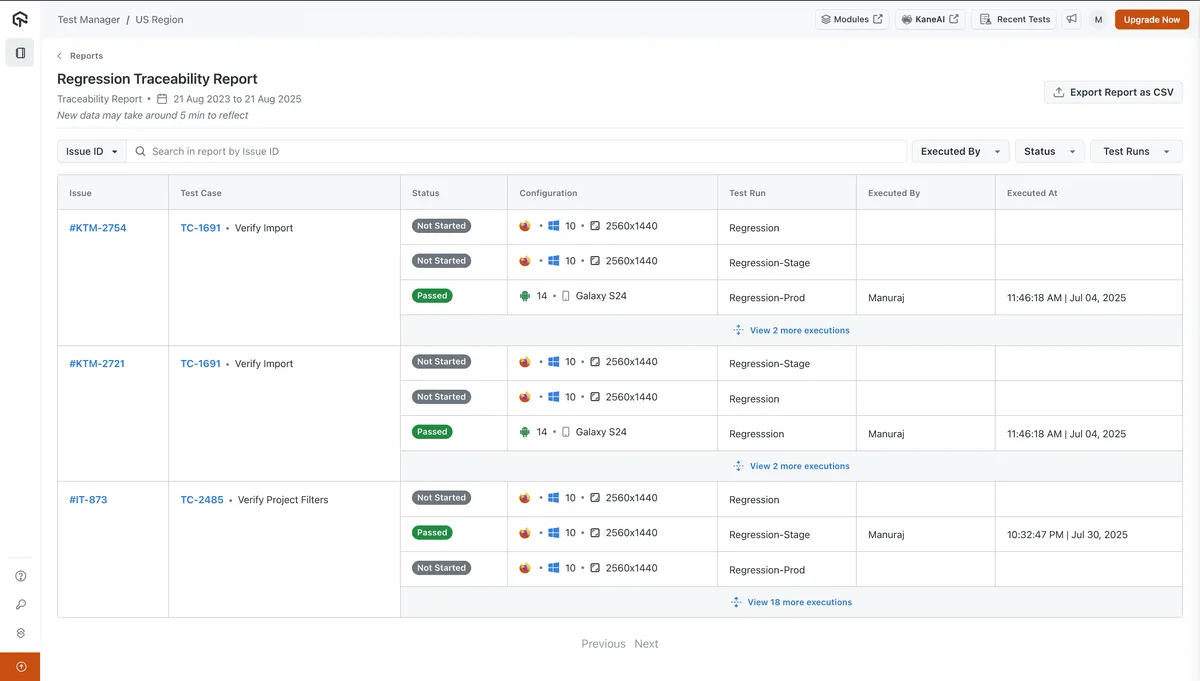
A traceability report in Test Manager by TestMu AI linking Jira issues to test cases, runs, configurations and results, with CSV export. Screenshot from TestMu AI's Test Manager documentation.
When a suite outgrows spreadsheets, cloud test management solutions keep execution history, evidence, and reporting in one place.
How Do the 19 Best Test Management Platforms Compare?
The 19 range from Jira-native apps such as Xray and Zephyr Scale to standalone platforms such as TestRail and Qase, plus Azure Test Plans inside Azure DevOps and Test Manager by TestMu AI, tied to cloud execution.
1. Test Manager by TestMu AI: AI Test Management Connected to Cloud Execution
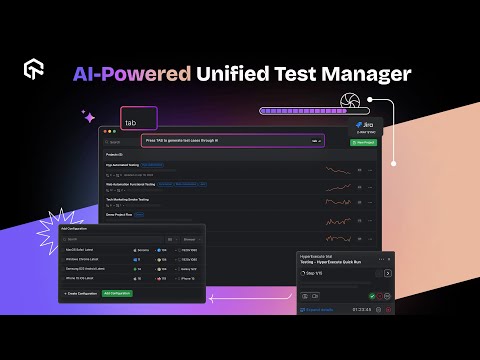
TestMu AI's Test Manager is a cloud workspace for planning, organizing, running and reporting manual and automated tests. Manual outcomes and CI/CD results land in the same test cycle, and a traceability matrix links requirements to tests, runs and defects.
Because it is the planning layer of the TestMu AI platform, results from HyperExecute, Real Device Cloud and KaneAI runs report back into its cycles. Its Test Deduplication Agent finds near-duplicate cases and lets you compare them, ignore a match, change the base case, or delete a duplicate permanently after typing DELETE. TestMu AI is named a Leader in the 2026 Gartner® Magic Quadrant™ for Agentic Software Quality Assurance Platforms.
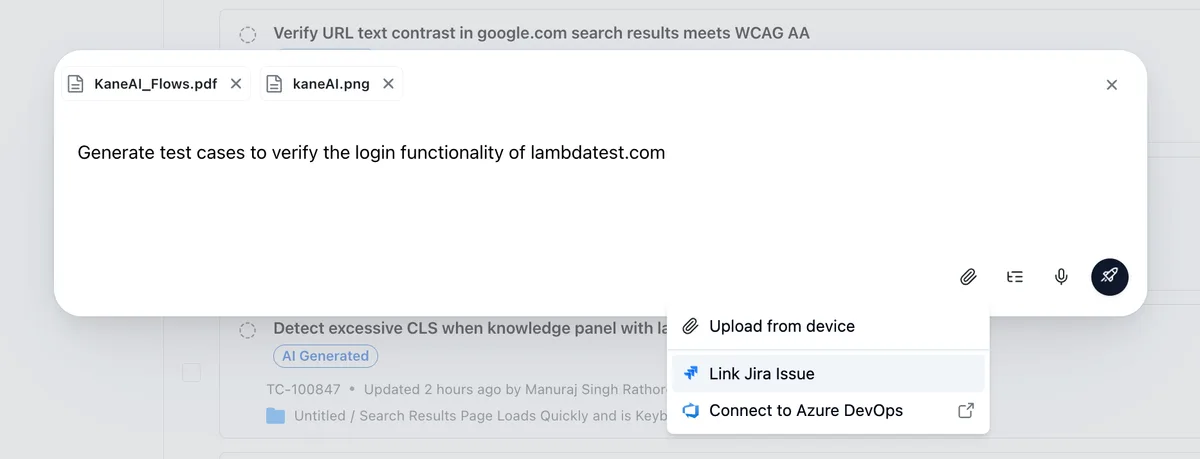
AI test case generation in Test Manager by TestMu AI: attach a PRD or image, or link a Jira issue or Azure DevOps work item, then generate cases. Screenshot from TestMu AI's Test Manager documentation.
Key features
- AI generates cases with steps, expected results and priority from user stories, PRDs, Jira tickets, Gherkin or Figma flows.
- Automated results from Jenkins, GitHub Actions, GitLab CI, CircleCI and Bitbucket Pipelines map to cases in active cycles.
- Insights dashboards built from a widget library, plus exportable coverage, defect-trend and execution history reports.
- One-click import from TestRail, Zephyr Scale Cloud, Xray and qTest Cloud, with CSV or API for other tools; Zephyr Scale test cycles and run history do not come across.
Why It's Important: TestMu AI is the only tool on this list that combines test case management with its own execution infrastructure, so planning, running, and reporting happen in one platform instead of three.
The execution side is compared on its own in our roundup of the best test execution tools.
Pros and cons
| Pros | Cons |
|---|---|
| Results from HyperExecute, Real Device Cloud and KaneAI runs report straight into its test cycles. | No self-hosted install: Enterprise adds a private cloud option, but nothing runs on your own servers the way TestRail's self-hosting does. |
| 1-click import from TestRail, Zephyr Scale Cloud, Xray and qTest Cloud, with CSV or API for the rest. | Zephyr Scale test cycles and run history do not come across on import, only the cases. |
| A permanent free plan with unlimited projects. | Its Jira app is young: 167 installs and not Cloud Fortified as of October 2026, against 25,103 installs for Xray. |
Pricing: Free plan at $0 with unlimited projects; Test Manager Premium at $49 per month per seat (billed annually) includes 2,000 AI credits per month. Verify current figures on the TestMu AI pricing page.
Why Choose TestMu AI Over Other Tools?
AI generation sits in the same workspace as the repository, so generating a case from a user story and bulk-cleaning imported legacy cases happen in the same place you organize them. A single traceability matrix runs requirements through tests and runs to defects, so requirements without tests show up in one view. One-click migration from TestRail, Zephyr Scale Cloud or Xray also means an evaluation does not have to start with a CSV export, though Zephyr Scale test cycles and run history do not come across.

Note: Manage your test cases, plans, and runs with AI-powered insights, and run them on TestMu AI's Real Device Cloud of 50,000+ real devices. Try Test Manager by TestMu AI for free!
2. TestRail: Mid-Size to Enterprise System of Record
TestRail, part of the Sembi quality suite, is a standalone test case management platform organized around repositories, milestones, test plans and runs. It links requirements, cases and defects in traceability reports, and all three plans include AI generation of test cases, BDD scenarios and test scripts.
Mid-size and enterprise QA teams use it as a framework-agnostic system of record for manual and automated testing.
Key features
- Test repositories with milestones, test plans and reusable cases.
- TestRail CLI and framework reporters for JUnit, Cypress and Playwright results.
- Scheduled, emailed reports on Professional and cross-project reporting on Enterprise.
- AI test case, BDD scenario and test script generation plus an MCP Server on every plan.
Jira integration: Standalone tool with a free Jira app plus requirement and defect integrations; the app needs a paid or trial TestRail license.
Free plan: There is no permanent free plan; each plan comes with a 30-day free trial that needs no credit card.
Gartner Peer Insights: 3.8 out of 5 from 8 reviews, as of October 2026.
Pros and cons
| Pros | Cons |
|---|---|
| Results arrive from any framework through the CLI, reporters or REST API. | Essentials is cloud-only and capped at 5 users. |
| Self-hosting on Professional and Enterprise, with Docker, Windows and Linux installs. | On-premise needs 10 or more seats and a 12-month minimum contract. |
| Admins can switch AI features off on any plan for compliance. | No execution grid is included, so automation runs on your own infrastructure. |
Pricing: Per-user tiers (Essentials, Professional, Enterprise) billed annually, with monthly billing on Essentials and Professional and a 12-month minimum for on-premise. Check the vendor's site for current figures.
Verdict: Fits teams that want a framework-agnostic record of manual and automated tests and may need to host it on their own servers.
3. Xray: BDD and Automation Inside Jira
Xray, sold by Xblend on the Atlassian Marketplace, is a Jira app in which tests, test sets, test plans and test executions are Jira issue types. It handles manual, BDD and automated tests, with Gherkin scenarios written in Jira and CI results sent to Jira through a REST API.
Jira teams with BDD or automation-heavy pipelines use it to keep coverage beside stories and bugs.
Key features
- Traceability across requirements, tests, executions and defects.
- Built-in Xray gadgets for Jira dashboards and a Document Generator for test reports.
- REST API that takes automated results from any CI/CD tool.
- AI test case generation, with AI test script generation in the Advanced edition.
Jira integration: Runs inside Jira as a Marketplace app for Jira Cloud and Data Center, storing tests as Jira issues.
Free plan: Xray has no free tier; its Marketplace listing lets you start a free trial of the Standard or Advanced edition.
Rating: 4.3 out of 5 from 552 ratings on the Atlassian Marketplace
Pros and cons
| Pros | Cons |
|---|---|
| Tests are Jira issues, so JQL filters and Jira dashboards cover test data. | Requires Jira; there is no standalone edition. |
| Cloud Fortified on Jira Cloud, with a Data Center version for self-managed Jira. | Pricing counts every user in the Jira instance, not only testers. |
| Test Case Importer loads tests, preconditions and test sets from CSV or JSON files. | The Test Case Importer handles up to 1,000 issues per import, so large migrations run in batches. |
Pricing: Standard and Advanced editions on the Atlassian Marketplace: a flat monthly fee for up to 10 Jira users, then a per-user rate counted across every user in the Jira instance. Check the vendor's site for current figures.
Verdict: Fits teams that already run on Jira, write BDD scenarios or push CI results, and want coverage stored as Jira issues next to their stories.
4. Zephyr Scale: Reusable Test Libraries Across Jira Projects
Zephyr Scale, now listed by SmartBear on the Atlassian Marketplace simply as Zephyr, is a Jira app that keeps test planning, cycles, execution and reporting inside Jira. Test cases sit in hierarchical folders and can be reused from any Jira project.
It suits Jira-centric teams that want no-code automation next to manual test cycles.
Key features
- Hierarchical folders with test case reuse across Jira projects.
- Test cycles that set what to test, when, and who runs it.
- No-code automation with record-and-playback, with a limited number of runs on Standard.
- Rovo skills that bulk-generate test cases from a Jira issue or prompt.
Jira integration: A Jira app for Jira Cloud and Data Center, so test cases, cycles and results stay in the Jira project.
Free plan: SmartBear lists no free plan for Zephyr; a free trial of either edition starts from the Atlassian Marketplace.
Rating: 4.1 out of 5 from 494 ratings on the Atlassian Marketplace
Gartner Peer Insights: 4.5 out of 5 from 5 reviews, as of October 2026.
Pros and cons
| Pros | Cons |
|---|---|
| Test management and no-code automation share one Jira app. | Atlassian ends Connect app support on January 31, 2027; the required Forge upgrade changes app URLs, so saved links break. |
| BDD, a REST API and CI integrations are in both Standard and Advanced. | Parallel and cross-browser runs on Chrome, Firefox, Edge and Safari need the Advanced edition. |
| Imports cases from Excel, CSV or other Jira projects. | Licenses are sized to the whole Jira user base, not just QA. |
Pricing: Sold per Jira user through the Atlassian Marketplace in Standard and Advanced editions, with a flat tier for sites of 1-10 users and monthly or annual billing. Check the vendor's site for current figures.
Verdict: Fits teams that live in Jira, reuse test cases across many projects, and want light no-code automation in the same app.
5. PractiTest: Enterprise QA with Filter-Based Reporting
PractiTest is a cloud test management platform that holds requirements, tests, test sets, runs and issues in one hub, organized through hierarchical filter trees. It supports scripted, exploratory, BDD and automated tests, and its SmartFox AI generates tests and steps from requirements and flags duplicates.
Enterprise QA groups that report release readiness to business stakeholders use it, with data hosted on AWS in the US, EU or Australia.
Key features
- Hierarchical filter trees and custom fields that slice tests, runs and issues.
- Firecracker uploads CI/CD and automation results with no code, and xBot triggers and schedules automated tests.
- SmartFox AI with Adaptive Test Generator, Duplication Guardian and Execution Strategist.
- Dashboards, downloadable reports, and traceability and coverage reporting.
Jira integration: Two-way Jira Cloud integration maps stories, tasks and epics to requirements and bugs to issues, with starred filters syncing every 4 hours (every 30 minutes on Corporate).
Free plan: PractiTest offers a 14-day free trial with no credit card instead of a free plan.
Gartner Peer Insights: 4.2 out of 5 from 6 reviews, as of October 2026.
Pros and cons
| Pros | Cons |
|---|---|
| An audit log comes with the Team plan. | SSO, SCIM, Jira Data Center integration and multiple two-way issue integrations are Corporate-only. |
| SOC 2 Type II and ISO 27001 certified. | Corporate needs at least 10 licenses on yearly billing. |
| Filtered views export to XLSX with their linked entities. | The REST API allows 30 calls per minute. |
Pricing: Team is priced per user with a 5-user minimum and monthly or yearly billing; Corporate is quote-only, yearly, with a 10-license minimum. Check the vendor's site for current figures.
Verdict: Fits teams that report release readiness to the business from filtered views and want an audit log without buying the top tier.
6. Qase: Agile Teams Starting on a Free Plan
Qase is a cloud test management platform for test cases, test runs and defects, with a REST API that accepts automated results. Paid plans add AI test case generation from requirements and an Agentic Mode for AI-driven test orchestration and execution.
Small agile teams start on the free plan and move to Teams for integrations, dashboards and SSO.
Key features
- Widgetized dashboards and a Requirement Traceability Matrix tied to Jira, GitHub, GitLab, Notion and Confluence.
- Qase query language for filtering any test artifact.
- Accepts 5,000 API-submitted results a month on Free and unlimited results on paid plans.
- Test case import from other tools and from CSV, XLS, XML or JSON files.
Jira integration: Two-way Jira integration with defect status sync, available only on the paid Teams and Enterprise plans.
Free plan: Free plan for up to 4 users, 2 projects, 2 active runs, 500 MB of storage and 30 days of test history, without integrations or AI.
Pros and cons
| Pros | Cons |
|---|---|
| A permanent free plan for up to 4 users. | Jira and other integrations, dashboards and AI are not on the Free plan. |
| SSO and role-based access start on Teams rather than Enterprise. | Audit logs are Enterprise-only, and the dedicated VPC cluster is a paid Enterprise add-on rather than an on-premise edition. |
| Agentic Mode and 2,000 AI credits a month come with Teams. | Teams requires at least 5 seats. |
Pricing: Free plan, then Teams priced per user with a 5-seat minimum and monthly or annual billing, and Enterprise by quote; additional AI credits are sold separately. Check the vendor's site for current figures.
Verdict: Fits teams that want to start free and add Jira sync, dashboards and AI generation when they move to a paid tier.

Austin Siewert
Co-Founder, Steadfast Systems
Discovered @TestMu AI yesterday. Best browser testing tool I've found for my use case. Great pricing model for the limited testing I do 👏
3M+ Devs and QAs rely on TestMu AI
Deliver immersive digital experiences with Next-Generation Mobile Apps and Cross Browser Testing Cloud

7. Testmo: Manual, Exploratory and Automated Runs Together
Testmo is a cloud test management tool that tracks test case runs, exploratory testing sessions and automated test results in one place. Its CLI submits results from any automation tool or CI pipeline, and Testmo AI generates test cases on every plan.
Teams that mix manual, exploratory and pipeline testing use it with GitHub, GitLab, Jira and Linear.
Key features
- Automation results submitted through the Testmo CLI from any framework or CI tool.
- Charts, dashboards and a coverage and traceability report, plus a Reporting Center on Business.
- CSV import wizard for CSV and Excel exports, including multi-row steps.
- SSO, a complete user audit log and Automation Launching on Enterprise.
Jira integration: Standalone tool with a Jira integration and a free Jira Cloud add-on.
Free plan: Testmo publishes no free plan; new accounts start on a free trial.
Pros and cons
| Pros | Cons |
|---|---|
| Each plan includes 5, 15 or 25 users in its base price, so seats up to that number cost nothing extra. | No on-premise server edition is offered. |
| Exploratory sessions, test case runs and automation share one set of reports. | SSO and the user audit log are Enterprise-only, and customizable role-based access starts on Business. |
| AI test case generation is included on every plan. | AI test updates and optimization are listed as coming soon. |
Pricing: Tiered monthly plans with users included in the base price: Team includes 5 users, Business 15 and Enterprise 25, and Business lets you add more as needed. Check the vendor's site for current figures.
Verdict: Fits teams that run exploratory sessions alongside CI automation and prefer a plan with a block of users included over pure per-seat billing.
8. Test Collab: Jira Teams Adding AI Test Automation
Test Collab (testcollab.com) is a cloud test management tool that keeps test cases, test plans and comments in one shared repository. Its Elite and Enterprise plans add AI test case generation and QA Copilot, which the vendor describes as AI-powered test automation.
It suits Jira-centered teams where many people only read test cases, because Jira users who just view them need no Test Collab license.
Key features
- One shared repository for test cases and test plans, with comments on each step or case and the time of each executed test recorded.
- Requirement traceability matrix and coverage reporting from the Premium plan up, plus CSV and PDF export.
- AI test case generation and QA Copilot test automation on the Elite and Enterprise plans.
- Enterprise adds Okta and Entra ID single sign-on, an audit log, US or EU data residency and hosting in your own AWS account.
- The tc command line tool uploads results from any test runner that writes JUnit XML or Mochawesome JSON, in any CI that runs Node.js.
Jira integration: A bi-directional Jira plugin is included from Premium up, and Jira users who only view test cases inside Jira need no Test Collab license.
Free plan: No free plan is published; a 14-day free trial is the only no-cost option.
Pros and cons
| Pros | Cons |
|---|---|
| Only Jira users who edit or delete test cases need a paid seat. | No permanent free plan, and the trial lasts 14 days. |
| Traceability matrix and coverage reports are on the entry paid plan. | AI generation and QA Copilot are missing from Premium, so AI starts at Elite. |
| Enterprise can be hosted in your own AWS account. | Single sign-on and the audit log are Enterprise only, and Enterprise is quote-based. |
Pricing: Premium and Elite are priced per user per month with monthly or yearly billing, and Enterprise is quoted by the feature bundle you pick. Check the vendor's site for current figures.
Verdict: Fits teams that plan in Jira and want many stakeholders to read test cases there without buying a seat for each reader.
9. Azure Test Plans: Microsoft-Stack Teams on Azure DevOps
Azure Test Plans (azure.microsoft.com) is the test management service in Microsoft's Azure DevOps suite, covering planned manual tests, exploratory testing and user acceptance testing. Test plans, suites and cases are Azure DevOps work items, so each result traces back to the story or bug it verifies.
For teams already planning in Azure Boards and building with Azure Pipelines, testing stays in the same platform.
Key features
- Test plans and suites for scripted manual tests, traced to work items and the bugs they raise.
- Browser-based exploratory tests with annotation, plus rich-client test execution for desktop apps.
- User acceptance testing and centralized reporting in the Basic + Test Plans license.
- Automated results from Azure Pipelines runs link to the same work items as manual results.
- Test Plans also runs on-premises in Azure DevOps Server; access levels and permissions control who plans and runs tests, cloud organizations backed by Microsoft Entra ID sign users in through Entra ID and can turn on an audit log (in public preview), and configurable charts, dashboard widgets and progress reports track test progress.
Jira integration: No Jira integration is published for Test Plans; requirements, bugs and test cases all live as Azure DevOps work items.
Free plan: Basic + Test Plans has a 30-day free trial; the free Stakeholder access and the 5 free Basic users do not include test plan management.
Pros and cons
| Pros | Cons |
|---|---|
| No extra vendor to buy or connect for teams already on Azure DevOps. | No Jira integration, so it fits poorly outside the Microsoft stack. |
| Results trace to work items and pipeline runs in one system. | Creating and managing test plans needs the paid Basic + Test Plans license for each user. |
| Covers web and desktop apps through browser-based and rich-client execution. | No built-in AI test case generation is published. |
Pricing: Licensed per user per month as Basic + Test Plans, which includes every Basic plan feature, while Stakeholder access is free. Check the vendor's site for current figures.
Verdict: Fits teams that already plan in Azure Boards and ship through Azure Pipelines and want testing in the same tool.
10. Testiny: Lightweight Cloud or Self-Hosted Test Management
Testiny (testiny.io) is a test management tool for manual test cases, test plans and test runs, available in the cloud or as a self-hosted Testiny Server. Automated test results are supported from the Business plan up.
Small teams start on the 3-user free plan and add paid seats when they need automation imports, SSO or an audit log.
Key features
- A REST API and CLI tool on every plan, including Free.
- Dashboards, built-in reports and PDF reports on every plan, CSV or Excel export from Starter up, and requirements traceability that links requirements to the test cases covering them.
- Issue-tracker integration, with two-way Jira integration on every plan.
- An MCP server, from Starter up, connects external AI assistants to Testiny.
Jira integration: Two-way Jira integration for Jira Cloud and Data Center comes with every plan, including Free.
Free plan: Free for up to 3 users, with test cases, plans, runs and executions capped at 1,000 in total and 5 GB of storage.
Pros and cons
| Pros | Cons |
|---|---|
| Two-way Jira sync works even on the free plan. | Testiny records manual test executions but does not run automated tests, and importing automated results needs the Business plan or higher. |
| Testiny Server gives a self-hosted option for teams that cannot use the cloud. | No built-in AI generation: AI works only through your own assistant over MCP, and not on Free. |
| Viewer seats cost less than user seats for people who only read and comment. | SSO starts at Business, while the audit log and custom roles need Enterprise. |
Pricing: Free plan for 3 users, then per-seat Starter, Business and Enterprise plans with automatic volume discounts, lower-priced viewer seats and two months free on yearly billing; Testiny Server is billed yearly in 5-user packages. Check the vendor's site for current figures.
Verdict: Fits teams that want two-way Jira sync from day one and expect to add CI result imports or a self-hosted install later.
11. TestLodge: Manual QA Teams Avoiding Per-User Fees
TestLodge (testlodge.com) is an online test case management tool for test plans, requirements, test suites and test runs, built around manual testing. Every plan has the same features and unlimited users; plans differ only in their limits on test plans, test cases, test runs and file storage.
It suits manual QA teams that log defects into an issue tracker and want one fixed monthly bill whatever the headcount.
Key features
- Requirements traceability matrix that shows which requirements have verifying tests and which do not.
- Failed tests can raise tickets in Jira, Azure DevOps, GitHub, Trello and other trackers, and for Jira, two-way sync pulls ticket status back for re-testing.
- Test configurations for running the same cases against specific browsers or device types.
- Imports existing requirement and test case files, and exports any document to CSV.
- A read and write REST API on every plan, through which teams send automated test results with their own scripts.
Jira integration: TestLodge creates and updates Jira issues while tests run and pulls the ticket status back for re-testing; it works as an integration, not as an app inside Jira.
Free plan: No free plan; each plan starts with a 30-day free trial that needs no credit card.
Pros and cons
| Pros | Cons |
|---|---|
| Unlimited users on every plan with no per-user charges. | No pre-built CI or framework integrations, so automated results need your own scripts against the REST API. |
| No feature gating: the smallest plan already has the traceability matrix, REST API, custom roles and two-way Jira sync. | Item caps are tight on small plans: Personal stores 200 test cases and 100 test runs. |
| Google SSO and multi-factor authentication on all plans. | No AI features, audit log or self-hosted option are published, and Google is the only SSO provider listed. |
Pricing: Flat monthly plans (Personal, Basic, Plus and Premium) with unlimited users and no per-user charges, sized by test plan, test case and test run limits; yearly billing saves 10%, and Gold, Elite and custom plans cover larger needs. Check the vendor's site for current figures.
Verdict: Fits teams that test manually, file bugs into an issue tracker and want a fixed monthly cost no matter how many testers join.
12. Tuskr: Small Teams Wanting AI-Assisted Authoring
Tuskr (tuskr.app) is a cloud test case management tool that holds manual test cases and automated results on one platform. Built-in AI drafts test cases, builds test runs by priority and flags risks, anomalies and coverage gaps.
It suits small agile teams that want AI help with authoring and run planning without an enterprise contract.
Key features
- Burndown charts, project dashboards and PDF status reports for stakeholders.
- Bulk result entry during test runs.
- Failed tests can raise Jira or GitHub issues, and paid plans add a REST API for automated results.
Jira integration: Tuskr creates a Jira issue when a test fails, and the tester marks the case for retest after the fix; automatic status sync back to Tuskr is not described.
Free plan: Free forever for up to 5 users, 5 projects, 1,000 test cases and 20 test plans per project, with no API access; dormant free accounts are deleted.
Pros and cons
| Pros | Cons |
|---|---|
| A 5-user free plan lets a small team run real projects at no cost. | Issue tracker links are one-way: Tuskr creates defects, and retests are marked by hand after a fix. |
| AI drafting, priority-based runs and risk flags are built into the product. | The free plan allows 0 API calls per hour, so automated results need a paid plan. |
| Audit trail and two-factor authentication from the Business plan up, plus custom security roles and project-level privileges. | SSO is Enterprise only, paid plans need at least 5 users, and payment is by credit card only. |
Pricing: Free plan, then Team, Business and Enterprise priced per user per year or per month, with a 5-user minimum on paid plans and 16% off for yearly billing. Check the vendor's site for current figures.
Verdict: Fits teams that want built-in AI test authoring and a free start for up to 5 users, and can accept one-way defect links to Jira.
13. QA Touch: AI Test Cases from Jira and Figma
QA Touch (qatouch.com) is a cloud test management tool that combines test case management with built-in issue tracking. Its AI generator turns prompts, Figma designs, business requirement documents and Jira issues into test cases on paid plans.
It suits startups and small agile teams that want AI-drafted test cases and a bug log in the same tool.
Key features
- AI test case generation from prompts, Figma, BRDs and Jira issues, capped at 20 uses on Professional and unlimited on Unlimited.
- Automation reporters for Playwright, Selenium and Pytest, plus Jenkins, on the Unlimited plan.
- Custom dashboards plus managerial and productivity reports.
Jira integration: Jira Cloud connects in a basic mode or a two-way mode, and both paid plans can generate test cases straight from Jira issues with AI.
Free plan: A free plan covers 3 projects, 100 test cases and 10 test runs with 10 MB of attachment storage; its user limit is not stated.
Pros and cons
| Pros | Cons |
|---|---|
| AI generation works from Figma files and requirement documents, not only from prompts. | The free plan stops at 100 test cases and 10 test runs. |
| Issues are built in, so small teams can skip a separate bug tracker. | Professional caps the AI generator at 20 uses; unlimited AI needs the top plan. |
| API access on both paid plans, at 50 or 100 requests per minute. | SSO (Google, Okta, Azure) is listed only on Unlimited, and no on-premise option is published. |
Pricing: Free plan, then Professional and Unlimited priced per user per month; no Enterprise or quote tier is listed. Check the vendor's site for current figures.
Verdict: Fits teams that write test cases from Figma designs, requirement documents or Jira issues and want AI to draft the first version.
14. TestMonitor: UAT and Risk-Based Manual Testing
TestMonitor is a cloud test management platform built for structured manual testing, covering requirements, risks, test cases, test runs and issues. Test cases link to requirements, which shows how well each requirement is covered.
The vendor aims it at UAT leads, QA teams and business users who do not write code, and all customer data is hosted on servers in Europe.
Key features
- Requirement-based testing with risk management.
- Sprint, test run and iteration planning with built-in and customizable reports.
- Results from 30+ automation tools, including Playwright, Selenium and JUnit.
- REST API and webhooks on every plan.
Jira integration: Jira and Azure DevOps integrations are listed on every plan, and two-way sync with both starts at the Professional plan.
Free plan: All plans start with a 14-day free trial, and there is no permanent free plan.
Pros and cons
| Pros | Cons |
|---|---|
| Manual test runs need no code, so business users can take part in acceptance testing. | Automated results are capped at 500 a day on Starter, 2,500 on Professional and 5,000 on Enterprise. |
| Role-based access and an audit log come with every plan, Starter included. | Two-way Jira sync needs Professional or Enterprise, and SAML single sign-on and SCIM are Enterprise only. |
| Automated results from 30+ tools sit next to manual runs in the same project. | No AI features and no on-premise option are listed. |
Pricing: Three tiers billed monthly or yearly: Starter includes 3 users, Professional is priced per user for teams of 5 to 100, and Enterprise is quoted from 10 users. Check the vendor's site for current figures.
Verdict: Fits teams that run structured manual and acceptance testing with business users and keep automated result volume modest.
15. TestFLO: Workflow-Driven Testing Inside Jira Data Center
TestFLO is a Deviniti app that turns Jira Data Center into a test management system, with test cases, test plans and executions built into the Jira issue view. It is configured through Jira custom fields and workflows, and traceability runs from requirements through test cases to bugs.
Because test work runs through configurable Jira workflows, teams can shape it around their own review and approval steps. For Jira Cloud, Deviniti offers a separate app, Requirements and Test Management (RTM), rather than a Cloud edition of TestFLO.
Key features
- Test cases grouped into test plans, with test plan iterations for repeated cycles.
- REST API plus Jenkins and Bamboo plugins for JUnit, TestNG, NUnit and Cucumber.
- Traceability, Test Plan Execution and Test Plan Iterations reports.
- Test import from CSV files and from TestLink.
Jira integration: TestFLO runs inside Jira itself. Its Marketplace listing covers Jira Data Center 11.0.0 to 11.3.12 and still lists Jira Server versions, which Atlassian stopped supporting in February 2024, and there is no Cloud edition.
Free plan: There is no free tier; the Atlassian Marketplace allows one 30-day Data Center trial per customer.
Rating: 4.3 out of 5 from 47 ratings on the Atlassian Marketplace
Pros and cons
| Pros | Cons |
|---|---|
| Tests, plans and bugs live in the same Jira instance, so there is no second tool or login. | No Jira Cloud edition, so teams on or moving to Jira Cloud need a different app. |
| Test work follows the same Jira workflows and custom fields as stories and bugs. | Setup runs through Jira custom fields and workflows, so it needs a Jira administrator. |
| Jenkins and Bamboo plugins tie JUnit, TestNG, NUnit and Cucumber runs back to Jira. | It works only inside Jira and has no standalone version. |
Pricing: Billed by Atlassian through the Marketplace, with the price set by the Jira Data Center user tier; the listing does not show the price table. Check the vendor's site for current figures.
Verdict: Fits teams that stay on Jira Data Center and want test work governed by the same Jira workflows as their stories and bugs.
16. Kualitee: Combined Test and Defect Management
Kualitee is a test management tool that keeps requirements, test cases, test executions and defects in one place, with iOS and Android apps for testing away from a desk. Its Hootie AI assistant generates test cases, including from a screenshot of a UI, and drafts automation scripts, metered by monthly AI credits.
Small teams can start on the free Growth plan, and it connects to project management tools such as Jira and Azure DevOps.
Key features
- Requirements, test cases, test executions and defect tracking in one workspace.
- Result ingestion from Playwright, Selenium and Cypress, plus REST APIs on all plans.
- Hootie AI for test case generation, screenshot-to-test-case and automation script drafts.
- Reporting dashboards and fully customizable reports, forward and backward traceability, and CSV or XLSX export.
Jira integration: A Kualitee-Jira plugin lets teams review test cases and reports from Jira, but the pricing page does not say whether the sync runs one way or both ways.
Free plan: The free Growth plan covers 3 users, 1 project, 500 test cases and 200 defects, and paid plans come with a 14-day trial that needs no credit card.
Pros and cons
| Pros | Cons |
|---|---|
| Defect tracking is built in and traces forward and backward to tests. | The free Growth plan stops at 1 project, 500 test cases and 200 defects. |
| The free plan includes 20 AI credits a month and the mobile apps. | AI use is metered: 20 credits a month on Growth, 100 on Hypergrowth, and none listed on Light Speed. |
| Role-based access control is included on the paid per-user plan. | Light Speed, the tier with Windows or Linux installation, needs at least 10 users on annual billing. |
Pricing: Free Growth plan, per-user Hypergrowth billed monthly or yearly, annual Light Speed from 10 users, lower-cost viewer licenses, a yearly on-premise license plus installation and upgrade charges, and AI credit bundles as add-ons. Check the vendor's site for current figures.
Verdict: Fits teams that want test cases and bug tracking in one tool, starting free and adding metered AI help as they grow.
17. SpiraTest: Traceable QA on Concurrent-User Licenses
SpiraTest is Inflectra's test management tool, holding requirements, test cases, test runs, incidents and releases in one repository with traceability between them. Licenses count concurrent users rather than named users, and it runs as SaaS or on your own servers.
For teams with compliance needs, it traces each requirement to the tests and incidents that cover it and includes built-in electronic signatures, and Inflectra publishes guidance on FDA 21 CFR Part 11 validation.
Key features
- Traceability across requirements, test cases, incidents and releases.
- RemoteLaunch runs scheduled automated test sets with Selenium, Playwright, TestComplete or Rapise.
- JUnit and NUnit extensions report automated results to mapped test cases.
- AI generation of test cases and BDD Gherkin steps through Inflectra.ai.
Jira integration: Inflectra's Jira data sync can run in both directions for releases, requirements, incidents and tasks, with versions for Jira Cloud and for Jira Server or Data Center.
Free plan: Inflectra offers a 30-day free trial, and no free plan is listed.
Pros and cons
| Pros | Cons |
|---|---|
| Only people logged in at the same time count toward the license, and named users and projects are unlimited. | Inflectra advises two-way Jira sync only for well-defined workflows with short polling intervals, since edits made in both tools can conflict. |
| Cloud and on-premise editions are both sold. | Single sign-on is listed through OAuth or LDAP, and the SpiraTest page does not mention SAML. |
| Requirement, test and incident links show auditors which tests cover each requirement. | No free plan is listed, so evaluation runs through the 30-day trial. |
Pricing: Priced by concurrent-user tier with unlimited named users and projects, sold as a monthly or yearly cloud subscription or as an on-premise license with a yearly renewal. Check the vendor's site for current figures.
Verdict: Fits teams that need requirement-to-test traceability with electronic signatures and want to license by concurrent rather than named users.
18. Testpad: Checklist-Style Exploratory and Manual Testing
Testpad is a cloud tool built on test plans rather than test case records: testers write tests as free-form checklists, without the per-case fields of traditional test case tools.
Guest testers join runs through a shared link with no login or seat, which suits user acceptance testing.
Key features
- Free-form checklists that replace per-case test records.
- Guest links for testing with no login and no seat, on Team plans and up.
- REST API and webhooks for posting results and connecting CI/CD.
- Two-factor authentication on every plan, which owners can enforce, according to Testpad's FAQ.
Jira integration: No Jira app or sync is published, and according to Testpad's site, Jira, GitHub and Trello issue IDs typed into results become links.
Free plan: Testpad offers a 30-day free trial rather than a free plan, and guest testers on Team plans and up do not take a paid seat.
Pros and cons
| Pros | Cons |
|---|---|
| Checklists need no test case schema, fields or templates to start. | As of October 2026, Testpad's FAQ lists SSO, directory integration and central user provisioning as not yet supported. |
| Guest testers run checks from a link with no login or paid seat. | Testpad's own comparison pages list no audit trail, and its FAQ names only two roles, members and guests. |
| CI/CD pipelines connect through the API and webhooks. | No built-in automation is listed; automated results arrive through the API. |
Pricing: Tiered by the number of testers: Testpad's plans page lists an Essential plan for 1 to 3 testers, Team plans for up to 10 or 15, and per-user pricing for larger teams. Check the vendor's site for current figures.
Verdict: Fits teams that run manual, exploratory or acceptance checks with non-QA staff and do not need Jira sync, SSO or automation.
19. Aqua ALM: AI-Assisted ALM for Regulated Industries
Aqua ALM, from aqua cloud, combines requirements management, test management and defect tracking, with requirements and test management sold as separate licenses or together in one Suite. Its built-in AI generates requirements, test cases and test data inside those modules.
The vendor names heavily regulated industries as its specialty, citing FDA 21 CFR Part 11 and 820 and ISO 13485, and the Suite installs in a private cloud or on premises.
Key features
- AI test case and test data generation on the Test Management license.
- Two-way, real-time Jira sync at requirement and defect level.
- Automation launching and API result import, with Jenkins, JMeter, SoapUI and Azure DevOps integrations.
- A tamper-proof log of changes made by every user, kept for audits.
Jira integration: Aqua ALM syncs with Jira in both directions in real time at the requirement and defect levels, and Azure DevOps is also on its integration list.
Free plan: There is no free plan for full users and no self-serve trial is published; guest licenses cost nothing, and aqua offers a demo on request.
Pros and cons
| Pros | Cons |
|---|---|
| AI for requirements, test cases and test data is part of the licenses rather than a separate product. | Single sign-on (SAML or LDAP) and on-premise installs are listed only on the Suite license. |
| Two-way Jira sync keeps requirements and defects aligned in both tools. | Floating and concurrent license prices are not published. |
| Free guest licenses give stakeholders access without a paid seat. | Requirements and test management are priced as separate named licenses, and the Suite license combines them. |
Pricing: License-based, with separate Requirement Management, Test Management and Test Runner licenses billed monthly or yearly, a Suite license for private cloud or on-premise, quote-only floating and concurrent licenses, and free guest licenses. Check the vendor's site for current figures.
Verdict: Fits teams that work in regulated industries, such as medical devices, and want requirements, tests and AI generation in one system with a change log for audits.
When Is Another Tool the Better Pick?
We make Test Manager, so here is where we would point you elsewhere, using the facts in the entries above:
- Your tests must live inside Jira, or on Jira Data Center - Xray (25,103 installs) and Zephyr Scale (14,805) are Jira-native and Cloud Fortified.
- You must host it on your own servers - TestRail self-hosts on Professional and Enterprise with Docker, Windows and Linux installs.
- You need concurrent-user licensing for large, shifting teams - SpiraTest.
- Your team works in Azure DevOps - Azure Test Plans sits in the same Microsoft stack.
- You run manual QA and want to avoid per-user fees - TestLodge.
- You test from checklists rather than scripted cases - Testpad.
- You are moving off Zephyr Scale and need its run history - our import brings the cases but not the cycles or history, so keep Zephyr read-only for audits or export its reports first.
Which Tools Offer a Free Plan or an Open Source License?
Six of the 19 tools have a permanent free plan: Test Manager by TestMu AI with unlimited projects, plus Qase, Testiny, Tuskr, QA Touch and Kualitee. TestLink, outside the 19, is free open source software.
- Test Manager by TestMu AI - free plan with unlimited projects, folder management, and test case and test run creation, plus 24/7 support; Premium adds 2,000 AI credits per user per month.
- Tuskr - free for up to 5 users, 5 projects and 1,000 test cases, with no API access; paid plans start at 5 users.
- TestLink - the full tool is open source under GPL v2, so you pay only for hosting and upkeep.
Read the full list of free test management tools here.
What Is the Best AI Test Management Tool?
Test Manager by TestMu AI writes test cases from user stories, PRDs, Jira tickets and Figma and flags duplicates for review, TestRail puts AI generation on every plan, and Xray adds it inside Jira.
- Test Manager by TestMu AI - generates cases with steps, expected results and priority from user stories, PRDs, Jira tickets, Gherkin or Figma flows, and its Test Deduplication Agent flags near-duplicate cases.
- TestRail - every plan includes AI test case, BDD scenario and test script generation.
- Xray - AI test case generation in Standard, with AI test script generation in the Advanced edition.
Read the full list of AI test management tools here.
How Did We Score These 19 Tools?
We scored every tool from 0 to 5 on six criteria using the vendor's own documentation, pricing and product pages and its Jira app listing. A capability a vendor does not publish scored 0.
- Jira integration - 5 when the tool runs inside Jira as an app or syncs both ways with Jira and Azure DevOps, 4 for two-way Jira sync alone, and lower for one-way links.
- Automation results - whether CI pipelines and framework reporters can post test automation results into test runs.
- Free tier - whether a permanent free plan exists and how far it goes: unlimited projects or test cases scored 5, a capped free plan for 3 or more users 4, and a tighter free plan 3; a free trial without a free plan scored 2 when it runs 30 days or more, and 1 when it is shorter or its length is not published.
- Reporting - dashboards, traceability from requirement to defect, and exports.
- Enterprise controls - SSO, role-based access, an audit trail, and an on-premise or data center option, counted only where the vendor documents them; Jira-native apps also inherit Jira's own SSO and permissions, which this score does not count.
- AI test generation - whether the product writes test cases from requirements, and on which plans.
We also pulled the Jira app records for 13 of the 19 tools, plus QMetry, from the Atlassian Marketplace API, because many teams shortlist on Jira fit. That data and the full scores follow below.
Disclosure and How to Read This Ranking
Test Manager is TestMu AI's own platform, judged on the same criteria as the rest, limitations included. Nothing here is paid placement, and every other tool's claims were checked on its own site. The numbered order is editorial, not a ranking by score; the score table has the totals. Atlassian Marketplace ratings appear only for Jira-native apps, whose listing is the product itself, and Gartner Peer Insights ratings appear for the tools Gartner lists with more than one review.
What Does the Jira Marketplace Data Show?
As of October 2026, Xray leads with 25,103 Jira installs, ahead of Zephyr Scale at 14,805 and the TestRail connector at 10,323, and of the 14 apps checked only Xray, Zephyr Scale and QMetry are Cloud Fortified.
Jira fit decides many shortlists, so we checked it. We queried the Atlassian Marketplace API for each tool's Jira app and recorded what each listing reports about itself. Each block below summarizes one API response: the app key, total installs, the latest Cloud and Data Center versions, how the app is billed, and whether it is Cloud Fortified.
Xray              com.xpandit.plugins.xray
  installs        25,103
  cloud           16.29.0, paid via Atlassian
  data center     8.5.5-j11, paid via Atlassian
  fortified       yes

Zephyr Scale      com.kanoah.test-manager
  installs        14,805
  cloud           20.0.0, paid via Atlassian
  data center     12.12.0-jira11, paid via Atlassian
  fortified       yes

TestRail          com.testrail.jira.testrail-plugin
  installs        10,323
  cloud           7.2.0, free app
  data center     1.0.1.151-110, free app
  fortified       no

Qase              qase.jira.cloud
  installs        2,809
  cloud           3.7.0, free app
  data center     1.0.14, free app
  fortified       no
Here are the 14 Jira apps we checked, 13 tools from this list plus QMetry, sorted by installs:
| Tool | Jira app installs | Cloud | Data Center | Billing | Cloud Fortified |
|---|---|---|---|---|---|
| Xray | 25,103 | Yes | Yes | Paid via Atlassian | Yes |
| Zephyr Scale | 14,805 | Yes | Yes | Paid via Atlassian | Yes |
| TestRail | 10,323 | Yes | Yes | Free app | No |
| Qase | 2,809 | Yes | Yes | Free app | No |
| QMetry | 2,075 | Yes | Yes | Paid via Atlassian | Yes |
| Testmo | 1,250 | Yes | No | Free app | No |
| PractiTest | 530 | Yes | Yes | Free app | No |
| Testiny | 452 | Yes | Yes | Free app | No |
| QA Touch | 224 | Yes | No | Free app | No |
| TestFLO | 211 | No | Yes | Paid via Atlassian | No |
| Test Manager by TestMu AI | 167 | Yes | No | Free app | No |
| Aqua ALM | 158 | Yes | Yes | Free app | No |
| Test Collab | 147 | Yes | No | Free app | No |
| Kualitee | 4 | Yes | No | Paid via Atlassian | No |
Billing does not explain the install counts on its own. Xray and Zephyr Scale lead while paid via Atlassian, but QMetry, TestFLO and Kualitee are billed the same way and trail the free TestRail connector. What the billing column does show is cost: apps paid via Atlassian are priced by the size of the whole Jira site, while a free connector leaves the price to the vendor's own plans. TestFLO has no Cloud version, which matters for teams moving off Jira Data Center.
Five tools have no Jira test management app on the Marketplace: Azure Test Plans, TestLodge, Tuskr, TestMonitor and Testpad. TestLodge, Tuskr and TestMonitor connect to Jira through their own integrations, Testpad only turns typed issue IDs into links, and Azure Test Plans keeps everything in Azure DevOps. SpiraTest's Jira app, Spira QA Coverage, was not part of this check.
Key Takeaway: Installs measure Jira reach, not product quality. Xray and Zephyr Scale lead by a wide margin, and the free TestRail connector comes third, so a standalone tool can still reach many Jira teams.
How Do the 19 Tools Score on Each Criterion?
Test Manager by TestMu AI scores highest at 28 out of 30, followed by Qase at 26 and Kualitee at 24. Testpad scores lowest at 10 because it publishes no Jira sync, SSO or AI test generation.
| Tool | Jira | Automation | Free tier | Reporting | Enterprise | AI | Total (of 30) |
|---|---|---|---|---|---|---|---|
| 1. Test Manager by TestMu AI | 5 | 4 | 5 | 5 | 4 | 5 | 28 |
| 2. TestRail | 3 | 4 | 2 | 4 | 5 | 5 | 23 |
| 3. Xray | 5 | 4 | 2 | 5 | 2 | 5 | 23 |
| 4. Zephyr Scale | 5 | 5 | 2 | 4 | 2 | 5 | 23 |
| 5. PractiTest | 4 | 4 | 1 | 5 | 4 | 5 | 23 |
| 6. Qase | 4 | 5 | 4 | 4 | 4 | 5 | 26 |
| 7. Testmo | 3 | 4 | 1 | 4 | 4 | 5 | 21 |
| 8. Test Collab | 4 | 4 | 1 | 4 | 5 | 4 | 22 |
| 9. Azure Test Plans | 0 | 5 | 2 | 5 | 5 | 0 | 17 |
| 10. Testiny | 4 | 4 | 4 | 4 | 5 | 0 | 21 |
| 11. TestLodge | 4 | 3 | 2 | 4 | 3 | 0 | 16 |
| 12. Tuskr | 3 | 3 | 4 | 3 | 4 | 4 | 21 |
| 13. QA Touch | 4 | 4 | 3 | 3 | 3 | 5 | 22 |
| 14. TestMonitor | 5 | 4 | 1 | 4 | 4 | 0 | 18 |
| 15. TestFLO | 5 | 4 | 2 | 3 | 2 | 0 | 16 |
| 16. Kualitee | 3 | 4 | 4 | 5 | 4 | 4 | 24 |
| 17. SpiraTest | 4 | 5 | 2 | 4 | 4 | 4 | 23 |
| 18. Testpad | 2 | 3 | 2 | 2 | 1 | 0 | 10 |
| 19. Aqua ALM | 4 | 5 | 0 | 4 | 5 | 5 | 23 |
What Are the Main Types of Test Case Management Tools?
The main types of test case management tools are Jira-native apps, standalone cloud tools, unified test and execution platforms, lightweight checklist tools, enterprise ALM suites and freemium tools.
Choosing the right category narrows your shortlist. Here are the main types, with examples from this list and who they fit best:
| Type | Best For | Examples from This List | Typical Pricing |
|---|---|---|---|
| Jira-Native | Teams already using Jira who want test management inside Jira, not a separate tool | TestFLO, Xray, Zephyr Scale | Priced per Jira user via the Atlassian Marketplace |
| Standalone Cloud | Teams that need full test lifecycle management independent of any project management tool | Qase, Testmo, TestRail, Testiny | Per-user tiers (Qase, TestRail, Testiny) or flat team-size tiers (Testmo) |
| Unified Platform | Teams that want test management connected to the same vendor's execution and device cloud | Test Manager by TestMu AI | Free plan, then per-seat Premium; Enterprise custom-priced; execution products priced separately |
| Lightweight/Manual | Small teams or non-technical testers who need simple checklist-style test tracking | Testpad, TestLodge, Tuskr | Free plan (Tuskr), flat plans with unlimited users (TestLodge) or tiers by team size (Testpad) |
| Enterprise ALM | Large organizations needing compliance, audit trails, and multi-project governance | SpiraTest, Aqua ALM, PractiTest | Per-user or concurrent-user licenses, with quote-only enterprise tiers |
| Freemium/Free Tier | Small teams that want to start at $0 and upgrade as they grow | Tuskr, Qase, Testiny, QA Touch, Kualitee | Free plan with user or project caps |
If Jira is what you are replacing, our comparison of Jira alternatives for test management covers whether to replace it or sync with it.
How Is AI Changing Test Case Writing and Maintenance?
AI is turning many test management tools from record-keeping into assistants that draft test cases from requirements, and some, such as Test Manager by TestMu AI, PractiTest and Aqua ALM, also flag duplicate cases.
The shift is still early. The World Quality Report 2025 found 89% of organizations piloting or deploying Gen AI-augmented quality workflows, yet only 15% scaled them enterprise-wide, with integration complexity (64%) among the top barriers.
When you compare tools, test the AI features on your own suite: generate cases for one real feature, check how many need rewriting, and confirm every generated case links to a requirement. The same checks apply to standalone AI test case generation tools.
Vendors outside this list are moving the same way: BrowserStack Test Management ships a Test Case Generator Agent and a Test Deduplication Agent, and Tricentis qTest offers Agentic Test Creation from requirements and images, covered in what is qTest.
Which Test Management Trends Will Matter in 2027?
AI that drafts and maintains test cases, agentic testing, consolidation into unified platforms and predictive testing that picks which tests to run are likely to shape test management in 2027.
Three shifts are already underway in 2026:
- AI for test creation and maintenance, not just execution: Most organizations now pilot or deploy generative AI in quality engineering (89% in the World Quality Report 2025), and many test management tools apply it to writing and maintaining tests, not only running them. TestMu AI's KaneAI, for example, authors and runs tests from natural-language instructions, and its results feed back into Test Manager cycles.
- Agentic testing is emerging: Unlike traditional AI-assisted tools that help humans write tests faster, agentic testing tools attempt to build, run, and maintain tests with minimal human input. The distinction matters: AI-assisted tools save time on authoring, while agentic tools aim to cut the time spent maintaining tests.
- Connected platforms: Some vendors now connect test management to their own execution and device clouds, so results flow back without stitching separate tools together. Test Manager by TestMu AI is an example: its test cases and Test Insights reporting connect to TestMu AI's separately priced HyperExecute and Real Device Cloud of 50,000+ real devices, plus CI/CD pipelines.
Manage Test Cases with Agentic AI Platform

Conclusion
No single test management tool fits every team. Test Manager by TestMu AI leads our score at 28 out of 30, TestRail remains the long-established standalone choice, and Xray or Zephyr Scale suit Jira-first teams. Pilot your shortlist for two weeks on your own test cases, and use the Test Manager documentation to import your cases and run a first test plan.
Sources and Last Checked
Every vendor fact on this page was checked on 22 October 2026 against the vendor's own pages:
- Test Manager by TestMu AI - TestMu AI product documentation and pricing page
- TestRail, Qase, Testmo, PractiTest - pricing pages, help centers and API documentation
- Xray, Zephyr Scale, TestFLO, QMetry - Atlassian Marketplace listings, plus the Atlassian Marketplace API for install, hosting and billing data
- Test Collab, Testiny, TestLodge, Tuskr, QA Touch - pricing, features and integrations pages, plus the TestLodge help center
- TestMonitor, Kualitee, SpiraTest, Testpad, Aqua ALM - pricing and product pages on each vendor site
- Azure Test Plans - Microsoft Learn documentation for Azure Test Plans and Azure DevOps auditing
- Industry data - Capgemini World Quality Report 2025
- Ratings - Gartner Peer Insights product pages for Test Manager by TestMu AI, TestRail, Zephyr and PractiTest
Update log: Originally written by Divyasshree N. 22 October 2026 - rebuilt all 19 reviews, published the scoring rules, re-scored tools after a three-round fact-check, and added Atlassian Marketplace data.
Gartner citation: Gartner, Magic Quadrant for Agentic Software Quality Assurance Platforms, By Ross Power, Sushant Singhal, C.A. Swan, 6 October 2026. Gartner and Magic Quadrant are trademarks of Gartner, Inc. and/or its affiliates. Gartner does not endorse any company, vendor, product or service depicted in its publications, and does not advise technology users to select only those vendors with the highest ratings or other designation. Gartner publications consist of the opinions of Gartner's business and technology insights organization and should not be construed as statements of fact. Gartner disclaims all warranties, expressed or implied, with respect to this publication, including any warranties of merchantability or fitness for a particular purpose.
Gartner Peer Insights: Gartner Peer Insights content consists of the opinions of individual end users based on their own experiences, and should not be construed as statements of fact, nor do they represent the views of Gartner or its affiliates. Gartner does not endorse any vendor, product or service depicted in this content nor makes any warranties, expressed or implied, with respect to this content, about its accuracy or completeness, including any warranties of merchantability or fitness for a particular purpose.
Author

Abhishek Mishra
Blogs: 16

Abhishek Mishra is a Technical Product Manager at TestMu AI, where he owns Test Manager, the test management product. He has over 8 years of experience in product management and market analysis, spanning AI-native software testing, product strategy, and analytics. On TestMu AI, he authored guides on test management and test case management. Previously, he served as the Product Lead at IndiaClan and co-founded Gartley618 Technologies, a firm focused on quantitative trading and blockchain. He holds a B.Tech degree.
Reviewer

Shantanu Wali
Reviewer
Shantanu Wali is Vice President of Product Management at TestMu AI, where he owns several product lines across the testing platform, including the Real Device Cloud and the Digital Experience Testing Cloud. He has also contributed significantly to the development and scaling of KaneAI, TestMu AI's flagship GenAI-native testing agent that uses natural language to make software testing faster and more reliable in this AI era. He brings 7+ years of experience across software development and product management, starting as a backend developer at Infosys building solutions for Fortune 500 clients. Shantanu holds an MBA from IIM Calcutta and a B.Tech in Mechanical Engineering.
On This Page
- What Are the Top Test Management Tools in 2026?
- What Are Software Test Management Tools?
- How Do the 19 Best Test Management Platforms Compare?
- When Is Another Tool the Better Pick?
- Which Tools Offer a Free Plan or an Open Source License?
- What Is the Best AI Test Management Tool?
- How Did We Score These 19 Tools?
- What Does the Jira Marketplace Data Show?
- How Do the 19 Tools Score on Each Criterion?
- What Are the Main Types of Test Case Management Tools?
- How Is AI Changing Test Case Writing and Maintenance?
- Which Test Management Trends Will Matter in 2027?
- Conclusion
Test Management Tools FAQs
Did you find this page helpful?
More Related Blogs

TestMu AI forEnterprise
Get access to solutions built on Enterprise
grade security, privacy, & compliance
- Advanced access controls
- Advanced data retention rules
- Advanced Local Testing
- Premium Support options
- Early access to beta features
- Private Slack Channel
- Unlimited Manual Accessibility DevTools Tests