
Power Your Software Testing with AI Agents and Cloud
The Native AI-Agentic Cloud Platform to Supercharge Quality Engineering. Test Intelligently and Ship Faster.


- TestMu AI (Formerly LambdaTest)
- /
- Blog
- /
- 11 Best Test Execution Tools I Tested in October 2026
11 Best Test Execution Tools I Tested in October 2026
I ran one 8-test Playwright suite on a laptop, a cloud grid, and HyperExecute, then ranked 11 test execution tools on parallel runs, retries, and CI fit.
Published on:
Test execution tools run your automated tests, spread them across workers or machines, retry failures, and report what passed. GitHub's Octoverse 2025 counted 11.5 billion GitHub Actions minutes used in public projects in 2025, up 35% from 2024, and the execution tool decides how many of those minutes a test suite takes.
To rank them, I ran the same 8-test Playwright suite on my laptop, on a cloud browser grid, and as a HyperExecute job, with one worker and with four. The ranking weighs how each tool splits a suite, handles retries, and reports results, not raw speed alone.
TL;DR
The best test execution tools are HyperExecute by TestMu AI, for splitting a whole suite across cloud VMs with retries and merged reports, and Playwright Test, for parallel browser runs on one machine. In my benchmark, 4 Playwright workers cut an 8-test suite from a 79-second median to 22 seconds once each test sat in its own file.
Best Test Execution Tools by Use Case
- Best for orchestrating whole suites: HyperExecute by TestMu AI - one YAML file auto-splits Selenium, Playwright, or Cypress tests across cloud VMs, retries failed commands, and merges the reports.
- Best for parallel browser tests in code: Playwright Test - runs test files in parallel workers by default; tests inside one file share a worker unless fullyParallel is on.
- Best self-hosted browser grid: Selenium Grid - routes WebDriver sessions from a Router and Distributor to Nodes you host; open source, and you maintain the machines.
- Best for Python suites: pytest-xdist - pytest -n auto starts one worker per CPU and offers load, loadfile, and worksteal distribution modes.
Count the workers that actually ran tests before buying more concurrency: my first 4-worker Playwright run put all 8 tests on one worker.
Our Review Standards
I compared each tool on how it splits a suite, how it handles retries and flaky tests, what it reports, and how it fits into CI/CD testing. I ran Playwright Test and HyperExecute hands-on and assessed the rest on their own documentation, checked on October 22, 2026, and TestMu AI, our product, is held to the same criteria. For definitions, execution stages, and test states, see our test execution tool guide.
11 Best Test Execution Tools, Compared
| Tool | Type | Best for | How it runs tests in parallel | Free option |
|---|---|---|---|---|
| HyperExecute by TestMu AI (Formerly LambdaTest) | Orchestration cloud | Splitting whole suites across VMs | Auto-Split, Matrix, or Hybrid across just-in-time VMs | Free tier |
| Playwright Test | Test runner | Parallel browser tests in code | Worker processes per file, plus --shard across machines | Open source |
| Selenium Grid | Browser grid | Self-hosted WebDriver sessions | Distributor assigns sessions to Nodes | Open source |
| Cypress | Runner plus cloud service | Front-end teams on JavaScript | Load-balances spec files when runs record to Cypress Cloud | Open-source app; free Cloud plan |
| pytest-xdist | Runner plugin | Python test suites | Worker processes with load, loadfile, or worksteal modes | Open source |
| BrowserStack Automate | Cloud browser grid | Hosted Selenium, Playwright, Cypress runs | Purchased parallel sessions, extra tests queued | Free trial |
| Sauce Labs | Cloud browser and device grid | Hosted runs with a secure tunnel | Concurrent sessions per plan; saucectl for JS frameworks | Free trial |
| Appium | Mobile automation server | Native and hybrid app tests | One session per device; the runner sets concurrency | Open source |
| Katalon | Low-code platform | Mixed-skill QA teams | Runtime Engine in CI; TestCloud for parallel cloud runs | Free tier, local runs only |
| Tricentis Tosca | Model-based enterprise suite | Codeless testing of enterprise apps | Distribution Agents or the Elastic Execution Grid | Trial only |
| Robot Framework | Keyword-driven framework | Readable acceptance tests and RPA | Pabot, a separate community tool | Open source |
1. HyperExecute by TestMu AI (Formerly LambdaTest)
HyperExecute is the test orchestration cloud from TestMu AI. You add one hyperexecute.yaml file to an existing suite, and its CLI uploads the code, splits the tests across fresh virtual machines, and returns one merged report. Each task keeps the test runner, browser, and dependencies on the same machine, which TestMu AI states makes runs up to 70% faster than a hub-and-node grid.
Key features
- Auto-Split - a discovery command lists your tests, and HyperExecute spreads them across the number of VMs you set with concurrency.
- Matrix and Hybrid - run one command across OS, browser, or tag combinations, or split tests inside each combination.
- Retries and fail-fast - retryOnFailure reruns failed test commands up to 5 times, retryOptions limits retries to matching error patterns, and failFast stops a job after a run of consecutive failures.
- Caching and reports - dependency folders are cached by lockfile checksum, and each task collects logs, video, and framework reports such as Playwright HTML and JUnit XML.
Lab results
- All 8 tests passed in each of three HyperExecute jobs on 4 Linux VMs, with a test stage of 20 to 34 seconds and no stalled tasks.
- Restoring node_modules with Chromium inside it from cache, instead of running npm ci and a fresh browser install, cut the whole job from 3m21s to 1m13s.
Pros
- There is no grid to maintain, since every task gets a fresh VM that is wiped after the job.
- The same YAML pattern runs Selenium, Playwright, Cypress, pytest, and other suites from any CI system that can call a CLI.
Good to know: retries fire on a non-zero exit from the test command, so a runner set to ignore failures, such as Maven with testFailureIgnore, never retries. Leave that flag off and failed tests retry as configured.
Pricing: TestMu AI offers a free tier with 300 minutes of execution and up to 2 concurrent sessions on Windows or Linux VMs; paid plans are priced per parallel on the TestMu AI pricing page.
2. Playwright Test
Playwright Test is the open-source runner that ships with Playwright, Microsoft's browser automation library for Chromium, Firefox, and WebKit on Windows, Linux, and macOS. In the State of JS 2024 survey, 3,674 respondents said they use Playwright at work.
Key features
- Parallel workers - test files run in parallel, and the default worker count is half the number of logical CPU cores.
- fullyParallel - lets tests inside one file run in parallel too; without it, a file's tests run in order in one worker.
- Sharding - npx playwright test --shard=1/4 splits the suite across four CI machines, as our Playwright sharding guide shows.
- Retries - failing tests are not retried by default; set retries in the config to rerun them and mark them flaky.
Lab results
- With each test in its own file, 4 workers cut my local run from a 79.3-second median to 21.6 seconds across five rounds.
- With all 8 tests in one file, the HTML report showed every test on worker 0, so the extra workers did nothing.
Pros
- Free, with parallel workers, sharding, retries, and built-in Playwright reporting, including an HTML report.
- Branded browsers such as Google Chrome and Microsoft Edge run alongside the bundled engines.
Limitation: sharding splits by whole file unless fullyParallel is on, so uneven files leave some shards with far more tests than others. The Playwright parallel testing guide covers worker and shard settings in detail.
Pricing: free and open source.
3. Selenium Grid
Selenium Grid runs WebDriver scripts on remote machines by routing each command to a remote browser. A Grid can run as a standalone server, as a hub with nodes, or fully distributed, and the Selenium Grid 4 hub is made of a Router, Distributor, Session Map, New Session Queue, and Event Bus.
Key features
- Session routing - the Distributor polls the New Session Queue and places each request on a suitable Node.
- Language bindings - core bindings for Java, Python, C#, Ruby, and JavaScript, all at version 4.51.0 (October 9, 2026).
- Any runner - TestNG, JUnit, pytest, or NUnit decide which tests run; the Grid only supplies browsers.
Pros
- Runs as a standalone server, as a hub with nodes, or fully distributed, so one setup grows from a laptop to a cluster.
- Full control over browser versions, network location, and data residency.
Limitation: you host, patch, and scale every machine yourself, starting from a Java 11 or later install.
Pricing: free and open source; the cost is the infrastructure you run it on.
4. Cypress
Cypress is an open-source test runner for web apps that runs tests inside Chrome-family browsers, including Edge, and Firefox, with WebKit support marked experimental. In the same State of JS 2024 chart of tools used at work, Cypress sits almost level with Playwright.
Key features
- Smart Orchestration - with cypress run --record --parallel, Cypress Cloud estimates each spec's duration and load-balances specs across machines.
- Browser support - Chrome-family browsers and Firefox, with WebKit experimental; Electron is deprecated as a test browser.
- Free Starter plan - includes parallelization, capped at 500 test results a month.
Pros
- Duration-based balancing keeps machines evenly loaded without manual sharding.
- The app itself is open source, so teams can start free and add Cypress Cloud later; our Cypress tutorial covers a first local run.
Limitation: parallel and load-balanced runs require recording to Cypress Cloud, and spec order is not guaranteed when runs are parallelized.
Pricing: the app is free and open source; Cypress Cloud has a free Starter plan, with paid tiers on the vendor's site.
5. pytest-xdist
pytest-xdist is the pytest plugin that runs a Python test suite across several worker processes. Running pytest -n auto starts one worker per available CPU, and a distribution mode decides which worker gets which test.
Key features
- load - the default; sends pending tests to whichever worker is free, in no guaranteed order.
- loadscope and loadfile - keep tests from one module, class, or file on the same worker, which protects shared fixtures.
- worksteal - splits tests evenly, then lets idle workers take tests from busy ones.
Pros
- One flag parallelizes an existing pytest suite, including Selenium and API tests written in pytest.
- With --dist loadgroup, the xdist_group mark keeps related tests on one worker without restructuring files.
Limitation: output capture cannot be disabled with -s, and every worker must collect the same tests in the same order, or the run errors.
Pricing: free and open source.
6. BrowserStack Automate
BrowserStack Automate is a managed cloud that runs Selenium, Playwright, Cypress, and other framework tests on real desktop and mobile browsers. Your suite stays in your CI and connects to the remote browsers over the network.
Key features
- Parallel sessions - runs as many tests at once as the parallels you buy, with 5 during the free trial.
- Queueing - extra session requests wait in a queue; accounts with 1 to 5 parallels can queue 5 tests.
- Framework coverage - Selenium, Playwright, Cypress, Nightwatch, Appium, and Espresso, among others.
Limitation: concurrency is capped by the parallels on your plan, and requests beyond the cap plus the queue fail.
Pricing: free trial; paid plans are on the vendor's site.
7. Sauce Labs
Sauce Labs runs Selenium, Appium, Cypress, Playwright, Espresso, and XCUITest tests on hosted browsers and devices. Its saucectl CLI packages JavaScript and native mobile suites and runs them in the Sauce Labs cloud.
Key features
- saucectl - runs Cypress, Playwright, TestCafe, Espresso, and XCUITest suites in the cloud from one config file.
- Sauce Connect 5 - a secure tunnel for apps behind a firewall or on localhost.
- Concurrency - self-serve plans list 1 to 5 concurrent sessions for parallel testing.
Limitation: saucectl covers only its listed frameworks, so Selenium and Appium tests connect through the WebDriver endpoint and get their parallelism from your own runner.
Pricing: free trial; paid plans are on the vendor's site.
8. Appium
Appium is an open-source server for mobile app testing that automates iOS, Android, desktop, browser, and TV apps through platform drivers. The current major version is Appium 3, and drivers such as UiAutomator2, XCUITest, and Espresso install separately with appium driver install.
Key features
- Driver model - each driver connects Appium to one platform, so one server can cover Android and iOS.
- Client libraries - Java, Python, Ruby, and .NET clients listed in the Appium docs.
- Device clouds - the same scripts run on hosted devices, such as the TestMu AI real device cloud with 10,000+ real Android and iOS devices.
Limitation: Appium drives sessions but does not split a suite; your runner and the number of available devices set how many tests run at once.
Pricing: free and open source.
9. Katalon
Katalon is a low-code automation platform where Katalon Studio authors and runs tests, and the Katalon Runtime Engine executes them from the command line in CI or in Docker containers. TestCloud runs suites in parallel on hosted browsers and devices.
Key features
- Record and playback - authoring for testers who do not write code.
- Runtime Engine - the add-on for headless and CI/CD execution.
- TestOps - plans cycles, tracks coverage, and gates releases on one shared report.
Limitation: the free tier runs tests locally only; CI execution needs Runtime Engine licenses, and cloud runs need the TestCloud add-on.
Pricing: free tier and a free trial; paid plans are on the vendor's site.
10. Tricentis Tosca
Tricentis Tosca is a commercial suite for codeless, model-based testing of enterprise applications. It runs tests in parallel either on Tosca Distribution Agents, machines that execute TestEvents, or on the Elastic Execution Grid, which provisions cloud and on-premises agents.
Key features
- Model-based and codeless - Tricentis describes Tosca as model-based testing with codeless, AI-powered automation.
- Distributed Execution - the DEX Server hands each TestEvent to any available agent; as of Tosca 2026.1 LTS it is no longer enabled by default.
- Elastic Execution Grid - provisions execution agents automatically for parallel runs.
Limitation: Distributed Execution needs a separate machine for each agent and does not support containers or Terminal Server setups.
Pricing: commercial, with a 14-day trial; pricing comes from the vendor.
11. Robot Framework
Robot Framework is an open-source framework for keyword-driven testing and robotic process automation, written in Python and extended through libraries. Version 7.5 is the current release, and parallel runs come from Pabot, a separate community project.
Key features
- Keyword syntax - tests read as plain-language steps that non-programmers can review.
- Pabot - splits execution by suite by default, or by test with --testlevelsplit; see our guide to Pabot with Robot Framework.
- Libraries - extend the framework in Python, Java, and other languages.
Limitation: Pabot splits by suite unless told otherwise, so one large suite can leave the other processes idle.
Pricing: free and open source.

Note: Running Selenium, Playwright, or Cypress suites one machine at a time? HyperExecute by TestMu AI splits them across cloud VMs from one YAML file, and its free tier needs no credit card. Start free with TestMu AI
Runners, Grids, and Orchestrators
Most "top test execution tools" lists mix three layers that do different jobs. A test runner decides which tests run and in what order, a grid supplies the browsers or devices, and a test orchestration platform splits the whole job across machines and collects the results.
| Layer | What it does | Tools in this list |
|---|---|---|
| Test runner | Finds tests, runs them in workers, retries, and writes reports | Playwright Test, pytest-xdist, Cypress, Robot Framework with Pabot |
| Grid or device cloud | Hosts the browsers and devices that sessions run on | Selenium Grid, BrowserStack Automate, Sauce Labs, Appium on device clouds |
| Orchestrator | Splits the suite across machines, caches dependencies, and merges results | HyperExecute, Cypress Cloud, Katalon TestCloud, Tosca Distributed Execution |
The layers stack: a pytest suite can drive a Selenium Grid while an orchestrator spreads the pytest workers across VMs. When the browsers sit on separate machines, every command crosses the network, which is the trade-off distributed testing architectures have to manage.
How I Tested the Tools
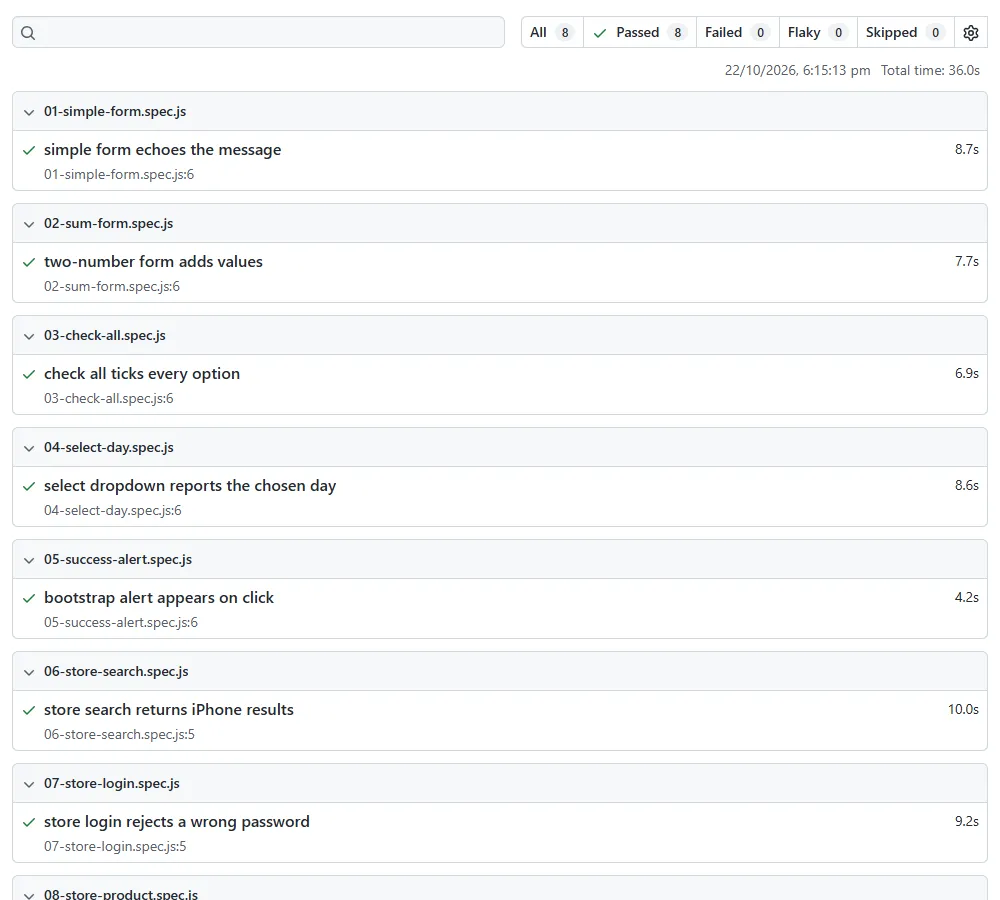
I wrote 8 Playwright tests against the TestMu AI Selenium Playground and the Ecommerce Playground: form input, a sum form, checkboxes, a dropdown, an alert, store search, a failed login, and a product page. I ran the suite with Playwright 1.56.1 in three setups: local and cloud runs with 1 worker and with 4, and HyperExecute jobs on 4 VMs.
- Local - Microsoft Edge on a Windows 11 laptop, run as headless browser testing.
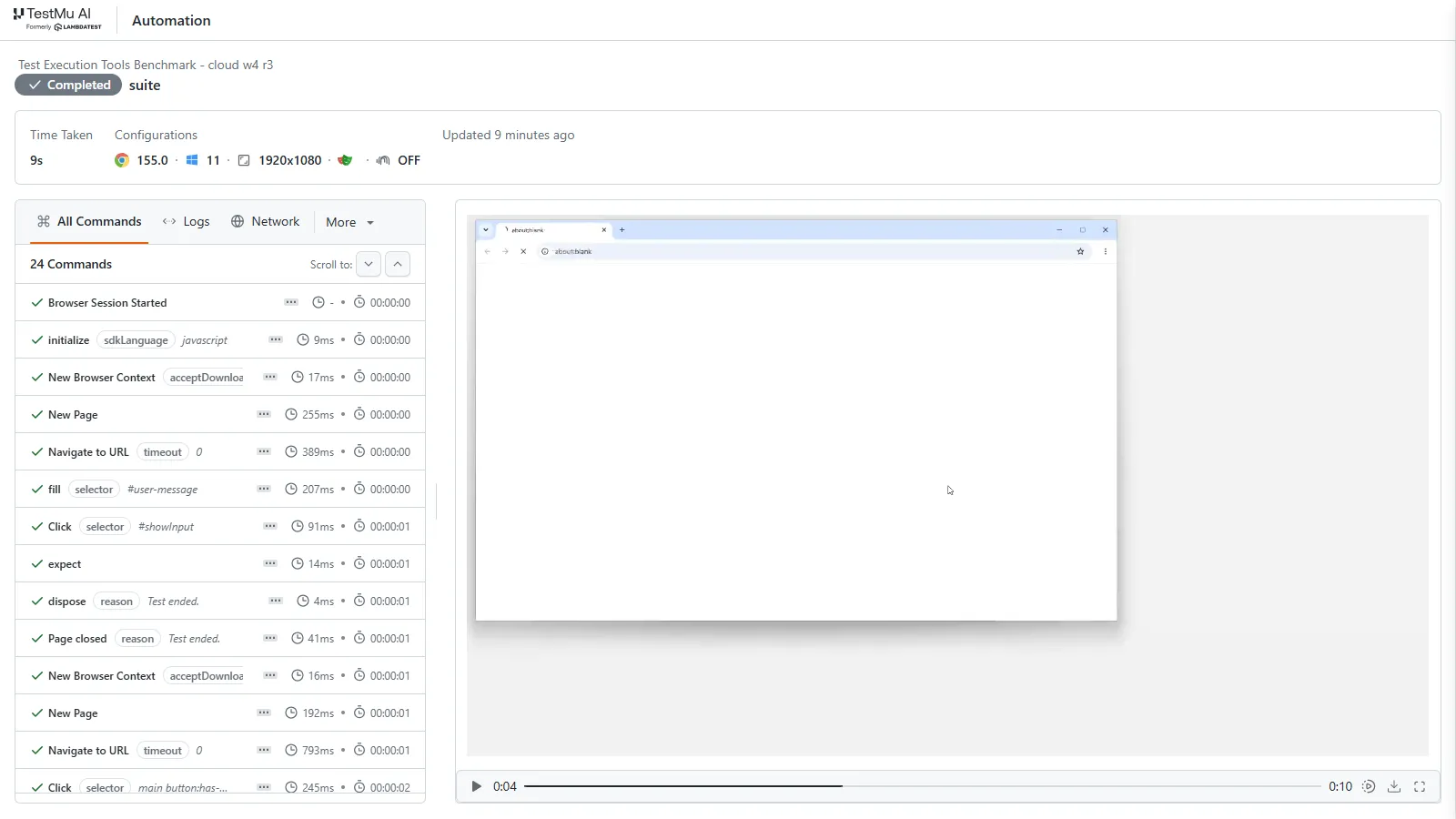
- Cloud grid - Chrome on Windows 11 on the TestMu AI automation cloud, with the runner on my laptop connecting to each browser over a WebSocket.
- Orchestrated - a HyperExecute job on Linux VMs, where the runner and Chromium sit on the same VM.
My first 4-worker runs gave inconsistent times, and the results showed all 8 tests on worker 0. Playwright runs tests inside one file in order, as the Playwright parallelism docs state, so I split the suite into one file per test and reran everything. This is the config I used for the local and cloud runs:
// playwright.config.js
const { defineConfig } = require('@playwright/test');
const target = process.env.TARGET || 'local';

function cloudWs(testName) {
  const caps = {
    browserName: 'Chrome',
    browserVersion: 'latest',
    'LT:Options': {
      platform: 'Windows 11',
      build: process.env.LT_BUILD || 'Test Execution Tools Benchmark',
      name: testName,
      user: process.env.LT_USERNAME,
      accessKey: process.env.LT_ACCESS_KEY,
      video: true,
      console: true,
    },
  };
  return `wss://cdp.lambdatest.com/playwright?capabilities=${encodeURIComponent(JSON.stringify(caps))}`;
}

module.exports = defineConfig({
  testDir: './tests',
  timeout: 90000,
  globalTimeout: 240000,
  retries: 0,
  reporter: [['list'], ['json', { outputFile: `results-${target}.json` }]],
  use: target === 'cloud'
    ? { connectOptions: { wsEndpoint: cloudWs('suite'), timeout: 60000 } }
    : { channel: process.env.PW_CHANNEL || undefined, headless: true },
});
The HyperExecute job used Auto-Split with 4 VMs, above the 2 concurrent sessions in the free tier. The discovery command lists the spec files, and each file runs as its own task. This is the tuned version; my first job used npm ci, which deletes node_modules and wastes the cache:
version: 0.1
runson: linux
autosplit: true
concurrency: 4
globalTimeout: 30
testSuiteTimeout: 30
testSuiteStep: 30

runtime:
  language: node
  version: "20"

cacheKey: 'pw-{{ checksum "package-lock.json" }}'
cacheDirectories:
  - node_modules

env:
  PLAYWRIGHT_BROWSERS_PATH: "0"

pre:
  - npm install --prefer-offline --no-audit --no-fund
  - npx playwright install chromium

testDiscovery:
  type: raw
  mode: remote
  command: ls tests/*.spec.js

testRunnerCommand: npx playwright test $test --reporter=list

retryOnFailure: true
maxRetries: 1

jobLabel: ['test-execution-tools-benchmark']
Test Results
I ran each local and cloud setup five times and HyperExecute three times, and every run used the same 8 tests. Wall time is what the runner reported from start to finish, so it includes browser launch, remote session start, and page loads.
| Setup | Workers | Runs | Result | Notes |
|---|---|---|---|---|
| Laptop, Edge | 1 | 5 | Median 79.3 s (32.4 to 90.5 s) | Store pages loaded slowly in three runs |
| Laptop, Edge | 4 | 5 | Median 21.6 s (19.8 to 99.1 s) | One run hit the 90 s timeout on a store login page |
| TestMu AI cloud grid, Chrome 155 on Windows 11 | 1 | 5 | Median 39.5 s (35.1 to 53.6 s) | Runner on my laptop, browser in the cloud |
| TestMu AI cloud grid, Chrome 155 on Windows 11 | 4 | 5 | 27.8 s and 29.2 s in the two clean runs | In three runs, one of the four sessions stalled, twice while connecting from my laptop; one run never finished and is excluded |
| HyperExecute, first job | 4 VMs | 1 | Test stage 34 s, whole job 3m21s | npm ci plus installing Chromium and its OS packages took 1m39s on the first VM |
| HyperExecute, cached | 4 VMs | 2 | Test stage 20 s and 24 s, whole job 1m33s and 1m13s | node_modules and Chromium restored from cache |
What the numbers mean for your suite
- Check that parallelism is real - four workers only helped after I split the tests into separate files; before that, every test ran on one worker.
- Slow pages decide wall time - one stalled page load set the time of a whole run, so give every test a timeout and turn on one retry.
- Remote sessions add a start-up cost - with the runner on my laptop, each worker had to open a cloud browser session first; add a connect timeout and retries before raising concurrency.
- Orchestration has a fixed cost per job - HyperExecute spent about a minute on upload, VM setup, and cache restore once tuned, which a suite of hundreds of tests absorbs and an 8-test suite does not.

How to Choose a Test Execution Tool
Pick the layer you are missing first, then the tool. Retry handling matters as much as speed: Atlassian's engineering team found flaky tests behind as much as 21% of master build failures in its Jira Frontend repository.
- One machine is enough - turn on your runner's own parallelism first: Playwright workers with fullyParallel, pytest -n auto, or Pabot for Robot Framework.
- You need browsers or devices you do not own - add a grid for cross-browser testing: Selenium Grid if you want to host it, a cloud grid if you do not.
- The suite outgrows one CI runner - add an orchestrator that splits by test, caches dependencies, and merges reports, such as HyperExecute.
- Testers do not write code - Katalon, Tricentis Tosca, or other codeless testing tools, with their execution add-ons budgeted from day one.
- Flaky failures block merges - choose a tool that reports retried tests separately and can limit retries to infrastructure errors; dedicated flaky test detection tools go further.
Before you switch tools, measure where the time goes today; our guide to reducing test execution time covers the profiling side.
Conclusion
Start by checking that your current test execution tool actually runs in parallel: open its report and count the workers that executed tests. If the suite still outgrows one machine, add a hyperexecute.yaml with Auto-Split and run it on the HyperExecute free tier, following the getting started with HyperExecute docs.
Author

Himanshu Sheth
Blogs: 143


Himanshu Sheth is the Director of Marketing (Technical Content) at TestMu AI, with over 8 years of hands-on experience in Selenium, Cypress, and other test automation frameworks. He has authored more than 130 technical blogs for TestMu AI, covering software testing, automation strategy, and CI/CD. At TestMu AI, he leads the technical content efforts across blogs, YouTube, and social media, while closely collaborating with contributors to enhance content quality and product feedback loops. He has done his graduation with a B.E. in Computer Engineering from Mumbai University. Before TestMu AI, Himanshu led engineering teams in embedded software domains at companies like Samsung Research, Motorola, and NXP Semiconductors. He is a core member of DZone and has been a speaker at several unconferences focused on technical writing and software quality.
Reviewer

Srinivasan Sekar
Reviewer
Srinivasan Sekar is Director of Engineering at TestMu AI, where he leads engineering and open-source initiatives behind the Selenium and Appium automation grid and owns TestMu AI's MCP Server. A committer to Appium and a contributor to Selenium, WebdriverIO, Taiko, and AppiumTestDistribution, he brings over 15 years of experience in quality engineering and open-source technologies. He is the author of the Apress book 'The MCP Standard: A Developer's Guide to Building Universal AI Tools with the Model Context Protocol,' a Certified Kubernetes and Cloud Native Associate, and an international conference speaker. Before TestMu AI he spent over eight years at Thoughtworks as a Principal Consultant and Quality Architect. Srinivasan holds a B.Tech in Information Technology from Anna University.


Test Execution Tools FAQs
Did you find this page helpful?
More Related Blogs

TestMu AI forEnterprise
Get access to solutions built on Enterprise
grade security, privacy, & compliance
- Advanced access controls
- Advanced data retention rules
- Advanced Local Testing
- Premium Support options
- Early access to beta features
- Private Slack Channel
- Unlimited Manual Accessibility DevTools Tests