

Power Your Software Testing with AI Agents and Cloud
The Native AI-Agentic Cloud Platform to Supercharge Quality Engineering. Test Intelligently and Ship Faster.


- TestMu AI (Formerly LambdaTest)
- /
- Blog
- /
- Jira Test Case Management
Jira Test Case Management: How to Manage Test Cases in Jira
Jira test case management explained: native Jira setup with JQL, Atlassian Marketplace apps, a connected platform, CI/CD sync, and a step-by-step walkthrough.
Last Updated on:
Jira runs the sprint, the backlog, and the bug queue for most agile teams. It has no test case. Search the Atlassian Marketplace for test management apps and it returns over 1,000 matches, which is the clearest evidence there is that Jira does not solve this on its own.
That leaves three real options: bend Jira's own issue types into test cases, install a Jira-native app, or connect a test management platform that syncs both ways with Jira. This guide walks through all three, shows the click-level setup for each, and gives you a decision table so you can tell which one your team actually needs.
The walkthrough in the middle of this guide uses TestMu AI Test Manager, whose Jira app is published on the Marketplace as a free app. If you are shopping for the tools themselves rather than the process, the companion roundup of Jira test management tools compares 20 options side by side.
Overview
Jira test case management is the practice of planning, executing, and reporting on test cases inside Jira. Jira Software has no built-in test case type, so teams build it on custom issue types, install a Jira-native app from the Atlassian Marketplace, or connect an external test management platform that syncs both ways with Jira issues.
Which Approach Fits Your Team?
- Native Jira issue types: A custom "Test Case" issue type plus fields for steps and expected results. Costs nothing extra and works for a few dozen cases, but Jira gives you no execution cycles, no per-run history, and no coverage report.
- Jira-native Marketplace apps: Apps such as Xray and Zephyr store test cases as Jira issues, so everything stays in one tracker. Best when testing is mostly manual and the team never leaves Jira.
- Connected test management platform: TestMu AI Test Manager keeps the repository outside Jira and syncs cases, executions, and defects both ways. Best when you also run automation across browsers and real devices and want manual plus automated results in one cycle view.
- Whichever you pick, the ordering is the same: link every case to the requirement it validates before you group cases into an execution cycle. Retro-fitting traceability after a release is what makes coverage reports unreliable.
What Does Jira Give You Natively?
Issues, custom fields, issue linking, JQL, and dashboard gadgets. That is enough to record that a test exists and which story it belongs to. It is not enough to record that the test ran twice on two builds with different results, which is the point at which every team outgrows the native setup.
What Is Jira Test Case Management?
Jira test case management is the practice of storing, running, and reporting on test cases inside Jira, so that a test case sits next to the user story it validates and the bug it produced. Because Jira Software has no test case object of its own, that practice is always built on top of something: a custom issue type, a Marketplace app, or an external platform that syncs into Jira.
The reason teams want it in Jira at all is traceability. A standalone test management tool can hold beautiful test cases and still leave you unable to answer the only question that matters at a release gate: which requirements shipped without a test.
Whatever layer you put on top, a working Jira test case management setup gives you five things:
- Traceability in both directions, so a story shows the cases that validate it and a case shows the defects it produced.
- A test repository with folders, tags, search, and version history, rather than test cases scattered as loose Jira issues.
- Execution cycles, so the same case can run against build 4.2 and build 4.3 and keep two separate results.
- Reporting on coverage, pass rate, and defect density, computed from execution data instead of assembled by hand.
- A CI/CD path, so automated runs update case status and open Jira defects without anyone copying results across.
Item three is the one that decides everything. A test case is a document; a test execution is an event. Jira models documents well and events badly, which is why the native approach works right up until you run the same suite twice.
Does Jira Have Built-In Test Case Management?
No. Jira Software has no test case issue type, no test steps field, no execution cycle object, and no coverage report. Atlassian's own testing tutorial for managing test cases in Jira lists installing a test management app as a prerequisite before step one, which is as direct an answer as the vendor gives.
What Jira does give you is a set of primitives that a test process can be built from:
- Custom issue types and custom fields, which is how a "Test Case" comes to exist at all.
- Issue linking with typed relationships (tests, is tested by, blocks), which carries requirement traceability.
- Workflows and statuses, which can model a test lifecycle of Draft, Ready for Review, Approved, Deprecated.
- JQL and filters, which turn a pile of issues into a queryable repository.
- Dashboard gadgets, which render those filters as pass and fail counts for a sprint.
What is missing is the execution layer. Jira has no concept of running the same test case again and keeping both results, so there is no run history, no pass rate over time, and no way to say that release 4.3 covered 92 percent of its requirements. That gap is exactly the space every Jira test management app sells into.
Why Use Jira for Test Case Management?
The argument is not that Jira is a good test management tool. It is that the requirement, the defect, and the release are already in Jira, so anything that keeps test cases away from them creates reconciliation work.
- Defects are created where the failure happened. A tester marking a step failed opens the Jira bug from the run, so environment, steps, and expected versus actual arrive filled in rather than retyped.
- Coverage is answerable per sprint and per epic, because cases hang off the same stories the sprint report reads from.
- Developers never install a second tool. They see the failing test on the story they are already looking at, which is usually what decides whether a QA process survives contact with an engineering team.
- Audit evidence is a query, not a project. Compliance-sensitive teams can show which requirement had which test and how the defect resolved, from links that already exist.
- Permissions and workflow rules you already maintain in Jira apply to test assets too, instead of being re-implemented in a second system.
The counterweight is real: Jira is an issue tracker, and a large test repository modelled as issues will slow boards and pollute sprint reports. That tension is what the three setup options below trade against each other.
Setting Up Test Case Management in Jira
Three setups are viable, and they are not a maturity ladder. A five-person team running manual regression is well served by the first; a team with an automation suite across browsers and devices will fight the first two. Each is described below at the level of the actual clicks.
Option 1: Native Jira Issue Types (No App)
This is the approach the Atlassian community and QA forums keep asking for, and it is genuinely workable below roughly 200 test cases. It costs nothing beyond your existing Jira licence. Jira admin permissions are required.
- Create the issue type. Go to Jira Settings, then Issues, then Issue types, and add a new standard issue type named Test Case. Add it to the issue type scheme of the project that will hold your tests.
- Add the fields a test case needs. Create a Paragraph field for Steps, a Paragraph field for Expected Result, a Paragraph field for Preconditions, and a Select List for Test Type with values such as Functional, Regression, and Smoke. Associate them with the Test Case issue type only, so they do not appear on stories.
- Give test cases their own workflow. A lifecycle of Draft, In Review, Approved, and Deprecated stops unreviewed cases entering a regression run, and it is the one piece of native Jira that beats a spreadsheet outright.
- Link cases to requirements. Use the "tests" and "is tested by" link types on every case. This is what a requirements traceability matrix is built from, and without it the whole point of keeping tests in Jira is lost.
- Model each run as a sub-task. Create a sub-task under the test case for a specific build, and use its status for Pass, Fail, or Blocked. The parent case stays the reusable document, the sub-task carries the event.
- Query with JQL and pin the result. A filter such as issuetype = "Test Case" AND issueFunction in linkedIssuesOf("fixVersion = 4.3") gives you a per-release coverage list, and a Filter Results gadget on a dashboard renders it for the team.
Where it breaks: sub-tasks give you run history but no cycle, so there is no single object that says "regression run for build 4.3, 140 cases, 91 percent passed". Reporting stops at whatever a JQL count can express, bulk-editing 300 cases through the Jira UI is slow, and there is no clean API for a CI job to push results in. Teams usually hit the wall at the second or third release, not the first.
Option 2: A Jira-Native Marketplace App
Jira-native apps store test cases as Jira issues, so nothing leaves the tracker. Xray and Zephyr are among the most-installed options in this category on the Atlassian Marketplace, with a long tail of smaller Jira-native apps alongside them. Setup follows the same shape whichever you pick.
- Install from the Marketplace and grant the app its requested Jira permissions. The app adds its own issue types, typically Test, Test Plan, Test Set, and Test Execution.
- Enable those issue types on the projects that will run tests. Skipping this is the most common reason a freshly installed app appears to do nothing.
- Build the repository as a folder tree by module or feature before importing anything, because reorganising several hundred cases afterwards is painful in every one of these tools.
- Link each case to the story it validates, then group cases into a test plan for the release and a test execution for the specific build and environment.
- Wire automation last. Each app exposes a REST endpoint that accepts a results file (commonly JUnit XML) and maps it onto existing cases.
The trade-off is the one Jira imposes on itself: every test case, every run, and every step is a Jira issue, so a large suite inflates the instance, and the test repository competes with development work for Jira performance. This is why the "use a separate QA project" advice appears in every one of these tools' own documentation.
Option 3: A Connected Test Management Platform
The third approach keeps the repository outside Jira and synchronises with it in both directions. Test cases, plans, and cycles live in a purpose-built platform; Jira keeps the requirements and the defects; the link between them stays live.
- Jira stays fast, because ten thousand test executions are rows in a test platform rather than ten thousand Jira issues.
- Manual and automated results land in the same cycle view, which a Jira-native app cannot do unless your automation already reports into Jira.
- Defects still open in Jira with full context, and status changes sync back to the linked case, so developers never see a second tool.
- Migration in is a real consideration, not a footnote. TestMu AI Test Manager imports existing suites from TestRail, Zephyr, Xray, or CSV and API, so switching does not mean rewriting the repository.
The cost is one more system in the stack. That is worth paying when execution happens outside Jira anyway, and not worth paying when a team of four runs manual tests and never touches a pipeline.
Choosing Your Jira Test Case Management Approach
The choice is decided by two things: how many cases you maintain, and whether test execution happens inside Jira or somewhere else. Everything else is detail.
| Dimension | Native Jira Issues | Jira-Native App | Connected Platform |
|---|---|---|---|
| Works well up to | Roughly 200 cases, one team | Thousands of cases, mostly manual | Thousands of cases, manual plus automated |
| Where cases live | Jira issues you designed | Jira issues the app created | External repository, synced to Jira |
| Execution cycles | None. Sub-tasks approximate a single run | First-class test execution objects | Plans and cycles with per-build history |
| Reporting | Whatever JQL and dashboard gadgets express | Coverage and execution reports inside Jira | Coverage, pass rate, and defect trend dashboards |
| Automated results | Manual entry only | REST endpoint accepting a results file | Pipeline results map into the active cycle |
| Effect on Jira performance | Grows the issue count directly | Grows the issue count fastest of the three | Neutral. Only defects and links are Jira issues |
| Typical fit | Small team proving the process | Manual QA that never leaves Jira | QA running cross-browser or real-device automation |
Read the table by your own situation rather than by column quality. If your suite is under a couple of hundred cases and nobody has asked for a coverage report yet, native issue types are the correct answer and installing an app is premature. If testing is entirely manual and the team lives in Jira, a Jira-native app is the shortest path. If automation already runs outside Jira, a connected platform is the only option of the three that puts manual and automated results in one view.
Two things worth deciding before you commit either way: whether the tool exports your cases in a format you could leave with, and whether it supports the test case management structures your team already uses, such as shared preconditions and reusable modules. Migration pain is the real switching cost, not the licence. For a feature-by-feature comparison of the individual apps in the second column, the companion roundup covers 20 of them.
Set Up and Manage Test Cases in Jira Using TestMu AI
This section is the third approach in practice. TestMu AI Test Manager holds the repository, plans, and cycles, and its Jira integration is two-way: defects raised from a failed step arrive in Jira with the case name, steps, expected versus actual, environment, and attachments filled in, and when a developer moves the ticket, the status syncs back to the linked case.
Two things separate it from the Jira-native apps above. Test cases can be generated from a plain-language description or straight from a Jira ticket rather than typed from scratch, and execution runs on TestMu AI's own cloud, which spans 10,000+ real devices and 3,000+ browser and OS combinations, so manual and automated results land in the same cycle. The companion Jira app is published on the Atlassian Marketplace as a free app.
The screenshots below are from a live TestMu AI account, following the setup in order.
Step 1: Connect TestMu AI Test Management to Jira
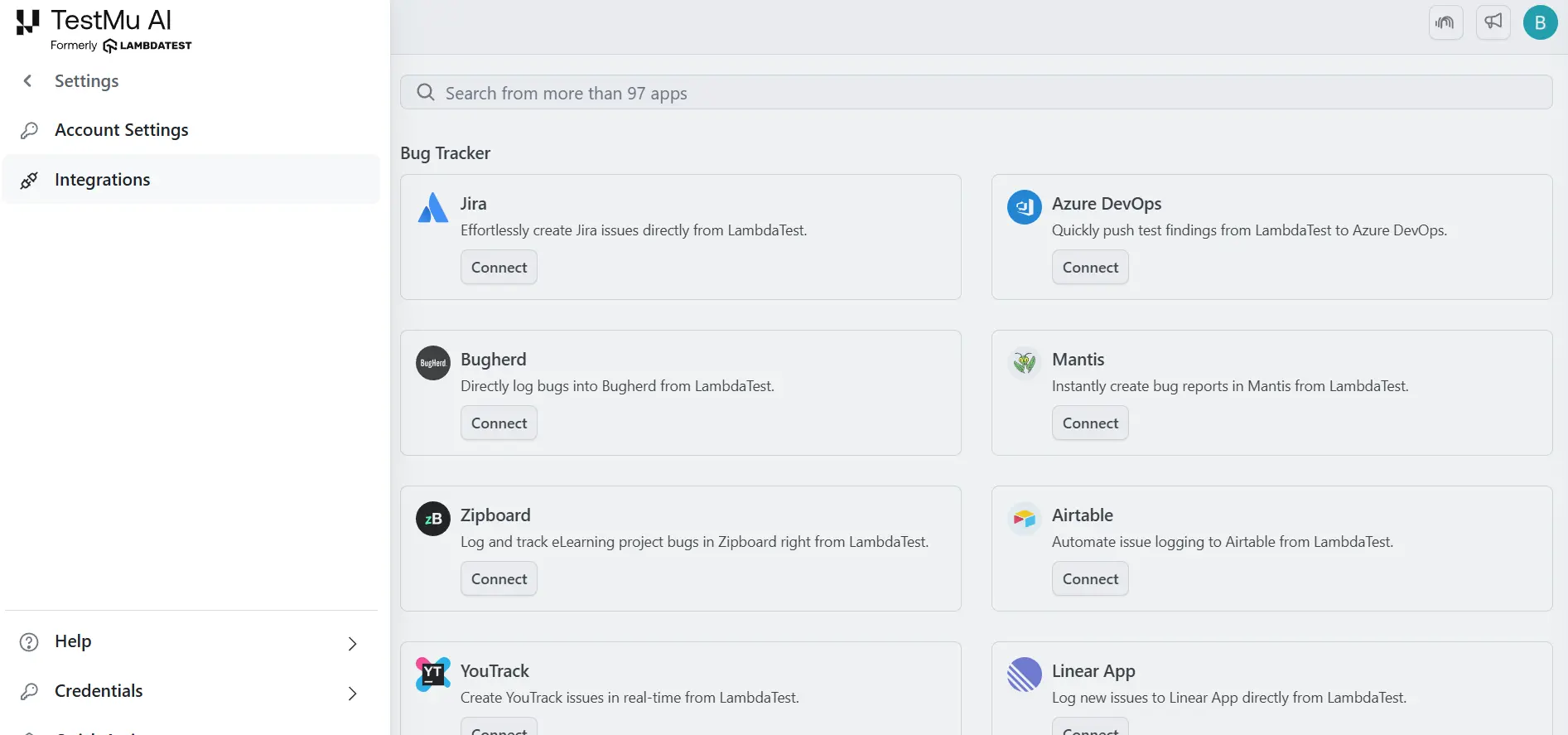
TestMu AI supports both Jira Cloud and self-hosted Jira instances. The integration takes a few minutes:
- Log in to TestMu AI, open Integrations, add Jira, authorize or enter credentials, select the projects to sync, and confirm the green tick to verify the connection. The Jira integration docs cover the self-hosted variant, which needs a base URL and an API token rather than the OAuth flow.
- Install the companion TestMu AI Cloud app so linked test cases and run history render inside the Jira issue itself. This is the piece that keeps developers out of a second tool.
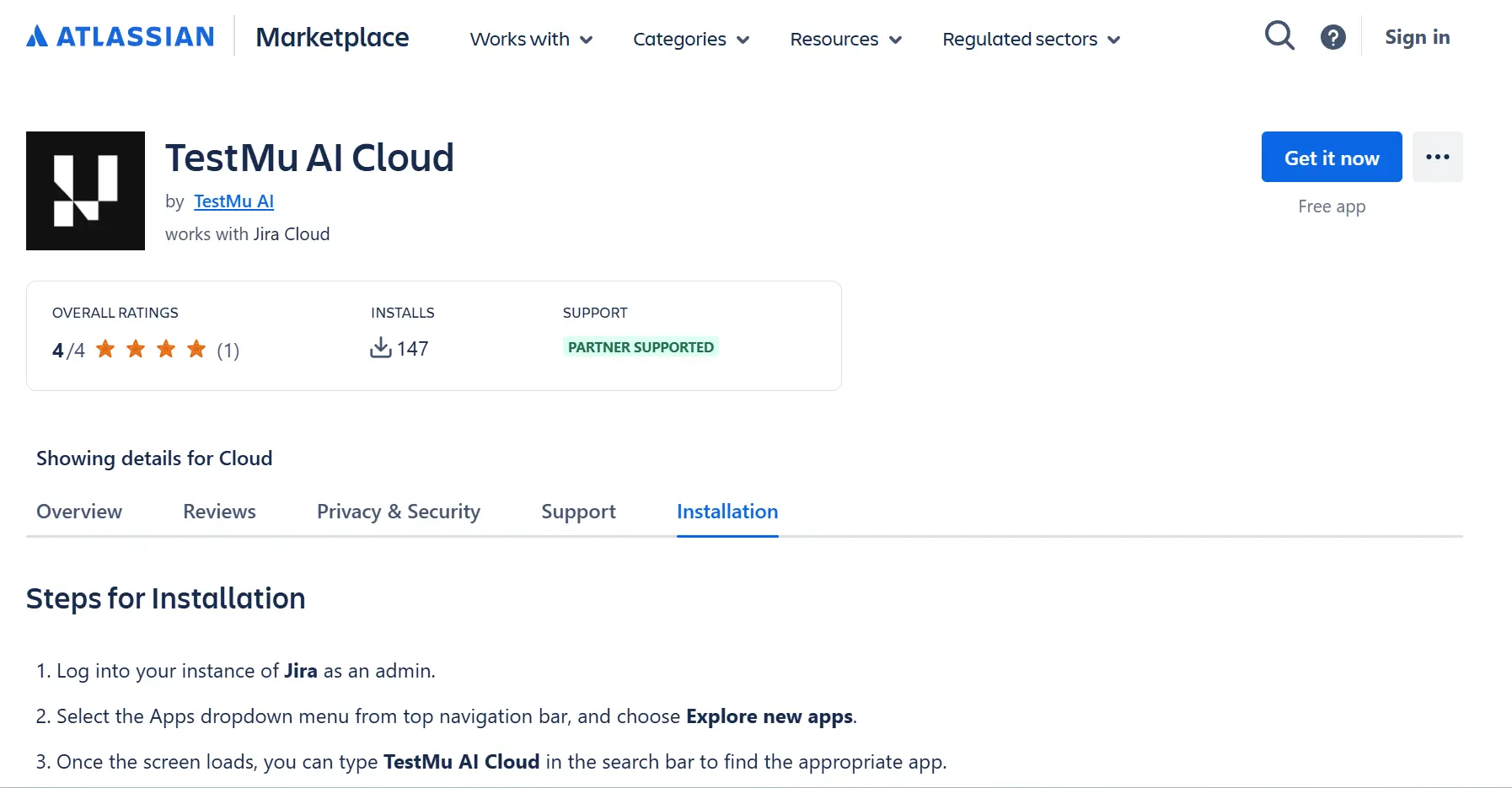
Only Jira projects with the BUG work type enabled will appear in the project dropdown for bug logging. If a project is missing, add the BUG work type in your Jira project settings and resync the integration from the TestMu AI Integrations page.
Step 2: Create and Import Test Cases
There are four ways into the repository, and which one you use depends on where your test cases are today:
- Manual authoring with hotkeys, for writing a case from scratch with steps, test data, and expected results without reaching for the mouse.
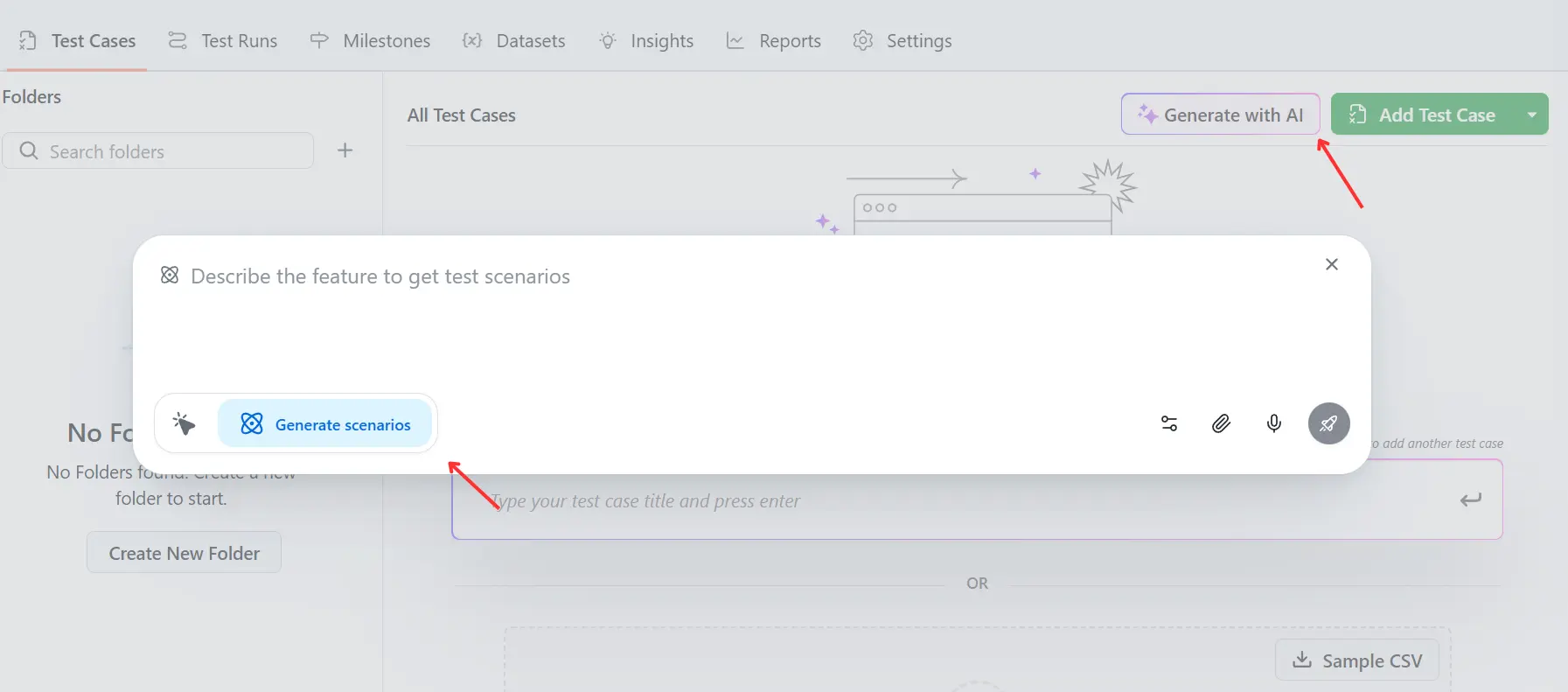
- AI generation from plain language, a Jira ticket, a user story, or a Gherkin scenario. Point it at a story and it returns a structured case with ordered steps, preconditions, and expected results, which you then edit. The AI test case generation docs cover the accepted input types.
- Reusable modules for shared steps such as login or checkout setup, so a change to the flow updates every case that uses it instead of 40 copies.
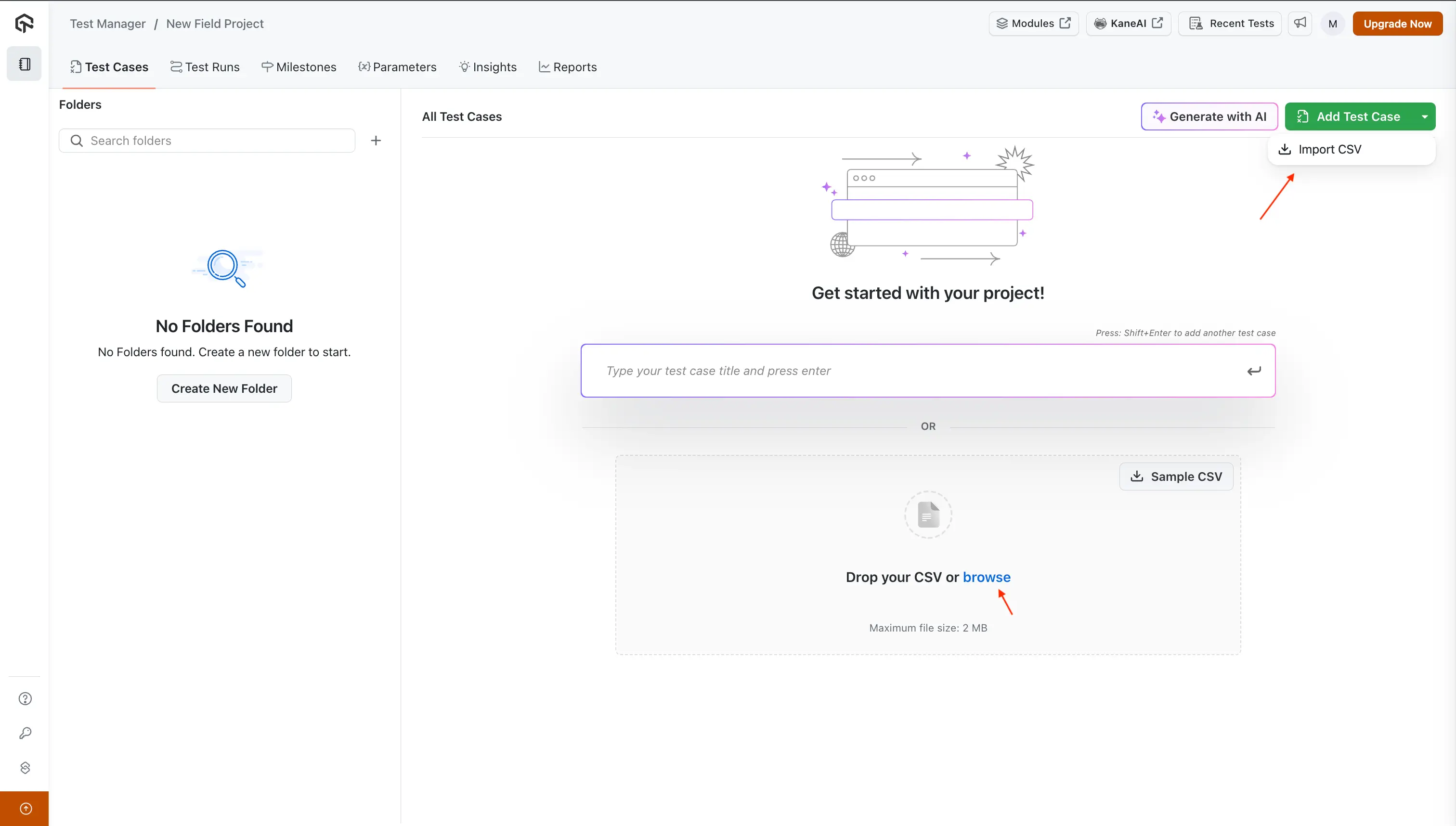
- CSV and API import with field mapping, which is the migration path off a spreadsheet or an existing tool. The CSV import guide lists the required columns and how unmapped fields are handled.
Step 3: Link Jira Issues with Test Cases
Do this before you build a plan, not after. Linking is what turns a pile of cases into a coverage report, and back-filling links across a finished release is the step teams skip and then regret.
- Connect each case to the Jira story or bug it validates. The link is live in both directions, so the story shows its cases and the case shows its requirement.
- Raise defects from the run itself. A failed step opens a Jira bug pre-filled with environment, the failing step, expected versus actual, and any screenshot or video captured during execution.
- Read execution status inside the Jira issue and update results there, so a developer checking a story sees the failing test without opening Test Manager.
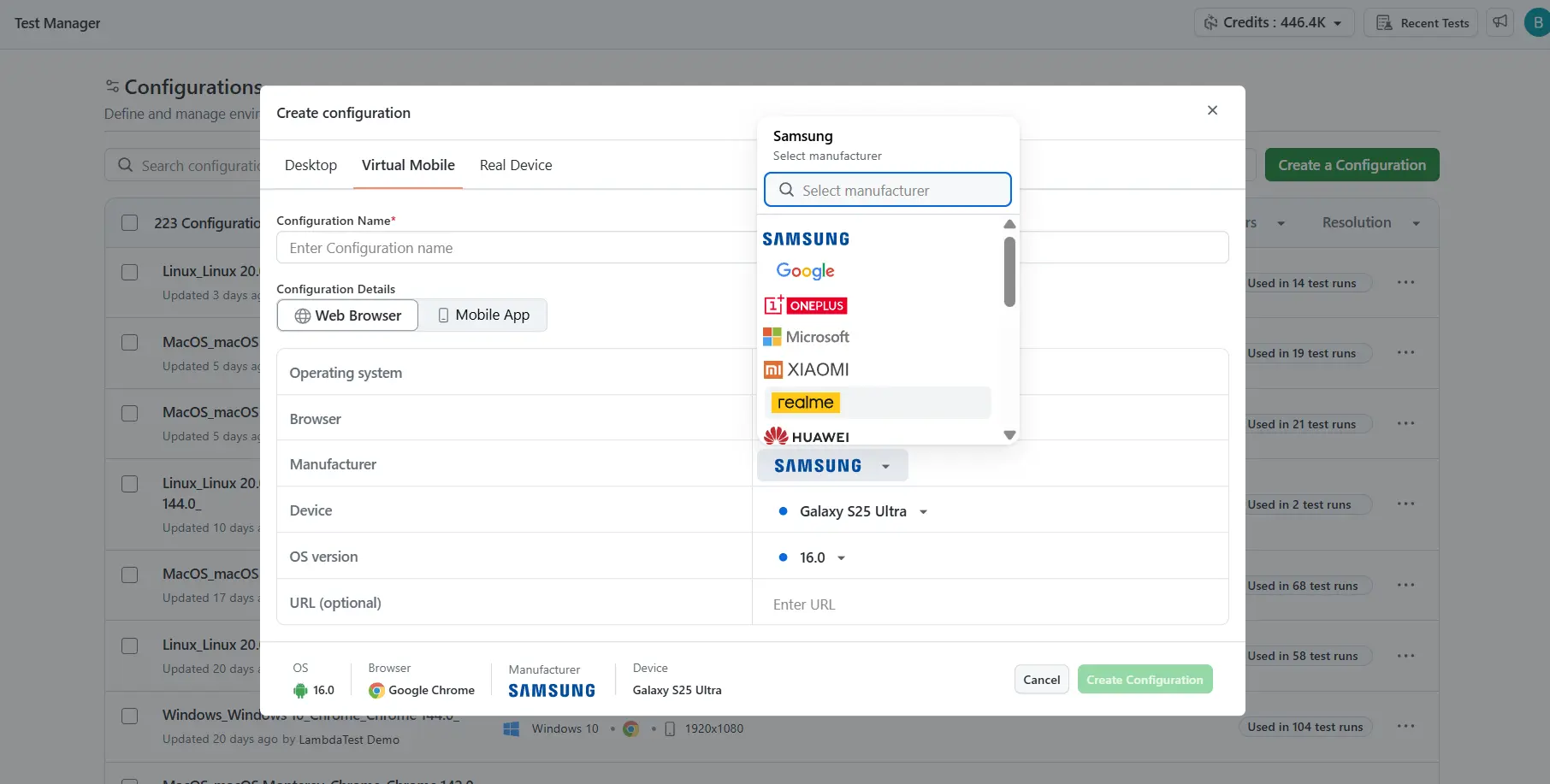
Step 4: Build Test Plans and Execute Tests
A plan is the release-level container; a test cycle inside it is one specific run. Keeping those separate is what gives you comparable results across builds, which is the capability native Jira cannot reproduce.
- Build a plan for the sprint or release, add cases from the repository, assign owners, and set the browser, OS, and device configurations the cycle should cover.
- Run cases step by step with pass, fail, skipped, or blocked per step, attaching screenshots and video as evidence, and log the Jira defect from the failing step.
- Clone the cycle next release rather than rebuilding it. A regression library reused across releases is the single largest time saving in this whole workflow.
Step 5: Track Results and Report from Jira
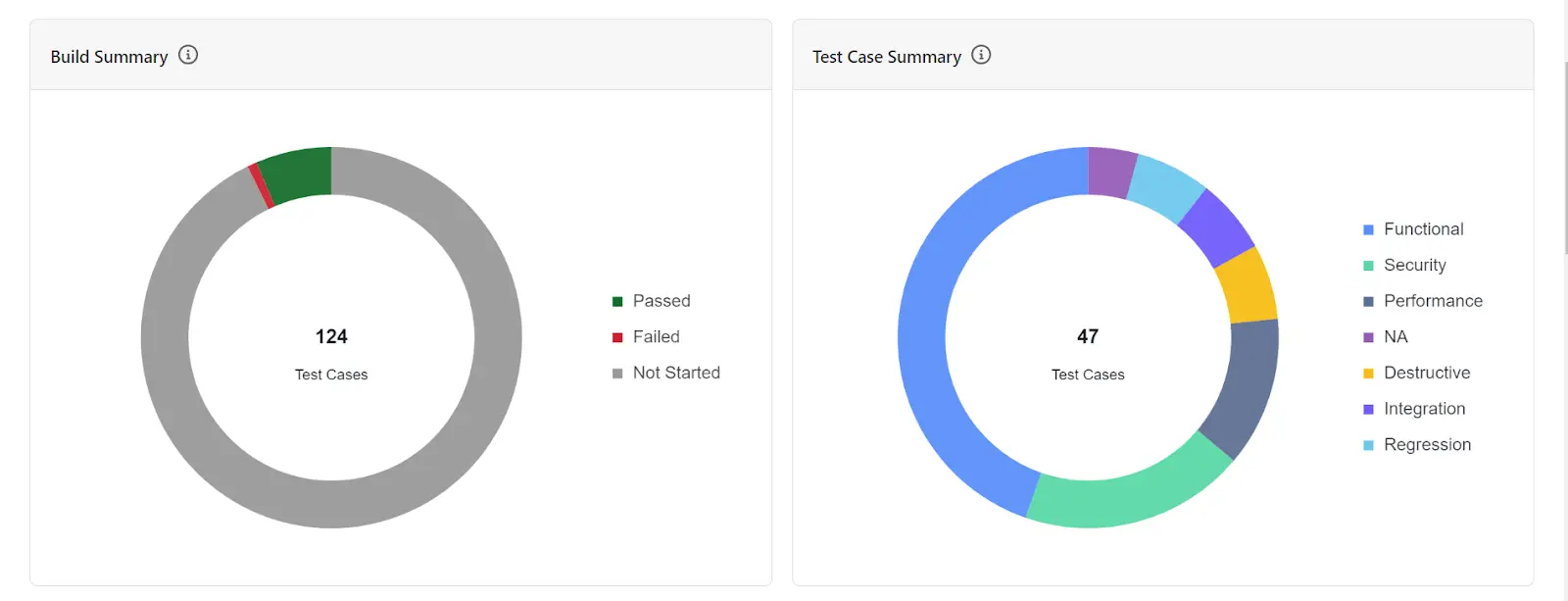
- Read execution progress, pass and fail rates, defect trends, and coverage from the cycle dashboard, surfaced inside Jira so the sprint review does not need a second screen.
- Compare results across builds to separate a genuine regression from a flaky test, using the run history and captured evidence rather than memory.
- Pull the traceability report to answer the release question directly: which requirements have tests, which of those tests passed, and which defects are still open. Filter it by project, sprint, or component for the sign-off conversation.
Integrating Jira Test Case Management with CI/CD Pipelines
Without this step, the whole setup is documentation. With it, a Jira story shows the result of the last pipeline run against the tests that validate it. Three moving parts make that work: a stable identifier on each test, a results file the pipeline emits, and a job that posts it.
The identifier matters most and is where most integrations fail. Every automated test needs a key that matches a test case in the repository, and that key has to survive refactoring. Carrying it in the test name is the usual approach, so the description can be reworded freely while the key stays fixed.
Five decisions determine whether the integration survives contact with a real pipeline:
- Tag every automated test with its test case key and treat that key as immutable. Renaming the test is safe; editing the key silently detaches it from its case and the result lands nowhere.
- Emit a JUnit XML report from the run. Most frameworks produce it with a single reporter flag, and it is the format every test management API accepts.
- Upload the report from a step that runs even when the suite fails. A reporting step conditioned on success never publishes the failures you actually care about, and it is the most common reason a CI integration appears configured but reports nothing.
- Key the upload to the commit SHA rather than a build or run number, so a result can still be traced to the code that produced it once the branch is deleted.
- Hold the API token as a CI secret rather than in the pipeline definition, alongside the cloud grid credentials the suite already needs.
Those five translate directly across Jenkins, GitHub Actions, GitLab CI, CircleCI, and Bitbucket Pipelines. Only the syntax for secrets and for always-run steps changes between them.
From there the platform maps each result onto its test case, updates the execution status in the active cycle, and opens Jira defects for new failures with the logs and commit context attached. Setting a quality gate on the pass rate is the last piece: fail the build below your threshold and the pipeline enforces the standard instead of a person chasing it.

Note: Manual runs and pipeline results in the same cycle view, with defects opening straight into Jira. TestMu AI Test Manager connects to Jira in both directions and executes across 10,000+ real devices. Start free.
Best Practices for Test Case Management in Jira
Most of these cost nothing to adopt on day one and are expensive to retro-fit at case three hundred.
- Put test cases in a dedicated QA project, not the development project. Boards and sprint reports stay readable, permissions can differ, and issue links preserve traceability across the boundary.
- Give every case a stable key and never reuse it. Naming can drift; the key is what CI results, defect links, and coverage reports all join on.
- Extract shared preconditions into reusable modules the first time you copy one. Login and setup steps duplicated across 40 cases become 40 edits the day the login flow changes.
- Link the case to its requirement at creation time. Adding links retroactively is the single most common cause of a coverage report nobody trusts.
- Build the dashboard before the first release, not after. A gadget nobody set up is why teams end up reporting test status in a spreadsheet anyway.
- Prune quarterly. Deprecate cases for removed features and update cases whose flows changed, otherwise the pass rate slowly stops describing the product.
- Gate execution behind a review status. Draft, In Review, Approved on the test workflow keeps unreviewed cases out of a regression run.
Common Challenges and How to Solve Them
Five failure modes account for most abandoned Jira test management setups, and each has a specific fix.
- Jira slows down as the suite grows, because every case, run, and step became an issue. Move test assets to a dedicated QA project, archive completed cycles, and if the instance is still struggling, move the repository out of Jira entirely and keep only defects and links inside it.
- Coverage reports look wrong because links were never made. Audit unlinked cases with a JQL filter each sprint rather than at release, since the fix takes minutes at ten missing links and days at two hundred.
- Manual and automated results live in two places, so nobody can state total coverage. This is not a process problem and cannot be trained away; it needs a tool that ingests both into one cycle.
- Testers stop updating status because the update is slower than the test. Measure the number of clicks to record a pass, and if it is more than two, the process will decay no matter how good the training was.
- Every team invents its own conventions once you pass three teams. Standardise the case template, the naming key, and the workflow centrally, then let teams own their folders inside it.

Conclusion
Start by counting your test cases and asking where execution happens. Under roughly 200 cases with manual testing only, spend an afternoon on the native setup in this guide: a Test Case issue type, four custom fields, the "tests" link on every case, and one JQL dashboard. That is a complete Jira test case management process and it costs nothing.
Move up when the native setup stops answering a specific question, and let that question pick the tool from the test management tools on your shortlist. If the question is "what did this case do on the last three builds", you need execution cycles, so a Jira-native app is enough. If it is "what is our total coverage including automation", a Jira-native app will not answer it, and a connected platform will. Teams already on a Marketplace app can weigh the trade in the Xray alternative comparison.
If the second question is the one you have, connect a Jira project to TestMu AI Test Manager and import an existing suite from CSV to see coverage across manual and automated runs in one cycle. The test run and cycle documentation covers the plan and cycle model end to end, and the Jira app itself is free on the Atlassian Marketplace.
Author

Bhavya Hada
Blogs: 29


Bhavya Hada is a Community Contributor at TestMu AI with over three years of experience in software testing and quality assurance. She has authored 20+ articles on software testing, test automation, QA, and other tech topics. She holds certifications in Automation Testing, KaneAI, Selenium, Appium, Playwright, and Cypress. At TestMu AI, Bhavya leads marketing initiatives around AI-driven test automation and develops technical content across blogs, social media, newsletters, and community forums. On LinkedIn, she is followed by 4,000+ QA engineers, testers, and tech professionals.
Reviewer

Abhishek Mishra
Reviewer
Abhishek Mishra is a Technical Product Manager at TestMu AI, where he owns Test Manager, the test management product. He has over 8 years of experience in product management and market analysis. His expertise spans across AI-native software testing, product strategy, and analytics. Previously, Abhishek served as the Product Lead at IndiaClan and co-founded Gartley618 Technologies, where he led innovative projects in quantitative trading and blockchain. He holds a B.Tech degree.
Jira Test Case Management FAQs
Did you find this page helpful?
More Related Blogs
TestMu AI forEnterprise
Get access to solutions built on Enterprise
grade security, privacy, & compliance
- Advanced access controls
- Advanced data retention rules
- Advanced Local Testing
- Premium Support options
- Early access to beta features
- Private Slack Channel
- Unlimited Manual Accessibility DevTools Tests