
Power Your Software Testing with AI Agents and Cloud
The Native AI-Agentic Cloud Platform to Supercharge Quality Engineering. Test Intelligently and Ship Faster.


- TestMu AI (Formerly LambdaTest)
- /
- Learning Hub
- /
- What Is Black Box Testing? Types, Techniques and Examples
What Is Black Box Testing? Types, Techniques and Examples
Black box testing explained: how it differs from white box and grey box testing, the eight core techniques, penetration testing, and worked examples.
Last Updated on:
On This Page
Black box testing is a software testing method that validates functional requirements without any knowledge of the internal structure or implementation. The tester works from the specification, not the code.
It confirms that a system does what the customer asked for. Black box tests apply at integration testing and system testing levels, and at acceptance testing, wherever behavior can be judged from the outside.
Key Takeaways
Black box testing checks software against its specified behavior using only its inputs and outputs, with no view of the source code. Testers feed valid and invalid data through the interface and compare actual results against expected results, which makes it the standard method for functional, non-functional, and regression testing.
- Black box testing works from requirements with no code access, so it catches features that were specified but never built.
- Black box testing cannot see which code paths went untested; white box testing cannot see a requirement that was never implemented.
- Choose black box testing when the risk is building the wrong thing, and white box testing when the risk is a wrong algorithm.
- Equivalence partitioning plus boundary value analysis catches the off-by-one defects that partitioning alone walks past.
- Grey box testing adds partial internal visibility, such as database or log access, while still driving the application from outside.
- A clean black box penetration test proves the external attack surface was probed, not that the application is free of vulnerabilities.
- A black box pass on one browser says nothing about the others, so teams run the suite across TestMu AI's 3,000+ browser and OS combinations.
What Is Black Box Testing?
Black box testing examines software without knowledge of its internal structure. The NIST computer security glossary records the NIST SP 800-192 definition as a method of software testing that examines the functionality of an application without peering into its internal structures or workings, and adds that it can be applied at virtually every level of testing: unit, integration, system, and acceptance.
That last point settles a common argument. Black box is a method, not a test level. A unit test written only against a documented function signature is black box in style, even though most unit tests are written by developers who can see the code and are therefore white box.
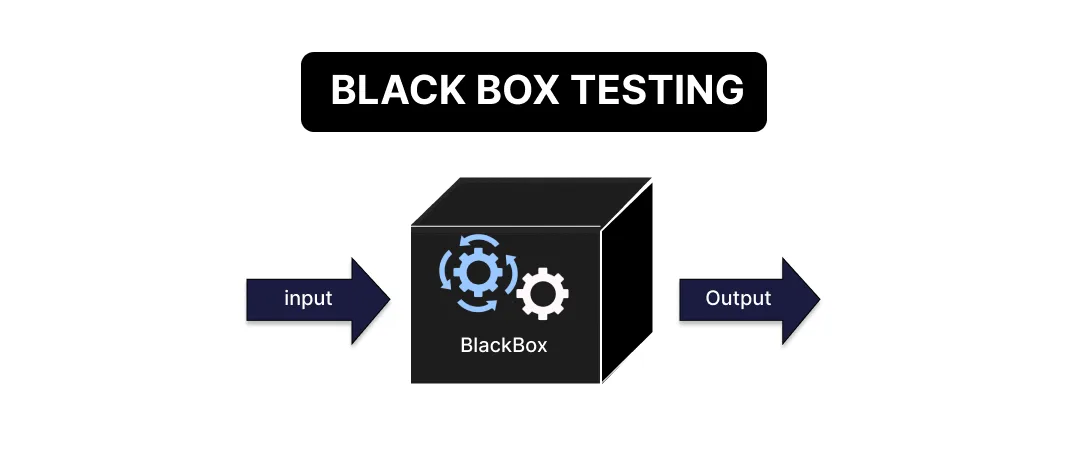
The working loop is narrow and repeatable. A tester picks a requirement, supplies an input, observes the output, and compares it against what the specification promised. Agreement passes the test; a mismatch is a defect report against the requirement, not against a line of code.
The method is also called behavioral, opaque-box, closed-box or specification-based testing, because it judges the software by how it behaves against its specification rather than how it is built.
Why Black Box Testing Matters
Code-level testing can only verify the code that exists. It cannot report a requirement that was never implemented, because there is no code to inspect. Black box testing starts from the specification instead, so an unbuilt requirement shows up as a failing test.
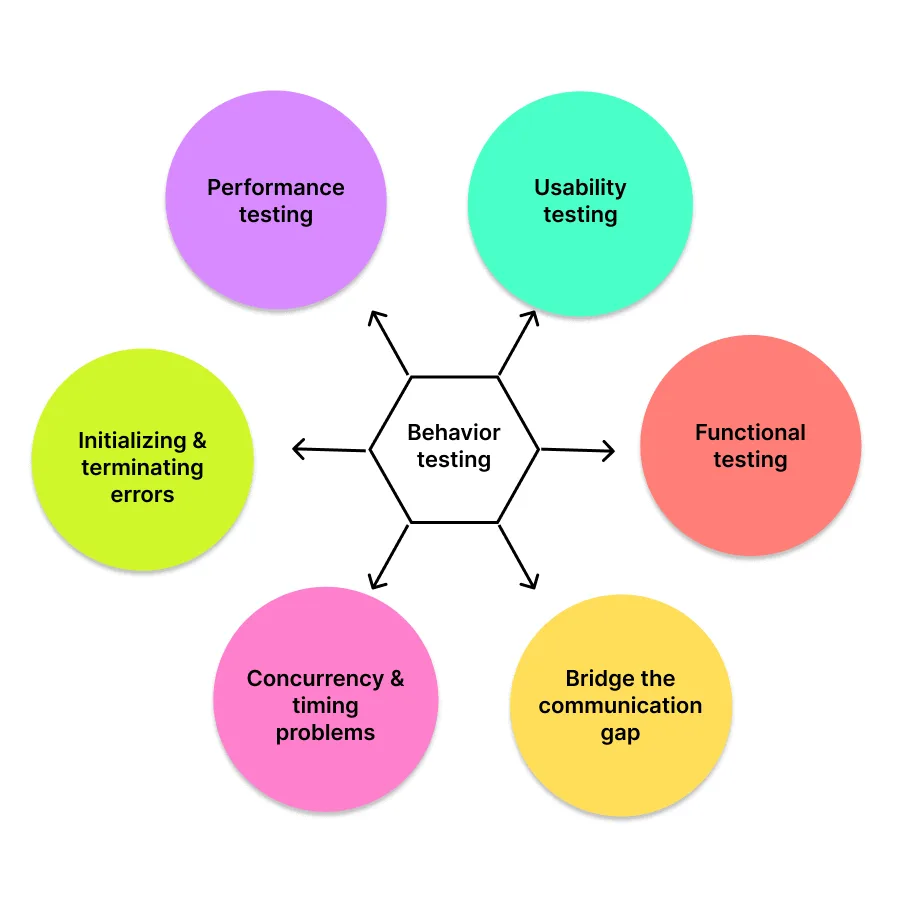
Working from the outside also surfaces defect classes that unit tests structurally cannot reach:
- Missing or misread requirements, where each component is correct but the assembled feature is not what was asked for.
- Interface and integration faults that appear only when real components exchange real data.
- Usability problems, such as an error message that is technically accurate and useless to the person reading it.
- Performance and concurrency behavior under realistic load, timing, and session conditions.
- Rendering and compatibility differences across browsers, operating systems, and devices.
- Initialization and shutdown faults that only appear across a full start-to-finish run.
Types of Black Box Testing
Black box testing is usually grouped into functional, non-functional and regression testing, which answer different questions about a build. Security testing applies the same outside-in method to attacks.
Functional Testing Checks Each Feature Against the Specification
Functional testing asks whether a feature does what the specification says. A login flow is exercised with valid credentials, then with wrong credentials, then with an empty field, and each result is checked against the documented behavior. Functional testing is where most black box effort is spent.
Non-Functional Testing Measures Speed, Accessibility and Compatibility
Non-functional testing asks how well the feature works rather than whether it works. Response time under load, behavior on a slow network, screen reader support, and rendering on an older browser are all non-functional testing concerns. It runs after functional testing, since measuring the speed of a broken feature tells you nothing.
Regression Testing Confirms a Change Broke Nothing That Worked Before
Regression testing asks whether a change broke something that previously worked. After a fix or upgrade, regression testing re-runs established cases to confirm existing behavior survived, since a fix in one module can introduce a defect in another.
Security Testing Attacks the Running Application From Outside
Security testing asks whether the application can be made to do something it should refuse. A black box security tester has the same view as an outside attacker: the URLs, forms, API endpoints and cookies the application exposes, and no source code. On the login form used throughout this guide, that means sending SQL injection strings in the email field, replaying a session cookie after logout, tampering with hidden form parameters, and checking whether the error text gives away which accounts exist.
Much of this work is automated as dynamic application security testing (DAST): a scanner crawls the running application, sends crafted requests to every input it finds, and reports the responses that look like vulnerabilities. Fuzzing is the same idea applied to a single input, with thousands of malformed or random values. Neither needs the code, which is why both count as black box methods. Scanners such as ZAP (formerly OWASP ZAP) and Burp Suite, covered in the tools section below, handle the automated part.
The fullest form is the black box penetration test, where a tester starts from public information only and tries to break in. The Black Box Penetration Testing section below covers how it differs from grey box and white box assessments, and what a clean report does and does not prove.
Black Box vs White Box Testing
The two methods fail in opposite directions. Black box testing can miss an untested code path; white box testing can miss a requirement that was never coded. Neither is a substitute for the other, and the table below is the practical basis for deciding which one answers the question in front of you.
| Dimension | Black box testing | White box testing |
|---|---|---|
| Source code access | Not required | Required |
| Who typically runs it | QA engineers, product owners, domain experts, end users | Developers and SDETs |
| Question it answers | Does the product do what was specified? | Does the code execute correctly on every path? |
| Test basis | Requirements, specifications, user stories | Source code, control flow, architecture |
| Coverage measured by | Requirements and input space covered | Statement, branch, and path coverage |
| Best-suited levels | System, acceptance, and end-to-end | Unit and component |
| Finds | Missing features, wrong behavior, integration and usability faults | Logic errors, unreachable code, untested branches |
| Blind to | Internal logic faults on paths no test happened to trigger | Requirements the code never implemented at all |
| Can start when | The specification is ready, before code exists | The code is written |
| Survives refactoring | Yes, if external behavior is unchanged | Often not, since tests bind to internal structure |
Two decision rules follow from that table. Choose black box testing when the risk you are managing is "we built the wrong thing", when the testers cannot or should not read the code, or when the suite must survive a refactor. Choose white box testing when the risk is "the algorithm is wrong", when you need branch coverage evidence, or when a defect has been traced to a specific module and you need to pin it down.
Most teams weight the pyramid accordingly: white box unit tests at the base for fast feedback on logic, black box system and acceptance tests at the top for confidence that the assembled product matches the requirement. Code coverage and test coverage measure these two layers separately, which is why a suite can report high code coverage and still miss a feature entirely. The full black box vs white box testing comparison covers the types, techniques and tools on each side, plus where grey box testing sits between them.
Where Grey Box Testing Fits
Grey box testing sits between the two. The tester drives the application from the outside, as in black box testing, but holds partial internal knowledge such as the database schema, API contracts, or server logs. That combination is useful when a defect is visible from the interface but only diagnosable from inside.
A worked example: submitting an order through the UI is black box, but checking that the order row landed in the database with the correct status makes the same test grey box. The extra visibility turns "the confirmation page looked right" into "the data is actually correct". Grey box testing covers the techniques and workflow in full.
Black Box Test Design Techniques
Exhaustive testing is impossible: a single unrestricted text field has more possible inputs than any team can run. Test design techniques exist to choose the small subset of inputs most likely to expose a defect. Pick by the shape of the input, not by habit.
| Technique | What it does | Reach for it when |
|---|---|---|
| Equivalence partitioning | Groups inputs the system should treat identically and tests one representative per group | An input has ranges or categories, and case count needs cutting |
| Boundary value analysis | Tests the values at and immediately around the edges of each valid range | Any numeric, date, or length-limited field |
| Decision table testing | Maps every combination of input conditions to its expected outcome | Business rules combine two or more conditions |
| State transition testing | Drives the system through its states and verifies each permitted and forbidden transition | Behavior depends on prior events, such as login lockout or order status |
| Use case testing | Derives cases from complete end-to-end user journeys | Validating whole workflows rather than isolated fields |
| Error guessing | Applies tester experience to target inputs that historically break similar systems | Supplementing formal techniques with exploratory judgement |
| Cause-effect graphing | Models the logical relationship between input causes and output effects, then derives a minimal case set | Requirements are dense with interacting conditions |
| Pairwise (all-pairs) testing | Covers every pair of parameter values instead of every full combination | Many independent options exist, such as checkboxes and dropdowns |
Several of the examples below use one running specification, the same login form tested later in this guide: a registered email and the matching password sign the user in, any other pair returns a generic error that names neither field, an empty field blocks submission with a required-field message, and five consecutive failed attempts lock the account for 30 minutes. The lockout rule is an example requirement written for this guide, so treat the numbers as the specification, not as a description of any live site.
Equivalence Partitioning: Test One Value per Input Class
A subscription form charging one rate for members of two years or more and another for new members has two input classes. Every value inside a class should be handled identically, so one representative from each is enough. Running twenty values from the same class adds runtime, not coverage. Equivalence partitioning covers valid and invalid classes in more depth.
Boundary Value Analysis: Test the Edges of Each Valid Range
Boundary value analysis pairs with partitioning directly, because defects cluster at the edges rather than the middle of a range. For a field accepting 1 to 100, the values worth running are 0, 1, 100, and 101, which catch the off-by-one and inclusive-versus-exclusive mistakes that partitioning alone walks past. The lockout rule has a boundary too: four failed attempts must leave the account open, and the fifth must lock it. Boundary value analysis works through the full method.
Decision Table Testing: Map Login Conditions to Expected Outcomes
The login rule depends on three conditions: is the email registered, is the password correct, and is the account locked. Three yes/no conditions give eight combinations, but an unregistered email has no password to match and no lock flag, so those four combinations collapse into one rule, R5 below. Each remaining rule becomes one test.
| Rule | Email registered | Password correct | Account locked | Expected outcome |
|---|---|---|---|---|
| R1 | Yes | Yes | No | Sign in, reset the failed-attempt counter |
| R2 | Yes | No | No | Generic error, add one to the counter |
| R3 | Yes | Yes | Yes | Refuse sign-in, show the lockout message |
| R4 | Yes | No | Yes | Refuse sign-in, show the lockout message |
| R5 | No | Not applicable | Not applicable | Generic error, no counter change |
R3 is the rule teams forget to test. A correct password on a locked account is the one input where "the password matched" and "access granted" must disagree. Decision table testing covers larger tables and how to reduce them.
State Transition Testing: Model the Login Lockout as States
The decision table cannot see history: whether a wrong password locks the account depends on how many came before it. A state model can. The account moves through Open with zero to four recorded failures, then Locked, and a successful sign-in from any Open state resets the count to zero. From Locked, the only way out is the 30-minute timer.
| Current state | Event | Next state |
|---|---|---|
| Open, 0 to 3 failures | Wrong password | Open, one more failure |
| Open, 4 failures | Wrong password | Locked |
| Open, any count | Correct password | Signed in, count reset to 0 |
| Locked | Correct or wrong password | Locked (sign-in refused) |
| Locked | 30 minutes pass | Open, 0 failures |
Each row is a valid transition to test. The forbidden ones matter as much: Locked must never move to Signed in, and a success after three failures must reset the count, so the next wrong password records one failure, not four. State transition testing shows how to build the state table, handle invalid transitions and derive cases from it.
Use Case Testing: Cover the Sign-In Journey and Its Alternate Flows
A use case describes the whole journey, not one field. For "a returning customer signs in", the main flow is open the login page, enter email and password, submit, and land on the account dashboard. The alternate flows branch from it: a wrong password returns the customer to the form with the generic error, the customer follows the forgotten-password link instead of retrying, or the fifth failure ends at the lockout message.
Each flow becomes one end-to-end test that runs from the first page to the final screen. That catches faults no single-field technique reaches, such as a forgotten-password link that works on its own but disappears once the form has shown an error. Use case testing covers writing the use cases themselves.
Error Guessing: Target the Inputs That Usually Break Login Forms
Error guessing has no formula. The tester lists inputs that broke similar forms before and runs them. For this login form, that list starts with:
- A registered email typed with capital letters or a trailing space, which some systems treat as a different account.
- A quote character or
' OR '1'='1in the email field, to check that the form rejects it cleanly instead of showing a database error. - A double-click on the submit button, which can record two failed attempts for one mistake and lock the account early.
- Failed attempts spread across two browser tabs, to check that the counter belongs to the account and not to the session.
- The browser back button after signing out, which should not show the account page again.
Error guessing finds what the specification never mentioned, so it supplements the formal techniques above rather than replacing them.
Cause-Effect Graphing: Turn the Login Rules Into Boolean Logic
Cause-effect graphing writes the requirement as logic before any table exists. The causes are C1 (email registered), C2 (password correct) and C3 (account locked). The effects are E1 (sign in), E2 (generic error) and E3 (lockout message):
- E1 = C1 AND C2 AND NOT C3
- E2 = NOT C1, or C1 AND NOT C2 AND NOT C3
- E3 = C1 AND C3
Writing it this way exposes a constraint the prose hid: C2 and C3 only have meaning when C1 is true. That constraint is what shrank the eight combinations to the five rules in the decision table above. The graph is the derivation and the table is the result, which is why cause-effect graphing pays off on requirements dense with interacting conditions and adds little on a single field.
Pairwise Testing: Cover Every Pair of Options Instead of Every Combination
Pairwise testing earns its place on combinatorial screens. A page with ten independent binary options has 1,024 full combinations, but covering every pair of values takes a fraction of that. The premise is stated in NIST SP 800-142, Practical Combinatorial Testing: not every parameter contributes to every fault, and most faults are caused by interactions between a relatively small number of parameters. Pairwise testing covers the tools that generate pair sets.

Note: Black box suites only prove real user behavior when they run on the browsers and devices users actually have. TestMu AI runs your Selenium, Cypress, and Playwright tests across 3,000+ browser and OS combinations with video, network, and console logs captured on every session. Start testing free
Black Box Penetration Testing
Security assessment borrows the same vocabulary. In the NIST glossary, the CNSSI 4009-2015 entry defines black box testing as a test methodology that assumes no knowledge of the internal structure and implementation detail of the assessment object.
In penetration testing, that means the tester starts with what an outside attacker has: a domain name, a public IP range, and whatever the organization has exposed. The three styles trade realism against depth:
- Black box assessments model an unaided external attacker most closely, but reconnaissance eats time, so flaws behind authentication can go unreached.
- Grey box assessments supply limited context, such as a user account or an API specification, which reaches authenticated functionality sooner.
- White box assessments provide source code and architecture, giving the broadest coverage while departing furthest from an attacker's real view.
So a clean black box report is evidence about the external attack surface within the time allotted, not evidence that the application is free of vulnerabilities. Security testing covers where each fits in a wider program.
How to Perform Black Box Testing
The sequence below turns a requirement into an executed, reported result.
- Read the requirements and specifications, and record any that are ambiguous. An untestable requirement is a defect in the specification and worth raising before a line of test code is written.
- Choose a design technique per input from the table above, based on the shape of that input rather than a default.
- Derive the cases, pairing each valid input with the invalid and boundary inputs that share its class.
- State the expected result before running anything. A case written without a predicted outcome cannot fail, it can only be observed.
- Execute across the browser, OS, and device configurations your users actually run.
- Compare actual against expected, and log every mismatch with steps to reproduce, environment, and the observed output.
- Re-test after the fix, and add the case to the regression suite so the defect cannot return unnoticed.
Step five is where black box testing gets expensive locally. Because these tests judge the product exactly as a user experiences it, a pass on one browser says nothing about the others, and reproducing the full matrix in-house means buying and patching machines that sit idle between runs.
A cloud testing infrastructure removes that hardware problem. TestMu AI's automation cloud runs existing Selenium, Cypress, Playwright, and Puppeteer scripts across 3,000+ browser and OS combinations without a local grid to maintain, and captures network logs, console logs, video, and screenshots on every session automatically, which is what makes a black box failure reproducible after the fact. For apps that are not publicly reachable, LT Tunnel routes cloud browsers to a local or staging host over an encrypted connection. The run your first Selenium test guide covers the setup.
Mobile behavior is a separate matrix again. Where a black box suite has to prove a flow on real hardware rather than an emulator, TestMu AI's real device cloud provides 10,000+ real Android and iOS devices for manual and automated runs.

Related reading: Selenium testing and End-to-End (E2E) testing.
Black Box Testing Example
A login form shows the method clearly, because its contract is fully visible from the outside: two inputs, a submit control, and two documented outcomes. Nothing about the hashing algorithm or the session store is needed to test it.
Test case 1: valid credentials
- Open the login page.
- Enter a registered email address.
- Enter the matching password.
- Submit the form.
Expected result: the user is authenticated and redirected to the account dashboard. Result: PASS when the redirect occurs.
Test case 2: invalid credentials
- Open the login page.
- Enter an unregistered email address, for example usernotfound@example.com.
- Enter an incorrect password.
- Submit the form.
Expected result: access is denied and an error message is displayed. The message should not reveal which of the two fields was wrong, since confirming that an email exists is an account enumeration weakness.
We ran test case 2 on the TestMu AI cloud against the Ecommerce Playground login page, on Chrome and Windows 11, under the build name Black Box Testing Hub Verification. The observed output was:
Warning: No match for E-Mail Address and/or Password.
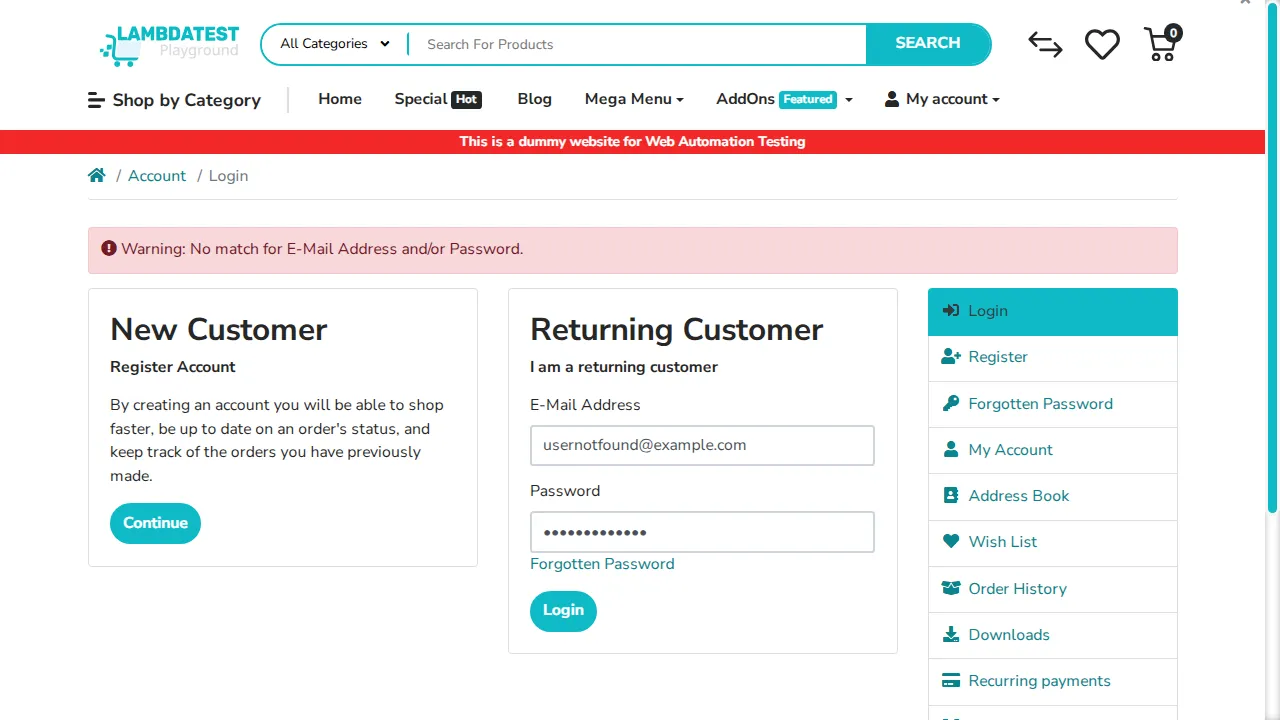
The case passes on both counts. Access was denied, and the wording names neither field specifically, so it does not confirm whether the email address is registered. That second observation is the value of writing the expected result first: a tester checking only for "an error appeared" would have recorded a pass without ever examining the enumeration risk.
Black Box Test Cases: A Login Form Example
The two cases above check a valid sign-in and one rejection. The ten below cover the full specification from the techniques section, including the five-failure, 30-minute lockout rule, and each one names the technique that produced it. TC-02 is the case executed above; the expected results for the rest come from the example specification, not from a live site.
| ID | Technique | Input | Expected result |
|---|---|---|---|
| TC-01 | Use case (main flow) | Registered email, correct password, account open | Signed in, redirected to the account dashboard |
| TC-02 | Equivalence partitioning (invalid class) | Unregistered email usernotfound@example.com, any password | Generic error naming neither field; no counter change |
| TC-03 | Decision table (R2) | Registered email, wrong password | Same generic error as TC-02; failed-attempt counter at 1 |
| TC-04 | Boundary value analysis | Four wrong passwords, then the correct one | Signed in; counter reset to 0 |
| TC-05 | Boundary value analysis | Five consecutive wrong passwords | Account locked; lockout message shown |
| TC-06 | Decision table (R3) and state transition | Correct password on a locked account | Sign-in refused; lockout message; no session created |
| TC-07 | State transition | Correct password 30 minutes after lockout | Signed in; counter reset to 0 |
| TC-08 | Equivalence partitioning (empty class) | Empty email and empty password | Form not submitted; required-field message; no counter change |
| TC-09 | Error guessing | ' OR '1'='1 as the email, any password | Generic error or validation message; no sign-in, no database error text |
| TC-10 | Error guessing | Two wrong passwords in one tab, three in a second tab | Account locked after the fifth failure across both tabs |
TC-04 and TC-05 pin the lockout boundary from both sides, and TC-06 checks the one combination where a correct password must still be refused. Once automated, the ten cases rerun as regression tests on every build.
Black Box Testing Tools for Web, Mobile, API, Performance and Security
Black box tools drive an application through its public interface, so they group by the interface they target rather than by vendor.
- Selenium - drives real browsers through the WebDriver protocol, with bindings for Java, Python, C#, JavaScript, Ruby, and PHP. It suits functional and regression suites on the web.
- Playwright and Cypress - cover the same ground with modern APIs, built-in waiting, and tighter debugging, which usually means less flakiness on dynamic single-page applications.
- Appium - extends the WebDriver model to mobile, automating native, hybrid, and mobile web apps on both Android and iOS from one script.
- Postman - sends requests to an API and asserts on status codes and response bodies, the black box view of a service with no UI. The app is commercial with a free tier; its Newman command-line runner, which runs Postman collections in CI, is open source under Apache-2.0. Postman API testing covers collections and scripts.
- REST Assured - a Java library, licensed Apache-2.0, for testing REST services in code, with checks on status codes, JSON and XML bodies, and authentication. The REST Assured tutorial walks through a first suite.
- SoapUI - SmartBear's open source functional testing tool for SOAP and REST APIs. ReadyAPI is its commercial edition.
- Apache JMeter - open source software, a 100% pure Java application designed to load test functional behavior and measure performance.
- LoadRunner - a long-established commercial performance testing tool, now part of OpenText following its acquisition of Micro Focus in 2023.
- ZAP (formerly OWASP ZAP) - the Zed Attack Proxy, now published as ZAP by Checkmarx, a free, Apache-2.0 web application scanner that finds security vulnerabilities in a running web app automatically and also supports manual testing by penetration testers.
- Burp Suite - PortSwigger's web security testing toolkit. The free Community Edition is a manual toolkit built around an HTTP and WebSockets proxy; the paid Professional edition adds the Burp Scanner for automated vulnerability scanning.
| Tool | Interface it tests | Open source |
|---|---|---|
| Selenium | Web UI (browsers) | Yes |
| Playwright | Web UI (browsers) | Yes |
| Cypress | Web UI (browsers) | Yes (Cypress Cloud is a separate commercial service) |
| Appium | Mobile UI (Android and iOS) | Yes |
| Postman | HTTP APIs | No (Newman runner: yes) |
| REST Assured | REST APIs (Java code) | Yes |
| SoapUI | SOAP and REST APIs | Yes (ReadyAPI is commercial) |
| Apache JMeter | Load and performance (HTTP and other protocols) | Yes |
| LoadRunner | Load and performance | No |
| ZAP (formerly OWASP ZAP) | Web app security (DAST) | Yes |
| Burp Suite | Web app security (proxy and scanner) | No (free Community Edition) |
The API testing tools and penetration testing tools roundups compare more options in those two groups.
Tool choice matters less than execution breadth. A Selenium suite that only ever runs on the tester's own Chrome build verifies one configuration, which is the narrowest possible reading of "works for users". The automation testing tools comparison goes deeper on selection.

Advantages of Black Box Testing
- Tests reflect the user's experience, so requirement gaps and specification mismatches surface as failures rather than being verified as correct code.
- Testers stay independent of the developer's assumptions, which removes the blind spot where the same misreading of a requirement shapes both the code and its tests.
- No programming knowledge is required, so domain experts, product owners, and support staff can contribute cases in the language of the business.
- Test cases can be written from the specification before the implementation exists, which lets test design run in parallel with development.
- Large and complex systems can be covered without a mental model of the whole codebase, so effort scales with the interface rather than the architecture.
- Cases survive internal refactoring untouched, because they bind to external behavior rather than internal structure.
Limitations of Black Box Testing
- Only a fraction of the possible input space can be exercised, so untested combinations remain a real risk and design techniques become mandatory rather than optional.
- Code paths are invisible, so a branch that no test happens to trigger stays unverified and unreported.
- Vague or missing specifications undermine the method at its root, since the expected result has to come from somewhere.
- Diagnosis is slower, because a failure reports a symptom at the interface rather than the line of code responsible.
- Duplicate effort is easy when testers unknowingly repeat scenarios the developers already covered in unit tests.
- Reproducing an environment-specific failure needs session artifacts, since "it failed on Safari" is not actionable on its own.
Best Practices for Black Box Testing
- Resolve ambiguous requirements before designing cases. A requirement no one can write an expected result for is a specification defect worth raising early.
- Write the expected result before execution, so the run confirms a prediction instead of describing whatever happened.
- Combine equivalence partitioning with boundary value analysis by default, since partitioning alone consistently walks past off-by-one defects.
- Give negative cases equal weight, because how a system rejects bad input is where security and usability defects concentrate.
- Keep test data separate from test logic, so the same case can be re-run against new datasets without an edit.
- Automate the stable, repetitive cases and keep exploratory time for the areas where human judgement finds what scripts cannot.
- Run the suite across the configurations your analytics show users on, rather than the ones the team happens to own.
- Attach environment, steps, and observed output to every defect report, so a failure is reproducible without a conversation.
- Add every fixed defect to the regression suite, which is how a bug stops being able to return unnoticed.
Conclusion
Start with your highest-risk requirement and write one test case for it using equivalence partitioning, then add the boundary values around each partition. That single pairing catches more defects per case written than any other technique combination, and it needs nothing but the specification.
Then decide where those cases run. Black box results are only as trustworthy as the configurations behind them, so once the suite is stable locally, move execution onto a grid that covers the browsers and devices your users actually have. The Selenium testing documentation walks through pointing an existing suite at the cloud, which is usually an endpoint change rather than a rewrite.
Author

Rajas Nawar

Rajas Nawar is a Community Contributor at TestMu AI, where he authors software-testing content for QA engineers and testers. His articles cover black box testing, state transition testing, CI/CD test case templates, and software-testing interview questions, giving testing teams practical guides and ready-to-use templates for their quality assurance work.
Reviewer

Himanshu Sheth
Reviewer
Himanshu Sheth is the Director of Marketing (Technical Content) at TestMu AI, with over 8 years of hands-on experience in Selenium, Cypress, and other test automation frameworks. He has authored more than 130 technical blogs for TestMu AI, covering software testing, automation strategy, and CI/CD. At TestMu AI, he leads the technical content efforts across blogs, YouTube, and social media, while closely collaborating with contributors to enhance content quality and product feedback loops. He has done his graduation with a B.E. in Computer Engineering from Mumbai University. Before TestMu AI, Himanshu led engineering teams in embedded software domains at companies like Samsung Research, Motorola, and NXP Semiconductors. He is a core member of DZone and has been a speaker at several unconferences focused on technical writing and software quality.


Black Box Testing FAQs
Did you find this page helpful?
More Related Learning Hubs

TestMu AI forEnterprise
Get access to solutions built on Enterprise
grade security, privacy, & compliance
- Advanced access controls
- Advanced data retention rules
- Advanced Local Testing
- Premium Support options
- Early access to beta features
- Private Slack Channel
- Unlimited Manual Accessibility DevTools Tests