
Author End-to-End Tests in Natural Language with KaneAI
Plan, Author, and Evolve E2E Tests for Web and Mobile Apps in Natural Language.

- TestMu AI (Formerly LambdaTest)
- /
- Blog
- /
- Postman API Testing: Collections, Scripts, and Newman
Postman API Testing: Collections, Scripts, and Newman
Postman API testing explained end to end: build a collection, write pm.test assertions, validate a JSON schema, and run your whole suite in CI with Newman.
Published on:
Cloudflare sits in front of a large share of the public web. Its 2024 API Security and Management Report states that "well over half of the dynamic traffic on our network" is API traffic.
The same report found 30.7% more API endpoints through automated discovery than organizations had documented themselves.
Both numbers point at one problem. Most of what your product serves is API responses, and roughly a third of your endpoints are on nobody's list.
Postman is where most teams start closing that gap, because it is already open on their second monitor.
This guide takes a collection from a single manual request to a suite running on every pull request.
Every command, script, and console output below came from a run I did on 7 August 2026, including one failure that took two attempts to diagnose.
Overview
Postman API testing means attaching JavaScript assertions to HTTP requests so each request becomes a repeatable pass or fail check. You group requests into a collection, assert status codes and response bodies with pm.test, and run the whole collection headlessly with Newman so the checks execute on every commit.
What Do You Need to Test an API in Postman?
Four pieces are the minimum, and the fifth catches what the other four miss.
- Collection: A saved, ordered group of requests exported as a single JSON file. The file is what gets committed to the repository and handed to the command-line runner, so the collection is the unit of version control.
- Environment variables: Named values such as baseUrl and authToken, referenced as double-brace placeholders inside requests. They are what let one collection run against local, staging, and production without editing a single request.
- pm.test assertions: Named blocks in a request's post-response script. Each one reports separately in the run output, so a failure names the specific check that broke rather than just the request.
- JSON Schema validation: A structural assertion via pm.response.to.have.jsonSchema. It catches a field whose type silently changed, which a status-code check returns 200 for and passes.
- Newman: Postman's command-line runner. It executes an exported collection headlessly and returns a non-zero exit code on any failed assertion, which is the mechanism that fails a CI job.
- A green collection proves the API answered correctly. It proves nothing about whether the interface rendered the value or the database write landed, so collections are a layer of coverage rather than the whole of it.
Can Postman Tests Run in a CI/CD Pipeline?
Yes, through Newman, which installs from npm and needs no display server. Where teams need the API call and the resulting screen validated together in one run rather than in two disconnected tools, TestMu AI covers both layers in a single flow.
What Is Postman API Testing?
Postman API testing is sending an HTTP request from Postman and attaching a script that asserts what the response should contain, turning a manual lookup into a repeatable pass or fail check.
That distinction matters more than it sounds. Sending a request and seeing a green 200 badge is inspection, not testing.
Asserting that the status is 200, that the payload carries an integer id, and that the response met a latency budget is a test, because it can fail unwatched.
New to the discipline rather than the tool? The broader API testing guide covers the test types and where each belongs in a strategy.
Four checks cover most of what a request-level test needs to know, and they map onto four different classes of production incident.
| Check | What it catches | What it misses |
|---|---|---|
| Status code | Routing errors, unhandled exceptions, auth misconfiguration returning 401 or 403 | A 200 carrying an empty or wrong payload |
| Response body values | Wrong data, missing records, filters that quietly ignore a query parameter | Fields you did not think to assert on |
| Schema conformance | A field changing type, a required key disappearing, a contract break between services | Values that are correctly typed but factually wrong |
| Response time | A query that lost its index, an N+1 introduced by a refactor | Load behavior, since one request tells you nothing about concurrency |
The right-hand column is worth reading twice, because it is the part a request runner cannot fix by itself.
API testing on TestMu AI runs on the same platform as the web, mobile, and visual suites, so a failing endpoint and the screen it broke surface in one place.
How Do You Create a Collection in Postman?
A collection is an ordered group of requests saved as one JSON file. Create it before the first request, because that file is what you commit and what the command-line runner consumes.
Examples throughout this guide run against a free public JSON API, so you can reproduce them without credentials. Start by defining two collection variables so no request hardcodes a host.
- Create a collection named after the service under test, not the sprint. That name ends up in every CI report.
- Open the collection's Variables tab and add baseUrl set to https://jsonplaceholder.typicode.com, plus userId set to 2.
- Add a GET request pointing at the baseUrl placeholder, then /users/, then the userId placeholder, each in double braces.
- Send it once and confirm a 200 before writing any assertion, so a later failure means a regression, not a typo.
Two habits at this stage save rework. Keep the base URL in a variable from the first request, because retrofitting variables into thirty requests is tedious and error prone.
Group requests in the order a real client would call them. The runner executes top to bottom, and later requests often depend on values the earlier ones produced.
How Do You Write Tests in Postman?
Tests live in the Scripts tab of a request, under Post-response. Postman exposes a global pm object, and each pm.test block registers one named assertion that reports independently.
Here is the script attached to the first request, exactly as it ran:
pm.test('Status code is 200', () => {
  pm.response.to.have.status(200);
});

pm.test('Responds in under 1500 ms', () => {
  pm.expect(pm.response.responseTime).to.be.below(1500);
});

// Hand a value to the next request in the collection
pm.collectionVariables.set('userName', pm.response.json().name);
The last line turns a folder of unrelated requests into a flow. Anything stored with pm.collectionVariables.set is available to every later request as a placeholder.
That is how you chain a login response into an authenticated call without pasting a token by hand.
Name assertions as statements of expected behavior, not labels. "Every post belongs to the requested user" tells you what broke when it goes red; "test 2" does not.
You will be reading that name in a CI log at an inconvenient hour, so spend the extra five words.
Assertions on a list of items deserve a loop rather than a spot check. An endpoint returning the wrong record in position seven passes any assertion that only reads position zero.
pm.test('Every post belongs to the requested user', () => {
  const posts = pm.response.json();
  pm.expect(posts).to.be.an('array').that.is.not.empty;
  posts.forEach(p => pm.expect(p.userId).to.eql(Number(pm.variables.get('userId'))));
});
Note pm.variables.get rather than pm.collectionVariables.get in that snippet. The reason is not stylistic, and it cost me two runs to find.
The data-driven runs section below shows the failure it prevents.
How Do You Store API Keys Securely in Postman?
Store credentials as the current value of an environment variable, never as an initial value. Initial values travel with the exported collection file and end up committed to your repository.
Broken authentication is the second entry in the OWASP API Security Top 10 for 2023, which notes the mechanism is an easy target because it is exposed to everyone.
Your test collection talks to exactly those endpoints, which makes credential storage part of the problem rather than an afterthought.
Postman splits variables into scopes, and the scope you pick decides whether a secret reaches version control.
| Scope | Lives in | Use it for |
|---|---|---|
| Collection variable | The exported collection JSON | Non-secret defaults such as a fallback base URL or a fixed test id |
| Environment variable | A separate environment file | Per-stage hosts and any value that differs between local, staging, and production |
| Initial vs current value | Initial is shared, current is local only | Tokens and passwords, entered as the current value so the shared copy stays blank |
| Data file variable | A CSV or JSON file passed to the runner | Test inputs that change per iteration, never credentials |
In a pipeline, inject the token as an environment variable at run time rather than storing it anywhere in the collection. The CI section below demonstrates the flag that does it.
For token-based flows, a pre-request script on the collection can fetch a fresh token once and store it, so individual requests never carry credentials at all.
That keeps the auth logic in exactly one place when the token endpoint changes.

Note: Chaining tokens and stage-specific hosts by hand stops scaling once several services are in play. TestMu AI keeps environments, credentials, and run history in one workspace so a suite moves between staging and production without hand-edited files. Try TestMu AI free!
How Do You Validate a Response Against a JSON Schema?
Declare a JSON Schema object in the test script and pass it to pm.response.to.have.jsonSchema. The assertion fails when a required field disappears or a field changes type, even on a 200.
Status-code and value assertions share a blind spot. If a refactor changes an id from an integer to a string, the endpoint still returns 200 and the value still looks right.
Meanwhile every client doing arithmetic on that id breaks in production.
A structural assertion closes that gap. Postman ships pm.response.to.have.jsonSchema, which validates the parsed body against a JSON Schema object you declare in the script.
It is the assertion most collections never add, which is why so many suites check values and never check shape.
const userSchema = {
  type: 'object',
  required: ['id', 'name', 'email', 'username'],
  properties: {
    id:       { type: 'integer' },
    name:     { type: 'string', minLength: 1 },
    username: { type: 'string', minLength: 1 },
    email:    { type: 'string', minLength: 3 }
  }
};

pm.test('Response matches the user schema', () => {
  pm.response.to.have.jsonSchema(userSchema);
});
Two properties of that schema do the real work. The required array fails the test when a key disappears, the most common breaking change in a shared API.
Declaring type: 'integer' on the id fails the test the moment the field is serialized as a string, before any consumer notices.
Keep schemas narrow. Asserting every optional field of a large response produces a test that fails on additive, backwards-compatible changes, and a test that cries wolf gets deleted.
Assert only the fields your consumers depend on. When schema checks become the point rather than a safety net, contract testing formalizes the same idea between producer and consumer teams.
A standalone JSON validator helps for checking a payload before you encode it as a schema.
How Do You Run a Postman Collection With a CSV File?
Supply a CSV whose header row names variables, and the runner executes the whole collection once per data row, substituting that row's values into every request that references them.
One collection then covers many inputs without a single duplicated request.
userId
1
2
3
Running the three-request collection against that file produced 9 requests and 21 assertions. On the first attempt, 2 of those 21 failed.
The failure is worth showing, because it is a genuine Postman trap rather than a typo.
  #  failure         detail

 1.  AssertionError  Every post belongs to the requested user
     iteration: 1    expected 1 to deeply equal 2
                     at assertion:1 in test-script
                     inside "Get posts by that user"

 2.  AssertionError  Every post belongs to the requested user
     iteration: 3    expected 3 to deeply equal 2
Read the message closely. Iteration 1 fetched posts for user 1 and compared them against 2. Iteration 2 passed. Iteration 3 fetched user 3 and again compared against 2.
The URL resolved the CSV value correctly; the assertion did not. The original script read pm.collectionVariables.get('userId'), which returns the collection default of 2 and never sees data-file values.
To be sure that was the cause rather than a guess, I printed all three scopes side by side on every iteration:
Iteration 1/3
  'iterationData:', 1, '| variables:', 1, '| collection:', '2'
Iteration 2/3
  'iterationData:', 2, '| variables:', 2, '| collection:', '2'
Iteration 3/3
  'iterationData:', 3, '| variables:', 3, '| collection:', '2'
Two scopes track the CSV row. The third stays pinned at the collection default for the whole run, which is why iteration 2 was the only one that passed.
Switching that one call to pm.variables.get('userId'), which resolves through the full scope chain, took all 21 assertions green on the next run.
As a general rule, read data-file values with pm.iterationData.get to be explicit, or pm.variables.get to take whatever the runner actually substituted.
Reaching for pm.collectionVariables.get inside a data-driven test is the bug, and it stays silent until a data file has more than one row.

How Do You Run Postman Tests in CI With Newman?
Newman runs an exported Postman collection headlessly from the command line and exits with a non-zero status code when any assertion fails, which is the mechanism that turns a CI job red.
A collection that only runs when someone clicks Send is documentation. Newman is what turns it into a test suite.
It is maintained in Postman's own GitHub organization and carries over 7,000 stars.
Export the collection, commit the JSON file, then run it:
npm install -g newman
newman run users-api.postman_collection.json -d users.csv
The output below is verbatim from the single-iteration run of this article's collection:
Users API Smoke

-> Get user
  GET https://jsonplaceholder.typicode.com/users/2 [200 OK, 1.65kB, 332ms]
  ok  Status code is 200
  ok  Responds in under 1500 ms
  ok  Response matches the user schema

-> Get posts by that user
  GET https://jsonplaceholder.typicode.com/posts?userId=2 [200 OK, 2.18kB, 97ms]
  ok  Status code is 200
  ok  Every post belongs to the requested user

-> Create a post
  POST https://jsonplaceholder.typicode.com/posts [201 Created, 1.32kB, 722ms]
  ok  Status code is 201
  ok  Echoes back the title we sent

+-------------------------+--------------------+--------------------+
|                         |           executed |             failed |
+-------------------------+--------------------+--------------------+
|              iterations |                  1 |                  0 |
|                requests |                  3 |                  0 |
|            test-scripts |                  3 |                  0 |
|              assertions |                  7 |                  0 |
+-------------------------+--------------------+--------------------+
| total run duration: 1424ms                                        |
| average response time: 383ms [min: 97ms, max: 722ms, s.d.: 257ms] |
+-------------------------------------------------------------------+
Three flags separate a working pipeline job from a frustrating one.
- --reporters cli,junit renders results as native CI test output instead of raw log text.
- --env-var injects secrets from CI variables at run time rather than committing them.
- --bail suits smoke suites only, since it stops at the first failure and hides the rest.
# .github/workflows/api-tests.yml
name: API Tests
on: [push, pull_request]

jobs:
  newman:
    runs-on: ubuntu-latest
    steps:
      - uses: actions/checkout@v4
      - uses: actions/setup-node@v4
        with:
          node-version: '20'
      - name: Install Newman
        run: npm install -g newman
      - name: Run collection
        run: |
          newman run users-api.postman_collection.json \
            -d users.csv \
            --env-var "authToken=$API_TOKEN" \
            --reporters cli,junit \
            --reporter-junit-export results/newman-junit.xml
        env:
          API_TOKEN: ${{ secrets.API_TOKEN }}
      - name: Publish results
        if: always()
        uses: actions/upload-artifact@v4
        with:
          name: newman-results
          path: results/
The if: always() on the upload step is the detail teams most often miss. Without it, the artifact step is skipped on failure, which is precisely the run whose report you needed.
Adding an HTML reporter alongside JUnit produces a browsable summary of every request and assertion in the run.
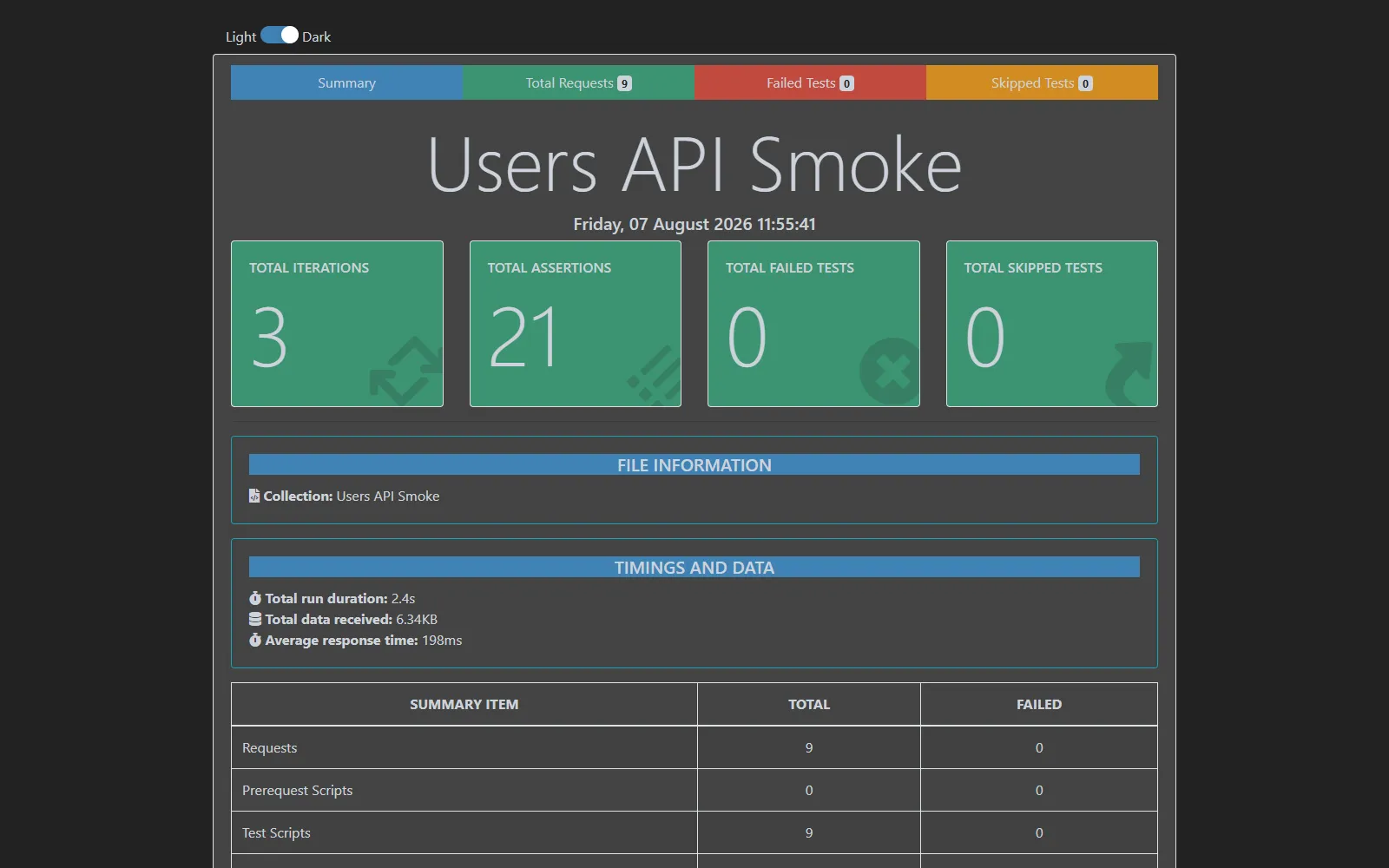
That report is the data-driven run of this article's collection: 3 iterations, 21 assertions, 0 failures, 2.4 seconds.
Publishing it as a pipeline artifact lets a reviewer open a failing pull request and see which assertion broke without rerunning anything locally.
Teams wiring their first pipeline will find the surrounding stages covered in automation testing in a CI/CD pipeline.
A per-run report answers one question: did this run pass? It cannot tell you which assertion failed in nine of the last forty builds.
That second question is the one that decides what to fix on Monday, and Newman keeps no memory across runs, so the trend has to live somewhere else.
For suites executing on TestMu AI, that somewhere is the Test Insights analytics dashboard, which aggregates execution records across builds, time, and configurations.
It flags consistently failing tests by failure frequency rather than by whoever complained loudest, reporting on verdicts the upstream assertions produced instead of substituting for them.
The AI root cause analysis documentation covers how a specific failure gets localized once the trend points you at it.
What Are the Limits of Postman API Testing?
Collections stop at the response boundary. They smoke-test endpoints and check contracts well, but never open a browser or query a database, so a correct response and a broken screen look identical.
Knowing where that ceiling sits saves teams from forcing a request runner to do a job it was never shaped for.
| Situation | Collections handle it? | Why |
|---|---|---|
| Smoke-testing endpoints on every commit | Yes | Fast, headless, and the exit code maps straight onto pipeline control flow |
| Contract checks between services | Yes | Schema assertions catch shape changes before consumers do |
| Verifying the UI reflects the API response | No | A collection never opens a browser, so a correct response and a broken screen look identical |
| Confirming a write reached the database | No | A 201 means the request was accepted, not that the row persisted |
| Suites in the hundreds across many services | Partly | Scripts live inside a JSON blob, so code review, reuse, and refactoring get awkward at scale |
Still weighing which request runner to standardize on? The roundup of API testing tools compares the wider field against these same limits.
The third and fourth rows are where most escaped defects hide. Coverage gaps at the seams happen because UI tests, API tests, and data validation live in separate tools owned by separate people.
Nobody validates the end-to-end path of click, API call, database write, and screen confirmation as one journey.
That seam is what KaneAI is built to close. It authors tests from natural-language prompts and validates web, API, database, network, and accessibility layers in connected flows.
Three capabilities matter most when you are coming from a collection:
- A single test performs a UI action and asserts the backing API behaved correctly in the same run.
- Web execution spans TestMu AI's 3,000+ browser and OS combinations, so coverage is not tied to local machines.
- Generated tests export to Selenium, Playwright, Cypress, or Appium, so adopting it does not strand an existing suite.
In practice the authoring surface is a prompt rather than a script, and one flow covers both layers of the check a collection can only do half of:
Go to the orders page and create an order for user 2.
Assert the create-order API responds 201 and returns an order id.
Assert the new order appears in the orders table on screen.
The second line is the assertion your Postman collection already makes. The third is the one it structurally cannot, and running both together stops a 201 with a blank table from shipping.
Every run produces a video, a step trace, and root-cause analysis on failure rather than a bare stack trace.
For teams that prefer the terminal, Kane CLI runs the same idea from a command line and a pipeline, returning standard exit codes that behave like Newman's.
The Kane CLI documentation covers installation and the CI patterns.

How Do You Start Automating Your API Tests?
Start with a single endpoint, add a status check, a schema check, and a latency budget, then export the collection and run it with Newman locally before wiring up the GitHub Actions job.
Pick the endpoint your team already worries about. That sequence takes under fifteen minutes and produces something a pipeline can execute today.
Add the CI job next, with the JUnit reporter and the always-upload artifact step, before the collection grows.
A suite that reaches thirty requests having never run in CI is far harder to wire up than one running in CI since request number one.
Once the API layer is covered, the gap that remains is everything after the response.
To validate the API call and the screen it drives in one flow, start with TestMu AI's getting started guide for KaneAI and point it at that same endpoint.
Wondering how these checks look outside Postman? REST API testing walks through the equivalent patterns in code.
Testing from the terminal? Kane CLI by TestMu AI lets SDETs and developers plan, write, run and debug tests from the command line.
Author

Anubhav Singhmaar
Blogs: 49

Anubhav Singhmaar is an AI Product Manager at TestMu AI driving Kane CLI, the command-line tool that brings browser automation to the terminal, turning natural-language flows into runs in a real Chrome browser that return pass or fail with shareable proof. He owns the roadmap and prioritization and works with engineering to ship developer-facing features. Before TestMu AI, he spent over four years at Sprinklr owning enterprise voice AI across APAC and EMEA. A mechanical engineer turned product manager, he grounds guidance in real QA workflows.
Reviewer

Harish Rajora
Reviewer
Harish Rajora is a software developer at TestMu AI with over 6 years of hands-on experience in Python and cross-platform application development across Windows, macOS, and Linux. He has authored 800+ technical articles and worked on large-scale projects, including GenAI applications and core engineering features used by millions. Harish has led DevOps initiatives building CI/CD pipelines with Jenkins, AWS, GitLab, and GitHub, and holds an M.Tech in Software Engineering from IIIT Allahabad.


Postman API Testing FAQs
Did you find this page helpful?
More Related Blogs

TestMu AI forEnterprise
Get access to solutions built on Enterprise
grade security, privacy, & compliance
- Advanced access controls
- Advanced data retention rules
- Advanced Local Testing
- Premium Support options
- Early access to beta features
- Private Slack Channel
- Unlimited Manual Accessibility DevTools Tests