

Power Your Software Testing with AI Agents and Cloud
The Native AI-Agentic Cloud Platform to Supercharge Quality Engineering. Test Intelligently and Ship Faster.


- TestMu AI (Formerly LambdaTest)
- /
- Learning Hub
- /
- What is Maintenance Testing in Software Testing?
What is Maintenance Testing in Software Testing?
Ensure software reliability with Maintenance Testing for optimal performance. Explore strategies to uphold system integrity post-deployment.
Last Updated on:
On This Page
- What is Maintenance Testing?
- Importance of Maintenance Testing
- Software Maintenance Testing Approaches
- Types Of Maintenance Testing
- 4 Software Maintenance Types
- Triggers of Maintenance Testing
- Factors To Remember While Conducting Maintenance Testing
- The Test Maintenance Crisis
- AI Self-Healing Tests
- Best Practices for Maintenance Testing
OVERVIEW
Maintenance testing is an important part of testing software. As testers, we check the software before it's officially out and even after it's out. When we test it after it's out, it's called maintenance testing. This helps make sure the software keeps working well and doesn't have problems that might show up later.
An effectively implemented maintenance testing regimen holds the potential to prolong the operational lifespan of equipment by approximately 30%. This not only optimizes the return on investment but also curtails replacement costs, offering a substantial financial advantage.
In this detailed guide, we will take a closer look at maintenance testing. We'll explore why it's so important, how it's done, and all the good things it brings to different industries.
What is Maintenance Testing?
Maintenance testing, according to the ISTQB glossary, means testing when changes are made to a system that's already running. It's like checking how these changes affect the system and how it works in its new surroundings, which is where impact analysis in testing scopes the retest to the areas a change actually touches. In software testing, especially within the agile framework, code changes occur frequently, sometimes even multiple times a day. As a result, the practice of test maintenance assumes a critical role in ensuring the alignment of automated tests with these rapid code updates.
Test maintenance, in this context, is the ongoing process of adjusting and updating automated tests to keep pace with the evolving codebase. It acts as a bridge between the dynamic nature of software development and the need for consistent and accurate testing. Given the frequency of code changes, it's essential to regularly modify and refine automated tests to prevent discrepancies and inaccuracies from emerging.
Moreover, maintaining a vigilant awareness of these ongoing code modifications is a pivotal component of the test maintenance process. This attentiveness is particularly significant due to the necessity of regression testing - a practice that verifies that new code changes do not unintentionally disrupt previously functioning aspects of the software application.

Note: Automate your test scripts across 3,000+ browser and OS combinations. Try TestMu AI Now!
Importance of Maintenance Testing
In software development, test maintenance is critical. It functions similarly to a strong support beam that holds up a building. It is significant because it affects the entire software development process. Let's take a closer look at why having tests in good shape is critical for software project success.
1. Efficiency in Test Creation
Test maintenance significantly streamlines the process of writing tests. Rather than continuously crafting new tests, test maintenance revolves around the art of refining and nurturing existing ones. This approach reduces the time and effort required to create new tests from scratch, translating into enhanced efficiency in the testing phase.
2. Cost Reduction
One of the most tangible benefits of test maintenance is the reduction in costs. By leveraging existing tests, the need to invest in the creation of entirely new test cases diminishes. Consequently, financial resources are conserved, which is especially pertinent in the budget-sensitive landscape of software development.
3. Simplification of Testing
Test maintenance simplifies the testing process itself. Instead of navigating through diverse, uncoordinated tests, a consolidated set of well-maintained tests streamlines the testing procedure. This simplicity fosters better visibility, comprehensibility, and manageability of the testing phase.
4. Continuous Test Quality
As the tests are refined and updated through maintenance, their quality is consistently upheld. Over time, these tests evolve to encompass edge cases, corner scenarios, and critical functionalities, ensuring that the test suite remains comprehensive and effective in uncovering defects.
5. Enhanced Automation Testing
Automation testing scripts benefit substantially from diligent test maintenance. With ongoing updates, automation scripts mature to address complex test scenarios. This evolution enhances the automation suite's capability to perform intricate tests, reducing manual intervention and expediting the testing process.
Elevate your automation testing endeavors with TestMu AI, an integrated digital experience testing platform. Benefit from a robust online device farm encompassing 10,000+ real devices and diverse operating systems for seamless scalability. TestMu AI also features effortless codeless test automation integration, streamlining the testing process.

6. Sustainable Test Framework
Test maintenance fosters the development of a sustainable test framework. By investing in the refinement of existing tests, a foundation for future tests is laid. This not only ensures that tests remain adaptable to changing requirements but also contributes to a culture of continuous improvement in testing practices.
Software Maintenance Testing Approaches
In this section, we'll look at different ways to perform maintenance testing. They include - Regression Test Suite way, the Heuristic-Based Framework way, the Keyword-Based way, the Graphical User Interface (GUI) Regression Testing way, and the Model-Based way. We'll talk about each of these ways in separate sections.
Regression Test Suite Approach (RTS)
When modifications are applied to a system, the associated components, such as test suites, need to be adjusted accordingly during the maintenance phase.
In this context, a case study was conducted by Skoglund, M., Runeson, P.: “A case study on regression test suite maintenance in system evolution” to explore the process of maintaining test suites as a system evolves due to changes made during the maintenance phase. The study leveraged reusable test environments and programs to facilitate the test suite maintenance process. The research examined challenges related to software maintenance through both an exploratory study and a follow-up study on change strategies, with inspiration drawn from the work of Rajlich, Gosavi: “A Case Study of Unanticipated Incremental Change.”
The case study encompassed four distinct phases, each playing a crucial role in the overall process. These phases are as follows: environment setup, build configuration, execution of unit testing, and execution of functional testing. Refer to the figure below for a graphical representation of these phases.
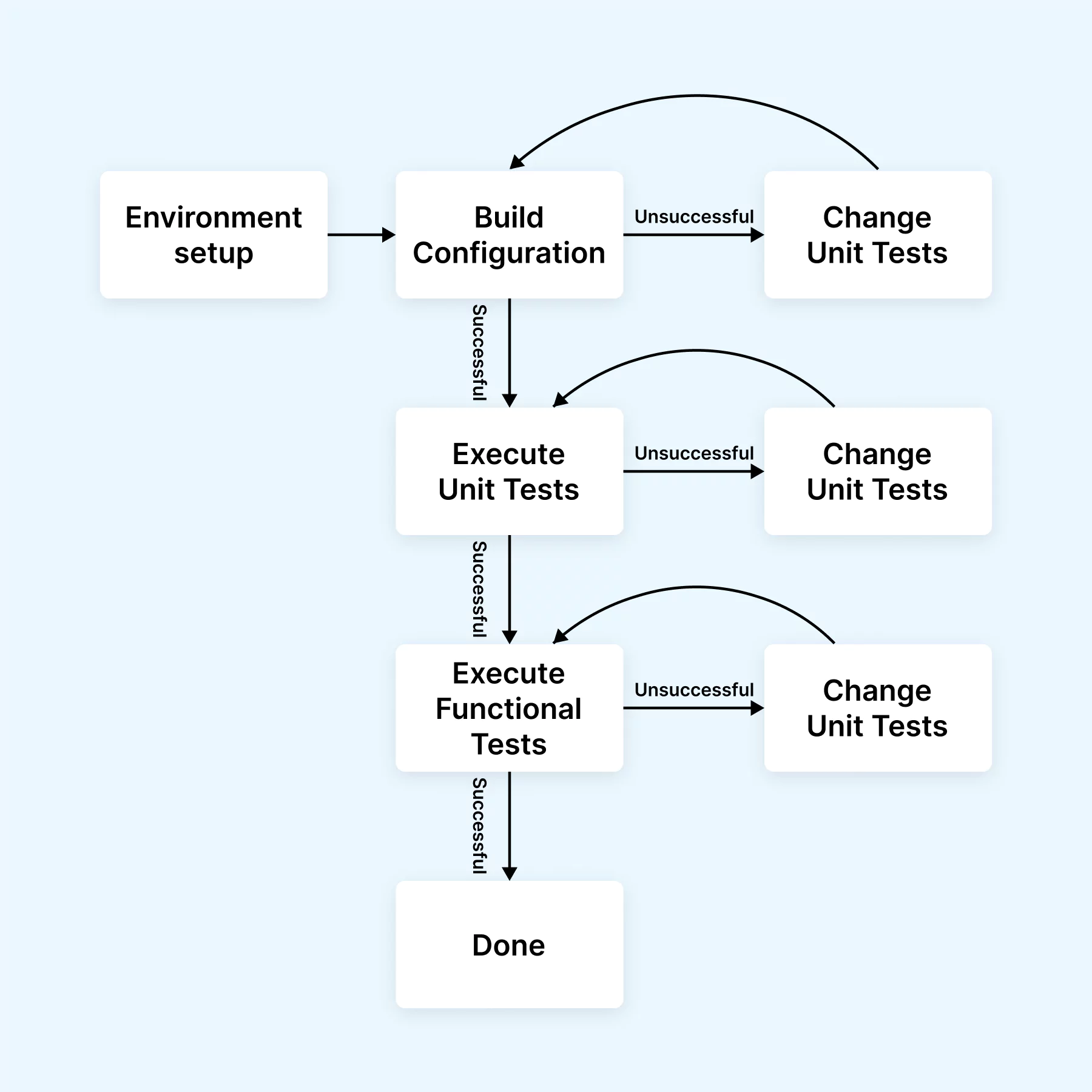
Throughout the testing process, several steps were executed. Initially, the baseline version of the system was installed, followed by test execution on this baseline to verify its operational and functional integrity. Subsequently, the process extended to the change propagation version, involving similar installation and execution procedures. During this process, any necessary adaptations were logged and documented.
To assess the effectiveness of the test suite maintenance, a comparative study was carried out involving different versions of the test cases. The outcomes of these studies were validated using a model known as "Padgett." The results of the study were then categorized into three distinct classifications: reactivity, researcher bias, and respondent bias.
For optimizing test execution velocity, the consideration of HyperExecute, a dynamic end-to-end test orchestration cloud, is paramount. It boasts the capability to accelerate the execution of automation tests by an impressive 70% when compared to alternative testing clouds. The HyperExecute platform provides comprehensive hosted runners for major operating systems, encompassing Windows, MacOS, and Linux containers.
The deployment of HyperExecute translates to condensed feedback cycles and expedited defect identification, resulting in the refinement of the testing process. This amalgamation of efficiency and precision is poised to elevate the realm of software testing to new heights.
Note: Reduce test execution by 70% with TestMu AI’s HyperExecute Orchestration cloud. Try HyperExecute Now!
Heuristic-Based Framework Approach (HBF)
Graphic User Interfaces (GUIs) constitute a substantial portion of source code. Testing GUIs presents distinct challenges compared to traditional testing methods that focus on the implementation level of source code and programming. McMaster, S., Memon, A.M addresses this in “An Extensible Heuristic-Based Framework for GUI Test Case Maintenance” by introducing an approach grounded in a heuristic model for GUI test case maintenance.
The approach employs two core techniques: Capture/Replay and Elements and Actions. Capture/Replay records user interactions for test case creation without requiring advanced programming skills. However, GUI changes can lead to malfunctioning test cases, requiring manual intervention. In contrast, Elements and Actions view GUI test cases as sequences of actions. These methods help capture user actions and system responses.
During system changes, GUI elements like the Find Dialog box can be updated, affecting test cases. To address this, the Heuristic-Based Framework (HBF) automated test case adjustments. This ensures that test cases remain effective even when the system evolves.
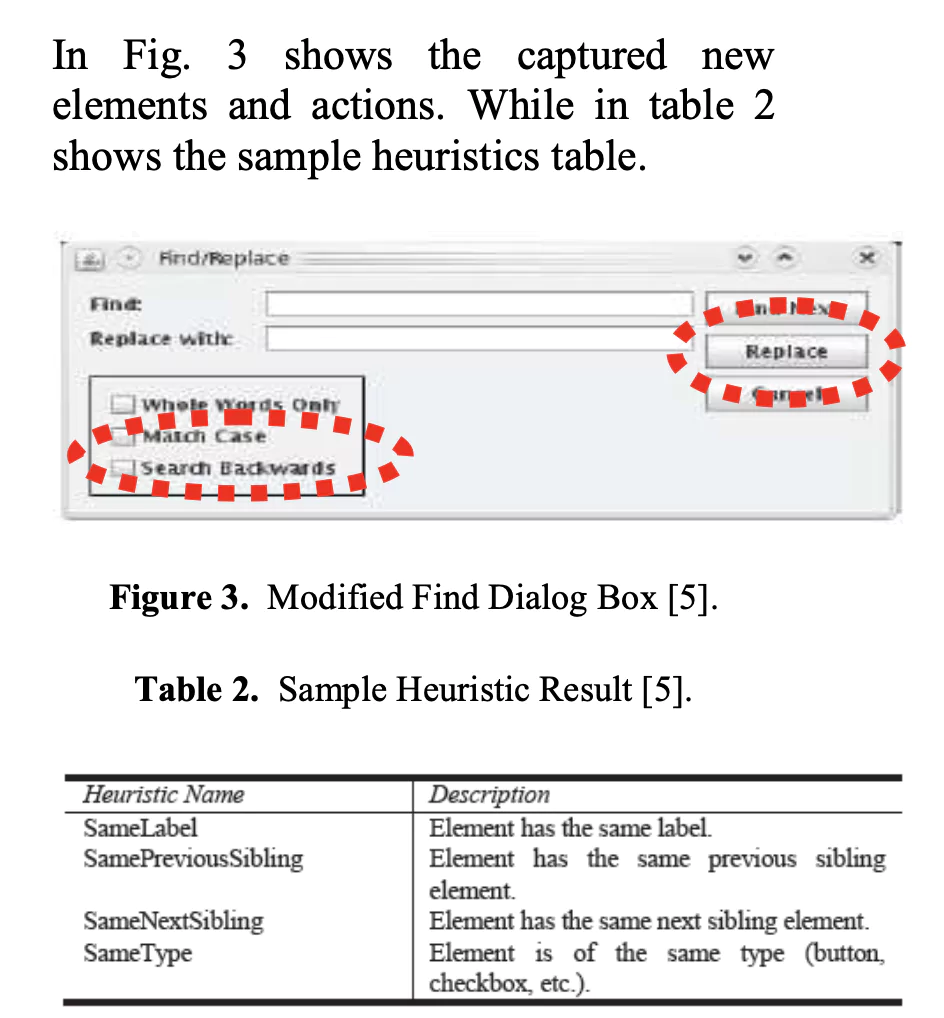
Source- Evaluating Software Maintenance Testing Approaches to Support Test Case Evolution
Keyword-Based Approach (KB)
In, a keyword-based approach was employed for software testing automation and maintenance. This approach involved categorizing test automation into five distinct categories: test management, unit testing, test data generation, performance testing, functional testing, system testing, and regression testing. The focus of this approach was on test execution automation.
The fundamental principle of the keyword-based approach entails the separation of test engineering tasks into specific roles. These roles include the test designer, automation engineer, and test executor. As the test designer, individuals are responsible for creating test cases using predefined keywords, which are then documented within a spreadsheet. The automation engineer proceeds to translate these keyword-driven scripts into actual code using scripting tools and programming languages. Ultimately, the test executor employs the spreadsheet to directly execute the tests.
This approach is designed to enhance the effectiveness of the Capture/Playback technique by reducing the overall volume of test scripts. The process is illustrated in Figure 4, accompanied by the research study's test results in Figure 5, as conducted by the authors. Wissink, T., Amaro, C.: Successful Test Automation for Software Maintenance.
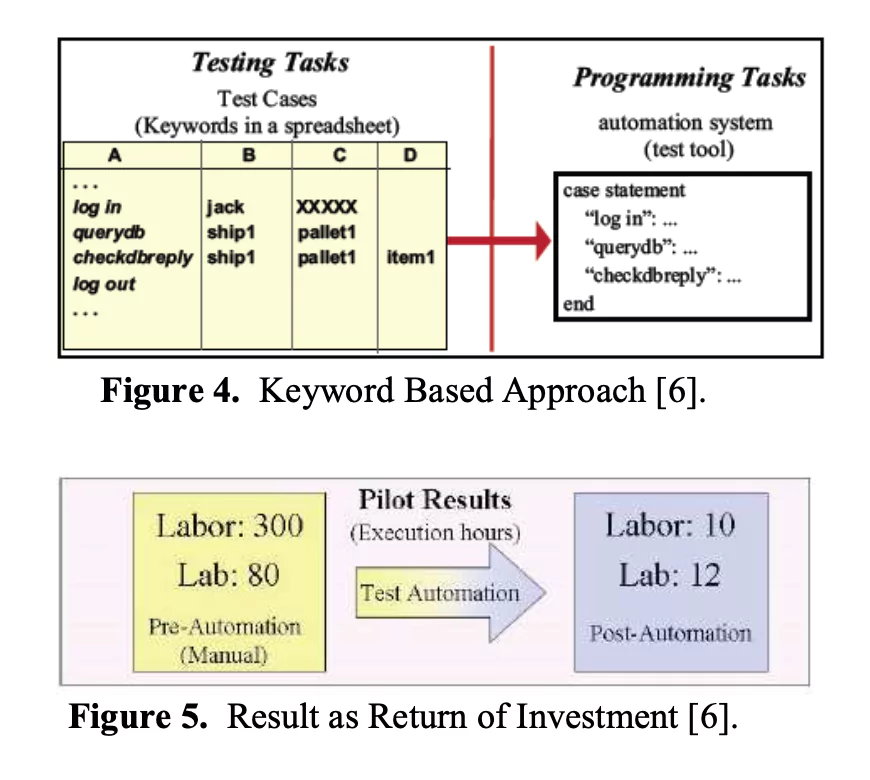
Source- Evaluating Software Maintenance Testing Approaches to Support Test Case Evolution
In short, the Keyword-Based Approach (KB) described in “Successful Test Automation for Software Maintenance” leverages a keyword-driven testing methodology for automating and maintaining software testing. It involves distinct roles such as the test designer, automation engineer, and test executor to streamline the process, resulting in improved automation and reduced script complexity.
Graphical User Interfaces (GUIs) Regression Testing Approach (GUIs-RT)
In proceedings of the 9th European Software Engineering Conference, a noteworthy assertion is made that test case maintenance using graphical user interfaces (GUIs) is a feasible endeavor despite the limited existing research in this domain. This approach, termed GUI Regression Testing (GUIs-RT), introduces valuable insights into the maintenance of test suites by focusing on GUI maintenance. Specifically, GUIs-RT is centered around evaluating the viability of test suites subsequent to alterations made to the system's graphical user interfaces.
The technique employed by GUIs-RT is bifurcated into two key components: a checker and a repairer. The checker undertakes the task of classifying test cases into two categories - usable and unusable. When a test case is identified as falling within the latter category, the repairer steps in to rectify these unusable test cases. After the necessary repairs, these modified test cases are labeled and preserved as repairable test cases. The details of this process are visually depicted in the figure below.
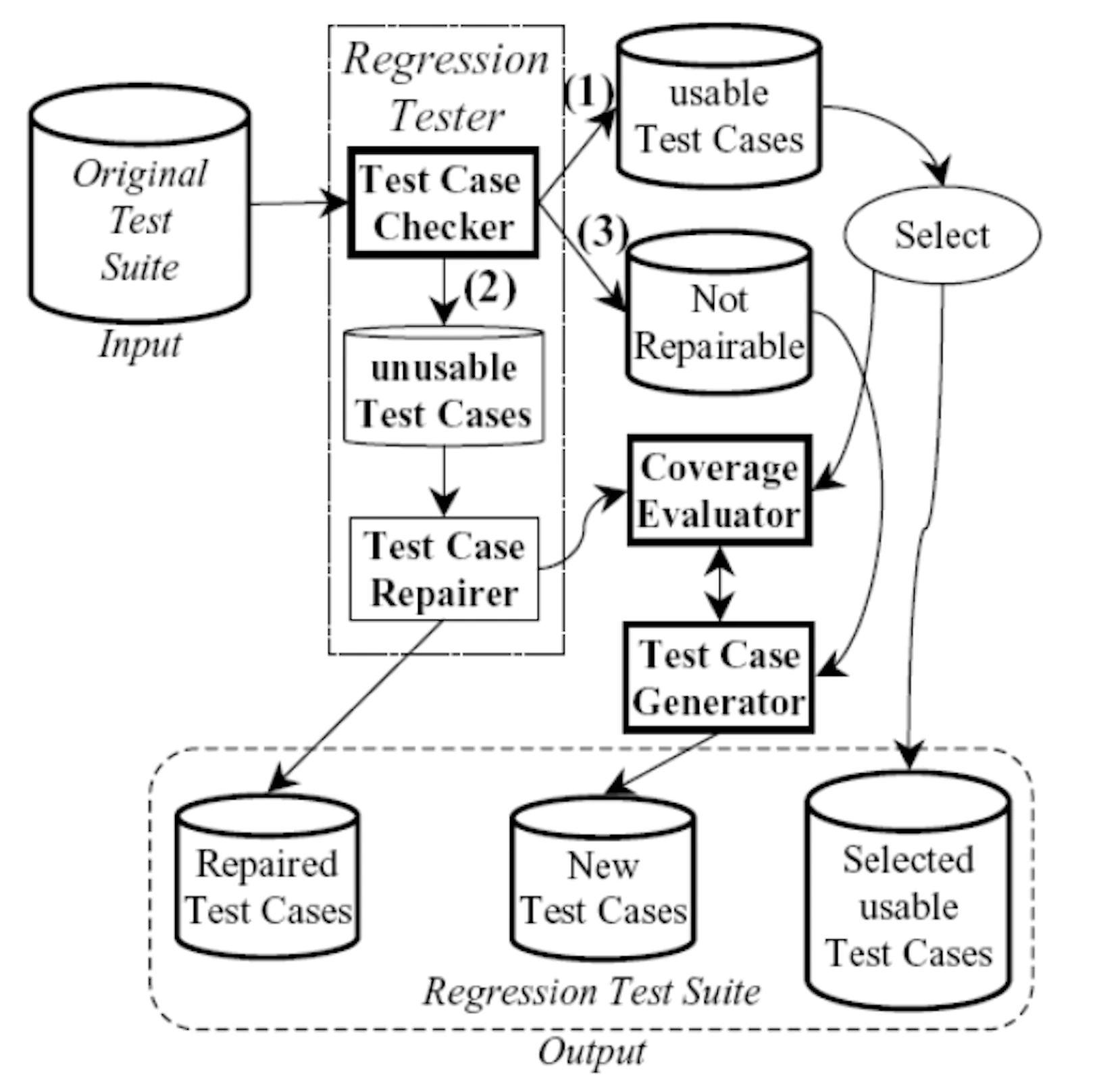
Source- Evaluating Software Maintenance Testing Approaches to Support Test Case Evolution
The concept of "repaired test cases" serves as an efficient strategy for mitigating the expenses associated with generating entirely new test cases. Detailed explanations of the various components within this approach are provided within the research study conducted by the authors, thereby obviating the need for repetition in this subsection.
To assess the efficacy of GUIs-RT, a comprehensive comparison is conducted across multiple case studies. Notably, the execution time of the Bit-vector and Graph Matching Checker is examined, as indicated in the table given below.
| Steps | Subject Application | Time |
|---|---|---|
| Manual Generation | Reader | 7.59 hrs. |
| WordPad | 5.47 hrs. | |
| Checker | Reader | 6.5 sec. |
| WordPad | 6.13 sec. | |
| Repairer | Reader | 17.76 sec. |
| WordPad | 18.01 sec. |
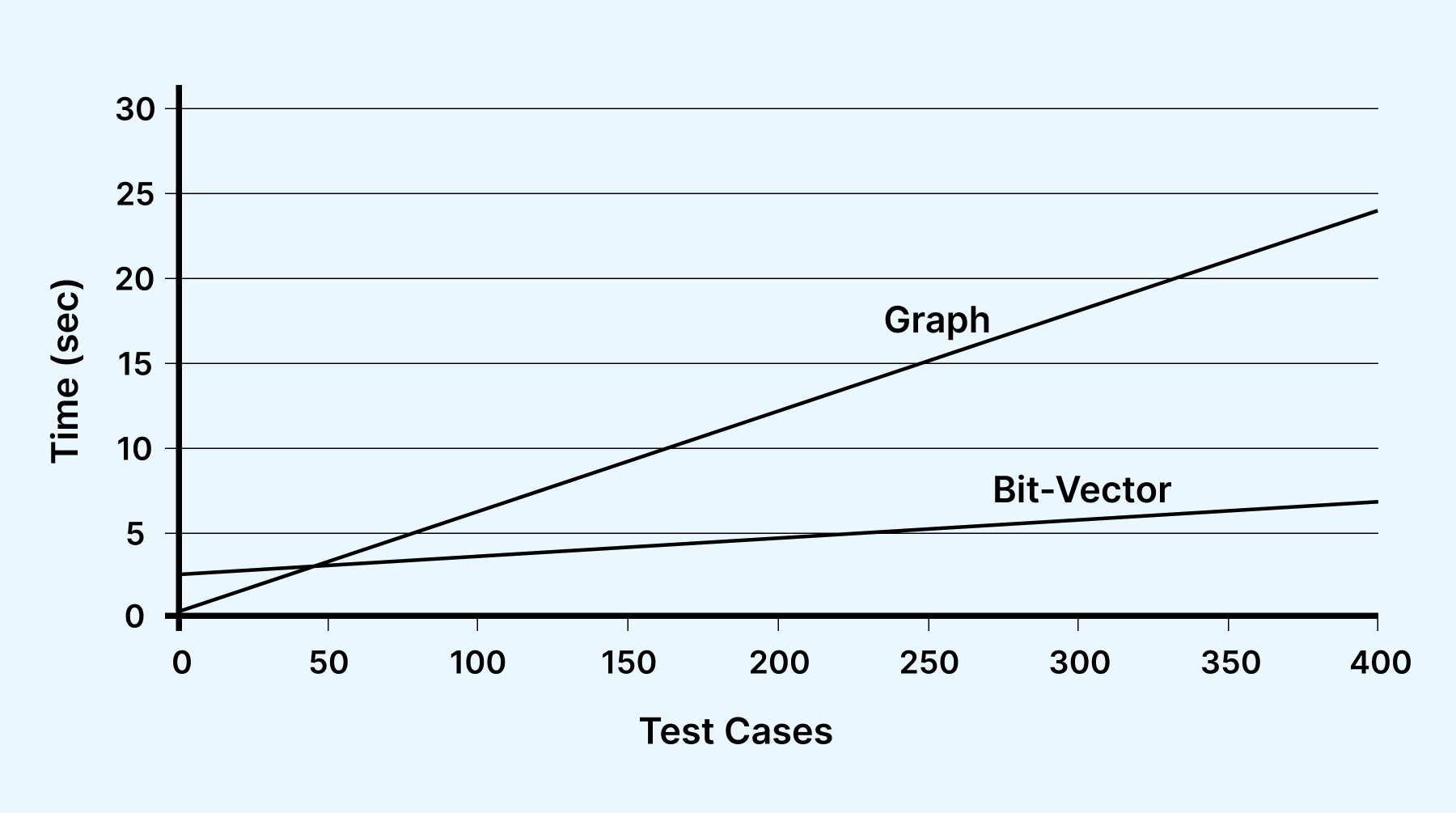
Similarly, the execution time of the Graph Matching Checker is visualized in the image below .
In essence, the Graphical User Interfaces (GUIs) Regression Testing Approach (GUIs-RT) discussed in the graph image emphasizes the feasibility of maintaining test cases pertaining to GUIs. By employing a checker and repairer framework, GUIs-RT effectively categorizes and remedies test cases for optimal usability. The value of repaired test cases in cost reduction is highlighted, and through case studies, the effectiveness of this approach is measured using the execution times of specialized checkers.
Model-Based Approach (MB)
Naslavsky, L., Ziv, H., Richardson, D.J. in “model-based regression test selection technique” proposed a model-based approach for maintenance testing, which focuses on ensuring the reliability and functionality of software during its maintenance phase. This approach centers around the utilization of models as its primary foundation, and it assumes the availability of tools that facilitate the seamless interaction between these models and the underlying source code. This allows for automated generation and synchronization of code and models. In particular, the approach leverages UML (Unified Modeling Language) class diagrams and sequence diagrams as the key input components for the generation of test cases.
The core concept of the Model-Based Approach involves the establishment of an infrastructure that consists of a test-related model and a highly detailed traceability mechanism. This infrastructure, as depicted in Figure 8, forms the backbone of the approach's methodology.
The Model-Based Approach is structured into two main phases, each serving distinct purposes:
Phase 1: Model and Traceability Creation
In the initial phase, the focus is on creating accurate and up-to-date models along with a comprehensive traceability mechanism. This involves two fundamental steps:
- Sequence Diagram to Model-Based Control Flow Graph (MBCFG) Transformation:The sequence diagrams, which represent the flow of interactions between different components of the software, are transformed into Model-Based Control Flow Graphs (MBCFG). This transformation captures the control flow aspects of the software's behavior.
- MBCFG Information to Test Generation Hierarchy Conversion: The information stored within the MBCFG is then converted into a test generation hierarchy. Concurrently, the traceability model is established, which allows for a clear linkage between the generated test hierarchy and the underlying components of the software.
Abstract test cases are generated as a result of these initial steps. As the process progresses, these abstract test cases are refined, and through subsequent transformations, they evolve into more concrete test script skeletons.
Phase 2: Model Utilization and Test Classification
The second phase revolves around the utilization of the models created in Phase 1, as well as any modified UML models that might arise during the maintenance process. This phase consists of four main activities:
- Model Comparison for Differences: The approach involves comparing the original models with any modified models to identify differences, and this process is referred to as "differencing the model."
- Sequence Diagram to Modified MBCFG Conversion: The sequence diagrams, which might have undergone modifications, are transformed into modified MBCFGs to reflect these changes accurately.
- Pairwise Graph Traversal: The original and modified MBCFGs, along with the differencing model, are utilized for pairwise graph traversal. This comparison aids in understanding the impacts of modifications on the software's behavior.
- Test Case Classification: The insights gained from the pairwise traversal are used to classify test cases. Particularly, dangerous entities are identified and used to categorize test cases for more targeted testing.
A notable feature of this approach is its ability to accommodate modifications made at the model level, encompassing both class diagrams and sequence diagrams. By encompassing these modifications, the Model-Based Approach ensures that software maintenance remains systematic, effective, and comprehensive.
Types Of Maintenance Testing
As maintenance testers work through validating applications, they navigate two distinct approaches based on test types:
1. Confirmation Maintenance Testing
In this method, known as confirmation maintenance testing, testers and QA professionals primarily concentrate on the modified features of the application. Their aim is to ensure that every aspect of the application functions precisely as intended. This entails validation of the altered functionalities to guarantee seamless integration and operation. Confirmation testing serves as a thorough check to confirm that all the recent changes align harmoniously with the software's original design and intended performance.
2. Regression Maintenance Testing
Within the domain of maintenance testing, regression testing holds a significant role. This approach involves assessing the existing functionalities of the application to verify that they remain intact and unimpaired by the introduction of new features.
Both types of maintenance testing work together to keep the software strong and reliable. Confirmation testing stops problems before they start, and regression testing makes sure everything keeps working as it should, even with changes. It's like having two safety nets to catch any issues and make sure the software runs smoothly all the time.
The 4 Types of Software Maintenance Testing
Maintenance testing maps directly onto the four standard categories of software maintenance described in the ISO/IEC 14764 maintenance standard. Each category is triggered by a different reason for changing production software, and each one shapes what you retest. Knowing which category a change belongs to helps QA teams scope maintenance testing precisely instead of rerunning the entire test suite after every release.
1. Corrective Maintenance Testing
Corrective maintenance addresses defects that surface after release, such as functional bugs, logic errors, or crashes reported by users. Corrective maintenance testing validates each fix and then runs regression checks to confirm the repair did not break neighboring functionality. Because these changes are often urgent, teams pair the fix with focused retesting of the affected module and the workflows that depend on it.
2. Adaptive Maintenance Testing
Adaptive maintenance keeps software working as its environment changes, whether that is a new operating system version, an upgraded database, a migrated cloud platform, or an updated third-party API. Adaptive maintenance testing verifies that the ported or migrated build still behaves correctly in the new surroundings, covering data conversion, configuration changes, and compatibility with the surrounding stack.
3. Perfective Maintenance Testing
Perfective maintenance covers enhancements that make the product better for users, including new features, usability refinements, and performance tuning requested after release. Perfective maintenance testing confirms that the new capability works as specified and that established features keep functioning, so improvements do not quietly introduce regressions.
4. Preventive Maintenance Testing
Preventive maintenance reduces the risk of future failures by improving the code before anything breaks, through refactoring, code optimization, and removing technical debt. Preventive maintenance testing checks that these internal changes preserve external behavior, giving teams confidence to keep the codebase clean without destabilizing what already ships.
Maintenance Testing vs Compatibility Testing
Searchers often confuse maintenance testing with compatibility testing because both cluster around releases, yet they answer different questions. The table below contrasts the two so you can pick the right approach for a given change.
| Aspect | Maintenance Testing | Compatibility Testing |
|---|---|---|
| Core question | Does the software still work correctly after a change? | Does the software work across different environments? |
| When it runs | After deployment, when code is modified, migrated, or patched | Whenever the target browser, OS, device, or network mix expands |
| Primary focus | Regression safety and stability of existing functionality | Consistent behavior on varied hardware and software combinations |
| Typical trigger | Bug fixes, enhancements, migrations, and refactoring | New browser or OS releases and new device support |
If your goal is validating behavior across environments rather than after changes, see the dedicated guide on compatibility testing.
Triggers of Maintenance Testing
Maintenance testing comes into play for both planned and unplanned changes, serving various purposes. These triggers for maintenance testing can be categorized into two distinct types:
1. Modification
Modifications become necessary for several reasons:
- Planned Enhancements: When improvements are planned for a software release, maintenance testing ensures these enhancements work as intended.
- Corrective Changes: If issues arise post-deployment, maintenance testing corrects these problems to restore functionality.
- Emergency Changes: Urgent fixes or changes, such as critical security patches, demand maintenance testing to ensure swift resolution.
- Operational Environment Changes: Upgrades to the operating system or database may necessitate maintenance testing to ensure compatibility.
- COTS Software Upgrades: When commercial off-the-shelf (COTS) software is upgraded, maintenance testing verifies its smooth integration. For ERP platforms, how much retesting each vendor release demands depends largely on ERP configuration vs customization decisions, since custom code is far more likely to break during upgrades than configured settings.
- Defect and Vulnerability Patches: Maintenance testing plays a pivotal role in testing patches aimed at fixing defects and security vulnerabilities.
2. Migration
Migration from one platform to another warrants operational testing for the new environment, modified software, and data conversion. Additionally, applications reach the retirement stage at the end of their life cycle. During this phase, testing is carried out for data migration or archiving, especially when extended data retention periods are essential. Procedures to restore or retrieve data after archiving may also need testing. Regression testing ensures that the existing functionality continues to work as expected.
Maintenance testing extends to the realm of the Internet of Things (IoT) as well. When entirely new or modified elements, such as hardware devices or software services, are introduced to a system, maintenance testing becomes critical. In such instances, integration testing takes center stage at different levels, spanning applications and networks. Moreover, maintenance testing zeroes in on security aspects, especially those related to safeguarding personal data.
In the tapestry of software development, maintenance testing serves as a sentinel, ensuring software quality, security, and performance remain intact amidst an ever-changing landscape.
Factors To Remember While Conducting Maintenance Testing
Here are two key points to keep in mind during this process:
1. Test Every Modification Completely
Regardless of the scope or magnitude of the modification being made to the software, it's imperative to subject it to comprehensive testing. This means that even seemingly minor changes should be scrutinized thoroughly. The reason behind this is to identify and rectify any potential issues before they can lead to downtime or affect the user experience.
It's important to recognize that seemingly insignificant changes can sometimes have far-reaching consequences, especially in complex software systems. By testing every modification comprehensively, you are taking a proactive approach to prevent issues from arising in the first place.
The goal here is to catch any bugs, errors, or glitches that might arise due to the modification. This could involve various types of testing, such as unit testing, integration testing, regression testing, and more. The testing process should simulate real-world scenarios and user interactions to ensure that the software remains robust and reliable.
2. Functionality Of Existing Software Should Not Be Affected
One of the primary objectives of Maintenance Testing is to make sure that any modifications do not disrupt the existing functionality of the software. While introducing new features or fixing existing issues, it's critical to maintain the overall integrity of the software. Users rely on the software's existing features to perform their tasks efficiently, and any disruption to this functionality can lead to frustration and decreased productivity.
The key is to strike a balance between innovation and stability. The proposed modification should undergo thorough testing to ensure that it seamlessly integrates with the existing codebase and functions as intended. This involves not only testing the new feature but also conducting regression testing to confirm that the modification hasn't introduced regressions in previously working areas of the software. By doing so, you ensure that the modification doesn't inadvertently break the core functionality of the software.
The Test Maintenance Crisis: Understanding Test Debt and Flaky Tests
As automated suites grow, many teams hit a wall where they spend more time repairing broken test scripts than writing new coverage. That accumulating repair burden is known as test debt, and left unmanaged it produces a maintenance spiral that slows every release. This is the practical, day-to-day reality of maintenance testing in modern CI/CD pipelines, and it is where most QA teams feel the pain.
What Is Test Debt?
Test debt is the backlog of test scripts that need fixing because the application changed underneath them. A renamed button, a restructured page, or a shifted layout can break dozens of tests that were bound to brittle element locators such as fixed XPaths and IDs. Each broken test has to be traced, understood, and re-pointed by hand, and while that work sits in the queue, coverage silently erodes. Like any debt, it compounds: the longer brittle tests go unmaintained, the larger the eventual repair bill.
How Flaky Tests Drain Release Velocity
Flaky tests fail intermittently without any real defect in the product, often because of timing issues, slow loads, or unstable locators. They are corrosive because they train teams to ignore red builds, and a single flaky test can trigger repeated manual reruns that stall a pipeline. Tracking down and stabilizing flaky tests is a core part of modern maintenance testing, since a suite no one trusts provides no safety net at all.
The maintenance spiral takes hold when repair work consistently outpaces new authoring. QA capacity gets consumed re-pointing selectors instead of expanding coverage, releases slow down, and the suite gradually shifts from an asset into a liability. Breaking that spiral is exactly where AI-driven approaches such as self-healing come in.
How AI Self-Healing Eliminates Maintenance Bottlenecks
Traditional automation breaks the moment a locator changes. Self-healing is the modern answer: instead of failing when a selector no longer matches, an AI app testing platform re-anchors the step to the correct element and keeps the run going. This turns most maintenance from a rewrite into a quick review, which is the single biggest lever for paying down test debt.
How Self-Healing Locators Work
When a test runs, a self-healing engine records multiple signals about each target element, including its text, role, position, nearby labels, and attributes, rather than relying on a single brittle selector. If the primary element locator stops matching after a UI change, the engine uses those backup signals to find the intended element, updates the locator automatically, and flags the change for a human to confirm. The result is a suite that adapts to routine UI churn instead of turning red. AI-native platforms such as Tricentis and testRigor have popularized self-healing as the standard remedy for maintenance overhead.
TestMu AI brings this capability into test authoring through KaneAI, its GenAI-native testing agent. KaneAI uses smart element detection to identify targets by intent and context, and its self-healing re-anchors steps when the application changes, so maintenance shifts from rewriting broken selectors to approving an automatic heal. Because tests are authored in natural language and export to Selenium, Playwright, Cypress, or Appium, teams keep their existing framework while significantly reducing the upkeep that drives test debt. Explore how it works on the KaneAI product page.

Best Practices for Maintenance Testing
When it comes to keeping tests up-to-date and effective, there are some easy steps to follow:
- Clear Communication: Make sure everyone on the team can talk and share ideas. Plan how to test things together and be open to changes in the test plan as needed.
- Use the Same Format: Use the same style for all tests. This makes them easier to read and update.
- Reuse Tests: Make tests that you can use again for different things. It saves time.
- Test Early: Start testing while the software is still being made. This helps catch problems early and makes testing faster.
- Test Everything: Try to test everything the first time. It saves time compared to adding new tests each time the code changes.
- Check Tests Regularly: Every month or so, look over your tests to see if anything is missing or needs to be updated.
- Think About Users: Focus on what users will see and do, not just the technical details. This helps find problems that users might notice.
- Keep Tests Up-to-Date: Whenever you change the code, make sure to change your tests too. This helps keep everything accurate.
- Use Helpful Tools: There are tools that make testing easier, like Testsigma. They can save time and make testing better.
By following these simple steps, you can keep your tests in good shape and make sure your software works well for users.
Conclusion
In the world of testing, creating automated tests is just the start. Keeping those tests up-to-date, called test maintenance, is also important for a QA engineer. It finds and fixes problems in software, making sure it runs smoothly. It also helps improve how fast the software works, ensures it works on different devices, and keeps it safe from cyber threats. The process of maintenance testing is like a loop. First, it finds issues. Then, it figures out why those issues happened. Next, it fixes them. Finally, it checks if the fixes worked well.
As we move into the future, where technology is everywhere, maintenance testing becomes even more important.
Author

Bhavya Hada
Blogs: 29


Bhavya Hada is a Community Contributor at TestMu AI with over three years of experience in software testing and quality assurance. She has authored 20+ articles on software testing, test automation, QA, and other tech topics. She holds certifications in Automation Testing, KaneAI, Selenium, Appium, Playwright, and Cypress. At TestMu AI, Bhavya leads marketing initiatives around AI-driven test automation and develops technical content across blogs, social media, newsletters, and community forums. On LinkedIn, she is followed by 4,000+ QA engineers, testers, and tech professionals.
Reviewer

Shahzeb Hoda
Reviewer
Shahzeb Hoda is the Associate Director of Marketing and a Community Contributor at TestMu AI, leading strategic initiatives in developer marketing, content, and community growth. With 10+ years of experience in quality engineering, software testing, automation testing, and e-learning, he has authored and reviewed 70+ technical articles on software testing and automation. Shahzeb holds an M.Tech in Computer Science from BIT, Mesra, and is certified in Selenium, Cypress, Playwright, Appium, and KaneAI. He brings deep expertise in CI/CD pipeline automation, cross-browser testing, AI-driven testing practices, and framework documentation. On LinkedIn, he is followed by 3,700+ engineers, developers, DevOps professionals, tech leaders, and enthusiasts.


Maintenance Testing FAQs
Did you find this page helpful?
More Related Learning Hubs
TestMu AI forEnterprise
Get access to solutions built on Enterprise
grade security, privacy, & compliance
- Advanced access controls
- Advanced data retention rules
- Advanced Local Testing
- Premium Support options
- Early access to beta features
- Private Slack Channel
- Unlimited Manual Accessibility DevTools Tests