
Run Web Automation Tests at Scale with Agentic AI
Generate tests with AI agents or automate test suites with Selenium, Playwright and other frameworks. Run tests in parallel on TestMu AI scalable cloud grid.

- TestMu AI (Formerly LambdaTest)
- /
- Learning Hub
- /
- Selenium Locators Tutorial
Selenium Locators Tutorial: A Comprehensive Guide, with Examples & Best Practices
Here's a perfect guide on Selenium Locators to help you understand what are Selenium Locators & its different types. There's a ton of content here to help you learn everything about locators in Selenium.
Last Updated on:
On This Page
- What are locators in Selenium WebDriver
- The 8 Traditional Selenium Locators
- Selenium Locators Comparison Table
- Relative Locators in Selenium 4
- ByChained and ByAll Locators
- Which Selenium Locator Is Best
- Absolute vs Relative XPath
- Name Locator In Selenium Automation Scripts
- Locating Elements by TagName In Selenium
- Class Name Locator In Selenium
- Complete Guide For Using XPath In Selenium
- CSS Selectors In Selenium Scripts
- Find Elements With Link Text & Partial Link
- Selenium Locators In Protractor
- How WebdriverIO Uses Selenium Locators
- SelectorsHub
- Find XPath in Selenium
Locators in Selenium play an important role in the life of an automation engineer. They provide a path to access web elements that are essential to automate specific actions like click, type, checkboxes, etc.
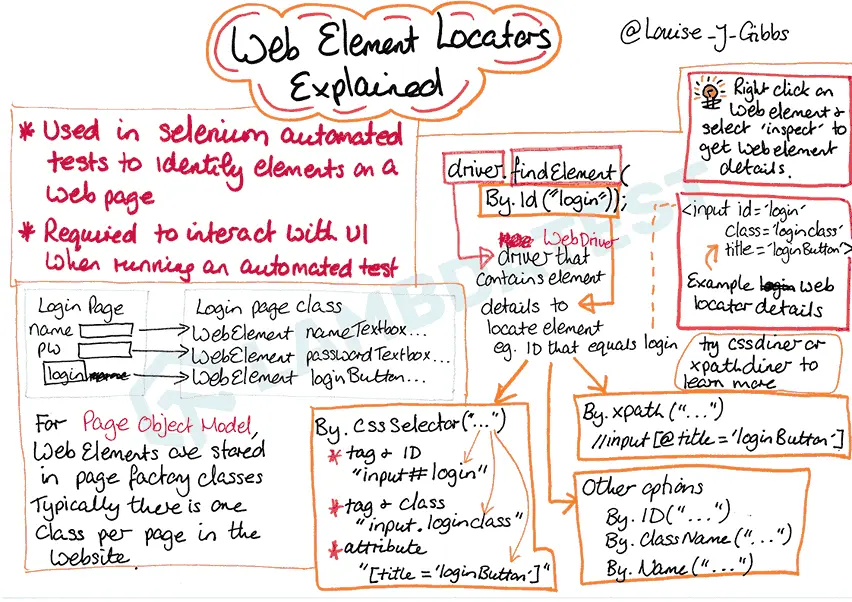
In this tutorial, you will learn about locators in Selenium and their types, deep dive into different locators and their use cases, and learn using locators with different automation testing frameworks.
A Selenium locator is the query strategy that tells the WebDriver how to find an element on a page. It is the instruction, expressed through the By class, that describes where an element lives in the DOM. Every locator you write, whether by id, name, CSS Selector, or XPath, is simply a different way of answering the same question: which element on this page do I want?
It is important to separate two ideas that beginners often confuse. A locator is the strategy, for example By.id("username"). A WebElement is the object Selenium hands back once that strategy successfully matches an element. You call driver.findElement(locator) with a locator, and you receive a WebElement in return. The locator is the recipe, and the WebElement is the dish you then act on with click(), sendKeys(), or getText().
What are locators in Selenium WebDriver
Locators in Selenium can be considered as the building block of Selenium automation scripts. This blog covers all the aspects related to Selenium Web Locators.
SEE MORE →
The 8 Traditional Selenium Locators
Selenium WebDriver ships with eight built-in locator strategies, all exposed through the By class. The examples below use Java and reference elements you can practice on in the TestMu AI Selenium Playground. Pick one language and stay consistent across your suite.
1. ID Locator
The ID locator finds an element by its unique id attribute and is the fastest, most reliable strategy available.
WebElement user = driver.findElement(By.id("user-message"));
user.sendKeys("TestMu AI");
2. Name Locator
The Name locator matches an element by its name attribute, which is handy for form fields.
WebElement email = driver.findElement(By.name("name"));
email.sendKeys("qa@example.com");
3. Class Name Locator
The Class Name locator selects an element by a single CSS class value applied to it.
WebElement button = driver.findElement(By.className("selenium_btn"));
button.click();
4. Tag Name Locator
The Tag Name locator returns elements by their HTML tag, which is useful for grabbing every link or list item.
List<WebElement> links = driver.findElements(By.tagName("a"));
System.out.println("Total links: " + links.size());
5. Link Text Locator
The Link Text locator matches an anchor by the exact visible text of the link.
WebElement link = driver.findElement(By.linkText("Selenium Playground"));
link.click();
6. Partial Link Text Locator
The Partial Link Text locator matches an anchor when only part of its visible text is known.
WebElement link = driver.findElement(By.partialLinkText("Playground"));
link.click();
7. CSS Selector
The CSS Selector locator uses standard CSS syntax and is fast and expressive for complex matches.
WebElement submit = driver.findElement(By.cssSelector("input#submit.btn"));
submit.click();
8. XPath Locator
The XPath locator navigates the DOM tree and can match on text, attributes, and relationships that other locators cannot.
WebElement heading = driver.findElement(By.xpath("//h1[text()='Selenium Playground']"));
System.out.println(heading.getText());
Selenium Locators Comparison Table
The table below summarizes all eight locators so you can pick the right one at a glance based on relative speed and typical use case.
| Locator | Example | Speed | Best Use Case |
|---|---|---|---|
| ID | By.id("user-message") | Fastest | Elements with a unique id |
| Name | By.name("name") | Fast | Form fields with a name attribute |
| Class Name | By.className("selenium_btn") | Fast | Grouped elements sharing a class |
| Tag Name | By.tagName("a") | Medium | Collecting all elements of a type |
| Link Text | By.linkText("Selenium Playground") | Medium | Anchors with exact visible text |
| Partial Link Text | By.partialLinkText("Playground") | Medium | Anchors with dynamic partial text |
| CSS Selector | By.cssSelector("input#submit") | Fast | Complex matches without an id |
| XPath | By.xpath("//h1[text()='...']") | Slowest | Dynamic elements, text and axes |
Relative Locators in Selenium 4 (Friendly Locators)
Selenium 4 introduced relative locators, also called friendly locators, which let you find an element by its visual position relative to a known reference element. Instead of writing a brittle XPath, you describe the layout the way a human would: the field above the password box, the button to the right of the label. Import them with import static org.openqa.selenium.support.locators.RelativeLocator.with;.
The five methods are above(), below(), toLeftOf(), toRightOf(), and near().
WebElement password = driver.findElement(By.id("password"));

// The field directly above the password field
WebElement email = driver.findElement(with(By.tagName("input")).above(password));

// The label below the password field
WebElement hint = driver.findElement(with(By.tagName("label")).below(password));

// The button to the right of the submit label
WebElement submit = driver.findElement(with(By.tagName("button")).toRightOf(By.id("submit-label")));

// Any input within 50px of the reference element
WebElement nearby = driver.findElement(with(By.tagName("input")).near(password));
You can chain methods to pin down an element that sits at the intersection of two directions.
// The cell that is both below the header and to the right of the name column
WebElement cell = driver.findElement(
        with(By.tagName("td"))
            .below(By.id("table-header"))
            .toRightOf(By.id("name-column")));
cell.click();
Advanced Locator Classes: ByChained and ByAll
Beyond the standard By strategies, the Selenium support library offers ByChained and ByAll for composing locators. Import them from org.openqa.selenium.support.pagefactory.
ByChained
ByChained applies locators in sequence to find a nested element: the first locator finds the parent, and the next searches only within it.
// Find the input that lives inside the login form
WebElement field = driver.findElement(
        new ByChained(By.id("login-form"), By.name("username")));
field.sendKeys("TestMu AI");
ByAll
ByAll matches an element that satisfies any one of several locators, which is useful when the same control appears under different attributes across pages.
// Match the submit control whether it uses an id or a name
WebElement submit = driver.findElement(
        new ByAll(By.id("submit"), By.name("submit-btn")));
submit.click();
Which Selenium Locator Is Best? (Performance and Reliability)
There is a clear hierarchy for choosing a locator, driven by speed and stability. Follow this order and your tests will be both faster and less flaky.
- ID: Always prefer ID when an element has a unique, stable id. The browser resolves it directly, so it is the fastest and least fragile choice.
- Name and CSS Selectors: When there is no id, fall back to Name for simple form fields and CSS Selectors for anything more complex. CSS runs on the browser's native, highly optimized engine, so it stays fast.
- XPath as a last resort: Reach for XPath only when you must match on text, traverse axes, or locate elements no other strategy can reach. XPath is evaluated by the WebDriver rather than the browser, which makes it slower, and long absolute paths break the moment the DOM shifts.
The practical takeaway is to keep locators as specific and as shallow as possible. Ask developers to add stable id or data-testid attributes to key elements so your suite does not depend on fragile positional paths.
Ready to run these Selenium locators at scale? Execute your WebDriver scripts in parallel across 3,000+ real browsers and operating systems on the TestMu AI automation cloud.
Absolute vs Relative XPath
XPath comes in two forms. Absolute XPath starts from the root of the document with a single slash and traces the complete path to the element. It is precise but brittle, because any change in the page structure breaks it.
// Absolute XPath: full path from the root
WebElement el = driver.findElement(By.xpath("/html/body/div[2]/form/input[1]"));
Relative XPath starts with a double slash and matches from anywhere in the DOM. It is shorter, more readable, and far more resilient to layout changes, which is why teams use it almost exclusively.
// Relative XPath: match from anywhere by attribute
WebElement el = driver.findElement(By.xpath("//input[@name='username']"));
How To Use Name Locator In Selenium Automation Scripts?
Deciding the right type of Web Locator is important for locating web elements on a web page. NAME is one of the preferred web locators that lets you locate web elements using the Name property.
SEE MORE →Locating Elements by TagName In Selenium
Tag Name locator is useful for finding Web Elements matching a specific Tag Name. The locator is helpful when you want to extract content within a Tag.
SEE MORE →How to use Class Name Locator In Selenium
Locators in Selenium are commonly used to identify the elements on a web page. Class name locator in Selenium helps in locating an element on a webpage through the class attribute.
SEE MORE →
Complete Guide For Using XPath In Selenium
Locating dynamic elements has always been a pain area when you want to automate the scripts. XPath locator in Selenium WebDriver helps in dynamically searching for an element within a web page.
SEE MORE →How to Use CSS Selectors In Selenium Scripts?
CSS Selectors in Selenium are used to identify a user-desired HTML web element. CSS Selectors are combinations of element selectors and values that are used for identifying the web element within the page.
SEE MORE →Find Elements With Link Text & Partial Link Text In Selenium
Link Text locator in Selenium locates the links by doing an exact match of the link text provided as a parameter. Partial Link Text locator in Selenium locates the links by doing a partial match of the links that is provided as a parameter.
SEE MORE →
Complete Guide To Selenium Locators In Protractor
Here we will discuss the Selenium locators in Protractor with examples and how you can use locators in Selenium for interacting with the application and fetching the current running state.
SEE MORE →How WebdriverIO Uses Selenium Locators
WebDriverIO has many advanced Selenium locator strategies compared to other automation testing frameworks. Reading this article, you will learn how WebDriverIO is transforming the Selenium locator strategy.
SEE MORE →
SelectorsHub: The Next Gen XPath, CSS Selectors Tool
SelectorsHub is a tool that can help you get XPath and CSS Selectors in under 5 seconds!! Read the blog and learn how browser extension SelectorsHub can be used to expedite the Selenium automation testing activity.
SEE MORE →
Chrome Extensions: How To Find XPath in Selenium
It could be challenging for the developers to find XPath of WebElements in Selenium while performing cross browser testing. Here we list the top ten Chrome extensions that let you find Xpath in Selenium with ease.
SEE MORE →
Testing from the terminal? Kane CLI by TestMu AI lets SDETs and developers plan, write, run and debug tests from the command line.
Author

Ritesh Shetty
Blogs: 7


Ritesh Shetty is a Community Contributor with experience in building and sharing content around software testing, automation, and technology. A former Content Marketing Manager at TestMu AI, he has contributed to simplifying testing concepts for QA engineers and developers. Currently serving as Head of Growth at Arya.ai, Ritesh continues to connect product, engineering, and quality through impactful knowledge-sharing and community contributions.


Frequently asked questions
Did you find this page helpful?
More Related Learning Hubs

TestMu AI forEnterprise
Get access to solutions built on Enterprise
grade security, privacy, & compliance
- Advanced access controls
- Advanced data retention rules
- Advanced Local Testing
- Premium Support options
- Early access to beta features
- Private Slack Channel
- Unlimited Manual Accessibility DevTools Tests