
Power Your Software Testing with AI Agents and Cloud
The Native AI-Agentic Cloud Platform to Supercharge Quality Engineering. Test Intelligently and Ship Faster.


- TestMu AI (Formerly LambdaTest)
- /
- Blog
- /
- UAT Environment: Setup, Types and Best Practices (2026)
UAT Environment: Setup, Types and Best Practices (2026)
Learn what a UAT environment is, how to set one up, entry and exit criteria, key components, tools, challenges, best practices, and the future of UAT in 2026.
Last Updated on:
On This Page
- What Is UAT Environment?
- Why Need a UAT Environment?
- Types of UAT Environments
- Key Components of UAT
- Setting Up UAT Environment
- UAT Entry & Exit Criteria
- UAT Test Plan
- UAT Checklist
- UAT Tools
- UAT vs Other Environments
- QA vs. UAT: Key Differences
- UAT vs. SIT
- Four Types of UAT
- Challenges in UAT Environments
- Best Practices
- Future of UAT
- Conclusion
User Acceptance Testing (UAT) environments serve as the final checkpoint before software goes live. They provide a controlled space where real end users validate whether applications actually work for their daily operations. Getting UAT right requires careful planning, realistic test conditions, and involvement from the people who will use the system.
This guide covers what UAT environments are, why they matter, how to set them up effectively, what tools support the process, and what entry and exit criteria keep the process honest.
Overview
To set up a successful UAT environment, replicate your production infrastructure and use TestMu AI for scalable cloud-based browser and device testing, while deploying Kane CLI to run automated, plain-English acceptance flows directly from your terminal to streamline manual testing cycles.
What Is a UAT Environment?
A UAT environment is a near-production setup where actual business users, rather than developers or QA, confirm that the software fits their everyday tasks before it ships.
Why Do Teams Need a UAT Environment?
It gives organizations a safe space to validate real workflows with genuine users, surface gaps between requirements and delivery, lower launch risk, and secure stakeholder sign-off before anything reaches live operations.
How Do You Set Up a UAT Environment?
- Best for aligning stakeholders: Requirement definition - Documenting business goals, testing scope, and acceptance criteria ensures everyone aligns before testing begins.
- Best for exposing environment issues: Production replication - Matching infrastructure, databases, browser versions, and third-party integrations helps expose environment-specific bugs early.
- Best for realistic testing scenarios: Access and data preparation - Creating role-based accounts and loading anonymized, realistic datasets mirrors genuine business scenarios without exposing sensitive information.
- Best for preventing data contamination: Environment isolation - Keeping the UAT environment separate from development and production prevents operational disruptions.
- Best for cloud-based testing: TestMu AI - This platform supports manual and automated UAT workflows across real browsers, devices, and environments while integrating with CI/CD pipelines.
- Best for ensuring initial stability: Pre-validation checks - Running smoke or sanity checks before opening the environment ensures business testers begin on a stable, fully working system.
Which Challenges Arise When Building UAT Environments?
- Building UAT environments often presents challenges such as copying production faithfully, sourcing compliant yet realistic test data, managing compressed timelines, and securing the participation of busy business users.
Where Does Kane CLI Fit into UAT?
- Best for terminal-based automation: Kane CLI - This tool runs plain-English acceptance flows directly from the terminal in a real Chrome browser without scripting, serving as an enterprise AI agents to scale regression checks.
What Is a UAT Environment?
A UAT environment is a production-like testing space where actual business users, not developers or QA, validate that the software supports their daily operations before it goes live to production.
It replicates the production system so end users can verify whether the application genuinely supports their operations and fulfills the business requirements defined at project inception.
The environment mirrors production conditions: identical server configurations, comparable data volumes, and matching system settings. This alignment matters because users must evaluate performance under authentic circumstances.
Testers run their standard workflows, process real business transactions, and confirm every function operates correctly. UAT is the final validation gate before release.
The objective differs from earlier phases; technical defects should already be resolved. Instead, users confirm the system addresses their operational challenges and fits their existing processes.
Successful completion gives stakeholders assurance that the application is ready for organization-wide deployment and will deliver the expected business value.
Research published in the Software Quality Journal established that UAT's uniqueness among testing phases lies specifically in its reliance on operational profiles and real business scenarios rather than technical specifications alone.
To better understand what UAT testing is and why the UAT environment plays a critical role in successful validation, refer to this detailed guide on User Acceptance Testing (UAT).

Note: Automate and Validate Your Application the Way Real Users Experience It. Try TestMu AI today!.
Why Need UAT Environment?
A UAT environment is critical because it lets real users validate business workflows before deployment, surfacing gaps between requirements and delivery and securing formal stakeholder sign-off.
- Validate business requirements with real users: Confirms the application supports actual user workflows and business needs, not just technical functionality.
- Identify gaps between requirements and delivery: Helps uncover missing features, misunderstood requirements, or workflows that do not align with real operations.
- Reduce business risk before launch: Detect usability, workflow, and functional issues early to avoid costly production failures and operational disruptions.
- Ensure environment-level readiness: Verify infrastructure, integrations, databases, network configurations, and security settings under production-like conditions.
- Obtain stakeholder sign-off: Provides formal business approval that the system meets expectations and is ready for release.
- Improve user adoption and satisfaction: Identify usability concerns early, enabling smoother rollouts, fewer support issues, and better user confidence.
Types of UAT Environments and Testing in Production Approaches
UAT environment types include staging, sandbox, cloud-based, customer-specific, and integrated system environments, plus controlled testing in production to validate apps under real conditions.
Organizations use different UAT environments to validate applications under real-world conditions before release. In some cases, teams also apply controlled testing in production practices to monitor behavior with live infrastructure and limited user exposure.
- Staging environments: Replicate production infrastructure to run final business workflows and catch environment-specific issues before launch.
- Sandbox environments: Provide isolated spaces for non-technical users and stakeholders to explore features, give feedback, and train without operational risk.
- Cloud-based testing infrastructure: Enable distributed teams to test across devices, browsers, and network conditions while scaling resources dynamically for major releases.
- Customer-specific validation environments: Set up dedicated environments tailored to match a client's production setup, ensuring custom integrations and configurations work before delivery.
- Integrated system testing environments: Combine connected systems, APIs, and third-party services to verify end-to-end data flows and component interactions.
- Testing in production approaches: Use controlled experiments, feature flags, or limited rollouts to validate behavior with real users while minimizing operational risk.
Choosing the right UAT approach means balancing project complexity, user needs, risks, time, and budget. A strong environment strategy helps ensure deployments meet business requirements, reduce production issues, and improve user satisfaction.
Key Components of a UAT Environment
A UAT environment's key components are production-like infrastructure, realistic and secure test data, role-based access controls, and clear process and documentation for tracking results.
User Acceptance Testing is the last checkpoint before software goes live, validating whether the application works for the business users who depend on it daily.
Getting UAT right requires more than spinning up a test server. It needs careful planning across infrastructure, data, access, and process management.
Production-Like Infrastructure
The UAT environment should replicate production as closely as possible. This is not about perfection, but about eliminating surprises when the software launches.
- Hardware and Configuration: Match production hardware specs, operating systems, and network setup. Mismatched configurations are a common reason applications fail after deployment.
- Integrations and Dependencies: Connect payment gateways, CRM platforms, email services, databases, and APIs so data flows between systems as in production.
- Stability and Pre-Validation: Before testers touch the system, run smoke tests, verify test accounts and permissions, and confirm data loaded correctly.
Realistic and Secure Data
Bad test data leads to bad testing. Users cannot validate workflows if the data does not represent what they will actually see.
- Realism and Edge Cases: Reflect real scenarios: bulk orders, refunds, international customers, and expired subscriptions. Happy-path data hides complex-workflow problems.
- Security and Compliance: Never use raw production data. Anonymize or replace personally identifiable information, financial records, and health data with synthetic alternatives.
Regulations like GDPR and HIPAA have serious penalties for mishandling data, even in test environments. Create realistic datasets that maintain the data structure and relationships without exposing sensitive information.
In 2021, the European Data Protection Board documented a EUR 125,000 fine issued to an organization that used 3.2 million personal records during cloud migration testing when synthetic data would have sufficed.
Access Controls and User Experience
UAT depends on real users testing the system, so they need an environment that matches their actual work conditions.
- True User Roles: Mirror production role-based access controls to verify permission settings work and the right people can reach each workflow.
- Business Focus: Test complete business processes, not isolated features. Configure UAT for end-to-end workflows that span multiple systems and user roles.
Process and Documentation
Good testing requires structure. Without clear documentation and tracking, UAT becomes chaotic, and findings get lost.
- Well-Documented Scenarios: Map every requirement to test cases with expected results and pass/fail criteria. A consistent user acceptance testing template standardizes this.
- Integrated Defect Management: Log issues in a central tool like Jira with reproduction steps and severity, then track through fix and retest.
- Monitoring and Reporting: Log error rates, response times, and system behavior during testing. Adding visual testing catches layout shifts and rendering regressions functional cases miss.
UI comparison tools compare screenshots across builds and flag unintended interface changes, which is especially useful in UAT, where non-technical stakeholders evaluate look and feel alongside functionality.
Give stakeholders regular updates on testing progress, including open issues, resolved defects, and blockers affecting sign-off. Transparency keeps everyone aligned and reduces last-minute surprises.
- Backup and Recovery: Automate backups and test restores beforehand, so a mid-cycle failure does not cost test data or delay.

How to Set Up a UAT Environment?
Set up a UAT environment by defining requirements, replicating production infrastructure, preparing user roles and realistic test data, isolating the environment, and running final validation checks.
Setting up a UAT environment requires careful planning to ensure the system reflects real-world business conditions before release. The goal is to create a stable, production-like setup where users can validate workflows safely and accurately.
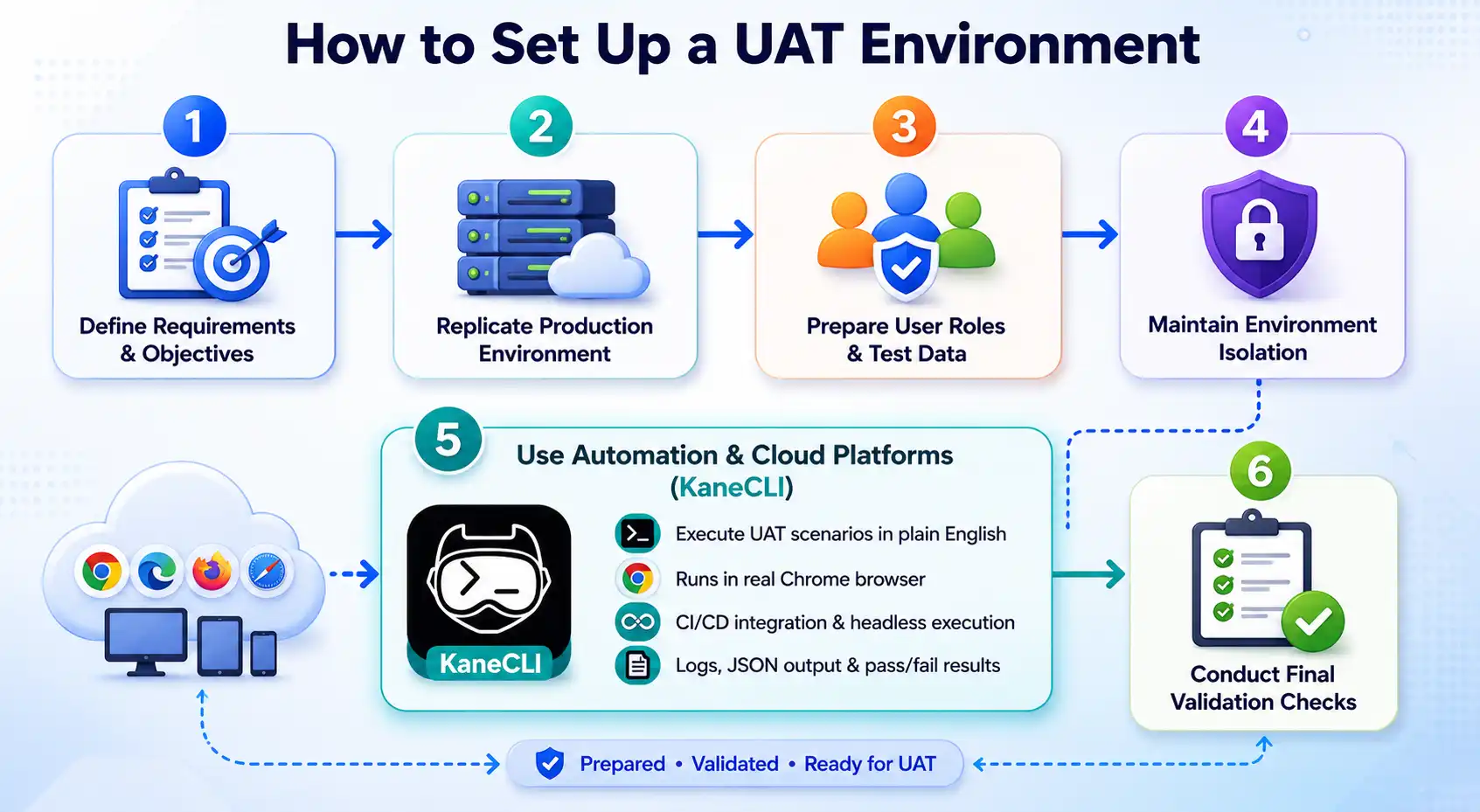
- Define Requirements and Objectives: Document business requirements, testing scope, acceptance criteria, and critical workflows so stakeholders align on real business validation.
- Replicate the Production Environment: Match production operating systems, databases, browser versions, network settings, and third-party integrations to surface environment-specific issues.
- Prepare User Roles and Test Data: Create accounts with realistic permissions, then load anonymized data covering real scenarios and edge cases.
- Maintain Environment Isolation: Keep UAT isolated from development and production to prevent data corruption and provide stable, reliable testing conditions.
- Use Automation and Cloud-Based Testing Platforms: Modern cloud-based test automation platform simplify UAT setup and execution by providing scalable browser and device coverage without requiring teams to maintain physical infrastructure. One such cloud platform is TestMu AI (Formerly LambdaTest), which offers a comprehensive solution for UAT across real browsers, devices, and environments.
TestMu AI supports both manual and automated UAT workflows across real browsers, real devices, and custom real-world environments while integrating with CI/CD delivery pipelines for continuous validation.
- Conduct Final Validation Checks: Before opening to users, run smoke tests and verify access, integrations, and defect reporting to avoid setup disruptions.
UAT Entry and Exit Criteria
UAT entry criteria are the conditions required before testing can begin, while exit criteria are the conditions that must be satisfied before UAT is formally closed and business sign-off is given.
Entry and exit criteria are two of the most important planning decisions in UAT, yet they are frequently skipped or left vague.
A systematic literature review published by ACM found that missing acceptance criteria is one of the most consistent factors in UAT failure across projects.
Defining these criteria clearly helps teams decide when testing should begin, when to stop testing, and whether the application is ready for sign-off. Without them, teams face confusion and disagreements about completion.
Understanding acceptance criteria vs acceptance tests is also important during UAT planning. Acceptance criteria define the expected business outcomes, while acceptance tests validate whether those outcomes are successfully achieved through real-world testing scenarios.
UAT Entry Criteria
Entry criteria are the conditions that must be satisfied before UAT can begin. Starting UAT before these conditions are met wastes business users' time and undermines confidence in the results.
- Resolved Critical Defects: All critical and high-severity defects from system testing have been fixed and successfully retested.
- Stable UAT Environment: The UAT environment is deployed, stable, and verified through smoke testing.
- Validated Test Data: Required test data has been loaded and checked for accuracy and completeness.
- Configured User Access: User accounts are created with the correct roles, permissions, and access levels.
- Approved Test Scenarios: Test cases and business scenarios have been reviewed and approved by stakeholders.
- Finalized Business Requirements: Acceptance criteria and business requirement documents are completed and agreed upon.
- Tester Readiness: Testers have received onboarding guidance, credentials, and environment access.
- Signed-off UAT test plan: The UAT test plan has been reviewed and formally approved by the project lead.
UAT Exit Criteria
Exit criteria are the conditions that must be met before UAT can be formally closed and sign-off given. These should be agreed upon before testing starts, not negotiated at the end.
- Completed test execution: A defined percentage of planned test cases has been executed, typically 95% or higher for business-critical scenarios.
- Resolved critical UAT defects: All critical and high-severity defects identified during UAT have been fixed and retested.
- No blocking issues: No open defects remain that prevent users from completing core business workflows.
- Validated business workflows: All business-critical user journeys have passed successfully.
- Reviewed UAT summary report: Business stakeholders have reviewed the final UAT results and testing summary.
- Formal stakeholder sign-off: Written approval has been obtained from the designated business owner or client representative.
- Accepted minor issues: Any remaining low-severity defects have been documented, risk-assessed, and approved for post-launch resolution.
UAT Test Plan
A UAT test plan is the document that coordinates the entire acceptance testing effort, defining the scope, entry and exit criteria, test scenarios, team roles, schedule, and sign-off procedure.
ISO/IEC/IEEE 29119-3:2021, the international standard for software test documentation, defines the templates and required components for formal test plans, including acceptance testing. Without it, stakeholders operate from different assumptions about scope, schedule, and success criteria.
Writing the plan before UAT begins forces those assumptions into the open where they can be aligned. A complete UAT test plan covers the following:
- Scope and objectives: What is being tested, what is explicitly out of scope, and what business requirements are being validated
- Entry and exit criteria: The conditions that govern when testing starts and when it can legitimately end
- Test scenarios and cases: The specific workflows and user journeys being validated, mapped to business requirements
- Roles and responsibilities: Who is responsible for test execution, defect logging, environment management, and sign-off
- Schedule and milestones: Testing windows, defect fix cycles, retest periods, and the planned sign-off date
- Environment details: Which environment is being used, who manages it, and how it was validated before testing began
- Defect management process: How defects are logged, categorized, prioritized, assigned, and tracked to resolution
- Sign-off procedure: Who provides formal acceptance, in what format, and what documentation is produced
The UAT test plan is not a lengthy bureaucratic document. A two to three-page plan covering these components gives everyone enough clarity to run a focused, efficient UAT cycle without surprises.
Note: Run your UAT cycles across real browsers and devices without maintaining any in-house lab. Start testing on TestMu AI.
UAT Checklist
A UAT checklist keeps the process on track across three phases, pre-UAT readiness, active execution, and final sign-off, so no environment, data, access, or approval step is missed before release.
Teams that skip the checklist often encounter environment issues mid-cycle or reach sign-off with unclear results.
For web applications, a structured website testing guide can also help teams validate usability, workflows, integrations, and browser compatibility during UAT.
Pre-UAT Readiness
- Defined UAT scope and objectives: UAT goals, scope, and acceptance criteria are documented and approved by stakeholders.
- Resolved major system defects: All defects above the agreed severity threshold have been fixed before UAT begins.
- Validated UAT environment: The UAT environment is deployed, stable, and verified through smoke testing.
- Prepared test data: Test data is loaded, anonymized, and aligned with realistic business scenarios.
- Configured user access: User accounts are created with the correct roles, permissions, and access levels.
- Reviewed test cases: Test cases are documented, reviewed, and mapped to business requirements.
- Tester onboarding completed: Testers have been briefed on workflows, testing tools, and defect reporting procedures.
- Accessible defect tracking system: The defect management tool is configured and available to all UAT participants.
- Approved UAT test plan: The UAT test plan has been reviewed and formally signed off before execution starts.
During Execution
- Executing test scenarios: Test cases are actively executed, and results are recorded for every business workflow and scenario.
- Logging defects properly: Defects are documented with clear descriptions, reproduction steps, screenshots if needed, and severity levels.
- Escalating testing blockers: Critical blockers are escalated quickly to prevent delays in UAT execution.
- Tracking test progress: Testing progress is monitored against the planned execution schedule and coverage targets.
- Communicating stakeholder updates: Regular status updates are shared with stakeholders at the agreed reporting cadence.
- Resolving environment issues: Technical teams address environment and infrastructure issues so business testers can stay focused on validation activities.
- Retesting resolved defects: Fixed defects are retested and verified before issues are formally closed.
Sign-Off
- Verified exit criteria: All agreed UAT exit criteria have been reviewed, validated, and documented.
- Completed UAT summary report: A final report has been prepared covering test execution results, defect metrics, and unresolved items.
- Accepted remaining risks: Any known low-priority issues have been risk-assessed and formally approved for post-launch resolution.
- Obtained formal approval: The business owner or client representative has provided written UAT sign-off.
- Stored sign-off records: Approval documents and supporting UAT records have been archived within the project documentation.
- Captured lessons learned: Key insights and improvement opportunities have been documented for future UAT cycles.
UAT Tools
Effective UAT uses a lightweight tool stack covering test management, defect tracking, browser and device testing, and communication, since no single tool covers the whole process.
Most teams assemble this stack from specialized tools and integrate them into a single workflow rather than relying on one platform.
Test Management Tools
Test management tools give teams a central place to create, organize, and track test cases and results. Without one, execution happens in spreadsheets that become unmanageable as scenarios grow.
Choosing the right test management software early prevents the tracking chaos that derails UAT cycles before release.
Commonly used options include TestRail, qTest, and PractiTest, each providing test case organization, execution tracking, reporting, and integration with defect tracking systems like Jira.
For teams already using Jira, Xray and Zephyr Scale are popular add-ons that bring test management into the same workflow.
Defect and Feedback Tracking Tools
Business users need a structured way to report issues during UAT. Purpose-built tools capture the defect description plus screenshots, browser details, URLs, and page context automatically, cutting the back-and-forth when developers cannot reproduce an issue.
Jira is the standard for Atlassian teams. BugHerd suits web-focused UAT because feedback pins directly to the page element, while Usersnap offers a lighter setup for external stakeholder testing.
Browser and Device Testing Platforms
UAT must validate software across the browsers and devices real users use. In-house device labs are expensive to scale, so many organizations rely on cloud-based platforms for broader coverage.
These platforms support cross-device and cross-browser testing with on-demand access to browser, operating system, and device combinations in production-like environments.
One such platform is TestMu AI (formerly LambdaTest), a Full Stack Agentic AI Quality Engineering platform. For UAT, it validates web, mobile, and enterprise applications across real browsers, real devices, and custom environments.
For continuous testing workflows, TestMu AI also provides Kane CLI, a terminal-based execution layer that allows teams to run human-like test flows using plain English commands without writing scripts.
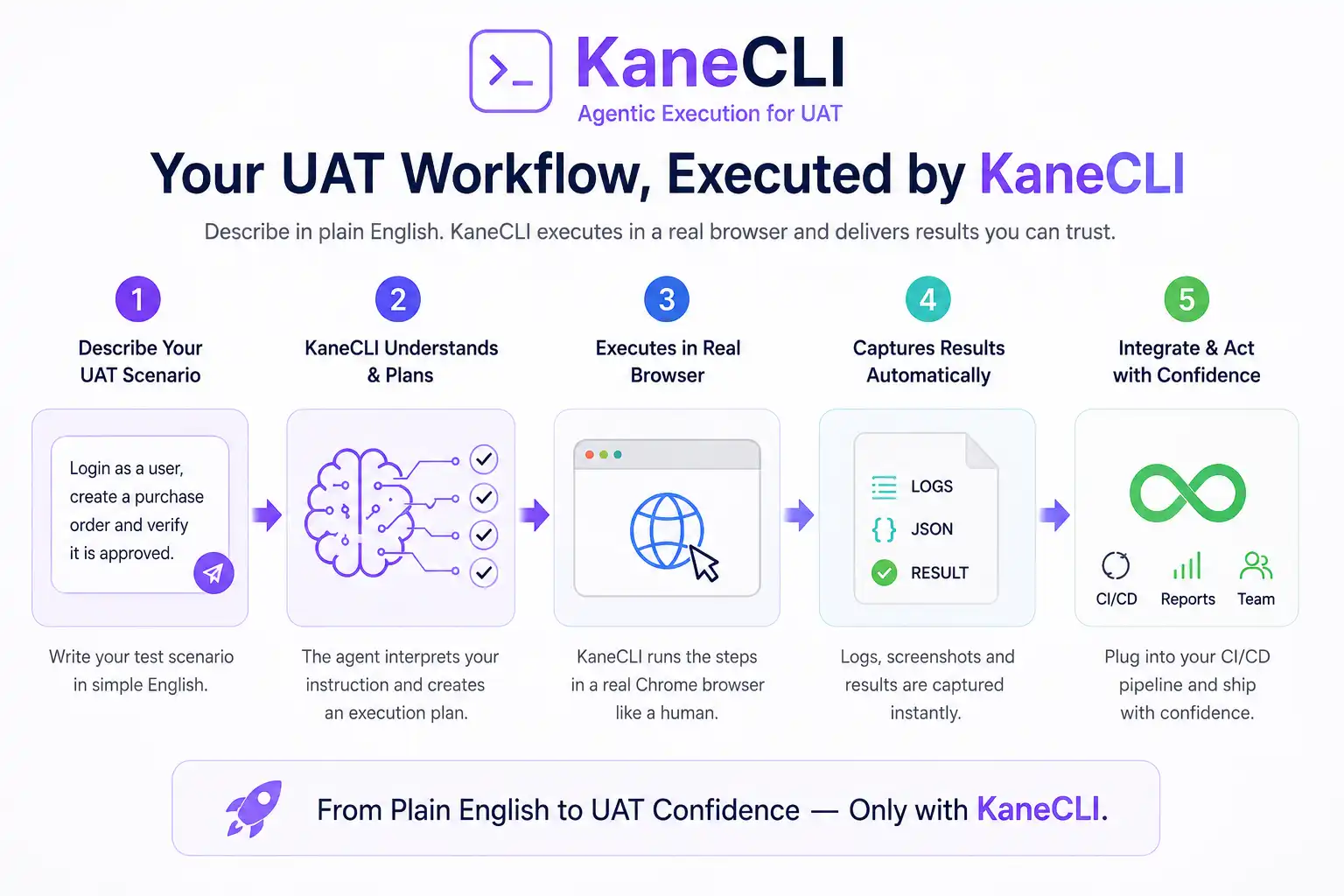
Kane CLI supports execution in real Chrome browsers, integrates with CI/CD pipelines, enables headless execution, and provides detailed logs with structured pass/fail reporting. This helps teams combine manual UAT validation with scalable automated regression coverage across release cycles.
Communication and Documentation Tools
UAT involves multiple stakeholders who must stay aligned throughout the cycle. Platforms like Confluence or Microsoft SharePoint centralize test plans, cases, reports, and sign-off documentation.
Dedicated channels in Slack or Microsoft Teams help teams communicate quickly, escalate blockers, and coordinate issue resolution without formal status meetings.

UAT vs Other Testing Environments
UAT differs from QA and system testing by who tests and why: business users validate real-world workflows for a go/no-go decision, while QA targets technical defects and integration.
UAT and standard testing environments both matter in software delivery, but differ in what they accomplish and who uses them. Understanding this helps teams allocate resources and set expectations.
| Aspect | UAT Environment | QA/Testing Environment | System Testing |
|---|---|---|---|
| Purpose | Validates software against actual business needs. Confirms it works for people doing their jobs. | Identifies technical defects. Verifies functional accuracy. Checks system integration points. | Verifies that the complete integrated system meets specified requirements before user validation. |
| Involvement | Real end users, department managers, business analysts. Sometimes external clients. | QA engineers, developers, test automation specialists. | QA engineers and test leads. No business user involvement. |
| Focus | Real work scenarios. Whether tasks can be completed. Whether systems fit operational needs. | Code bugs, technical specifications, regression suites, performance benchmarks. | End-to-end system behavior, integration points, and non-functional requirements. |
| Timing | Final phases, after technical testing completes, right before production release. | Continuously during development, from unit tests through integration phases. | After integration testing and before UAT. |
| Test Data | Production-like, sanitized for privacy, reflects genuine business scenarios. | Synthetic datasets, fabricated records, minimal data for boundary testing. | Representative data covering all system functions, often partially realistic. |
| Environment Setup | Mirrors production infrastructure closely. Matches live configurations. | May differ from production specs. Optimized for debugging needs. | Should closely mirror production to catch environment-specific issues. |
| Outcome | Go or no-go decision. Business stakeholders make the final call. | Defect reports, quality metrics, technical stability confirmation. | System readiness confirmation before business validation begins. |
| Ownership | Business teams control the process. Product owners lead sessions. | QA departments own these environments. | QA departments own these, with developer involvement for fixes. |
QA vs. UAT: Key Differences
QA is performed by technical testers to find bugs in a dedicated QA environment, while UAT is performed by business users to validate real workflows in a production-like UAT environment.
The two phases answer different questions. QA asks whether the software works correctly from a technical standpoint, catching functional defects, regressions, and integration failures before release.
UAT asks whether the software helps business users complete their day-to-day tasks. Because it assumes a technically stable build, QA must be completed first.
Running them in the wrong order means business users waste time reporting bugs QA should have caught, which erodes confidence in the release.
The table below compares QA, System Integration Testing (SIT), and UAT across who performs each phase, the goal, the environment, and lifecycle position.
| Aspect | QA Testing | SIT (System Integration Testing) | UAT |
|---|---|---|---|
| Who performs it | QA engineers and technical testers. | QA engineers and integration specialists. | Business users, product owners, and business analysts. |
| Primary goal | Find functional and technical defects before release. | Validate data flows and interactions between integrated systems. | Confirm the software supports real business workflows. |
| Environment | Dedicated QA environment optimized for debugging. | Integration environment connecting all dependent systems. | Production-like UAT environment mirroring live conditions. |
| Lifecycle stage | During and after development, before SIT. | After QA, before code is promoted to UAT. | Final phase, right before production release. |
UAT vs. SIT (System Integration Testing)
SIT technically validates that data flows correctly between integrated systems, and it must be signed off before code is promoted to the UAT environment.
System Integration Testing sits between QA and UAT in the delivery pipeline. Its focus is technical: verifying that APIs, databases, third-party services, and internal modules exchange data accurately and handle failures gracefully when combined.
SIT is carried out by QA engineers and integration specialists on connected systems, not isolated components. UAT, by contrast, is business-facing and assumes those integrations already work.
The dependency is strict. Code should reach the UAT environment only after SIT is formally signed off, because unresolved integration defects surface as confusing, workflow-breaking failures during UAT.
Spinning up isolated, production-like environments for both SIT and UAT is easier on a cloud platform. You can validate integrated flows across real browsers and devices using the cloud-based automation testing platform from TestMu AI.
The Four Types of User Acceptance Testing
The four main types of user acceptance testing are alpha, beta, contractual acceptance, and regulatory acceptance testing, each validating the software from a different angle.
- Alpha testing: Conducted internally by staff or internal users in a controlled environment before the software reaches real customers.
- Beta testing: Carried out by a limited group of external users in their own environment to surface real-world issues before general release.
- Contractual acceptance testing: Verifies the delivered software meets the criteria and terms agreed upon in a formal contract with the client.
- Regulatory acceptance testing: Confirms the software complies with applicable legal, industry, and regulatory standards before it can be lawfully deployed.
Validate Real Business Workflows in a Production-Like UAT Environment

Challenges in Setting Up UAT Environments
Common UAT environment challenges include replicating production, managing compliant test data, limited time and resources, stakeholder availability, communication gaps, and test-case complexity.
While UAT is critical for validating business workflows, setting up and maintaining an effective environment brings operational and technical challenges. Addressing them proactively improves testing reliability and reduces production risks.
| Challenge Area | Common Difficulties | Potential Impact | Recommended Solution |
|---|---|---|---|
| Production Replication | Matching production infrastructure, network settings, security policies, and third-party integrations is complex and expensive. | Environment-specific defects may go undetected until after release, causing operational disruptions. | Use infrastructure-as-code, cloud-based environments, and automated configuration management to maintain production consistency. |
| Data Management | Privacy regulations such as GDPR and HIPAA limit the use of real customer data in testing environments. | Unrealistic datasets can lead to inaccurate testing results and missed performance issues. | Use anonymized or synthetic test data that reflects real-world business scenarios while maintaining compliance. |
| Resource and Time Allocation | UAT often gets compressed due to delays in earlier development or testing phases. | Incomplete testing increases the risk of production defects and missed validations. | Plan realistic UAT schedules and automate repetitive setup and regression tasks to speed up testing cycles. |
| Stakeholder and User Involvement | Business users and stakeholders may struggle to balance testing with daily operational responsibilities. | Limited participation weakens business validation and delays sign-off decisions. | Involve stakeholders early, define responsibilities clearly, and provide structured testing guidance. |
| Communication and Documentation | Teams may use inconsistent terminology, unclear workflows, or incomplete defect reports. | Miscommunication slows issue resolution and creates confusion around acceptance criteria. | Use centralized collaboration, defect tracking, and documentation tools to improve visibility and communication. |
| Test Case Complexity | Covering all business workflows, integrations, and edge cases is difficult in complex systems. | High-risk scenarios may remain untested and fail in production environments. | Prioritize business-critical workflows, maintain reusable test scenarios, and continuously refine coverage based on risk analysis. |
Best Practices for Setting Up UAT Environments
Best practices for a UAT environment: replicate production accurately, keep it isolated, validate integrations, involve stakeholders early, use realistic anonymized data, and track defects centrally.
A successful UAT environment should support realistic business validation while remaining stable, secure, and easy to manage. Following proven setup practices helps teams reduce production risks, improve testing reliability, and speed up testing cycles.
- Replicate production accurately: Match production infrastructure, software versions, security settings, integrations, and network configurations to uncover environment-specific issues early.
- Maintain complete isolation: Keep UAT separate from development and production systems to prevent data contamination and operational risk.
- Validate system integrations: Connect APIs, third-party services, CRMs, payment systems, and external tools to verify complete business workflows.
- Involve stakeholders early: Include business users, product owners, and technical teams during planning to align testing goals and expectations.
- Define entry and exit criteria: Establish clear conditions for starting and completing UAT to avoid confusion and delays.
- Allocate realistic testing time: Give business users enough time to validate workflows thoroughly without rushing critical scenarios.
- Automate environment provisioning: Use automated setup and configuration processes to reduce manual errors and maintain consistency.
- Refresh test data automatically: Reload clean test datasets between testing cycles to improve efficiency and repeatability.
- Use cloud-based platforms: Adopt scalable cloud testing environments for broader browser, device, and operating system coverage.
- Create business-focused test cases: Cover critical workflows, edge cases, and high-risk operational scenarios.
- Use realistic test data: Populate environments with anonymized or synthetic data that reflects actual business usage patterns.
- Configure role-based access: Validate permissions and workflows for different user roles and access levels.
- Maintain clear communication channels: Enable fast collaboration between testers, developers, and business stakeholders throughout UAT.
- Track defects systematically: Use centralized defect management and reporting tools to document issues, monitor progress, and support faster resolution.
Future of UAT Environments
The future of UAT shifts it from a late-stage gate to continuous, AI-driven validation, powered by Agentic AI, ephemeral production-like infrastructure, and empowered non-technical business users.
The UAT environment is transforming from a slow, late-stage quality gate into an automated, continuous quality assurance hub. Three forces drive this shift: Agentic AI, hyper-automated infrastructure, and empowered non-technical business users.
The core principle is straightforward: remove manual effort from testing and elevate the human role to strategic validation.
The Autonomous Engine: Agentic AI in Testing
Agentic AI describes autonomous systems that make decisions, learn, and act without direct human intervention, making it the greatest disruptor in UAT.
Enterprise AI agents purpose-built for quality engineering already automate test scenario generation, failure triage, and regression prioritization at scale.
The best AI agents for UAT combine contextual understanding of business requirements with the ability to interact with live applications, bridging the gap between what requirements documents say and what the system actually does.
KaneAI by TestMu AI enables teams to author and evolve test scenarios using natural language while the AI app testing agent handles locator management, execution, and failure analysis autonomously.
The execution layer powering this is Kane CLI. Anything KaneAI manages can be triggered from the terminal without writing a single test script.
Kane CLI executes plain English instructions in a real Chrome browser, producing logs, JSON output, and pass-or-fail results that integrate cleanly into CI/CD pipelines.
Because execution happens through a real browser, the way a human would interact with the application, rather than through scripted API calls or synthetic DOM queries, the results reflect what actual users would encounter.
This combination of KaneAI for authoring and Kane CLI for execution creates a fully agentic UAT workflow that scales from exploratory testing to automated regression without changing the underlying test descriptions.
- Self-Healing and Zero Maintenance: Auto-healing test assets adjust when UI elements, object paths, or user flows change, staying reliable through rapid deployment.
- Intelligent Test Design and Prioritization: Large Language Models parse requirements to generate UAT scenarios, while predictive models prioritize high-risk flows.
- Shift-Right Analytics and Real User Behavior: Post-release agents analyze behavior, clickstreams, and telemetry, keeping UAT informed by real customer journeys.
Ephemeral Infrastructure and Continuous Quality Mandates
For UAT to integrate fully into modern DevOps pipelines, environments must be instantaneous, disposable, and identical to production.
- Mirror-to-Production Fidelity: Ephemeral sandboxes provisioned via Docker, CloudFormation, and Kubernetes keep code, schema, and services consistent with live systems.
- Continuous Validation across the SDLC: Shift-Left lets users validate features in early sprints, while Shift-Right validation continues into production using SRE data.
- Data Realism and Compliance: Synthetic data creates realistic but non-existent records, and masking addresses GDPR and HIPAA while keeping production-like complexity.
Democratization and The Empowered Business User
Future UAT emphasizes empowering business stakeholders to drive quality directly, eliminating QA teams as testing bottlenecks.
- No-Code and Low-Code Test Creation: Low-code platforms let non-technical users design and run tests via natural language or visual interfaces.
- Universal Accessibility as a Non-Negotiable: Accessibility testing is transitioning from a specialized, optional check into a required, automated component of every UAT sign-off. Automated accessibility testing tools now run WCAG 2.1 compliance scans during test execution, flagging issues with color contrast, ARIA labels, keyboard navigation, and screen reader compatibility without requiring manual review of every page.
App accessibility testing, which covers mobile and web interfaces together, is increasingly expected in enterprise UAT cycles as organizations face growing regulatory pressure around digital inclusion.
Integrated accessibility testing tools check usability against assistive devices automatically, making it practical to include accessibility validation in every UAT run rather than treating it as a separate audit phase.
The W3C Web Accessibility Initiative publishes the full suite of accessibility evaluation methodologies, including WCAG-EM, which defines how to assess web content conformance systematically.
- Crowdtesting for Device Diversity: Global crowdtesting reaches real users across many operating systems, devices, and networks, giving coverage internal teams cannot replicate.
The future UAT environment is less about traditional testing and more about continuous, intelligent validation. Shifting routine execution to AI frees business experts for high-value exploratory testing and quality ownership.
Conclusion
User Acceptance Testing environments do more than check boxes. They confirm whether software helps people do their jobs.
When you build UAT setups that match production, use realistic data, and involve actual users, you catch problems before customers do. Teams that take UAT seriously face fewer post-launch emergencies.
The time invested in proper UAT validation prevents expensive production failures. It ensures what you built solves real problems, not just meets technical requirements on paper.
Technology keeps changing, with AI testing tools, cloud infrastructure, and automated processes reshaping the work. UAT environments will adapt alongside these changes.
One thing stays constant: test with real users before money and reputation are on the line. Successful software is not about perfect code.
It is about creating systems people can actually use to get work done without frustration or workarounds.
Author

Zikra Mohammadi
Blogs: 17


Zikra brings 5+ years of hands-on expertise in AI, web development, and software testing to her role as a technical content strategist. Certified in AI, manual, and automation testing, she breaks down complex ideas into step-by-step guides, tutorials, and reference docs, helping teams unlock the full power of AI-driven, codeless automation on web and mobile.


Frequently asked questions
Did you find this page helpful?
More Related Blogs

TestMu AI forEnterprise
Get access to solutions built on Enterprise
grade security, privacy, & compliance
- Advanced access controls
- Advanced data retention rules
- Advanced Local Testing
- Premium Support options
- Early access to beta features
- Private Slack Channel
- Unlimited Manual Accessibility DevTools Tests