

Power Your Software Testing with AI Agents and Cloud
The Native AI-Agentic Cloud Platform to Supercharge Quality Engineering. Test Intelligently and Ship Faster.


- TestMu AI (Formerly LambdaTest)
- /
- Blog
- /
- SAP Testing: Types, Tools, and How to Test SAP ERP
SAP Testing: Types, Tools, and How to Test SAP ERP
SAP testing explained: the seven ERP testing types, SAP testing tools, module-level testing for MM, SD, and FI, and how to test SAP Fiori and SAPUI5 apps.
Last Updated on:
SAP runs the finance, procurement, and supply chain operations of a large share of the world's biggest companies, which makes an untested change in one module an operational risk across every module it feeds. SAP testing is the discipline that contains that risk, and it splits cleanly into two jobs that need different tools: validating the ABAP-based ERP backend, and validating the SAP Fiori and SAPUI5 web interface that now sits on top of nearly every S/4HANA deployment.
This guide covers both sides: the seven ERP testing types, the tools that map to each layer, what to test inside individual SAP modules such as MM and SD, and how to test Fiori and SAPUI5 applications with QUnit, OPA5, and UIVeri5.
Overview
To test SAP ERP effectively, use ABAP Workbench for backend ABAP code validation and TestMu AI to run Fiori web-layer automation at scale. Successful SAP testing requires validating both the ABAP-based ERP backend and the SAP Fiori web layer across unit, integration, functional, performance, security, regression, and user acceptance testing.
Which SAP Layers Need Testing?
- Best for backend validation: ABAP-based ERP backend - requires SAP-native tooling to validate core business logic and database transactions.
- Best for user interface validation: SAP Fiori and SAPUI5 web layer - requires web frameworks to validate the modern user experience layer.
What Are the Types of SAP Testing?
- Best for validating ABAP objects: Unit testing - validates individual ABAP objects and WRICEF developments before integration to ensure custom code works correctly.
- Best for validating data flow: Integration testing - checks data flow between SAP modules and external systems to prevent partial writes and sync errors.
- Best for validating business processes: Functional testing - confirms business processes match documented requirements and functional designs rather than just the UI.
- Best for validating system behavior under load: Performance testing - measures system behavior under high transaction volumes, peak load, and background scheduled jobs.
- Best for validating authorizations: Security testing - validates user roles, permissions, and segregation of duties to ensure compliance and traceability.
- Best for validating system changes: Regression testing - confirms existing business processes survive each change, support pack, or quarterly Fiori release.
- Best for final release approval: User acceptance testing - allows business users to validate real-world scenarios and provide sign-off before go-live.
Which SAP Testing Tools Should You Use?
- Best for ABAP unit testing: ABAP Workbench - provides tools for building, modifying, and unit-testing standard and custom ABAP application logic.
- Best for static code quality checks: ABAP Test Cockpit - provides static code quality checks and consolidated results for objects developed in SAP.
- Best for recording GUI transactions: eCATT - records and parameterizes GUI transactions through a graphical interface and an ABAP script editor.
- Best for cross-module ERP testing: SAP TAO - composes automated end-to-end business process tests from reusable transaction components across modules.
- Best for JavaScript unit tests: QUnit - executes JavaScript unit tests on controllers, formatters, and models within the SAPUI5 framework.
- Best for Fiori integration tests: OPA5 - drives the rendered Fiori UI for integration testing without requiring a separate browser driver.
- Best for Fiori end-to-end tests: UIVeri5 - executes system and end-to-end tests in a real browser, which is the approach SAP recommends.
- Best for cross-browser Fiori testing at scale: TestMu AI's test automation cloud - executes Selenium and AI-authored suites on 3,000+ browser and operating system combinations.
Where Do SAP Testing Programs Usually Fail?
- Security testing and user acceptance testing are the most commonly under-resourced testing types, with defects usually surfacing only after go-live.
- Regression volume spikes after every quarterly Fiori release because UI-bound scripts break faster than teams can patch them in production.
What Is SAP Testing and Why Does It Matter?
SAP testing is the practice of validating that SAP applications, configurations, and customizations work correctly across business functions. It matters because a single defect can disrupt every connected module and process.
SAP (also known as SAP AG and SAP SE) stands for Systems, Applications, and Products. It is a German-based multinational known for its ERP business application software. ERP stands for Enterprise Resource Planning, a consolidated platform that lets organizations integrate business processes that are diversified in nature.
With an SAP ERP solution, an organization manages human resources, customer and supplier relationships, supply chain, enterprise performance, materials procurement and tracking, and financial accounts through one system. That consolidation is what makes testing consequential: a wrong pricing condition in Sales and Distribution does not stay in Sales and Distribution, it posts into Financial Accounting.
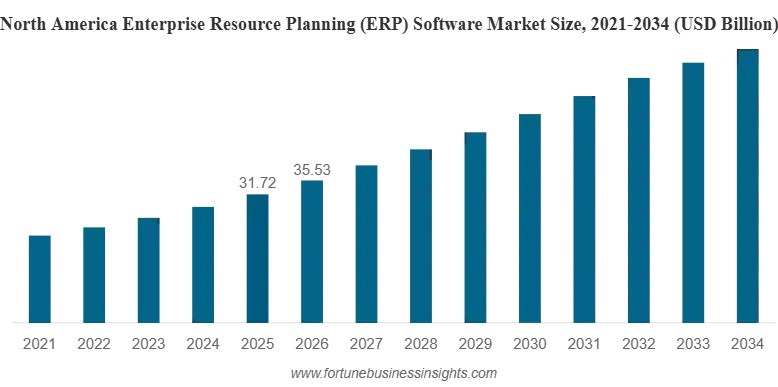
The market this software sits in keeps expanding. According to Fortune Business Insights, the global ERP software market was valued at USD 92.6 billion in 2025, is projected at USD 106.22 billion in 2026, and is forecast to reach USD 281.58 billion by 2034 at a 13% CAGR.
Scale also shows up at the small-business end. SAP reports that more than 83,000 customers and 1.2 million users across more than 170 countries run SAP Business One, supported by 850 partners and over 500 industry and country-specific extensions.
SAP offers a large number of products, along with IDEs, design systems, and the SAP Fiori design language plus the SAPUI5 UI framework. SAP Fiori is now the standard UX layer for S/4HANA, which is exactly why both the ERP backend and the SAPUI5 web layer need their own testing approach.
What Does SAP ERP Offer Across Business Sizes?
SAP ERP has an offering for every business size: S/4HANA for large enterprises, Business ByDesign for mid-sized firms, and Business One for small organizations.
SAP ERP lets an organization run human resources, customer relationship management, financial accounting, inventory, manufacturing, and management control end-to-end through a single system.
SAP S/4HANA is the latest ERP offering for large-scale enterprises, installable in on-premises data centers or in the cloud. SAP Business ByDesign serves medium-scale organizations, and SAP Business One serves small ones. Which tier a team runs changes the testing scope directly: an S/4HANA landscape means Fiori, so the web layer is in scope, while a classic ECC landscape keeps testing centered on SAP GUI and ABAP.
How Do You Test an SAP ERP Application or SAP S/4HANA?
Testing SAP ERP or S/4HANA means validating business processes, integrations, configurations, customizations, performance, and security before deployment and after any change.
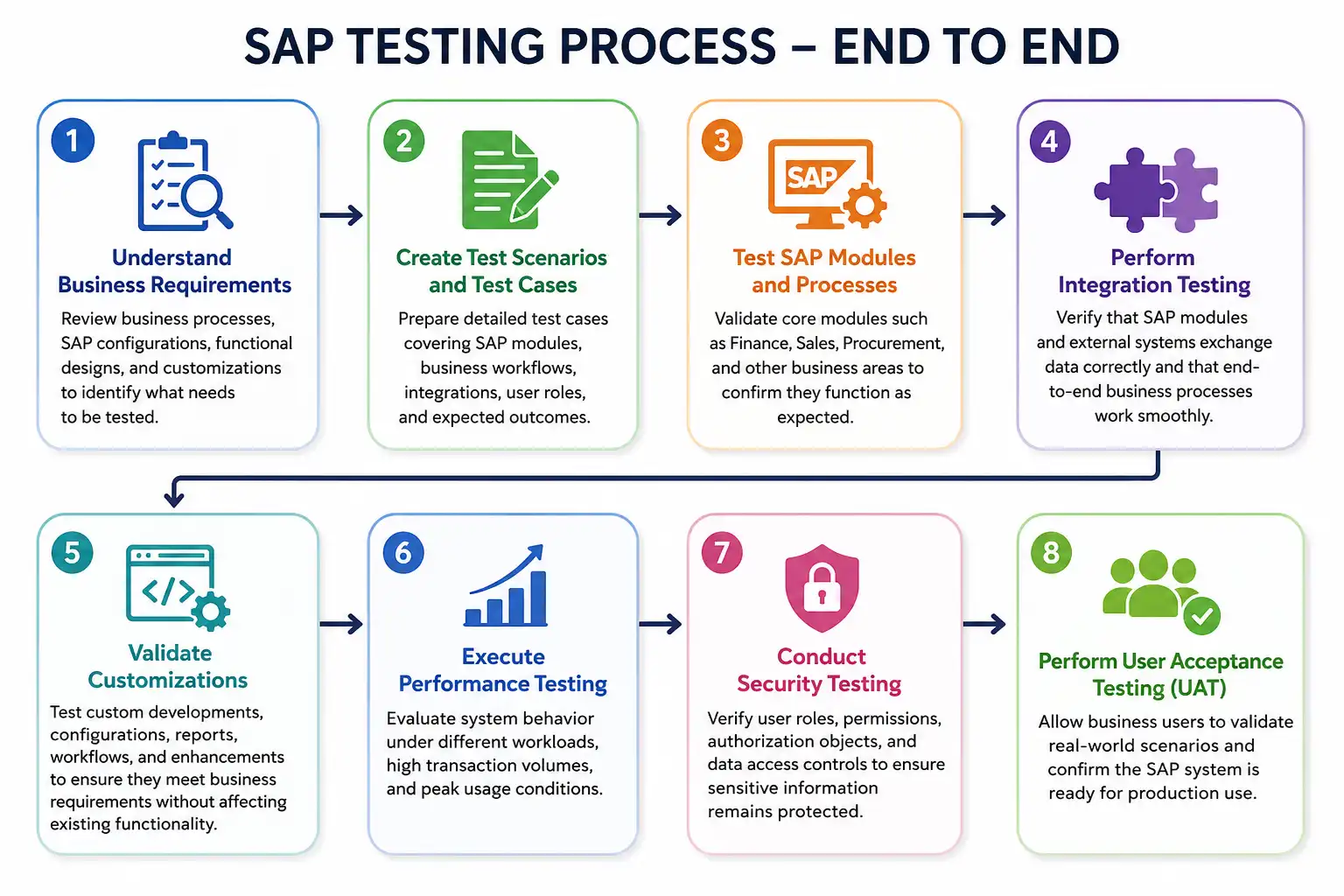
- Understand business requirements - review business processes, SAP configurations, functional designs, and customizations to identify what needs testing.
- Create test scenarios and cases - write detailed cases covering SAP modules, business workflows, integrations, user roles, and expected outcomes.
- Test SAP modules and processes - validate core modules such as Finance, Sales, and Procurement against expected behavior.
- Perform integration testing - verify SAP modules and external systems exchange data correctly and end-to-end processes complete.
- Validate customizations - test custom developments, configurations, reports, workflows, and enhancements without breaking existing functionality.
- Execute performance testing - evaluate system behavior under different workloads, high transaction volumes, and peak usage.
- Conduct security testing - verify user roles, permissions, authorization objects, and data access controls.
- Perform user acceptance testing - let business users validate real-world scenarios and confirm production readiness.
One point worth being explicit about: SAP ERP testing largely means testing the customizations layered on top of standard SAP. The out-of-the-box modules ship tested by SAP. The configuration, WRICEF objects, and enhancements your organization added are what needs a test case, and they are where defects concentrate. The difference between ERP configuration and customization also sets the regression bill: configuration changes generally survive upgrades, while custom code has to be retested after every one.
What Are the SAP Testing Tools?
SAP testing tools split by layer: ABAP Workbench, ABAP Test Cockpit, ABAP Test Double Framework, eCATT, SAP TAO, and SAP GRC cover the backend and SAP GUI, while QUnit, OPA5, UIVeri5, and Selenium cover Fiori and SAPUI5.
Choosing a tool starts with one question: which layer is the change in? A tool that records SAP GUI transactions cannot assert on a Fiori DOM, and a browser automation framework cannot execute an ABAP unit test. The table below maps each tool to the layer it actually covers.
| Tool | Layer covered | Best used for |
|---|---|---|
| ABAP Workbench | ABAP backend | Building, modifying, and unit-testing standard and custom ABAP application logic. |
| ABAP Test Cockpit (ATC) | ABAP backend | Static code quality checks and consolidated results for objects developed in SAP. |
| ABAP Test Double Framework | ABAP backend | Isolating the object under test by substituting dependencies with mock objects. |
| eCATT | SAP GUI and backend | Recording and parameterizing GUI transactions through a graphical interface plus an ABAP script editor. |
| SAP TAO | Cross-module ERP | Composing automated end-to-end business process tests from reusable transaction components. |
| SAP GRC | Security and authorizations | Validating roles, authorization objects, segregation of duties, and compliance controls. |
| QUnit | SAPUI5 and Fiori web | JavaScript unit tests on controllers, formatters, and models. |
| OPA5 | SAPUI5 and Fiori web | Integration tests that drive the rendered Fiori UI without a separate browser driver. |
| UIVeri5 | SAPUI5 and Fiori web | System and end-to-end tests in a real browser, the approach SAP recommends for E2E. |
| Selenium | Fiori web at scale | Cross-browser end-to-end coverage of Fiori apps, run in parallel on a cloud grid. |
| KaneAI | Fiori web | Authoring and maintaining Fiori tests in plain English, with self-healing after UI changes. |
Commercial model-based platforms such as Tricentis Tosca and Worksoft Certify also target SAP specifically, offering low-code authoring designed to absorb SAP changes with less script maintenance. They sit alongside, not instead of, the SAP-native tools above. The table here maps tools to layers; for a ranked feature-by-feature comparison of the commercial options, see this roundup of the top SAP testing tools, or widen the scope with this guide to automation testing tools.
What Are the Types of Testing Involved in SAP ERP?
SAP ERP testing includes unit, integration, functional, performance, security, regression, and user acceptance testing. Each covers a different risk area, and skipping one leaves a specific gap rather than a general one.
Unit Testing
Unit testing validates individual SAP components, especially ABAP code, before integration. In SAP it is triggered whenever a change lands in Workflow, Report, Interface, Conversion, Enhancement, or Forms, collectively known as WRICEF.
- ABAP code validation - tests the correctness of custom developments, reports, workflows, interfaces, conversions, enhancements, and forms.
- Dependency isolation - substitute external objects with mock objects so the test measures the object under test, not its neighbors.
Integration Testing
Integration testing verifies communication between SAP modules and external systems. A worked example: if an organization runs a CRM for customer relationships and SAP for everything else, provisioning a new customer in the CRM must sync into the SAP financial and sales performance modules with matching identifiers and no partial writes.
- Cross-module validation - tests interactions between SAP modules such as Finance, Sales, and Procurement.
- External system integration - validates data synchronization between SAP and connected platforms.
Because the CRM side of that flow is usually Salesforce, it is worth treating it as its own testing discipline. Start with this complete guide to Salesforce testing, then compare the best Salesforce test automation tools for platforms with native CRM data-sync support and API-level assertions.
For implementation, this guide to Salesforce test automation covers why SAP-to-CRM sync automation fails and how to design a framework that survives seasonal releases. Driving that side with Selenium specifically is covered in Salesforce Selenium testing, while Salesforce case management and Salesforce CPQ testing cover the Service Cloud and quote-to-billing flows that SAP ERP feeds.
Functional Testing
Functional testing confirms SAP business processes meet documented requirements. SAP is highly configurable, so QA engineers work from the functional design document rather than the UI, since two organizations running the same module can have legitimately different correct behavior.
- Business process validation - tests configurations and workflows across SAP modules.
- Scenario-based testing - builds test scenarios from business requirements and functional designs.
Performance Testing
Performance testing evaluates SAP ERP behavior under load. Load in an SAP context comes from three directions: concurrent user count, high-volume business transactions such as month-end postings, and background scheduled jobs competing for the same resources.
- Load validation - checks system behavior with increased users, large transaction volumes, and scheduled background jobs.
- Stress testing - measures how the system degrades under extreme conditions and workload pressure.
Security Testing
Security testing validates SAP authorization, access controls, and data protection. This is the type most often deprioritized, because a segregation-of-duties gap does not block a go-live the way a broken workflow does. It surfaces later, in an audit.
- Role and permission testing - ensures users reach only the transactions and data their role requires.
- Segregation of duties - confirms no single user can perform conflicting business activities, such as creating a vendor and approving its payment.
- Audit validation - checks that significant changes remain traceable through logs.
Regression Testing
Regression testing confirms that new SAP releases, configurations, or changes leave existing functionality intact. It runs at two moments: before a release once code and configuration are frozen, and in production whenever a change request ships.
- Release validation - ensures existing business processes still work after updates.
- Change impact testing - verifies new changes do not break existing modules or integrations.
User Acceptance Testing (UAT)
User acceptance testing is the final validation before SAP changes go live, performed by business users rather than QA. It catches the class of defect where the system does exactly what the specification said and the specification was wrong.
- Business scenario validation - confirms SAP functionality matches real business expectations.
- Production-like testing - uses a UAT environment with realistic configurations and data.
- Release approval - business users provide documented sign-off before deployment.

Note: Run SAP Fiori and SAPUI5 test suites across 3,000+ browser and operating system combinations with TestMu AI. Try TestMu AI now!
How Do You Test Individual SAP Modules?
SAP module testing validates the business process each module owns, then validates the postings it creates in neighboring modules. Module boundaries are where integration defects concentrate.
Testing "SAP" in the abstract produces vague coverage. Testing a module means following one business process end to end and asserting on the documents it generates at each step. Three modules carry most of the transactional load in a typical implementation.
SAP MM (Materials Management)
MM owns procure-to-pay. A complete test follows a purchase requisition into a purchase order, records a goods receipt against it, and posts an invoice, then asserts the three-way match between order, receipt, and invoice holds. Common defect areas are release strategies that approve the wrong value bands, and material master data that lets a receipt post against a closed order.
SAP SD (Sales and Distribution)
SD owns order-to-cash. The test path runs sales order, delivery, goods issue, and billing document, checking that pricing conditions resolve correctly for each customer and that availability checks reserve the right stock. Pricing condition records are the highest-risk area, because a misconfigured condition produces a plausible-looking but wrong invoice rather than an error.
SAP FI (Financial Accounting)
FI receives the financial consequences of everything the other modules do. Testing it means verifying that MM goods receipts and SD billing documents post to the correct general ledger accounts, that tax determination applies the right codes, and that period-end close runs without unbalanced documents. Most FI defects originate as configuration errors in MM or SD, which is why module tests should always assert on the downstream posting rather than stopping at the originating document.
How to Perform SAP Automation Testing?
SAP automation testing uses tools and scripts to validate SAP business processes, configurations, and UI workflows automatically instead of executing every test by hand.
Because SAP landscapes change with each quarterly Fiori release and support pack, automation is what keeps regression coverage alive without expanding manual effort at the same rate. A reliable process follows these steps.
- Define scope and identify what to automate - start with business-critical, stable, frequently executed flows such as order-to-cash, procure-to-pay, and financial postings. A workable rule: if a test runs more than a few times across its lifetime, automate it.
- Select the right automation tool - SAP-native options such as SAP TAO and eCATT cover backend and GUI flows, while web-native frameworks handle the Fiori and SAPUI5 layer of S/4HANA.
- Design detailed test cases - document preconditions, steps, expected results, and required test data, mapped back to the business processes and modules under test.
- Prepare and manage test data - SAP data is highly dynamic, so parameterized, data-driven tests survive far longer than hardcoded values.
- Execute across backend and web layers - run scripts against both the ABAP layer and the browser-based Fiori UI, validating processes that span multiple SAP and non-SAP systems.
- Manage defects and run regression - log failures, retest fixes, and re-run regression suites after every change or SAP update.
- Report and integrate into CI/CD - track coverage, pass rates, and open defects, then wire the suites into the release pipeline to keep pace with SAP's release cadence.
On the backend, SAP TAO handles automated end-to-end testing while eCATT records and parameterizes test objects for automation testing. For the S/4HANA web layer, Selenium automation testing works well against the Fiori HTML5 UI, and TestMu AI's Selenium Grid cloud runs those suites without local infrastructure.
Teams can also run cross-browser testing for SAP S/4HANA and Fiori applications across 3,000+ browser and operating system combinations, which matters more for SAP than for most enterprise software because Fiori is consumed on desktops, tablets, and shop-floor devices in the same deployment.
Check out this quick video on how to perform automation testing on desktop browsers using the TestMu AI platform.
You can also subscribe to the TestMu AI YouTube Channel for tutorials on automated browser testing, Selenium testing, and CI/CD.

SAP Regression Testing Best Practices
Regression is where most SAP testing budget goes, because SAP's release cadence guarantees repeat work. These practices reduce the volume rather than just absorbing it.
- Build the suite around business processes, not transactions. A regression pack organized as order-to-cash and procure-to-pay flows stays meaningful after a transaction code is deprecated; one organized as a list of transaction codes does not.
- Risk-rank before every cycle. Full regression on every support pack is rarely affordable. Rank by change impact, so modules touched by the transport and their downstream postings get full coverage while untouched areas get a smoke pass.
- Parameterize test data and reset it between runs. SAP tests that consume documents leave state behind, and a suite that passes only on a freshly refreshed client is not a regression suite.
- Separate the backend and web packs. ABAP and Fiori tests break for different reasons and on different schedules, so mixing them into one pack makes failures harder to triage.
- Treat locator strategy as a maintenance decision. Fiori generates deeply nested, generated IDs, so tests bound to those IDs break on every UI change. Prefer stable attributes, or use tooling that resolves elements semantically.
- Run the web pack in parallel. Sequential execution is the reason regression cycles stretch into days once the suite passes a few hundred Fiori cases.
For the last point, parallel testing across a cloud grid is the practical lever. Running the Fiori regression pack on an online browser farm collapses a sequential multi-hour cycle into a fraction of the wall-clock time without provisioning local machines.
SAP Test Management and Traceability
SAP programs generate a traceability problem that smaller applications do not. A single S/4HANA release can touch a dozen modules, and auditors ask which business requirement each test covered and who signed it off. That is a test management question, not an automation question.
A workable SAP test management setup needs four things: test cases organized by business process and module, execution cycles tied to a specific transport or release, defect links back to the failing case, and requirement-to-test traceability that survives an audit. Spreadsheets handle the first two and fail at the last two once the program passes a few hundred cases.
TestMu AI's Test Manager covers cases, cycles, and requirement-to-defect traceability in one workspace, so manual UAT results recorded by business users and automated Fiori runs land in the same report rather than in two systems that have to be reconciled by hand. Defining the overall approach first helps: this guide to building a test strategy covers scope, entry and exit criteria, and environment planning.
How Do AI Agents Like KaneAI Automate SAP Web Testing?
AI test automation agents like KaneAI automate SAP web testing by generating, running, and auto-healing Fiori and SAPUI5 tests from plain-English instructions.
Every testing type above still depends on someone authoring and maintaining the underlying test logic, whether that is ABAP code, QUnit scripts, or Selenium locators. That authoring work is exactly what breaks when SAP ships a quarterly update.
AI agents change that for one specific layer of SAP testing, the web UI. KaneAI by TestMu AI is a GenAI-native testing agent that lets teams describe SAP web workflows in plain English and have the tests generated, executed, and maintained. Here is how AI agents apply to SAP:
- Plain-English test authoring - instead of writing OPA5 page objects or Selenium locators by hand, a tester describes a Fiori workflow such as creating a sales order or approving a purchase requisition, and the agent generates the test.
- Requirements as input - KaneAI turns PRDs, Jira tickets, PDFs, and recordings directly into scenarios, which suits SAP programs where functional design documents already define the expected behavior.
- Execution across real browsers and devices - generated tests run in parallel on HyperExecute across 3,000+ browser and operating system combinations and 10,000+ real devices.
- Smart element detection and auto-healing - when the next Fiori release changes the UI, steps are re-anchored semantically instead of failing on a brittle selector, which significantly reduces the maintenance spike after each release.
- Multi-framework export - tests export to Selenium, Playwright, Cypress, or Appium, so an SAP team that already owns a Selenium suite keeps its existing code ecosystem.
- Human-in-the-loop review - plans are approved before execution and runs can be paused mid-flight, so the sign-off checkpoint SAP programs already require moves earlier rather than disappearing.
TestMu AI's own deployment data gives a sense of scale on SAP specifically: in one education technology customer engagement, a team automated 400 SAP test cases during a 3.5-month pilot, reporting a 60% reduction in manual testing time and a 50% increase in test coverage. To set up a first SAP web test, see the KaneAI documentation.
Scope matters here. KaneAI automates SAP's modern web and browser layer, including SAP Fiori, SAPUI5 applications, and the S/4HANA Cloud browser UI, the same layer covered by QUnit, OPA5, and UIVeri5. It does not drive the classic SAP GUI desktop client or ABAP-level backend logic, where ABAP Test Cockpit, eCATT, and standard unit and integration approaches still apply.
What Is the SAPUI5 Framework?
SAPUI5 is an enterprise-ready UI development framework for building web applications based on HTML5 standards.
SAPUI5 uses HTML5, CSS, AJAX, and jQuery at its core, and follows the Model View Controller approach. It ships with the features large organizations need:
- Internationalization and localization
- Data-driven UIs and routing
- A suite for performance analysis
- Testing tools covering both unit and end-to-end testing
The framework ships a large library of UI control elements, from switches and buttons to table views and analytical report charts, and renders them responsively across desktop, laptop, tablet, and smartphone. That breadth is what makes Fiori test suites brittle: a single control can render different DOM structures depending on device width, so a locator that works on desktop can miss on tablet.
SAP recommends designing the UX according to SAP Fiori principles and then implementing it with SAPUI5 controls. That Fiori-on-SAPUI5 relationship is why SAP Fiori testing and SAPUI5 testing are, in practice, the same discipline applied to the same code base.
SAPUI5 also produced OpenUI5, the open-source subset released under the Apache 2.0 license for building cross-platform responsive web applications. Both come from the same code base, though OpenUI5 omits some components such as a few plotting libraries.
How Do You Test Websites and Web Apps Built on SAPUI5?
SAPUI5 and Fiori web apps are tested with QUnit for unit tests, OPA5 for integration tests, and UIVeri5 for system and end-to-end tests, with Selenium also supported.
Since SAPUI5 and OpenUI5 share a code base, the approaches below apply equally to applications built on either, including SAP Fiori apps. Developers and testers already fluent in Selenium or Karma can keep using them to write automation scripts against SAPUI5 applications.
Running an OpenUI5 reference application on the TestMu AI cloud while preparing this guide, recorded as build 97889449, surfaces a detail worth designing around. A Fiori-style catalog renders its category list and item cards from data bindings, so assertions written against the rendered counts break whenever the underlying data changes. Assert on the control and its binding, not on the displayed value.
What Are the Types of Testing Involved in SAPUI5-Based Sites?
SAPUI5 and Fiori sites use three testing layers: unit, integration, and system testing. The suite should hold more unit tests than integration tests, and more integration tests than system tests, since lower-level tests are cheaper to write, faster to run, and easier to keep green.
Unit Testing
QUnit, a JavaScript testing framework, is the standard for unit testing SAPUI5 and Fiori applications. It provides a test runner, test suites, test cases, assertions, and run reports, which is everything needed to test controllers, formatters, and models in isolation.
Wiring the suite to execute whenever a source file changes keeps the feedback loop tight during Fiori development.
Restrictions With the OPA5 Library and How to Deal With Them
Despite this advantage, there are restrictions developers and testers should be aware of when using OPA5 for testing purposes.
- One cannot do screen capturing with the OPA5 library.
In production, application users can encounter functional or cosmetic problems. Although functional checks can be achieved using the OPA5 library, due to the absence of a screen-capturing feature, teams need to plan test strategies that also cover cosmetic or visual areas.
With TestMu AI's visual testing tool feature, a visual regression testing and visual comparison tool built into the platform, testers can spot visual changes introduced in a SAPUI5 or Fiori application with a single button click.
A change in icon size or font size, a shift in background color, UI layout, or the position of a UI element can all be easily spotted using this kind of visual testing tool.
Given below is a screenshot taken from the TestMu AI platform.
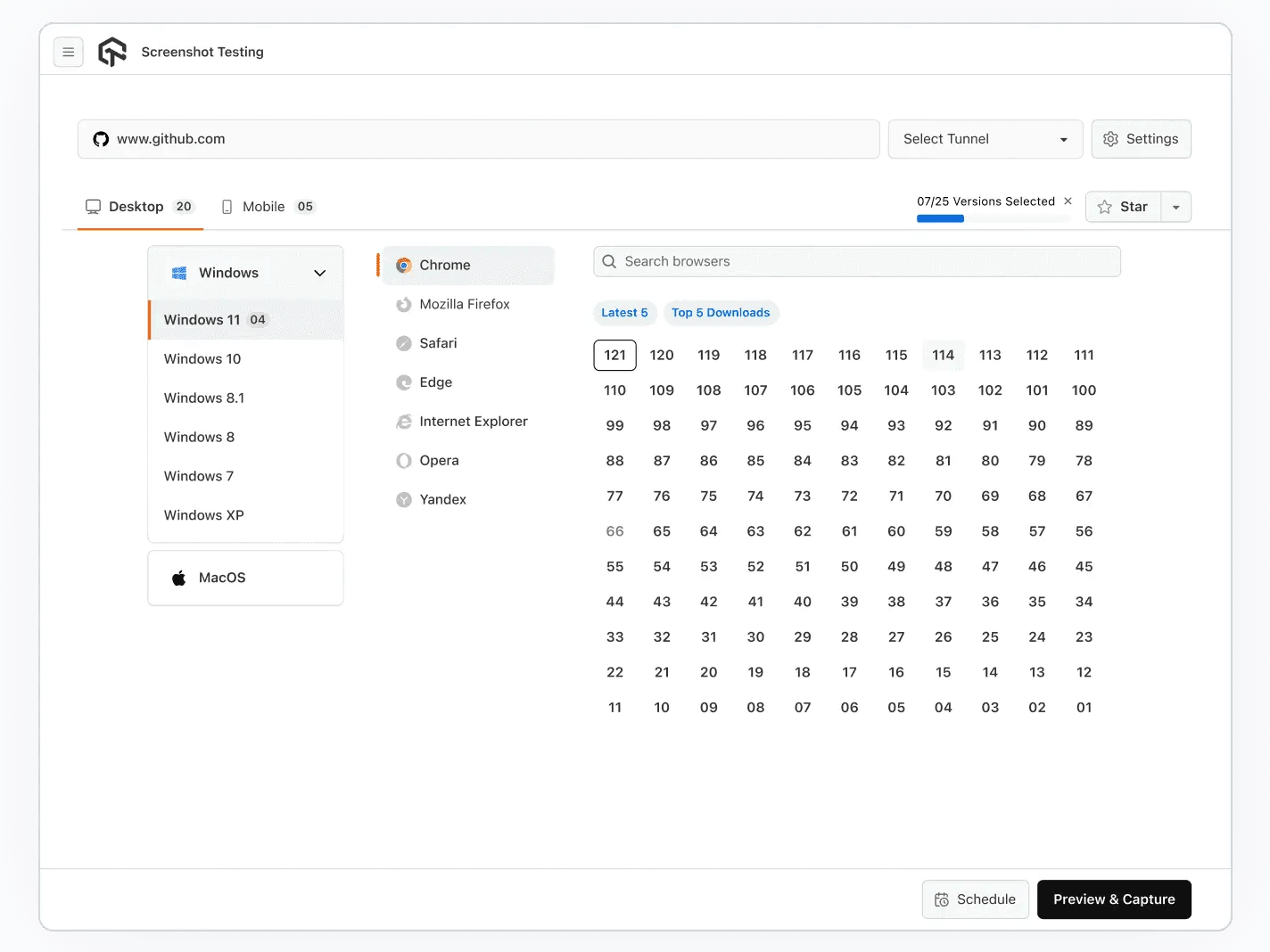
The platform can also be scheduled to run automated screenshot testing at set intervals and send results over email, removing the need to wait around for test completion.
Testing Across More Than One Page at a Time
Testing SAP applications across multiple pages, browsers, and devices can become time-consuming as the number of test combinations increases. While testing a single page is manageable, validating complete user workflows across different environments requires an efficient approach.
This is where parallel testing helps. Parallel test execution with Selenium allows teams to run multiple test cases simultaneously across different machines or virtual environments, reducing execution time and improving testing efficiency.
With TestMu AI, teams can leverage cloud-based Selenium Grid capabilities to execute SAP testing in parallel on an online browser farm of thousands of real browser and operating system combinations, without managing local test infrastructure.
As a cloud-based test automation platform, it helps validate SAP S/4HANA and Fiori applications faster while maintaining consistent test coverage across different user environments.
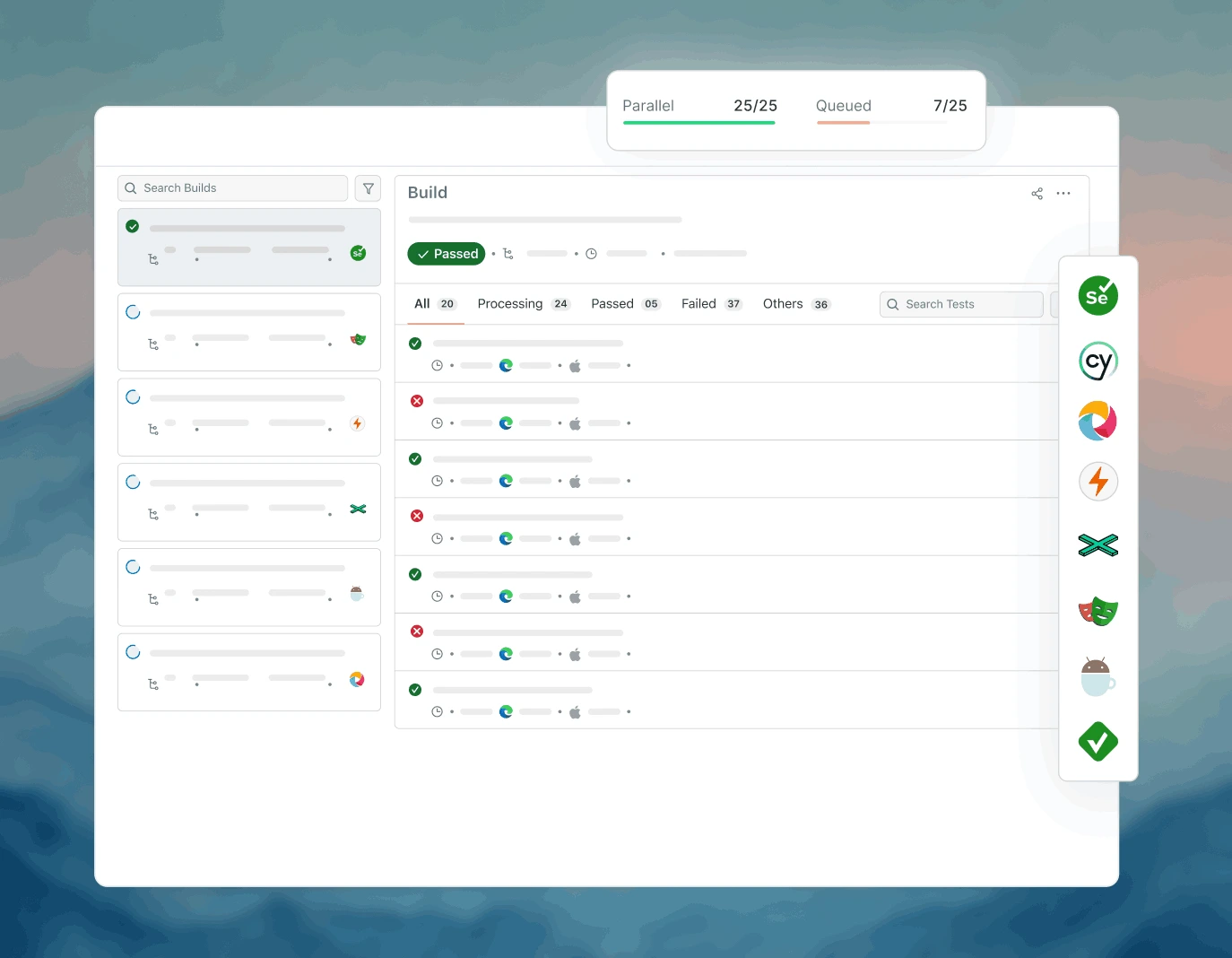
After execution, test results can be reviewed through the TestMu AI dashboard, providing visibility into automation runs, execution status, and outcomes.
System Testing
SAP recommends UIVeri5 for system and end-to-end tests. Inspired by Protractor, it uses WebDriverJS to launch a real browser so scripts interact with SAPUI5 and Fiori apps the way a user does. Tests are typically written synchronously, and the framework supports Chrome, Firefox, Safari, and Android and iOS browsers.

Conclusion
Start by mapping your own landscape to the two layers in this guide: list which changes are ABAP and SAP GUI, and which are Fiori and SAPUI5. That split decides your tool set, because ABAP Test Cockpit, eCATT, and SAP TAO cover one side and QUnit, OPA5, UIVeri5, and Selenium cover the other. Teams that skip this step end up buying a tool that cannot reach half their surface area.
From there, risk-rank the seven testing types against your release calendar. Security testing and UAT are the two most commonly under-resourced, and both fail quietly until after go-live. Regression is the type that grows fastest, so it is the first candidate for parallel execution and for the self-healing approach that AI testing tools bring to the web layer.
To put the Fiori half into practice, run your existing Selenium or AI-authored suites in parallel on HyperExecute across 3,000+ browser and operating system combinations, and use the KaneAI documentation linked above to author the first plain-English SAP web test.
Author

Saniya Gazala
Blogs: 45


Saniya Gazala is a Product Marketing Manager and Community Evangelist at TestMu AI with 2+ years of experience in software QA, manual testing, and automation adoption. She holds a B.Tech in Computer Science Engineering. At TestMu AI, she leads content strategy, community growth, and test automation initiatives, having managed a 5-member team and contributed to certification programs using Selenium, Cypress, Playwright, Appium, and KaneAI. Saniya has authored 15+ articles on QA and holds certifications in Automation Testing, Six Sigma Yellow Belt, Microsoft Power BI, and multiple automation tools. She also crafted hands-on problem statements for Appium and Espresso. Her work blends detailed execution with a strategic focus on impact, learning, and long-term community value.
Reviewer

Srinivasan Sekar
Reviewer
Srinivasan Sekar is Director of Engineering at TestMu AI (formerly LambdaTest), where he leads engineering and open-source initiatives behind the Selenium and Appium automation grid and owns TestMu AI's MCP Server. A committer to Appium and a contributor to Selenium, WebdriverIO, Taiko, and AppiumTestDistribution, he brings over 15 years of experience in quality engineering and open-source technologies. He is the author of the Apress book 'The MCP Standard: A Developer's Guide to Building Universal AI Tools with the Model Context Protocol,' a Certified Kubernetes and Cloud Native Associate, and an international conference speaker. Before TestMu AI he spent over eight years at Thoughtworks as a Principal Consultant and Quality Architect. Srinivasan holds a B.Tech in Information Technology from Anna University.


SAP Testing FAQs
Did you find this page helpful?
More Related Blogs
TestMu AI forEnterprise
Get access to solutions built on Enterprise
grade security, privacy, & compliance
- Advanced access controls
- Advanced data retention rules
- Advanced Local Testing
- Premium Support options
- Early access to beta features
- Private Slack Channel
- Unlimited Manual Accessibility DevTools Tests