

Power Your Software Testing with AI Agents and Cloud
The Native AI-Agentic Cloud Platform to Supercharge Quality Engineering. Test Intelligently and Ship Faster.


- TestMu AI (Formerly LambdaTest)
- /
- Learning Hub
- /
- Salesforce Testing Guide: What It Is, Types & Best Practices
Salesforce Testing Guide: What It Is, Types & Best Practices
Understand what Salesforce testing is, the types of Salesforce testing, how to test a Salesforce application step by step, and the best practices teams follow.
Last Updated on:
Salesforce testing validates that your CRM environment performs correctly after every deployment, configuration change, and platform upgrade. With three major releases every year and continuous org customizations, a single untested change can break workflows that thousands of users depend on daily.
This guide covers everything a QA team or Salesforce admin needs: the full testing process step by step, every major test type from Apex unit tests to Agentforce AI agent validation, a comparison of the leading tools, and the specific challenges (Shadow DOM, MFA, dynamic IDs) that make Salesforce harder to automate than standard web applications.
TL;DR
Deploy Salesforce updates reliably by combining manual exploratory testing with automated regression suites. Use KaneAI by TestMu AI to automate complex end-to-end workflows, bypass Lightning Shadow DOM boundaries, and auto-heal locators, while reserving manual testing for initial user acceptance and exploratory checks.
What Salesforce Testing Ensures
- Salesforce testing validates configuration, customization, and integrations rather than a conventional web app.
- Shadow DOM and dynamic element IDs are what make it harder to automate than standard web testing.
- Salesforce requires at least 75 percent Apex code coverage before any deployment reaches production.
- Sandboxes carry production metadata, while scratch orgs are disposable, so pick by what the test needs.
Manual vs. Automated Testing
- Automated Testing: Regression suites, multi-step end-to-end workflows like Lead-to-Cash, and high-volume data setups that exercise governor limits require automation because they repeat on every release.
- Manual Testing: Exploratory testing, initial user acceptance testing, and one-off configuration tweaks require manual execution because they depend on human judgment rather than fixed assertions.
Steps to Test a Salesforce Application
- Sandbox Setup: Developers must select a Developer, Partial Copy, or Full Copy sandbox based on the required testing depth to isolate changes from live production data. See how org-copy sandboxes compare with the other kinds of sandbox environment.
- Test Case Definition: Teams map scenarios to real workflows with defined inputs, similar to how Salesforce case management turns case creation, routing, and escalation into discrete testable steps.
- Apex Unit Tests: Developers execute Apex test classes via the Developer Console or Salesforce CLI to confirm at least 75% code coverage before deployment.
- Functional and Regression Testing: QA teams validate updated workflows, validation rules, page layouts, and flows, then re-run existing tests to confirm no existing features broke.
- Integration and API Testing: Testers verify external connections like ERP, marketing, and payment systems to check two-way data flow, error handling, and authentication validity.
- User Acceptance Testing: Stakeholders validate workflows using scripted scenarios and sign off in a UAT environment that closely mirrors production configuration and data volume.
- Production Verification: After go-live, teams run 10 to 15 targeted smoke tests covering record creation, automation triggers, reports, and key integration paths.
How KaneAI Simplifies Salesforce Automation
- Plain English Test Authoring: KaneAI allows users to describe Salesforce workflows in natural language, automatically generating the full test sequence without manual scripting or locator setup.
- Shadow DOM and Dynamic ID Handling: KaneAI natively crosses the Lightning Shadow DOM boundary and resolves dynamic element IDs using Salesforce metadata.
- Built-In MFA Support: KaneAI automatically detects and completes multi-factor authentication dialogs during execution, removing a common blocker in Salesforce automation.
- Auto-Healing Locators: KaneAI automatically identifies and corrects broken locators following seasonal Salesforce releases before the next test run begins.
- Multi-Org Parallel Execution: KaneAI runs the same test simultaneously across sandbox, staging, and production orgs via HyperExecute without requiring script duplication.
- AI-Powered Results Analysis: KaneAI delivers a dashboard with step-level pass/fail status, screenshots, network logs, and root cause analysis after each run.
What Are the Key Salesforce Terminologies?
Understanding Salesforce starts with learning its vocabulary. These are the building blocks that shape how data, automation, and user experiences are designed inside the platform.
- Objects - Containers for data in Salesforce, similar to tables in a database. Examples include Accounts, Contacts, and Opportunities.
- Fields - Individual pieces of data within an object, like columns in a table. Can be standard or custom.
- Records - Single entries in an object; each record represents an instance, like one account or contact.
- Page Layouts - Define how fields, sections, and buttons are arranged on a record's interface.
- Workflows - Automation rules that trigger actions such as email alerts or field updates when conditions are met.
- Process Builder - A tool for building more advanced automation, including multiple if/then actions.
- Flows - Flexible automation for guided screens, approvals, and complex business processes.
- Validation Rules - Rules that enforce data integrity by preventing invalid or incomplete data entry.
- Apex - Salesforce's proprietary programming language for custom logic and advanced automation.
- Lightning Web Components (LWC) - Reusable modules built on web standards used to construct dynamic interfaces in Salesforce Lightning Experience.
- Sandbox - A copy of a Salesforce environment used for development, testing, or training without affecting live data.
- Developer Sandbox - A lightweight copy of your production metadata used for building and testing Apex code and configurations in isolation.
- Partial and Full Sandboxes - Partial sandboxes copy a subset of production data; Full sandboxes replicate metadata and data for high-fidelity workflow testing.
- Scratch Org - A temporary, source-driven Salesforce environment created via Salesforce DX, ideal for isolated feature development and CI/CD pipelines.
- Salesforce Object Query Language (SOQL) - A query language similar to SQL, used to retrieve Salesforce data.
- Agentforce - Salesforce's agentic AI platform (formerly Einstein Copilot) that runs autonomous agents for multi-step business tasks, adding a new testing layer.
- Einstein Trust Layer - Salesforce's built-in security and compliance framework for AI, including audit trails and data masking for Agentforce interactions.
- Chatter - Salesforce's collaboration tool for posting updates, sharing files, and team communication.
- AppExchange - Salesforce's marketplace for third-party apps and integrations that extend platform functionality.
- Tri-Annual Releases - Salesforce delivers three platform updates every year (Spring, Summer, and Winter), each requiring regression testing to protect existing customizations.
Several of these terms shift meaning with every platform update, and the Salesforce release notes record exactly what changed in the current cycle.
These fundamentals help testers (also called SFDC testers) design better test cases and identify issues early. The same grounding prepares you for common Salesforce interview questions when targeting testing or admin roles.
What Is Salesforce Testing?
Salesforce testing verifies that a Salesforce CRM environment works correctly after deployments, configuration changes, integrations, or platform updates, covering functional, regression, integration, and UAT checks across Sales Cloud, Service Cloud, and custom Apex.
The goal is to ensure that every customization, automation, and third-party connection behaves as intended without disrupting live operations or data integrity.
Unlike standard web apps, Salesforce testing requires understanding the metadata layer (objects, fields, relationships), not just the UI. Lightning's Shadow DOM boundaries break standard automation tools, and three annual releases mean continuous coverage upkeep.
Salesforce holds the leading CRM market share, ranked #1 by IDC's 2025 Worldwide Semiannual Software Tracker. At that scale, one untested change can break workflows thousands rely on daily.
Rising release cadence and AI-assisted development are what force Salesforce teams to formalize testing.
The scope of Salesforce QA testing includes:
- Customizations - Make sure the workflows, automation, and Apex logic you build behave exactly as intended.
- Integrations - Check that your connections with external apps and middleware continue to run without errors.
- Salesforce Updates - After every seasonal release, ensure your existing functionality stays stable.
- Data Consistency - Verify that records, fields, and reports in your org remain accurate and reliable.
- AI Agent Validation - As Agentforce adoption grows, test that agents make correct decisions, stay in scope, and escalate when confidence is low.
- User-Facing Processes - Ensure that the CRM experience you deliver to your teams remains efficient and dependable.
Why Is Salesforce Testing Crucial?
Salesforce testing is critical because failures in core workflows directly impact revenue, data accuracy, and user productivity while the platform evolves with three releases each year.
The platform supports revenue-generating activities, so any failure in core workflows hits business outcomes directly. Salesforce delivers three major releases each year, and most orgs add continuous customizations, compounding risk with every cycle.
Here are the key reasons why Salesforce testing is essential:
- Platform Evolution - Salesforce delivers three major releases each year, and testing confirms that your functionality continues to perform as intended.
- Complex Customizations - With proper validation, workflows, automation, and Apex code function together without conflict.
- Data Reliability - Consistent testing supports accurate reports and dashboards that leadership can trust for decision-making.
- User Productivity - A reliable CRM environment empowers your teams to work efficiently and stay focused on outcomes.
- Third-Party Integrations - Testing ensures applications and middleware exchange data accurately to keep processes running without any interruptions.
- AI Agent Reliability - With Agentforce deployments growing, testing AI agent behavior ensures autonomous actions are correct, compliant, and within approved boundaries.
Using Salesforce testing with KaneAI by TestMu AI (formerly LambdaTest), enterprises are accelerating release cycles and improving testing efficiency.
In a recent case study, this platform helped Boomi reduce test execution time by 78% using HyperExecute, AI-Native Test Analytics, and AI-Native Test Intelligence.
Similarly, another case study shows Transavia achieved 70% faster test execution, enabling quicker releases and faster time to market.

Note: Test your Salesforce orgs across 3,000+ browser and OS combinations and 10,000+ real devices with TestMu AI. Start free.
Normal Testing vs. Salesforce Testing
Salesforce testing is harder than standard web testing because the platform is metadata-driven rather than code-first, runs in a shared multi-tenant environment, and generates element IDs dynamically at runtime.
Lightning components render inside a Shadow DOM that hides elements from conventional locators, and Salesforce ships three releases every year (Spring, Summer, and Winter) that can shift UI behavior overnight.
A standard web app changes on your schedule; a Salesforce org changes on both yours and Salesforce's, so your suite must absorb configuration drift, dynamic IDs, and tri-annual upgrades without constant manual repair.
| Aspect | Standard Web App Testing | Salesforce Testing |
|---|---|---|
| Architecture | Code-first; the UI maps directly to your own source. | Metadata-driven; objects, fields, and layouts are configuration, not code. |
| Environment | Single-tenant; you control the full stack. | Multi-tenant; governor limits and shared infrastructure shape behavior. |
| Element IDs | Stable IDs and selectors you define. | Dynamic IDs regenerated at runtime, plus Shadow DOM boundaries. |
| Release cadence | Changes only on your own schedule. | Tri-annual platform releases (Spring, Summer, Winter) on top of your changes. |
What Are the Different Types of Salesforce Testing?
Salesforce testing includes unit, functional, integration, regression, UAT, performance, security, Agentforce AI agent testing, and seasonal release testing, each addressing different failure modes in the platform.
Testing Salesforce requires a layered approach because failure modes exist at multiple levels. The platform combines custom code, configurations, and external integrations, so a single test type never validates the full scope of an org.
Below is a clear framework that covers the major testing types, when to use them, and why they matter.
Unit and Component Testing
Unit testing is where quality starts. Developers perform unit testing for Apex code, Lightning Web Components, and Flows before anything moves to the broader QA cycle.
- Apex tests check triggers, classes, and batch jobs. Salesforce enforces at least 75% code coverage before production, per the Salesforce Apex Testing Documentation. For the developer view of trigger events, context variables, and bulk test classes, see our Salesforce Apex trigger reference.
- Lightning Web Component tests use Jest to verify component rendering, data binding, and user interactions; see the dedicated LWC Jest section below.
- Flow tests validate automation logic. Complex Flows should be tested with multiple input variations.
Purpose: Catch defects early and validate that the smallest building blocks of your solution work as intended.
Business Process and Functional Testing
Once the pieces are in place, you need to see how the system supports real business operations. This layer of testing validates that Salesforce delivers the right outcomes for users across their daily workflows.
- Functional testing ensures page layouts, validation rules, workflows, and approvals work according to requirements.
- Regression testing re-checks existing functionality after updates or deployments.
- Smoke testing provides a quick confidence check that core actions (like creating a record or running a report) still function.
Purpose: Ensure that day-to-day processes remain reliable and consistent.
Integration and Data Testing
Salesforce rarely stands alone. It often connects with ERP, billing, or marketing platforms, and these connections must be verified after every change to prevent silent data failures downstream.
- Integration testing checks APIs, middleware, and event-driven processes.
- End-to-end testing validates workflows that cross system boundaries.
- Data migration testing ensures clean imports, accurate mapping, and complete reconciliation when moving data from legacy systems.
Purpose: Ensure that information flows correctly across systems and data quality remains intact.
Non-Functional Testing
Beyond does it work, you need to ask does it perform, scale, and stay secure. Non-functional testing is often skipped until a production incident forces the issue.
- Performance testing evaluates response times and scalability under load.
- Security testing validates permissions, authentication, and data protection. For regulated industries, this covers GDPR controls and the Einstein Trust Layer.
- Resilience testing simulates failures (like API outages) to confirm the system can recover gracefully.
Purpose: Ensure Salesforce meets expectations for speed, safety, and reliability.
User Acceptance and Production Testing
Finally, testing comes back to the people who actually use Salesforce.
- User Acceptance Testing (UAT) allows business users to validate that Salesforce supports their real-world tasks.
- Production verification testing takes place after go-live to ensure deployments succeeded.
- Seasonal release testing matters because Salesforce ships three updates a year (Spring, Summer, Winter). Regression tests during these windows prevent disruptions.
Purpose: Build confidence among end users and maintain stability through Salesforce's continuous evolution.
What Makes Salesforce Automation Testing Harder Than Standard Web Testing?
Shadow DOM in Lightning components, dynamic element IDs, MFA dialogs, and org-specific configuration drift make Salesforce automation significantly harder than standard web testing.
Salesforce automation testing is the practice of using automated testing tools to verify that Salesforce applications, customizations, and integrations work as expected. It reduces manual effort, speeds up regression testing, and helps teams catch issues earlier in the release cycle.
Automated tests cover the full stack: Apex unit tests via the native framework, UI flows via Selenium or Playwright, API integrations via REST and SOAP validators, and end-to-end processes via AI-native platforms.
Salesforce Selenium testing remains the code-first route, and it only stays stable once a team has solved four things by hand: durable Lightning locators, Shadow DOM traversal in LWC, an MFA workaround, and a working lead-creation example to build the rest of the suite around.
The specific challenges that make Salesforce automation testing harder than standard web automation are:
- Shadow DOM - Lightning components render inside a Shadow DOM, hiding elements from standard locators. Tools must traverse the shadow root to interact.
- Dynamic element IDs - Salesforce generates IDs dynamically, so hard-coded XPath or ID selectors break often. Use metadata or semantic-attribute locators.
- MFA handling - Multi-factor authentication dialogs appear during execution in secure orgs. Tools must handle MFA challenges programmatically to avoid blocking runs.
- Configuration drift - Profiles, permission sets, and validation rules vary across environments, so a test passing in one sandbox fails when config drifts.
- Seasonal release breakage - Three updates per year shift locators, rendering, and API behavior. Teams on standard tools spend weeks fixing broken tests.
How Does KaneAI Solve Salesforce Automation Testing Challenges?
KaneAI solves Salesforce automation challenges with native Shadow DOM traversal, AI-powered auto-healing locators, built-in MFA handling, and parallel execution across multiple orgs.
When choosing a Salesforce automation testing tools, prioritize native Shadow DOM support, AI-powered auto-healing for broken locators, sandbox-to-production parity, and CI/CD pipeline integration.
Manual testing cannot keep pace with Salesforce's continuous update cycle. Teams that automate with an AI-native platform significantly reduce test maintenance overhead and cut regression cycle times from weeks to hours.
Most Salesforce test automation initiatives stall for the same three reasons: no sandbox strategy, a framework chosen before the workflows were mapped, and CI/CD wiring left until the end. Sequencing the work from sandbox setup through production verification is what keeps the suite alive past its first seasonal release.
AI-native testing solutions close these gaps by working with the platform's structure instead of against it. They traverse Shadow DOM and resolve dynamic IDs from Salesforce metadata rather than brittle XPath, heal locators automatically when a seasonal release shifts the UI, clear MFA challenges during execution, and let anyone on the team author tests in plain English.
When to Automate Salesforce Testing vs. Manual Testing
Not every Salesforce test belongs in automation, and not every check is worth a human's time. The rule of thumb: automate anything stable, repetitive, and high-volume; keep human judgment for exploratory or one-off work.
Automate these:
- Regression suites - Re-running the same validations after every deployment and seasonal release is exactly where automation pays for itself.
- End-to-end workflows - Multi-step business processes such as Lead-to-Cash span objects, automation, and integrations, and need to be verified on every change cycle.
- High-volume data setups - Generating and validating bulk records to exercise governor limits and performance is impractical to do by hand.
Keep these manual:
- Exploratory testing - Unscripted investigation of new features surfaces edge cases no automated assertion anticipates.
- Initial UAT - Business stakeholders validating that a workflow feels right belongs with real users, not scripts.
- One-off configuration changes - A single field tweak or layout adjustment rarely justifies the cost of authoring and maintaining an automated test.
For the automated tier, an AI-native platform such as TestMu AI automation cloud lets you author regression and Lead-to-Cash flows in plain English and run them in parallel across real environments.
Common Salesforce Test Scenarios
Most Salesforce test coverage comes down to a handful of recurring business scenarios. Building explicit test cases around each one gives your regression suite a dependable backbone:
- Lead-to-Opportunity conversion - Convert a qualified lead and confirm field mapping carries company, contact, and custom values into the new records without loss.
- Opportunity-to-Quote (CPQ) - Generate a quote from an Opportunity and verify that pricing rules, discounts, product bundles, and line items calculate correctly and sync back. Salesforce CPQ testing helps ensure these quote-to-cash processes remain accurate across every release.
- Validation-rule enforcement - Save a record with required fields missing and confirm the rule blocks the save and surfaces the correct error message.
- Profile-based permission checks - Log in as different profiles and verify each role sees only the records, fields, and actions its permissions allow.
How to Test a Salesforce Application: Step-by-Step?
Set up a sandbox, define test cases mapped to business workflows, run unit and functional tests, validate integrations, conduct UAT, then verify in production after each deployment.
Salesforce testing follows a structured flow from sandbox setup through to production verification. The steps below apply whether you are testing a new customization, validating a third-party integration, or preparing for a seasonal release.
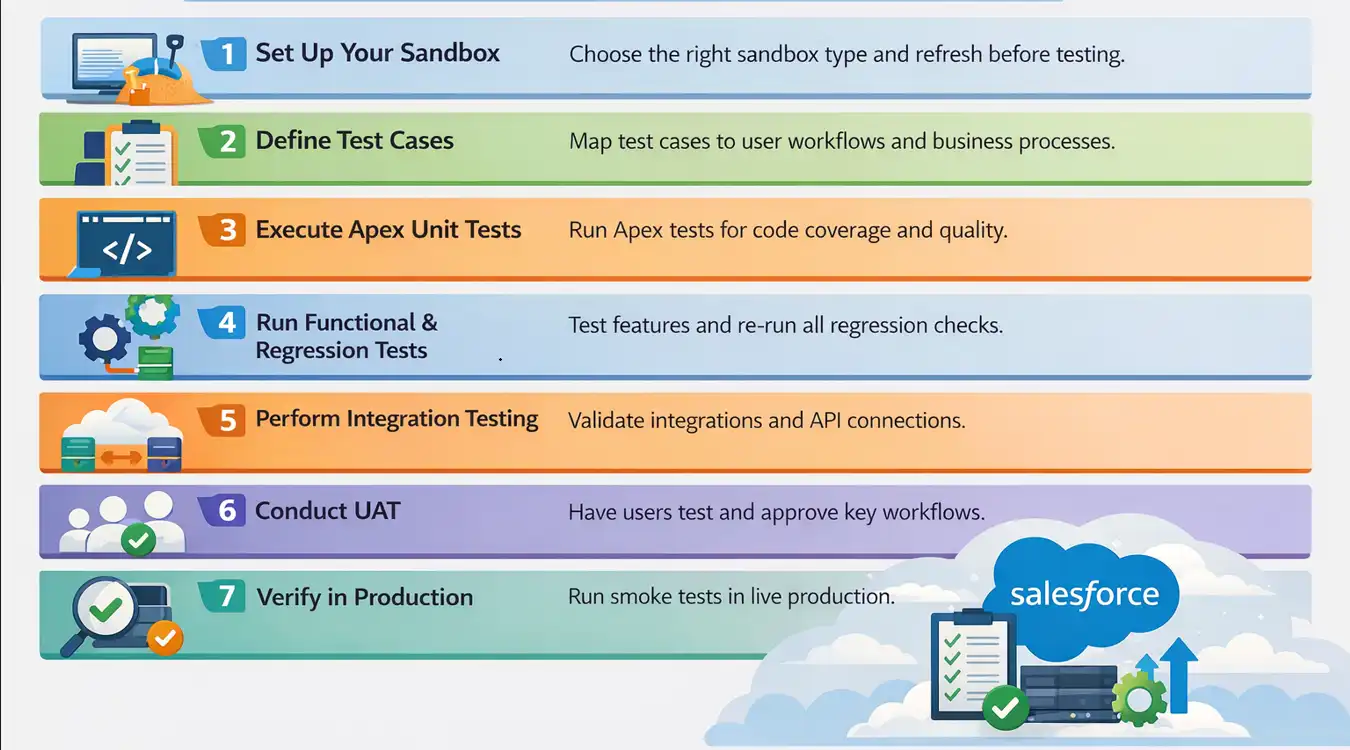
Step 1: Set Up Your Sandbox Environment
Before any test runs, work in a sandbox, not production. Choose your sandbox type based on what you need to test:
- Developer sandbox for unit testing and Apex code.
- Partial copy sandbox for functional and integration testing with a representative data sample.
- Full copy sandbox for UAT and performance testing with production-scale data.
- Scratch org for CI/CD pipelines where each build requires a clean, reproducible environment via Salesforce DX.
Refresh sandbox metadata before each major test cycle to ensure parity with the current production configuration.
Step 2: Define Test Cases Based on Business Processes
Map test cases to real user journeys, not just requirements. A lead-to-opportunity workflow, a CPQ quote, or a case resolution are valid scenarios. Each case defines input data, action, expected result, and acceptance criteria.
Step 3: Execute Unit Tests on Apex Code
Run Apex test classes in the Developer Console or via Salesforce CLI. Salesforce requires at least 75% code coverage before deployment. Spring '26 added RunRelevantTests (beta), running only tests relevant to your changes.
Step 4: Run Functional and Regression Tests
Test all modified and affected workflows, validation rules, page layouts, and automation flows. For regression, re-run your full suite of previously passing tests to confirm no existing functionality was broken by recent changes.
Step 5: Perform Integration and API Testing
If your org connects to external systems (ERP, marketing, or payment processors), validate each integration point. Confirm data flows both ways, error handling works, and tokens stay valid.
From February 2026, Salesforce drops session IDs in outbound messages; use OAuth to authenticate all outbound calls instead.
Step 6: Conduct User Acceptance Testing
Invite business stakeholders to test real-world workflows in the staging sandbox. UAT should be scripted with defined test scenarios, expected outcomes, and a clear pass or fail sign-off process before deployment proceeds.
Step 7: Verify in Production After Deployment
After go-live, run smoke tests in production to confirm the deployment succeeded. Check critical paths: record creation, automation triggers, reports, and integrations. Production verification stays fast (10 to 15 scenarios), not a full regression run.

How to Perform Salesforce Unit Testing?
Salesforce unit testing uses Apex test classes annotated with @isTest to verify individual methods and triggers, requiring at least 75% code coverage before any production deployment.
Consider you run a store and want to give discounts. If a customer buys something worth 1000 and you give a 10% discount, the final price should be 900.
Let's write a unit test in Salesforce that calculates this correctly and then test it.
Code to Test (Apex Class):
This is the class that calculates the discount.
public class DiscountService {
    public static Decimal applyDiscount(Decimal amount, Decimal percent) {
        if(amount == null || percent == null) {
            throw new AuraHandledException('Amount and percent are required');
        }
        return amount - (amount * (percent / 100));
    }
}
Code Walkthrough:
- Takes two numbers - amount and percent.
- If either is missing, it throws an error.
- Otherwise, it subtracts the discount and gives back the final price.
The Unit Test (Test Class):
Now we create a test class to verify the method works.
@isTest
public class DiscountServiceTest {
    @isTest
    static void testApplyDiscount() {
        // Step 1: Set up input values
        Decimal amount = 1000;
        Decimal percent = 10;
        // Step 2: Call the method we want to test
        Decimal result = DiscountService.applyDiscount(amount, percent);

        // Step 3: Verify the result is what we expect
        System.assertEquals(900, result, '10% discount on 1000 should return 900');
    }
}
Code Walkthrough:
- @isTest tells Salesforce this is a test class.
- Give the method inputs (1000 and 10).
- Run the discount method.
- Check if the output is exactly 900.
If the method works, the test passes. If not, it fails.
Test Execution:
1. Go to Setup > Apex Test Execution.
2. Select DiscountServiceTest.
3. Click Run.
4. Look at the results:
- Green = test passed.
- Red = test failed.
How to Test Salesforce Lightning Web Components (LWC) with Jest?
Lightning Web Components are the standard building block for Salesforce Lightning UIs, and they need a separate testing approach from Apex.
Apex classes run inside Salesforce; LWC tests run outside it using Jest and the @salesforce/sfdx-lwc-jest package, which mocks platform modules.
LWC Jest tests let you verify component rendering, user interaction handling, and wire adapter behavior in complete isolation, catching bugs before the component ever touches a real org.
Setting Up LWC Jest Testing
Install the Jest testing utilities for LWC in your Salesforce DX project:
# Install LWC Jest utilities
npm install @salesforce/sfdx-lwc-jest --save-dev

# Run all LWC tests
npm run test:unit

# Run tests in watch mode during development
npm run test:unit -- --watch
Example: Testing an LWC Component with Jest
Consider a simple contactCard component that displays a contact's name and email. Here is the component and its corresponding Jest test:
Component HTML (contactCard.html):
<template>
    <lightning-card title="Contact Details">
        <div class="slds-p-around_medium">
            <p class="contact-name">{name}</p>
            <p class="contact-email">{email}</p>
        </div>
    </lightning-card>
</template>
Jest Test (contactCard.test.js):
import { createElement } from 'lwc';
import ContactCard from 'c/contactCard';

describe('c-contact-card', () => {
    afterEach(() => {
        // Clean up DOM after each test
        while (document.body.firstChild) {
            document.body.removeChild(document.body.firstChild);
        }
    });

    it('renders contact name and email correctly', () => {
        // Step 1: Create the component
        const element = createElement('c-contact-card', {
            is: ContactCard
        });

        // Step 2: Set component properties
        element.name = 'Jane Doe';
        element.email = 'jane@example.com';
        document.body.appendChild(element);

        // Step 3: Assert rendered output
        const nameEl = element.shadowRoot.querySelector('.contact-name');
        const emailEl = element.shadowRoot.querySelector('.contact-email');

        expect(nameEl.textContent).toBe('Jane Doe');
        expect(emailEl.textContent).toBe('jane@example.com');
    });

    it('displays empty string when no name is provided', () => {
        const element = createElement('c-contact-card', {
            is: ContactCard
        });
        element.name = '';
        document.body.appendChild(element);

        const nameEl = element.shadowRoot.querySelector('.contact-name');
        expect(nameEl.textContent).toBe('');
    });
});
Key points about LWC Jest testing:
- Shadow DOM access - Use element.shadowRoot.querySelector() to access elements inside the component's Shadow DOM; standard document.querySelector() will not find them.
- Wire adapters - Use @salesforce/sfdx-lwc-jest mock utilities to simulate @wire data; real Salesforce data is not available in Jest tests.
- Cleanup - Always remove components from the DOM in afterEach to prevent test interference.
- Spring '26 update - TypeScript for Lightning Web Components is a Developer Preview, so confirm its status before relying on it for component tests.
For end-to-end LWC testing in a real Salesforce org, where Shadow DOM traversal happens during live browser interactions, KaneAI by TestMu AI handles it automatically with metadata-aware locators, no custom configuration needed.
How to Perform Salesforce Testing Using KaneAI?
KaneAI is an agentic end-to-end testing platform that plans, authors, executes, and maintains Salesforce tests from a plain-English description. Rather than acting as a single-step script generator, it carries a workflow through the full cycle, deciding the steps, running them against a live org, and adapting them as the org changes, so QA teams, admins, and business users can own end-to-end coverage without scripting.
Connect your Salesforce org to KaneAI, describe the test in plain English, review generated steps, and execute across browsers with AI root cause analysis for any failures.
TestMu AI provides a scalable Salesforce testing cloud for automated tests using Selenium, Cypress, Playwright, or Salesforce frameworks. KaneAI is the agentic end-to-end testing platform layered on top of it, owning the whole loop rather than one step of it: it works out what the test needs to do, authors it, drives it against a live org, and repairs it as the org drifts, so nobody is left maintaining scripts or locators.
You describe what you want to test in plain English, and KaneAI generates the full test sequence, runs it across real Salesforce environments, and heals it automatically when the platform changes.
Step 1: Connect your Salesforce org to KaneAI
Log in to TestMu AI, navigate to KaneAI, and connect your Salesforce sandbox or production org. If your org is behind a firewall, the TestMu AI Tunnel handles the secure connection automatically.
Step 2: Describe your Salesforce test in plain English
Type a plain English description of the Salesforce workflow you want to test. For example, this is an actual test executed on a live Salesforce org using KaneAI:
- Log in to Salesforce with your username and password.
- Complete MFA verification.
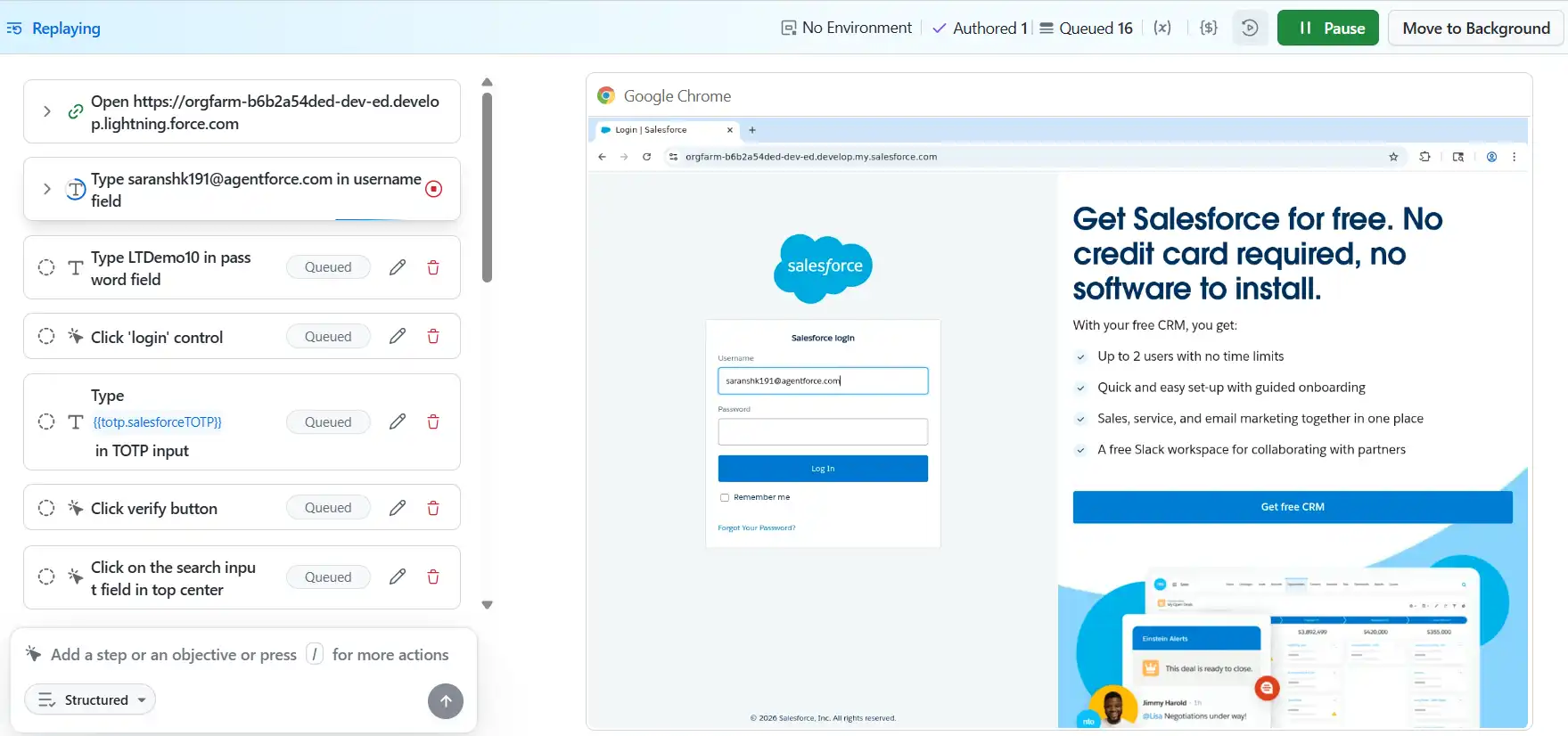
- Search for the TestMu AI account.
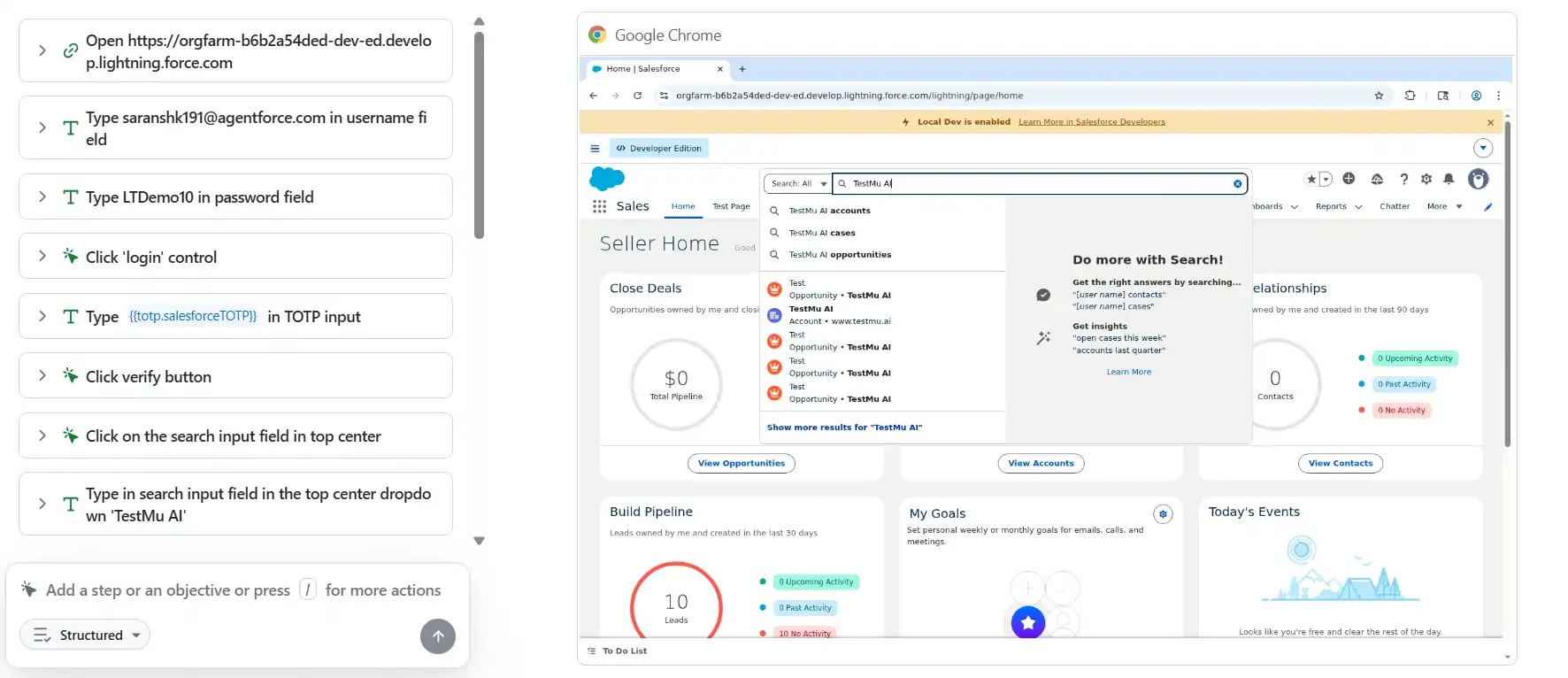
- Open the Opportunities section.
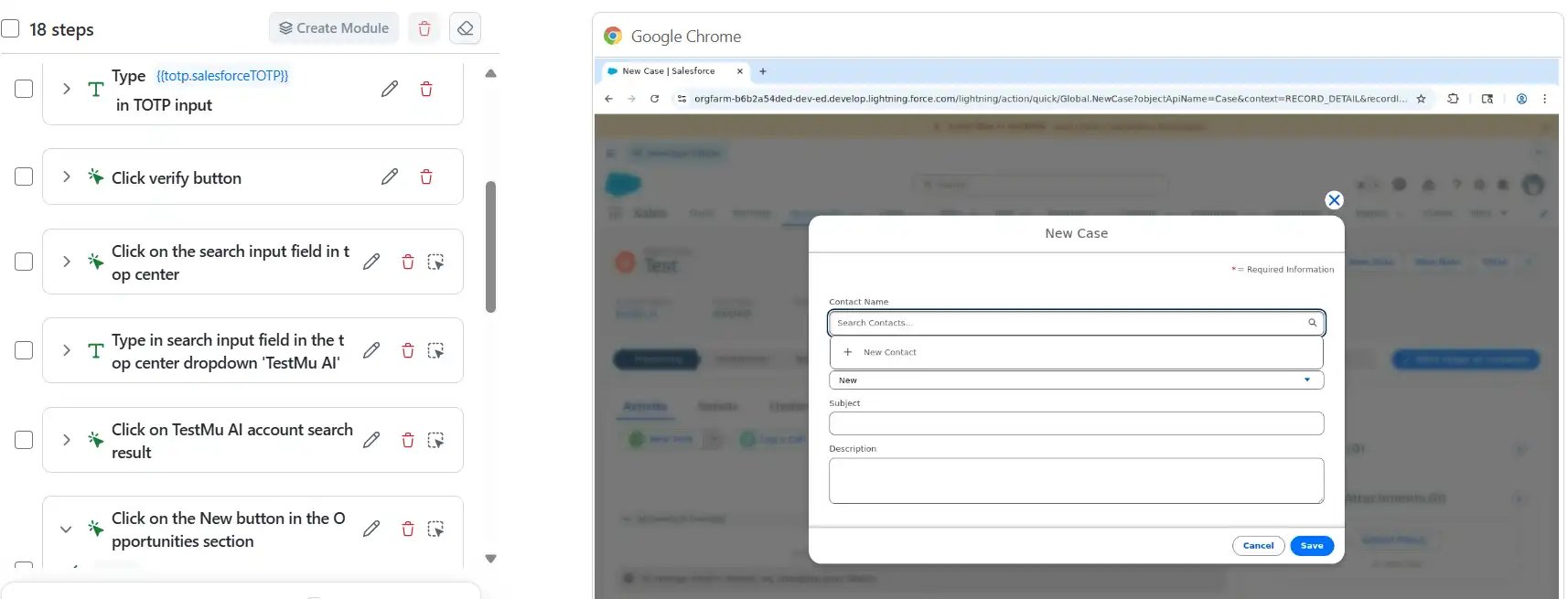
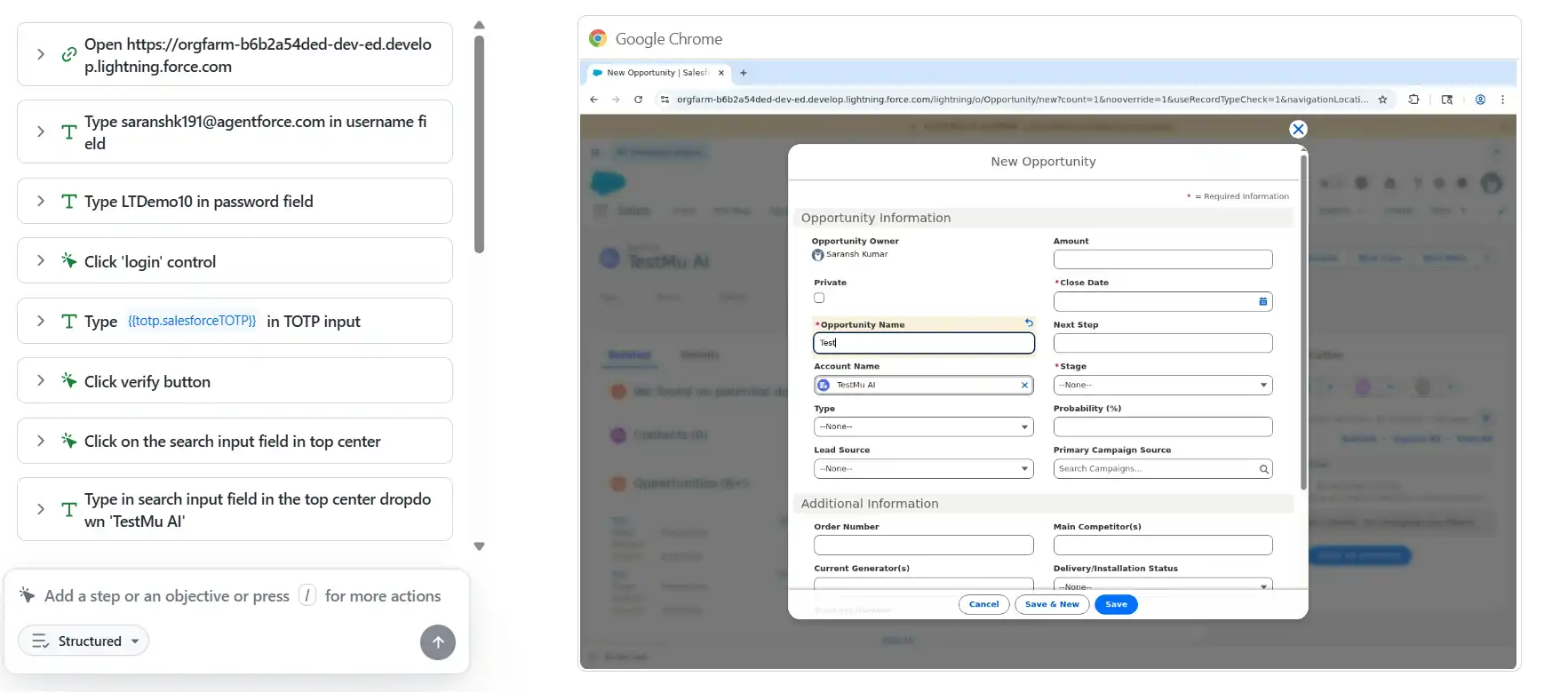
- Click New to create a new opportunity.
- Enter the opportunity name as Test.
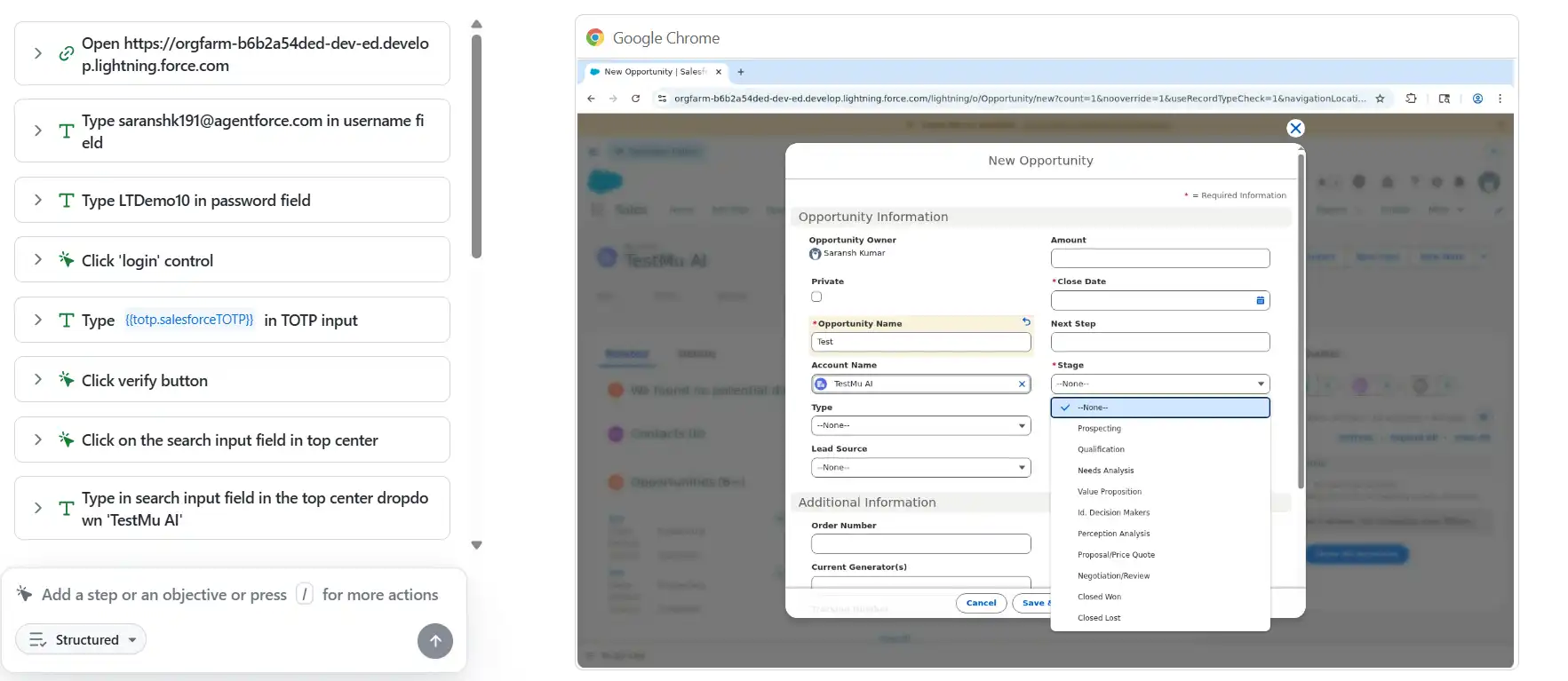
- Set Stage to Prospecting.
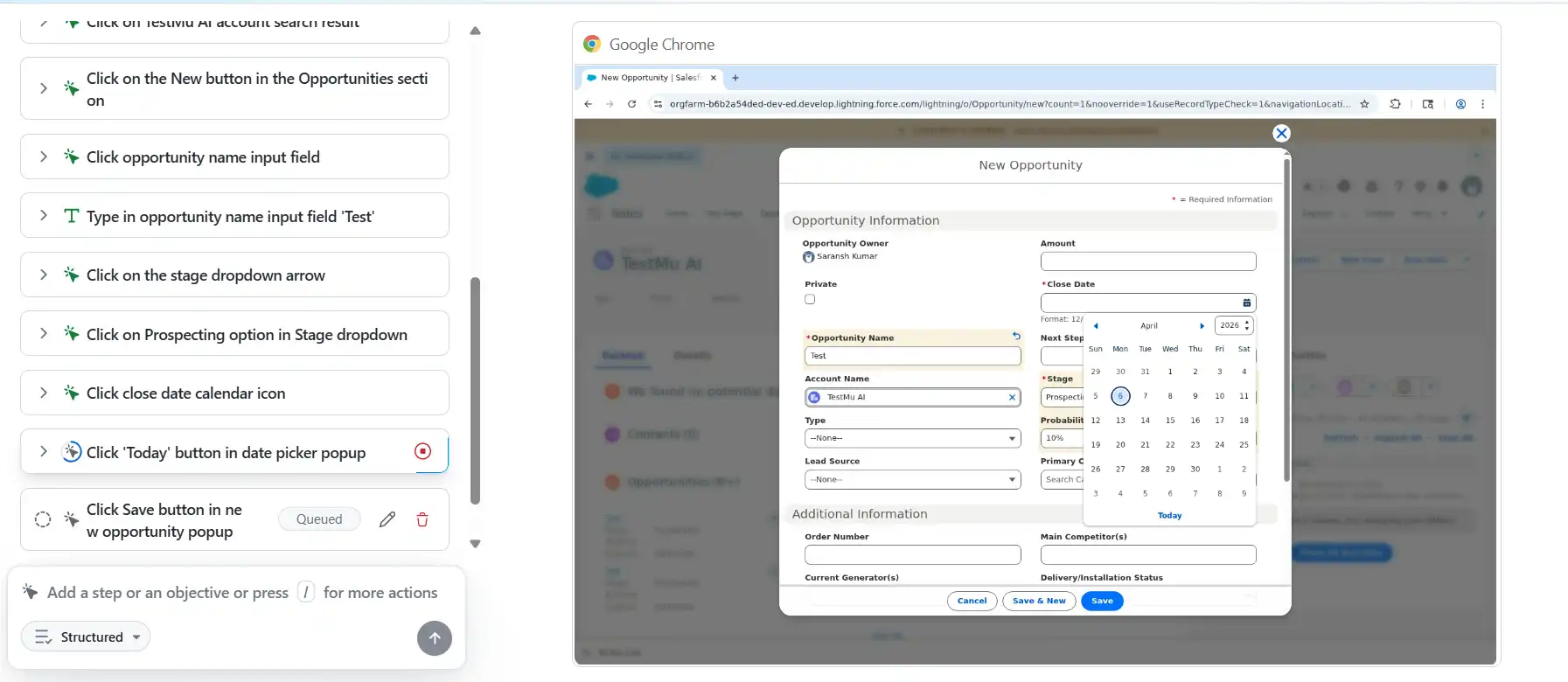
- Set Close Date to today.
- Click Save.
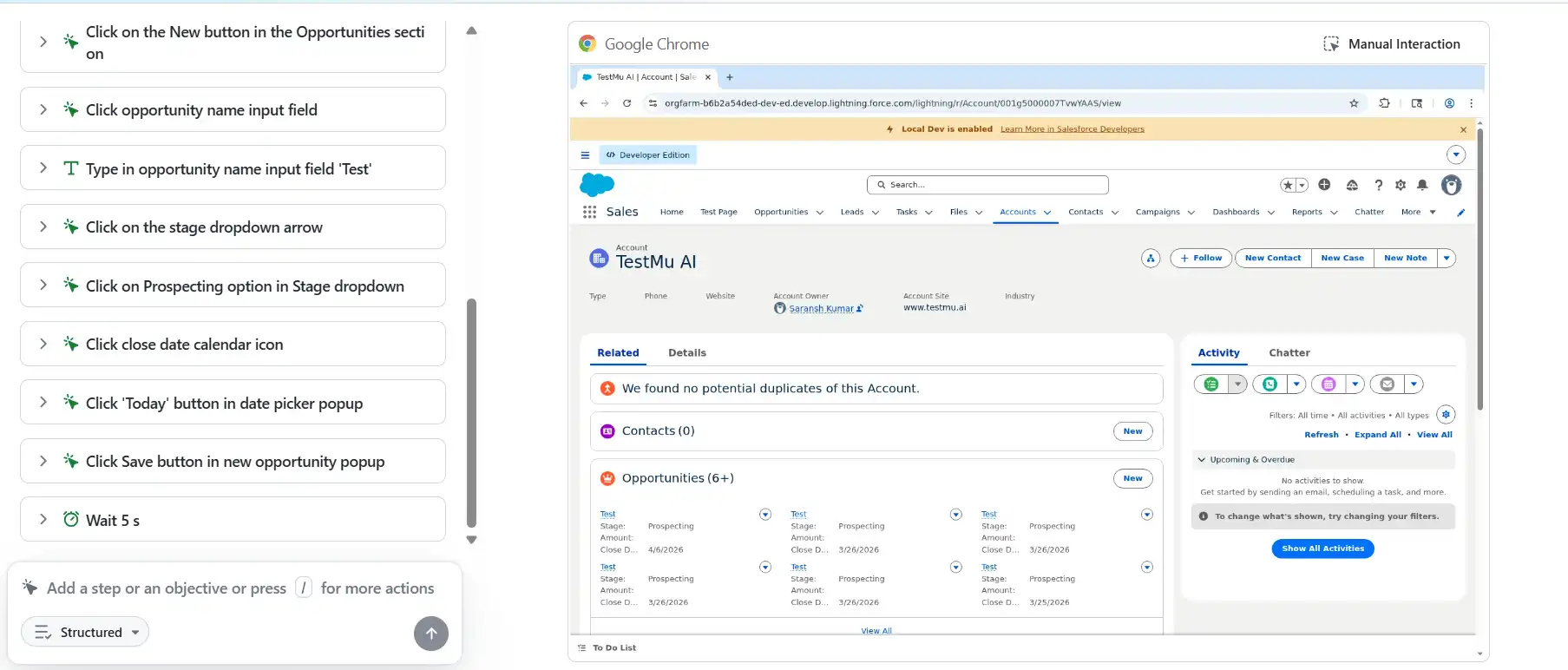
KaneAI reads this description, maps each instruction to the Salesforce UI, and generates every step automatically, including MFA handling, Shadow DOM traversal, and date picker interaction, with no selector or script written.
Step 3: Review and Execute
KaneAI presents the generated steps for review before execution. Edit steps, add assertions, or parameterize across data sets and orgs.
Click Run, and KaneAI executes it across your chosen browser, OS, and org in parallel on HyperExecute.
Step 4: Review Results with AI-Powered Root Cause Analysis
After execution, KaneAI surfaces a dashboard with per-step pass/fail status, screenshots, network logs, and AI-powered root cause analysis. If a seasonal release breaks a locator, KaneAI flags it, explains the cause, and fixes it automatically.
What KaneAI Handles Natively for Salesforce?
KaneAI is built with deep Salesforce awareness, so it handles many of the platform's testing complexities out of the box without any custom configuration:
- Shadow DOM traversal - KaneAI natively crosses the Shadow DOM boundary to locate and interact with Salesforce Lightning Web Components without custom scripts.
- Dynamic element ID resolution - KaneAI uses Salesforce metadata to identify elements reliably, even when Salesforce regenerates component IDs dynamically at runtime.
- MFA dialog handling - KaneAI detects and completes multi-factor authentication dialogs automatically during test execution without blocking or failing the test run.
- Multi-org test execution - KaneAI runs the same Salesforce test simultaneously across sandbox, staging, and production orgs without duplicating test scripts.
- Auto-healing - KaneAI detects broken locators after every Salesforce seasonal release and corrects them automatically before the next test run executes.
- Parallel execution - KaneAI runs your entire Salesforce test suite simultaneously across 10,000+ real browsers and environments using HyperExecute for faster results.
The support documentation on how you can author your first KaneAI test takes a single Salesforce login-and-create-record flow from plain English description to a first green run.
How to Test Agentforce AI Agents in Salesforce?
Agentforce, Salesforce's agentic AI platform and evolution of Einstein Copilot, runs autonomous agents that resolve cases, qualify leads, and trigger workflows on their own.
As of 2026, Agentforce testing is a required discipline for any org deploying AI automation.
Testing Agentforce agents differs fundamentally from testing Apex code or Lightning components. Agents are non-deterministic: the Atlas Reasoning Engine can produce slightly different outputs from the same input on each run.
Traditional pass/fail assertions built on exact-match output do not work reliably, so your testing strategy must account for acceptable output variance.
What Makes Agentforce Testing Unique?
Testing Salesforce Agentforce is fundamentally different from traditional UI or workflow automation because AI agents make dynamic decisions, reason across multiple steps, and rely heavily on enterprise data context. Effective testing must validate behavior, governance, and decision quality, not just fixed outputs.
- Non-deterministic outputs - The same prompt can yield slightly different responses. Tests must validate intent and accuracy, not exact wording.
- Multi-step reasoning - Agents can invoke multiple Salesforce actions in sequence. Testing must cover the full action chain, not just the final output.
- Data dependency - Agentforce agents are grounded in your Data Cloud. Stale or low-quality records cause wrong decisions, making data quality a prerequisite.
- Governance requirements - The Einstein Trust Layer provides audit trails, but regulated organizations must verify agents cannot access data beyond their defined scope.
- Environment limitations - Some agent behaviors (particularly those that rely on production usage context) are difficult to fully replicate in sandbox environments.
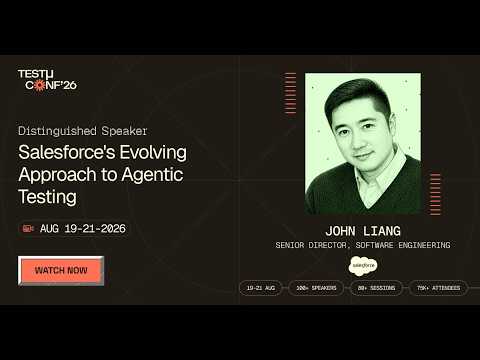
In this TestMu Conf 2026 session, John Liang covers Testing at the Speed of Agents: Salesforce's Evolving Approach to Agentic Testing, walking through the testing assumptions that broke once agent outputs stopped being deterministic.
Using the Agentforce Testing Center
Salesforce provides a native Agentforce Testing Center (Setup > Testing Center) that accepts CSV test cases for batch validation. Each row defines a test: a user utterance, the expected topic, and the expected actions. Testing Center runs consume Agentforce credits even in a sandbox; the Agentforce Testing Center cost and limits breakdown covers what to budget.
Example CSV test case structure for an Agentforce service agent:
utterance,expectedTopic,expectedActions
"What is the status of my order #12345?","OrderStatusInquiry","QueryOrderRecord,SendStatusResponse"
"I want to cancel my subscription","SubscriptionCancellation","VerifyIdentity,EscalateToHuman"
"Can you update my billing address?","AccountUpdate","VerifyIdentity,UpdateBillingAddress"
Steps to run tests in the Agentforce Testing Center:
- Go to Setup > Testing Center and click New Test.
- Select your Agentforce agent (e.g., Agentforce Default v1).
- Download the CSV template and populate it with your test utterances and expected outcomes.
- Upload the CSV and save the test configuration.
- Click Run and review results; the Testing Center reports which utterances were routed to the correct topic and which actions were triggered.
Agentforce Testing Best Practices
- Audit your data first - Validate core records before testing. Agentforce decisions are only as good as the underlying data quality.
- Test narrow use cases - Deploy agents with single, well-defined domains first (e.g., case deflection). Broad multi-topic agents are harder to validate fully.
- Test escalation paths - Check what happens when confidence is low or the topic is out of scope. Good agents escalate, not guess.
- Validate permissions and data scope - Confirm agents access only records their profiles permit. Review Einstein Trust Layer audit trails each cycle.
- Re-run the suite before every release - Keep the test spec in source control and re-run it before each Salesforce release and after every agent change. The Agentforce regression testing guide covers the sf agent test workflow and a CI gate that catches failed assertions.
- Test in production context - Some behaviors surface only with real production data. Plan a monitored production pilot as the final validation step.
Using TestMu AI Agent Skills to Validate Salesforce AI Agents
Validating an Agentforce agent goes beyond running CSV test prompts through the Testing Center. Once the agent is live, your QA workflow itself benefits from agentic tooling, and that is where TestMu AI Agent Skills fit in.
Agent Skills are framework-specific skills (Selenium, Cypress, Playwright, Appium, and more) that you drop into the skills directory of any AI coding agent, such as Claude Code, Cursor, or Windsurf.
Once installed, the agent gains expert knowledge of that framework and can author, debug, and maintain Salesforce tests with a clear grasp of Shadow DOM patterns, Lightning locators, and Agentforce response handling.
For Salesforce and Agentforce QA teams, Agent Skills help in three ways:
- Generate tests in plain English - Describe the utterance, topic, and actions; the agent writes a test hitting the Agentforce API or UI.
- Validate non-deterministic outputs - Skills include assertion patterns for natural-language variability, such as semantic similarity checks instead of exact string matches.
- Cover the action chain - Skills assert on the sequence of actions an agent triggers, not just the final response.
To get started, clone the TestMu AI agent-skills repository and copy the framework folder you use (for example, playwright-skill) into your IDE's skills directory.
Open agent mode and prompt the agent to write your first Agentforce test. It applies the skill automatically and produces a maintainable test scoped to your Salesforce org.
Note: Testing Agentforce alongside standard Salesforce workflows? TestMu AI's KaneAI handles both in a single end-to-end test run, with Shadow DOM, MFA, and non-deterministic agent outputs covered out of the box. Start free.
How to Evaluate Salesforce Testing Tools: A Capability Framework
Your Salesforce testing approach decides how fast you ship and how much engineering time vanishes into post-release locator triage. Rather than rank vendors, score whatever you evaluate against the seven capabilities below.
Miss three or more rows and the approach turns unmaintainable as your org grows.
If you are already shortlisting Salesforce testing tools, run each one through this same capability checklist before you commit to a trial.
Individual vendors score very differently once you apply this lens, and the best Salesforce test automation tools each win on a different row of it. The framework below is what tells you which rows you can afford to lose.
| Capability | Why It Matters for Salesforce | What to Demand in a Demo |
|---|---|---|
| Native Shadow DOM traversal | Every Lightning component renders inside its own shadow root; tools without first-class traversal force you to write fragile bridging code. | Author a test against a Lightning record page without any shadow-root selector helpers. |
| Metadata-aware locators | Dynamic IDs change on every page render; XPath and CSS selectors based on them break under load. | Show me a locator strategy that survives a sandbox refresh without manual repair. |
| Auto-healing after seasonal releases | Spring, Summer, and Winter releases ship UI deltas; teams without auto-heal lose two to four weeks fixing locators each cycle. | Run the same suite before and after the latest preview sandbox upgrade. Count the manual fixes. |
| Built-in MFA handling | Secure orgs require MFA on every login; tools that block on the MFA dialog cannot run unattended in CI. | Execute a headless test through MFA with no custom hooks or test-mode logins. |
| Multi-org parallel execution | Most teams maintain sandbox, staging, and production tiers. Serial execution turns a 15-minute suite into a 90-minute suite. | Trigger the same test concurrently against two org URLs without script duplication. |
| Plain-English or codeless authoring | Salesforce admins and business analysts own most workflows; if only engineers can write tests, coverage stalls. | Hand the tool to an admin and watch them author a test in under 10 minutes. |
| CI/CD + Salesforce DX integration | Tests must run on every PR, not on demand. A tool that cannot speak to GitHub Actions, Jenkins, or your DevOps deployment webhooks is a manual tool. | Show the YAML / pipeline snippet that runs the suite on a scratch org spin-up. |
How to Pick the Right Approach for Your Team
Match the buyer profile to the right category instead of fixating on logos:
- Admin-led or business-analyst-led teams - prioritize codeless authoring and metadata-aware locators. Engineering dependency is the biggest blocker to coverage at this profile.
- DevOps-centric teams - prioritize CI/CD wiring, scratch-org orchestration, and gate-on-coverage policies. Authoring speed matters less than pipeline determinism.
- Enterprise QA teams (multi-cloud, regulated) - prioritize audit trails, parallel multi-org execution, and governance-grade reporting. A capability gap here becomes a compliance gap.
- Engineering-led teams with custom frameworks - prioritize extensibility, deep Apex test integration, and the ability to call the tool from existing automation harnesses.
- AI-native QA teams - prioritize plain-English authoring, auto-healing, and Agentforce-aware execution. KaneAI on TestMu AI is purpose-built, running tests in parallel via HyperExecute. Its AI app testing also validates API responses in the same run as the UI flow.
The most important consideration is sustainability: a feature-rich tool that creates scripting dependency your team cannot maintain is worse than a simpler tool your admins can own confidently.
How to Integrate Salesforce Testing into a CI/CD Pipeline
Shift-left testing, moving quality checks as early as possible, is now standard for Salesforce teams that release continuously.
A pipeline running Apex, LWC Jest, and integration smoke tests on every commit catches failures in minutes, not during UAT or after go-live.
The foundation of a Salesforce CI/CD pipeline is Salesforce DX (SFDX), Salesforce's source-driven development model that treats org configuration and code as version-controlled source files, making automated deployments and testing reproducible.
Example: GitHub Actions Pipeline for Salesforce Testing
The following YAML workflow runs on every pull request. It authenticates to the target org, deploys the source, runs Apex tests via the Spring '26 RunRelevantTests beta, and then runs LWC Jest tests:
name: Salesforce CI

on:
  pull_request:
    branches: [main, develop]

jobs:
  salesforce-tests:
    runs-on: ubuntu-latest

    steps:
      # 1. Checkout source
      - uses: actions/checkout@v4

      # 2. Install Salesforce CLI
      - name: Install Salesforce CLI
        run: npm install -g @salesforce/cli

      # 3. Authenticate to sandbox using JWT
      - name: Authenticate to Salesforce Sandbox
        run: |
          sf org login jwt             --client-id ${{ secrets.SF_CLIENT_ID }}             --jwt-key-file server.key             --username ${{ secrets.SF_USERNAME }}             --alias ci-sandbox

      # 4. Deploy source to sandbox
      - name: Deploy to sandbox
        run: sf project deploy start --target-org ci-sandbox

      # 5. Run Apex tests
      - name: Run Apex Tests
        run: |
          sf apex run test             --target-org ci-sandbox             --test-level RunLocalTests             --output-dir ./test-results             --result-format tap

      # 6. Run LWC Jest unit tests
      - name: Run LWC Jest Tests
        run: npm run test:unit -- --coverage

      # 7. Upload test results
      - name: Upload test results
        uses: actions/upload-artifact@v4
        with:
          name: salesforce-test-results
          path: ./test-results
CI/CD Best Practices for Salesforce
- Use scratch orgs for PR builds - Ephemeral and source-driven, they give each run a clean environment. Reserve sandboxes for integration and UAT.
- Gate on test coverage - Fail the build if Apex coverage drops below 75% or any test class fails at PR stage.
- Add a post-deployment stage - After deploying to staging, trigger KaneAI's end-to-end suite via the API for UI, integration, and Agentforce tests.
- Cache CLI and npm dependencies - Setup is dominated by CLI and npm installs. GitHub Actions caching cuts cold-start to under 30 seconds.
- Scope your test level in Spring '26 - The --test-level RunLocalTests flag (beta) runs only tests relevant to your changes, cutting suite time.

Salesforce Testing Challenges and Solutions
Testing Salesforce applications presents unique challenges due to their complex workflows, customizations, and cloud-based architecture. Ensuring quality requires targeted strategies and attention to platform-specific limitations. Each challenge below includes a practical solution your team can apply immediately.
Challenge #1: Customization Complexity
Salesforce orgs often have extensive custom objects, fields, triggers, and Apex logic. Testing needs to account for both standard and custom behavior to prevent unexpected failures after every deployment.
Solution: Keep a dedicated test suite for custom objects and triggers, separate from standard functionality. Use Apex classes with data factory patterns for consistent data. Prioritize regression coverage for high-risk customizations touching revenue or integrations.
Challenge #2: Integration Dependencies
Salesforce frequently connects with ERP, marketing, and billing platforms. These connections can cause delays, failures, or data inconsistencies that are difficult to reproduce in a sandbox environment.
Solution: Use mock services and stub APIs to simulate external responses during sandbox testing. Keep an integration sandbox that mirrors your production middleware. Run live integration tests in a full-copy sandbox before every deployment.
Challenge #3: Data Volume and Quality
Testing with unrealistic datasets produces misleading results. High data volumes can surface performance issues that developer sandboxes never expose, and incomplete data leads to false test passes.
Solution: Use synthetic data generation tools to build production-scale datasets in your full sandbox. Mask sensitive production data before importing it. Include large-volume scenarios in your regression suite to catch performance regressions before production.
Challenge #4: Limited Test Execution in Sandboxes
Salesforce sandboxes do not perfectly mirror production. Workflow rules, email alerts, and third-party integrations may behave differently in a sandbox, creating gaps between what you tested and what goes live.
Solution: Use full-copy sandboxes for UAT and pre-production, not developer or partial ones. Sync sandbox metadata with production before each major cycle. Run production verification smoke tests after every deployment to catch missed gaps.
Challenge #5: Automated Testing Constraints
Tools like Selenium have significant limitations for Salesforce Lightning UI automation. Shadow DOM components, dynamic element IDs, and MFA dialogs break standard locator strategies and require constant manual maintenance after seasonal releases, which is why most Salesforce teams eventually evaluate a Selenium alternative.
Solution: Use AI testing tools like KaneAI that handle Shadow DOM traversal and dynamic IDs natively via metadata. KaneAI auto-heal corrects broken locators after seasonal releases, removing the overhead that makes script-based frameworks unsustainable.
In practice, teams using Selenium for Salesforce spend two to four weeks after every seasonal release manually updating broken locators. KaneAI's auto-healing eliminates this entirely.
Challenge #6: Release Management Challenges
Salesforce delivers three major updates every year (Spring, Summer, and Winter). Each can change UI behavior, deprecate APIs, or alter component rendering. Teams without a release testing plan spend weeks manually fixing broken automation.
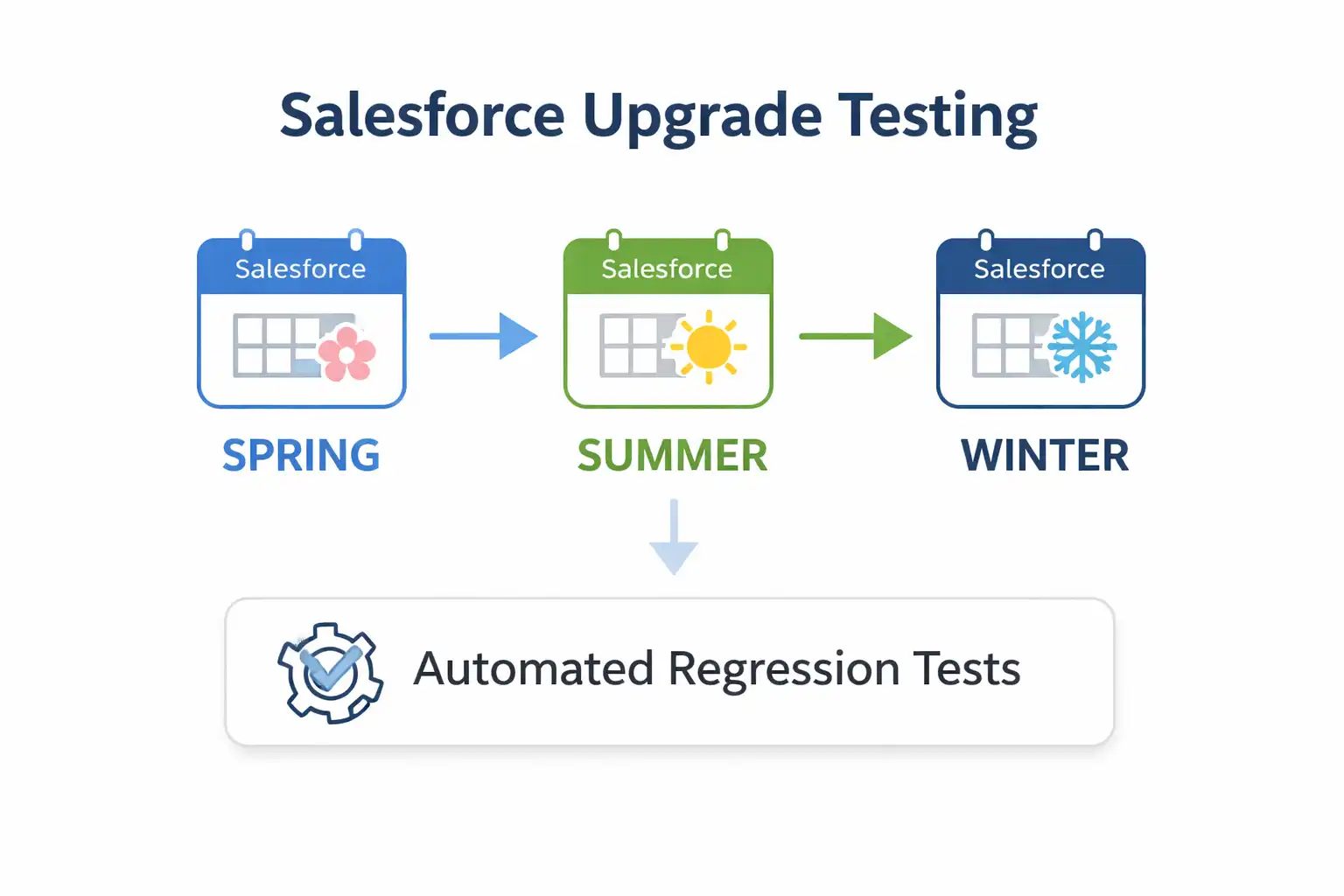
Solution: Subscribe to Salesforce release notes six weeks ahead. Refresh a preview sandbox four weeks before GA and run full regression. Let KaneAI's auto-healing fix locator breakages overnight, clean by release day.
Spring '26 note: This release added the RunRelevantTests beta for faster Apex deployments, TypeScript for LWC, and an Error Console for non-fatal errors. Add these to your preview checklist before the Summer '26 enforcement dates.
Challenge #7: Security and Access Controls
Profiles, permission sets, and sharing rules create complex access control scenarios that are difficult to test comprehensively. A misconfigured permission can expose sensitive data to the wrong user or block a workflow entirely.
Solution: Build role-based test cases that log in under each major profile (Sales Rep, Manager, Admin, Support Agent) and check field visibility, record access, and permissions. Automate them to validate access control on every deployment.
Challenge #8: Agentforce AI Agent Validation
AI agents are non-deterministic, so the same input can yield different outputs each run. Exact-match pass/fail assertions do not work reliably for Agentforce agents, and sandboxes cannot always replicate production data context.
Solution: Use the Agentforce Testing Center for batch CSV testing of topic routing and action sequences. Supplement with a monitored production pilot for behaviors needing real usage context.
Validate the Einstein Trust Layer audit trail for data access boundaries, and test escalation paths so agents hand off to humans when confidence is low.
Best Practices in Salesforce Testing
Implementing effective testing practices in Salesforce ensures higher quality releases, fewer defects, and smoother adoption of new features. The practices below reflect what consistently works across Salesforce orgs of varying complexity, from small implementations to enterprise multi-org deployments.
- Use Sandbox Environments Effectively - Use full, partial, and developer sandboxes for different testing needs, and scratch orgs for CI/CD builds. Keep sandboxes refreshed with current metadata before each major cycle.
- Prioritize Automated Testing - Implement automated test scripts using Salesforce DX, Selenium, or other compatible tools for repetitive regression and integration tests. Automation improves consistency and accelerates testing cycles.
- Maintain Test Data Management - Use anonymized, masked, or synthetic datasets that reflect production data patterns. Ensure tests cover edge cases, large data volumes, and data integrity scenarios.
- Focus on Integration Testing - Test all connected systems thoroughly. Use mock services when real integrations are unavailable to validate workflows and data flows across platforms.
- Combine Declarative and Programmatic Testing - Pair declarative testing (flows, validation rules) with Apex unit tests and LWC Jest tests. Maintain high code coverage without relying solely on automated UI scripts.
- Monitor Releases and Regression Risks - Subscribe to Salesforce release notes six weeks before each release. Run your full regression suite against a preview sandbox four weeks before general availability.
- Implement Role-Based Testing - Verify security, profiles, and permission sets. Ensure different user roles have appropriate access to data and functionalities.
- Integrate Testing into CI/CD - Gate every pull request with Apex unit test runs, LWC Jest checks, and minimum coverage enforcement. Use scratch orgs for isolated PR builds and sandbox environments for integration validation.
- Plan for Agentforce Testing Separately - AI agent validation requires a different approach than traditional Salesforce testing. Use the Agentforce Testing Center for topic routing checks and plan production pilot phases for behaviors that require real usage context.
- Automate Salesforce-Specific Scenarios First - Prioritize automation for regression suites, tri-annual release validation, and integration touchpoints. An agentic end-to-end testing platform like KaneAI keeps that suite maintainable because it does not just generate the test, it re-plans and self-heals it as Shadow DOM structures and locators shift underneath.
Future Trends in Salesforce Testing
Salesforce testing is evolving rapidly as new technologies and methodologies emerge. Staying ahead of these trends helps organizations maintain high-quality applications, improve efficiency, and adapt to complex Salesforce environments.
Here are some key trends shaping the future of Salesforce testing:
- AI Testing: Artificial intelligence and machine learning are increasingly used to automatically generate, execute, and maintain test scripts, reducing manual effort and improving accuracy across Salesforce workflows. The category is shifting from Generative AI tools that emit a script towards agentic end-to-end testing platforms such as KaneAI, which plan the steps, author them from a natural language command, execute them against a live org, and adapt them as the app changes, opening Salesforce automation testing to non-technical stakeholders.
- Agentforce and AI Agent Testing - As Agentforce adoption grows, testing will increasingly need to validate non-deterministic AI behavior, not just rule-based flows. New frameworks for AI output evaluation, confidence scoring, and escalation path testing will become standard parts of the Salesforce QA toolkit.
- Shift-Left Testing - Testing is moving earlier in the development lifecycle. Continuous integration pipelines now incorporate Salesforce testing from the earliest stages, helping catch defects sooner and reduce deployment risks.
- Low-Code and Codeless Automation - Codeless testing tools are gaining traction, allowing non-technical users to create and run tests efficiently. This trend democratizes testing and accelerates release cycles for Salesforce applications.
- Enhanced Test Data Management - Advanced strategies like synthetic data generation, masking, and automated refreshes will become standard to ensure realistic, secure datasets for Salesforce testing without relying directly on production data.
- Cloud-Native and Cross-Browser Testing - As Salesforce continues expanding on cloud platforms, testing across multiple browsers, devices, and geographies will become more automated and integrated within cloud-based testing platforms.
- Integration of DevOps and Continuous Testing - DevOps practices will merge further with Salesforce testing, enabling tighter CI/CD pipelines, automated regression testing, and faster feedback loops for Agile development.
- Focus on Security and Compliance - With increasing data regulations, automated checks for security, privacy, and compliance (including Einstein Trust Layer validation for AI features), will become an integral part of Salesforce testing.
Where to Start This Week
If your Salesforce regression suite has not been touched since last seasonal release, this is the order to fix it: pick one workflow you cannot afford to ship broken (lead-to-opportunity, case-to-resolution, or quote-to-cash), author it once in plain English on KaneAI, wire it into a GitHub Actions or Jenkins job that runs on every PR, and let auto-heal handle the next Spring, Summer, or Winter release locator drift for you. From there, expand coverage one workflow at a time rather than trying to automate everything at once.
The platform's complexity (Shadow DOM, dynamic IDs, frequent releases, Agentforce non-determinism, and deep customizations) makes manual testing unsustainable at scale. Teams that adopt AI-native Salesforce automation testing tools cut regression cycle times significantly and free QA engineers to focus on coverage gaps rather than script maintenance. The KaneAI getting-started docs take you from a first authored Salesforce test to a parallel run across real browsers and devices on HyperExecute.
Citations
Note: This article was researched and drafted with AI assistance, then reviewed, fact-checked, and published by Salman Khan, Community Contributor at TestMu AI, whose listed expertise includes Software Testing and Automation Testing. Every Salesforce statistic, release-note claim, and customer case study cited here was verified against the primary source. Read our editorial process and AI use policy for the full details.
Author

Saniya Gazala
Blogs: 44


Saniya Gazala is a Product Marketing Manager and Community Evangelist at TestMu AI with 2+ years of experience in software QA, manual testing, and automation adoption. She holds a B.Tech in Computer Science Engineering. At TestMu AI, she leads content strategy, community growth, and test automation initiatives, having managed a 5-member team and contributed to certification programs using Selenium, Cypress, Playwright, Appium, and KaneAI. Saniya has authored 15+ articles on QA and holds certifications in Automation Testing, Six Sigma Yellow Belt, Microsoft Power BI, and multiple automation tools. She also crafted hands-on problem statements for Appium and Espresso. Her work blends detailed execution with a strategic focus on impact, learning, and long-term community value.
Reviewer

Himanshu Sheth
Reviewer
Himanshu Sheth is the Director of Marketing (Technical Content) at TestMu AI, with over 8 years of hands-on experience in Selenium, Cypress, and other test automation frameworks. He has authored more than 130 technical blogs for TestMu AI, covering software testing, automation strategy, and CI/CD. At TestMu AI, he leads the technical content efforts across blogs, YouTube, and social media, while closely collaborating with contributors to enhance content quality and product feedback loops. He has done his graduation with a B.E. in Computer Engineering from Mumbai University. Before TestMu AI, Himanshu led engineering teams in embedded software domains at companies like Samsung Research, Motorola, and NXP Semiconductors. He is a core member of DZone and has been a speaker at several unconferences focused on technical writing and software quality.
On This Page
- Key Salesforce Terminologies
- What Is Salesforce Testing?
- Why Is Salesforce Testing Crucial?
- Normal Testing vs. Salesforce Testing
- Types of Salesforce Testing
- Why Salesforce Testing is Harder
- When to Automate vs. Manual Testing
- Common Salesforce Test Scenarios
- Steps For Testing a Salesforce Application
- Perform Salesforce Unit Testing
- LWC Jest Testing
- Salesforce Testing Using KaneAI
- Agentforce & AI Agent Testing
- CI/CD Pipeline Integration
- How to Evaluate Tools
- Challenges and Solutions
- Best Practices
- Future Trends
Salesforce Testing FAQs
Did you find this page helpful?
More Related Learning Hubs
TestMu AI forEnterprise
Get access to solutions built on Enterprise
grade security, privacy, & compliance
- Advanced access controls
- Advanced data retention rules
- Advanced Local Testing
- Premium Support options
- Early access to beta features
- Private Slack Channel
- Unlimited Manual Accessibility DevTools Tests