

Power Your Software Testing with AI Agents and Cloud
The Native AI-Agentic Cloud Platform to Supercharge Quality Engineering. Test Intelligently and Ship Faster.


- TestMu AI (Formerly LambdaTest)
- /
- Learning Hub
- /
- What Is Canary Testing? Definition, Benefits, Best Practices
What Is Canary Testing? Definition, Benefits, Best Practices
Canary testing releases a change to a small group of real users first. Learn how it works, its phases, key metrics, rollback criteria, and tools.
Last Updated on:
On This Page
- What Is Canary Testing?
- Where Does the Name Canary Testing Come From?
- Why Use Canary Testing?
- What Are the Benefits of Canary Testing?
- What Does a Canary Test Do?
- When Should You Use Canary Testing?
- What Are Canary Deployment and Canary Release?
- What Are the Main Canary Testing Approaches?
- Should You Run Canary or Automated Testing First?
- Which Frameworks and Libraries Support Canary Testing?
- How Does Canary Testing Work?
- What Are the Three Phases of Canary Testing?
- How Do You Select and Segment Your Canary Testing Group?
- Which Metrics and Rollback Criteria Matter in Canary Analysis?
- How Does Canary Testing Differ From Beta Testing and Smoke Testing?
- What Are the Challenges of Canary Testing and Their Solutions?
- How Is AI Changing Canary Testing?
- When Is Canary Testing Worth Adopting?
Canary testing is a software release strategy in which a new version is rolled out to a small subset of real users in a production (live) environment before it reaches everyone. The release is closely monitored for errors, system crashes, and performance degradation, and traffic can be rolled back automatically if problems appear. By exposing only a fraction of users to the change, teams catch issues early while limiting the blast radius of any defect.
In the Software Development Life Cycle, various types of software testing approaches are executed by the DevOps team to ensure the reliability and quality of software applications. All organizations recognize the utmost importance of running tests on their software products before deploying them to end users.
Such testing is done because it demonstrates that the software meets the specified requirements of developers and end-users while also ensuring the absence of coding defects. The canary test complements the testing process and allows organizations to further validate the stability and quality of their software before a full-scale release.
DevOps teams use this approach to identify performance bottlenecks in software applications. This test observes how the software application behaves for a small chunk of end-users, similar to statistical sampling. Further, by analyzing this sample, DevOps teams can gain insights and estimates regarding the overall response.
What Is Canary Testing?
Canary testing serves as a risk reduction and validation method for a new software application by introducing it to a limited number of real users. The team implements canary testing to test minor changes to the software application for a specific set of end-users. This group typically has a small percentage of the larger user base. By deploying this code to a sample group, the DevOps team can identify issues in the code.
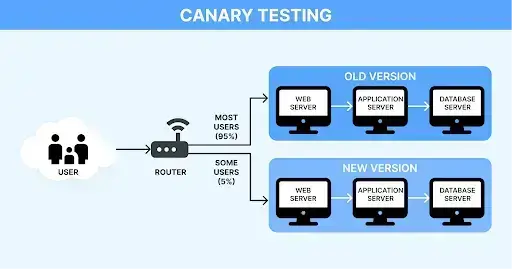
It is a valuable and practical method as developers gradually deploy the code. It allows them to test new features and functionalities during production while minimizing the impact on the application's users. By limiting the exposure of the new feature, teams can validate the changes without significantly affecting the overall user experience.
In many instances, canary testing is often used interchangeably with canary release and canary deployment. However, when referring to canary testing specifically, it involves releasing code to evaluate and test new features or versions using real users within the live production environment.
Canary vs. Blue-Green vs. A/B Testing
Canary testing is one of several progressive delivery strategies. The table below shows how it differs from blue-green deployment and A/B testing so you can pick the right approach for a given release.
| Strategy | How it works | Primary goal |
|---|---|---|
| Canary testing | Routes a small percentage of live traffic to the new version, then widens the rollout gradually | Reduce release risk by catching issues early on real users |
| Blue-green deployment | Runs two identical environments and switches all traffic from the old (blue) to the new (green) at once | Enable instant release and instant rollback |
| A/B testing | Splits traffic between two versions to compare user behavior against a chosen metric | Measure which variant performs better |
Where Does the Name Canary Testing Come From?
The word "canary" is used in software development to describe a way of testing new software applications before releasing them to the public. The term comes from coal mining, where they used canary birds to keep miners safe. These birds were more sensitive to dangerous gases than people, so if the air became dangerous, the canaries would show signs of distress or even die, warning the miners to get out.
In terms of canary testing of a software application, a small group of users first tests out the new version. These users don't know they're like the canaries, helping to find any issues early on. If there are issues with the new code, developers fix it before letting more users try it. This way, they can make sure the software product works well for everyone and doesn't cause any major issues.

Note: Test your web apps across 3,000+ browser/OS combinations. Try TestMu AI Now!
Why Use Canary Testing?
Assuming you already have a process in place to test your software upgrades, you most likely utilize various techniques from the DevOps realm, such as A/B testing and blue-green deployments.
Developers create automated tests for their software's new features and modifications. The changes are deployed to a testing environment where others can explore and interact with the new features. If everything goes smoothly, the new software update is rolled out to the production environment, allowing end users to benefit from the newly added feature.
However, given the nature of software, bugs tend to move into production. As humans, it is impossible to anticipate every potential edge case. Moreover, deadlines and budget constraints add to the pressure.
Canary testing is a technique that aims to limit the impact of these production bugs to a small subset of users. Traditionally, it involves having two identical production environments, although they need not be separate servers. For instance, two web applications could run on the same server.
Once you have a new release ready, you can deploy it to one of the environments. Then, you can direct a small portion of your users (around 5% is recommended) to this canary release. These users will experience the new features, while the other group will not encounter any changes.
You can then closely monitor this canary release and address any bugs. The objective is not to eliminate production bugs but to minimize their impact. If a bug exists in the new version, only 5% of your users are affected. While the bug still requires fixing, the pressure on you may be less than if all users were affected.
What Are the Benefits of Canary Testing?
Testing helps to identify and address software application issues that affect user experience. Canary tests go a step further by introducing changes to the production environment to minimize or eliminate any negative impact on usability. Here are the advantages that make canary testing a valuable process:
- Canary tests are easy to deploy. Since the new features are minor and initially targeted at a limited number of users, running canary tests is a quick and straightforward process.
- If canary tests fail and users do not like the new software changes, it is easy to revert back to the previous state.
- The overall test process requires minimal maintenance. Developers focus on individual small functionalities, push them into production, and then move on to the next one after analyzing and running the tests.
- Canary tests do not require system downtime, ensuring the application's continuous availability.
- Running most canary tests only requires a simple and small infrastructure. Everything is handled internally, and the cost of fixing any issues is also low.
- Developers have the freedom to innovate and experiment with their code. Since the new code affe only a small group of selected users, developers can explore different ideas and possibilities.
- Users can be involved in the beta version of the software application, providing valuable feedback to address issues and take the code to production.
What Does a Canary Test Do?
The canary test address the following aspects to ensure the less buggy software applications:
- Network connectivity: It verifies that firewall rules are in compliance, ports are accessible, and the proxy is functioning correctly. It also monitors the ping to ensure it remains within an acceptable threshold.
- Database and middleware: It confirms that the code meets the performance criteria established by developers and functions correctly with the available databases and middleware. Additionally, it validates the database schema and conducts data auditing to identify and address system bugs.
- Disk quota: It checks for excessive space usage caused by logs.
- Validity: It validates the legitimacy of logins and passwords.
- Integrity of data references: It ensures that the reference data provided by developers is consistent and functions without issues.
- Licenses: Canary tests verify user licenses' availability and active status, ensuring they are not expired.
If any issue arises, rolling back the changes and returning users to the original infrastructure is always possible.
When Should You Use Canary Testing?
Use canary testing after automated tests pass, whenever a change is risky to release to everyone at once, such as new features, infrastructure updates, or major refactors.
It is important to understand when to execute the canary test. As we have learned in the previous section, the canary test is performed by the development team to check the functionality of the new version of the software applications.
Nonetheless, it remains crucial to test the code before deployment to prevent future issues thoroughly. To this, canary testing is performed to comprehensively understand the code's capabilities before updating the entire environment. Here are some other crucial scenarios where you have to perform canary tests:
- Given the prevalence of regular software updates and the rapid advancements in technology, canary tests are important in minimizing downtime and ensuring optimal application performance.
- Testing in live production mode becomes essential for applications built on legacy or third-party systems and infrastructure, as replicating such systems can be complex and expensive. Here, you can go for a canary test.
- In situations where applications employing multiple independent microservices necessitate running canary tests in live production mode
Implementing canary tests is easy and helpful if you carefully follow the abovementioned steps. By doing this, you can successfully conduct canary tests and deployments, getting valuable insights to improve your software application and foster innovation.
Limiting the number of users affected by software changes makes identifying and addressing any software-related errors simpler. However, subtle distinctions exist between canary deployment and canary release that may cause confusion. The following section breaks down these differences.

What Are Canary Deployment and Canary Release?
Using a canary release is an effective method for gradually introducing incremental code changes associated with adding new features or developing a new software version. This approach involves releasing the code to real users in the production environment, allowing the development team to quickly assess whether the changes yield the intended or expected results.
Furthermore, canary deployment permits developers to migrate a small portion of users to the new functionality offered in a new release. Exposing only a subset of the overall user base to the new code minimizes potential issues related to the new software. Additionally, this approach facilitates an easier rollback of a faulty release, preventing it from impacting the entire user base.
What Are the Main Canary Testing Approaches?
The two main canary testing approaches are blue-green deployments, which switch traffic between two environments, and feature flags, which expose a change to selected users.
To execute the canary test, two approaches are mainly implemented to achieve reliable outcomes. Here are those two approaches:
Blue-Green Deployments
Blue-green deployment is one of the most used approaches to implement the canary test. In this, two identical environments are developed, "blue" and "green", and the existing version of the software application is executed in a blue environment. In contrast, its new version is deployed in a green environment. However, there is a slight difference in the context of blue-green deployment.
Instead of having a separate environment to wait for switching to another environment once the deployment is done, a canary test using blue-green deployment involves initially switching over only a small subset of servers or nodes before proceeding with the rest.
This is how it is done:
- A traffic router is used at the server level to split the traffic between these environments.
- The traffic router directs a fraction of the incoming requests to the green environment while the rest continue to be routed to the blue environment.
- This traffic division can be done based on various criteria, such as random selection, specific user groups, or predefined rules.
Various configurations can be implemented for canary deployments. The easiest method involves setting up your environment behind a load balancer as usual but with a few spare nodes or servers (depending on your application's size) that are not in use. These spare nodes or servers are designated as the deployment targets for your CI/CD pipeline.
Once you build, deploy, and test these nodes, you reintroduce them to the load balancer for a limited duration and a restricted group of users. This enables you to ensure the success of the changes before repeating the process with the remaining nodes in your cluster.
Feature Flags
Feature flags are a popular method of conducting canary tests that focuses on specific features. Instead of relying on releases, feature flags utilize code to allow development teams to activate or deactivate particular features for specific users. With the feature flag, you can limit the release to 1% of the users and monitor the key metrics, such as error rate and business metrics.
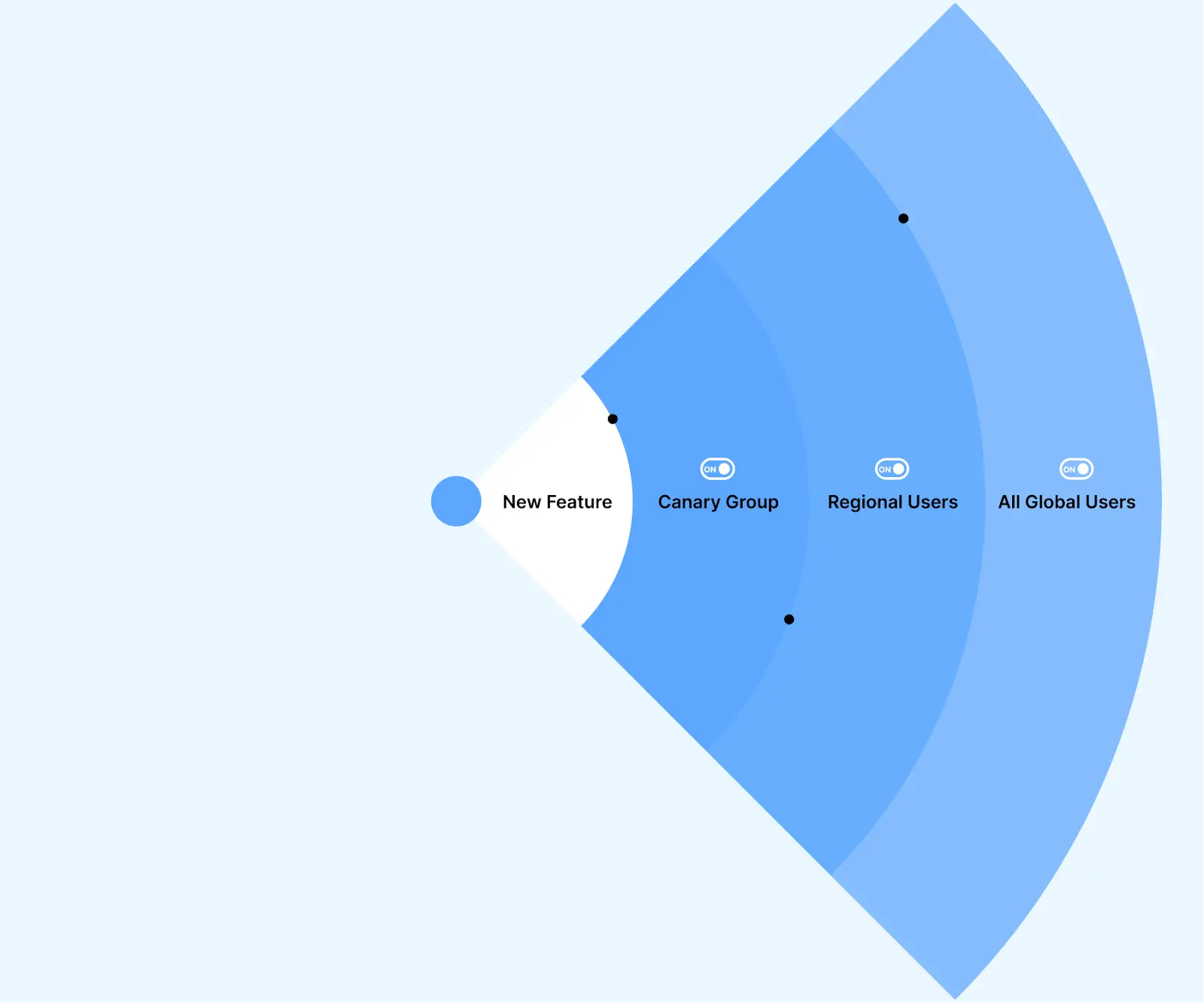
This helps to ensure that new features added to the software application do not have any negative impact. This approach is handy for business stakeholders who need to test new features before implementing them for everyone. However, while performing a canary test, if any issue is detected during the deployment method, you can easily disable the new features by turning the feature off.
Here are some common scenarios where feature flags are applied:
- Early access programs: Stakeholders seeking feedback on early features can utilize feature flags to gather valuable insights and make necessary refinements before releasing them to all users.
- Blocking features: In some instances, applications may require blocking specific features for certain users, such as due to regulatory requirements. Feature flags simplify this process by providing a simple toggle switch instead of building complex user-facing options.
- A/B testing features: Features can be easily compared through A/B testing without exposing either option to the entire user base. For instance, assessing the performance of different versions of a specific feature becomes possible.
- New vs. power users: Some features might be too intricate for new users but essential for power users. Feature flags enable the deactivation of advanced features for new users, thereby avoiding confusion while simultaneously providing these features to users who can fully leverage them.
Should You Run Canary or Automated Testing First?
Prior to conducting canary tests, it is important to execute your automated tests. This step ensures that the code intended for release to your selected users is free from bugs and meets the initial quality standards. Typically, organizations already have established processes for testing software updates. Many utilize techniques such as A/B testing and leverage DevOps practices to automate the development, testing, and deployment of code modifications in the form of builds.
Once you have completed the automated testing phase for your new code and it has passed the necessary checks, you can push it to the production environment for user access. Following this, the canary test process can begin.
It is advisable to perform automated testing using a suitable test automation framework or tool. This will provide a significant level of code control while accurately documenting and presenting the test results. Selecting an automation tool that allows you to execute test cases on web and mobile applications is important, as canary tests encompass these devices and environments. For this, you can opt for cloud-based testing platforms to test on vast combinations of browsers, devices, and platforms.
TestMu AI is one of the most used AI-Native test orchestration and execution platforms that allow testing across large farms of 3,000+ browser/OS combinations. With its real device cloud infrastructure, you can perform both manual and automated tests. Deploy and scale faster with its cross browser testing capabilities.
With TestMu AI's cloud-based grid, you can efficiently execute tests using frameworks such as Selenium, Cypress, Playwright, and more. Check documentation to get started with automation testing on TestMu AI.
You can also look at the tutorial below that gives you a basic understanding of performing automation testing on TestMu AI.

Catch up on the latest tutorials around Selenium automation testing, Playwright testing, CI/CD, and more. Subscribe to the TestMu AI YouTube Channel.

Which Frameworks and Libraries Support Canary Testing?
When the canary test has to be performed, you will need libraries and frameworks to streamline the test process and provide useful features. Here are some testing frameworks that you can use:
- Kayenta:It is an open-source canary analysis testing tool which is developed by Netflix. Kayenta is associated with different metrics sources and used in integration with Spinnaker to sync for the continuous delivery pipeline.
- Istio:This tool allows canary deployment functionality and helps control traffic. Istio helps in fine-grained traffic control, and with this, you can enable canary release by leveraging its traffic routing and load balancing ability.
- Traffic Split: It is part of the Kubernetes service mesh ecosystem. Using this tool will allow you to deploy and test the canary release. It is mainly done by splitting traffic between diverse software application versions.
- Prometheus: It is an open-source monitoring and alerting toolkit that helps you to collect and store metrics while you perform canary tests.
- Grafana: It is a visualization tool that will help you perform the canary test by integrating with Prometheus. Using this tool, you can create dashboards and alerts to observe the behavior of the canary deployment.
Monitoring and Observability Tools
Utilizing specialized tools is indispensable to oversee canary releases and guarantee observability throughout testing effectively. Presented below are a few commonly employed tools for monitoring and observability:
- New Relic: It is a comprehensive platform for monitoring that provides real-time insights into application performance, user experience, and infrastructure metrics. New Relic encompasses distributed tracing, anomaly detection, and synthetic monitoring functionalities.
- Datadog: It is a cloud-based platform for monitoring and analytics that aids in tracking the performance of applications, servers, and other components. Datadog provides customizable dashboards, alerts, and integrations with diverse data sources.
- Splunk: It is a widely adopted platform for managing and analyzing logs. Splunk enables centralized log collection, monitoring, and troubleshooting during canary tests, facilitating prompt detection and resolution of issues.
- Dynatrace: It is an AI-powered observability platform that grants comprehensive visibility into the performance and dependencies of applications, microservices, and infrastructure. Dynatrace offers automated anomaly detection, root cause analysis, and intelligent alerts.
- Elastic Stack: It is a collection of open-source tools, including Elasticsearch, Logstash, and Kibana, commonly referred to as ELK Stack. Elastic Stack enables log collection, storage, search, and visualization, thereby aiding in monitoring and analysis during canary testing.
Bear in mind that the selection of canary testing frameworks and monitoring tools depends on the specific requirements of your project, the technology stack being utilized, and the desired level of complexity in your canary deployment and monitoring processes.
How Does Canary Testing Work?
The process of canary testing operates in a structured manner, similar to other software testing methods. The steps involved are as follows:
Step 1: The development team carefully selects a group of users who will serve as testers. This group represents a small subset of the overall user base, yet it is large enough to yield meaningful statistical analysis. Importantly, these users are unaware that they are participating in the testing process.
Step 2: A dedicated testing environment is established, running alongside the existing live environment. The system load balancer is configured to direct user requests from the designated canary testers to the new environment.
Step 3: The canary test begins as developers route test user requests to the new environment. Throughout this period, the developers closely monitor the testers to ensure that the new version operates as expected.
Step 4: If the new version meets the predetermined deployment criteria, the new software feature or version can be released to all users. However, if the new version has numerous bugs, diminishes application performance, or introduces any other issues for users, the testers are redirected back to the original software version.
Step 5: The development team addresses the identified bugs and subsequently releases the software to a broader audience.
By following these steps, canary tests foster thorough evaluation and validation of software changes before deployment to a large user base.
Note: Test your web and mobile apps in real-user conditions. Try TestMu AI Now!
What Are the Three Phases of Canary Testing?
The process of the canary test involves three main phases, which are very simple to be executed. Below are the main phases of the canary test:
Planning a Canary Test Deployment
This phase can be the longest and most challenging of all. During the initial step of canary testing, it is crucial to engage in proper planning. In this phase of the canary test, a small group of users will receive the updated code before a full release, called a canary deployment. Several factors need to be considered when planning a canary test, including:
- Number of users and stages: It is important to decide how many users will be in the canary deployment and how many stages will be involved. The canary test code is typically directed to 5% or 10% of the total user base. However, the test users may be selected based on their geographic location.
- Timing/duration: During the planning phase, it is also important to establish boundaries for the test duration. Typically, canary tests run for a duration ranging from minutes to hours, necessitating close monitoring.
- Evaluation criteria: Like any other software testing, the success or failure of a canary test can only be determined if the evaluation criteria have been defined beforehand.
- Performance metrics Metrics need to be gathered to track the progress of the test, evaluate the application's performance (e.g., latency), measure CPU and memory usage, and monitor errors.
Once you have finalized these decisions, you and your team can start working on establishing the canary infrastructure. This involves the following steps:
- Creating the canary and dividing your user base.
- Routing the new code to the selected user base.
- Preparing everything for the deployment on a staging server, including deployment manifests, configuration files, build artifacts, and testing scripts.
Followed to this, you need to generate a canary node using load balancing. You will replicate your production environment, creating a similar infrastructure to the currently active software environment. One of the clones will serve as the original or baseline, which you can rely on if the new code fails. If necessary, you can roll back to this baseline clone. The number of clones you create depends on the number of features you intend to test, with a minimum requirement of two.
Implementing a Canary Test Deployment
After finishing the planning phase, the development team proceeds with the actual deployment of the canary test by directing the updated code to the chosen test group. The team will prepare deployment manifests and configuration files, build artifacts, and create testing scripts.
The team will then establish a canary node by balancing the load and duplicating the existing production environment. At least two production environments are needed for canary testing, with one serving as the original application without any code modifications (baseline). Also, the team will evaluate the new version by collecting data for the designated metrics determined in the previous stage.
The aim is to assess the latest version's performance consistency and system health. It is crucial to examine metrics such as latency, memory usage, error count, and volume is crucial. Detailed logs will be provided to identify any bottlenecks.
Analyzing a Canary Test Deployment
In this phase of canary testing, the canary code is routed to the selected number of users, resulting in traffic in both baseline and test nodes. With this, it becomes easy to comparatively evaluate the application's performance and check whether the test version aligns with the evaluation criteria.
If any issue is identified, information will be shared with the team for early fixing. Without any issues, you can deploy the version to the entire baseline or conduct another test with a different subset of users.
Here you get three options that you can choose from:
- On the success of the test execution, the code release can be done to the entire infrastructure.
- If the test gets successful, however, there is a requirement for some additional information for performing another canary test. Here, you need to increase the subset to 10% or 20% from 5% or 10%, respectively.
- If the test fails, you have to roll back to the previous version and get it restored. In this case, the team has to fix the issues before running another test.
How Do You Select and Segment Your Canary Testing Group?
Choosing who receives the canary build matters as much as the build itself. A good canary group is small enough to contain risk yet representative enough to surface real problems. Most teams widen the audience in stages, starting with the lowest-risk users and expanding only when the metrics stay healthy.
- Internal employees first, often called dogfooding. Release the change to your own staff before anyone outside the company sees it. Employees tolerate rough edges, report issues quickly, and give you a safe first signal.
- Opt-in beta testers next. Move to users who have chosen to try early features. They expect occasional instability and provide willing, engaged feedback.
- Specific geographic regions or non-critical customer segments. Target a single region, timezone, or a lower-tier customer group so any fault stays contained to a slice of traffic you can afford to disrupt.
- Random percentage-based routing. Finally, route a small random share of production traffic, commonly 1% to 5%, to the new version. Random selection removes sampling bias and gives a statistically fair read on how the change behaves at scale.
Traffic at each stage is usually split with a service mesh or a progressive delivery controller rather than by hand. Istio, Linkerd, and the Envoy proxy can route a defined percentage of requests to the canary, while Argo Rollouts and Spinnaker automate the step-by-step increase from 1% to 5%, 25%, and beyond. This lets you grow the canary group on a schedule and pause or roll back the moment a metric crosses its threshold.
Mix up the canary groups across releases so you do not always test on the same users. Rotating segments keeps any single group from carrying the entire testing burden and helps you catch issues that only appear for particular regions, devices, or usage patterns.
Which Metrics and Rollback Criteria Matter in Canary Analysis?
A canary release is only as good as the signals you watch during it. Before you route any traffic, decide which metrics define success and which values trigger a rollback. The canary version is then compared, in real time, against the baseline version so that a regression shows up as a divergence between the two.
System and Business Metrics to Track
- Error rate - the share of requests that fail. A rising error rate on the canary against a stable baseline is the clearest sign that the new version is broken.
- HTTP 5xx responses - server-side failures such as 500, 502, and 503 codes. A spike in HTTP 5xx traffic points to crashes, timeouts, or bad deploys in the canary.
- Latency - request and response times at the median and the tail (p95 and p99). Slower responses on the canary degrade user experience even when nothing throws an error.
- CPU and memory usage - resource spikes on the canary nodes often reveal leaks, inefficient code paths, or capacity problems before they reach every user.
- Business metrics - conversions, sign-ups, checkout completion, or any KPI tied to revenue. A technically healthy release that quietly drops conversions still needs to roll back.
These metrics are usually collected with Prometheus and visualized in Grafana, with dashboards comparing the canary and the baseline side by side. Many teams anchor the pass or fail decision to their service level objectives (SLOs) and service level agreements (SLAs). If the canary would breach an SLO for latency or availability, it fails analysis.
Setting Automated Rollback Thresholds
Automated rollback removes human delay from the riskiest moment of a release. You define a rule, the analysis engine watches the metric, and traffic reverts to the baseline the instant the rule trips. A common threshold is to roll back automatically if the error rate exceeds 0.5% for five minutes, or if p95 latency rises beyond an agreed SLO budget.
Tools such as Argo Rollouts and Kayenta, used with Spinnaker, run this analysis for you, querying Prometheus at each step and promoting or aborting the rollout based on the result. Automating the decision keeps a bad release from sitting in production while someone reads a dashboard.
Before any build reaches a canary, the automated suite that gates it needs to run fast and reliably. HyperExecute, the AI-native test orchestration cloud from TestMu AI, runs those suites up to 70% faster than traditional grids and adds fail-fast, automatic retries scoped to real failures, and AI root cause analysis, so a broken build is caught in CI before it ever reaches live users. It plugs into the same CI/CD pipelines, such as GitHub Actions, Jenkins, and GitLab, that drive your canary rollout.
How Does Canary Testing Differ From Beta Testing and Smoke Testing?
Canary, beta, and smoke testing all reduce release risk, but they work at different points in the lifecycle and answer different questions. Canary testing is an automated, traffic-splitting release strategy where a small percentage of live users gets the new version while metrics decide whether to proceed. Beta testing is user-feedback driven and manual, where volunteers try a pre-release build and report what they think. Smoke testing is a quick, post-deployment sanity check that confirms core functions work before deeper testing begins.
| Aspect | Canary Testing | Beta Testing | Smoke Testing |
|---|---|---|---|
| Goal | Validate a release safely on live traffic | Gather real user feedback before launch | Confirm the build is stable enough to test |
| Approach | Automated traffic splitting to a small user share | Manual, feedback-driven trial by volunteers | Fast checks of critical paths after deployment |
| Environment | Production | Pre-production or limited production | Any build or test environment |
| Decision signal | Live metrics such as error rate, latency, and SLOs | User comments and survey responses | Pass or fail of core functionality |
| Rollback | Automated and near instant | Not applicable, it is a feedback loop | Blocks the build from progressing |
The short version is that smoke testing asks whether the build even runs, beta testing asks whether users like it, and canary testing asks whether it is safe to release to everyone. Many teams use all three together, where a smoke test gates the build, a beta gathers feedback, and a canary release rolls it out to production with metric-based safety.
What Are the Challenges of Canary Testing and Their Solutions?
Every approach has its own challenges, and canary releases are no exception. However, rather than considering them as "disadvantages," feature management solutions can effectively address these challenges.
- Mobile applications:: When dealing with mobile apps, the situation becomes more problematic as there is typically only one environment available, the user's device. Since app distribution occurs through app stores, it's not possible to selectively provide newer versions of the app to specific users.
- Canary release management: Managing canary releases becomes more complex when rapidly introducing multiple new features. In scenarios where you need to test two new features simultaneously, you would require three environments: one for most users and one for each of the two new features. It might even be necessary to have a fourth environment to assess the combined impact of the two new features. This complexity can become challenging to handle effectively.
- Getting started with canary tests using feature management: Implementing canary releases in a single production environment is significantly easier with feature flags. Canary testing reduces the risk associated with software releases, enhances flexibility and confidence, and accelerates the rollout of new features.
Fortunately, feature flags can come to the rescue once again. By incorporating feature flags into the new version of the app, you can enable the feature for a small group of users while keeping it disabled for others. Thus, feature flags allow you to conduct canary deployments even within a single production instance of your application.
Again, the utilization of feature flags can alleviate these difficulties. By leveraging a robust feature flag management platform, you can easily enable one or more features for specific groups of users. As things progress according to plan, you can gradually increase the percentage of users who experience the new version of your software until it reaches all users.
How Is AI Changing Canary Testing?
AI is changing canary testing by comparing canary and baseline metrics automatically, spotting anomalies in error rates or latency, and deciding whether to promote or roll back a release.
Automated canary analysis tools such as Kayenta already score canaries statistically; machine learning adds the ability to learn normal behavior per service and catch subtle regressions that fixed thresholds miss.
Keep rollback thresholds and final promotion rules explicit and reviewable, so an automated decision can always be explained. Our roundup of ai testing tools covers options that support this work.
When Is Canary Testing Worth Adopting?
Canary testing is worth adopting once you ship often and can monitor production, because it limits the damage of a bad release to a small group of users.
Throughout this guide, we have covered the fundamental concepts and best practices associated with canary testing. By gradually introducing alterations to a small subset of users or systems, canary testing empowers teams to carefully monitor the impact of these changes in a controlled environment before deploying features to the broader audience.
One of the key advantages of canary tests is their capacity to mitigate the risks linked to software updates or feature releases. Beyond the technical aspects, successful implementation of canary tests necessitates meticulous planning, transparent communication, and collaboration among development, operations, and other pertinent teams.
As organizations strive for continuous delivery and rapid innovation, canary testing remains an indispensable approach in their arsenal, ensuring that software updates are rolled out seamlessly and reliably.
Author

Nazneen Ahmad
Blogs: 39


Nazneen Ahmad is a freelance Technical Content SEO Writer with over 6 years of experience in crafting high ranking content on software testing, web development, and medical case studies. She has written 60+ technical blogs, including 50+ top-ranking articles focused on software testing and web development. Certified in Automation Basic and Advanced Training - XO 10, she blends subject knowledge with SEO strategies to create user focused, authoritative content. Over time, she has shifted from quick, keyword-heavy drafts to producing content that prioritizes user intent, readability, and topical authority to deliver lasting value.
Reviewer

Aman Chopra
Reviewer
Aman Chopra is a DevOps Engineer and Community Contributor with over 7 years of experience in cloud technologies, software development, and software testing. Currently working at TestMu AI, Aman specializes in optimizing Azure cloud infrastructure, enhancing API accessibility, and integrating cloud platforms like AWS and GCP. With expertise in Git, Docker, Kubernetes, and CI/CD practices, Aman has contributed to various open-source projects and authored guides on cloud computing, containers, and CI/CD. He holds a B.Tech in Computer Science.


Canary Testing FAQs
Did you find this page helpful?
More Related Learning Hubs
TestMu AI forEnterprise
Get access to solutions built on Enterprise
grade security, privacy, & compliance
- Advanced access controls
- Advanced data retention rules
- Advanced Local Testing
- Premium Support options
- Early access to beta features
- Private Slack Channel
- Unlimited Manual Accessibility DevTools Tests