

Power Your Software Testing with AI Agents and Cloud
The Native AI-Agentic Cloud Platform to Supercharge Quality Engineering. Test Intelligently and Ship Faster.


- TestMu AI (Formerly LambdaTest)
- /
- Blog
- /
- What Is a DevOps Pipeline: A Complete Guide
What Is a DevOps Pipeline: A Complete Guide
Every stage of a DevOps pipeline with a worked example: the components, how to build one that holds up, and the challenges that quietly break pipelines.
Last Updated on:
A DevOps pipeline is a series of automated steps that move code from development to production in a consistent, reliable way, letting teams build, test, and deploy faster. It typically spans eight stages: plan, code, build, test, release, deploy, operate, and monitor, tied together by CI/CD tools like Jenkins or GitLab.
Without a proper pipeline, teams often face slow releases, manual errors, and inconsistent deployments. A DevOps pipeline solves this by automating processes like integration, testing, and deployment through CI/CD practices.
Key Takeaways
A DevOps pipeline is an automated workflow that builds, tests, and deploys code using CI/CD practices to accelerate software delivery. Teams use Jenkins for highly customizable workflow automation and TestMu AI for accelerated, AI-native test orchestration to ensure reliable, rapid releases.
- Customizable workflow automation: Jenkins is an open-source CI/CD tool that provides remarkable customizability, allowing development teams to tailor automated build, test, and deployment workflows to their specific organizational needs.
- Flexible release management: GitHub Actions is an automation tool that provides the flexibility to tailor release stages, helping teams manage and execute automated builds, tests, and deployments within their DevOps pipeline.
- Pipeline management: Docker is an automation tool that plays a key role in building and managing DevOps pipelines to improve the scalability, consistency, and overall efficiency of software delivery.
- Scalable deployment: Kubernetes is an automation tool that plays a key role in managing DevOps pipelines, helping teams improve the scalability, consistency, and overall efficiency of their software delivery process.
- Fast test orchestration: HyperExecute by TestMu AI is an AI-native end-to-end test orchestration platform that runs tests up to 70% faster than traditional cloud grids, accelerating feedback for development teams.
What Is a DevOps Pipeline?
In modern software development, releasing code manually can lead to delays and errors. A DevOps pipeline solves this by automating the process of building, testing, and deploying applications.
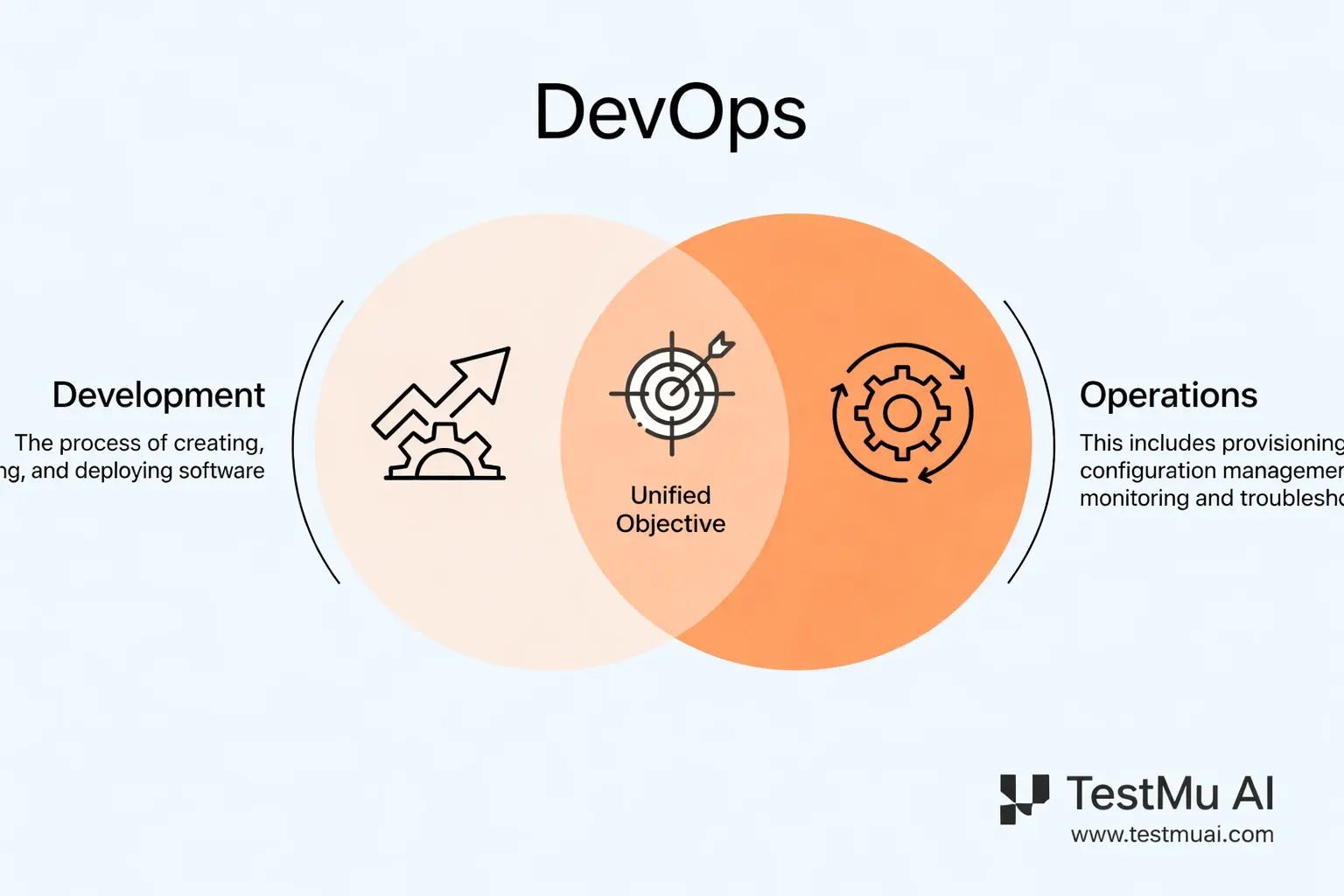
A DevOps pipeline is a series of automated steps that move code from development to production in a consistent and reliable way. It uses CI/CD practices and DevOps automation to ensure every code change is built, tested, and deployed with minimal manual effort, creating a faster feedback loop for development teams.
Here is how a DevOps pipeline works:
- Code is committed to a repository
- The application is built
- Automated tests are executed
- The application is deployed
- The system is monitored
By automating these steps, a DevOps pipeline helps teams deliver software faster and more reliably.
Key Components of a DevOps Pipeline
A DevOps pipeline is composed of three interconnected categories that ensure continuous value delivery:
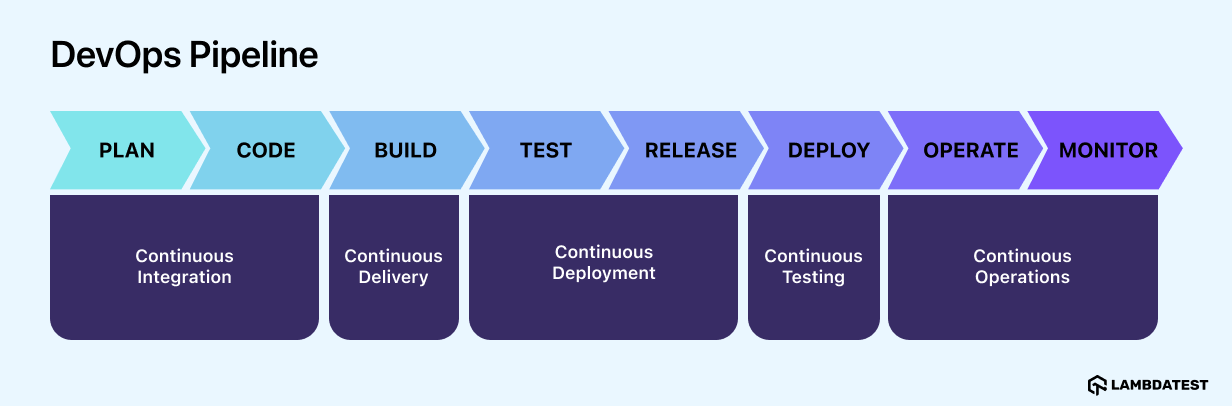
- Continuous Integration and Continuous Delivery (CI/CD): Continuous Integration leads by streamlining code integration. By automating merging code changes from multiple developers and ensuring compatibility, CI reduces integration issues and accelerates the development cycle.
- Continuous Testing: It is a crucial component of a DevOps pipeline that enables automated testing at every stage of development. By seamlessly integrating into the development process, continuous testing in DevOps provides swift risk assessments for code integrations, ensuring that software is thoroughly tested and meets the highest quality standards before deployment.
- Continuous Deployment: It follows Continuous Delivery and automatically deploys updates into production if they successfully pass the automated testing phase. While this expedites deployments, there’s a risk of undetected bugs reaching the end users, potentially causing application failures.
- Continuous Monitoring: It ensures stability, providing real-time insights into system health and performance. Organizations can proactively detect and resolve potential issues by leveraging monitoring tools and collecting metrics on key performance indicators, ensuring smooth operation.
- Continuous Feedback: Once software is deployed, continuous feedback becomes the bridge between developers, stakeholders, and customers, gathering real-time insights into user reactions. This vital component is crucial in aligning expectations and identifying critical issues identified by testers and end users.
- Continuous Operations: It is vital in maintaining uninterrupted service and minimizing planned downtime for end-users. This approach emphasizes the importance of ensuring Continuous Operations by mitigating disruptions caused by hardware or software changes, thereby enhancing the reliability and availability of services.
Whereas Continuous Deployment refers to the automated process of deploying the tested and integrated code changes directly to the production environment, seamlessly moving code from development to release. CD further accelerates the delivery of new features and improvements to users.

Note: Automate your CI/CD testing on the cloud. Try TestMu AI Today!
5 Benefits of a DevOps Pipeline
DevOps pipelines deliver measurable business and technical benefits that justify the investment. Here are the key value drivers organizations see:
- Faster Releases and Competitive Advantage: Organizations implementing mature DevOps practices achieve dramatically faster release cycles. Elite DevOps teams perform multiple deployments per day, while lower-performing teams may deploy less than once a month. This speed translates directly to business advantage.
- Reduced Costs Through Automation and Efficiency: DevOps eliminates expensive manual processes that drain resources. High-performing teams report significantly less manual work due to increased automation, freeing engineers to focus on innovation rather than repetitive tasks.
- By applying cloud DevOps practices, organizations can provision only the infrastructure capacity they actually need, reducing infrastructure expenses by up to 50%.
- Organizations that have adopted CI/CD report a 50% reduction in the cost of software delivery. This comes from faster deployment cycles and reduced manual overhead.
- Enhanced Software Quality and Reliability: Continuous testing and monitoring create feedback loops that catch problems before they affect customers.
- Early defect detection through automated testing at every stage
- Real-time monitoring that identifies performance issues before users report them
- Rapid incident response minimizing customer impact
- Shift-left security through automated vulnerability scanning in CI/CD pipelines
- Improved Developer Experience and Retention: DevOps teams report higher job satisfaction. When deployment friction disappears, developers see their work reach customers faster. Teams collaborate more effectively because they are working toward shared goals rather than protecting their silos.
- Risk Mitigation and Security: Organizations integrating security early into DevOps see a great reduction in security vulnerabilities and associated costs. DevOps makes security continuous rather than a final gate-keeping activity.
Real Impact: Etsy achieved the capability to deploy more than 50 times per day through a fully automated deployment pipeline, thorough application monitoring, and IRC-based collaboration.
Cost Savings Mechanisms:
Quality Mechanisms:
Organizations struggling with traditional IT workflows often face high turnover among talented engineers. DevOps modern practices, cloud infrastructure, and automation are exactly what top talent wants to work with.
By deploying smaller changes more frequently, teams reduce risk per deployment. Feature flags enable teams to deploy code without immediately activating unfinished features, allowing safe testing in production before full rollout.
Stages of a DevOps Pipeline
The DevOps pipeline consists of the following stages:
- Plan: Establishes the project’s foundation by mapping workflows and structuring tasks before coding begins. Tools like Jira, Azure DevOps, or Asana help track the product roadmap.
- Code: Developers write code and track progress using version control tools like Git. Static analysis, cloud IDEs, and CI/CD integration make this phase faster, more collaborative, and more secure.
- Build: When code is committed, a code review is triggered through a pull request alongside an automated build. Adding cross-browser tests at this stage further strengthens code quality before deployment.
- Test: Automation testing ensures product quality with minimal manual effort, catching bugs early. Unit tests — often written via Test-Driven Development with tools like JUnit — form the foundation.
- Release: Marks the deployment of a tested build. Teams may choose continuous deployment, manual approvals, or scheduled releases — CI/CD tools like Jenkins, GitLab, CircleCI, and GitHub Actions provide the flexibility to tailor each approach.
- Deploy: Automates deployment using Infrastructure as Code (IaC) or methods like blue-green deployment. IaC keeps infrastructure in a desired state and allows quick rollback to previous configurations when needed.
- Operate: Manages the live environment, optimizing resources and tracking user interactions through logs and feedback. The ops team relies on automation to keep the product running smoothly and meeting performance standards.
- Monitor: Automated DevOps monitoring tools surface performance issues and application glitches in real time.
Key metrics like deployment frequency, failure rates, MTTD, MTTM, and MTTR drive proactive issue resolution and reveal automation opportunities across the toolchain.
DevOps Pipeline Example: Production-Ready Container Deployment Workflow
A modern delivery pipeline balancing speed with safety:
Code Integration → main branch
- Build container image with multi-stage optimization
- Parallel execution: unit tests, code linting, security scanning
- Tag and push verified image to container registry
Staging Validation
- Deploy via Helm to staging environment
- Execute integration and smoke tests
- Validate against production-like data subset
Production Rollout
- Manual approval checkpoint (configurable for low-risk changes)
- Progressive canary release: 5% → 25% → 100% traffic
- Automated health monitoring with rollback triggers:
- Error rate exceeds threshold
- Latency degradation detected
- Failed health checks
Key Safeguards
- Immutable image tags prevent deployment confusion
- Error budget enforcement protects system reliability
- Automated rollback preserves service continuity
How to Build an Effective DevOps Pipeline?
Getting started with DevOps begins with establishing a pipeline that optimizes the Software Development Life Cycle. This comprises five essential steps:
- Select a CI/CD Tool: Choose a robust CI/CD tool aligned with the project’s requirements. Popular choices like Jenkins, GitLab, TeamCity, or Bamboo offer versatile solutions. Jenkins, renowned for its open-source nature and remarkable customizability, emerges as an excellent option, enabling tailored adaptations to specific organizational needs.
- Establish a Source Control Environment: Development teams necessitate a centralized repository for code storage and collaborative work. Git, GitLab, or BitBucket serve as effective control environments, facilitating version management and conflict resolution. These platforms enable multiple developers to collaborate seamlessly on the same codebase while avoiding merge conflicts.
- Set Up a Build Server (CI Server): A dependable build server is critical for integrating code changes and ensuring code integrity. Jenkins, Travis-CI, or TeamCity are centralized environments retrieving integrated code from source repositories. These servers provide a clean and stable platform for validating code, a crucial step in ensuring it functions correctly.
- Use Automation Testing Tools: Since automated testing is pivotal in the DevOps process, various tools are essential for running multiple tests, including unit, regression, and functional tests.
- Deploy to Different Environments: The final stage involves deploying the developed software to production or any other staging environment. This can be executed manually or automatically, considering deployment frequency, size, success metrics, and time to value.
The CI server is triggered whenever a developer pushes code changes to the repository. It automatically clones the repository, checks out the source branch, merges it with the mainline branch (e.g., master), and builds the code. If the build succeeds, the changes can be safely merged into the mainline branch.
Also, the CI server helps enforce coding standards, such as code formatting and test coverage requirements. It can be configured to fail the build if the code violates any predefined rules or if the test coverage drops below a specified threshold.
The transition from manual to automated testing, facilitated by identifying and rectifying bottlenecks, can be pivotal. Test orchestration becomes particularly advantageous when a series of tasks need to be executed in a specific order, enhancing the feedback process and ensuring swift availability of feedback to development teams.
Compared to tools like Jenkins and Bamboo, HyperExecute by TestMu AI stands out as a high-performing option in this case. HyperExecute is an AI-native end-to-end test orchestration platform that offers a streamlined and accelerated approach, up to 70% faster than any cloud grid or traditional alternatives.
To get started, refer to this HyperExecute documentation .
Incorporating automation early in the development life cycle while maintaining a degree of manual testing can streamline the testing process, boost throughput, and ensure thorough coverage of the ever-growing codebase.
Common Challenges in DevOps Pipelines
DevOps pipelines deliver faster releases and better quality, but teams face challenges during implementation:

Teams invest heavily in automation, but still struggle with slow releases because the real bottleneck isn’t the tooling, it’s decision-making. Every handoff, approval, or unclear ownership adds friction that no CI/CD tool can fix.
The highest-performing pipelines aren’t the most complex; they’re the ones designed to minimize cognitive load and accelerate feedback. That’s where AI is starting to make an impact not by writing code, but by surfacing risks early, highlighting bottlenecks, and helping teams focus on what actually moves deployment forward.
— Tal Paperin, CRO & Founder at DealMentor
Tool Integration and Maintenance
- Multiple disconnected tools require manual coordination between platforms
- Engineers waste time context-switching instead of building features
- Custom integrations become technical debt
Solution: Use integrated platforms that bundle core capabilities. Consolidate tools where possible.
Legacy System Integration
- Older applications were not built for containers or cloud infrastructure
- Modernization competes with feature delivery priorities
- Monolithic architectures resist automation
Solution: Modernize incrementally. Run legacy and modern systems side-by-side during transition.
Inconsistent Processes Across Teams
- Different teams use different tools and deployment frequencies
- Knowledge does not transfer between teams
- Pipeline implementations vary wildly
Solution: Standardize pipeline templates. Document core processes. Make consistency a shared goal.
Security Gaps
- Security reviews happen after development instead of during
- Dependencies with vulnerabilities slip into production
- Compliance creates manual review burden
Solution: Integrate security scanning into pipelines. Scan dependencies before merging code.
Exposed Secrets in Code
- Developers accidentally commit passwords and API keys
- Secrets remain in git history even after deletion
- Anyone with repository access sees production credentials
Solution: Use secrets management tools. Implement pre-commit scanning. Rotate credentials regularly.
Skills Shortage
- DevOps requires expertise across development, infrastructure, and operations
- Knowledge concentrates in one person who becomes a bottleneck
- Hiring qualified engineers is difficult
Solution: Train existing teams. Cross-train so knowledge spreads. Use managed services to reduce complexity.
Cultural Resistance
- Teams resist changing familiar workflows
- Silos persist despite new tools
- Manual approval processes slow delivery
Solution: Start with culture, not tools. Create shared metrics. Involve teams in designing new processes.
Conclusion
The DevOps pipeline represents a transformative approach to software development, empowering organizations to accelerate delivery, enhance quality, and foster collaboration between development and operations teams.
By building an efficient DevOps pipeline, organizations can stay ahead of the curve, delivering high-quality software faster and more reliably to meet the ever-changing demands of the digital landscape.
Don’t miss the chance to explore the latest DevOps trends, tools, and best practices at the upcoming DevOps conference. It’s a great opportunity to learn from experts and connect with peers driving innovation in the field.
Citations
- Analysis Of DevOps Infrastructure Methodology and Functionality of Build Pipelines: https://www.researchgate.net/publication/377814221
Author

Chandrika Deb
Blogs: 13


Chandrika Deb is a Community Contributor with over 4 years of experience in DevOps, JUnit, and application testing frameworks. She built a Face Mask Detection System using OpenCV and Keras/TensorFlow, applying deep learning and computer vision to detect masks in static images and real-time video streams. The project has earned over 1.6k stars on GitHub. With 2,000+ followers on GitHub and more than 9,000 on Twitter, she actively engages with the developer communities. She has completed B.Tech in Computer Science from BIT Mesra.
Reviewer

Harish Rajora
Reviewer
Harish Rajora is a software developer at TestMu AI with over 6 years of hands-on experience in Python and cross-platform application development across Windows, macOS, and Linux. He has authored 800+ technical articles and worked on large-scale projects, including GenAI applications and core engineering features used by millions. Harish has led DevOps initiatives building CI/CD pipelines with Jenkins, AWS, GitLab, and GitHub, and holds an M.Tech in Software Engineering from IIIT Allahabad.


DevOps Pipeline FAQs
Did you find this page helpful?
More Related Blogs
TestMu AI forEnterprise
Get access to solutions built on Enterprise
grade security, privacy, & compliance
- Advanced access controls
- Advanced data retention rules
- Advanced Local Testing
- Premium Support options
- Early access to beta features
- Private Slack Channel
- Unlimited Manual Accessibility DevTools Tests