

Next-Gen App & Browser Testing Cloud
Trusted by 2 Mn+ QAs & Devs to accelerate their release cycles


9 Best Reporting Tools for Selenium [2026]
Are you looking for a reporting tool for Selenium? Let's dig into this list of 9 best reporting tools for Selenium that we selected based on factors such as ease to set up, the crispness in content, supported report formats, pricing, and more.

Himanshu Sheth
February 23, 2026
When it comes to testing with Selenium, a detailed test report generated using the right reporting tool for Selenium can do wonders for the testing activity. Test reports generated using Selenium reporting tools give detailed insights into the testing activity and show the test scenarios’ status.
Often you come across situations where you need the test reports immediately, to either present it to someone or for some other purpose. In those situations, you can leverage the best reporting tool for Selenium to generate short & understandable test reports so that anyone from the team can quickly grasp the information.
Overview
What Are Selenium Reporting Tools?
Selenium reporting tools generate structured test execution reports that show test status and provide insights into automation results.
What Are the Top Reporting Tools for Selenium?
Several tools help generate clear and customizable Selenium test reports. Below are some of the top options discussed in the blog:
- Allure: Open-source framework for detailed, modern HTML reports.
- Extent Reports: Rich, customizable reports with visuals and logs.
- JUnit (with Jenkins): Built-in reporting support for Java projects in CI environments.
- pytest-html: PyTest plugin that generates HTML and XML reports.
Importance of Selenium Reporting Tools
As Selenium provides client APIs for multiple languages such as Java, C#, Python, R, and many more, it is essential to choose the best reporting tool for Selenium that meets the preferred programming language requirements and also fulfills your criteria.
Selenium test result reports should carry all the relevant information so that your team members (and managers) can gauge the reports’ progress. By the end of this blog, you would be able to select the best reporting tool for Selenium-based on the language that is used for test case development.
Top 9 Reporting Tools for Selenium
Here are the top 9 Selenium reporting tools that we selected based on factors such as ease of setup, the crispness in content, supported report formats (e.g., HTML, XML, etc.), pricing, and more.
1. ReportNG
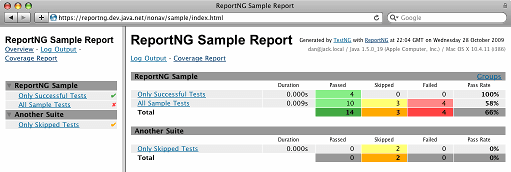
ReportNG is a simple HTML reporting plugin that is developed for the TestNG framework. It can be used in place of the default TestNG HTML report. ReportNG uses a color-coding mechanism in the test reports, making the report easy to understand at a single glance.
The plugin generates 100 percent valid XHTML 1.0 files. There is an option to override the default color coding used in the reports by overriding the default stylesheet with your own CSS file.
Language – Java
License – Open Source
Advantages
- More detailed reporting mechanism than the default HTML reports provided by TestNG framework
- Ease to customize the look and feel using a user-defined CSS file
- Inclusion of a second reporter that produces JUnit format XML output from version 0.9.0
- Easy to integrate with CI/CD tool like Jenkins
- Its version of the JUnit reporter ignores TestNG’s notion of suites and produces output that is relatively inline with the output produced using JUnit
Shortcomings
- Only available for the TestNG framework.
- The latest version (ReportNG 1.1.4) is tested with TestNG 6.2 and is assumed to work with the later versions of TestNG.
- ReportNG 1.1.4 is the final version of ReportNG, post which the software is no longer maintained. However, ReportNG is available for development on GitHub.
Our Verdict
The ReportNG plugin adds immense value to the Selenium test result reports compared to the default report generated using TestNG. However, it is not the best reporting tool for Selenium with Java, as its development is halted. There is a possibility that it may not work with future versions of the TestNG framework.
2. Allure
Allure is an open-source framework that is designed for creating test execution reports that are easy to understand. It is lightweight and lets you add parameters, steps, and attachments.
Allure is based on standard xUnit results, to which it adds some supplementary data. Report generation in Allure occurs in two steps.
In the first step (also called the test execution phase), the testing framework is attached with a small library called adapter that saves details about the executed tests to XML files. In the second step (also called the report generation phase), the XML files are transformed into an HTML report. The transformation step can be performed using a command-line tool, plugin for CI, or a build tool.
Allure provides adapters for widely used test frameworks for Ruby, Python, Scala, Java, PHP, and C#.
Language(s) – Ruby, Python, Scala, Java, PHP, and C#License – Open Source

Advantages
- Generates detailed test reports that give a clear visualization of summary, defects, behaviors (for BDD tests), graphs, and timelines.
- Providers adapters for popular testing frameworks.
- Active community on GitHub and platforms like StackOverflow.
- Usable as an on-premise solution.
- Easy to integrate with the best CI/CD tools like Jenkins, GitLab CI, etc. where report generation is an integral part of POST Build actions
- Support for taking screenshots, a feature that helps in UI testing.
- Detailed documentation and exhaustive examples with different programming languages.
- Allure Plugin System provides a greater level of flexibility to the representation of reports.
Shortcomings
- If you want to drive better value from the Allure framework, you should use it in conjunction with CI/CD tools like Jenkins, Bamboo, TeamCity, and more.
Our Verdict
The Allure framework is amongst one of the best reporting tools for Selenium as it provides modern-style reports. Allure reports can be generated using a range of tools like command-line, Jenkins, TeamCity, Bamboo, Codefresh, Gradle, and Maven.
Allure is one of the selected few Selenium reporting tools that can be used for a large project, as it creates reports (with color coding and styling) that are easy to understand.

Note: Generate test reports with detailed AI-native insights. Try TestMu AI today!
3. JUnit
JUnit provides an option as one of the Selenium reporting tools for Java and Selenium. The implementation under @BeforeClass annotation is run before starting any annotation in the class. Hence, pre-execution tasks like opening the HTML report, adding predefined information, and more can be under the @BeforeClass annotation.
The implementation under @AfterClass annotation is run once all the tests have been executed. Post execution tasks like adding test case results and closing reports can be under the @AfterClass annotation.
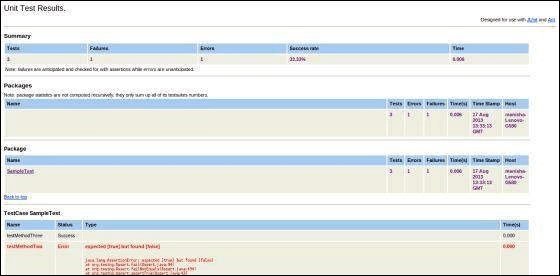
Like TestNG, JUnit also gives Selenium test result reports in a very simple and understandable format.
Language(s) – Java
License – Open Source
Advantages
- The reporting functionality is available by default with the JUnit framework.
- JUnit is a popular open-source unit testing tool that is used by Java developers Hence, JUnit’s reporting feature automatically becomes one of the best reporting tools for Selenium and Java.
- It creates easily understandable HTML reports.
Shortcomings
- A fair bit of implementation has to be done for using Selenium reporting tools with JUnit.
- Selenium test result reports have a primitive look and feel.
Our Verdict
As JUnit is a popular test framework for unit testing, including cross browser testing, JUnit reports become the preferred choice if the report’s look & feel is not a top priority. You can use the JUnit framework with popular CI/CD tools like Jenkins. As the implementation requires minimal (to no) changes to shift to a Continuous Integration (CI) environment.
4. HTML Publisher + Jenkins
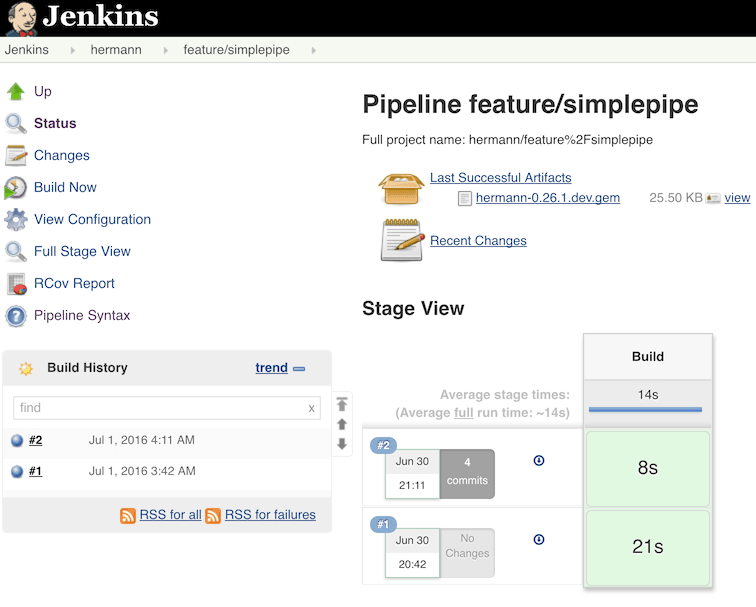
HTML Publisher plugin can work with FreeStyle and Pipeline projects in Jenkins. It is very easy to install the plugin and use it with a job in Jenkins. The HTML report directory location has to be archived, and the Index Page (index.html) has to be added as a part of the ‘Post Publish Actions.’
For using the HTML Publisher plugin with Jenkins pipeline, the publish HTML step has to be added in the ‘post’ section of the pipeline.
Language(s) – Java, Python, C#
License – Open Source
Advantages
- HTML Publisher plugin in Jenkins lets users publish HTML reports created during a test run and including the same within the Jenkins project results.
- It supports popular test frameworks for Ruby, Python, Java, and C#
- You can use third-party APIs in Jenkins for generating HTML reports with the test results
- It is relatively easy to use the plugin in FreeStyle projects and Jenkins Pipeline projects.
- Uniform color-coding that indicates the status of the tests executed, making it easy to understand the report contents
Shortcomings
- Documentation is not exhaustive due to which users (particularly first-time) face issues in configuring the plugin, display issues in the HTML report, and more.
Our Verdict
If you are using Jenkins for Continuous Integration and looking for a plugin that can be used to publish simple HTML reports, you should go for the HTML Publisher plugin. Also, you can use it for adding HTML-formatted code coverage reports to the builds.
5. PyTest HTML
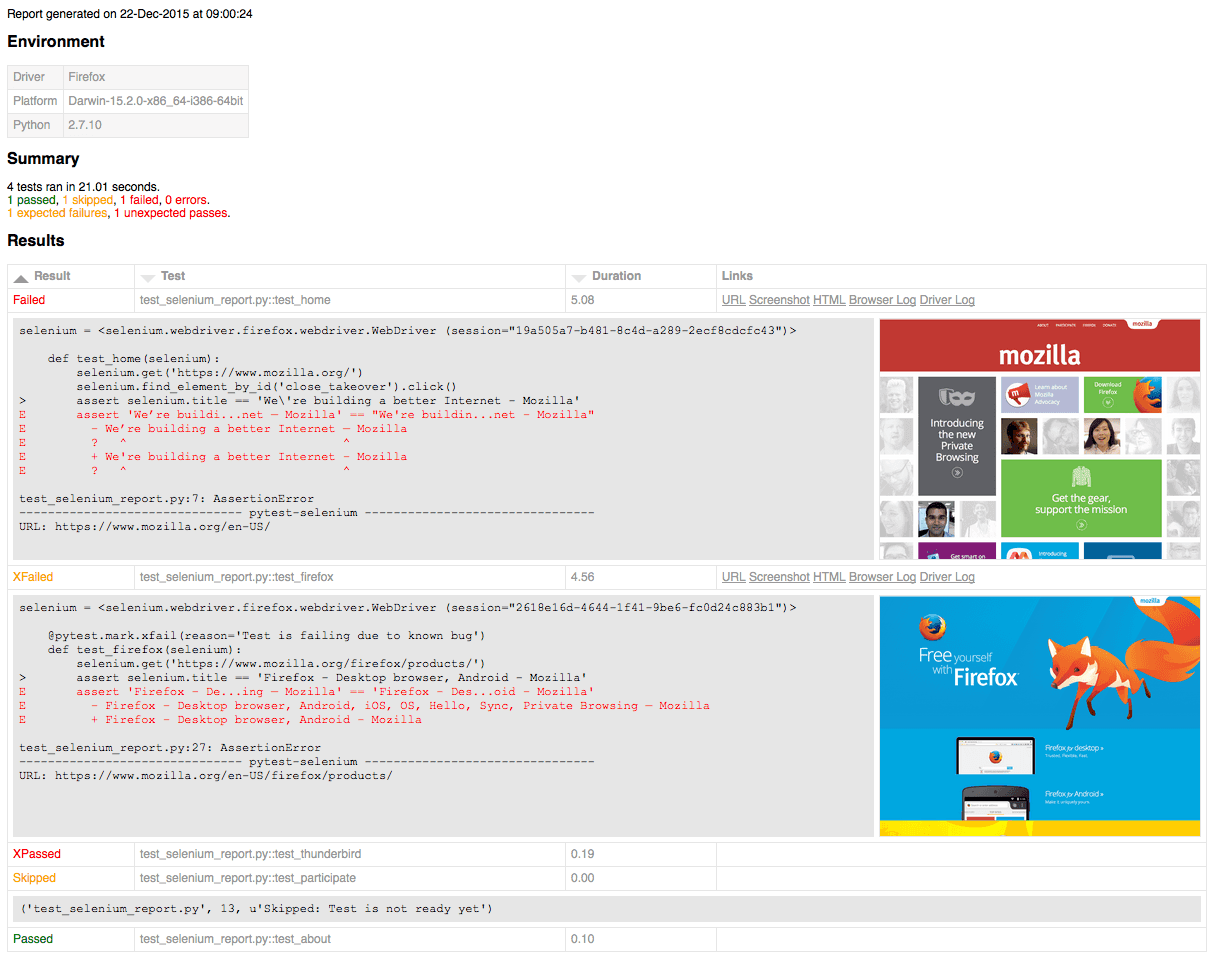
pytest HTML plugin is a widely used plugin for PyTest that generates an HTML report for test results. As it is a plugin, it is easy to install and use along with the PyTest framework. Selenium test result reports generated using pytest-html can be in the HTML or XML format.
Language(s) – Python
License – Open Source
Advantages
- The plugin pytest-html is easy to configure and install.
- It supports popular report formats like HTML and XML.
- It is easy to enhance the reporting functionality using the APIs supported by cloud-based Selenium Grid.
Shortcomings
- The support is only available for the PyTest framework, i.e., it cannot be used with other test frameworks in Python.
- The reports generated using pytest-html have a primitive look & feel.
Our Verdict
Developers and testers prefer the pytest-html plugin with PyTest to generate test automation reports with minimal complications.
Though the information provided in the report is basic, it makes the task of decoding the output easier. It is one of the best reporting tools for Selenium with PyTest, as it is easy to get started with PyTest report generation using pytest-html. For advanced reporting, you should go with Allure for PyTest.
6. JUnit Plugin + Jenkins
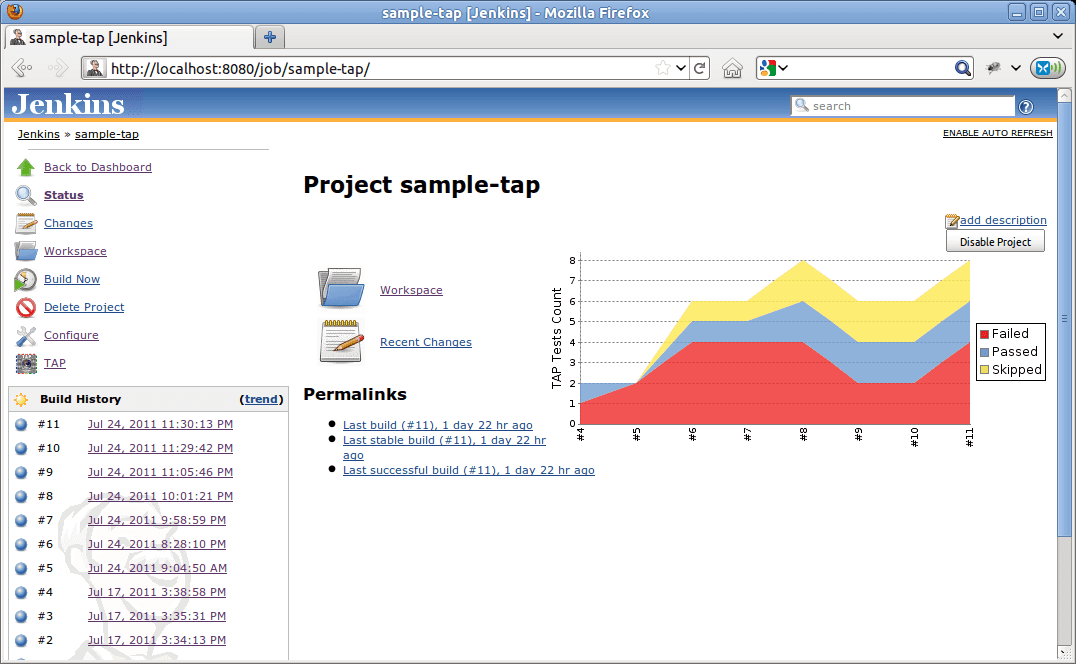
The JUnit Jenkins plugin provides a publisher that generates HTML reports using the XML test report generated during the build process. The plugin also adds visualization of the historical test results, web UI for viewing test reports, tracking the status of test cases (including failures), and more.
When the option JUnit test report XML format with TestNG is configured in Jenkins, it can also provide additional information about test results (e.g., trends). The JUnit publisher plugin can be used with FreeStyle projects and Jenkins Pipeline.
It can be configured to allow empty results, trigger reporting only if tests are successful, etc. as part of the post-build action.
Language(s) – Java
License – Open Source
Advantages
- Built-in support for JUnit and TestNG framework.
- Simple and efficient plugin in Jenkins for generating test automation reports.
- It can be easily integrated with other test automation frameworks only if they generate reports in the JUnit format.
Shortcomings
- Works only with Jenkins.
- The prerequisite is that reports should be generated in the JUnit format.
- Reports have a primitive look & feel.
Our Verdict
JUnit Jenkins plugin should be a preferred choice for test report generation with Java on Jenkins. It is easy to get started with JUnit by triggering report generation using ‘Execute Windows Batch Command under build section’ or ‘post build action’ in Jenkins Pipeline.
We prefer the HTML Publisher plugin with Jenkins. It can be used with other languages apart from Java and provides detailed information than other Selenium reporting tools like JUnit (on Jenkins).
7. Extent Reports
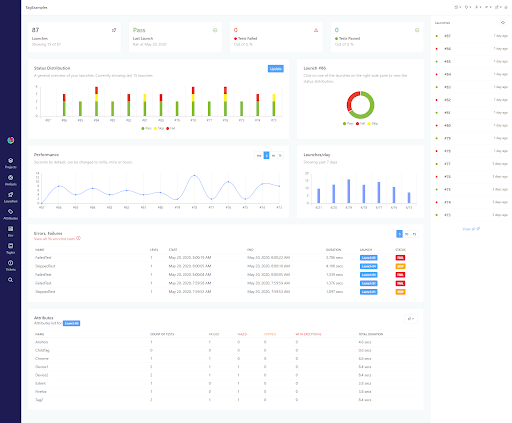
The Extent Report library is also used for generating HTML reports like its other counterparts. The major difference between the reports provided by JUnit and Extent library is the readability and clarity of information that is supplemented with pie charts and other visual elements.
Extent Reports come into two different editions – Community and Professional. At the time of this article, the latest version of the ExtentReports Library was version 5. The ExtentReports Library has provision to add logs, events, screenshots, devices, tags, authors, or any other information that can enhance the report’s information. It can also be used in collaboration with TestNG and Junit frameworks.
Language(s) – Java, C#
License – Community and Professional Edition
Advantages
- Beautifully crafted modern-style reports that contain various aspects related to the automation tests.
- Exhaustive documentation that makes it easy to get started.
- Supports different reporting formats, i.e., HTML, Email, or pushing data to MongoDB for Klov.
- Option to customize each report template by specifying custom CSS (or JavaScript) from XML or directly from code.
- Historical Analytics and Insights in a single dashboard help track the progress of automation tests and analyze how they performed over time.
- Can be integrated with CI/CD tools.
- The professional edition can be used with popular CDN platforms like Amazon AWS and S3.
Shortcomings
- It supports only Java and C#.
- Limited functionalities in the dashboard of the Community Edition of ExtentReports.
- The Community Edition does not support integration with CI/CD tools.
Our Verdict
Extent Report is the best reporting tool for Selenium, as the ExtentReports Library provides capabilities that can be used for generating exhaustive Selenium test result reports. We expect that there is support for Python in the future versions of the ExtentReport library. The Extentx server stores the historical data, making it easy to analyze the progress of automation testing activity.
8. Maven Surefire Plugin + Jenkins
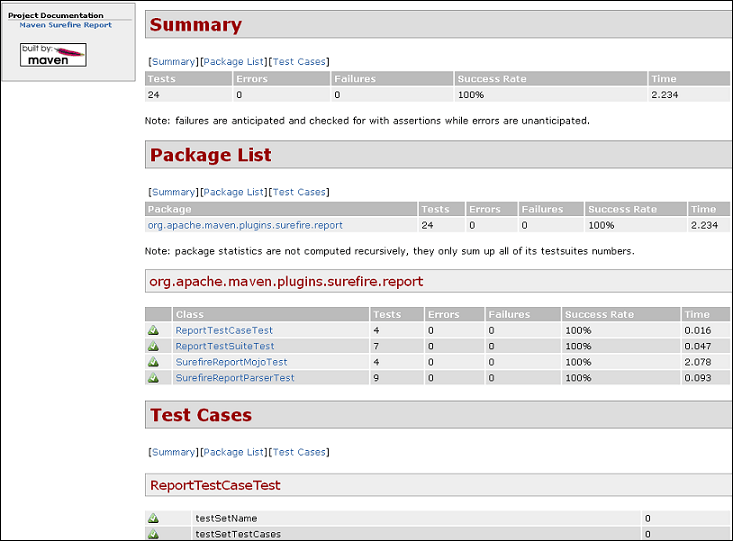
The Maven Surefire Report plugin is one of the widely used plugins in Jenkins. It generates reports in the XML format (i.e. TEST-*.xml) that are stored in the directory target/surefire-reports. The surefire plugin can be used with TestNG and JUnit, the popular Java-based test automation frameworks.
The Maven Surefire plugin is a part of the Maven build tool, and the behavior of surefire is the same, irrespective of the test automation framework being used for testing.
Language(s) – Java
License – Open Source
Advantages
- The Maven Surefire plugin can be used with FreeStyle, Maven, and Jenkins Pipelines projects.
- The plugin has only one goal, which is bound to the test phase of the build cycle.
- The plugin’s behavior does not change with the underlying test automation framework.
Shortcomings
- This plugin can only be used with tests that are written using Java.
- Tests reports are provided in the XML format. Hence, additional plugins like HTML Publisher Plugin have to be used on the output directory to convert it into the HTML format (which is a preferred format for Selenium test reports)
Our Verdict
The Maven Surefire plugin is the default Jenkins plugin for Java that provides parseable test results. As the report is generated in the XML format, an additional plugin in Jenkins that parses the report output to give the result in the HTML report has to be used. In our experience, the HTML Publisher Plugin is the best reporting tool for Selenium that can be used along with the Maven Surefire plugin.
These were 9 of the best reporting tools for Selenium. What? You wanted more! Well alright. Here’s a bonus tool for you.
8. Robot Framework
Robot Framework is a popular extensible keyword-driven test automation framework in Python. The framework is primarily used for ATDD (Acceptance Test Driven Development), acceptance testing, RPA (Robotic Process Automation), and BDD (Behavior Driven Development).
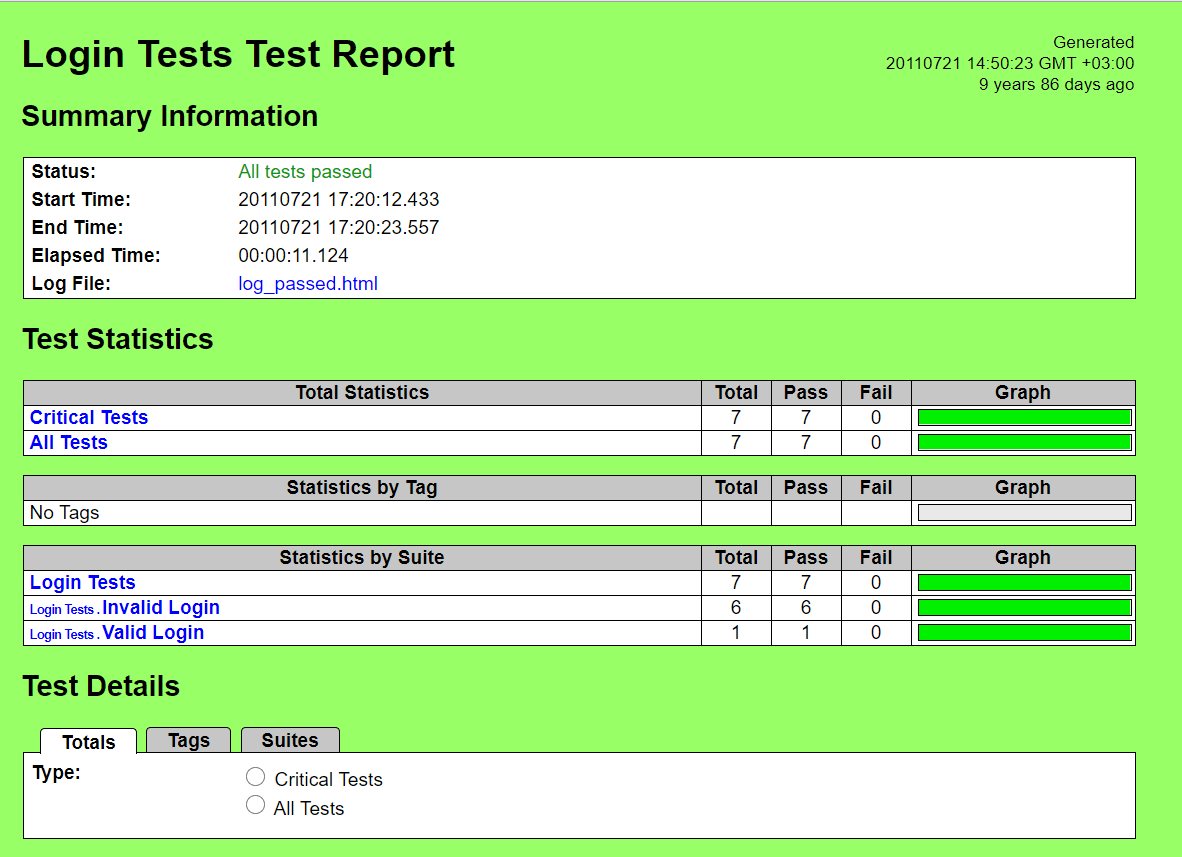
The framework is agnostic of the target on which testing is performed. It follows a layered architecture, and the interaction between layers in the system occurs using system libraries. Once the test execution is complete, the framework generates logs and reports. The supported formats are XML and HTML. The reports provided by the Robot framework are exhaustive and contain information about each line that is executed as a part of the test scenario(s).
Language(s) – Python
Language(s) – Python
Advantages
- The reporting mechanism is built-in the Robot framework.
- It is capable of generating reports in XML and HTML formats.
- The framework has support for Keyword Driven Test reports.
- The reports are detailed and easier to read. The information about error messages is available in the log files as messages of failed keywords.
Shortcomings
- As the Robot framework is used for Keyword Driven (or Table Driven) Testing, you need to follow the same format in the reports.
Our Verdict
Robot Framework supports reporting features out of the box. If you plan to test your Python code using the Keyword Driven Testing approach, you should give the Robot framework a try! The HTML reports generated by the Robot framework provide enough information about the status of test scenarios, and more detailed information can be found in the logs folder. Overall, it is one of the best reporting tools for Selenium that can be used for Keyword Driven (or Table Driven) Testing in Python.
You can use all the reporting tools mentioned above on a single cloud-based platform like TestMu AI. TestMu AI is an AI-Native test orchestration and execution platform that lets you run manual and automated tests at scale with over 5000+ real devices, browsers and OS combinations.
For deeper insights into your passed/failed test suites, you can leverage test analytics for comprehensive test insights that include the test summary, browser categorization, test trends, test status ratio, and more.
TestMu AI Insights is an AI-Native test observability platform that provides vital information on tests, including test inconsistencies, the number of tests, and tests categorized by their status and environments.

Additionally, TestMu AI offers AI-Native Test Intelligence that helps identify issues using root cause analysis for quick resolution and efficient problem-solving.
Watch this video to know more about test result analysis and reporting in Selenium 4.
Subscribe to the TestMu AI YouTube channel for more such tutorials.
100+ Free Online Tools From TestMu AI!
TestMu AI has come up with an index of 100+ free online tools for developers and testers. From HTML, XML, and JSON formatters to robust data generators, and hash calculators. TestMu AI’s free online tools are built to help engineering teams accelerate and be more productive with their daily activities.
Code Tidy
- JSON Prettify
- JSON Minify
- HTML Prettify
- HTML Minify
- JavaScript Minify
- CSS Minify
- CSS Prettify
- XML Minify
- XML Prettify
Data Format
- IDN Encode
- IDN Decode
- XML to JSON Converter
- JSON to XML Converter
- BCD to Decimal
- HEX to Decimal
- Decimal to BCD
- UTF8 Decode
- UTF8 Encode
- HEX to RGB Converter
- RGB to HEX Converter
- HTML to Markdown Converter
- Markdown to HTML Converter
- Decimal to Gray Code Converter
- Gray Code to Decimal
- URL Decode
- URL Encode
- Base64 Encode
- Base64 Decode
- Text to HTML Entities Converter
- HTML Entities to Text Converter
Random Data
- Random JSON Generator
- Random XML Generator
- Random CSV Generator
- Random YAML Generator
- Placeholder Image Generator
- Random Binary Generator
- Random Character Generator
- Random Color Generator
- Random Date Generator
- Random Decimal Fraction Generator
- Random Decimal Generator
- Random GUID Generator
- Random HEX Generator
- Random Octal Generator
- Random IP Generator
- Random MAC Generator
- Random Number Generator
- Random Paragraph Generator
- Random Password Generator
- Random Time Generator
- Random UUID Generator
- Random Sentence Generator
- Random String Generator
- Random Word Generator
- Random Data from RegEXP
- Test Data Generator
- Lorem Ipsum Generator
- Credit Card Number Generator
- QR Code Generator
- Random Byte Generator
Security Tools
- Hash Calculator
- Hash MAC Generator
- CRC32 Hash Calculator
- CRC32B Hash Calculator
- Ripe MD 128 Hash Calculator
- Ripe MD 160 Hash Calculator
- Ripe MD 256 Hash Calculator
- Ripe MD 320 Hash Calculator
- MD2 Hash Calculator
- MD4 Hash Calculator
- Adler32 Hash Calculator
- Gost Hash Calculator
- Whirlpool Hash Calculator
- MD5 Hash Calculator
- SHA1 Hash Calculator
- SHA256 Hash Calculator
- SHA384 Hash Calculator
- SHA512 Hash Calculator
Utils
- Find and Replace String
- HTML Escape
- HTML Unescape
- Difference Checker
- Shuffle Letters
- Shuffle Text Lines
- Sorting List
- Split Your String
- Text Lowercase
- Text Uppercase
- Text Repeater
- Text Rotator
- Character Count
- Word Count
- Lines Count
- Sentence Count
- URL Parse
- JSON Escape
- JSON Unescape
- Extract Text from HTML
- Extract Text from JSON
- Extract Text from XML
- Strip HTML
- JSON Validator
Conclusion
In this blog, we had a detailed look at some of Selenium’s best reporting tools, some of which are language-specific, whereas some are specific to the CI/CD tool. The usage of the ideal Selenium reporting tools is essential for any project that involves Selenium automation testing. It helps track the progress of the testing activity and helps in communicating the status to the relevant stakeholders of the project.
We genuinely hope this guide has helped you find the right selenium reporting tool for you. And if you did find it valuable, We’d be grateful if you could share it on your LinkedIn and Twitter.


Frequently asked questions
Did you find this page helpful?
More Related Hubs
TestMu AI forEnterprise
Get access to solutions built on Enterprise
grade security, privacy, & compliance
- Advanced access controls
- Advanced data retention rules
- Advanced Local Testing
- Premium Support options
- Early access to beta features
- Private Slack Channel
- Unlimited Manual Accessibility DevTools Tests