
The Best Alternative To BlazeMeter
Scalable and secure cloud load testing, built on managed infrastructure and priced on the usage you actually run.

Trusted by 3M+ users globally at




"We have tripled our tests and are now executing tests in less than 2 hours with 78% Faster Test Execution"


"We figured out a more efficient way to monitor system health and resolve failures earlier in lower environments."





"TestMu AI has significantly boosted our testing speed, is easy to implement, and provides exceptional support."


"With 70% faster test execution, TestMu AI helped us achieve faster time-to-market and enhanced CX."



TestMu AI vs BlazeMeter

Top Choice
Features

BlazeMeter
Global Multi-Region Load Distribution
Smart Test Distribution
Split CSV Data Handling
Isolated Environments
Thread Group Flexibility
Parallel Node Execution
Deep Debugging and Logs
Artifact Management
CI/CD Integration
Unified Testing Platform
Open Source Portability
API Testing (dedicated)
Deployment Options
Pricing (Basic plan)
Max Concurrent Users (Basic plan)
Usage Metering (Basic plan)
Max Test Duration (Basic plan)
Security and Compliance
Support
Methodology
How We Compared TestMu AI and BlazeMeter
Every BlazeMeter figure on this page comes from its own public pricing page and its documentation at help.blazemeter.com, read on 4 September 2026. Every TestMu AI figure comes from the Performance Testing plan cards on our own pricing page and the HyperExecute JMeter and Gatling documentation. We only scored capabilities both vendors document, and we left out anything we could not source: BlazeMeter prices its Unleashed tier on request, so no number for it appears here. Where BlazeMeter is ahead, on load-generation footprint, private locations inside your network, service virtualization and anomaly detection, the table says so. Two limits on our own side are stated rather than omitted: the self-serve plan cards read single region, with multi-region load generation listed under Enterprise, and JMeter projects are configured in the portal rather than triggered directly from CI.
Last updated
September 2026
What was compared
19 dimensions across load distribution, execution, reporting, plan ceilings, pricing and compliance
Sources
blazemeter.com pricing and docs, TestMu AI pricing and HyperExecute documentation
Your JMeter Plans on Managed Load Generators
Your test plans, your data files and your thread groups stay as they are.
 MIGRATION
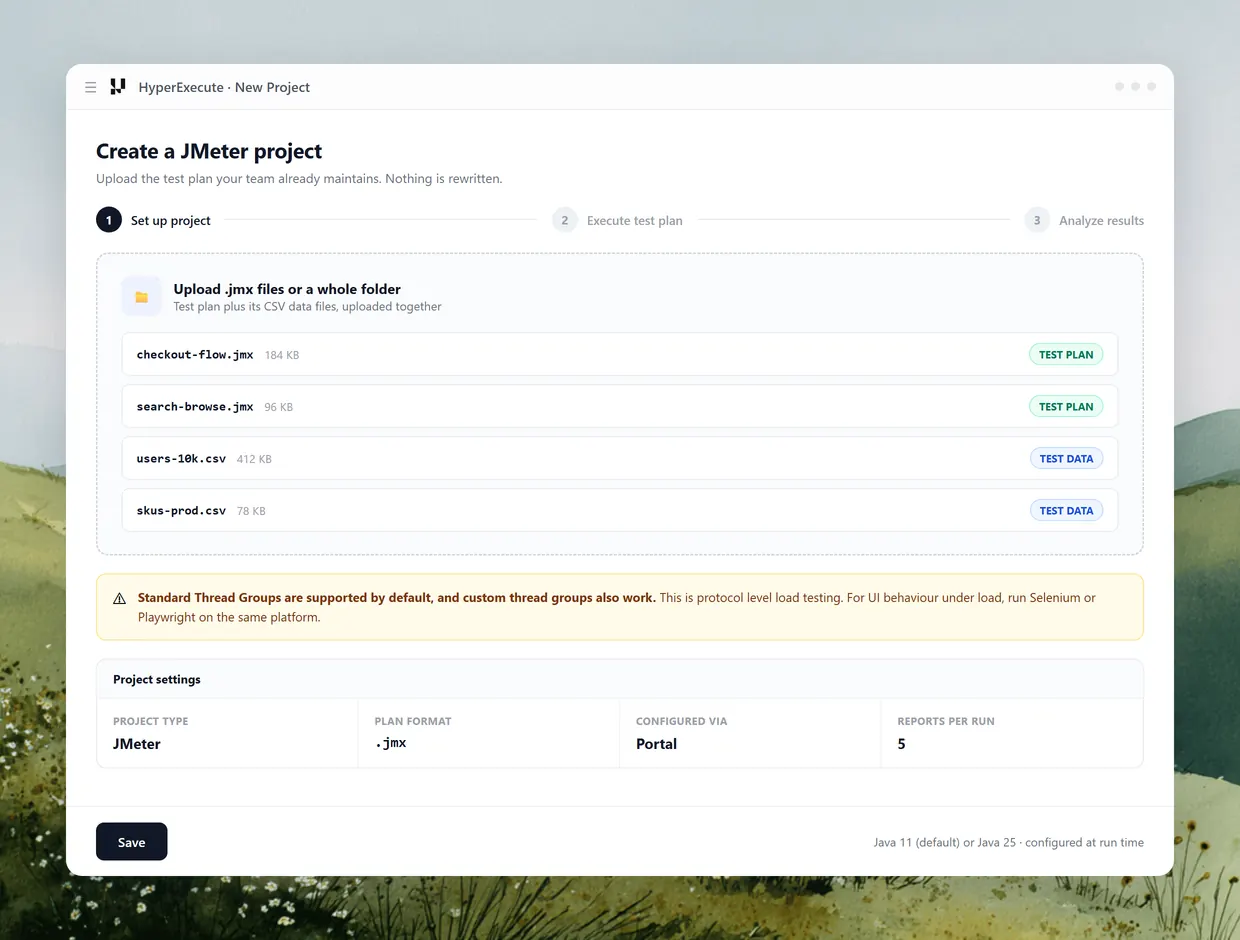
Bring the Same .jmx
Upload the JMeter project your team already maintains. Test plans and their CSV data files upload together and run without a rewrite.
Start Free Testing
- Upload .jmx files or a whole project folder
- Standard and custom JMeter thread groups both run
- Split CSV spreads rows across threads and regions

LOAD CONFIGURATION
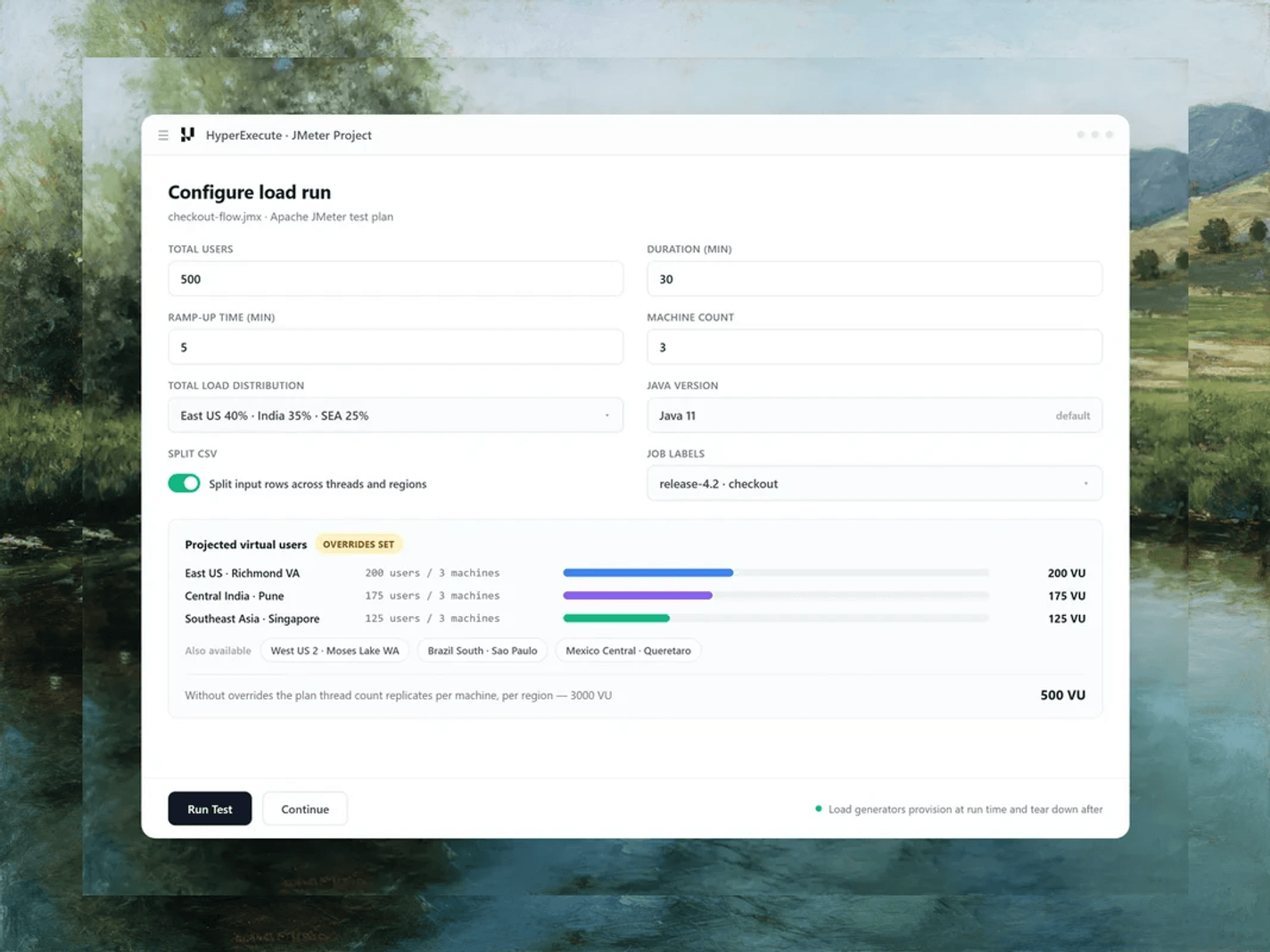
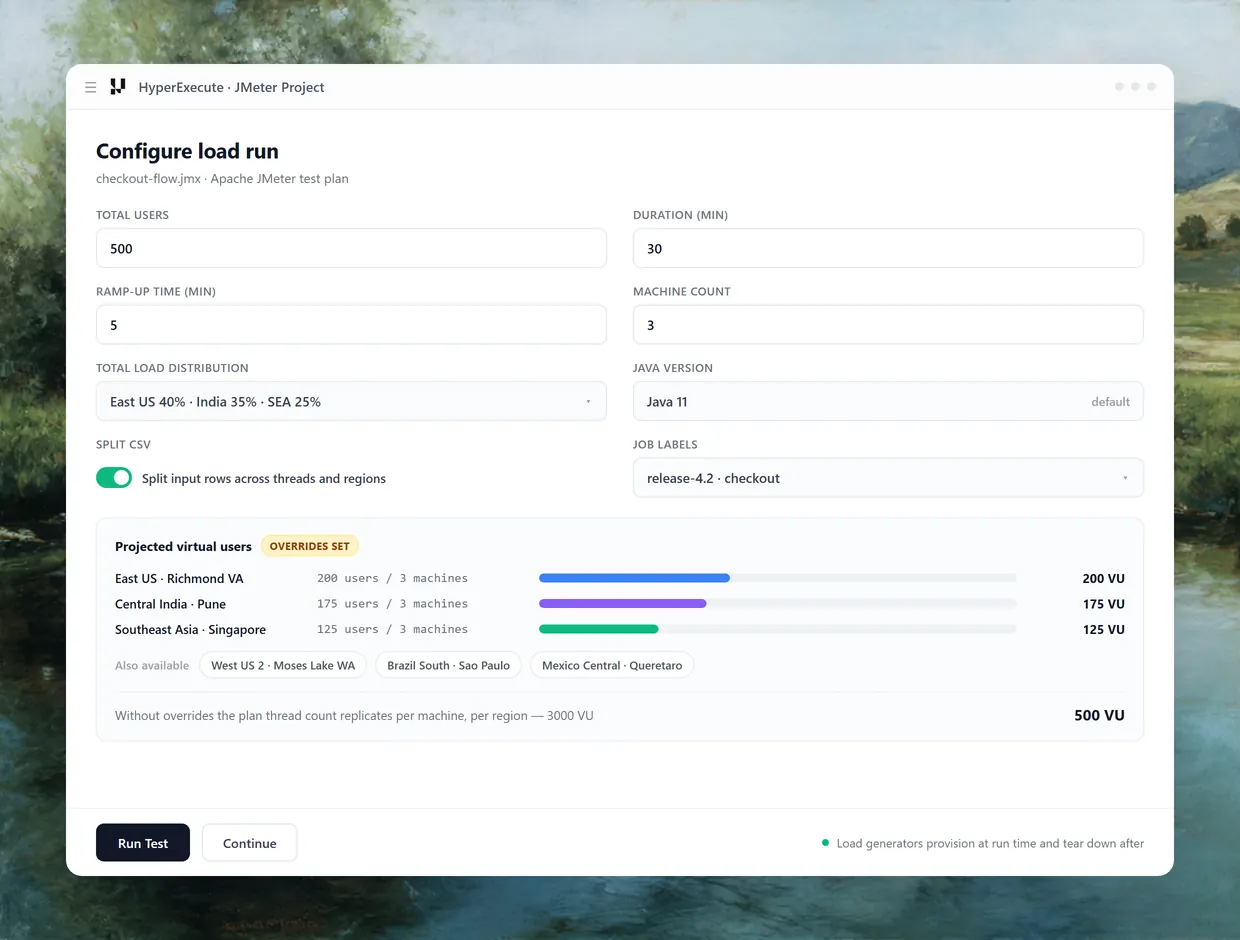
Configure Load, Not Grids
Set total users, duration, ramp-up and machine count in the run form. Load generators provision at run time and tear down after.
See the run form- Total users, duration and ramp-up set per run
- Machine count controls parallel load generators
- No idle generator fleet to keep alive between runs
 RESULTS
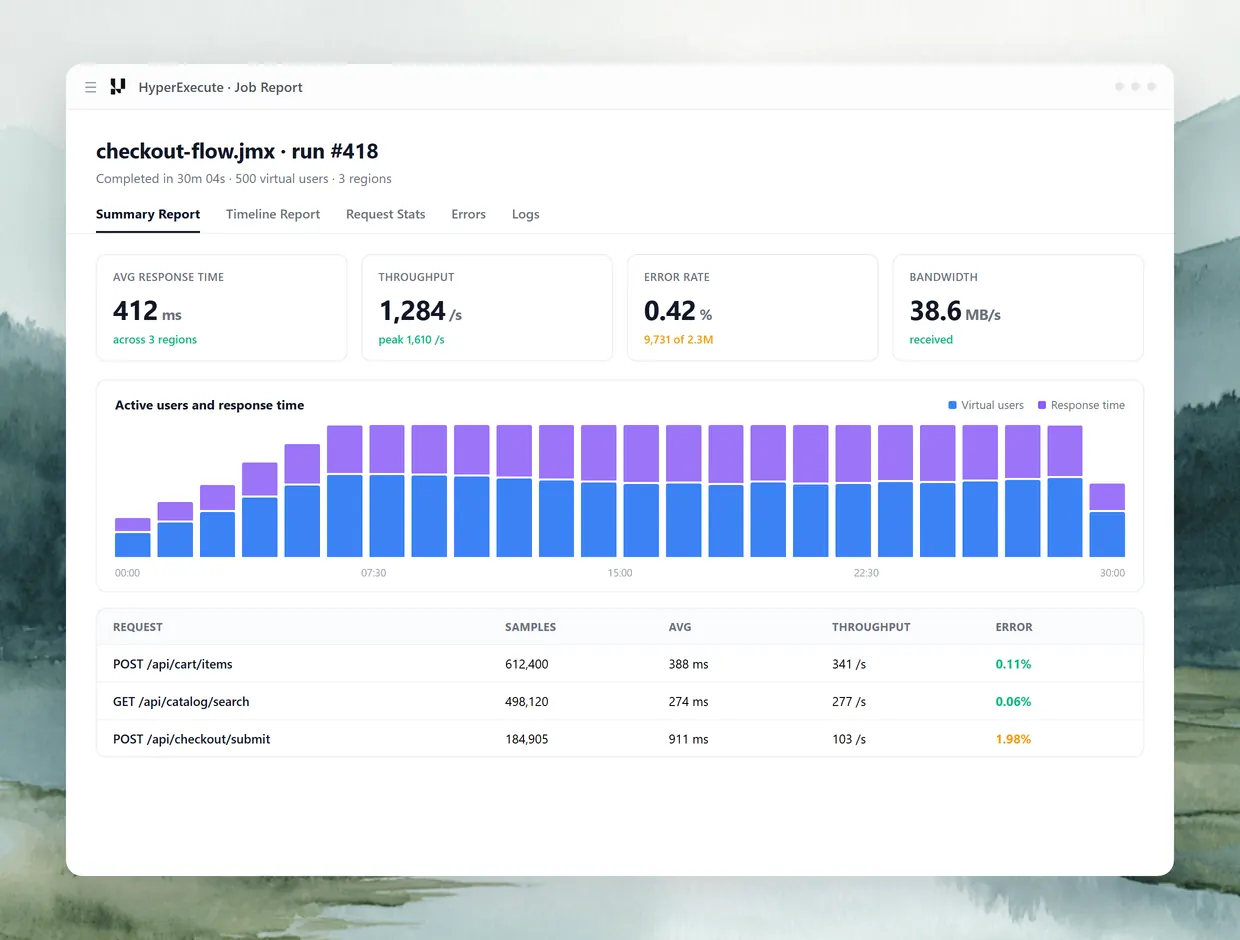
Five Reports Per Run
Summary, Timeline, Request Stats, Errors and Logs land against the job, with errors grouped by response code.
Start Free Testing- Response time, throughput, error rate and bandwidth
- Errors grouped by response code with sample counts
- Metrics toggle between milliseconds and seconds
Migration
Moving a JMeter Plan Off BlazeMeter
The test plan is the part that travels intact. Both platforms run Apache JMeter natively, so the .jmx file, its thread groups, samplers, assertions and listeners are not rewritten and not re-validated. What you rebuild is the run configuration wrapped around the plan, and there are three pieces of it worth planning for before the first billed run.
Carries over unchanged
- The .jmx test plan, uploaded on its own or as a whole project folder
- CSV data files, uploaded alongside the plan they belong to
- Standard Thread Groups, which are supported by default, and custom thread groups
- Your existing assertions, timers and listener configuration
Rebuilt in the run form
- Threads-per-engine and calibration become total users, machine count, and a maximum users per machine threshold
- Shared data files become the Split CSV option, which spreads rows across threads and regions
- A Taurus YAML wrapper has no direct equivalent, because JMeter here is configured through the portal
- Ramp-up, duration and the regional split are set per run rather than per engine
One default decides your first invoice, so set it deliberately. Without the Total Load Distribution overrides, the thread count inside the .jmx replicates onto every machine in every region instead of being divided across them. A 250 user plan running on three machines in each of two regions generates 1,500 virtual users, not 250, and it draws down six times the virtual-user-hours you expected. Set the overrides and the platform divides users proportionally, packing them evenly across machines without crossing the per-machine ceiling. The JMeter run form walks through all eight fields, and teams that want load configuration reviewed in a pull request should look at Gatling, which reads its run configuration from a hyperexecute.yaml committed beside the simulation. For protocol and endpoint level work, API load testing covers the load, stress, spike and soak shapes on the same runner.
Performance Testing in the Execute Stage With HyperExecute
 Planning
 AI Test Case Generator & Test DeduplicationTwo-Way Jira & ADO Sync, Link Linear Issues1-Click Migration from Other Platforms
 Authoring


 Execute
 AnalysisAI-powered error classificationSmart auto-healingSmart flakiness detection


The Case for Choosing BlazeMeter
BlazeMeter is the stronger choice in these cases, each one a capability TestMu AI scopes differently or does not offer.

Wider load footprint
Around 56 cloud locations across AWS, GCP and Azure, with up to 10 per test. TestMu AI generates load from six named regions.

Load from inside your network
Private locations run tests behind your firewall through Docker and Kubernetes agents. TestMu AI performance testing is cloud SaaS.

Service virtualization
Virtual services and a synthetic test data module are sold alongside load testing. TestMu AI does not offer service virtualization.

Wider protocol coverage
BlazeMeter documents protocols such as gRPC, MQTT, JMS and LDAP. TestMu AI runs protocol load through JMeter and Gatling plans.






















Success Stories of TestMu AI (Formerly LambdaTest)

50%
reduction in test execution time
“HyperExecute is a highly reliable test execution platform and has excellent customer support.”
Sagar Uday Kumar
Sr. Engineering Manager
More Reasons to Love TestMu AI (formerly LambdaTest)
See how TestMu AI improves your testing with seamless integration, quicker results, and unmatched accuracy.
Users
3M+
Tests
1.5B+
Enterprises
18K+
Countries
132
TestMu AI positioned as a Leader in the 2026 Gartner® Magic Quadrant™
Read ReportTestMu AI recognized in The Forrester Wave™: Autonomous Testing Platforms, Q4 2025
Read ReportWall of Fame
TestMu AI is the #1 choice for SMBs and enterprises across the globe.

Enterprise-Grade Security
We safeguard your data and AI systems with global security, privacy, responsible AI, and ESG standards.

Integrations
Works where you work, 120+ integrations with the tools your team relies on.




As Seen On
Some Love from our Customers
But this took literally negligible amount of time. Plus, you don't even need to go anywhere else to run these test cases, you can integrate it directly with TestMu AI HyperExecute for end-to-end testing. Best of both worlds!
HyperExecute

Adarsh M
adarsh1gupta

New testing platform alert! I recently tried out's HyperExecute, an end-to-end smart test orchestration platform. I was amazed at its speed and 'intelligence'.
HyperExecute

Sanjay Kumar
SanjayKumaarr
Anyone have experience of using for #automated #UI #testing? If so, have you also used BrowserStack/SauceLabs and can offer impartial pros/cons comparisons? #SoftwareDevelopment
HyperExecute
Web Automation Testing

Paul Arnold
@paulmarnold
Frequently asked questions
TestMu AI for Enterprise
Get access to solutions built on enterprise-grade
security, privacy, & compliance
- Advanced access controls
- Advanced data retention rules
- Advanced Local Testing
- Premium Support options
- Early access to beta features
- Private Slack Channel
- Unlimited Manual Accessibility DevTools Tests